"26aaab8a5d5ed4fc"{"id":"1001026","slug":"utility-power-pole","title":"Utility/Power Pole","category":"Street / Road","engine":"4.26+,5.0+","assetVersion":"","engineVersion":"Engine Version: 4.26+,5.0+","tag":"Street / Road","accent":"blue","visual":"mech","summary":"A set of 7 unique power/utility pole blueprints with dynamic wire creation and adjustable slack. Modular mesh pieces allow custom pole designs, with optimized P","platform":"Unreal Engine","publishedAt":"2026-08-23T06:16:36.079Z","updatedAt":"2026-08-23T06:16:36.079Z","sourceNotes":[],"fileContents":[],"compatibility":["Unreal Engine","Engine Version: 4.26+,5.0+"],"featuredImage":{"alt":"Utility/Power Pole","src":"/wp-content/uploads/published/2026/08/1b7ec68d1b41-03980b46-75f4-45af-b65d-0d527bf424ae-4a8ed77fb8.webp"},"hasDownloadLink":true,"downloads":1,"terms":[{"taxonomy":"category","slug":"street-road","name":"Street / Road"}],"galleryImages":[{"src":"/wp-content/uploads/published/2026/08/3ad75101fb41-5438c0d1-1961-432d-a719-054347306fe0-543eb0bb10.webp","alt":"Utility/Power Pole"},{"src":"/wp-content/uploads/published/2026/08/0d44b3b6a46e-ce18a1d9-65bf-4d36-9a16-09071afc8b00-c213e157e1.webp","alt":"Utility/Power Pole"},{"src":"/wp-content/uploads/published/2026/08/ac1560fde9aa-b0c64a64-1b2d-4f0d-a2fc-228d3f7156fe-c87aaa8abe.webp","alt":"Utility/Power Pole"},{"src":"/wp-content/uploads/published/2026/08/0642d66fcfbd-66eb2d92-d4cd-4df2-9e49-81c166ee6df3-fac7ab8c29.webp","alt":"Utility/Power Pole"},{"src":"/wp-content/uploads/published/2026/08/1bd6a8e2175a-3d841264-f47b-48a3-a3a7-bfcf2ab78453-8154670a42.webp","alt":"Utility/Power Pole"},{"src":"/wp-content/uploads/published/2026/08/5e328f3e4351-c6efea4b-b755-4ec9-a1ee-eb63322bc02c-a557973937.webp","alt":"Utility/Power Pole"},{"src":"/wp-content/uploads/published/2026/08/765623ad9e82-526721c3-d13c-414c-9968-2c368b126187-a8de402ab6.webp","alt":"Utility/Power Pole"},{"src":"/wp-content/uploads/published/2026/08/6c21fe5652fc-6f1af686-9c54-443d-8c36-af4aa66fe13f-55eb45cf18.webp","alt":"Utility/Power Pole"},{"src":"/wp-content/uploads/published/2026/08/bff7997c1b61-2dbbd5ea-0e0f-493a-a41f-501ec9e81e1c-45e3202abd.webp","alt":"Utility/Power Pole"},{"src":"/wp-content/uploads/published/2026/08/eabb7dfbe176-2574f979-4dd6-40e5-8ca3-678951662b12-4e46fe83e7.webp","alt":"Utility/Power Pole"}],"accessPanel":{"kind":"resource","title":"Download this resource","eyebrow":"Free Download","message":"Log in or create a free account to start your download.","fileName":"Content.7z","safetyNote":"Resources are manually reviewed before listing to improve quality and reduce obvious risks.","actionLabel":"Download Free","resourceType":"Resource archive"},"contentHtml":"\u003cp\u003eSetting up believable power lines across a street, an alley, or an industrial block usually means placing identical poles and then wrestling with spline tools to get acceptable wire sag. The Utility/Power Pole set bypasses that busywork: its seven poles are blueprints, and the wires that stretch between them are generated dynamically in the editor.\u003c/p\u003e\u003cp\u003eA short demonstration video shows the linking process in practice. Once you place a pole and connect it to a neighbor, the wire appears along that connection. Instead of adjusting each cable by hand, you can control the slack and let the line drop closer to the ground when the scene calls for it. That single variable affects a whole chain, making it easy to raise or lower the feel of a power line without touching individual vertices.\u003c/p\u003e\u003ch2\u003eWires That Obey the Slack Setting\u003c/h2\u003e\u003cp\u003eThe blueprint-driven workflow is the core of the set. Each pole knows how to connect to the next one, so a pair of poles becomes a segment and a row of poles becomes a continuous run. The dynamic creation happens directly in the editor, which means you see the result immediately during layout.\u003c/p\u003e\u003cp\u003eBecause the wires are not baked into the meshes, they stay flexible. Adjusting the slack is a parameter shift rather than a modeling operation. For a long, high transmission span you can keep the wire taut. For a weathered utility line near a residential street, you can add enough slack that the cable sags close to the ground. That gesture of control gives each scene a different mood without requiring a second pass in a DCC tool. \"Wires that get dynamically created\" is the phrase that sums up the setup: place two poles, link them, and the connection is drawn for you.\u003c/p\u003e\u003ch2\u003eSeven Poles, One Connected Network\u003c/h2\u003e\u003cp\u003eThe set includes seven unique power and utility pole designs. They are distinct from each other, so a single map can avoid the repeated-stamp look that often comes with functional props. The blueprints can be linked to one another to build out a connected network that follows roads, property lines, or a player-created layout.\u003c/p\u003e\u003cp\u003eThis is not a collection of static meshes that simply look like poles. The linking logic turns them into a spatial system. You can plan a path with pole placements, then let the wire generation fill in the gaps. It is a way of working that suits both rapid prototypes and final level dressing, because the same set can be arranged loosely for a mood test or carefully for a shipped scene. Each pole in the set has its own silhouette, so the network reads as a real mix of utility hardware rather than a row of clones.\u003c/p\u003e\u003ch2\u003eCustom Poles From the Included Mesh Pieces\u003c/h2\u003e\u003cp\u003eEvery pole in the set is also broken down into its component mesh pieces. Those pieces are included, so you can create your own pole variation from the original parts. If a crossarm needs to sit higher, or a specific bracket style matches the local architecture, you can reassemble the pieces to make a custom pole that still shares the visual language of the set.\u003c/p\u003e\u003cp\u003eThis modular approach extends the value of the pack well beyond the seven base poles. An environment artist can mix and match between pieces to generate subtle differences across a district. A designer might build a unique landmark pole for a key encounter. The pieces also serve as a learning resource for understanding how the blueprints use their meshes. Because the source meshes for the poles are part of the package, the door is open to creating a pole that matches a specific street corner, a town square, or a back lot.\u003c/p\u003e\u003ch2\u003eSubstance Painter Materials and Optimized Meshes\u003c/h2\u003e\u003cp\u003eThe models use PBR materials made in Substance Painter. That means the surfaces respond predictably across different lighting conditions, which is particularly important for outdoor scenes with changing sunlight. The detail is positioned for first-person games, where players can inspect the pole up close, so texture resolution and material fidelity are matched to that vantage.\u003c/p\u003e\u003cp\u003eAt the same time, the polygon counts are optimized for games. The set does not sacrifice the high-detail look for performance, nor does it bloat scenes with dense meshes. This balance makes the poles suitable for environments where many instances appear at once, such as a strip of road with repeated utility lines. The material work stands up to scrutiny; the optimized geometry keeps the frame rate stable. That combination is exactly what an open area filled with poles needs.\u003c/p\u003e\u003ch2\u003eThe Demonstration Video That Walks Through Linking\u003c/h2\u003e\u003cp\u003eThe pack includes a demonstration video that walks through the wire-linking process. It shows how to connect poles, generate the wires in the editor, and use the slack control to change how the lines hang. For a resource that relies on blueprint logic, that visual walkthrough is just as useful as the assets themselves.\u003c/p\u003e\u003cp\u003eGetting the poles into a scene is straightforward because the workflow is based on linking. The video removes the guesswork from the setup, letting a developer move directly to arranging the poles and tuning the wires. It also clarifies how the dynamic wires behave, so you can predict what will happen when you extend a line beyond a few connections.\u003c/p\u003e\u003ch2\u003eFit for Close-Up Play and Open Streets\u003c/h2\u003e\u003cp\u003eUtility poles fill out the background of many urban and industrial environments, but they often become a bottleneck because of the wiring. This set removes that bottleneck: the poles themselves are game-ready, the wire geometry is generated as you link, and the slack parameter lets you shape the result to match the scene.\u003c/p\u003e\u003cp\u003eBecause the modular mesh pieces are included, the set also serves as a base for unique props on a street, a lot, or a utility corridor. The blueprints handle the connection logic, the materials carry the visual weight, and the amount of detail is intended for scenes where players get close. Whether the goal is a quick power-line layout or a fully dressed city block, having a linkable generator for wires changes the pacing of environment work. The Utility/Power Pole set puts that system in place.\u003c/p\u003e\n\n\u003ch2\u003eContinue Browsing Similar Packs\u003c/h2\u003e\n\u003cul\u003e\n\u003cli\u003e\u003ca href=\"https://3dcghub.com/smart-cable-connector/\" title=\"Smart Cable Connector\"\u003eSmart Cable Connector\u003c/a\u003e\u003c/li\u003e\n\u003cli\u003e\u003ca href=\"https://3dcghub.com/adventures-of-climbing-poles-and-moving-heavy-objects/\" title=\"Adventures of climbing poles and moving heavy objects\"\u003eAdventures of climbing poles and moving heavy objects\u003c/a\u003e\u003c/li\u003e\n\u003cli\u003e\u003ca href=\"https://3dcghub.com/power-tools-pack/\" title=\"Power Tools Pack\"\u003ePower Tools Pack\u003c/a\u003e\u003c/li\u003e\n\u003cli\u003e\u003ca href=\"https://3dcghub.com/brushify-country-roads-pack/\" title=\"Brushify - Country Roads Pack\"\u003eBrushify - Country Roads Pack\u003c/a\u003e\u003c/li\u003e\n\u003cli\u003e\u003ca href=\"https://3dcghub.com/advanced-road-materials/\" title=\"Advanced road materials\"\u003eAdvanced road materials\u003c/a\u003e\u003c/li\u003e\n\u003c/ul\u003e","contentTextLength":6184,"navigation":{"current":492,"total":3400,"previous":{"id":"1001027","slug":"vehicle-variety-first-person-vehicle-interaction-system-fpvis","title":"Vehicle Variety First Person Vehicle Interaction System (FPVIS)","category":"Vehicles \u0026 Transportation","platform":"Unreal Engine","updatedAt":"2026-08-23T06:31:45.549Z"},"next":{"id":"1001025","slug":"use-phone","title":"Use Phone","category":"Locomotion / Gaits","platform":"Unreal Engine","updatedAt":"2026-08-23T05:48:40.633Z"}},"relatedResources":[{"id":"11117","slug":"smart-cable-connector","title":"Smart Cable Connector","category":"Gameplay Features","engine":"4.26+,5.0+","assetVersion":"Engine version: 4.26+,5.0+","engineVersion":"4.19","tag":"Gameplay Features","accent":"blue","visual":"mech","summary":"The Smart Cable Connector is a drag-and-drop Unreal Engine blueprint designed to connect power poles and telephone posts in seconds. This beginner-friendly tool automates cable placement and offers extensive customization for environment artists.","platform":"Unreal Engine","publishedAt":"2026-03-03T16:58:40.000Z","updatedAt":"2026-04-19T15:49:49.000Z","sourceNotes":[],"fileContents":[],"compatibility":["Unreal Engine","Engine version: 4.26+,5.0+"],"featuredImage":{"alt":"Smart Cable Connector","src":"https://3dcghub.com/wp-content/uploads/2026/03/fced4180-e41f-42ae-b147-f53db4ef33d5.webp"},"hasDownloadLink":true,"downloads":0},{"id":"6225","slug":"adventures-of-climbing-poles-and-moving-heavy-objects","title":"Adventures of climbing poles and moving heavy objects","category":"Variety","engine":"4.26+,5.0+","assetVersion":"Engine version: 4.26+,5.0+","engineVersion":"4.16","tag":"Variety","accent":"blue","visual":"animation","summary":"Enhance your project with 43 high-quality animations for climbing poles and moving heavy objects in Unreal Engine. Includes Blueprints and ready-to-use assets.","platform":"Unreal Engine","publishedAt":"2026-02-19T14:09:38.000Z","updatedAt":"2026-04-19T15:56:28.000Z","sourceNotes":[],"fileContents":[],"compatibility":["Unreal Engine","Engine version: 4.26+,5.0+"],"featuredImage":{"alt":"Adventures of climbing poles and moving heavy objects","src":"https://3dcghub.com/wp-content/uploads/2026/02/23afd805-97b2-4eff-94db-5c5186ffc1b7.webp"},"hasDownloadLink":true,"downloads":1},{"id":"4609","slug":"power-tools-pack","title":"Power Tools Pack","category":"Hardware","engine":"4.26+,5.0+","assetVersion":"Engine version: 4.26+,5.0+","engineVersion":"4.25","tag":"Hardware","accent":"blue","visual":"audio","summary":"Discover a high-quality Power Tools Pack featuring 2K textures, LODs, and modular parts. Perfect for creating realistic workshop and industrial 3D environments.","platform":"Unreal Engine","publishedAt":"2026-02-13T08:56:50.000Z","updatedAt":"2026-04-19T15:57:06.000Z","sourceNotes":[],"fileContents":[],"compatibility":["Unreal Engine","Engine version: 4.26+,5.0+"],"featuredImage":{"alt":"Power Tools Pack","src":"https://3dcghub.com/wp-content/uploads/2026/02/f2696596-09da-4a1f-9569-cff51a799f79.webp"},"hasDownloadLink":true,"downloads":0}]}
Street / Road
Utility/Power Pole
A set of 7 unique power/utility pole blueprints with dynamic wire creation and adjustable slack. Modular mesh pieces allow custom pole designs, with optimized P
Setting up believable power lines across a street, an alley, or an industrial block usually means placing identical poles and then wrestling with spline tools to get acceptable wire sag. The Utility/Power Pole set bypasses that busywork: its seven poles are blueprints, and the wires that stretch between them are generated dynamically in the editor.
A short demonstration video shows the linking process in practice. Once you place a pole and connect it to a neighbor, the wire appears along that connection. Instead of adjusting each cable by hand, you can control the slack and let the line drop closer to the ground when the scene calls for it. That single variable affects a whole chain, making it easy to raise or lower the feel of a power line without touching individual vertices.
Wires That Obey the Slack Setting
The blueprint-driven workflow is the core of the set. Each pole knows how to connect to the next one, so a pair of poles becomes a segment and a row of poles becomes a continuous run. The dynamic creation happens directly in the editor, which means you see the result immediately during layout.
Because the wires are not baked into the meshes, they stay flexible. Adjusting the slack is a parameter shift rather than a modeling operation. For a long, high transmission span you can keep the wire taut. For a weathered utility line near a residential street, you can add enough slack that the cable sags close to the ground. That gesture of control gives each scene a different mood without requiring a second pass in a DCC tool. "Wires that get dynamically created" is the phrase that sums up the setup: place two poles, link them, and the connection is drawn for you.
Seven Poles, One Connected Network
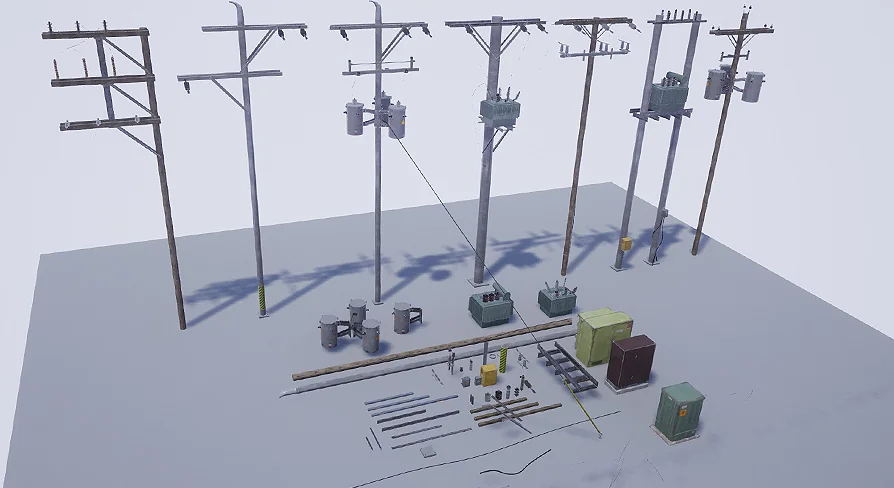
The set includes seven unique power and utility pole designs. They are distinct from each other, so a single map can avoid the repeated-stamp look that often comes with functional props. The blueprints can be linked to one another to build out a connected network that follows roads, property lines, or a player-created layout.
This is not a collection of static meshes that simply look like poles. The linking logic turns them into a spatial system. You can plan a path with pole placements, then let the wire generation fill in the gaps. It is a way of working that suits both rapid prototypes and final level dressing, because the same set can be arranged loosely for a mood test or carefully for a shipped scene. Each pole in the set has its own silhouette, so the network reads as a real mix of utility hardware rather than a row of clones.
Custom Poles From the Included Mesh Pieces
Every pole in the set is also broken down into its component mesh pieces. Those pieces are included, so you can create your own pole variation from the original parts. If a crossarm needs to sit higher, or a specific bracket style matches the local architecture, you can reassemble the pieces to make a custom pole that still shares the visual language of the set.
This modular approach extends the value of the pack well beyond the seven base poles. An environment artist can mix and match between pieces to generate subtle differences across a district. A designer might build a unique landmark pole for a key encounter. The pieces also serve as a learning resource for understanding how the blueprints use their meshes. Because the source meshes for the poles are part of the package, the door is open to creating a pole that matches a specific street corner, a town square, or a back lot.
Substance Painter Materials and Optimized Meshes
The models use PBR materials made in Substance Painter. That means the surfaces respond predictably across different lighting conditions, which is particularly important for outdoor scenes with changing sunlight. The detail is positioned for first-person games, where players can inspect the pole up close, so texture resolution and material fidelity are matched to that vantage.
At the same time, the polygon counts are optimized for games. The set does not sacrifice the high-detail look for performance, nor does it bloat scenes with dense meshes. This balance makes the poles suitable for environments where many instances appear at once, such as a strip of road with repeated utility lines. The material work stands up to scrutiny; the optimized geometry keeps the frame rate stable. That combination is exactly what an open area filled with poles needs.
The Demonstration Video That Walks Through Linking
The pack includes a demonstration video that walks through the wire-linking process. It shows how to connect poles, generate the wires in the editor, and use the slack control to change how the lines hang. For a resource that relies on blueprint logic, that visual walkthrough is just as useful as the assets themselves.
Getting the poles into a scene is straightforward because the workflow is based on linking. The video removes the guesswork from the setup, letting a developer move directly to arranging the poles and tuning the wires. It also clarifies how the dynamic wires behave, so you can predict what will happen when you extend a line beyond a few connections.
Fit for Close-Up Play and Open Streets
Utility poles fill out the background of many urban and industrial environments, but they often become a bottleneck because of the wiring. This set removes that bottleneck: the poles themselves are game-ready, the wire geometry is generated as you link, and the slack parameter lets you shape the result to match the scene.
Because the modular mesh pieces are included, the set also serves as a base for unique props on a street, a lot, or a utility corridor. The blueprints handle the connection logic, the materials carry the visual weight, and the amount of detail is intended for scenes where players get close. Whether the goal is a quick power-line layout or a fully dressed city block, having a linkable generator for wires changes the pacing of environment work. The Utility/Power Pole set puts that system in place.
 Street / Road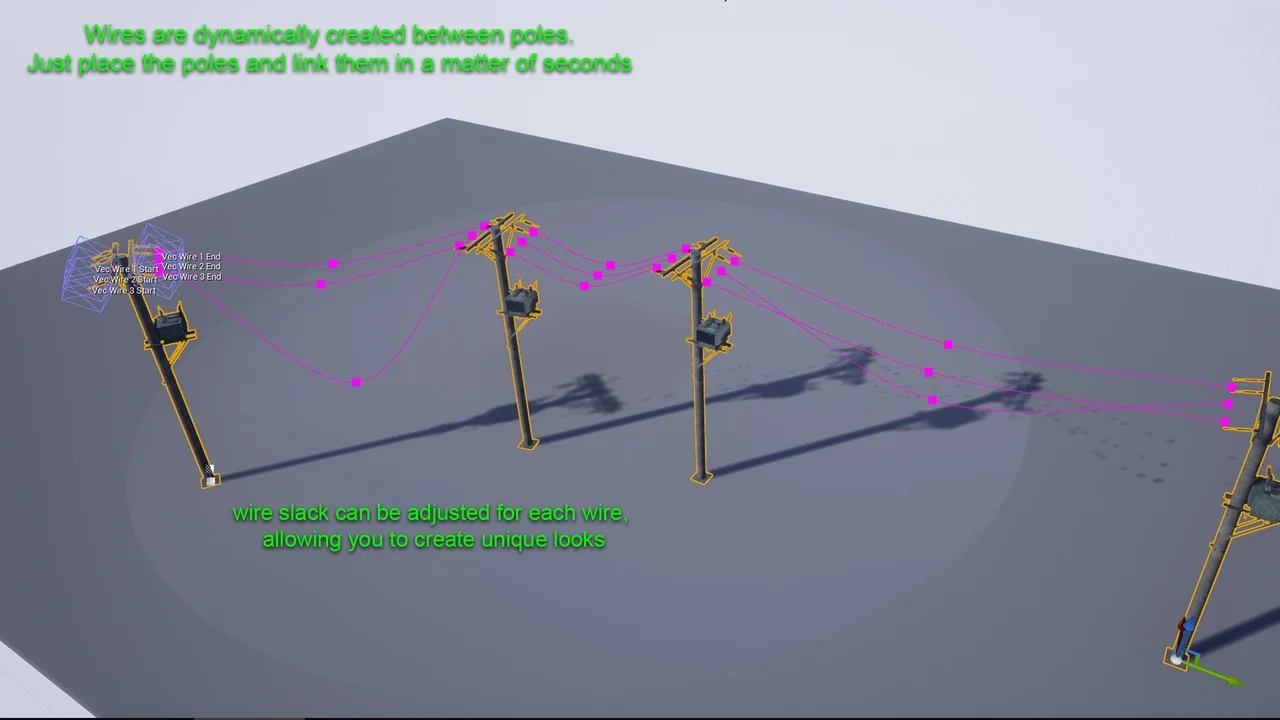
 Gameplay Features
 Variety
 Hardware