"148d1066ed74e216"{"id":"1002925","slug":"multi-objects-renaming-tool-rename-assets-and-actors","title":"Multi Objects Renaming Tool (Rename Assets \u0026 Actors)","category":"Engine Tools","engine":"4.26 - 5.5","assetVersion":"Asset Version: 3.2","engineVersion":"Engine Version: 4.26 - 5.5","tag":"Engine Tools","accent":"blue","visual":"mech","summary":"Organize World Outliner actors and Content Browser assets efficiently with the Multi Objects Renaming Tool editor utility widget.","platform":"Unreal Engine","indexPolicy":"index","publishedAt":"2026-11-21T22:53:51.900Z","updatedAt":"2026-11-21T22:53:51.900Z","sourceNotes":[],"fileContents":[],"compatibility":["Unreal Engine","Asset Version: 3.2","Engine Version: 4.26 - 5.5"],"featuredImage":{"alt":"Multi Objects Renaming Tool (Rename Assets \u0026 Actors)","src":"/wp-content/uploads/published/2026/11/e4ad1476eaff-d274d83a-bdc9-4f78-acdf-db747eebc9f3-40fb639b66.webp"},"fileSizeBytes":1256849,"hasDownloadLink":true,"downloads":0,"terms":[{"taxonomy":"category","slug":"engine-tools-tools-and-plugins","name":"Engine Tools"}],"galleryImages":[{"src":"/wp-content/uploads/published/2026/11/aa30f8fdbef9-d5011165-0651-43ba-a83e-3d1494f74115-98718eb129.webp","alt":"Multi Objects Renaming Tool (Rename Assets \u0026 Actors)"},{"src":"/wp-content/uploads/published/2026/11/b9260707f696-7282265c-c5f2-4968-a1ed-749860064853-52dc06a374.webp","alt":"Multi Objects Renaming Tool (Rename Assets \u0026 Actors)"},{"src":"/wp-content/uploads/published/2026/11/6a42ed2e9475-f1a08477-73e0-4ef4-9075-56f870e985aa-0a926ae16f.webp","alt":"Multi Objects Renaming Tool (Rename Assets \u0026 Actors)"},{"src":"/wp-content/uploads/published/2026/11/6c32e77afac8-2fc38896-b218-4055-842f-114a6d02b78c-0b934d52b5.webp","alt":"Multi Objects Renaming Tool (Rename Assets \u0026 Actors)"},{"src":"/wp-content/uploads/published/2026/11/8556c489031b-cf61e152-eef9-4765-88d0-ff5bed88d7a5-95a6be789e.webp","alt":"Multi Objects Renaming Tool (Rename Assets \u0026 Actors)"}],"accessPanel":{"kind":"resource","title":"Get this resource","safetyNote":"Resources are manually reviewed before listing to improve quality and reduce obvious risks.","fileName":"Multi Objects Renaming Tool (Rename Assets \u0026 Actors).7z","resourceType":"Resource archive","versions":[]},"contentHtml":"\u003ch2\u003eStructuring Complex Scenes with the Multi Objects Renaming Tool\u003c/h2\u003e\u003cp\u003eDense environments, expansive level streaming setups, and modular prop assemblies frequently accumulate hundreds of disparate elements during active production. When staging large-scale interior maps, urban exterior sets, or sprawling terrain filled with foliage instances and decorative props, unmanaged level hierarchies quickly become difficult to navigate. Maintaining clear nomenclature and orderly grouping across level actors directly dictates how smoothly lighting artists, level designers, and technical directors interact with a shared scene. The Multi Objects Renaming Tool functions as an editor improvement tailored specifically to resolve hierarchy chaos, giving developers a centralized way to handle restructuring inside the editor workspace.\u003c/p\u003e\u003cp\u003eBy directly targeting both world-space instances and project-level files, this utility addresses the dual nature of project maintenance. Clutter rarely remains isolated to a single panel. A rapid set dressing pass that introduces dozens of static meshes into a level outliner usually mirrors an equally scattered directory tree inside the project folders. Unifying the process of cleaning up these instances ensures that structural adjustments made to placed scene items can be mirrored by consistent naming conventions in the asset repository, keeping production standards coherent across the entire development pipeline.\u003c/p\u003e\u003ch2\u003eTargeting World Outliner Actors and Level Hierarchies\u003c/h2\u003e\u003cp\u003eWorking inside the World Outliner on dense production maps requires continuous management of actor names, parenting hierarchies, and spatial folders. In standard workflows without dedicated tooling, renaming multiple spawned actors, duplicates, or imported geometry pieces demands tedious manual input. The Multi Objects Renaming Tool addresses this friction directly by enabling users to rename and rearrange structure among placed actors in the World Outliner.\u003c/p\u003e\u003cp\u003eWhen an environment layout changes—such as converting individual architectural panels into systematic modular walls or distinguishing interactive gameplay props from background dressing—having bulk management capabilities transforms the maintenance phase. Instead of individually clicking through lists of placed lights, collision volumes, or static mesh actors, the tool facilitates automatic and organized updates. This helps teams preserve clean naming schemes that indicate actor function, zone location, or hierarchy depth without interrupting the creative momentum of level construction.\u003c/p\u003e\u003cp\u003eRearranging the structural layout of the outliner is equally critical when projects move from rough blockout to final polish. Grouping items logically prevents misclicks, simplifies visibility toggles during lighting bakes or performance profiling passes, and ensures secondary team members can immediately locate specific scene actors. Through cleaner sorting and organized renaming passes, scene outliners remain readable even as actor counts escalate toward final shipping builds.\u003c/p\u003e\u003ch2\u003eRenaming Assets Across Content Browser Directories\u003c/h2\u003e\u003cp\u003eBeyond the active level viewport, project sustainability depends heavily on keeping source files standardized. The Content Browser often collects experimental variations, prototype blueprints, imported textures, and intermediate materials that require rigorous naming conventions before milestone check-ins. The Multi Objects Renaming Tool extends its utility directly into the Content Browser, facilitating the renaming and rearrangement of project structure across assets.\u003c/p\u003e\u003cp\u003eAsset organization benefits from bulk operations whenever broad cataloging passes occur. For instance, teams standardizing prefixes and suffixes across character meshes, audio cues, particle systems, and master materials can apply uniform updates across selections simultaneously. Using the helper widget to handle asset naming prevents human error, such as typos in standardized tags or inconsistent shorthand that can break automated search queries and filters.\u003c/p\u003e\u003cp\u003eOrderly asset structures in the browser also simplify project migrations, packaging passes, and dependency audits. When files follow predictable identifiers and reside in cleanly rearranged structural groupings, finding required source files takes significantly less time. The tool's ability to operate on assets alongside scene actors bridges the gap between what is placed in the level and how source data is stored on disk.\u003c/p\u003e\u003ch2\u003eAutomation and Bulk Cleaner Capabilities in Editor Widgets\u003c/h2\u003e\u003cp\u003eOperating as an editor widget, the tool provides an accessible interface that integrates directly into the production environment. Its design emphasizes simplicity, functioning as a practical helper utility rather than an intrusive overlay. Built-in automation and find capabilities allow developers to pinpoint target elements rapidly, execute clean renaming sweeps, and organize scene data with minimal steps.\u003c/p\u003e\u003cp\u003eThe bulk operations supported by the widget act as a reliable cleaner mechanism. In fast-paced production cycles, naming conventions are frequently neglected during exploratory prototyping. Implementing this utility allows developers to conduct periodic clean-up passes, finding orphaned names, inconsistent duplicates, or temporary test actors and replacing them with standardized labels. Applying bulk updates in a single action eliminates the repetitive overhead associated with manual outliner hygiene.\u003c/p\u003e\u003cp\u003eBecause the widget is geared toward organization, it functions as both an organizational backbone and an everyday workflow accelerator. Whether a developer needs to locate specific groups of objects via find features or restructure an entire branch of actors before handing off a level to another department, the tool minimizes friction while enforcing consistent conventions.\u003c/p\u003e\u003ch2\u003eCoordinating Renaming Systems with Companion Editor Utilities\u003c/h2\u003e\u003cp\u003eEfficient project maintenance often involves pairing complementary editor utilities to cover different administrative bottlenecks. While the Multi Objects Renaming Tool handles the naming and structural organization of actors and assets, related productivity aids operate alongside it to tackle adjacent tasks. For teams seeking comprehensive editor improvements, tools such as Multi Assets Changer address batch parameter adjustments, while utilities like Runtime Output Log enhance in-editor monitoring and diagnostic tracking.\u003c/p\u003e\u003cp\u003eDeploying targeted tools for specific workflow challenges creates a modular editor setup that maintains speed without introducing unnecessary complexity. By focusing specifically on the structural integrity and naming clarity of the World Outliner and Content Browser, the Multi Objects Renaming Tool fulfills a defined, high-impact role in day-to-day asset and level management. Teams building complex interactive scenes can rely on its straightforward bulk processing to keep projects structured, searchable, and clean across every stage of development.\u003c/p\u003e\n\n\u003ch2\u003eContinue Browsing Similar Packs\u003c/h2\u003e\n\u003cul\u003e\n\u003cli\u003e\u003ca href=\"https://3dcghub.com/actor-pool-manager-plugin/\" rel=\"noopener noreferrer\"\u003eActor Pool Manager Plugin\u003c/a\u003e\u003c/li\u003e\n\u003cli\u003e\u003ca href=\"https://3dcghub.com/multi-window/\" rel=\"noopener noreferrer\"\u003eMulti window\u003c/a\u003e\u003c/li\u003e\n\u003cli\u003e\u003ca href=\"https://3dcghub.com/easy-multi-save/\" rel=\"noopener noreferrer\"\u003eEasy Multi Save\u003c/a\u003e\u003c/li\u003e\n\u003cli\u003e\u003ca href=\"https://3dcghub.com/object-pool-plugin/\" rel=\"noopener noreferrer\"\u003eObject Pool Plugin\u003c/a\u003e\u003c/li\u003e\n\u003cli\u003e\u003ca href=\"https://3dcghub.com/multi-channel-media-player-by-opencv-high-performance-webcamera/\" rel=\"noopener noreferrer\"\u003eMulti Channel Media Player By OpenCV High Performance WebCamera\u003c/a\u003e\u003c/li\u003e\n\u003c/ul\u003e","contentTextLength":7130,"navigation":{"current":47,"total":4890,"previous":{"id":"1002926","slug":"multiplayer-and-single-player-aircraft-battle-system-v2","title":"Multiplayer \u0026 Single player Aircraft Battle System V2","category":"Action-Adventure","platform":"Unreal Engine","updatedAt":"2026-11-21T22:54:37.614Z"},"next":{"id":"1002924","slug":"miss-no-hit","title":"Miss No Hit","category":"Engine Tools","platform":"Unreal Engine","updatedAt":"2026-11-21T22:49:53.601Z"}},"relatedResources":[{"id":"1002877","slug":"actor-pool-manager-plugin","title":"Actor Pool Manager Plugin","category":"Engine Tools","engine":"4.26 - 5.4","assetVersion":"Asset Version: 1.2 - 1.7","engineVersion":"Engine Version: 4.26 - 5.4","tag":"Engine Tools","accent":"blue","visual":"mech","summary":"Optimize engine performance and framerates by recycling C++ and Blueprint actors using the Actor Pool Manager Plugin and its PoolActorInterface.","platform":"Unreal Engine","indexPolicy":"index","publishedAt":"2026-11-21T01:35:40.505Z","updatedAt":"2026-11-21T01:35:40.505Z","sourceNotes":[],"fileContents":[],"compatibility":["Unreal Engine","Asset Version: 1.2 - 1.7","Engine Version: 4.26 - 5.4"],"featuredImage":{"alt":"Actor Pool Manager Plugin","src":"/wp-content/uploads/published/2026/11/c158887cfeaf-b01dfcab-c4bf-46d3-a358-b31ad7d2ec05-805c656ecb.webp"},"fileSizeBytes":107749035,"hasDownloadLink":true,"downloads":0},{"id":"14243","slug":"multi-window","title":"Multi window","category":"Engine Tools","engine":"4.25 - 5.7","assetVersion":"Asset Version: 1.0","engineVersion":"Engine version: 4.25 - 5.7","tag":"Engine Tools","accent":"blue","visual":"character","summary":"The Multi window plugin enables developers to display multiple views simultaneously across different windows using simple Blueprint nodes. With support for advanced rendering and persistent cross-level windows, it is a versatile tool for complex UI and disp...","platform":"Unreal Engine","indexPolicy":"index","publishedAt":"2026-03-11T17:07:21.000Z","updatedAt":"2026-08-06T12:55:43.741Z","sourceNotes":[],"fileContents":[],"compatibility":["Unreal Engine","Asset Version: 1.0","Engine version: 4.25 - 5.7"],"featuredImage":{"alt":"Multi window","src":"https://3dcghub.com/wp-content/uploads/2026/03/2e68fe3f-2dca-47bc-80cc-c4bc96fea474.webp"},"fileSizeBytes":238064687,"hasDownloadLink":true,"downloads":1},{"id":"13913","slug":"easy-multi-save","title":"Easy Multi Save","category":"Engine Tools","engine":"1.10 - 1.74","assetVersion":"Engine version: 4.25 - 5.7","engineVersion":"Asset Version:1.10 - 1.74","tag":"Engine Tools","accent":"blue","visual":"mech","summary":"Easy Multi Save provides a robust, streamlined solution for managing game data in Unreal Engine, supporting everything from simple variables to complex World Partition levels.","platform":"Unreal Engine","indexPolicy":"noindex","publishedAt":"2026-03-11T10:40:22.000Z","updatedAt":"2026-07-18T09:48:15.051Z","sourceNotes":[],"fileContents":[],"compatibility":["Unreal Engine","Engine version: 4.25 - 5.7","Asset Version:1.10 - 1.74"],"featuredImage":{"alt":"Easy Multi Save","src":"https://3dcghub.com/wp-content/uploads/2026/03/fab7f07b-78c6-4508-a4df-9cb7d78f90e0.webp"},"fileSizeBytes":480916216,"hasDownloadLink":true,"downloads":2}]}[{"id":4225,"sourceId":4225,"taxonomyId":4225,"taxonomy":"category","slug":"asset-library","name":"Asset Library","parentId":null,"count":4744,"hasChildren":true,"href":"/","seoTitle":"Free Game Assets Library | 3DCGHUB","seoDescription":"Browse free Unreal Engine, Unity, Blender assets and game development tutorials on 3DCGHUB with previews, compatibility notes, and secure downloads.","sitemapEnabled":true,"children":[{"id":4227,"sourceId":4227,"taxonomyId":4227,"taxonomy":"category","slug":"blender-add-ons-plugins","name":"Blender Add-ons \u0026 Plugins","parentId":4225,"count":10,"hasChildren":false,"href":"/category/blender-add-ons-plugins/","seoTitle":"Free Blender Add-ons \u0026 Plugins | 3DCGHUB","seoDescription":"Browse free Blender Add-ons \u0026 Plugins tools for Blender on 3DCGHUB: curated downloads with preview images, compatibility notes and secure download access.","sitemapEnabled":true},{"id":514,"sourceId":514,"taxonomyId":514,"taxonomy":"category","slug":"unity-2","name":"Unity","parentId":4225,"count":453,"hasChildren":true,"href":"/category/unity-2/","seoTitle":"Free Unity Assets | 3DCGHUB","seoDescription":"Browse free Unity resources on 3DCGHUB: curated downloads with preview images, compatibility notes and secure download access.","sitemapEnabled":true,"children":[{"id":523,"sourceId":523,"taxonomyId":523,"taxonomy":"category","slug":"2d","name":"2D","parentId":514,"count":1,"hasChildren":true,"href":"/category/2d/","seoTitle":"Free Unity 2D | 3DCGHUB","seoDescription":"Browse free 2D assets for Unity on 3DCGHUB: curated downloads with preview images, compatibility notes and secure download access.","sitemapEnabled":true},{"id":515,"sourceId":515,"taxonomyId":515,"taxonomy":"category","slug":"3d-unity-2","name":"3D","parentId":514,"count":162,"hasChildren":true,"href":"/category/3d-unity-2/","seoTitle":"Free Unity 3D Assets | 3DCGHUB","seoDescription":"Browse free 3D assets for Unity on 3DCGHUB: curated downloads with preview images, compatibility notes and secure download access.","sitemapEnabled":true},{"id":565,"sourceId":565,"taxonomyId":565,"taxonomy":"category","slug":"add-ons","name":"Add-Ons","parentId":514,"count":2,"hasChildren":false,"href":"/category/add-ons/","seoTitle":"Free Unity Add-Ons | 3DCGHUB","seoDescription":"Browse free Add-Ons assets for Unity on 3DCGHUB: curated downloads with preview images, compatibility notes and secure download access.","sitemapEnabled":true},{"id":529,"sourceId":529,"taxonomyId":529,"taxonomy":"category","slug":"audio-unity-2","name":"Audio","parentId":514,"count":1,"hasChildren":true,"href":"/category/audio-unity-2/","seoTitle":"Free Unity Audio | 3DCGHUB","seoDescription":"Browse free Audio for Unity on 3DCGHUB: curated downloads with preview images, compatibility notes and secure download access.","sitemapEnabled":true},{"id":557,"sourceId":557,"taxonomyId":557,"taxonomy":"category","slug":"templates","name":"Templates","parentId":514,"count":36,"hasChildren":true,"href":"/category/templates/","seoTitle":"Free Unity Templates | 3DCGHUB","seoDescription":"Browse free Unity project templates on 3DCGHUB. Starter kits with previews, compatibility notes, and secure download access.","sitemapEnabled":true},{"id":533,"sourceId":533,"taxonomyId":533,"taxonomy":"category","slug":"tools-unity-2","name":"Tools","parentId":514,"count":0,"hasChildren":true,"href":"/category/tools-unity-2/","sitemapEnabled":true},{"id":554,"sourceId":554,"taxonomyId":554,"taxonomy":"category","slug":"vfx-unity-2","name":"VFX","parentId":514,"count":4,"hasChildren":true,"href":"/category/vfx-unity-2/","seoTitle":"Free Unity VFX | 3DCGHUB","seoDescription":"Browse free VFX for Unity on 3DCGHUB: curated downloads with preview images, compatibility notes and secure download access.","sitemapEnabled":true}]},{"id":511,"sourceId":511,"taxonomyId":511,"taxonomy":"category","slug":"unreal-engine-2","name":"Unreal Engine","parentId":4225,"count":4282,"hasChildren":true,"href":"/category/unreal-engine-2/","seoTitle":"Free Unreal Engine Assets | 3DCGHUB","seoDescription":"Browse free Unreal Engine resources on 3DCGHUB: curated downloads with preview images, compatibility notes and secure download access.","sitemapEnabled":true,"children":[{"id":54,"sourceId":54,"taxonomyId":54,"taxonomy":"category","slug":"3d","name":"3D","parentId":511,"count":2428,"hasChildren":true,"href":"/category/3d/","seoTitle":"Free Unreal Engine 3D | 3DCGHUB","seoDescription":"Browse free 3D assets for Unreal Engine on 3DCGHUB: curated downloads with preview images, compatibility notes and secure download access.","sitemapEnabled":true},{"id":441,"sourceId":441,"taxonomyId":441,"taxonomy":"category","slug":"animations","name":"Animations","parentId":511,"count":245,"hasChildren":true,"href":"/category/animations/","seoTitle":"Free Unreal Engine Animations | 3DCGHUB","seoDescription":"Browse free Animations for Unreal Engine on 3DCGHUB: curated downloads with preview images, compatibility notes and secure download access.","sitemapEnabled":true},{"id":446,"sourceId":446,"taxonomyId":446,"taxonomy":"category","slug":"audio","name":"Audio","parentId":511,"count":63,"hasChildren":true,"href":"/category/audio/","seoTitle":"Free Unreal Engine Audio Resources | 3DCGHUB","seoDescription":"Browse free Unreal Engine audio resources including sound effects, voices, dialogue, and ambient sounds. Curated free downloads on 3DCGHUB.","sitemapEnabled":true},{"id":466,"sourceId":466,"taxonomyId":466,"taxonomy":"category","slug":"game-systems","name":"Game Systems","parentId":511,"count":356,"hasChildren":true,"href":"/category/game-systems/","seoTitle":"Free Unreal Engine Game Systems | 3DCGHUB","seoDescription":"Browse free Game Systems tools for Unreal Engine on 3DCGHUB: curated downloads with preview images, compatibility notes and secure download access.","sitemapEnabled":true},{"id":478,"sourceId":478,"taxonomyId":478,"taxonomy":"category","slug":"game-templates","name":"Game Templates","parentId":511,"count":150,"hasChildren":true,"href":"/category/game-templates/","seoTitle":"Free Unreal Engine Game Templates | 3DCGHUB","seoDescription":"Browse free Game Templates for Unreal Engine on 3DCGHUB: curated downloads with preview images, compatibility notes and secure download access.","sitemapEnabled":true},{"id":432,"sourceId":432,"taxonomyId":432,"taxonomy":"category","slug":"hdri","name":"HDRI","parentId":511,"count":6,"hasChildren":true,"href":"/category/hdri/","seoTitle":"Free Unreal Engine HDRI | 3DCGHUB","seoDescription":"Browse free Unreal Engine HDRI skies and lighting maps on 3DCGHUB. Environment lighting with previews and secure downloads.","sitemapEnabled":true},{"id":228,"sourceId":228,"taxonomyId":228,"taxonomy":"category","slug":"material-and-textures","name":"Material \u0026 Textures","parentId":511,"count":172,"hasChildren":true,"href":"/category/material-and-textures/","seoTitle":"Free Unreal Engine Material \u0026 Textures | 3DCGHUB","seoDescription":"Browse free Material \u0026 Textures for Unreal Engine on 3DCGHUB: curated downloads with preview images, compatibility notes and secure download access.","sitemapEnabled":true},{"id":298,"sourceId":298,"taxonomyId":298,"taxonomy":"category","slug":"sprites-and-flipbooks","name":"Sprites \u0026 Flipbooks","parentId":511,"count":17,"hasChildren":true,"href":"/category/sprites-and-flipbooks/","seoTitle":"Free Unreal Engine Sprites \u0026 Flipbooks | 3DCGHUB","seoDescription":"Browse free Sprites \u0026 Flipbooks assets for Unreal Engine on 3DCGHUB: curated downloads with preview images, compatibility notes and secure download access.","sitemapEnabled":true},{"id":489,"sourceId":489,"taxonomyId":489,"taxonomy":"category","slug":"tools-and-plugins","name":"Tools \u0026 Plugins","parentId":511,"count":390,"hasChildren":true,"href":"/category/tools-and-plugins/","seoTitle":"Free Unreal Engine Tools \u0026 Plugins | 3DCGHUB","seoDescription":"Browse free Tools \u0026 Plugins for Unreal Engine on 3DCGHUB: curated downloads with preview images, compatibility notes and secure download access.","sitemapEnabled":true},{"id":459,"sourceId":459,"taxonomyId":459,"taxonomy":"category","slug":"ui","name":"UI","parentId":511,"count":43,"hasChildren":true,"href":"/category/ui/","seoTitle":"Free Unreal Engine UI | 3DCGHUB","seoDescription":"Browse free UI for Unreal Engine on 3DCGHUB: curated downloads with preview images, compatibility notes and secure download access.","sitemapEnabled":true},{"id":450,"sourceId":450,"taxonomyId":450,"taxonomy":"category","slug":"vfx","name":"VFX","parentId":511,"count":412,"hasChildren":true,"href":"/category/vfx/","seoTitle":"Free Unreal Engine VFX | 3DCGHUB","seoDescription":"Browse free VFX for Unreal Engine on 3DCGHUB: curated downloads with preview images, compatibility notes and secure download access.","sitemapEnabled":true}]}]},{"id":4222,"sourceId":4222,"taxonomyId":4222,"taxonomy":"category","slug":"tutorial-library","name":"Tutorial Library","parentId":null,"count":117,"hasChildren":false,"href":"/tutorials/","seoTitle":"Free Game Development Tutorial Library | 3DCGHUB","seoDescription":"Browse free game development tutorials for Unreal Engine, Unity, Blender, and more on 3DCGHUB with practical workflows and secure downloads.","sitemapEnabled":true}]
Resource screenshots
1 / 5
Join our channel
Follow 3DCGHUB on Telegram for new resource drops, migration updates, and community notices.
Structuring Complex Scenes with the Multi Objects Renaming Tool
Dense environments, expansive level streaming setups, and modular prop assemblies frequently accumulate hundreds of disparate elements during active production. When staging large-scale interior maps, urban exterior sets, or sprawling terrain filled with foliage instances and decorative props, unmanaged level hierarchies quickly become difficult to navigate. Maintaining clear nomenclature and orderly grouping across level actors directly dictates how smoothly lighting artists, level designers, and technical directors interact with a shared scene. The Multi Objects Renaming Tool functions as an editor improvement tailored specifically to resolve hierarchy chaos, giving developers a centralized way to handle restructuring inside the editor workspace.
By directly targeting both world-space instances and project-level files, this utility addresses the dual nature of project maintenance. Clutter rarely remains isolated to a single panel. A rapid set dressing pass that introduces dozens of static meshes into a level outliner usually mirrors an equally scattered directory tree inside the project folders. Unifying the process of cleaning up these instances ensures that structural adjustments made to placed scene items can be mirrored by consistent naming conventions in the asset repository, keeping production standards coherent across the entire development pipeline.
Targeting World Outliner Actors and Level Hierarchies
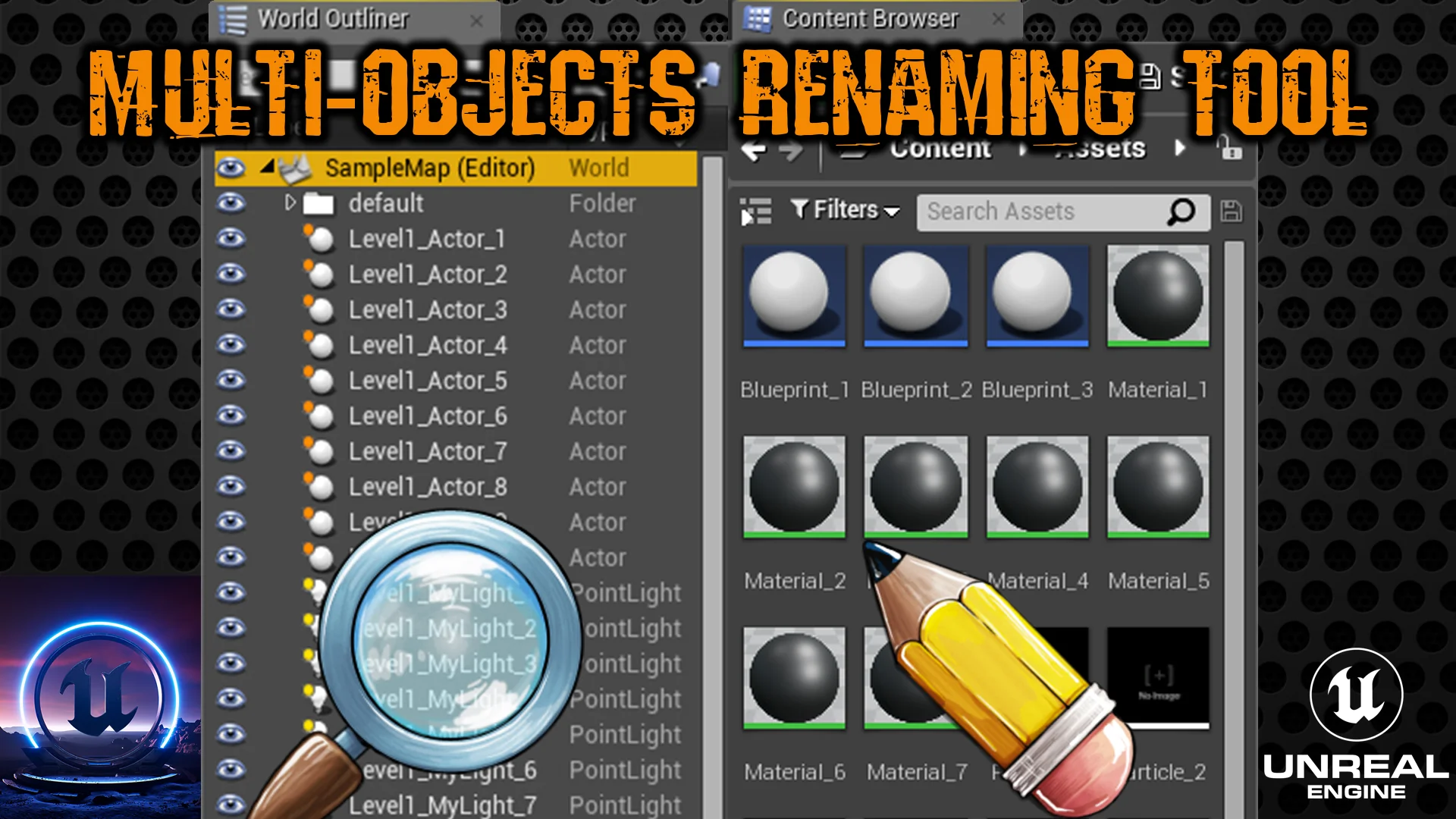
Working inside the World Outliner on dense production maps requires continuous management of actor names, parenting hierarchies, and spatial folders. In standard workflows without dedicated tooling, renaming multiple spawned actors, duplicates, or imported geometry pieces demands tedious manual input. The Multi Objects Renaming Tool addresses this friction directly by enabling users to rename and rearrange structure among placed actors in the World Outliner.
When an environment layout changes—such as converting individual architectural panels into systematic modular walls or distinguishing interactive gameplay props from background dressing—having bulk management capabilities transforms the maintenance phase. Instead of individually clicking through lists of placed lights, collision volumes, or static mesh actors, the tool facilitates automatic and organized updates. This helps teams preserve clean naming schemes that indicate actor function, zone location, or hierarchy depth without interrupting the creative momentum of level construction.
Rearranging the structural layout of the outliner is equally critical when projects move from rough blockout to final polish. Grouping items logically prevents misclicks, simplifies visibility toggles during lighting bakes or performance profiling passes, and ensures secondary team members can immediately locate specific scene actors. Through cleaner sorting and organized renaming passes, scene outliners remain readable even as actor counts escalate toward final shipping builds.
Renaming Assets Across Content Browser Directories
Beyond the active level viewport, project sustainability depends heavily on keeping source files standardized. The Content Browser often collects experimental variations, prototype blueprints, imported textures, and intermediate materials that require rigorous naming conventions before milestone check-ins. The Multi Objects Renaming Tool extends its utility directly into the Content Browser, facilitating the renaming and rearrangement of project structure across assets.
Asset organization benefits from bulk operations whenever broad cataloging passes occur. For instance, teams standardizing prefixes and suffixes across character meshes, audio cues, particle systems, and master materials can apply uniform updates across selections simultaneously. Using the helper widget to handle asset naming prevents human error, such as typos in standardized tags or inconsistent shorthand that can break automated search queries and filters.
Orderly asset structures in the browser also simplify project migrations, packaging passes, and dependency audits. When files follow predictable identifiers and reside in cleanly rearranged structural groupings, finding required source files takes significantly less time. The tool's ability to operate on assets alongside scene actors bridges the gap between what is placed in the level and how source data is stored on disk.
Automation and Bulk Cleaner Capabilities in Editor Widgets
Operating as an editor widget, the tool provides an accessible interface that integrates directly into the production environment. Its design emphasizes simplicity, functioning as a practical helper utility rather than an intrusive overlay. Built-in automation and find capabilities allow developers to pinpoint target elements rapidly, execute clean renaming sweeps, and organize scene data with minimal steps.
The bulk operations supported by the widget act as a reliable cleaner mechanism. In fast-paced production cycles, naming conventions are frequently neglected during exploratory prototyping. Implementing this utility allows developers to conduct periodic clean-up passes, finding orphaned names, inconsistent duplicates, or temporary test actors and replacing them with standardized labels. Applying bulk updates in a single action eliminates the repetitive overhead associated with manual outliner hygiene.
Because the widget is geared toward organization, it functions as both an organizational backbone and an everyday workflow accelerator. Whether a developer needs to locate specific groups of objects via find features or restructure an entire branch of actors before handing off a level to another department, the tool minimizes friction while enforcing consistent conventions.
Coordinating Renaming Systems with Companion Editor Utilities
Efficient project maintenance often involves pairing complementary editor utilities to cover different administrative bottlenecks. While the Multi Objects Renaming Tool handles the naming and structural organization of actors and assets, related productivity aids operate alongside it to tackle adjacent tasks. For teams seeking comprehensive editor improvements, tools such as Multi Assets Changer address batch parameter adjustments, while utilities like Runtime Output Log enhance in-editor monitoring and diagnostic tracking.
Deploying targeted tools for specific workflow challenges creates a modular editor setup that maintains speed without introducing unnecessary complexity. By focusing specifically on the structural integrity and naming clarity of the World Outliner and Content Browser, the Multi Objects Renaming Tool fulfills a defined, high-impact role in day-to-day asset and level management. Teams building complex interactive scenes can rely on its straightforward bulk processing to keep projects structured, searchable, and clean across every stage of development.
 Engine Tools
 Engine Tools
 Engine Tools