"b00678cacce53329"{"id":"1002797","slug":"laser-show-system","title":"Laser Show System","category":"Variety","engine":"4.25+,5.0+","assetVersion":"","engineVersion":"Engine Version: 4.25+,5.0+","tag":"Variety","accent":"blue","visual":"mech","summary":"Explore the Laser Show System for Unreal Engine, featuring DMX control, Control Rig preset creation, Tick-driven beams, and virtual stage workflows.","platform":"Unreal Engine","indexPolicy":"index","publishedAt":"2026-11-20T07:21:53.047Z","updatedAt":"2026-11-20T07:21:53.047Z","sourceNotes":[],"fileContents":[],"compatibility":["Unreal Engine","Engine Version: 4.25+,5.0+"],"featuredImage":{"alt":"Laser Show System","src":"/wp-content/uploads/published/2026/11/53ebeccdb510-415a2a16-b709-4beb-85cc-69a43cb18e97-8991813840.webp"},"fileSizeBytes":26699219,"hasDownloadLink":true,"downloads":0,"terms":[{"taxonomy":"category","slug":"variety-vfx","name":"Variety"}],"galleryImages":[{"src":"/wp-content/uploads/published/2026/11/ca1951ca943d-1ae0962e-3628-4be0-9e97-2756954db3b8-876e080be5.webp","alt":"Laser Show System"},{"src":"/wp-content/uploads/published/2026/11/c4872361eaa6-45b4818c-f9c8-4271-bcce-39edaa49a7d6-e57377897a.webp","alt":"Laser Show System"},{"src":"/wp-content/uploads/published/2026/11/d00e98081fd7-edc4d1cd-3874-45bf-af4e-6e601a99d318-c9ce6758bb.webp","alt":"Laser Show System"},{"src":"/wp-content/uploads/published/2026/11/ef78022cc421-4dfdb15a-19b7-436d-ad85-c619e2cfbdb3-edbfc0530c.webp","alt":"Laser Show System"},{"src":"/wp-content/uploads/published/2026/11/8464a4c58faf-754a5588-1f96-4977-b732-81928ebde2e6-c5de4d5321.webp","alt":"Laser Show System"},{"src":"/wp-content/uploads/published/2026/11/8de1e128d037-657b3d43-9f78-4b4c-bc23-cff77a4327b5-804f6f7b87.webp","alt":"Laser Show System"},{"src":"/wp-content/uploads/published/2026/11/7946a6b1cccb-471c7932-6731-432c-8323-5170084ee4e9-a11193c507.webp","alt":"Laser Show System"},{"src":"/wp-content/uploads/published/2026/11/3b0924f6566a-b5f8e787-a1de-4681-9fc1-466a1216e562-074c3ee8c3.webp","alt":"Laser Show System"},{"src":"/wp-content/uploads/published/2026/11/a72bd179ff47-4b851301-cfa9-4e4e-bb99-5b69e50d8d44-7bb44a1c39.webp","alt":"Laser Show System"},{"src":"/wp-content/uploads/published/2026/11/598825ea8184-b816e920-39d9-4889-8f78-6ba54f14398c-a7f31de7cf.webp","alt":"Laser Show System"}],"accessPanel":{"kind":"resource","title":"Get this resource","safetyNote":"Resources are manually reviewed before listing to improve quality and reduce obvious risks.","fileName":"Content.7z","resourceType":"Resource archive","versions":[]},"contentHtml":"\u003ch2\u003eBeam Generation in the Laser Show System and the PIE Requirement\u003c/h2\u003e\u003cp\u003eVirtual stage environments require lighting effects that replicate the intense, concentrated projection of real optical fixtures. The Laser Show System handles this real-time reproduction inside Unreal Engine through an execution model driven directly by Tick nodes. Because the calculation and rendering of each beam depend entirely on runtime ticking, the beams do not appear in the static Unreal Editor viewport during standard composition. Visualizing, evaluating, and operating the beams requires running Play In Editor (PIE) mode or launching a standalone game build. In environments where the engine is not actively executing frames through PIE or a standalone runtime, the beam graphics cannot be reproduced.\u003c/p\u003e\u003cp\u003eThis operational requirement defines how staging scenes must be tested. When balancing virtual production lighting, club environments, or disco dance floors, designers preview movements and beam intensity by actively simulating the session. Standalone game builds maintain full functionality, allowing interactive entertainment, live visual playback, and packaged virtual events to run the beam passes without deviation from editor testing.\u003c/p\u003e\u003ch2\u003eOptical Unit Architecture: Beam Count and Surface Layout\u003c/h2\u003e\u003cp\u003eThe structural layout of the fixtures is structured around dense multi-beam units. A single unit is composed of 12 surfaces, functioning with 24 beams, along with 24 individual beams. This arrangement gives each active fixture the density required to generate complex geometric fans, intersecting sheets of light, and layered stage sweeps that mimic heavy live concert production rigs.\u003c/p\u003e\u003cp\u003eBeyond the structural emitter layout, individual parameters within the fixture are exposed for granular adjustment. Every parameter can be tuned in fine detail, enabling operators to control the visual spread, alignment, and behavioral properties of the output. Rather than locking users into a rigid pattern, the fixture logic allows adjustments across the array of beams, making it possible to isolate specific sections of the 12 surfaces or modulate the full 24-beam array depending on the visual scale required by the scene.\u003c/p\u003e\u003ch2\u003eCustom Presets in the Laser Editor Kit and Animation Sequences\u003c/h2\u003e\u003cp\u003ePre-configured motion and patterns are deployed directly through Animation Sequences. The package supplies a collection containing numerous pre-made presets that establish standard laser show movements, dynamic sweeps, and geometric transformations right out of the box. These sequences drive the fixtures across timelines, making it straightforward to match optical shifts to recorded musical cues or scripted theatrical events.\u003c/p\u003e\u003cp\u003eFor productions requiring bespoke movement profiles, the package includes a dedicated Editor Kit. This toolkit utilizes Unreal Engine's Control Rig plugin, providing the structural rig controls needed to construct entirely custom motion patterns and user-authored presets. By leveraging Control Rig within the editor, technical artists can manipulate the underlying rig points directly, keying specific paths and building unique Animation Sequences that plug straight back into the playback pipeline.\u003c/p\u003e\u003ch2\u003eProject Configuration and Provisional DMX Capabilities in UE5\u003c/h2\u003e\u003cp\u003eManaging live lighting protocols inside Unreal Engine requires specific foundational settings. Because proper DMX communication demands dedicated engine plugins, protocol routing, and specific input configurations, the delivery format was transitioned from a standard Asset Pack into a Complete Project. This Complete Project structure guarantees that all required project settings, internal mappings, and execution flags are correctly pre-configured without requiring manual project-level reconstruction.\u003c/p\u003e\u003cp\u003eThe package integrates provisional DMX control designed specifically as a test implementation for Unreal Engine 5. Through this DMX layer, virtual stages can connect to external lighting control environments, enabling real-time desk manipulation over network protocols. For production setups routing commands through professional consoles such as grandMA hardware or the MA on PC software environment, fixture profiles and operational instructions rely on standard MA Lighting workflows and support channels. The Complete Project framework establishes the baseline environment so these incoming signals can interface directly with the virtual fixtures during active simulation.\u003c/p\u003e\u003ch2\u003eTechnical Boundaries and Virtual Staging Contexts\u003c/h2\u003e\u003cp\u003eUnderstanding the exact engineering parameters of the Laser Show System involves recognizing its technical constraints. The system does not support light reflections, meaning beams will not bounce off reflective surfaces, mirrors, or water volumes. Surface cutoffs are likewise unsupported; beams do not automatically clip against intersecting world geometry. Due to underlying technical hurdles, there are no plans to introduce surface cutoff or reflection features in future revisions. In addition, the system does not support the ILDA protocol, keeping control firmly focused on native Unreal Animation Sequences and its provisional DMX pipeline.\u003c/p\u003e\u003cp\u003ePhysical fixture aesthetics are also decoupled from the system's logic: the project does not include equipment 3D models. The assets supply the optical, mathematical, and programmatic beam structure, leaving exterior chassis, truss clamps, and moving-head housings to be supplied independently if visible hardware meshes are required on stage.\u003c/p\u003e\u003cp\u003eThese operational features target specific real-time environments, including club venues, virtual stages, disco sets, and live virtual production environments such as G and LAT.43°N. By combining deep per-parameter control, pre-built Animation Sequences, Control Rig creation tools, and network-ready DMX testing within a project-level configuration, the system provides a specialized optical framework tailored strictly for active runtime execution.\u003c/p\u003e\n\n\u003ch2\u003eRelated Resources Worth Checking\u003c/h2\u003e\n\u003cul\u003e\n\u003cli\u003e\u003ca href=\"https://3dcghub.com/niagara-realistic-starter-vfx-pack/\" rel=\"noopener noreferrer\"\u003eNiagara Realistic Starter VFX Pack\u003c/a\u003e\u003c/li\u003e\n\u003cli\u003e\u003ca href=\"https://3dcghub.com/snowfall-vfx/\" rel=\"noopener noreferrer\"\u003eSnowfall VFX\u003c/a\u003e\u003c/li\u003e\n\u003cli\u003e\u003ca href=\"https://3dcghub.com/portal-pack-niagara-vfx/\" rel=\"noopener noreferrer\"\u003ePortal Pack -Niagara VFX\u003c/a\u003e\u003c/li\u003e\n\u003cli\u003e\u003ca href=\"https://3dcghub.com/volumetric-spotlight-with-shadow/\" rel=\"noopener noreferrer\"\u003eVolumetric Spotlight with Shadow\u003c/a\u003e\u003c/li\u003e\n\u003cli\u003e\u003ca href=\"https://3dcghub.com/simple-cartoon-fx-pack/\" rel=\"noopener noreferrer\"\u003eSimple Cartoon FX Pack\u003c/a\u003e\u003c/li\u003e\n\u003c/ul\u003e","contentTextLength":6091,"navigation":{"current":83,"total":4797,"previous":{"id":"1002798","slug":"lazy-godray","title":"Lazy Godray","category":"Weather","platform":"Unreal Engine","updatedAt":"2026-11-20T07:22:44.806Z"},"next":{"id":"1002796","slug":"ky-magic-chant-fx","title":"KY Magic Chant FX","category":"Spells \u0026 Combat","platform":"Unreal Engine","updatedAt":"2026-11-20T07:20:53.760Z"}},"relatedResources":[{"id":"1002831","slug":"scan-fx","title":"Scan FX","category":"Variety","engine":"4.18+,5.0+","assetVersion":"","engineVersion":"Engine Version: 4.18+,5.0+","tag":"Variety","accent":"blue","visual":"mech","summary":"A close look at Scan FX, featuring customizable laser rays, projection grids, x-rays, full-screen post-processing waves, and sensory perception modes.","platform":"Unreal Engine","indexPolicy":"index","publishedAt":"2026-11-20T12:01:23.630Z","updatedAt":"2026-11-20T12:01:23.630Z","sourceNotes":[],"fileContents":[],"compatibility":["Unreal Engine","Engine Version: 4.18+,5.0+"],"featuredImage":{"alt":"Scan FX","src":"/wp-content/uploads/published/2026/11/dbbc2af04e7a-fa545948-7450-4630-bb74-7621b33c5cee-dd442c4355.webp"},"fileSizeBytes":100213068,"hasDownloadLink":true,"downloads":0},{"id":"1002848","slug":"teleportation-system-vfx-blueprints","title":"Teleportation system (VFX + Blueprints)","category":"Variety","engine":"4.25+,5.0+","assetVersion":"","engineVersion":"Engine Version: 4.25+,5.0+","tag":"Variety","accent":"blue","visual":"mech","summary":"Explore the Niagara-powered Teleportation system (VFX + Blueprints), featuring automated mesh dissolve, multi-mesh tracking, and mobile-ready shaders.","platform":"Unreal Engine","indexPolicy":"index","publishedAt":"2026-11-20T12:30:30.684Z","updatedAt":"2026-11-20T12:30:30.684Z","sourceNotes":[],"fileContents":[],"compatibility":["Unreal Engine","Engine Version: 4.25+,5.0+"],"featuredImage":{"alt":"Teleportation system (VFX + Blueprints)","src":"/wp-content/uploads/published/2026/11/b827053ff827-809a021b-5655-43ab-9e60-73830780acc6-70d91f06e9.webp"},"fileSizeBytes":38592585,"hasDownloadLink":true,"downloads":0},{"id":"1002824","slug":"niagara-sci-fi-starter-vfx-pack","title":"Niagara Sci-Fi Starter VFX Pack","category":"Variety","engine":"4.25+,5.0+","assetVersion":"","engineVersion":"Engine Version: 4.25+,5.0+","tag":"Variety","accent":"blue","visual":"mech","summary":"A technical breakdown of the Niagara Sci-Fi Starter VFX Pack, covering 80 particle systems, scale handling, materials, meshes, and prototyping workflows.","platform":"Unreal Engine","indexPolicy":"index","publishedAt":"2026-11-20T08:01:46.751Z","updatedAt":"2026-11-20T08:01:46.751Z","sourceNotes":[],"fileContents":[],"compatibility":["Unreal Engine","Engine Version: 4.25+,5.0+"],"featuredImage":{"alt":"Niagara Sci-Fi Starter VFX Pack","src":"/wp-content/uploads/published/2026/11/04195f3fcc68-a0d8c532-4fe0-4b42-bc6c-9ce9f9c7cc25-68e9114bd6.webp"},"fileSizeBytes":230322289,"hasDownloadLink":true,"downloads":0}]}
Resource screenshots
1 / 10
Join our channel
Follow 3DCGHUB on Telegram for new resource drops, migration updates, and community notices.
Beam Generation in the Laser Show System and the PIE Requirement
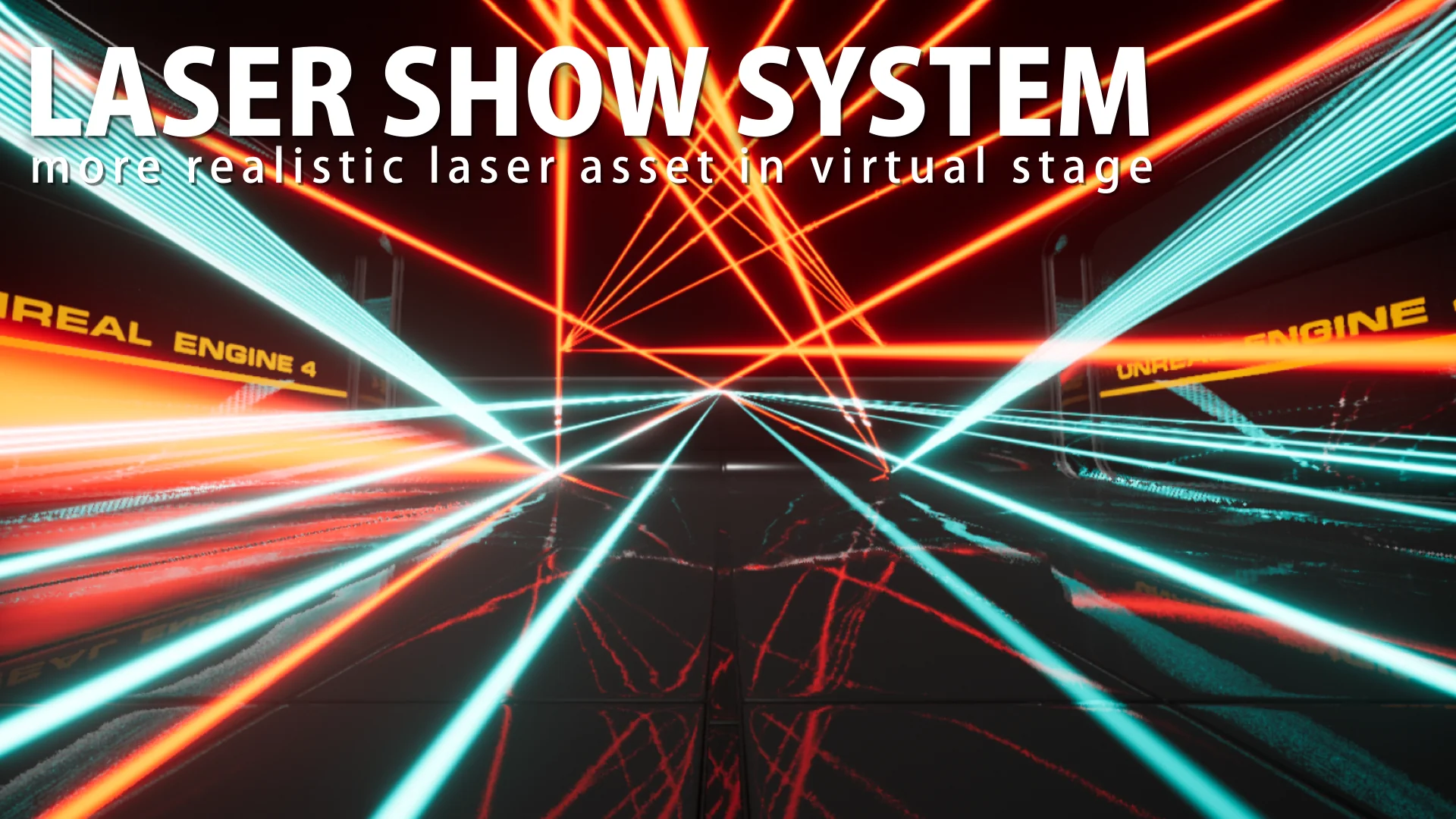
Virtual stage environments require lighting effects that replicate the intense, concentrated projection of real optical fixtures. The Laser Show System handles this real-time reproduction inside Unreal Engine through an execution model driven directly by Tick nodes. Because the calculation and rendering of each beam depend entirely on runtime ticking, the beams do not appear in the static Unreal Editor viewport during standard composition. Visualizing, evaluating, and operating the beams requires running Play In Editor (PIE) mode or launching a standalone game build. In environments where the engine is not actively executing frames through PIE or a standalone runtime, the beam graphics cannot be reproduced.
This operational requirement defines how staging scenes must be tested. When balancing virtual production lighting, club environments, or disco dance floors, designers preview movements and beam intensity by actively simulating the session. Standalone game builds maintain full functionality, allowing interactive entertainment, live visual playback, and packaged virtual events to run the beam passes without deviation from editor testing.
Optical Unit Architecture: Beam Count and Surface Layout
The structural layout of the fixtures is structured around dense multi-beam units. A single unit is composed of 12 surfaces, functioning with 24 beams, along with 24 individual beams. This arrangement gives each active fixture the density required to generate complex geometric fans, intersecting sheets of light, and layered stage sweeps that mimic heavy live concert production rigs.
Beyond the structural emitter layout, individual parameters within the fixture are exposed for granular adjustment. Every parameter can be tuned in fine detail, enabling operators to control the visual spread, alignment, and behavioral properties of the output. Rather than locking users into a rigid pattern, the fixture logic allows adjustments across the array of beams, making it possible to isolate specific sections of the 12 surfaces or modulate the full 24-beam array depending on the visual scale required by the scene.
Custom Presets in the Laser Editor Kit and Animation Sequences
Pre-configured motion and patterns are deployed directly through Animation Sequences. The package supplies a collection containing numerous pre-made presets that establish standard laser show movements, dynamic sweeps, and geometric transformations right out of the box. These sequences drive the fixtures across timelines, making it straightforward to match optical shifts to recorded musical cues or scripted theatrical events.
For productions requiring bespoke movement profiles, the package includes a dedicated Editor Kit. This toolkit utilizes Unreal Engine's Control Rig plugin, providing the structural rig controls needed to construct entirely custom motion patterns and user-authored presets. By leveraging Control Rig within the editor, technical artists can manipulate the underlying rig points directly, keying specific paths and building unique Animation Sequences that plug straight back into the playback pipeline.
Project Configuration and Provisional DMX Capabilities in UE5
Managing live lighting protocols inside Unreal Engine requires specific foundational settings. Because proper DMX communication demands dedicated engine plugins, protocol routing, and specific input configurations, the delivery format was transitioned from a standard Asset Pack into a Complete Project. This Complete Project structure guarantees that all required project settings, internal mappings, and execution flags are correctly pre-configured without requiring manual project-level reconstruction.
The package integrates provisional DMX control designed specifically as a test implementation for Unreal Engine 5. Through this DMX layer, virtual stages can connect to external lighting control environments, enabling real-time desk manipulation over network protocols. For production setups routing commands through professional consoles such as grandMA hardware or the MA on PC software environment, fixture profiles and operational instructions rely on standard MA Lighting workflows and support channels. The Complete Project framework establishes the baseline environment so these incoming signals can interface directly with the virtual fixtures during active simulation.
Technical Boundaries and Virtual Staging Contexts
Understanding the exact engineering parameters of the Laser Show System involves recognizing its technical constraints. The system does not support light reflections, meaning beams will not bounce off reflective surfaces, mirrors, or water volumes. Surface cutoffs are likewise unsupported; beams do not automatically clip against intersecting world geometry. Due to underlying technical hurdles, there are no plans to introduce surface cutoff or reflection features in future revisions. In addition, the system does not support the ILDA protocol, keeping control firmly focused on native Unreal Animation Sequences and its provisional DMX pipeline.
Physical fixture aesthetics are also decoupled from the system's logic: the project does not include equipment 3D models. The assets supply the optical, mathematical, and programmatic beam structure, leaving exterior chassis, truss clamps, and moving-head housings to be supplied independently if visible hardware meshes are required on stage.
These operational features target specific real-time environments, including club venues, virtual stages, disco sets, and live virtual production environments such as G and LAT.43°N. By combining deep per-parameter control, pre-built Animation Sequences, Control Rig creation tools, and network-ready DMX testing within a project-level configuration, the system provides a specialized optical framework tailored strictly for active runtime execution.
 Variety
 Variety
 Variety