"b00678cacce53329"{"id":"1002848","slug":"teleportation-system-vfx-blueprints","title":"Teleportation system (VFX + Blueprints)","category":"Variety","engine":"4.25+,5.0+","assetVersion":"","engineVersion":"Engine Version: 4.25+,5.0+","tag":"Variety","accent":"blue","visual":"mech","summary":"Explore the Niagara-powered Teleportation system (VFX + Blueprints), featuring automated mesh dissolve, multi-mesh tracking, and mobile-ready shaders.","platform":"Unreal Engine","indexPolicy":"index","publishedAt":"2026-11-20T12:30:30.684Z","updatedAt":"2026-11-20T12:30:30.684Z","sourceNotes":[],"fileContents":[],"compatibility":["Unreal Engine","Engine Version: 4.25+,5.0+"],"featuredImage":{"alt":"Teleportation system (VFX + Blueprints)","src":"/wp-content/uploads/published/2026/11/b827053ff827-809a021b-5655-43ab-9e60-73830780acc6-70d91f06e9.webp"},"fileSizeBytes":38592585,"hasDownloadLink":true,"downloads":0,"terms":[{"taxonomy":"category","slug":"variety-vfx","name":"Variety"}],"galleryImages":[{"src":"/wp-content/uploads/published/2026/11/9cf8b708db18-197f48ae-705f-4510-8c6b-f10a54ad1918-984acecfba.webp","alt":"Teleportation system (VFX + Blueprints)"},{"src":"/wp-content/uploads/published/2026/11/94d89f1ca113-c2c77bed-2fc9-4bcd-99a5-b72f272cb54d-25eaa37d52.webp","alt":"Teleportation system (VFX + Blueprints)"},{"src":"/wp-content/uploads/published/2026/11/870b30623230-468f8de9-0b0d-4409-8e43-1b7e67b8b9f5-ca8130c058.webp","alt":"Teleportation system (VFX + Blueprints)"},{"src":"/wp-content/uploads/published/2026/11/dc035ced3568-6c0ab37b-6e9a-4e85-a03f-01ea3aaeff33-5e042ebccc.webp","alt":"Teleportation system (VFX + Blueprints)"},{"src":"/wp-content/uploads/published/2026/11/fa4e37faee70-90539958-dce9-4552-8c66-d212877328f8-8831cd2766.webp","alt":"Teleportation system (VFX + Blueprints)"},{"src":"/wp-content/uploads/published/2026/11/4b22fc774f18-f3f09e37-7eec-460e-83d3-32826783991f-43314c2ea3.webp","alt":"Teleportation system (VFX + Blueprints)"},{"src":"/wp-content/uploads/published/2026/11/4a0fcbdee70f-cadfd9fc-e559-43ef-ac28-6a08ab9d7be7-7396039b10.webp","alt":"Teleportation system (VFX + Blueprints)"},{"src":"/wp-content/uploads/published/2026/11/76bcd9af50fa-e47738d4-7fb1-446b-9830-e6a2a62cda43-d9707fb875.webp","alt":"Teleportation system (VFX + Blueprints)"}],"accessPanel":{"kind":"resource","title":"Get this resource","safetyNote":"Resources are manually reviewed before listing to improve quality and reduce obvious risks.","fileName":"Content.7z","resourceType":"Resource archive","versions":[]},"contentHtml":"\u003cp\u003eWhen an actor initiates transit across a level, geometric rings spin outward, particles gather across the silhouette, and the entire form dematerializes through a pattern-driven dissolve before reappearing at a chosen destination. Translating an actor across 3D space involves more than changing world coordinates; it requires visual continuity that sells the relocation to the player. The system addresses this interaction through a combination of modular Niagara particle simulations and Blueprint logic engineered for rapid deployment.\u003c/p\u003e \u003ch2\u003eAutomated Mesh Handling in the Teleportation Blueprints\u003c/h2\u003e\n\u003cp\u003eOne of the most friction-heavy steps when building character-level visual effects is accounting for complex actor hierarchies. Modern player characters rarely consist of a single skeletal mesh. A fully equipped hero often carries a separate skeletal rig alongside modular armor attachments, secondary static meshes for weapons, shields, hanging potion flasks, and cosmetic accessories. Setting up a dissolve or teleportation sequence on such an actor typically demands manually referencing every individual component or establishing tedious tag filters inside material instances.\u003c/p\u003e\n\u003cp\u003eThe teleportation Blueprint bypasses that tedious pipeline by automating mesh detection directly. Upon triggering the teleport sequence, the logic automatically scans the target actor, identifies every distinct mesh component tied to the hierarchy, and applies the transit effects across all of them in unison. Whether a character carries a sword, holds a shield, wears segmented plate armor, or carries small utility props, the entire collection dissolves and reforms together. This eliminates visual artifacts where a character body vanishes while their weapon remains floating in mid-air for several frames. By automating component indexing, the setup allows technical artists to drop the Blueprint onto diverse character classes without rewriting internal node networks for every equipment permutation.\u003c/p\u003e \u003ch2\u003eParametric Niagara VFX and Dissolve Controls\u003c/h2\u003e\n\u003cp\u003eVisual style across games varies drastically, ranging from hard-edged sci-fi warps to ethereal magical incantations. To support different aesthetic directions, the system exposes key parameters directly within the Blueprint interface for quick adjustment. Artists can manipulate the core dimensions and timing of the effect without opening the underlying Niagara emitter graphs or rewriting vertex shader functions.\u003c/p\u003e\n\u003cp\u003eAccessible variables include:\u003c/p\u003e\n\u003cul\u003e\n\u003cli\u003e\u003cstrong\u003eSpeed and Rotation:\u003c/strong\u003e Dictate how briskly the particle volume gathers, spins, and dissipates across the arrival and departure thresholds.\u003c/li\u003e\n\u003cli\u003e\u003cstrong\u003eHeight, Effect Size, and Effect Thickness:\u003c/strong\u003e Control the spatial boundary of the teleportation volume, letting creators enclose towering bosses, slender humanoids, or compact items.\u003c/li\u003e\n\u003cli\u003e\u003cstrong\u003eColor and Color Boost:\u003c/strong\u003e Fine-tune emissive intensity and chromatic styling to match specific elemental magic or technological themes.\u003c/li\u003e\n\u003cli\u003e\u003cstrong\u003eGeometry Configuration:\u003c/strong\u003e Adjust the structural layout of the surrounding visual shapes that manifest during the sequence.\u003c/li\u003e\n\u003cli\u003e\u003cstrong\u003ePositional Transit Toggles:\u003c/strong\u003e Enable or disable whether the visual effect travels along the vector path between the departure and arrival points during the teleportation process.\u003c/li\u003e\n\u003c/ul\u003e\n\u003cp\u003eMaterial breakdown during transit is governed by a dedicated mesh dissolve effect. The system ships with seven distinct dissolve patterns out of the box, allowing teams to choose between varied organic, digital, or stylized decay motifs. Projects requiring custom art direction can plug their own dissolve pattern textures directly into the system to keep the erosion profile visually consistent with their game's existing shader libraries.\u003c/p\u003e \u003ch2\u003eActor Dissolution and Spawning Extensions\u003c/h2\u003e\n\u003cp\u003eTransit logic frequently shares mechanics with other gameplay events, such as item spawning and character death. An update expanded the core feature set by introducing dedicated utility Blueprints that decouple the visual dissolve pipeline from spatial repositioning.\u003c/p\u003e\n\u003cp\u003eThe first addition, designated as the dissolve actor utility, allows developers to apply the procedural dissolve routine to lingering entities in the world. A standard practical use involves dissolving a defeated enemy character once their death animation finishes, clearing memory footprint without abruptly popping the mesh out of existence. The companion spawn actor utility reverses this sequence, introducing newly instantiated items, interactive objects, or arriving allies into the scene with a matching visual flourish.\u003c/p\u003e\n\u003cp\u003eBoth utilities give creators granular control over secondary graphical layers. Depending on the dramatic weight of the moment, developers can toggle the expanding rings and particle bursts on or off. A high-priority teleport terminal might warrant the full suite of spinning rings and intense particle bursts, while standard ambient spawns or battlefield cleanups can run with rings disabled to keep scene readability focused on active threats.\u003c/p\u003e \u003ch2\u003eVR and Mobile Optimization via Lightweight Shaders\u003c/h2\u003e\n\u003cp\u003eStylized visual effects relying heavily on transparency, dynamic emissive boosts, and mesh sampling can rapidly saturate GPU bandwidth on performance-constrained platforms. To alleviate fill-rate bottlenecks, the package provides a dedicated folder containing reworked Niagara effects structured specifically for mobile platforms and virtual reality hardware.\u003c/p\u003e\n\u003cp\u003eThe reworked mobile and VR variants are engineered to maintain a fully green shader complexity profile in development viewports. Keeping instruction counts low and avoiding expensive overdraw layers ensures that the dissolve and particle bursts render cleanly without triggering sudden frame pacing spikes during rapid player transit. For mobile productions targeting handheld chipsets, utilizing the VR-designated particle variants is recommended to secure consistent performance budgets.\u003c/p\u003e\n\u003cp\u003eProjects deploying specifically to autonomous, standalone VR headsets may still need targeted optimization passes to reconcile local hardware constraints with thermal thresholds. When packaging for virtual reality environments, developers must ensure that Instanced Stereo is disabled, as the visual effects pipeline currently relies on standard stereo rendering pathways to resolve particle positions accurately across both displays.\u003c/p\u003e \u003ch2\u003eNetworking Realities within the Teleportation System\u003c/h2\u003e\n\u003cp\u003eThe system is intentionally shaped by single-player implementation out of the box, having established its foundation as a prize-winning utility during the Epic MegaJam 2020. It prioritizes turnkey local usability, making it simple to test mechanics inside prototypes, single-player campaigns, and stylized action sequences.\u003c/p\u003e\n\u003cp\u003eBecause the logic does not arrive pre-configured with client-server network authority or native replication triggers, developers targeting multiplayer titles must adapt the architecture to their project's network topology. Doing so involves routing the Blueprint trigger events through custom Remote Procedure Calls (RPCs), synchronizing start and end coordinates across the server, and multicasting the visual Niagara triggers to connected clients. Dedicated tutorial documentation covers the process of setting up teleportation for multiplayer environments, guiding technical designers through bridging the standalone VFX triggers with networked gameplay frameworks.\u003c/p\u003e\n\n\u003ch2\u003eMore From The Same Workflow\u003c/h2\u003e\n\u003cul\u003e\n\u003cli\u003e\u003ca href=\"https://3dcghub.com/stylized-vfx-minipack/\" rel=\"noopener noreferrer\"\u003eStylized Vfx Minipack\u003c/a\u003e\u003c/li\u003e\n\u003cli\u003e\u003ca href=\"https://3dcghub.com/snowfall-vfx/\" rel=\"noopener noreferrer\"\u003eSnowfall VFX\u003c/a\u003e\u003c/li\u003e\n\u003cli\u003e\u003ca href=\"https://3dcghub.com/mixed-vfx-pack-4-niagara/\" rel=\"noopener noreferrer\"\u003eMixed Vfx Pack 4 (Niagara)\u003c/a\u003e\u003c/li\u003e\n\u003cli\u003e\u003ca href=\"https://3dcghub.com/vfx-backgrounds/\" rel=\"noopener noreferrer\"\u003eVFX Backgrounds\u003c/a\u003e\u003c/li\u003e\n\u003cli\u003e\u003ca href=\"https://3dcghub.com/attack-animals-vfx/\" rel=\"noopener noreferrer\"\u003eAttack Animals VFX\u003c/a\u003e\u003c/li\u003e\n\u003c/ul\u003e","contentTextLength":7450,"navigation":{"current":32,"total":4797,"previous":{"id":"1002849","slug":"text-popup-effects-and-magic-spells","title":"Text Popup effects and Magic Spells","category":"Spells \u0026 Combat","platform":"Unreal Engine","updatedAt":"2026-11-20T12:31:09.942Z"},"next":{"id":"1002847","slug":"sword-swipes-anim-trail","title":"Sword Swipes Anim Trail","category":"Spells \u0026 Combat","platform":"Unreal Engine","updatedAt":"2026-11-20T12:29:30.087Z"}},"relatedResources":[{"id":"1002857","slug":"vfx-spark-pack","title":"VFX Spark Pack","category":"Variety","engine":"4.18+,5.0+","assetVersion":"","engineVersion":"Engine Version: 4.18+,5.0+","tag":"Variety","accent":"blue","visual":"mech","summary":"Explore the VFX Spark Pack for Unreal Engine 5, featuring Blueprint-driven electrical arcs, collision sparks, beam effects, and timing controls.","platform":"Unreal Engine","indexPolicy":"index","publishedAt":"2026-11-20T12:38:12.653Z","updatedAt":"2026-11-20T12:38:12.653Z","sourceNotes":[],"fileContents":[],"compatibility":["Unreal Engine","Engine Version: 4.18+,5.0+"],"featuredImage":{"alt":"VFX Spark Pack","src":"/wp-content/uploads/published/2026/11/fe4488da9388-015f4412-e839-4b38-ad77-9fc7c9a4d9f1-c226b6f13a.webp"},"fileSizeBytes":125381741,"hasDownloadLink":true,"downloads":0},{"id":"1002856","slug":"vfx-series-pack-1","title":"VFX Series Pack 1","category":"Variety","engine":"4.15+,5.0+","assetVersion":"","engineVersion":"Engine Version: 4.15+,5.0+","tag":"Variety","accent":"blue","visual":"mech","summary":"VFX Series Pack 1 provides particle systems, a multi-purpose projectile blueprint, and prototyping tools for kinetic, tracking plasma, and beam effects.","platform":"Unreal Engine","indexPolicy":"index","publishedAt":"2026-11-20T12:37:19.700Z","updatedAt":"2026-11-20T12:37:19.700Z","sourceNotes":[],"fileContents":[],"compatibility":["Unreal Engine","Engine Version: 4.15+,5.0+"],"featuredImage":{"alt":"VFX Series Pack 1","src":"/wp-content/uploads/published/2026/11/ae2ffb17df50-0f2ca29c-7dfd-4b0a-9545-02d1a6161873-9478d63e76.webp"},"fileSizeBytes":125292350,"hasDownloadLink":true,"downloads":0},{"id":"1002855","slug":"vfx-playground","title":"VFX Playground","category":"Variety","engine":"4.22+,5.0+","assetVersion":"","engineVersion":"Engine Version: 4.22+,5.0+","tag":"Variety","accent":"blue","visual":"mech","summary":"Explore the VFX Playground project file, featuring Cascade particle systems, weapon and spell blueprints, in-game UI documentation, and testing templates.","platform":"Unreal Engine","indexPolicy":"index","publishedAt":"2026-11-20T12:36:41.568Z","updatedAt":"2026-11-20T12:36:41.568Z","sourceNotes":[],"fileContents":[],"compatibility":["Unreal Engine","Engine Version: 4.22+,5.0+"],"featuredImage":{"alt":"VFX Playground","src":"/wp-content/uploads/published/2026/11/cc9433c7e926-4d181f07-2d4d-4075-80f0-6797f13c21b0-68cc780d3b.webp"},"fileSizeBytes":143299614,"hasDownloadLink":true,"downloads":0}]}
Resource screenshots
1 / 8
Join our channel
Follow 3DCGHUB on Telegram for new resource drops, migration updates, and community notices.
When an actor initiates transit across a level, geometric rings spin outward, particles gather across the silhouette, and the entire form dematerializes through a pattern-driven dissolve before reappearing at a chosen destination. Translating an actor across 3D space involves more than changing world coordinates; it requires visual continuity that sells the relocation to the player. The system addresses this interaction through a combination of modular Niagara particle simulations and Blueprint logic engineered for rapid deployment.
Automated Mesh Handling in the Teleportation Blueprints
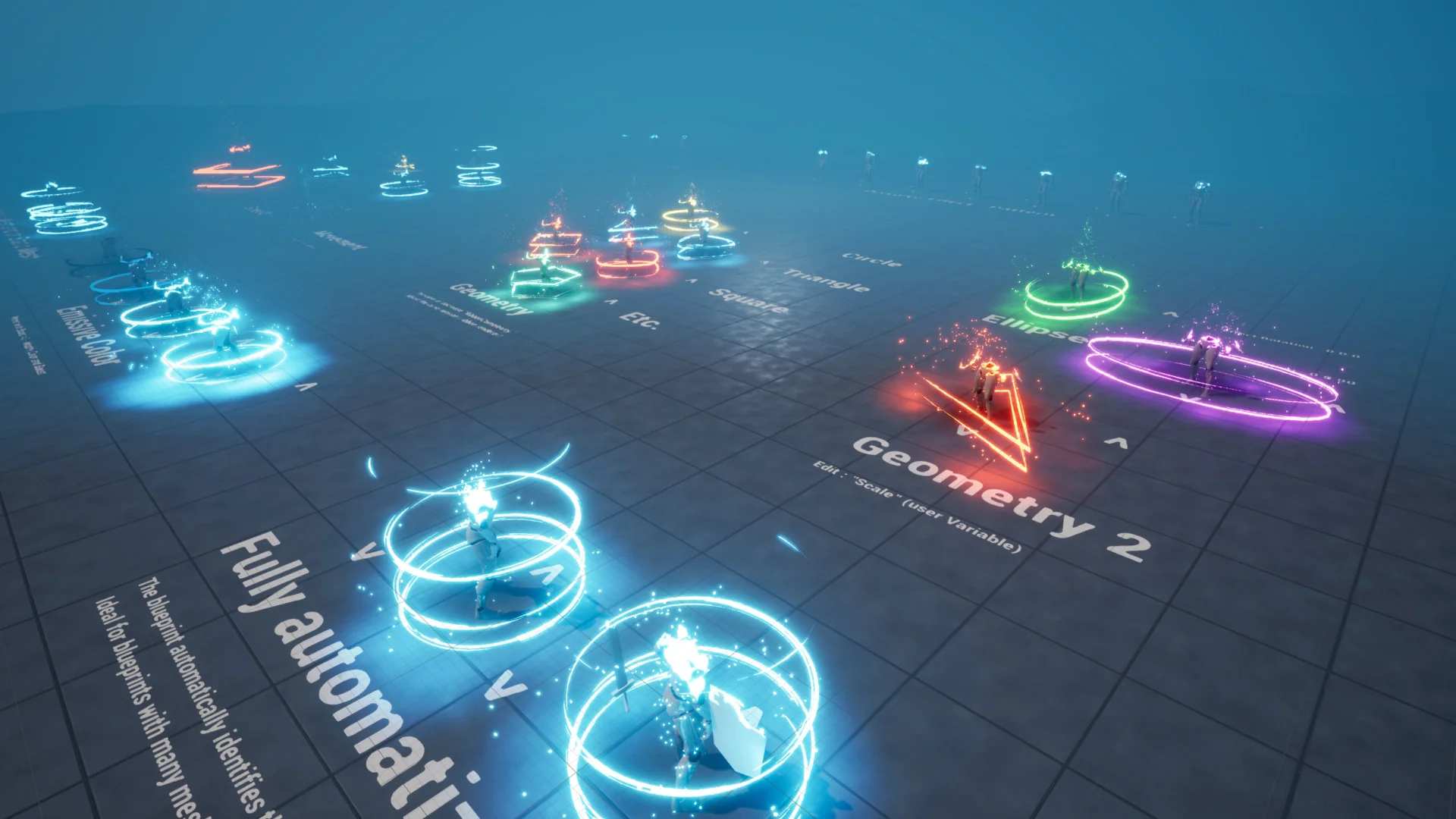
One of the most friction-heavy steps when building character-level visual effects is accounting for complex actor hierarchies. Modern player characters rarely consist of a single skeletal mesh. A fully equipped hero often carries a separate skeletal rig alongside modular armor attachments, secondary static meshes for weapons, shields, hanging potion flasks, and cosmetic accessories. Setting up a dissolve or teleportation sequence on such an actor typically demands manually referencing every individual component or establishing tedious tag filters inside material instances.
The teleportation Blueprint bypasses that tedious pipeline by automating mesh detection directly. Upon triggering the teleport sequence, the logic automatically scans the target actor, identifies every distinct mesh component tied to the hierarchy, and applies the transit effects across all of them in unison. Whether a character carries a sword, holds a shield, wears segmented plate armor, or carries small utility props, the entire collection dissolves and reforms together. This eliminates visual artifacts where a character body vanishes while their weapon remains floating in mid-air for several frames. By automating component indexing, the setup allows technical artists to drop the Blueprint onto diverse character classes without rewriting internal node networks for every equipment permutation.
Parametric Niagara VFX and Dissolve Controls
Visual style across games varies drastically, ranging from hard-edged sci-fi warps to ethereal magical incantations. To support different aesthetic directions, the system exposes key parameters directly within the Blueprint interface for quick adjustment. Artists can manipulate the core dimensions and timing of the effect without opening the underlying Niagara emitter graphs or rewriting vertex shader functions.
Accessible variables include:
Speed and Rotation: Dictate how briskly the particle volume gathers, spins, and dissipates across the arrival and departure thresholds.
Height, Effect Size, and Effect Thickness: Control the spatial boundary of the teleportation volume, letting creators enclose towering bosses, slender humanoids, or compact items.
Color and Color Boost: Fine-tune emissive intensity and chromatic styling to match specific elemental magic or technological themes.
Geometry Configuration: Adjust the structural layout of the surrounding visual shapes that manifest during the sequence.
Positional Transit Toggles: Enable or disable whether the visual effect travels along the vector path between the departure and arrival points during the teleportation process.
Material breakdown during transit is governed by a dedicated mesh dissolve effect. The system ships with seven distinct dissolve patterns out of the box, allowing teams to choose between varied organic, digital, or stylized decay motifs. Projects requiring custom art direction can plug their own dissolve pattern textures directly into the system to keep the erosion profile visually consistent with their game's existing shader libraries.
Actor Dissolution and Spawning Extensions
Transit logic frequently shares mechanics with other gameplay events, such as item spawning and character death. An update expanded the core feature set by introducing dedicated utility Blueprints that decouple the visual dissolve pipeline from spatial repositioning.
The first addition, designated as the dissolve actor utility, allows developers to apply the procedural dissolve routine to lingering entities in the world. A standard practical use involves dissolving a defeated enemy character once their death animation finishes, clearing memory footprint without abruptly popping the mesh out of existence. The companion spawn actor utility reverses this sequence, introducing newly instantiated items, interactive objects, or arriving allies into the scene with a matching visual flourish.
Both utilities give creators granular control over secondary graphical layers. Depending on the dramatic weight of the moment, developers can toggle the expanding rings and particle bursts on or off. A high-priority teleport terminal might warrant the full suite of spinning rings and intense particle bursts, while standard ambient spawns or battlefield cleanups can run with rings disabled to keep scene readability focused on active threats.
VR and Mobile Optimization via Lightweight Shaders
Stylized visual effects relying heavily on transparency, dynamic emissive boosts, and mesh sampling can rapidly saturate GPU bandwidth on performance-constrained platforms. To alleviate fill-rate bottlenecks, the package provides a dedicated folder containing reworked Niagara effects structured specifically for mobile platforms and virtual reality hardware.
The reworked mobile and VR variants are engineered to maintain a fully green shader complexity profile in development viewports. Keeping instruction counts low and avoiding expensive overdraw layers ensures that the dissolve and particle bursts render cleanly without triggering sudden frame pacing spikes during rapid player transit. For mobile productions targeting handheld chipsets, utilizing the VR-designated particle variants is recommended to secure consistent performance budgets.
Projects deploying specifically to autonomous, standalone VR headsets may still need targeted optimization passes to reconcile local hardware constraints with thermal thresholds. When packaging for virtual reality environments, developers must ensure that Instanced Stereo is disabled, as the visual effects pipeline currently relies on standard stereo rendering pathways to resolve particle positions accurately across both displays.
Networking Realities within the Teleportation System
The system is intentionally shaped by single-player implementation out of the box, having established its foundation as a prize-winning utility during the Epic MegaJam 2020. It prioritizes turnkey local usability, making it simple to test mechanics inside prototypes, single-player campaigns, and stylized action sequences.
Because the logic does not arrive pre-configured with client-server network authority or native replication triggers, developers targeting multiplayer titles must adapt the architecture to their project's network topology. Doing so involves routing the Blueprint trigger events through custom Remote Procedure Calls (RPCs), synchronizing start and end coordinates across the server, and multicasting the visual Niagara triggers to connected clients. Dedicated tutorial documentation covers the process of setting up teleportation for multiplayer environments, guiding technical designers through bridging the standalone VFX triggers with networked gameplay frameworks.
 Variety
 Variety
 Variety