"b00678cacce53329"{"id":"1002798","slug":"lazy-godray","title":"Lazy Godray","category":"Weather","engine":"4.24+,5.0+","assetVersion":"","engineVersion":"Engine Version: 4.24+,5.0+","tag":"Weather","accent":"blue","visual":"mech","summary":"Build isolated, geometry-driven atmospheric light shafts in Unreal Engine using Lazy Godray's unlit VFX Blueprint, Niagara dust, and overdraw-friendly setups.","platform":"Unreal Engine","indexPolicy":"index","publishedAt":"2026-11-20T07:22:44.806Z","updatedAt":"2026-11-20T07:22:44.806Z","sourceNotes":[],"fileContents":[],"compatibility":["Unreal Engine","Engine Version: 4.24+,5.0+"],"featuredImage":{"alt":"Lazy Godray","src":"/wp-content/uploads/published/2026/11/b18aed2fadeb-fa8f6687-466f-4236-95f1-769b3e9241c4-2664a28dc5.webp"},"fileSizeBytes":62915299,"hasDownloadLink":true,"downloads":0,"terms":[{"taxonomy":"category","slug":"weather-vfx","name":"Weather"}],"galleryImages":[{"src":"/wp-content/uploads/published/2026/11/b09fd37bf119-8390f2c6-c878-4b88-a42c-8128f7ff3fac-2b7f6042f7.webp","alt":"Lazy Godray"},{"src":"/wp-content/uploads/published/2026/11/ae1be6fdd0a6-c925d08a-f03b-44ea-aa27-9225e3b0e9bc-e495c17426.webp","alt":"Lazy Godray"},{"src":"/wp-content/uploads/published/2026/11/82a451ec231c-7010fc0b-b4d3-4efb-805b-5c194fc550d8-c1f1b6ed2b.webp","alt":"Lazy Godray"},{"src":"/wp-content/uploads/published/2026/11/73b1114c3724-e0891cb7-1a4d-471a-893e-751ab92d16d1-e025870db6.webp","alt":"Lazy Godray"},{"src":"/wp-content/uploads/published/2026/11/317487df8ded-1e8f4ee2-b7e5-4847-a8f9-6116650285f8-1b6b60ff01.webp","alt":"Lazy Godray"}],"accessPanel":{"kind":"resource","title":"Get this resource","safetyNote":"Resources are manually reviewed before listing to improve quality and reduce obvious risks.","fileName":"Content.7z","resourceType":"Resource archive","versions":[]},"contentHtml":"\u003ch2\u003eIsolating Atmosphere with Lazy Godray\u003c/h2\u003e\u003cp\u003eEstablishing localized atmosphere in an environment frequently forces artists to balance visual fidelity against global rendering cost. Broad volumetric fog passes and scene-wide atmospheric lighting calculations can introduce significant performance burdens, particularly when an environment only calls for a single sunbeam breaking through a ruined roof, a solitary shaft descending into a cavern, or a controlled column of illuminated mist spilling from a high window. Lazy Godray addresses this specific production scenario by packaging every element required for localized light beams into a unified Blueprint that operates entirely independent of the native volumetric lighting system in Unreal Engine.\u003c/p\u003e\u003cp\u003eBy treating the light beam as a targeted, self-contained visual effect rather than an engine-wide simulation, artists can place atmospheric highlights exactly where an art director or level designer wants them. The Blueprint bundles the foundational visual components into one place, allowing instant placement without forcing changes to global post-process volumes, directional light settings, or exponential height fog configurations. This isolation makes it possible to build dense, dramatic lighting accents in tight interior chambers or sprawling open layouts while keeping the computational footprint strictly localized.\u003c/p\u003e\u003ch2\u003eGeometry-Driven Light Beams and Unlit Shading\u003c/h2\u003e\u003cp\u003eThe structural foundation of the system relies on a lightweight geometry-driven godray effect paired with an Unlit shading model. Using custom geometry to define the volume of the light beam bypasses the expensive ray-marching routines typically associated with dynamic volumetric lighting. Because the underlying materials utilize the Unlit shading profile, they do not evaluate scene lights, receive dynamic shadow maps, or contribute to complex light interaction passes. This design ensures that adding several beams throughout an interior space will not compound per-pixel dynamic lighting calculations across surrounding surfaces.\u003c/p\u003e\u003cp\u003eWhile the asset intentionally avoids direct interactions with the engine lighting system, it simulates the appearance of illuminated atmosphere entirely through its internal shader logic and geometry orientation. The unlit shader calculates its own light shaft behavior, blending internal color, opacity, and falloff so that the beam appears convincingly luminous against dark geometry or contrasting backdrops. For pipelines working under tight frame budgets, relying on geometry-driven light shafts offers predictable, stable rendering times that do not fluctuate based on scene-level lighting complexity.\u003c/p\u003e\u003ch2\u003eCustomizing Smoke, Light Shafts, and Volumetric Density in Lazy Godray\u003c/h2\u003e\u003cp\u003eA static, uniform cone of light rarely looks believable in a lived-in environment. Lazy Godray accommodates detailed environmental storytelling through extensive material and Blueprint parameter customization. The asset includes customizable textures for both the core light shaft effect and moving smoke layers, giving artists the ability to determine how smooth or turbulent the beam appears as it cuts through the air.\u003c/p\u003e\u003cp\u003eArtists can fine-tune volumetric parameters to mirror the physical characteristics of smoke, fog, and scattered light. Adjustments to panning motion, edge softness, core brightness, and density gradients allow the beam to shift across a wide range of visual styles. A clean, sharp, directional beam can simulate bright noon sunlight piercing architectural glass, while a broken, churning, noise-driven profile can mimic damp industrial steam, subterranean dungeon moisture, or lingering atmospheric haze. Because these physical smoke attributes are governed directly by exposed parameters, dialing in the right visual density does not require modifying shader code or leaving the Blueprint editor viewport.\u003c/p\u003e\u003ch2\u003eNiagara Dust Particles and Integrated Spotlight Control\u003c/h2\u003e\u003cp\u003eTo ground the geometry within the physical scene, the Blueprint incorporates secondary visual elements that complement the light shaft. An integrated spotlight component provides convenient directional alignment and localized illumination cues, helping the unlit beam mesh blend seamlessly with surrounding static meshes and architectural bounds.\u003c/p\u003e\u003cp\u003eSuspended matter inside a light beam is vital for establishing scale and realism. The UE5.5 update completely modernizes the dust system, transitioning the implementation away from legacy Cascade emitters to a native Niagara System. Alongside this modernization, the update delivers overhauled dust customization settings and resolves particle visibility issues, ensuring dust motes correctly reveal themselves in strict accordance with the Blueprint settings. Artists can precisely control the dispersion, visibility thresholds, and motion of motes drifting through the illuminated channel, adding the subtle microscopic movement needed to make static scenes feel alive.\u003c/p\u003e\u003ch2\u003eTranslucency Overdraw Management and Card-Based Material Applications\u003c/h2\u003e\u003cp\u003eLarge translucent meshes stacked in front of one another are a notorious source of performance drops, particularly in scenes where multiple beams intersect or where cameras move close to wide geometry planes. To address this common rendering bottleneck, Lazy Godray includes an additional variation specifically configured for improved translucency overdraw performance. This variation allows teams to deploy dense atmospheric arrangements in combat arenas or dense corridors without inducing extreme fill-rate penalties.\u003c/p\u003e\u003cp\u003eThe utility of the asset also extends beyond the primary Blueprint geometry. The underlying material is engineered so that it can be decoupled from the primary godray mesh and deployed independently as a fog material. Artists can assign this material to simple planar cards or feed it into standard particle systems to populate corners with ground mist, lingering smoke patches, or localized ambient clouds. Utilizing the same core material across both directed beams and ambient planar cards creates visual continuity throughout an environment, ensuring that floating smoke and directional light shafts share identical motion noise, coloration, and dissipation behaviors.\u003c/p\u003e\u003ch2\u003eCamera-Facing Variants and Sequencer Animation Workflows\u003c/h2\u003e\u003cp\u003eStatic beams can break immersion if a player or cinematic camera views them from an extreme side angle or catches the sharp edge of the underlying geometry. Demonstrations of the system highlight dedicated camera-facing variants designed to adjust as the viewing perspective shifts, preserving the illusion of a soft, rounded, continuous volumetric column from any vantage point. This variant is especially valuable in third-person exploration titles or first-person environments where players can navigate freely around the light source.\u003c/p\u003e\u003cp\u003eFor narrative and cutscene production, the asset directly interfaces with cinematic pipelines. Showcase workflows demonstrate smooth compatibility with Sequencer, allowing artists to drive light beam parameters across a timeline. Directors can animate beam intensity, smoke churn rate, color shifts, and visibility triggers to match dynamic story moments, such as a spotlight swinging across a prison yard, sunlight breaking through clouds during a dramatic reveal, or power flickering on in an abandoned facility. Because every setting remains exposed at the Blueprint level, controlling atmospheric evolution across scripted sequences requires no custom scripting hooks.\u003c/p\u003e\n\n\u003ch2\u003eContinue Browsing Similar Packs\u003c/h2\u003e\n\u003cul\u003e\n\u003cli\u003e\u003ca href=\"https://3dcghub.com/good-fx-rain/\" rel=\"noopener noreferrer\"\u003eGood FX : Rain\u003c/a\u003e\u003c/li\u003e\n\u003cli\u003e\u003ca href=\"https://3dcghub.com/niagara-weather/\" rel=\"noopener noreferrer\"\u003eNiagara Weather\u003c/a\u003e\u003c/li\u003e\n\u003cli\u003e\u003ca href=\"https://3dcghub.com/rain-effects/\" rel=\"noopener noreferrer\"\u003eRain Effects\u003c/a\u003e\u003c/li\u003e\n\u003cli\u003e\u003ca href=\"https://3dcghub.com/ultra-volumetrics/\" rel=\"noopener noreferrer\"\u003eUltra Volumetrics\u003c/a\u003e\u003c/li\u003e\n\u003cli\u003e\u003ca href=\"https://3dcghub.com/ice-cool/\" rel=\"noopener noreferrer\"\u003eIce Cool\u003c/a\u003e\u003c/li\u003e\n\u003c/ul\u003e","contentTextLength":7575,"navigation":{"current":82,"total":4797,"previous":{"id":"1002799","slug":"lightning-fast","title":"Lightning Fast","category":"Procedural Systems","platform":"Unreal Engine","updatedAt":"2026-11-20T07:23:46.559Z"},"next":{"id":"1002797","slug":"laser-show-system","title":"Laser Show System","category":"Variety","platform":"Unreal Engine","updatedAt":"2026-11-20T07:21:53.047Z"}},"relatedResources":[{"id":"1002823","slug":"niagara-ribbon-examples","title":"Niagara Ribbon examples","category":"Weather","engine":"4.26+,5.0+","assetVersion":"","engineVersion":"Engine Version: 4.26+,5.0+","tag":"Weather","accent":"blue","visual":"mech","summary":"Explore Niagara Ribbon examples featuring lightning, procedural tree structures, and conceptual systems for real-time visual effects.","platform":"Unreal Engine","indexPolicy":"index","publishedAt":"2026-11-20T07:58:36.251Z","updatedAt":"2026-11-20T07:58:36.251Z","sourceNotes":[],"fileContents":[],"compatibility":["Unreal Engine","Engine Version: 4.26+,5.0+"],"featuredImage":{"alt":"Niagara Ribbon examples","src":"/wp-content/uploads/published/2026/11/2d56e9a2782a-7cb66038-81bf-4e32-af4a-5aaf65747410-f9a90f0f60.webp"},"fileSizeBytes":440933117,"hasDownloadLink":true,"downloads":0},{"id":"1001731","slug":"good-fx-rain","title":"Good FX : Rain","category":"Weather","engine":"4.25+,5.0+","assetVersion":"","engineVersion":"Engine Version: 4.25+,5.0+","tag":"Weather","accent":"blue","visual":"mech","summary":"Good FX: Rain delivers a drag-and-drop Niagara rain and splash simulation with Blueprint controls for spawn rate, scale, color, and range.","platform":"Unreal Engine","indexPolicy":"index","publishedAt":"2026-10-20T02:37:07.841Z","updatedAt":"2026-10-20T02:37:07.841Z","sourceNotes":[],"fileContents":[],"compatibility":["Unreal Engine","Engine Version: 4.25+,5.0+"],"featuredImage":{"alt":"Good FX : Rain","src":"/wp-content/uploads/published/2026/10/8582e50667f8-77fae63e-f4e9-45c9-8e22-f2cb6c8749f0-441821f992.webp"},"fileSizeBytes":20099958,"hasDownloadLink":true,"downloads":1},{"id":"1002132","slug":"niagara-weather","title":"Niagara Weather","category":"Weather","engine":"4.27+,5.0+","assetVersion":"","engineVersion":"Engine Version: 4.27+,5.0+","tag":"Weather","accent":"blue","visual":"mech","summary":"Niagara Weather supplies 20 Niagara systems for Unreal Engine, featuring rain, snow, blizzard, wind, and falling leaves for environment design.","platform":"Unreal Engine","indexPolicy":"index","publishedAt":"2026-10-29T09:13:04.872Z","updatedAt":"2026-10-29T09:13:04.872Z","sourceNotes":[],"fileContents":[],"compatibility":["Unreal Engine","Engine Version: 4.27+,5.0+"],"featuredImage":{"alt":"Niagara Weather","src":"/wp-content/uploads/published/2026/10/131d02cfc31a-58cf1805-d8b9-4879-be71-3617e3c4d33a-f934227ba1.webp"},"fileSizeBytes":28604211,"hasDownloadLink":true,"downloads":0}]}
Resource screenshots
1 / 5
Join our channel
Follow 3DCGHUB on Telegram for new resource drops, migration updates, and community notices.
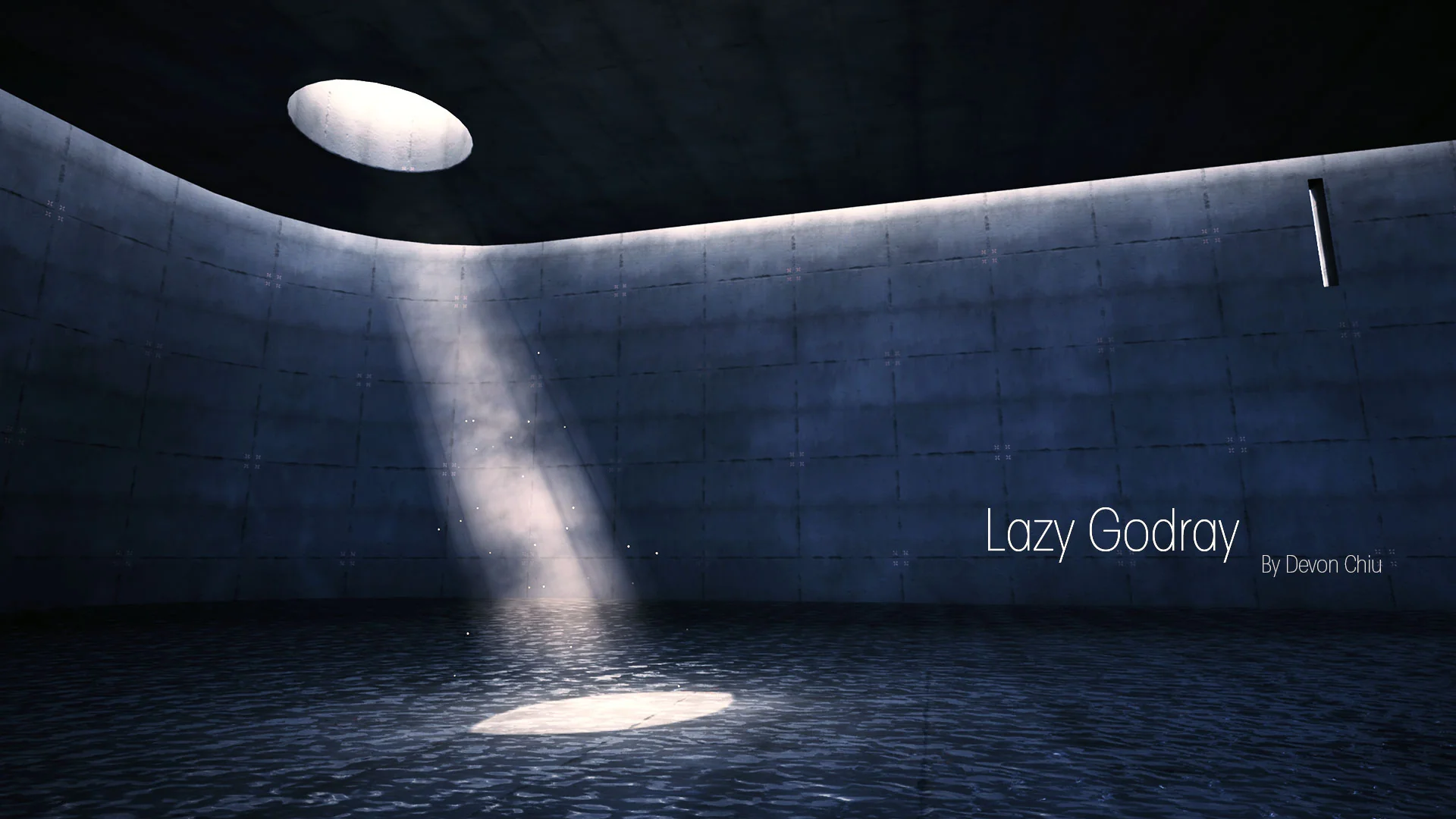
Establishing localized atmosphere in an environment frequently forces artists to balance visual fidelity against global rendering cost. Broad volumetric fog passes and scene-wide atmospheric lighting calculations can introduce significant performance burdens, particularly when an environment only calls for a single sunbeam breaking through a ruined roof, a solitary shaft descending into a cavern, or a controlled column of illuminated mist spilling from a high window. Lazy Godray addresses this specific production scenario by packaging every element required for localized light beams into a unified Blueprint that operates entirely independent of the native volumetric lighting system in Unreal Engine.
By treating the light beam as a targeted, self-contained visual effect rather than an engine-wide simulation, artists can place atmospheric highlights exactly where an art director or level designer wants them. The Blueprint bundles the foundational visual components into one place, allowing instant placement without forcing changes to global post-process volumes, directional light settings, or exponential height fog configurations. This isolation makes it possible to build dense, dramatic lighting accents in tight interior chambers or sprawling open layouts while keeping the computational footprint strictly localized.
Geometry-Driven Light Beams and Unlit Shading
The structural foundation of the system relies on a lightweight geometry-driven godray effect paired with an Unlit shading model. Using custom geometry to define the volume of the light beam bypasses the expensive ray-marching routines typically associated with dynamic volumetric lighting. Because the underlying materials utilize the Unlit shading profile, they do not evaluate scene lights, receive dynamic shadow maps, or contribute to complex light interaction passes. This design ensures that adding several beams throughout an interior space will not compound per-pixel dynamic lighting calculations across surrounding surfaces.
While the asset intentionally avoids direct interactions with the engine lighting system, it simulates the appearance of illuminated atmosphere entirely through its internal shader logic and geometry orientation. The unlit shader calculates its own light shaft behavior, blending internal color, opacity, and falloff so that the beam appears convincingly luminous against dark geometry or contrasting backdrops. For pipelines working under tight frame budgets, relying on geometry-driven light shafts offers predictable, stable rendering times that do not fluctuate based on scene-level lighting complexity.
Customizing Smoke, Light Shafts, and Volumetric Density in Lazy Godray
A static, uniform cone of light rarely looks believable in a lived-in environment. Lazy Godray accommodates detailed environmental storytelling through extensive material and Blueprint parameter customization. The asset includes customizable textures for both the core light shaft effect and moving smoke layers, giving artists the ability to determine how smooth or turbulent the beam appears as it cuts through the air.
Artists can fine-tune volumetric parameters to mirror the physical characteristics of smoke, fog, and scattered light. Adjustments to panning motion, edge softness, core brightness, and density gradients allow the beam to shift across a wide range of visual styles. A clean, sharp, directional beam can simulate bright noon sunlight piercing architectural glass, while a broken, churning, noise-driven profile can mimic damp industrial steam, subterranean dungeon moisture, or lingering atmospheric haze. Because these physical smoke attributes are governed directly by exposed parameters, dialing in the right visual density does not require modifying shader code or leaving the Blueprint editor viewport.
Niagara Dust Particles and Integrated Spotlight Control
To ground the geometry within the physical scene, the Blueprint incorporates secondary visual elements that complement the light shaft. An integrated spotlight component provides convenient directional alignment and localized illumination cues, helping the unlit beam mesh blend seamlessly with surrounding static meshes and architectural bounds.
Suspended matter inside a light beam is vital for establishing scale and realism. The UE5.5 update completely modernizes the dust system, transitioning the implementation away from legacy Cascade emitters to a native Niagara System. Alongside this modernization, the update delivers overhauled dust customization settings and resolves particle visibility issues, ensuring dust motes correctly reveal themselves in strict accordance with the Blueprint settings. Artists can precisely control the dispersion, visibility thresholds, and motion of motes drifting through the illuminated channel, adding the subtle microscopic movement needed to make static scenes feel alive.
Translucency Overdraw Management and Card-Based Material Applications
Large translucent meshes stacked in front of one another are a notorious source of performance drops, particularly in scenes where multiple beams intersect or where cameras move close to wide geometry planes. To address this common rendering bottleneck, Lazy Godray includes an additional variation specifically configured for improved translucency overdraw performance. This variation allows teams to deploy dense atmospheric arrangements in combat arenas or dense corridors without inducing extreme fill-rate penalties.
The utility of the asset also extends beyond the primary Blueprint geometry. The underlying material is engineered so that it can be decoupled from the primary godray mesh and deployed independently as a fog material. Artists can assign this material to simple planar cards or feed it into standard particle systems to populate corners with ground mist, lingering smoke patches, or localized ambient clouds. Utilizing the same core material across both directed beams and ambient planar cards creates visual continuity throughout an environment, ensuring that floating smoke and directional light shafts share identical motion noise, coloration, and dissipation behaviors.
Camera-Facing Variants and Sequencer Animation Workflows
Static beams can break immersion if a player or cinematic camera views them from an extreme side angle or catches the sharp edge of the underlying geometry. Demonstrations of the system highlight dedicated camera-facing variants designed to adjust as the viewing perspective shifts, preserving the illusion of a soft, rounded, continuous volumetric column from any vantage point. This variant is especially valuable in third-person exploration titles or first-person environments where players can navigate freely around the light source.
For narrative and cutscene production, the asset directly interfaces with cinematic pipelines. Showcase workflows demonstrate smooth compatibility with Sequencer, allowing artists to drive light beam parameters across a timeline. Directors can animate beam intensity, smoke churn rate, color shifts, and visibility triggers to match dynamic story moments, such as a spotlight swinging across a prison yard, sunlight breaking through clouds during a dramatic reveal, or power flickering on in an abandoned facility. Because every setting remains exposed at the Blueprint level, controlling atmospheric evolution across scripted sequences requires no custom scripting hooks.
 Weather
 Weather
 Weather