"c14ff6bd758dadb1"{"id":"1001731","slug":"good-fx-rain","title":"Good FX : Rain","category":"Weather","engine":"4.25+,5.0+","assetVersion":"","engineVersion":"Engine Version: 4.25+,5.0+","tag":"Weather","accent":"blue","visual":"mech","summary":"Good FX: Rain delivers a drag-and-drop Niagara rain and splash simulation with Blueprint controls for spawn rate, scale, color, and range.","platform":"Unreal Engine","publishedAt":"2026-10-20T02:37:07.841Z","updatedAt":"2026-10-20T02:37:07.841Z","sourceNotes":[],"fileContents":[],"compatibility":["Unreal Engine","Engine Version: 4.25+,5.0+"],"featuredImage":{"alt":"Good FX : Rain","src":"/wp-content/uploads/published/2026/10/8582e50667f8-77fae63e-f4e9-45c9-8e22-f2cb6c8749f0-441821f992.webp"},"hasDownloadLink":true,"downloads":0,"terms":[{"taxonomy":"category","slug":"weather-vfx","name":"Weather"}],"galleryImages":[{"src":"/wp-content/uploads/published/2026/10/05cb3d4fef85-dfb7ba03-e948-4c93-a3e3-cfe0ea06fc55-5cdc3b0a63.webp","alt":"Good FX : Rain"},{"src":"/wp-content/uploads/published/2026/10/02a33cb0bed1-27e26a67-0327-4853-afbd-e4170be67122-4f7c3d3124.webp","alt":"Good FX : Rain"},{"src":"/wp-content/uploads/published/2026/10/7eadd3f54593-6147802e-1445-4a88-bf9b-25b659201985-4689105ba7.webp","alt":"Good FX : Rain"},{"src":"/wp-content/uploads/published/2026/10/7dca0b1a5820-090a6278-a5ee-4042-a45b-bc5581a75143-6107c55a8a.webp","alt":"Good FX : Rain"}],"accessPanel":{"kind":"resource","title":"Download this resource","eyebrow":"Free Download","message":"Log in or create a free account to start your download.","fileName":"Good FX Rain.7z","safetyNote":"Resources are manually reviewed before listing to improve quality and reduce obvious risks.","actionLabel":"Download Free","resourceType":"Resource archive"},"contentHtml":"\u003cp\u003eDropping sheets of water and reactive ground impacts into an environment immediately alters atmospheric mood and material response. Good FX: Rain approaches weather simulation by coupling falling water droplets with interactive surface splash effects, resolving both aerial precipitation and ground-level water contact inside a single drag-and-drop framework. Powered by Niagara and packaged within an accessible Blueprint actor, the system is structured to function immediately upon import without requiring manual emitter assembly, node wiring, or complex parameter mapping across separate scene elements.\u003c/p\u003e \u003ch2\u003eNiagara Particle Architecture and Blueprint Control\u003c/h2\u003e\n\u003cp\u003eThe foundation of Good FX: Rain rests on a Blueprint-based particle architecture running on the Niagara visual effects framework. In modern real-time rendering, managing weather particle counts can quickly become a performance bottleneck if calculations are handled inefficiently. Niagara manages the heavier simulation workloads, computing the movement, lifespan, and velocity of high-density droplet arrays with high precision. By encapsulating these underlying Niagara emitters inside a standard Blueprint actor, the package removes the need for technical artists or level designers to parse emitter graphs when placing weather volumes.\u003c/p\u003e \u003cp\u003eBecause the asset is delivered ready to use out of the box, setting up a rain volume requires nothing more than dragging the Blueprint directly from the content browser into the level viewport. The Blueprint handles initialization, emitter activation, and alignment within the target volume. This setup suits fast-moving level design iterations where immediate visual feedback is essential. Instead of binding separate particle components to character cameras or placing independent splash meshes along ground collision planes, the Blueprint coordinates the droplets and splash particles simultaneously, preserving a consistent look across the coverage area.\u003c/p\u003e \u003ch2\u003eCustomizing Rain Parameters Inside the Details Panel\u003c/h2\u003e\n\u003cp\u003eWhile the default preset operates as soon as it is placed, Good FX: Rain provides broad customization options exposed directly in the standard details panel. Users do not need to construct custom dynamic material instances or dive into Niagara module scripts to alter the characteristics of the downpour. Key environmental variables can be tuned in real time while observing the viewport:\u003c/p\u003e \u003cul\u003e \u003cli\u003e\u003cstrong\u003eSpawn Rate:\u003c/strong\u003e Adjusting the emission rate directly controls downpour density. A low spawn rate yields an intermittent, gentle drizzle, whereas cranking the value produces dense, torrential rainfall that obscures sightlines and intensifies scene mood.\u003c/li\u003e \u003cli\u003e\u003cstrong\u003eRange:\u003c/strong\u003e Defining the range determines the spatial bounds of the simulation. This setting enables developers to restrict precipitation to localized regions—such as a specific open courtyard or courtyard entryway—or expand the volume to cover vast outdoor map sections.\u003c/li\u003e \u003cli\u003e\u003cstrong\u003eSize:\u003c/strong\u003e Modifying droplet dimensions changes both realism and visual readability. Finer droplet sizing mimics realistic light mist and persistent overcast drizzles, while larger particle dimensions help raindrops read clearly against bright backgrounds or in stylized aesthetic settings.\u003c/li\u003e \u003cli\u003e\u003cstrong\u003eColor:\u003c/strong\u003e Particle color inputs allow fine-tuning against diverse lighting scenarios. Drops can be tinted to blend naturally into dark midnight environments, balanced against glaring streetlights, or given unconventional color profiles for surreal, alien, or stylized weather events.\u003c/li\u003e\n\u003c/ul\u003e \u003cp\u003eExposing these adjustments inside the details panel allows different instances of the Blueprint to exist across a single project without conflicting. A single level can utilize one instance configured for wide-range, high-density rainfall across an open field, alongside a smaller, low-density instance providing light dripping effects near a sheltered overhang.\u003c/p\u003e \u003ch2\u003eEvaluating Rain and Splash Dynamics with Included Project Assets\u003c/h2\u003e\n\u003cp\u003eEvaluating simulation density, splash responsiveness, and overall visual balance is supported through several supplementary assets provided with the package. Good FX: Rain includes a dedicated demo scene, giving creators an established reference environment to observe how the particles settle against scene geometry, reflect environment lighting, and produce ground-level splash responses.\u003c/p\u003e \u003cp\u003eFor quick evaluation outside the editor environment, a compiled Demo.exe is packaged alongside the project files. This standalone executable provides a direct look at the runtime behavior of the rain system, confirming performance and visual fidelity in a packaged build state before any integration work begins. Technical documentation is handled through an included User Guide, which maps out setup routines and parameter adjustments, while a Showcase Video demonstrates the particle system active across varied conditions.\u003c/p\u003e \u003cp\u003eThe splash component of the system deserves particular attention when evaluating these demonstrations. Rain simulations often fall short when droplets simply terminate upon hitting floor collision meshes. By pairing downward droplet simulation with realistic splash bursts, Good FX: Rain maintains the visual illusion of surface saturation, water pooling, and continuous environmental wetness throughout the active particle zone.\u003c/p\u003e \u003ch2\u003eEnvironmental Simulation Workflows and Good FX: Impact Synergy\u003c/h2\u003e\n\u003cp\u003eOutdoor visual effects rarely operate in total isolation. Good FX: Rain is built to complement broader environmental and impact systems, carrying explicit compatibility with Good FX: Impact. In production scenarios where characters, projectiles, or physical debris interact with wet terrain, aligning the ambient weather effects of the rain system with targeted impact responses ensures visual continuity across combat and exploration sequences.\u003c/p\u003e \u003cp\u003eBecause the weather setup relies on clean parameter exposure, integrating it into broader gameplay systems—such as dynamic weather directors, day-night cycles, or indoor-outdoor volume triggers—remains straightforward. Scripting changes to the exposed Blueprint parameters allows the rain to ramp up naturally over time, shifting from an overcast fog to a full storm by progressively driving the spawn rate and scale variables.\u003c/p\u003e \u003ch2\u003ePractical Takeaway for Production Teams\u003c/h2\u003e\n\u003cp\u003eGood FX: Rain fits production pipelines that need immediate, dependable precipitation without committing engineering time to custom emitter development. The combination of Niagara performance, single-actor drag-and-drop workflow, and straightforward details-panel adjustments for spawn rate, scale, range, and color provides technical and environment artists with a reliable tool for atmospheric weather construction.\u003c/p\u003e\n\n\u003ch2\u003eRelated Resources Worth Checking\u003c/h2\u003e\n\u003cul\u003e\n\u003cli\u003e\u003ca href=\"https://3dcghub.com/rain-effects/\" title=\"Rain Effects\"\u003eRain Effects\u003c/a\u003e\u003c/li\u003e\n\u003cli\u003e\u003ca href=\"https://3dcghub.com/tornado-fx-vdb/\" title=\"Tornado FX VDB\"\u003eTornado FX VDB\u003c/a\u003e\u003c/li\u003e\n\u003cli\u003e\u003ca href=\"https://3dcghub.com/ambient-fx-in-unreal-engine/\" title=\"Ambient Fx in Unreal Engine\"\u003eAmbient Fx in Unreal Engine\u003c/a\u003e\u003c/li\u003e\n\u003cli\u003e\u003ca href=\"https://3dcghub.com/fire-tornado-fx-vdb/\" title=\"Fire Tornado FX VDB\"\u003eFire Tornado FX VDB\u003c/a\u003e\u003c/li\u003e\n\u003cli\u003e\u003ca href=\"https://3dcghub.com/rain-water-drop-flow-material-fx-system/\" title=\"Rain - Water Drop - Flow Material \u0026amp; FX System\"\u003eRain - Water Drop - Flow Material \u0026amp; FX System\u003c/a\u003e\u003c/li\u003e\n\u003c/ul\u003e","contentTextLength":6812,"navigation":{"current":52,"total":3719,"previous":{"id":"1001732","slug":"heavy-tractor","title":"Heavy Tractor","category":"Service \u0026 Commercial Vehicles","platform":"Unreal Engine","updatedAt":"2026-10-20T02:37:51.976Z"},"next":{"id":"1001730","slug":"fire-hydrant-package","title":"Fire Hydrant Package","category":"Street / Road","platform":"Unreal Engine","updatedAt":"2026-10-20T02:36:25.870Z"}},"relatedResources":[{"id":"1000134","slug":"rain-effects","title":"Rain Effects","category":"Weather","engine":"4.26+,5.0+","assetVersion":"","engineVersion":"Engine Version: 4.26+,5.0+","tag":"Weather","accent":"blue","visual":"mech","summary":"Rain Effects for Unreal Engine simulates rain, surface and glass droplets, ground ripples, camera drops, and a small waterfall for games and archviz.","platform":"Unreal Engine","publishedAt":"2026-06-12T07:28:51.718Z","updatedAt":"2026-06-12T07:28:51.718Z","sourceNotes":[],"fileContents":[],"compatibility":["Unreal Engine","Engine Version: 4.26+,5.0+"],"featuredImage":{"alt":"Rain Effects","src":"/wp-content/uploads/published/2026/06/59452ed7ebcb-830af71b-bff3-4d1b-b821-a19853936e43-2dab9bd27d.webp"},"hasDownloadLink":true,"downloads":1},{"id":"1001710","slug":"tornado-fx-vdb","title":"Tornado FX VDB","category":"Weather","engine":"5.3+","assetVersion":"","engineVersion":"Engine Version: 5.3+","tag":"Weather","accent":"blue","visual":"mech","summary":"Explore Tornado FX VDB, featuring 12 Blueprint-wrapped volumetric tornado effects with customizable Material Instances, looping modes, and 700-frame cycles.","platform":"Unreal Engine","publishedAt":"2026-10-14T17:14:38.510Z","updatedAt":"2026-10-14T17:14:38.510Z","sourceNotes":[],"fileContents":[],"compatibility":["Unreal Engine","Engine Version: 5.3+"],"featuredImage":{"alt":"Tornado FX VDB","src":"/wp-content/uploads/published/2026/10/21e6b0bfae86-29875d9b-afa4-43e7-8989-1dcb5d3afde4-dd0cac842e.webp"},"hasDownloadLink":true,"downloads":3},{"id":"1001733","slug":"ja-silent-hill-2-fog-vfx","title":"JA - Silent Hill 2 Fog VFX","category":"Weather","engine":"5.5+","assetVersion":"","engineVersion":"Engine Version: 5.5+","tag":"Weather","accent":"blue","visual":"mech","summary":"Examine the JA - Silent Hill 2 Fog VFX pack, featuring fully editable volumetric fog, light-reactive materials, Niagara rain, and retro PSX compatibility.","platform":"Unreal Engine","publishedAt":"2026-10-20T02:38:23.542Z","updatedAt":"2026-10-20T02:38:23.542Z","sourceNotes":[],"fileContents":[],"compatibility":["Unreal Engine","Engine Version: 5.5+"],"featuredImage":{"alt":"JA - Silent Hill 2 Fog VFX","src":"/wp-content/uploads/published/2026/10/1567e71066fd-29f48fc1-2b61-4df4-897f-214120e690cc-44c52f359a.webp"},"hasDownloadLink":true,"downloads":0}]}
Weather
Good FX : Rain
Good FX: Rain delivers a drag-and-drop Niagara rain and splash simulation with Blueprint controls for spawn rate, scale, color, and range.
Category:Unreal Engine,WeatherPlatform: Unreal EngineEngine Version: 4.25+,5.0+Published: Oct 20, 2026
Weather
Resource overview
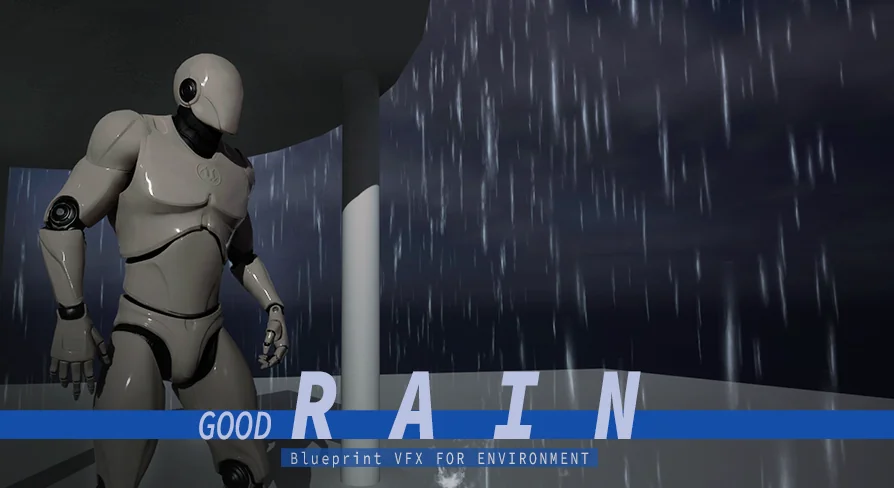
Dropping sheets of water and reactive ground impacts into an environment immediately alters atmospheric mood and material response. Good FX: Rain approaches weather simulation by coupling falling water droplets with interactive surface splash effects, resolving both aerial precipitation and ground-level water contact inside a single drag-and-drop framework. Powered by Niagara and packaged within an accessible Blueprint actor, the system is structured to function immediately upon import without requiring manual emitter assembly, node wiring, or complex parameter mapping across separate scene elements.
Niagara Particle Architecture and Blueprint Control
The foundation of Good FX: Rain rests on a Blueprint-based particle architecture running on the Niagara visual effects framework. In modern real-time rendering, managing weather particle counts can quickly become a performance bottleneck if calculations are handled inefficiently. Niagara manages the heavier simulation workloads, computing the movement, lifespan, and velocity of high-density droplet arrays with high precision. By encapsulating these underlying Niagara emitters inside a standard Blueprint actor, the package removes the need for technical artists or level designers to parse emitter graphs when placing weather volumes.
Because the asset is delivered ready to use out of the box, setting up a rain volume requires nothing more than dragging the Blueprint directly from the content browser into the level viewport. The Blueprint handles initialization, emitter activation, and alignment within the target volume. This setup suits fast-moving level design iterations where immediate visual feedback is essential. Instead of binding separate particle components to character cameras or placing independent splash meshes along ground collision planes, the Blueprint coordinates the droplets and splash particles simultaneously, preserving a consistent look across the coverage area.
Customizing Rain Parameters Inside the Details Panel
While the default preset operates as soon as it is placed, Good FX: Rain provides broad customization options exposed directly in the standard details panel. Users do not need to construct custom dynamic material instances or dive into Niagara module scripts to alter the characteristics of the downpour. Key environmental variables can be tuned in real time while observing the viewport:
Spawn Rate: Adjusting the emission rate directly controls downpour density. A low spawn rate yields an intermittent, gentle drizzle, whereas cranking the value produces dense, torrential rainfall that obscures sightlines and intensifies scene mood.
Range: Defining the range determines the spatial bounds of the simulation. This setting enables developers to restrict precipitation to localized regions—such as a specific open courtyard or courtyard entryway—or expand the volume to cover vast outdoor map sections.
Size: Modifying droplet dimensions changes both realism and visual readability. Finer droplet sizing mimics realistic light mist and persistent overcast drizzles, while larger particle dimensions help raindrops read clearly against bright backgrounds or in stylized aesthetic settings.
Color: Particle color inputs allow fine-tuning against diverse lighting scenarios. Drops can be tinted to blend naturally into dark midnight environments, balanced against glaring streetlights, or given unconventional color profiles for surreal, alien, or stylized weather events.
Exposing these adjustments inside the details panel allows different instances of the Blueprint to exist across a single project without conflicting. A single level can utilize one instance configured for wide-range, high-density rainfall across an open field, alongside a smaller, low-density instance providing light dripping effects near a sheltered overhang.
Evaluating Rain and Splash Dynamics with Included Project Assets
Evaluating simulation density, splash responsiveness, and overall visual balance is supported through several supplementary assets provided with the package. Good FX: Rain includes a dedicated demo scene, giving creators an established reference environment to observe how the particles settle against scene geometry, reflect environment lighting, and produce ground-level splash responses.
For quick evaluation outside the editor environment, a compiled Demo.exe is packaged alongside the project files. This standalone executable provides a direct look at the runtime behavior of the rain system, confirming performance and visual fidelity in a packaged build state before any integration work begins. Technical documentation is handled through an included User Guide, which maps out setup routines and parameter adjustments, while a Showcase Video demonstrates the particle system active across varied conditions.
The splash component of the system deserves particular attention when evaluating these demonstrations. Rain simulations often fall short when droplets simply terminate upon hitting floor collision meshes. By pairing downward droplet simulation with realistic splash bursts, Good FX: Rain maintains the visual illusion of surface saturation, water pooling, and continuous environmental wetness throughout the active particle zone.
Environmental Simulation Workflows and Good FX: Impact Synergy
Outdoor visual effects rarely operate in total isolation. Good FX: Rain is built to complement broader environmental and impact systems, carrying explicit compatibility with Good FX: Impact. In production scenarios where characters, projectiles, or physical debris interact with wet terrain, aligning the ambient weather effects of the rain system with targeted impact responses ensures visual continuity across combat and exploration sequences.
Because the weather setup relies on clean parameter exposure, integrating it into broader gameplay systems—such as dynamic weather directors, day-night cycles, or indoor-outdoor volume triggers—remains straightforward. Scripting changes to the exposed Blueprint parameters allows the rain to ramp up naturally over time, shifting from an overcast fog to a full storm by progressively driving the spawn rate and scale variables.
Practical Takeaway for Production Teams
Good FX: Rain fits production pipelines that need immediate, dependable precipitation without committing engineering time to custom emitter development. The combination of Niagara performance, single-actor drag-and-drop workflow, and straightforward details-panel adjustments for spawn rate, scale, range, and color provides technical and environment artists with a reliable tool for atmospheric weather construction.
 Weather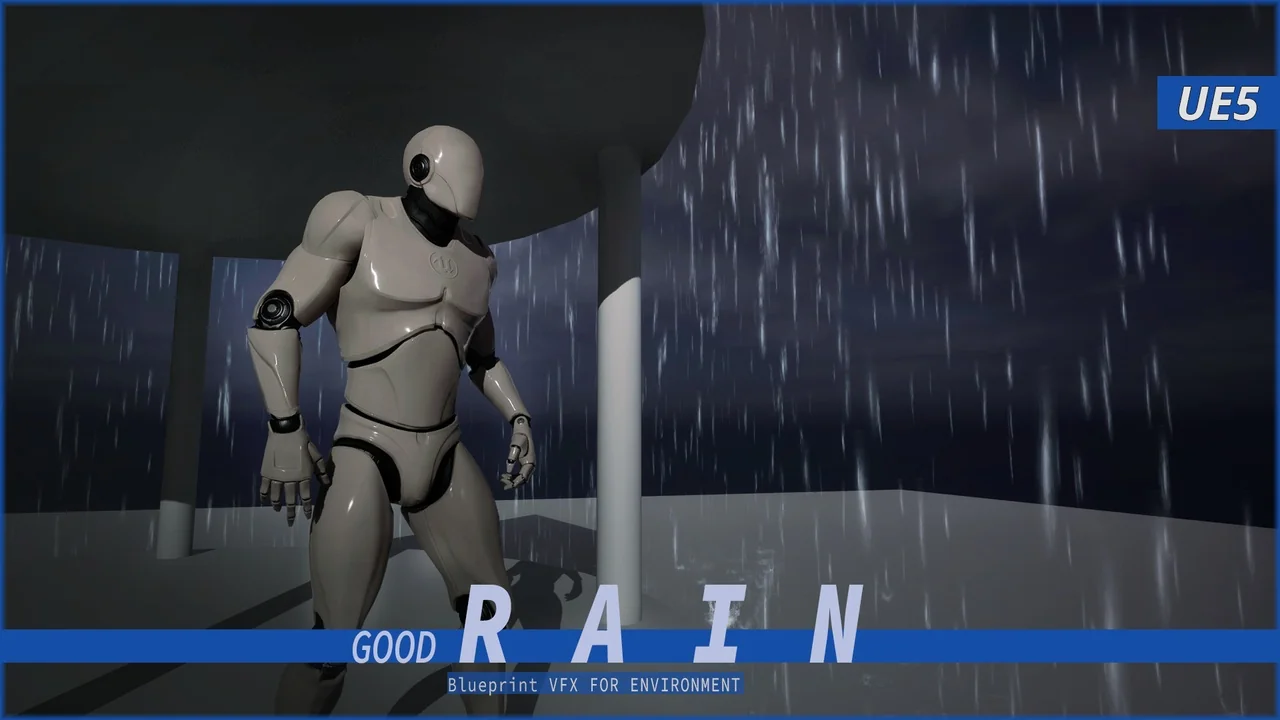
 Weather
 Weather
 Weather