"0341a2901a4ae9aa"{"id":"17676","slug":"ultra-volumetrics","title":"Ultra Volumetrics","category":"Weather","engine":"4.27,5.0+","assetVersion":"Engine version: 4.27,5.0+","engineVersion":"4.27","tag":"Weather","accent":"blue","visual":"animation","summary":"Enhance your game environments with Ultra Volumetrics, a performant solution for local volumetric fog. This toolset features paintable flow maps, spline-based placement, and full physics interactivity.","platform":"Unreal Engine","publishedAt":"2026-03-13T15:10:01.000Z","updatedAt":"2026-04-19T15:43:29.000Z","sourceNotes":[],"fileContents":[],"compatibility":["Unreal Engine","Engine version: 4.27,5.0+"],"featuredImage":{"alt":"Ultra Volumetrics","src":"https://3dcghub.com/wp-content/uploads/2026/03/1cdfde32-9989-4e52-8d6b-1e1a30df7c43.webp"},"hasDownloadLink":true,"downloads":1,"terms":[{"taxonomy":"category","slug":"weather-vfx","name":"Weather"},{"taxonomy":"post_tag","slug":"animation","name":"Animation"},{"taxonomy":"post_tag","slug":"characters","name":"Characters"},{"taxonomy":"post_tag","slug":"environment","name":"Environment"},{"taxonomy":"post_tag","slug":"textures","name":"Textures"},{"taxonomy":"post_tag","slug":"unreal-engine-5","name":"Unreal Engine 5"},{"taxonomy":"post_tag","slug":"vfx","name":"VFX"}],"galleryImages":[{"src":"https://3dcghub.com/wp-content/uploads/2026/03/84d3b83d1b81_630ee6fa-2285-4e8a-b556-53a1325181b5.webp","alt":"Ultra Volumetrics"},{"src":"https://3dcghub.com/wp-content/uploads/2026/03/f963e2509bd1_ac644d98-6d17-40f9-a022-37b6d6117f13.webp","alt":"Ultra Volumetrics"},{"src":"https://3dcghub.com/wp-content/uploads/2026/03/b0dd35bba78f_6006e029-2e2c-4cc7-8373-68b50f2179be.webp","alt":"Ultra Volumetrics"},{"src":"https://3dcghub.com/wp-content/uploads/2026/03/4e824e1b2fab_42456567-b3b2-4c53-874a-276e3a76ec04.webp","alt":"Ultra Volumetrics"},{"src":"https://3dcghub.com/wp-content/uploads/2026/03/10063e4a4f8c_afa154ad-fbf4-42f6-aea2-7b6c2dac5099.webp","alt":"Ultra Volumetrics"},{"src":"https://3dcghub.com/wp-content/uploads/2026/03/c4bd1f9f8d52_b397480c-387e-46dc-bf4e-4aac3f6fe54d.webp","alt":"Ultra Volumetrics"},{"src":"https://3dcghub.com/wp-content/uploads/2026/03/57cbdab73824_b9b9e5c4-c04e-48f4-a0fc-afd22ef5207e.webp","alt":"Ultra Volumetrics"},{"src":"https://3dcghub.com/wp-content/uploads/2026/03/002e5b530f4f_b3b8b2a7-9507-4986-9c00-f0e1cfc6195b.webp","alt":"Ultra Volumetrics"},{"src":"https://3dcghub.com/wp-content/uploads/2026/03/a93e6114c475_0abe42c0-2af1-4516-bddc-0524a34877be.webp","alt":"Ultra Volumetrics"},{"src":"https://3dcghub.com/wp-content/uploads/2026/03/01318b10d93f_b211f07a-74d4-454c-a8b6-4d50cd26e56e.webp","alt":"Ultra Volumetrics"},{"src":"https://3dcghub.com/wp-content/uploads/2026/03/90a286ca03e0_93c95c49-5bba-4f6d-9b8e-c503720236a3.webp","alt":"Ultra Volumetrics"},{"src":"https://3dcghub.com/wp-content/uploads/2026/03/22905ce3e176_c5981250-033e-4b7f-8284-aed44f6373e3.webp","alt":"Ultra Volumetrics"},{"src":"https://3dcghub.com/wp-content/uploads/2026/03/5794ef66129a_32607b24-b5da-486b-8397-4e69b5c71b7d.webp","alt":"Ultra Volumetrics"},{"src":"https://3dcghub.com/wp-content/uploads/2026/03/a88923e5376d_73883bb4-9990-406c-a6b0-9192df79326f.webp","alt":"Ultra Volumetrics"},{"src":"https://3dcghub.com/wp-content/uploads/2026/03/c0251f2d275c_d1433a7c-d6ec-4711-b65a-e4674ccd2dc2.webp","alt":"Ultra Volumetrics"},{"src":"https://3dcghub.com/wp-content/uploads/2026/03/419ede03c864_23592e6a-5ede-4a16-a38a-d768c765fb27.webp","alt":"Ultra Volumetrics"}],"accessPanel":{"kind":"resource","title":"Access this resource","eyebrow":"Free Download","message":"Log in or create a free account to start your download.","fileName":"Ultra Volumetrics.7z","safetyNote":"All resources are 100% manually reviewed to eliminate all risks.","actionLabel":"Download Free","resourceType":"Resource archive"},"contentHtml":"\u003ch2\u003eIntroduction to Ultra Volumetrics\u003c/h2\u003e\n\u003cp\u003eUltra Volumetrics is a simple way to add visually interesting local volumetric fog to any project. The developer designed this system to be game-ready and highly performant. Consequently, creators can enhance their scenes without sacrificing significant frame rates. The tool includes many adjustable parameters and functions that ensure ease of use for developers of all skill levels.\u003c/p\u003e\n\n\u003ch2\u003eAdvanced Painting and Spline Tools\u003c/h2\u003e\n\u003cp\u003eOne of the standout features of Ultra Volumetrics is the built-in Paint Mode. This tool allows you to paint fog exactly where you want it within your level. Moreover, you can paint flow maps to make the fog move in any specific direction. This level of control ensures that environmental effects match the artistic vision of the scene.\u003c/p\u003e\n\n\u003cp\u003eIn addition, the system utilizes the power of splines for rapid environment dressing. You can place fog along paths very quickly without losing any core functionality. These spline-based fog blueprints also support animations. Therefore, you can easily create moving mist or flowing steam along complex paths in your game world.\u003c/p\u003e\n\n\u003ch2\u003eDynamic Interactivity and Physics\u003c/h2\u003e\n\u003cp\u003eUltra Volumetrics goes beyond static visuals by offering full interactivity. Both players and physics objects can interact with the fog volumes. The system can generate overlap events, allowing the environment to react to gameplay triggers. To demonstrate these capabilities, the creator included an interactive example character named Ultrabot.\u003c/p\u003e\n\n\u003cp\u003eOn top of that, the fog supports various fading effects. For instance, there are specific fading functions for both Third Person and First Person perspectives. This ensures that the fog never obstructs the camera in an unnatural way. You can also mix multiple volumes together to create complex, layered atmospheric effects.\u003c/p\u003e\n\n\u003ch2\u003eHigh-Fidelity Visual Features\u003c/h2\u003e\n\u003cp\u003eThe visual quality of the fog is driven by several advanced technical features. The fog can cling to surfaces using distance fields, creating a grounded and realistic appearance. Additionally, the system supports self-shadowing, which includes shadows cast from directional lights. This results in more depth and volume within the mist itself.\u003c/p\u003e\n\n\u003cp\u003eOther visual parameters include adjustable fog color and scattering. The fog also supports rotational adjustments to fit the orientation of your scene. For projects using the latest technology, the tool supports path tracing in versions UE 5.4 and above. These features combined allow for stunning, cinematic environmental effects.\u003c/p\u003e\n\n\u003ch2\u003eWorkflow Efficiency and Optimization\u003c/h2\u003e\n\u003cp\u003eEfficiency is a core focus of this toolset. It includes a randomize function with seed numbers, making it incredibly fast to dress up levels with variety. Moreover, the developer provided a collection of fog presets. You can also save your own custom presets to reuse them across different levels or projects.\u003c/p\u003e\n\n\u003cp\u003eOptimization is handled through various quality settings. These settings can be adjusted based on the distance from the camera to maintain performance. The package includes a quality settings editor utility widget and a quality settings trigger for precise control. Furthermore, panning speed functions and distance fade settings allow for smooth transitions and animations.\u003c/p\u003e\n\n\u003ch2\u003eFinal Take\u003c/h2\u003e\n\u003cp\u003eUltra Volumetrics offers a comprehensive suite of tools for any developer needing performant atmospheric effects. By combining paintable flow maps, spline-based placement, and physics interactivity, it provides a versatile solution for modern game development. Whether you need subtle mist or dense, interactive smoke, this system provides the necessary control and optimization.\u003c/p\u003e\n\n\u003ch2\u003eMore From The Same Workflow\u003c/h2\u003e\n\u003cul\u003e\n\u003cli\u003e\u003ca href=\"https://3dcghub.com/ambient-fx-in-unreal-engine/\" title=\"Ambient Fx in Unreal Engine\"\u003eAmbient Fx in Unreal Engine\u003c/a\u003e\u003c/li\u003e\n\u003cli\u003e\u003ca href=\"https://3dcghub.com/rodinbridge-unreal-engine-add-on/\" title=\"RodinBridge – Unreal Engine Add-on\"\u003eRodinBridge – Unreal Engine Add-on\u003c/a\u003e\u003c/li\u003e\n\u003cli\u003e\u003ca href=\"https://3dcghub.com/extile-plus-ultimate-non-tiling-material-toolkit-for-unreal-engine-environments/\" title=\"EXTILE PLUS -Ultimate Non-Tiling Material Toolkit for Unreal Engine Environments\"\u003eEXTILE PLUS -Ultimate Non-Tiling Material Toolkit for Unreal Engine Environments\u003c/a\u003e\u003c/li\u003e\n\u003cli\u003e\u003ca href=\"https://3dcghub.com/ultimate-template-unrealengine-2d-dialogue-inventory-system-save/\" title=\"ULTIMATE Template UnrealEngine || 2D + Dialogue + Inventory system + Save | |\"\u003eULTIMATE Template UnrealEngine || 2D + Dialogue + Inventory system + Save | |\u003c/a\u003e\u003c/li\u003e\n\u003cli\u003e\u003ca href=\"https://3dcghub.com/altermesh-geometry-nodes-in-unreal/\" title=\"AlterMesh – Geometry Nodes in Unreal\"\u003eAlterMesh – Geometry Nodes in Unreal\u003c/a\u003e\u003c/li\u003e\n\u003c/ul\u003e","contentTextLength":3964,"navigation":{"current":3585,"total":4017,"previous":{"id":"17691","slug":"2d-laser-system","title":"2D Laser system","category":"2D","platform":"Unity","updatedAt":"2026-04-19T15:43:29.000Z"},"next":{"id":"17657","slug":"sand-vfx","title":"Sand VFX","category":"Weather","platform":"Unreal Engine","updatedAt":"2026-04-19T15:43:29.000Z"}},"relatedResources":[{"id":"17603","slug":"ice-cool","title":"Ice Cool","category":"Weather","engine":"4.26+,5.0+","assetVersion":"Engine version: 4.26+,5.0+","engineVersion":"4.18","tag":"Weather","accent":"blue","visual":"character","summary":"Enhance your cold-weather environments with Ice Cool, a versatile master material designed for high-performance ice rendering. From icebergs to icicles, this tool provides deep cracks and advanced translucency.","platform":"Unreal Engine","publishedAt":"2026-03-13T14:59:11.000Z","updatedAt":"2026-04-19T15:43:30.000Z","sourceNotes":[],"fileContents":[],"compatibility":["Unreal Engine","Engine version: 4.26+,5.0+"],"featuredImage":{"alt":"Ice Cool","src":"https://3dcghub.com/wp-content/uploads/2026/03/95d3c457-60ba-48b1-a791-311800085067.webp"},"hasDownloadLink":true,"downloads":0},{"id":"17639","slug":"natural-and-insects-p1","title":"Natural And Insects P1","category":"Weather","engine":"4.26+,5.0+","assetVersion":"Engine version: 4.26+,5.0+","engineVersion":"4.26","tag":"Weather","accent":"blue","visual":"audio","summary":"Enhance your digital environments with Natural And Insects P1, a collection featuring animated insects and dynamic Niagara effects. This pack includes everything from attacking bees to interactive autumn leaves for realistic nature scenes.","platform":"Unreal Engine","publishedAt":"2026-03-13T15:02:38.000Z","updatedAt":"2026-04-19T15:43:29.000Z","sourceNotes":[],"fileContents":[],"compatibility":["Unreal Engine","Engine version: 4.26+,5.0+"],"featuredImage":{"alt":"Natural And Insects P1","src":"https://3dcghub.com/wp-content/uploads/2026/03/1078180b-3406-4eb6-8e6b-e18b002a3002.webp"},"hasDownloadLink":true,"downloads":0},{"id":"17657","slug":"sand-vfx","title":"Sand VFX","category":"Weather","engine":"5.0+","assetVersion":"Engine version: 5.0+","engineVersion":"4.27","tag":"Weather","accent":"blue","visual":"character","summary":"Enhance your game environments with the Sand VFX pack, featuring sandstorms, interactive dunes, and rock eruption effects. This starter kit is perfect for desert landscapes and earth-type RPG attacks.","platform":"Unreal Engine","publishedAt":"2026-03-13T15:05:34.000Z","updatedAt":"2026-04-19T15:43:29.000Z","sourceNotes":[],"fileContents":[],"compatibility":["Unreal Engine","Engine version: 5.0+"],"featuredImage":{"alt":"Sand VFX","src":"https://3dcghub.com/wp-content/uploads/2026/03/89f23f17-446d-4d54-b26c-b2bbc4dfcce6.webp"},"hasDownloadLink":true,"downloads":4}]}
Weather
Ultra Volumetrics
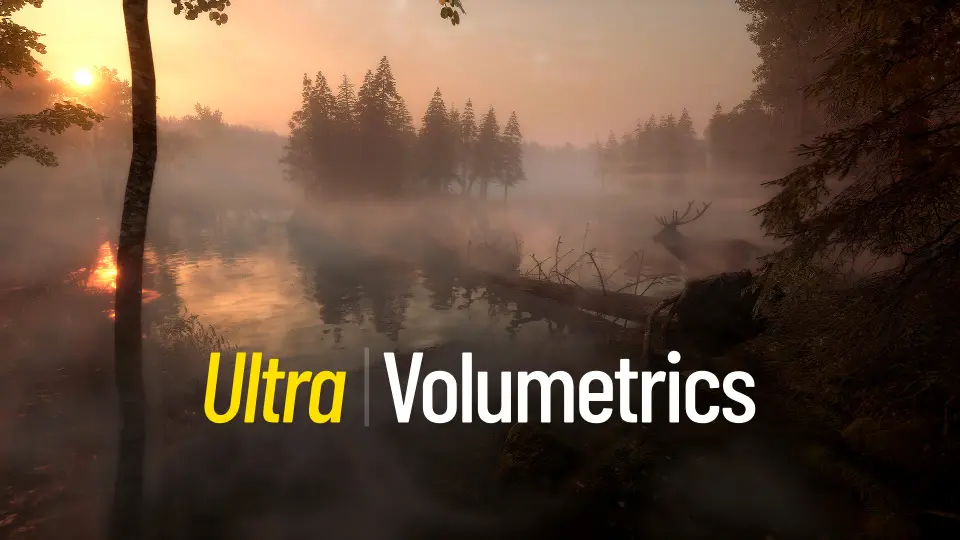
Enhance your game environments with Ultra Volumetrics, a performant solution for local volumetric fog. This toolset features paintable flow maps, spline-based placement, and full physics interactivity.
Ultra Volumetrics is a simple way to add visually interesting local volumetric fog to any project. The developer designed this system to be game-ready and highly performant. Consequently, creators can enhance their scenes without sacrificing significant frame rates. The tool includes many adjustable parameters and functions that ensure ease of use for developers of all skill levels.
Advanced Painting and Spline Tools
One of the standout features of Ultra Volumetrics is the built-in Paint Mode. This tool allows you to paint fog exactly where you want it within your level. Moreover, you can paint flow maps to make the fog move in any specific direction. This level of control ensures that environmental effects match the artistic vision of the scene.
In addition, the system utilizes the power of splines for rapid environment dressing. You can place fog along paths very quickly without losing any core functionality. These spline-based fog blueprints also support animations. Therefore, you can easily create moving mist or flowing steam along complex paths in your game world.
Dynamic Interactivity and Physics
Ultra Volumetrics goes beyond static visuals by offering full interactivity. Both players and physics objects can interact with the fog volumes. The system can generate overlap events, allowing the environment to react to gameplay triggers. To demonstrate these capabilities, the creator included an interactive example character named Ultrabot.
On top of that, the fog supports various fading effects. For instance, there are specific fading functions for both Third Person and First Person perspectives. This ensures that the fog never obstructs the camera in an unnatural way. You can also mix multiple volumes together to create complex, layered atmospheric effects.
High-Fidelity Visual Features
The visual quality of the fog is driven by several advanced technical features. The fog can cling to surfaces using distance fields, creating a grounded and realistic appearance. Additionally, the system supports self-shadowing, which includes shadows cast from directional lights. This results in more depth and volume within the mist itself.
Other visual parameters include adjustable fog color and scattering. The fog also supports rotational adjustments to fit the orientation of your scene. For projects using the latest technology, the tool supports path tracing in versions UE 5.4 and above. These features combined allow for stunning, cinematic environmental effects.
Workflow Efficiency and Optimization
Efficiency is a core focus of this toolset. It includes a randomize function with seed numbers, making it incredibly fast to dress up levels with variety. Moreover, the developer provided a collection of fog presets. You can also save your own custom presets to reuse them across different levels or projects.
Optimization is handled through various quality settings. These settings can be adjusted based on the distance from the camera to maintain performance. The package includes a quality settings editor utility widget and a quality settings trigger for precise control. Furthermore, panning speed functions and distance fade settings allow for smooth transitions and animations.
Final Take
Ultra Volumetrics offers a comprehensive suite of tools for any developer needing performant atmospheric effects. By combining paintable flow maps, spline-based placement, and physics interactivity, it provides a versatile solution for modern game development. Whether you need subtle mist or dense, interactive smoke, this system provides the necessary control and optimization.
 Weather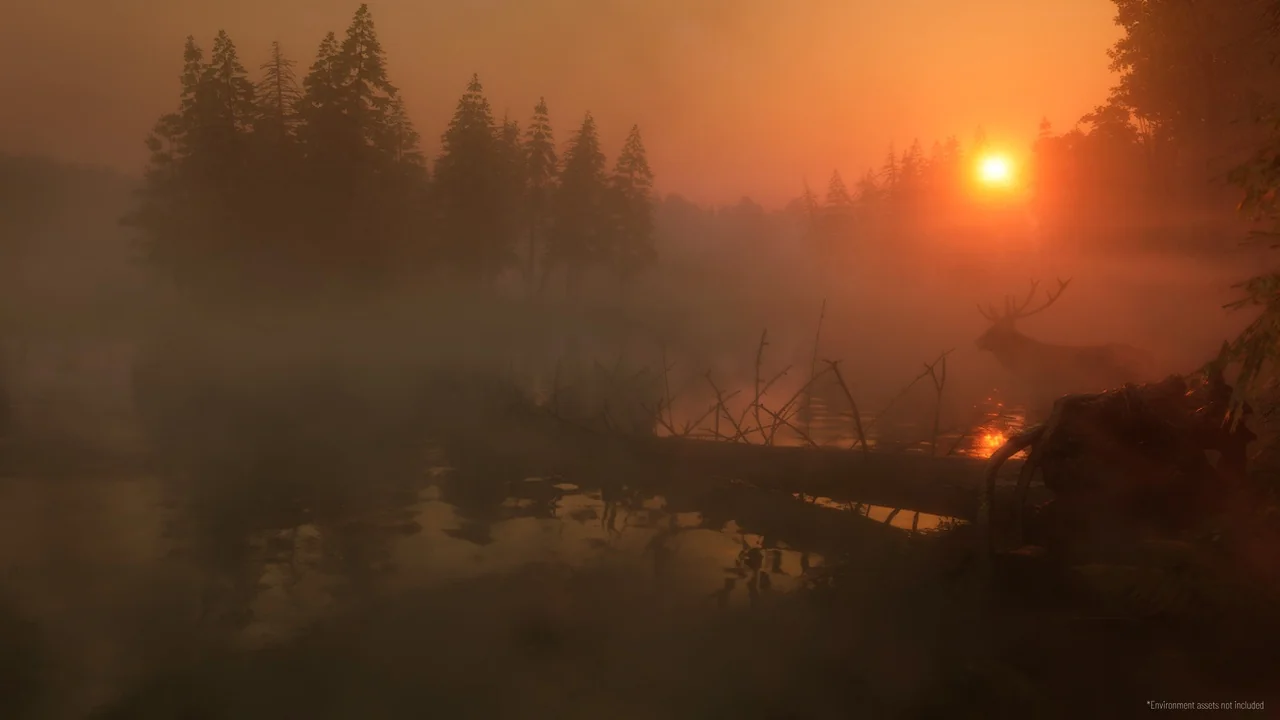
 Weather
 Weather
 Weather