"148d1066ed74e216"{"id":"1002920","slug":"easy-colliders","title":"Easy Colliders","category":"Engine Tools","engine":"5.1 - 5.5","assetVersion":"Asset Version: 1.0","engineVersion":"Engine Version: 5.1 - 5.5","tag":"Engine Tools","accent":"blue","visual":"mech","summary":"A detailed breakdown of Easy Colliders for Unreal Engine, featuring custom editor modes, two-click surface placement, and out-of-bounds level design tools.","platform":"Unreal Engine","indexPolicy":"index","publishedAt":"2026-11-21T22:25:04.059Z","updatedAt":"2026-11-21T22:25:04.059Z","sourceNotes":[],"fileContents":[],"compatibility":["Unreal Engine","Asset Version: 1.0","Engine Version: 5.1 - 5.5"],"featuredImage":{"alt":"Easy Colliders","src":"/wp-content/uploads/published/2026/11/68d269b67b9f-273bb7ca-2762-4b5e-a25f-935b032850e3-24fa00f6c1.webp"},"fileSizeBytes":1345594,"hasDownloadLink":true,"downloads":0,"terms":[{"taxonomy":"category","slug":"engine-tools-tools-and-plugins","name":"Engine Tools"}],"galleryImages":[{"src":"/wp-content/uploads/published/2026/11/36a10749c4ea-f37bee18-f9fc-4883-b3c6-a1fcfc8c4727-9cebdf8306.webp","alt":"Easy Colliders"},{"src":"/wp-content/uploads/published/2026/11/a35aed0ef82a-4e9cbefd-5930-44ec-897a-820f546eccd9-1a8911b813.webp","alt":"Easy Colliders"},{"src":"/wp-content/uploads/published/2026/11/db3a5d2ae9fc-239d2be1-bfae-439f-beac-8781067b744f-458821c8ca.webp","alt":"Easy Colliders"},{"src":"/wp-content/uploads/published/2026/11/5901744f4870-f207fb78-06ae-469e-b54f-7bfa0e1329c0-70a11d09b8.webp","alt":"Easy Colliders"}],"accessPanel":{"kind":"resource","title":"Get this resource","safetyNote":"Resources are manually reviewed before listing to improve quality and reduce obvious risks.","fileName":"Easy Colliders.7z","resourceType":"Resource archive","versions":[]},"contentHtml":"\u003cp\u003eA dedicated editor tab, specialized input handling, a two-click surface placement system, and an alternate selection state make up the foundational structure of Easy Colliders. Constructed specifically for Unreal Engine world building, the tool shifts collision setup away from standard actor menu navigation and anchors it into the editor's primary interaction modes alongside systems like Landscape and Foliage. This setup organizes boundary generation into direct viewport interactions, giving level designers a faster way to map physical limits across complex environment geometry.\u003c/p\u003e \u003ch2\u003eThe Easy Colliders Workspace and Editor Mode Structure\u003c/h2\u003e\n\u003cp\u003eIntegrating a collision system as a primary Unreal Engine editor mode alters how an artist moves through a scene. Traditional object setup requires locating collision volumes within asset menus, dragging components into a viewport, and spending considerable time matching coordinates against uneven terrain or modular walls. Operating in a mode equivalent to Foliage or Landscape replaces that multi-window process with a persistent tool palette that sits directly alongside other world-building utilities.\u003c/p\u003e \u003cp\u003eCustom input handling serves as the operational engine for this mode. Rather than relying on the default editor viewport selection rules, which can inadvertently grab lighting actors, foliage instances, or landscape tiles, the tool intercepts view inputs to isolate collider interactions. Designers can navigate around geometry, target specific surfaces, and initiate collision commands without fighting the default transform gizmos or triggering accidental background selections.\u003c/p\u003e \u003ch2\u003eTwo-Click Surface Placement in Easy Colliders\u003c/h2\u003e\n\u003cp\u003eThe core mechanic of Placement mode hinges on a precise two-click rhythm. Once the mode is enabled, clicking directly onto a surface inside the viewport sets the first spatial reference point, and the second click completes the placement of the collider directly against the target surface. This process relies on direct hit detection against the underlying level geometry, allowing designers to drape boundary meshes over varied assets without adjusting transforms through manual numeric entry in the details panel.\u003c/p\u003e \u003cp\u003eRapid placement becomes vital when tracing long runs of obstacles or defining walkable paths through dense architectural geometry. Moving along a boundary and applying two clicks per segment removes the downtime typically spent resetting rotation alignments or scaling bounding boxes along arbitrary world axes. Because the system calculates placement against the surface normal and position registered during the clicks, colliders naturally conform to slopes, cliff faces, and modular structural pieces as quickly as the user can trace them.\u003c/p\u003e \u003ch2\u003eSelection Mode and Manipulation Flow\u003c/h2\u003e\n\u003cp\u003eSeparating the interface into dedicated Placement and Selection modes prevents unintended object generation during fine-tuning phases. In Placement mode, user inputs are reserved entirely for spawning and orienting new colliders. Switching into Selection mode reconfigures the viewport controls to prioritize the inspection, adjustment, and spatial manipulation of colliders that have already been dropped into the scene.\u003c/p\u003e \u003cp\u003eThis division protects the level layout from accidental spawns when a designer only wants to adjust a boundary edge. In Selection mode, existing colliders can be quickly picked out, inspected, and shifted to resolve small overlaps or coverage gaps. Toggling back and forth between these states establishes a clean pipeline: trace a set of boundaries through Placement mode, switch to Selection mode to refine edges or reposition sections, and toggle back to Placement mode to continue extending boundaries elsewhere in the map.\u003c/p\u003e \u003ch2\u003eHandcrafted Boundaries for Large Scale Environments\u003c/h2\u003e\n\u003cp\u003eExpansive open maps present unique collision challenges that automatic asset collisions cannot always solve. Complex natural geometry, such as modular rock clusters, steep mountain passes, and dense tree lines, often features tiny crevices or inconsistent collision hulls where player characters can get stuck or slip outside the playable zone. Manually placing handcrafted collision boundaries is the standard defense against these out-of-bounds exploits.\u003c/p\u003e \u003cp\u003eTracing perimeter fences or invisible walls across hundreds of meters of rugged terrain is normally a tedious, repetitive chore. Using a streamlined two-click surface placement system allows world builders to run invisible perimeter boundaries quickly along mountain ridges, shoreline edges, or canyon borders. By keeping placement tethered to the visible geometry under the cursor, designers maintain tight control over where player exploration ends while keeping collision logic cleanly decoupled from render meshes.\u003c/p\u003e \u003ch2\u003eExtending Collision Behaviors Across Custom Projects\u003c/h2\u003e\n\u003cp\u003eGame frameworks often require custom collision responses that go beyond simple blocking barriers. Different game types demand specific collision channels, custom object responses, or dynamic interaction triggers that react differently to vehicles, player pawns, or projectiles. The architecture behind the tool is structured to remain extensible, allowing technical designers to build upon the baseline toolset and implement specific collision rules required by distinct project pipelines.\u003c/p\u003e \u003cp\u003eBecause the plugin is supported across new engine iterations, studios integrating the tool into their world-building workflow can rely on it across long-term production schedules. Environment artists, level designers, and world builders who spend extensive time blocking player access, securing exterior borders, and refining physical scene bounds can drop the editor mode into their production line to simplify otherwise labor-intensive blocking passes.\u003c/p\u003e\n\n\u003ch2\u003eContinue Browsing Similar Packs\u003c/h2\u003e\n\u003cul\u003e\n\u003cli\u003e\u003ca href=\"https://3dcghub.com/did-it-hit-trace-detection-plugin/\" rel=\"noopener noreferrer\"\u003eDid it hit - Trace Detection Plugin\u003c/a\u003e\u003c/li\u003e\n\u003cli\u003e\u003ca href=\"https://3dcghub.com/ascent-ui-tools-gamepad-navigation-ui-framework/\" rel=\"noopener noreferrer\"\u003eAscent UI Tools - Gamepad Navigation \u0026amp; UI Framework\u003c/a\u003e\u003c/li\u003e\n\u003cli\u003e\u003ca href=\"https://3dcghub.com/loading-screen-with-load-percentage/\" rel=\"noopener noreferrer\"\u003eLoading Screen With Load Percentage\u003c/a\u003e\u003c/li\u003e\n\u003cli\u003e\u003ca href=\"https://3dcghub.com/combat-components/\" rel=\"noopener noreferrer\"\u003eCombat Components\u003c/a\u003e\u003c/li\u003e\n\u003cli\u003e\u003ca href=\"https://3dcghub.com/content-pack-generator/\" rel=\"noopener noreferrer\"\u003eContent Pack Generator\u003c/a\u003e\u003c/li\u003e\n\u003c/ul\u003e","contentTextLength":5948,"navigation":{"current":52,"total":4890,"previous":{"id":"1002921","slug":"dialogue-builder","title":"Dialogue Builder","category":"Dialog Systems","platform":"Unreal Engine","updatedAt":"2026-11-21T22:44:59.391Z"},"next":{"id":"1002919","slug":"collision-preset-filter-in-editor-collision-preset-debugging-tool","title":"Collision Preset Filter - In Editor Collision Preset Debugging Tool","category":"Engine Tools","platform":"Unreal Engine","updatedAt":"2026-11-21T22:24:30.675Z"}},"relatedResources":[{"id":"13853","slug":"did-it-hit-trace-detection-plugin","title":"Did it hit - Trace Detection Plugin","category":"Engine Tools","engine":"4.25 - 5.8","assetVersion":"Asset Version:1.1.0 - 1.5","engineVersion":"Engine version: 4.25 - 5.8","tag":"Engine Tools","accent":"blue","visual":"luts","summary":"Solve the issue of skipped collisions in fast-paced games. This plugin provides a high-performance tracing system for bullets and weapon swings that standard colliders might miss.","platform":"Unreal Engine","indexPolicy":"noindex","publishedAt":"2026-03-11T10:23:29.000Z","updatedAt":"2026-09-29T08:41:33.282Z","sourceNotes":[],"fileContents":[],"compatibility":["Unreal Engine","Asset Version:1.1.0 - 1.5","Engine version: 4.25 - 5.8"],"featuredImage":{"alt":"Did it hit - Trace Detection Plugin","src":"https://3dcghub.com/wp-content/uploads/2026/03/bd3e4c0f-52b7-4c26-a033-df949ae21c94.webp"},"fileSizeBytes":135486939,"hasDownloadLink":true,"downloads":0},{"id":"13682","slug":"ase-importer","title":"Ase Importer","category":"Engine Tools","engine":"5.1,5.3 - 5.5","assetVersion":"Asset Version: 1.0","engineVersion":"Engine version: 5.1,5.3 - 5.5","tag":"Engine Tools","accent":"blue","visual":"character","summary":"The Ase Importer plugin streamlines the process of bringing pixel art into your project. It automatically converts .aseprite files into texture atlases and PaperFlipbooks with a simple drag-and-drop action.","platform":"Unreal Engine","indexPolicy":"noindex","publishedAt":"2026-03-11T09:35:57.000Z","updatedAt":"2026-09-30T05:37:33.311Z","sourceNotes":[],"fileContents":[],"compatibility":["Unreal Engine","Asset Version: 1.0","Engine version: 5.1,5.3 - 5.5"],"featuredImage":{"alt":"Ase Importer","src":"https://3dcghub.com/wp-content/uploads/2026/03/c4b21ae8-3546-46af-9639-02081461927a.webp"},"fileSizeBytes":30602576,"hasDownloadLink":true,"downloads":1},{"id":"1002931","slug":"nodes-bundle","title":"Nodes (Bundle)","category":"Engine Tools","engine":"5.1 - 5.5","assetVersion":"Asset Version: 2.0 - 4.0","engineVersion":"Engine Version: 5.1 - 5.5","tag":"Engine Tools","accent":"blue","visual":"mech","summary":"Explore the Nodes (Bundle) plugin collection for Unreal Engine, featuring over 650 Blueprint and C++ functions across 15 consolidated system plugins.","platform":"Unreal Engine","indexPolicy":"index","publishedAt":"2026-11-21T23:08:25.672Z","updatedAt":"2026-11-21T23:08:25.672Z","sourceNotes":[],"fileContents":[],"compatibility":["Unreal Engine","Asset Version: 2.0 - 4.0","Engine Version: 5.1 - 5.5"],"featuredImage":{"alt":"Nodes (Bundle)","src":"/wp-content/uploads/published/2026/11/b01ceb488951-38c388ce-63fc-47de-b743-b8d2cddc3a93-7c3e9e1d5e.webp"},"fileSizeBytes":2066052,"hasDownloadLink":true,"downloads":0}]}[{"id":4225,"sourceId":4225,"taxonomyId":4225,"taxonomy":"category","slug":"asset-library","name":"Asset Library","parentId":null,"count":4744,"hasChildren":true,"href":"/","seoTitle":"Free Game Assets Library | 3DCGHUB","seoDescription":"Browse free Unreal Engine, Unity, Blender assets and game development tutorials on 3DCGHUB with previews, compatibility notes, and secure downloads.","sitemapEnabled":true,"children":[{"id":4227,"sourceId":4227,"taxonomyId":4227,"taxonomy":"category","slug":"blender-add-ons-plugins","name":"Blender Add-ons \u0026 Plugins","parentId":4225,"count":10,"hasChildren":false,"href":"/category/blender-add-ons-plugins/","seoTitle":"Free Blender Add-ons \u0026 Plugins | 3DCGHUB","seoDescription":"Browse free Blender Add-ons \u0026 Plugins tools for Blender on 3DCGHUB: curated downloads with preview images, compatibility notes and secure download access.","sitemapEnabled":true},{"id":514,"sourceId":514,"taxonomyId":514,"taxonomy":"category","slug":"unity-2","name":"Unity","parentId":4225,"count":453,"hasChildren":true,"href":"/category/unity-2/","seoTitle":"Free Unity Assets | 3DCGHUB","seoDescription":"Browse free Unity resources on 3DCGHUB: curated downloads with preview images, compatibility notes and secure download access.","sitemapEnabled":true,"children":[{"id":523,"sourceId":523,"taxonomyId":523,"taxonomy":"category","slug":"2d","name":"2D","parentId":514,"count":1,"hasChildren":true,"href":"/category/2d/","seoTitle":"Free Unity 2D | 3DCGHUB","seoDescription":"Browse free 2D assets for Unity on 3DCGHUB: curated downloads with preview images, compatibility notes and secure download access.","sitemapEnabled":true},{"id":515,"sourceId":515,"taxonomyId":515,"taxonomy":"category","slug":"3d-unity-2","name":"3D","parentId":514,"count":162,"hasChildren":true,"href":"/category/3d-unity-2/","seoTitle":"Free Unity 3D Assets | 3DCGHUB","seoDescription":"Browse free 3D assets for Unity on 3DCGHUB: curated downloads with preview images, compatibility notes and secure download access.","sitemapEnabled":true},{"id":565,"sourceId":565,"taxonomyId":565,"taxonomy":"category","slug":"add-ons","name":"Add-Ons","parentId":514,"count":2,"hasChildren":false,"href":"/category/add-ons/","seoTitle":"Free Unity Add-Ons | 3DCGHUB","seoDescription":"Browse free Add-Ons assets for Unity on 3DCGHUB: curated downloads with preview images, compatibility notes and secure download access.","sitemapEnabled":true},{"id":529,"sourceId":529,"taxonomyId":529,"taxonomy":"category","slug":"audio-unity-2","name":"Audio","parentId":514,"count":1,"hasChildren":true,"href":"/category/audio-unity-2/","seoTitle":"Free Unity Audio | 3DCGHUB","seoDescription":"Browse free Audio for Unity on 3DCGHUB: curated downloads with preview images, compatibility notes and secure download access.","sitemapEnabled":true},{"id":557,"sourceId":557,"taxonomyId":557,"taxonomy":"category","slug":"templates","name":"Templates","parentId":514,"count":36,"hasChildren":true,"href":"/category/templates/","seoTitle":"Free Unity Templates | 3DCGHUB","seoDescription":"Browse free Unity project templates on 3DCGHUB. Starter kits with previews, compatibility notes, and secure download access.","sitemapEnabled":true},{"id":533,"sourceId":533,"taxonomyId":533,"taxonomy":"category","slug":"tools-unity-2","name":"Tools","parentId":514,"count":0,"hasChildren":true,"href":"/category/tools-unity-2/","sitemapEnabled":true},{"id":554,"sourceId":554,"taxonomyId":554,"taxonomy":"category","slug":"vfx-unity-2","name":"VFX","parentId":514,"count":4,"hasChildren":true,"href":"/category/vfx-unity-2/","seoTitle":"Free Unity VFX | 3DCGHUB","seoDescription":"Browse free VFX for Unity on 3DCGHUB: curated downloads with preview images, compatibility notes and secure download access.","sitemapEnabled":true}]},{"id":511,"sourceId":511,"taxonomyId":511,"taxonomy":"category","slug":"unreal-engine-2","name":"Unreal Engine","parentId":4225,"count":4282,"hasChildren":true,"href":"/category/unreal-engine-2/","seoTitle":"Free Unreal Engine Assets | 3DCGHUB","seoDescription":"Browse free Unreal Engine resources on 3DCGHUB: curated downloads with preview images, compatibility notes and secure download access.","sitemapEnabled":true,"children":[{"id":54,"sourceId":54,"taxonomyId":54,"taxonomy":"category","slug":"3d","name":"3D","parentId":511,"count":2428,"hasChildren":true,"href":"/category/3d/","seoTitle":"Free Unreal Engine 3D | 3DCGHUB","seoDescription":"Browse free 3D assets for Unreal Engine on 3DCGHUB: curated downloads with preview images, compatibility notes and secure download access.","sitemapEnabled":true},{"id":441,"sourceId":441,"taxonomyId":441,"taxonomy":"category","slug":"animations","name":"Animations","parentId":511,"count":245,"hasChildren":true,"href":"/category/animations/","seoTitle":"Free Unreal Engine Animations | 3DCGHUB","seoDescription":"Browse free Animations for Unreal Engine on 3DCGHUB: curated downloads with preview images, compatibility notes and secure download access.","sitemapEnabled":true},{"id":446,"sourceId":446,"taxonomyId":446,"taxonomy":"category","slug":"audio","name":"Audio","parentId":511,"count":63,"hasChildren":true,"href":"/category/audio/","seoTitle":"Free Unreal Engine Audio Resources | 3DCGHUB","seoDescription":"Browse free Unreal Engine audio resources including sound effects, voices, dialogue, and ambient sounds. Curated free downloads on 3DCGHUB.","sitemapEnabled":true},{"id":466,"sourceId":466,"taxonomyId":466,"taxonomy":"category","slug":"game-systems","name":"Game Systems","parentId":511,"count":356,"hasChildren":true,"href":"/category/game-systems/","seoTitle":"Free Unreal Engine Game Systems | 3DCGHUB","seoDescription":"Browse free Game Systems tools for Unreal Engine on 3DCGHUB: curated downloads with preview images, compatibility notes and secure download access.","sitemapEnabled":true},{"id":478,"sourceId":478,"taxonomyId":478,"taxonomy":"category","slug":"game-templates","name":"Game Templates","parentId":511,"count":150,"hasChildren":true,"href":"/category/game-templates/","seoTitle":"Free Unreal Engine Game Templates | 3DCGHUB","seoDescription":"Browse free Game Templates for Unreal Engine on 3DCGHUB: curated downloads with preview images, compatibility notes and secure download access.","sitemapEnabled":true},{"id":432,"sourceId":432,"taxonomyId":432,"taxonomy":"category","slug":"hdri","name":"HDRI","parentId":511,"count":6,"hasChildren":true,"href":"/category/hdri/","seoTitle":"Free Unreal Engine HDRI | 3DCGHUB","seoDescription":"Browse free Unreal Engine HDRI skies and lighting maps on 3DCGHUB. Environment lighting with previews and secure downloads.","sitemapEnabled":true},{"id":228,"sourceId":228,"taxonomyId":228,"taxonomy":"category","slug":"material-and-textures","name":"Material \u0026 Textures","parentId":511,"count":172,"hasChildren":true,"href":"/category/material-and-textures/","seoTitle":"Free Unreal Engine Material \u0026 Textures | 3DCGHUB","seoDescription":"Browse free Material \u0026 Textures for Unreal Engine on 3DCGHUB: curated downloads with preview images, compatibility notes and secure download access.","sitemapEnabled":true},{"id":298,"sourceId":298,"taxonomyId":298,"taxonomy":"category","slug":"sprites-and-flipbooks","name":"Sprites \u0026 Flipbooks","parentId":511,"count":17,"hasChildren":true,"href":"/category/sprites-and-flipbooks/","seoTitle":"Free Unreal Engine Sprites \u0026 Flipbooks | 3DCGHUB","seoDescription":"Browse free Sprites \u0026 Flipbooks assets for Unreal Engine on 3DCGHUB: curated downloads with preview images, compatibility notes and secure download access.","sitemapEnabled":true},{"id":489,"sourceId":489,"taxonomyId":489,"taxonomy":"category","slug":"tools-and-plugins","name":"Tools \u0026 Plugins","parentId":511,"count":390,"hasChildren":true,"href":"/category/tools-and-plugins/","seoTitle":"Free Unreal Engine Tools \u0026 Plugins | 3DCGHUB","seoDescription":"Browse free Tools \u0026 Plugins for Unreal Engine on 3DCGHUB: curated downloads with preview images, compatibility notes and secure download access.","sitemapEnabled":true},{"id":459,"sourceId":459,"taxonomyId":459,"taxonomy":"category","slug":"ui","name":"UI","parentId":511,"count":43,"hasChildren":true,"href":"/category/ui/","seoTitle":"Free Unreal Engine UI | 3DCGHUB","seoDescription":"Browse free UI for Unreal Engine on 3DCGHUB: curated downloads with preview images, compatibility notes and secure download access.","sitemapEnabled":true},{"id":450,"sourceId":450,"taxonomyId":450,"taxonomy":"category","slug":"vfx","name":"VFX","parentId":511,"count":412,"hasChildren":true,"href":"/category/vfx/","seoTitle":"Free Unreal Engine VFX | 3DCGHUB","seoDescription":"Browse free VFX for Unreal Engine on 3DCGHUB: curated downloads with preview images, compatibility notes and secure download access.","sitemapEnabled":true}]}]},{"id":4222,"sourceId":4222,"taxonomyId":4222,"taxonomy":"category","slug":"tutorial-library","name":"Tutorial Library","parentId":null,"count":117,"hasChildren":false,"href":"/tutorials/","seoTitle":"Free Game Development Tutorial Library | 3DCGHUB","seoDescription":"Browse free game development tutorials for Unreal Engine, Unity, Blender, and more on 3DCGHUB with practical workflows and secure downloads.","sitemapEnabled":true}]
Resource screenshots
1 / 4
Join our channel
Follow 3DCGHUB on Telegram for new resource drops, migration updates, and community notices.
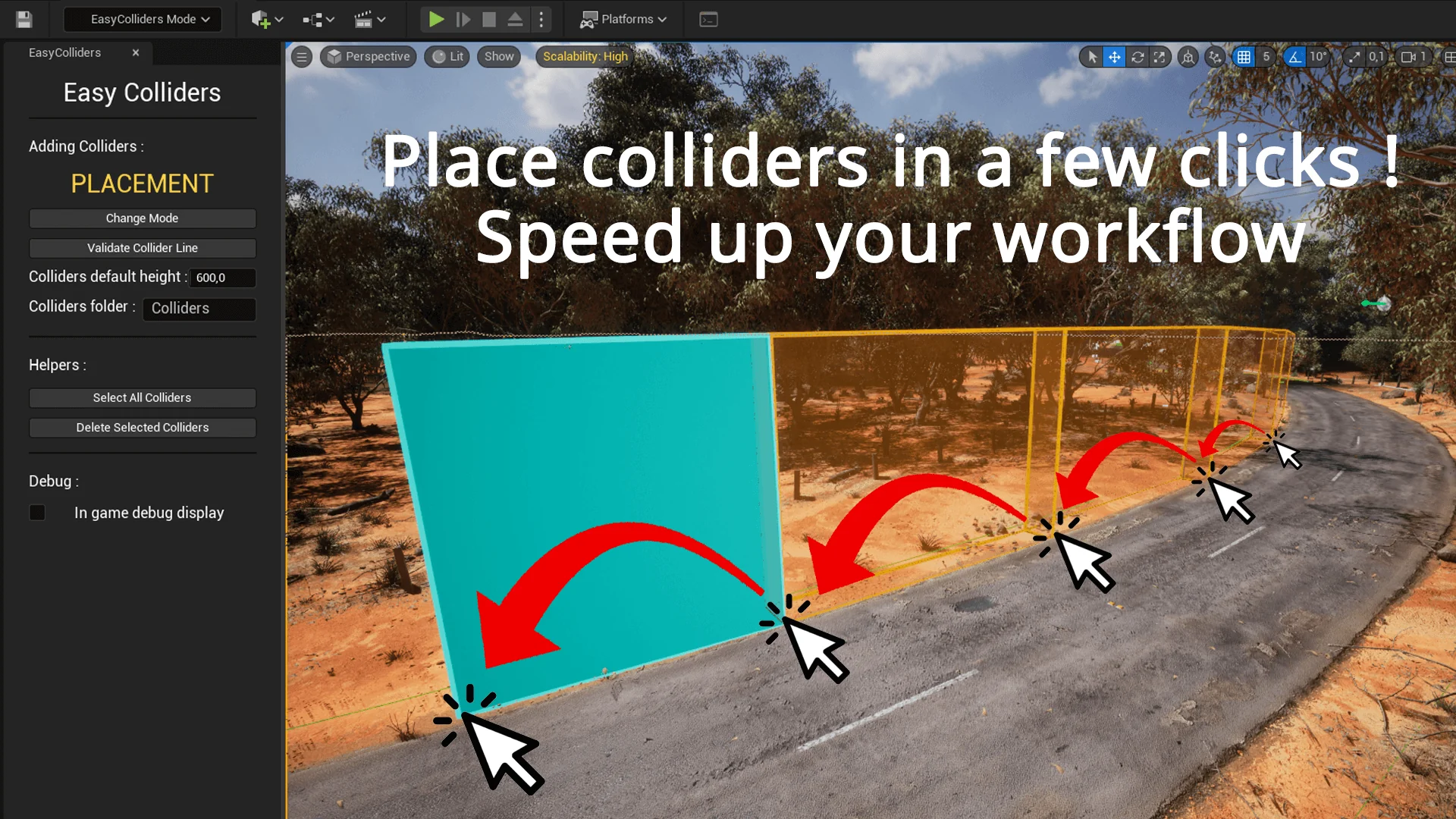
A dedicated editor tab, specialized input handling, a two-click surface placement system, and an alternate selection state make up the foundational structure of Easy Colliders. Constructed specifically for Unreal Engine world building, the tool shifts collision setup away from standard actor menu navigation and anchors it into the editor's primary interaction modes alongside systems like Landscape and Foliage. This setup organizes boundary generation into direct viewport interactions, giving level designers a faster way to map physical limits across complex environment geometry.
The Easy Colliders Workspace and Editor Mode Structure
Integrating a collision system as a primary Unreal Engine editor mode alters how an artist moves through a scene. Traditional object setup requires locating collision volumes within asset menus, dragging components into a viewport, and spending considerable time matching coordinates against uneven terrain or modular walls. Operating in a mode equivalent to Foliage or Landscape replaces that multi-window process with a persistent tool palette that sits directly alongside other world-building utilities.
Custom input handling serves as the operational engine for this mode. Rather than relying on the default editor viewport selection rules, which can inadvertently grab lighting actors, foliage instances, or landscape tiles, the tool intercepts view inputs to isolate collider interactions. Designers can navigate around geometry, target specific surfaces, and initiate collision commands without fighting the default transform gizmos or triggering accidental background selections.
Two-Click Surface Placement in Easy Colliders
The core mechanic of Placement mode hinges on a precise two-click rhythm. Once the mode is enabled, clicking directly onto a surface inside the viewport sets the first spatial reference point, and the second click completes the placement of the collider directly against the target surface. This process relies on direct hit detection against the underlying level geometry, allowing designers to drape boundary meshes over varied assets without adjusting transforms through manual numeric entry in the details panel.
Rapid placement becomes vital when tracing long runs of obstacles or defining walkable paths through dense architectural geometry. Moving along a boundary and applying two clicks per segment removes the downtime typically spent resetting rotation alignments or scaling bounding boxes along arbitrary world axes. Because the system calculates placement against the surface normal and position registered during the clicks, colliders naturally conform to slopes, cliff faces, and modular structural pieces as quickly as the user can trace them.
Selection Mode and Manipulation Flow
Separating the interface into dedicated Placement and Selection modes prevents unintended object generation during fine-tuning phases. In Placement mode, user inputs are reserved entirely for spawning and orienting new colliders. Switching into Selection mode reconfigures the viewport controls to prioritize the inspection, adjustment, and spatial manipulation of colliders that have already been dropped into the scene.
This division protects the level layout from accidental spawns when a designer only wants to adjust a boundary edge. In Selection mode, existing colliders can be quickly picked out, inspected, and shifted to resolve small overlaps or coverage gaps. Toggling back and forth between these states establishes a clean pipeline: trace a set of boundaries through Placement mode, switch to Selection mode to refine edges or reposition sections, and toggle back to Placement mode to continue extending boundaries elsewhere in the map.
Handcrafted Boundaries for Large Scale Environments
Expansive open maps present unique collision challenges that automatic asset collisions cannot always solve. Complex natural geometry, such as modular rock clusters, steep mountain passes, and dense tree lines, often features tiny crevices or inconsistent collision hulls where player characters can get stuck or slip outside the playable zone. Manually placing handcrafted collision boundaries is the standard defense against these out-of-bounds exploits.
Tracing perimeter fences or invisible walls across hundreds of meters of rugged terrain is normally a tedious, repetitive chore. Using a streamlined two-click surface placement system allows world builders to run invisible perimeter boundaries quickly along mountain ridges, shoreline edges, or canyon borders. By keeping placement tethered to the visible geometry under the cursor, designers maintain tight control over where player exploration ends while keeping collision logic cleanly decoupled from render meshes.
Extending Collision Behaviors Across Custom Projects
Game frameworks often require custom collision responses that go beyond simple blocking barriers. Different game types demand specific collision channels, custom object responses, or dynamic interaction triggers that react differently to vehicles, player pawns, or projectiles. The architecture behind the tool is structured to remain extensible, allowing technical designers to build upon the baseline toolset and implement specific collision rules required by distinct project pipelines.
Because the plugin is supported across new engine iterations, studios integrating the tool into their world-building workflow can rely on it across long-term production schedules. Environment artists, level designers, and world builders who spend extensive time blocking player access, securing exterior borders, and refining physical scene bounds can drop the editor mode into their production line to simplify otherwise labor-intensive blocking passes.
 Engine Tools
 Engine Tools
 Engine Tools