"2596237520a17fbf"{"id":"1002907","slug":"combat-components","title":"Combat Components","category":"Engine Tools","engine":"5.5 - 5.6","assetVersion":"Asset Version: 1.0","engineVersion":"Engine Version: 5.5 - 5.6","tag":"Engine Tools","accent":"blue","visual":"mech","summary":"A technical breakdown of Combat Components, covering trace-based collision handling on skeletal and static meshes, actor rotation, and melee setup.","platform":"Unreal Engine","indexPolicy":"index","publishedAt":"2026-11-21T15:37:23.981Z","updatedAt":"2026-11-21T15:37:23.981Z","sourceNotes":[],"fileContents":[],"compatibility":["Unreal Engine","Asset Version: 1.0","Engine Version: 5.5 - 5.6"],"featuredImage":{"alt":"Combat Components","src":"/wp-content/uploads/published/2026/11/3945fe73f95f-bfac2b38-f25f-43a3-acdb-40d37751a652-7af1cbdb52.webp"},"fileSizeBytes":23345842,"hasDownloadLink":true,"downloads":0,"terms":[{"taxonomy":"category","slug":"engine-tools-tools-and-plugins","name":"Engine Tools"}],"galleryImages":[{"src":"/wp-content/uploads/published/2026/11/2196206f31f8-39ae8f7b-dd90-4c95-a63b-08e04be09d3a-1768ea3317.webp","alt":"Combat Components"},{"src":"/wp-content/uploads/published/2026/11/bf6de956884a-e05eb203-56d3-4b99-b0fe-2568230524fc-42bbc6af0f.webp","alt":"Combat Components"},{"src":"/wp-content/uploads/published/2026/11/e15ce709996a-6c8706bd-c3b5-4722-9b7b-bc4c1645a596-6226e5e3bb.webp","alt":"Combat Components"},{"src":"/wp-content/uploads/published/2026/11/f0d97d6b68ae-864ee99f-12a7-4ea7-b5b1-6ecf3b8b872e-ceb55a9db1.webp","alt":"Combat Components"},{"src":"/wp-content/uploads/published/2026/11/daeb22a30e41-b1210ad1-00dd-4037-80e3-a30928336aa9-d497bc2780.webp","alt":"Combat Components"}],"contentHtml":"\u003ch2\u003eModular Architecture in Combat Components\u003c/h2\u003e\n\u003cp\u003eDeveloping responsive combat requires solving two foundational problems: determining exactly when an attack connects with a target, and making sure the attacking actor faces the intended direction during execution. Combat Components addresses these demands by isolating trace detection and directional orientation into dedicated, reusable code modules. Rather than forcing developers to construct complex trace logic and rotation calculations directly inside bulky character classes, the plugin delivers isolated components that attach cleanly to existing actor hierarchies.\u003c/p\u003e\n\u003cp\u003eBecause the tooling is separated into modular parts, its utility extends past standard character combat routines into environmental hazards, traps, autonomous AI entities, and interactive objects. Separating the responsibilities of spatial tracing and rotational alignment speeds up the prototyping phase while preserving a clean architecture for long-term production. Game systems can implement the precise behavior needed without inheriting extraneous code dependencies or restrictive gameplay frameworks.\u003c/p\u003e \u003ch2\u003eCombat Hit Registration Through Trace-Based Detection\u003c/h2\u003e\n\u003cp\u003eThe primary tool for damage evaluation within the package is the CollisionHandler component. Traditional primitive collision volumes often prove inadequate for fast-paced action games, as static collision boxes or capsules fail to match the dynamic arc of a weapon swing or an animated limb. The CollisionHandler detects contact with trace queries, giving combat logic a direct way to test the space around a striking surface or target body.\u003c/p\u003e\n\u003cp\u003eA critical technical advantage of the CollisionHandler is its native support for both skeletal meshes and static meshes:\u003c/p\u003e\n\u003cul\u003e\n\u003cli\u003e\u003cstrong\u003eSkeletal Mesh Integration:\u003c/strong\u003e When used with animated character rigs, the component performs trace-based detection against skeletal meshes. This suits unarmed combat, martial arts kicks, monster claw swipes, or other attacks where the damage-dealing geometry moves across animated frames.\u003c/li\u003e\n\u003cli\u003e\u003cstrong\u003eStatic Mesh Integration:\u003c/strong\u003e When applied to rigid equipment such as swords, axes, blunt clubs, shields, or thrown props, the component can use static mesh actors for the same trace-based detection. This makes it possible to test contact around swappable weapon actors without building a separate detection path for each one.\u003c/li\u003e\n\u003c/ul\u003e\n\u003cp\u003eTrace-based detection delivers the precision required for tight melee exchanges. The resulting hit data can feed the project's own damage, impact, and feedback logic, leaving the specific reactions to the combat system rather than hard-coding them into the component.\u003c/p\u003e \u003ch2\u003eComponents for Directional Movement and Actor Rotation\u003c/h2\u003e\n\u003cp\u003eStriking accurately in a melee system depends heavily on how the attacking entity aligns with its surroundings. The RotatingOwner component provides focused control over the spatial orientation of whatever actor holds it. It rotates the owning actor toward a given direction, giving combat logic a reusable way to align an attacker without writing a fresh rotation routine for every pawn.\u003c/p\u003e\n\u003cp\u003eIn combat scenarios, this capability governs key combat behaviors:\u003c/p\u003e\n\u003cul\u003e\n\u003cli\u003e\u003cstrong\u003eAttack Commitment and Tracking:\u003c/strong\u003e Melee animations often require a character to pivot toward an intended target during the wind-up phase while locking down rotation during the active release phase to prevent unnatural sliding.\u003c/li\u003e\n\u003cli\u003e\u003cstrong\u003eTarget Snapping and Lock-on:\u003c/strong\u003e When combined with target-locking systems, the component aligns the attacker toward an opponent upon initiating an ability or combo sequence.\u003c/li\u003e\n\u003cli\u003e\u003cstrong\u003eDirectional Evades and Dodges:\u003c/strong\u003e The component can pivot the character toward an evasion vector before launching root-motion or physics impulses.\u003c/li\u003e\n\u003c/ul\u003e\n\u003cp\u003eBecause the component only handles rotation, it can be attached to player-controlled pawns, AI-driven characters, or other actors that need to face a direction. The surrounding behavior — when to rotate, how quickly, and what happens next — stays in the project's own gameplay logic.\u003c/p\u003e \u003ch2\u003eImplementing Combat Components Across Melee and AI Systems\u003c/h2\u003e\n\u003cp\u003eWhen combined, the CollisionHandler and RotatingOwner form the structural backbone of an action combat encounter. In artificial intelligence design, enemy agents need to acquire targets, rotate smoothly to address threats, and sweep their striking surfaces accurately during attack behaviors. An AI controller can query the distance to a player, issue a directional command to the RotatingOwner to orient the enemy pawn, and activate the CollisionHandler across specific animation notify windows.\u003c/p\u003e\n\u003cp\u003eThis separation of concerns simplifies debugging. If an attack fails to hit, the developer can inspect the trace parameters of the CollisionHandler without worrying that actor facing logic interfered with the test. Similarly, if an actor turns too sharply or fails to track a flanking adversary, adjustments remain confined to the RotatingOwner configuration. The two systems interact harmoniously without creating tightly coupled code dependencies.\u003c/p\u003e \u003ch2\u003eCode-First Deployment and Extensibility\u003c/h2\u003e\u003cp\u003eCombat Components stays deliberately narrow: one component handles trace-based collision detection, the other handles rotating an owner toward a direction. That leaves damage rules, animation state, targeting, and AI decisions to the project, so the plugin can fit melee, ranged, vehicle, or environmental systems without imposing a combat framework.\u003c/p\u003e\u003cp\u003eBecause both tools are exposed as components, they can be added to the actors that need them instead of forcing every combat behavior into a single character class. The resulting separation makes it easier to test one piece at a time: if an attack misses, the trace setup can be inspected on its own; if an actor does not face the intended direction, the rotation setup can be adjusted without touching the hit detection. For teams that want a small set of reusable building blocks rather than a complete combat solution, that focus is the main advantage.\u003c/p\u003e\n\n\u003ch2\u003eContinue Browsing Similar Packs\u003c/h2\u003e\n\u003cul\u003e\n\u003cli\u003e\u003ca href=\"https://3dcghub.com/multiworld/\" rel=\"noopener noreferrer\"\u003eMultiWorld\u003c/a\u003e\u003c/li\u003e\n\u003cli\u003e\u003ca href=\"https://3dcghub.com/dodge-it-component/\" rel=\"noopener noreferrer\"\u003eDodge It Component\u003c/a\u003e\u003c/li\u003e\n\u003cli\u003e\u003ca href=\"https://3dcghub.com/collision-settings-debugger-2/\" rel=\"noopener noreferrer\"\u003eCollision Settings Debugger\u003c/a\u003e\u003c/li\u003e\n\u003cli\u003e\u003ca href=\"https://3dcghub.com/collision-settings-debugger/\" rel=\"noopener noreferrer\"\u003eCollision Settings Debugger\u003c/a\u003e\u003c/li\u003e\n\u003cli\u003e\u003ca href=\"https://3dcghub.com/combo-graph/\" rel=\"noopener noreferrer\"\u003eCombo Graph\u003c/a\u003e\u003c/li\u003e\n\u003c/ul\u003e","contentTextLength":6035,"navigation":{"current":12,"total":4839,"previous":{"id":"1002908","slug":"custom-shape-volumes","title":"Custom Shape Volumes","category":"Gameplay Features","platform":"Unreal Engine","updatedAt":"2026-11-21T15:37:48.565Z"},"next":{"id":"1002906","slug":"arc-inventory","title":"Arc Inventory","category":"Gameplay Features","platform":"Unreal Engine","updatedAt":"2026-11-21T15:36:54.446Z"}},"relatedResources":[{"id":"1001115","slug":"multiworld","title":"MultiWorld","category":"Engine Tools","engine":"5.6 - 5.8","assetVersion":"Asset Version: 1.11.1","engineVersion":"Engine Version: 5.6 - 5.8","tag":"Engine Tools","accent":"blue","visual":"mech","summary":"MultiWorld is a UE5 runtime plugin for managing independent UWorld instances in parallel, with isolated actors and components, player travel between worlds, and","platform":"Unreal Engine","indexPolicy":"index","publishedAt":"2026-09-07T12:23:26.726Z","updatedAt":"2026-09-07T12:23:26.726Z","sourceNotes":[],"fileContents":[],"compatibility":["Unreal Engine","Asset Version: 1.11.1","Engine Version: 5.6 - 5.8"],"featuredImage":{"alt":"MultiWorld","src":"/wp-content/uploads/published/2026/09/29ee6d8b472d-d8de6242-0467-45c1-a0b6-fb66295c257c-1713fac46d.webp"},"fileSizeBytes":144833398,"hasDownloadLink":true,"downloads":0},{"id":"1002582","slug":"dodge-it-component","title":"Dodge It Component","category":"Weapons \u0026 Combat","engine":"5.0+","assetVersion":"","engineVersion":"Engine Version: 5.0+","tag":"Weapons \u0026 Combat","accent":"blue","visual":"mech","summary":"Set up responsive, directional dodging and roll animations based on character movement input, fully compatible with the COMBAT FURY system.","platform":"Unreal Engine","indexPolicy":"index","publishedAt":"2026-11-14T05:22:36.409Z","updatedAt":"2026-11-14T05:22:36.409Z","sourceNotes":[],"fileContents":[],"compatibility":["Unreal Engine","Engine Version: 5.0+"],"featuredImage":{"alt":"Dodge It Component","src":"/wp-content/uploads/published/2026/11/99de09d580f2-14287107-5f77-4946-ad0c-b2fe1d590126-38a11861ef.webp"},"fileSizeBytes":37060372,"hasDownloadLink":true,"downloads":0},{"id":"1001322","slug":"collision-settings-debugger-2","title":"Collision Settings Debugger","category":"Engine Tools","engine":"5.2 - 5.8","assetVersion":"Asset Version: 1.0","engineVersion":"Engine Version: 5.2 - 5.8","tag":"Engine Tools","accent":"blue","visual":"mech","summary":"Inspect and verify primitive component collision settings in Unreal Engine using a dedicated Gameplay Debugger category and Blueprint query nodes.","platform":"Unreal Engine","indexPolicy":"index","publishedAt":"2026-10-02T09:47:46.569Z","updatedAt":"2026-10-02T09:47:46.569Z","sourceNotes":[],"fileContents":[],"compatibility":["Unreal Engine","Asset Version: 1.0","Engine Version: 5.2 - 5.8"],"featuredImage":{"alt":"Collision Settings Debugger","src":"/wp-content/uploads/published/2026/10/c67f33b2af27-cbdc50fb-4aa1-4656-9759-3b1f00b8d07e-1da0e85a65.webp"},"fileSizeBytes":66200734,"hasDownloadLink":true,"downloads":0}]}
Resource screenshots
1 / 5
Join our channel
Follow 3DCGHUB on Telegram for new resource drops, migration updates, and community notices.
Developing responsive combat requires solving two foundational problems: determining exactly when an attack connects with a target, and making sure the attacking actor faces the intended direction during execution. Combat Components addresses these demands by isolating trace detection and directional orientation into dedicated, reusable code modules. Rather than forcing developers to construct complex trace logic and rotation calculations directly inside bulky character classes, the plugin delivers isolated components that attach cleanly to existing actor hierarchies.
Because the tooling is separated into modular parts, its utility extends past standard character combat routines into environmental hazards, traps, autonomous AI entities, and interactive objects. Separating the responsibilities of spatial tracing and rotational alignment speeds up the prototyping phase while preserving a clean architecture for long-term production. Game systems can implement the precise behavior needed without inheriting extraneous code dependencies or restrictive gameplay frameworks.
Combat Hit Registration Through Trace-Based Detection
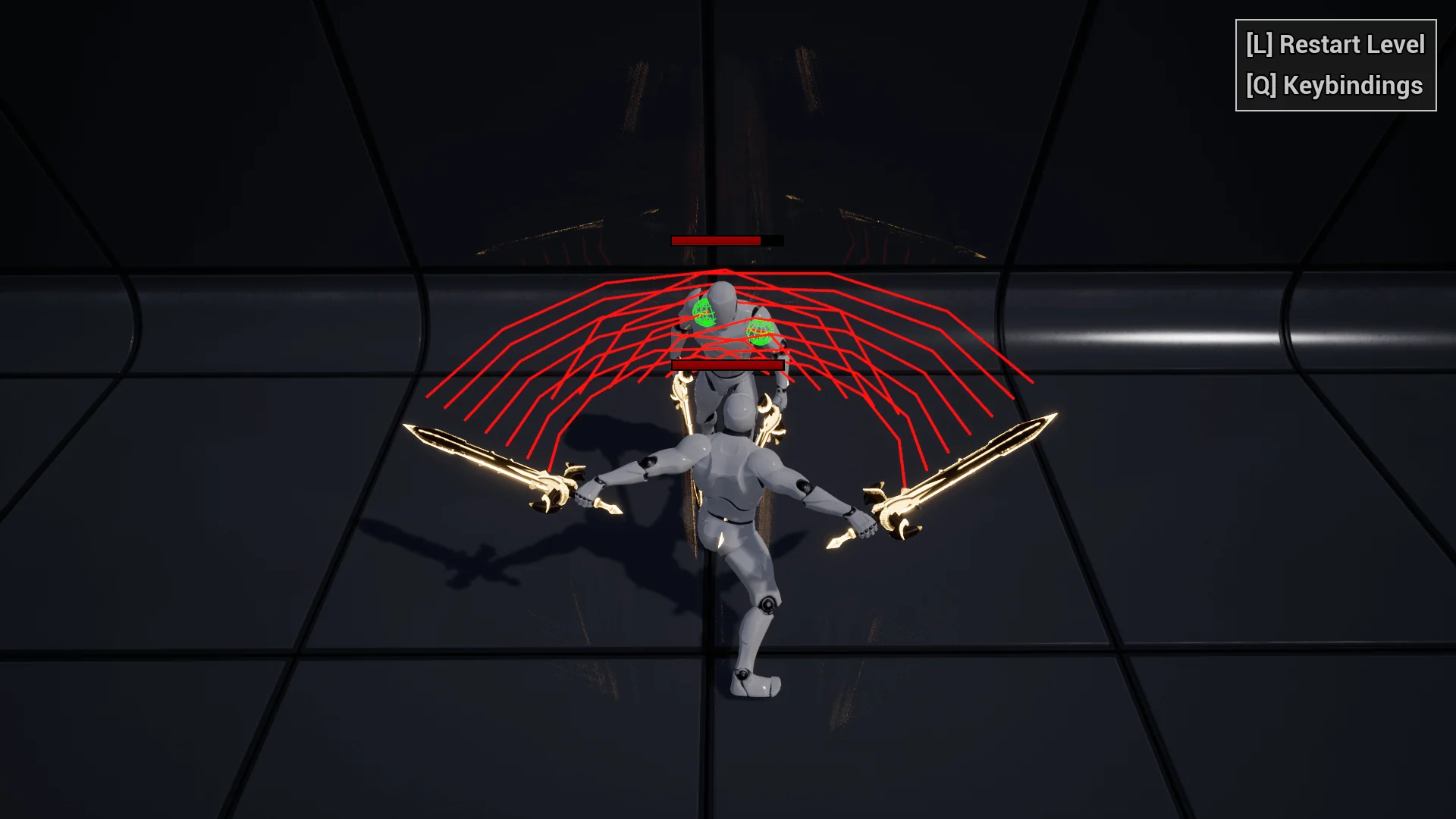
The primary tool for damage evaluation within the package is the CollisionHandler component. Traditional primitive collision volumes often prove inadequate for fast-paced action games, as static collision boxes or capsules fail to match the dynamic arc of a weapon swing or an animated limb. The CollisionHandler detects contact with trace queries, giving combat logic a direct way to test the space around a striking surface or target body.
A critical technical advantage of the CollisionHandler is its native support for both skeletal meshes and static meshes:
Skeletal Mesh Integration: When used with animated character rigs, the component performs trace-based detection against skeletal meshes. This suits unarmed combat, martial arts kicks, monster claw swipes, or other attacks where the damage-dealing geometry moves across animated frames.
Static Mesh Integration: When applied to rigid equipment such as swords, axes, blunt clubs, shields, or thrown props, the component can use static mesh actors for the same trace-based detection. This makes it possible to test contact around swappable weapon actors without building a separate detection path for each one.
Trace-based detection delivers the precision required for tight melee exchanges. The resulting hit data can feed the project's own damage, impact, and feedback logic, leaving the specific reactions to the combat system rather than hard-coding them into the component.
Components for Directional Movement and Actor Rotation
Striking accurately in a melee system depends heavily on how the attacking entity aligns with its surroundings. The RotatingOwner component provides focused control over the spatial orientation of whatever actor holds it. It rotates the owning actor toward a given direction, giving combat logic a reusable way to align an attacker without writing a fresh rotation routine for every pawn.
In combat scenarios, this capability governs key combat behaviors:
Attack Commitment and Tracking: Melee animations often require a character to pivot toward an intended target during the wind-up phase while locking down rotation during the active release phase to prevent unnatural sliding.
Target Snapping and Lock-on: When combined with target-locking systems, the component aligns the attacker toward an opponent upon initiating an ability or combo sequence.
Directional Evades and Dodges: The component can pivot the character toward an evasion vector before launching root-motion or physics impulses.
Because the component only handles rotation, it can be attached to player-controlled pawns, AI-driven characters, or other actors that need to face a direction. The surrounding behavior — when to rotate, how quickly, and what happens next — stays in the project's own gameplay logic.
Implementing Combat Components Across Melee and AI Systems
When combined, the CollisionHandler and RotatingOwner form the structural backbone of an action combat encounter. In artificial intelligence design, enemy agents need to acquire targets, rotate smoothly to address threats, and sweep their striking surfaces accurately during attack behaviors. An AI controller can query the distance to a player, issue a directional command to the RotatingOwner to orient the enemy pawn, and activate the CollisionHandler across specific animation notify windows.
This separation of concerns simplifies debugging. If an attack fails to hit, the developer can inspect the trace parameters of the CollisionHandler without worrying that actor facing logic interfered with the test. Similarly, if an actor turns too sharply or fails to track a flanking adversary, adjustments remain confined to the RotatingOwner configuration. The two systems interact harmoniously without creating tightly coupled code dependencies.
Code-First Deployment and Extensibility
Combat Components stays deliberately narrow: one component handles trace-based collision detection, the other handles rotating an owner toward a direction. That leaves damage rules, animation state, targeting, and AI decisions to the project, so the plugin can fit melee, ranged, vehicle, or environmental systems without imposing a combat framework.
Because both tools are exposed as components, they can be added to the actors that need them instead of forcing every combat behavior into a single character class. The resulting separation makes it easier to test one piece at a time: if an attack misses, the trace setup can be inspected on its own; if an actor does not face the intended direction, the rotation setup can be adjusted without touching the hit detection. For teams that want a small set of reusable building blocks rather than a complete combat solution, that focus is the main advantage.
 Engine Tools
 Weapons & Combat
 Engine Tools