"2596237520a17fbf"{"id":"1002906","slug":"arc-inventory","title":"Arc Inventory","category":"Gameplay Features","engine":"4.27 - 5.1","assetVersion":"Asset Version: 1.4.0.157 - 2.0.2.271","engineVersion":"Engine Version: 4.27 - 5.1","tag":"Gameplay Features","accent":"blue","visual":"mech","summary":"A Gameplay Ability System inventory plugin for Unreal Engine, supporting multiplayer, ability-powered items, shooters, and RPG mechanics.","platform":"Unreal Engine","indexPolicy":"index","publishedAt":"2026-11-21T15:36:54.446Z","updatedAt":"2026-11-21T15:36:54.446Z","sourceNotes":[],"fileContents":[],"compatibility":["Unreal Engine","Asset Version: 1.4.0.157 - 2.0.2.271","Engine Version: 4.27 - 5.1"],"featuredImage":{"alt":"Arc Inventory","src":"/wp-content/uploads/published/2026/11/67074388befa-038469b4-87a1-4107-a50a-a0d2a2fa4793-7cbcbc413b.webp"},"fileSizeBytes":106049030,"hasDownloadLink":true,"downloads":0,"terms":[{"taxonomy":"category","slug":"gameplay-features-tools-and-plugins","name":"Gameplay Features"}],"galleryImages":[{"src":"/wp-content/uploads/published/2026/11/d83f5271eb17-6049b9af-9194-4a64-96fd-ee33712f5733-5e4c7ff371.webp","alt":"Arc Inventory"},{"src":"/wp-content/uploads/published/2026/11/997482109b13-1f73809f-ceff-422c-adfa-26f5a0cf19e3-bda282cfef.webp","alt":"Arc Inventory"},{"src":"/wp-content/uploads/published/2026/11/9340044245f4-21b6910e-43cd-42d8-91c9-e51bd0364d8c-01f8d723c7.webp","alt":"Arc Inventory"},{"src":"/wp-content/uploads/published/2026/11/f263025df412-f5aaf3e3-abcf-4dbd-b505-ed56eb55e12f-a51ecf8d5b.webp","alt":"Arc Inventory"},{"src":"/wp-content/uploads/published/2026/11/98d16fa6f272-1d755fef-6bac-445e-96ec-8afa72e70bab-c57218e41c.webp","alt":"Arc Inventory"},{"src":"/wp-content/uploads/published/2026/11/c919cac312c2-3c7901f5-768b-4dac-8c1e-57527f0cb252-90387f7e57.webp","alt":"Arc Inventory"}],"contentHtml":"\u003ch2\u003eDeploying Arc Inventory Across Ability-Driven Game Projects\u003c/h2\u003e\u003cp\u003eProjects constructed around Unreal Engine's Gameplay Ability System often hit an architectural roadblock when handling physical and digital gear: standard inventory templates maintain isolated data containers that do not communicate cleanly with gameplay attributes, tags, and abilities. Arc Inventory resolves this separation by functioning directly as a Gameplay Ability System based inventory solution. Instead of treating items as inert database entries that merely adjust disconnected variables, the system treats items as ability-powered assets that plug directly into existing ability tasks, attribute sets, and gameplay tags.\u003c/p\u003e\u003cp\u003eBecause the plugin requires the use of the Unreal Engine Gameplay Ability System, it assumes that abilities form the baseline of character interactions. Integrating items into this ecosystem means an equipped object can grant gameplay abilities, apply persistent effects, or listen for gameplay tags without custom wrapper logic. The architecture slots cleanly into titles that already rely on ability-driven characters, providing an established path to translate equipment, consumables, and carryable tools into functional game mechanics.\u003c/p\u003e\u003cp\u003eNetwork synchronization is frequently the most demanding aspect of inventory design. Arc Inventory was built from the ground up for multiplayer environments, ensuring that replication routines, inventory management rules, and item transactions function in client-server topologies out of the box. Whether an item moves between equipment slots, drops into the world space as a pickup, or transfers through complex containers, the underlying architecture protects replication consistency across connected clients.\u003c/p\u003e\u003ch2\u003eConfiguring Shooters and Attachments Through Arc Inventory\u003c/h2\u003e\u003cp\u003eAction titles and tactical shooters impose rigorous demands on inventory software. Weapons must manage active ammunition states, dynamic firing modes, reload actions, and visual accessory swaps. Arc Inventory handles these interactions through dedicated active item workflows. Under this model, weapons function as ability-driven items that trigger active gameplay abilities whenever a player executes fire, aim, or utility commands.\u003c/p\u003e\u003cp\u003eBeyond standard firing logic, shooter mechanics frequently require dynamic modularity. The framework natively supports weapon attachment systems, allowing secondary items to latch onto base weapons. A scope, muzzle device, or magazine extension can be slotted into a parent firearm item, dynamically altering the underlying abilities or modifying active gameplay tags. This opens clear paths for weapon customization setups where attaching a silencer suppresses audio cues through tag updates, or adding an extended magazine alters weapon capacity attributes.\u003c/p\u003e\u003cp\u003eWorld pickups are similarly integrated into the active loop. Projects can use the same item definitions for world items as well, so a dropped weapon or field pickup can carry its state and attachment configuration when it returns to an inventory. That leaves the design of scavenging and gear recovery in the project's hands instead of requiring a separate item representation.\u003c/p\u003e\u003ch2\u003eManaging RPG Progression, Passive Gear, and Procedural Loot\u003c/h2\u003e\u003cp\u003eRole-playing games present an entirely different design profile, centering on attribute progression, gear stats, and massive collections of consumable or crafting goods. Arc Inventory adapts directly to RPG gameplay through full support for passive items, stacking mechanics, and procedural item creation.\u003c/p\u003e\u003cp\u003eEquippable gear such as armor, rings, and talismans typically rely on persistent statistical enhancements rather than button-triggered actions. Arc Inventory manages passive items by continuously applying gameplay effects or granting passive abilities as long as the item occupies an active slot. Unequipping the item strips those effects cleanly, preventing the lingering attribute calculation errors that often affect custom-built inventory scripts.\u003c/p\u003e\u003cp\u003eLoot-heavy progression loops rely on specific item structures that the plugin accommodates:\u003c/p\u003e\u003cul\u003e\u003cli\u003e\u003cstrong\u003eStacking Items:\u003c/strong\u003e Crafting ingredients, potions, scrolls, and currency accumulate without bloating performance or complicating replication arrays.\u003c/li\u003e\u003cli\u003e\u003cstrong\u003ePassive Items:\u003c/strong\u003e Worn armor pieces, relics, and charms apply ongoing gameplay effects and stat adjustments straight into the character's attribute sets.\u003c/li\u003e\u003cli\u003e\u003cstrong\u003eActive Items:\u003c/strong\u003e Consumable potions, deployable items, and triggerable spell relics cast abilities directly on use.\u003c/li\u003e\u003cli\u003e\u003cstrong\u003eWorld Items:\u003c/strong\u003e Loot drops can reuse the same item definitions when they move between the world and an inventory.\u003c/li\u003e\u003c/ul\u003e\u003cp\u003eFor games focused on dynamic loot drops, Arc Inventory supports procedural item generation. Designers can construct item pipelines that assemble stats, abilities, and parameters algorithmically at runtime. A dropped piece of armor or a discovered weapon can generate varied attributes and ability combinations, supporting dungeon crawlers, rogue-lites, and procedural action titles that rely on unpredictable loot tables.\u003c/p\u003e\u003ch2\u003eDesigner-Focused Control and Arc Inventory 2.0 Upgrades\u003c/h2\u003e\u003cp\u003eWhile the Gameplay Ability System is known for its steep engineering requirements, Arc Inventory is structured as an easy-to-use, designer-focused system. Game designers can construct items, assign active and passive abilities, designate stacking limits, and build equipment profiles without requiring deep C++ programming interventions for standard design iterations.\u003c/p\u003e\u003cp\u003eThe system is used in multiple games to run wildly different play loops, demonstrating that its structure does not enforce a rigid genre template. Different projects can run very different item rules on top of the same core logic. Designers can tailor the framework to fit varying slot restrictions, bag sizes, equipment layouts, and container interactions to match the creative vision of each project.\u003c/p\u003e\u003cp\u003eTo assist implementation, an official example project is available as a reference for how the system is set up in a working project. It gives developers a starting point for studying how abilities link to item definitions in practice. With the arrival of Arc Inventory 2.0, teams working on legacy builds can review the dedicated migration guide within the plugin documentation to transition their data structures and item workflows to the updated 2.0 version smoothly.\u003c/p\u003e\u003ch2\u003eProduction Takeaways and Project Compatibility\u003c/h2\u003e\u003cp\u003eArc Inventory offers its highest utility to development teams building multiplayer Unreal Engine titles that have already committed to the Gameplay Ability System. Because GAS requires specialized network patterns, writing a separate inventory system from scratch frequently leads to redundant code, networking friction, and difficult debugging cycles when items and abilities collide.\u003c/p\u003e\u003cp\u003eBy unifying ability execution, attribute distribution, and item management under a single multiplayer architecture, the plugin allows engineering and design teams to concentrate on combat pacing, gear progression, and world systems. Developers seeking an established, multiplayer-ready foundation for ability-based gear will find Arc Inventory well aligned with complex shooter mechanics, deep RPG structures, and procedural loot design.\u003c/p\u003e\n\n\u003ch2\u003eMore From The Same Workflow\u003c/h2\u003e\n\u003cul\u003e\n\u003cli\u003e\u003ca href=\"https://3dcghub.com/advanced-fade-objects-pro-object-fading-with-tags-colors-and-multiplayer/\" rel=\"noopener noreferrer\"\u003eAdvanced Fade Objects PRO – Object Fading with Tags, Colors and Multiplayer\u003c/a\u003e\u003c/li\u003e\n\u003cli\u003e\u003ca href=\"https://3dcghub.com/auto-mesh-outline/\" rel=\"noopener noreferrer\"\u003eAuto Mesh Outline\u003c/a\u003e\u003c/li\u003e\n\u003cli\u003e\u003ca href=\"https://3dcghub.com/tempest-inventory-system/\" rel=\"noopener noreferrer\"\u003eTempest Inventory System\u003c/a\u003e\u003c/li\u003e\n\u003cli\u003e\u003ca href=\"https://3dcghub.com/customizable-interaction-plugin/\" rel=\"noopener noreferrer\"\u003eCustomizable Interaction Plugin\u003c/a\u003e\u003c/li\u003e\n\u003cli\u003e\u003ca href=\"https://3dcghub.com/action-camera-manager-2/\" rel=\"noopener noreferrer\"\u003eAction Camera Manager\u003c/a\u003e\u003c/li\u003e\n\u003c/ul\u003e","contentTextLength":7398,"navigation":{"current":13,"total":4839,"previous":{"id":"1002907","slug":"combat-components","title":"Combat Components","category":"Engine Tools","platform":"Unreal Engine","updatedAt":"2026-11-21T15:37:23.981Z"},"next":{"id":"1002905","slug":"agora-static-mesh-thumbnail-render-extension","title":"Agora Static Mesh Thumbnail Render Extension","category":"Engine Tools","platform":"Unreal Engine","updatedAt":"2026-11-21T15:36:22.699Z"}},"relatedResources":[{"id":"14967","slug":"advanced-fade-objects-pro-object-fading-with-tags-colors-and-multiplayer","title":"Advanced Fade Objects PRO – Object Fading with Tags, Colors and Multiplayer","category":"Gameplay Features","engine":"4.26 - 5.8","assetVersion":"Asset Version: 1.1 - 1.4.1","engineVersion":"Engine version: 4.26 - 5.8","tag":"Gameplay Features","accent":"blue","visual":"audio","summary":"Enhance your game's visibility with Advanced Fade Objects PRO. This C++ powered plugin automates object transparency between the camera and character for a smoother player experience.","platform":"Unreal Engine","indexPolicy":"index","publishedAt":"2026-03-12T07:09:41.000Z","updatedAt":"2026-07-29T12:55:52.438Z","sourceNotes":[],"fileContents":[],"compatibility":["Unreal Engine","Asset Version: 1.1 - 1.4.1","Engine version: 4.26 - 5.8"],"featuredImage":{"alt":"Advanced Fade Objects PRO – Object Fading with Tags, Colors and Multiplayer","src":"https://3dcghub.com/wp-content/uploads/2026/03/b42cd28c-8fea-4b0f-a37a-48aa5fe8a212.webp"},"fileSizeBytes":297492926,"hasDownloadLink":true,"downloads":1},{"id":"14982","slug":"auto-mesh-outline","title":"Auto Mesh Outline","category":"Gameplay Features","engine":"4.27,5.0 - 5.7","assetVersion":"Engine version:4.27,5.0 - 5.7","engineVersion":"Asset Version:1.1","tag":"Gameplay Features","accent":"blue","visual":"character","summary":"Streamline your 3D workflow with Auto Mesh Outline, a tool designed to apply consistent visual outlines via component tags. It features runtime update capabilities and full network support for multi-part character meshes.","platform":"Unreal Engine","indexPolicy":"noindex","publishedAt":"2026-03-12T07:13:53.000Z","updatedAt":"2026-04-25T11:35:59.000Z","sourceNotes":[],"fileContents":[],"compatibility":["Unreal Engine","Engine version: 4.27,5.0 - 5.7"],"featuredImage":{"alt":"Auto Mesh Outline","src":"https://3dcghub.com/wp-content/uploads/2026/03/80591b4e-2023-47e9-8211-58ca4b02a293.webp"},"fileSizeBytes":129674054,"hasDownloadLink":true,"downloads":0},{"id":"1000697","slug":"tempest-inventory-system","title":"Tempest Inventory System","category":"Gameplay Features","engine":"5.6","assetVersion":"Asset Version: 1.0","engineVersion":"Engine Version: 5.6","tag":"Gameplay Features","accent":"blue","visual":"mech","summary":"Dark Souls-inspired Unreal Engine inventory plugin with dynamic item management, atmospheric UI, loot, equipment, merchant systems, and modular gameplay tags.","platform":"Unreal Engine","indexPolicy":"index","publishedAt":"2026-07-23T16:33:58.202Z","updatedAt":"2026-07-23T16:33:58.202Z","sourceNotes":[],"fileContents":[],"compatibility":["Unreal Engine","Asset Version: 1.0","Engine Version: 5.6"],"featuredImage":{"alt":"Tempest Inventory System","src":"/wp-content/uploads/published/2026/07/0f711c1e995e-aca8a686-893b-49b3-9a59-8b9f73f2d5b5-bc8705b511.webp"},"fileSizeBytes":11942313,"hasDownloadLink":true,"downloads":0}]}
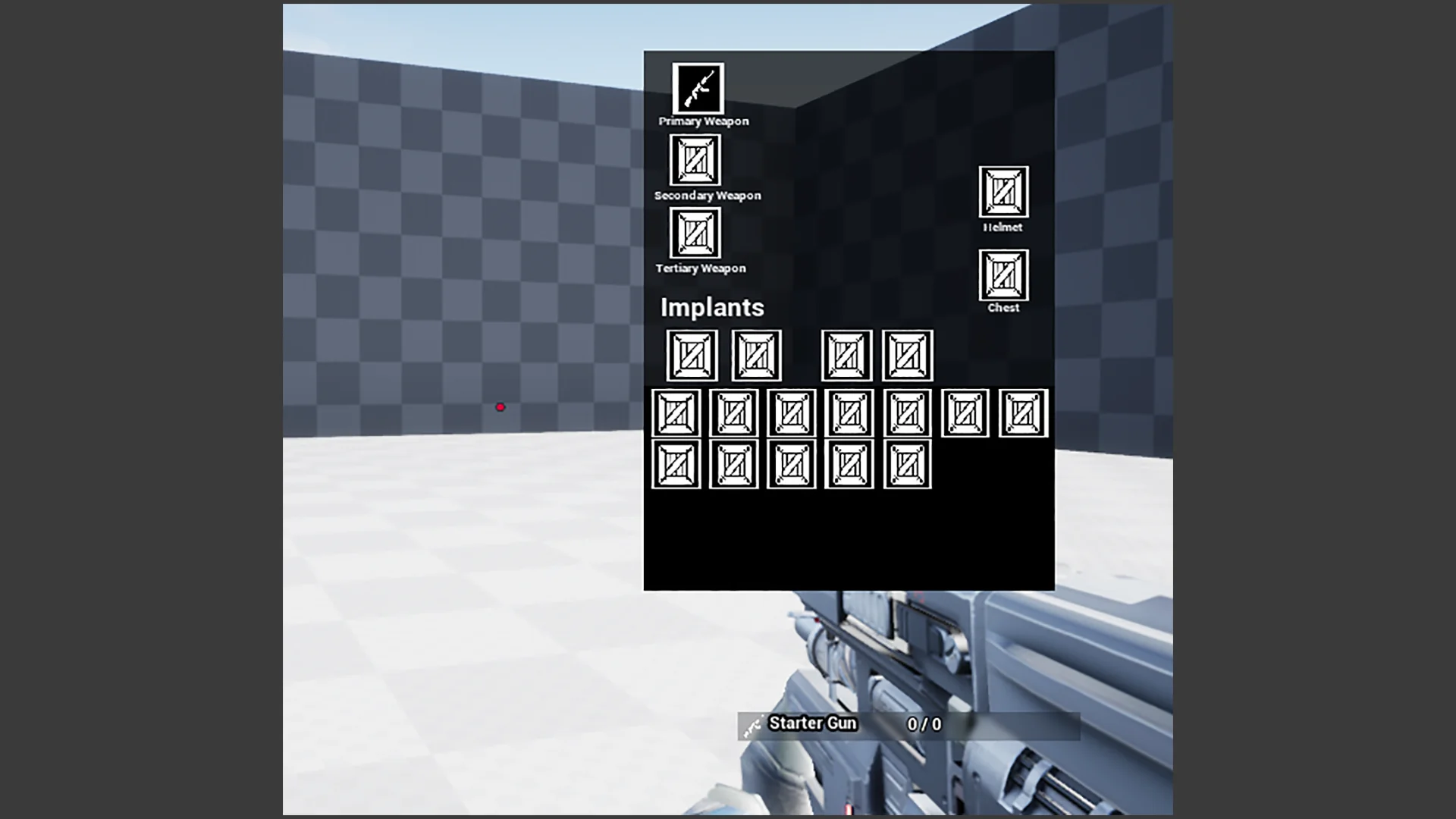
Resource screenshots
1 / 6
Join our channel
Follow 3DCGHUB on Telegram for new resource drops, migration updates, and community notices.
Deploying Arc Inventory Across Ability-Driven Game Projects
Projects constructed around Unreal Engine's Gameplay Ability System often hit an architectural roadblock when handling physical and digital gear: standard inventory templates maintain isolated data containers that do not communicate cleanly with gameplay attributes, tags, and abilities. Arc Inventory resolves this separation by functioning directly as a Gameplay Ability System based inventory solution. Instead of treating items as inert database entries that merely adjust disconnected variables, the system treats items as ability-powered assets that plug directly into existing ability tasks, attribute sets, and gameplay tags.
Because the plugin requires the use of the Unreal Engine Gameplay Ability System, it assumes that abilities form the baseline of character interactions. Integrating items into this ecosystem means an equipped object can grant gameplay abilities, apply persistent effects, or listen for gameplay tags without custom wrapper logic. The architecture slots cleanly into titles that already rely on ability-driven characters, providing an established path to translate equipment, consumables, and carryable tools into functional game mechanics.
Network synchronization is frequently the most demanding aspect of inventory design. Arc Inventory was built from the ground up for multiplayer environments, ensuring that replication routines, inventory management rules, and item transactions function in client-server topologies out of the box. Whether an item moves between equipment slots, drops into the world space as a pickup, or transfers through complex containers, the underlying architecture protects replication consistency across connected clients.
Configuring Shooters and Attachments Through Arc Inventory
Action titles and tactical shooters impose rigorous demands on inventory software. Weapons must manage active ammunition states, dynamic firing modes, reload actions, and visual accessory swaps. Arc Inventory handles these interactions through dedicated active item workflows. Under this model, weapons function as ability-driven items that trigger active gameplay abilities whenever a player executes fire, aim, or utility commands.
Beyond standard firing logic, shooter mechanics frequently require dynamic modularity. The framework natively supports weapon attachment systems, allowing secondary items to latch onto base weapons. A scope, muzzle device, or magazine extension can be slotted into a parent firearm item, dynamically altering the underlying abilities or modifying active gameplay tags. This opens clear paths for weapon customization setups where attaching a silencer suppresses audio cues through tag updates, or adding an extended magazine alters weapon capacity attributes.
World pickups are similarly integrated into the active loop. Projects can use the same item definitions for world items as well, so a dropped weapon or field pickup can carry its state and attachment configuration when it returns to an inventory. That leaves the design of scavenging and gear recovery in the project's hands instead of requiring a separate item representation.
Managing RPG Progression, Passive Gear, and Procedural Loot
Role-playing games present an entirely different design profile, centering on attribute progression, gear stats, and massive collections of consumable or crafting goods. Arc Inventory adapts directly to RPG gameplay through full support for passive items, stacking mechanics, and procedural item creation.
Equippable gear such as armor, rings, and talismans typically rely on persistent statistical enhancements rather than button-triggered actions. Arc Inventory manages passive items by continuously applying gameplay effects or granting passive abilities as long as the item occupies an active slot. Unequipping the item strips those effects cleanly, preventing the lingering attribute calculation errors that often affect custom-built inventory scripts.
Loot-heavy progression loops rely on specific item structures that the plugin accommodates:
Stacking Items: Crafting ingredients, potions, scrolls, and currency accumulate without bloating performance or complicating replication arrays.
Passive Items: Worn armor pieces, relics, and charms apply ongoing gameplay effects and stat adjustments straight into the character's attribute sets.
Active Items: Consumable potions, deployable items, and triggerable spell relics cast abilities directly on use.
World Items: Loot drops can reuse the same item definitions when they move between the world and an inventory.
For games focused on dynamic loot drops, Arc Inventory supports procedural item generation. Designers can construct item pipelines that assemble stats, abilities, and parameters algorithmically at runtime. A dropped piece of armor or a discovered weapon can generate varied attributes and ability combinations, supporting dungeon crawlers, rogue-lites, and procedural action titles that rely on unpredictable loot tables.
Designer-Focused Control and Arc Inventory 2.0 Upgrades
While the Gameplay Ability System is known for its steep engineering requirements, Arc Inventory is structured as an easy-to-use, designer-focused system. Game designers can construct items, assign active and passive abilities, designate stacking limits, and build equipment profiles without requiring deep C++ programming interventions for standard design iterations.
The system is used in multiple games to run wildly different play loops, demonstrating that its structure does not enforce a rigid genre template. Different projects can run very different item rules on top of the same core logic. Designers can tailor the framework to fit varying slot restrictions, bag sizes, equipment layouts, and container interactions to match the creative vision of each project.
To assist implementation, an official example project is available as a reference for how the system is set up in a working project. It gives developers a starting point for studying how abilities link to item definitions in practice. With the arrival of Arc Inventory 2.0, teams working on legacy builds can review the dedicated migration guide within the plugin documentation to transition their data structures and item workflows to the updated 2.0 version smoothly.
Production Takeaways and Project Compatibility
Arc Inventory offers its highest utility to development teams building multiplayer Unreal Engine titles that have already committed to the Gameplay Ability System. Because GAS requires specialized network patterns, writing a separate inventory system from scratch frequently leads to redundant code, networking friction, and difficult debugging cycles when items and abilities collide.
By unifying ability execution, attribute distribution, and item management under a single multiplayer architecture, the plugin allows engineering and design teams to concentrate on combat pacing, gear progression, and world systems. Developers seeking an established, multiplayer-ready foundation for ability-based gear will find Arc Inventory well aligned with complex shooter mechanics, deep RPG structures, and procedural loot design.
 Gameplay Features
 Gameplay Features
 Gameplay Features