"2596237520a17fbf"{"id":"1002905","slug":"agora-static-mesh-thumbnail-render-extension","title":"Agora Static Mesh Thumbnail Render Extension","category":"Engine Tools","engine":"4.26 - 5.3","assetVersion":"Asset Version: 1.0","engineVersion":"Engine Version: 4.26 - 5.3","tag":"Engine Tools","accent":"blue","visual":"mech","summary":"Display essential static mesh information and detailed preview data directly inside the Content Browser with the Agora editor plugin.","platform":"Unreal Engine","indexPolicy":"index","publishedAt":"2026-11-21T15:36:22.699Z","updatedAt":"2026-11-21T15:36:22.699Z","sourceNotes":[],"fileContents":[],"compatibility":["Unreal Engine","Asset Version: 1.0","Engine Version: 4.26 - 5.3"],"featuredImage":{"alt":"Agora Static Mesh Thumbnail Render Extension","src":"/wp-content/uploads/published/2026/11/8c3d61aa8314-3f9d0bfe-b027-4a68-a13c-54894f7c5712-19c9dd927b.webp"},"fileSizeBytes":23007956,"hasDownloadLink":true,"downloads":0,"terms":[{"taxonomy":"category","slug":"engine-tools-tools-and-plugins","name":"Engine Tools"}],"galleryImages":[{"src":"/wp-content/uploads/published/2026/11/d7b353f0c8b9-e5a574b2-5e59-4e71-9702-e5622a9abb3d-050315c6f0.webp","alt":"Agora Static Mesh Thumbnail Render Extension"},{"src":"/wp-content/uploads/published/2026/11/ce626a888bef-20af7a23-1eec-4ce1-beb1-0bc154c29016-2215fea755.webp","alt":"Agora Static Mesh Thumbnail Render Extension"}],"contentHtml":"\u003ch2\u003eBringing Static Mesh Information into the Content Browser\u003c/h2\u003e\u003cp\u003eStatic meshes make up much of the geometry in a typical Unreal Engine environment, and large projects can hold hundreds or thousands of them across nested folders. The Content Browser gives each asset a thumbnail, but a small picture does not always answer the questions that come up while building a level: which version of a prop is this, what does the mesh belong to, and is this the asset that was intended for the scene? Agora Static Mesh Thumbnail Render Extension addresses that everyday friction by showing information about static mesh actors directly in the Content Browser.\u003c/p\u003e\u003cp\u003eThe goal is straightforward: make the asset grid more informative without turning it into a separate tool. The plugin is designed to be simple and easy, and it is aimed at editors who spend long sessions browsing, selecting, and placing static geometry. Instead of opening an asset or a details panel to confirm what a mesh is, users can read the added information while they continue working in the folder view.\u003c/p\u003e\u003ch2\u003eA Simple Editor-Side Extension\u003c/h2\u003e\u003cp\u003eThe extension is an editor plugin rather than a runtime gameplay system. It does not add actor components, change level geometry, or require a custom project framework; it operates in the editor's Content Browser and is intended to be enabled and used without a complicated setup. That editor-only scope matters because it keeps the tool out of packaged builds and avoids imposing runtime cost on the game itself.\u003c/p\u003e\u003cp\u003eBecause the plugin works alongside the existing asset pipeline, projects do not need to rename meshes, reorganize folders, or adopt a specific naming convention before using it. Existing static mesh actors can benefit as they are. The same quality makes the plugin easy to evaluate: enable it, browse a familiar project, and decide whether the added information improves the way the team identifies assets.\u003c/p\u003e\u003ch2\u003eWhere Thumbnail-Level Information Helps\u003c/h2\u003e\u003cp\u003eEnvironment art is full of near-duplicates. A modular wall kit may contain several meshes with similar silhouettes, a prop library may include multiple states of the same object, and an architectural set may repeat a shape at different scales. Thumbnails alone can make those variations hard to tell apart, especially when the camera angle or lighting in the preview is similar. Showing mesh information at the thumbnail level gives artists another reference point while selecting assets.\u003c/p\u003e\u003cp\u003eThe benefit grows with library size. In a small project, opening an asset to check it is a minor interruption. In a production with thousands of meshes, those interruptions accumulate across level design, set dressing, and asset audits. Keeping the information in the browser reduces the need to leave the current folder and helps maintain context when comparing several candidates. Level designers can browse faster, environment artists can confirm they are using the intended mesh, and technical directors have a clearer view of what is present in a content folder.\u003c/p\u003e\u003cp\u003eAsset handoffs are another common source of friction. When a level or environment kit moves between artists, the receiving artist may not know why a particular mesh was chosen or which variant belongs to a set. Seeing more information at the browser level gives that context without requiring a separate document, and it makes quick spot checks during review less disruptive. The same benefit applies to auditing a folder before a milestone: a more informative grid makes it easier to spot the asset that does not belong, while leaving the actual cleanup and organization to the team's established process.\u003c/p\u003e\u003ch2\u003eFitting into an Existing Content Workflow\u003c/h2\u003e\u003cp\u003eThe plugin does not attempt to replace asset management conventions or impose a new browser. It adds a layer of information to the existing Content Browser, so teams can keep their folder structure, naming rules, and review process. That makes it suitable for both solo developers and studios, and it can be adopted gradually: one artist can enable it to test the workflow, and a team can standardize on it later if the added visibility proves useful.\u003c/p\u003e\u003cp\u003eFor teams working with modular kits, environment packs, or imported static geometry, the most practical value is consistency. When everyone sees the same information next to the same thumbnail, discussions about which mesh to use become less ambiguous. The plugin is not a replacement for a full asset auditing suite, and it is deliberately focused on static mesh actors; within that scope, it offers a low-friction way to make the Content Browser more informative.\u003c/p\u003e\u003ch2\u003eWho the Extension Suits\u003c/h2\u003e\u003cp\u003eAgora Static Mesh Thumbnail Render Extension is aimed at Unreal Engine editors who want a small, focused improvement to asset browsing rather than a large framework. It fits environment artists assembling modular scenes, level designers selecting props from dense libraries, and technical artists who need a clearer view of static mesh content. Because it is an editor plugin, it is also easy to remove if a project's workflow changes.\u003c/p\u003e\u003cp\u003eThe asset is presented as a simple tool with a narrow purpose: show information about static mesh actors in the Content Browser. Teams that value that specific convenience can add it without restructuring their project, while teams looking for runtime mesh management or a complete asset database should look elsewhere. Used within that scope, the extension provides a direct way to reduce the small, repeated interruptions that come from checking static meshes one by one.\u003c/p\u003e\n\n\u003ch2\u003eMore From The Same Workflow\u003c/h2\u003e\n\u003cul\u003e\n\u003cli\u003e\u003ca href=\"https://3dcghub.com/rdlodtools-rd-tools-pro/\" rel=\"noopener noreferrer\"\u003erdLODtools (rd Tools Pro)\u003c/a\u003e\u003c/li\u003e\n\u003cli\u003e\u003ca href=\"https://3dcghub.com/blueprint-mesh-extractor/\" rel=\"noopener noreferrer\"\u003eBlueprint Mesh Extractor\u003c/a\u003e\u003c/li\u003e\n\u003cli\u003e\u003ca href=\"https://3dcghub.com/web-browser-for-video/\" rel=\"noopener noreferrer\"\u003eWeb Browser For Video\u003c/a\u003e\u003c/li\u003e\n\u003cli\u003e\u003ca href=\"https://3dcghub.com/material-assignment-tool-materiall-assignmentt-tooll-materialed-tooled/\" rel=\"noopener noreferrer\"\u003eMaterial Assignment Tool ( Materiall Assignmentt Tooll Materialed Tooled )\u003c/a\u003e\u003c/li\u003e\n\u003cli\u003e\u003ca href=\"https://3dcghub.com/mesh-ops-mesh-operations-plugin/\" rel=\"noopener noreferrer\"\u003eMesh Ops - Mesh Operations Plugin\u003c/a\u003e\u003c/li\u003e\n\u003c/ul\u003e","contentTextLength":5715,"navigation":{"current":14,"total":4839,"previous":{"id":"1002906","slug":"arc-inventory","title":"Arc Inventory","category":"Gameplay Features","platform":"Unreal Engine","updatedAt":"2026-11-21T15:36:54.446Z"},"next":{"id":"28288","slug":"huge-arpg","title":"Huge ARPG","category":"RPG","platform":"Unreal Engine","updatedAt":"2026-11-21T10:52:44.346Z"}},"relatedResources":[{"id":"14433","slug":"rdlodtools-rd-tools-pro","title":"rdLODtools (rd Tools Pro)","category":"Engine Tools","engine":"4.27 - 5.8","assetVersion":"Asset Version: 1.4.0 - 1.5.1","engineVersion":"Engine version: 4.27 - 5.8","tag":"Engine Tools","accent":"blue","visual":"luts","summary":"rdLODtools (rd Tools Pro) is a powerful Unreal Engine plugin that simplifies the creation of Billboard, Planar, Cubic, and Impostor LODs directly within the Static Mesh Editor.","platform":"Unreal Engine","indexPolicy":"noindex","publishedAt":"2026-03-11T18:04:48.000Z","updatedAt":"2026-07-24T02:13:03.808Z","sourceNotes":[],"fileContents":[],"compatibility":["Unreal Engine","Asset Version: 1.4.0 - 1.5.1","Engine version: 4.27 - 5.8"],"featuredImage":{"alt":"rdLODtools (rd Tools Pro)","src":"https://3dcghub.com/wp-content/uploads/2026/03/970ae304-82e9-45bf-b173-3ffeb82a1413.webp"},"fileSizeBytes":92887775,"hasDownloadLink":true,"downloads":2},{"id":"1000796","slug":"blueprint-mesh-extractor","title":"Blueprint Mesh Extractor","category":"Engine Tools","engine":"5.7","assetVersion":"Asset Version: 1.0","engineVersion":"Engine Version: 5.7","tag":"Engine Tools","accent":"blue","visual":"mech","summary":"Blueprint Mesh Extractor breaks Blueprint Actors into separate Static Mesh Actors, preserving transforms, materials, and child actors, with bulk extraction from","platform":"Unreal Engine","indexPolicy":"index","publishedAt":"2026-07-30T14:29:11.117Z","updatedAt":"2026-07-30T14:29:11.117Z","sourceNotes":[],"fileContents":[],"compatibility":["Unreal Engine","Asset Version: 1.0","Engine Version: 5.7"],"featuredImage":{"alt":"Blueprint Mesh Extractor","src":"/wp-content/uploads/published/2026/07/4565c5f72c93-3a93b647-ac5f-43a0-8e2d-6754dccb9d34-aa8b0957a6.webp"},"fileSizeBytes":56196,"hasDownloadLink":true,"downloads":2},{"id":"14814","slug":"web-browser-for-video","title":"Web Browser For Video","category":"Engine Tools","engine":"5.5","assetVersion":"Engine version: 5.5","engineVersion":"Asset Version:1.0","tag":"Engine Tools","accent":"blue","visual":"city","summary":"Web Browser For Video allows developers to render multiple high-frame-rate web windows onto static meshes. This specialized tool is optimized for performance and includes specific compatibility features for Cesium projects.","platform":"Unreal Engine","indexPolicy":"noindex","publishedAt":"2026-03-11T19:27:23.000Z","updatedAt":"2026-04-19T15:45:40.000Z","sourceNotes":[],"fileContents":[],"compatibility":["Unreal Engine","Engine version: 5.5","Asset Version: 1.0"],"featuredImage":{"alt":"Web Browser For Video","src":"https://3dcghub.com/wp-content/uploads/2026/03/87bbb7ef-4349-4802-a3a8-595dafdd4bab.webp"},"fileSizeBytes":90502408,"hasDownloadLink":true,"downloads":0}]}
Resource screenshots
1 / 2
Join our channel
Follow 3DCGHUB on Telegram for new resource drops, migration updates, and community notices.
Bringing Static Mesh Information into the Content Browser
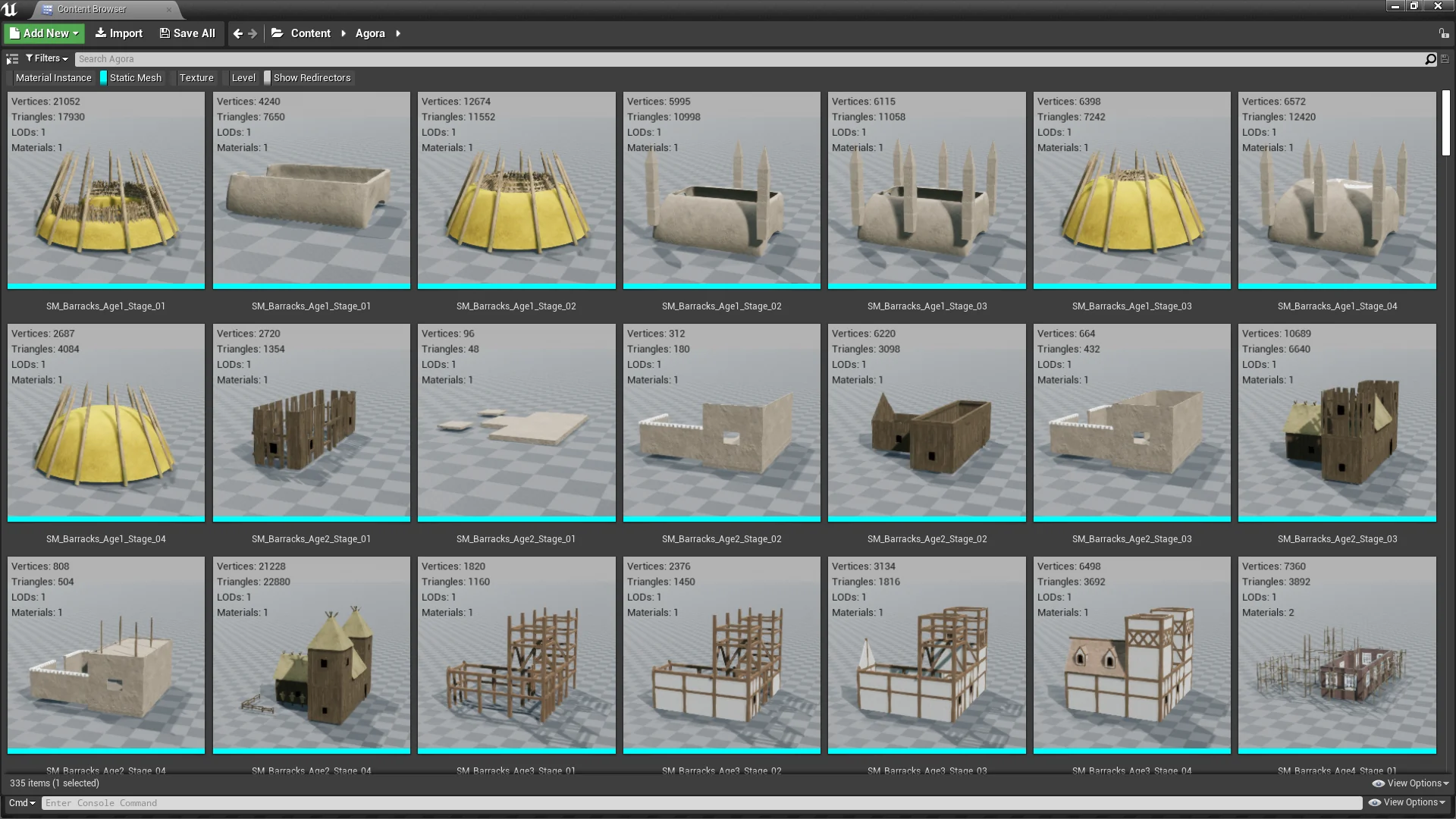
Static meshes make up much of the geometry in a typical Unreal Engine environment, and large projects can hold hundreds or thousands of them across nested folders. The Content Browser gives each asset a thumbnail, but a small picture does not always answer the questions that come up while building a level: which version of a prop is this, what does the mesh belong to, and is this the asset that was intended for the scene? Agora Static Mesh Thumbnail Render Extension addresses that everyday friction by showing information about static mesh actors directly in the Content Browser.
The goal is straightforward: make the asset grid more informative without turning it into a separate tool. The plugin is designed to be simple and easy, and it is aimed at editors who spend long sessions browsing, selecting, and placing static geometry. Instead of opening an asset or a details panel to confirm what a mesh is, users can read the added information while they continue working in the folder view.
A Simple Editor-Side Extension
The extension is an editor plugin rather than a runtime gameplay system. It does not add actor components, change level geometry, or require a custom project framework; it operates in the editor's Content Browser and is intended to be enabled and used without a complicated setup. That editor-only scope matters because it keeps the tool out of packaged builds and avoids imposing runtime cost on the game itself.
Because the plugin works alongside the existing asset pipeline, projects do not need to rename meshes, reorganize folders, or adopt a specific naming convention before using it. Existing static mesh actors can benefit as they are. The same quality makes the plugin easy to evaluate: enable it, browse a familiar project, and decide whether the added information improves the way the team identifies assets.
Where Thumbnail-Level Information Helps
Environment art is full of near-duplicates. A modular wall kit may contain several meshes with similar silhouettes, a prop library may include multiple states of the same object, and an architectural set may repeat a shape at different scales. Thumbnails alone can make those variations hard to tell apart, especially when the camera angle or lighting in the preview is similar. Showing mesh information at the thumbnail level gives artists another reference point while selecting assets.
The benefit grows with library size. In a small project, opening an asset to check it is a minor interruption. In a production with thousands of meshes, those interruptions accumulate across level design, set dressing, and asset audits. Keeping the information in the browser reduces the need to leave the current folder and helps maintain context when comparing several candidates. Level designers can browse faster, environment artists can confirm they are using the intended mesh, and technical directors have a clearer view of what is present in a content folder.
Asset handoffs are another common source of friction. When a level or environment kit moves between artists, the receiving artist may not know why a particular mesh was chosen or which variant belongs to a set. Seeing more information at the browser level gives that context without requiring a separate document, and it makes quick spot checks during review less disruptive. The same benefit applies to auditing a folder before a milestone: a more informative grid makes it easier to spot the asset that does not belong, while leaving the actual cleanup and organization to the team's established process.
Fitting into an Existing Content Workflow
The plugin does not attempt to replace asset management conventions or impose a new browser. It adds a layer of information to the existing Content Browser, so teams can keep their folder structure, naming rules, and review process. That makes it suitable for both solo developers and studios, and it can be adopted gradually: one artist can enable it to test the workflow, and a team can standardize on it later if the added visibility proves useful.
For teams working with modular kits, environment packs, or imported static geometry, the most practical value is consistency. When everyone sees the same information next to the same thumbnail, discussions about which mesh to use become less ambiguous. The plugin is not a replacement for a full asset auditing suite, and it is deliberately focused on static mesh actors; within that scope, it offers a low-friction way to make the Content Browser more informative.
Who the Extension Suits
Agora Static Mesh Thumbnail Render Extension is aimed at Unreal Engine editors who want a small, focused improvement to asset browsing rather than a large framework. It fits environment artists assembling modular scenes, level designers selecting props from dense libraries, and technical artists who need a clearer view of static mesh content. Because it is an editor plugin, it is also easy to remove if a project's workflow changes.
The asset is presented as a simple tool with a narrow purpose: show information about static mesh actors in the Content Browser. Teams that value that specific convenience can add it without restructuring their project, while teams looking for runtime mesh management or a complete asset database should look elsewhere. Used within that scope, the extension provides a direct way to reduce the small, repeated interruptions that come from checking static meshes one by one.
 Engine Tools
 Engine Tools
 Engine Tools