"148d1066ed74e216"{"id":"1002931","slug":"nodes-bundle","title":"Nodes (Bundle)","category":"Engine Tools","engine":"5.1 - 5.5","assetVersion":"Asset Version: 2.0 - 4.0","engineVersion":"Engine Version: 5.1 - 5.5","tag":"Engine Tools","accent":"blue","visual":"mech","summary":"Explore the Nodes (Bundle) plugin collection for Unreal Engine, featuring over 650 Blueprint and C++ functions across 15 consolidated system plugins.","platform":"Unreal Engine","indexPolicy":"index","publishedAt":"2026-11-21T23:08:25.672Z","updatedAt":"2026-11-21T23:08:25.672Z","sourceNotes":[],"fileContents":[],"compatibility":["Unreal Engine","Asset Version: 2.0 - 4.0","Engine Version: 5.1 - 5.5"],"featuredImage":{"alt":"Nodes (Bundle)","src":"/wp-content/uploads/published/2026/11/b01ceb488951-38c388ce-63fc-47de-b743-b8d2cddc3a93-7c3e9e1d5e.webp"},"fileSizeBytes":2066052,"hasDownloadLink":true,"downloads":0,"terms":[{"taxonomy":"category","slug":"engine-tools-tools-and-plugins","name":"Engine Tools"}],"galleryImages":[{"src":"/wp-content/uploads/published/2026/11/1cde93806a54-70f27794-e0b8-454d-96cf-3ef232d904f3-dc6d929e7d.webp","alt":"Nodes (Bundle)"},{"src":"/wp-content/uploads/published/2026/11/a3dbd91def64-a130e93b-3de5-4a81-9b59-73ca7dc7e600-e7ed016cf5.webp","alt":"Nodes (Bundle)"},{"src":"/wp-content/uploads/published/2026/11/2e95be247bcc-0a295718-b4a6-4fbe-8ccc-42a845f3e385-99357adfa6.webp","alt":"Nodes (Bundle)"},{"src":"/wp-content/uploads/published/2026/11/be211b08115c-46bf38c4-7630-48ba-bb9f-c1f01d1a6fc9-762265c68f.webp","alt":"Nodes (Bundle)"},{"src":"/wp-content/uploads/published/2026/11/c46bdbc0603f-e8ce4009-d6e4-4954-9319-72d74d5278fe-6a4f96d13e.webp","alt":"Nodes (Bundle)"},{"src":"/wp-content/uploads/published/2026/11/8297d4146852-1b3d4c29-1185-4023-bdbd-a51371bbba88-d48861797c.webp","alt":"Nodes (Bundle)"},{"src":"/wp-content/uploads/published/2026/11/4b545687a84e-e9eaac71-e8e5-4b1c-9b64-50d74ff09167-0bad7273ca.webp","alt":"Nodes (Bundle)"},{"src":"/wp-content/uploads/published/2026/11/874803bc2d2b-d9449c92-9ad5-4108-8b8b-cc01e35bff1e-f5b3efb9f7.webp","alt":"Nodes (Bundle)"},{"src":"/wp-content/uploads/published/2026/11/66110f5ea1c1-a63f2c27-bb59-44d4-a149-103341d6d0f3-4819ff14c9.webp","alt":"Nodes (Bundle)"},{"src":"/wp-content/uploads/published/2026/11/61e1ae932264-6779b1fe-48e4-4e85-af11-74974182b214-567a9c2d13.webp","alt":"Nodes (Bundle)"}],"accessPanel":{"kind":"resource","title":"Get this resource","safetyNote":"Resources are manually reviewed before listing to improve quality and reduce obvious risks.","fileName":"Nodes (Bundle).7z","resourceType":"Resource archive","versions":[]},"contentHtml":"\u003cp\u003eInteractive simulations, standalone desktop utilities, and commercial games frequently require communication with operating system subsystems that sit well outside standard graphics pipelines and game world logic. Projects built in Unreal Engine often hit strict limits when trying to interact directly with host processes, system clipboards, arbitrary window handles, or platform network ecosystems. Rather than building and maintaining isolated custom solutions for each low-level requirement, developers can rely on expansive function collections that expose deep system-level APIs directly inside the engine editor environment.\u003c/p\u003e\u003cp\u003eNodes (Bundle) unifies fifteen specialized functional plugins into a single, cohesive development library containing over 650 individual nodes. With compatibility spanning Unreal Engine 5.1 through Unreal Engine 5.7, this collection provides access to both Blueprint and C++ implementations built upon an organized codebase exceeding 8,600 lines of code. It comes with full source code access, enabling teams to study, extend, or directly integrate its underlying architectures into both commercial and non-commercial production pipelines without external runtime limitations.\u003c/p\u003e\u003ch2\u003eFifteen Integrated Plugins in the Nodes Library\u003c/h2\u003e\u003cp\u003eThe primary utility of the bundle comes from bringing together fifteen standalone toolsets under a unified implementation footprint. When scaling a project, managing separate third-party plugins for each missing system call often creates version conflicts, overlapping header dependencies, and fragmented Blueprint palettes. By grouping related extensions together, the suite covers an extensive range of desktop and external platform functionalities in one place.\u003c/p\u003e\u003cp\u003eThe included components address specialized technical requirements across several categories:\u003c/p\u003e\u003cul\u003e\u003cli\u003e\u003cstrong\u003eOperating System \u0026amp; Process Control:\u003c/strong\u003e The.bat Extension,.exe Extension \u0026amp; Process Management, and Dialog Extension allow developers to launch executables, run script tasks, manage running system processes, and trigger native platform dialog boxes directly from gameplay logic.\u003c/li\u003e\u003cli\u003e\u003cstrong\u003eClipboard Operations:\u003c/strong\u003e The Clipboard Extension alongside the specialized Clipboard Extension for Images allows projects to read and write text data as well as raw image buffers directly to and from the user operating system clipboard.\u003c/li\u003e\u003cli\u003e\u003cstrong\u003eWindowing \u0026amp; Desktop Presentation:\u003c/strong\u003e Deep control over operating system windows is handled via the Window Extension, Multi Window Extension, and Custom Shaped Windows, allowing applications to drive multiple viewports, non-standard window frames, and specialized multi-monitor desktop experiences.\u003c/li\u003e\u003cli\u003e\u003cstrong\u003ePlatform Integrations:\u003c/strong\u003e Dedicated network interfaces connect external community networks via the Discord Suite and provide native game-service pipelines through Steam Achievements and Steam Leaderboards.\u003c/li\u003e\u003cli\u003e\u003cstrong\u003eCore Engine Utilities:\u003c/strong\u003e The Multi Thread Extension, Texture Extension, LinkPro: Project Connector, and the comprehensive Functions Mega Pack expand runtime data handling, parallel processing pathways, asset manipulation, and node utility sets.\u003c/li\u003e\u003c/ul\u003e\u003ch2\u003eExpanding Engine Capabilities Across Operating Systems and Windows\u003c/h2\u003e\u003cp\u003eDesktop software built inside modern game engines often demands interface paradigms that diverge sharply from standard full-screen or bordered-window game formats. Applications like arch-viz configurators, launcher utilities, productivity applications, and multi-display simulator rigs require granular control over operating system window styling, multiple screen coordinate spaces, and process boundaries.\u003c/p\u003e\u003cp\u003eThrough the bundled Window Extension and Multi Window Extension, developers can spawn and orchestrate supplemental windows from within a running project. This allows secondary viewports, custom debugging monitors, or detachable user interfaces to exist simultaneously across different desktop displays. When combined with Custom Shaped Windows, standard rectangular frame requirements are completely bypassed, permitting irregular UI forms, transparent desktop overlays, and stylized borders that conform to custom application graphics. The Dialog Extension complements these windowing setups by exposing native platform dialog options, ensuring file browsing prompts, confirmation notices, and warning popups match the native design conventions of the host operating system.\u003c/p\u003e\u003cp\u003eDirect machine-level communication is reinforced through the.exe Extension \u0026amp; Process Management and.bat Extension nodes. Complex production utilities can invoke external helper processes, orchestrate secondary command scripts, track running background instances, and exchange runtime execution statuses without leaving Unreal Engine's visual scripting framework. Data interchange is further augmented by both the Clipboard Extension and the Clipboard Extension for Images, granting runtime logic the ability to copy rendered screens, dynamic texture data, or string outputs straight to the host machine clipboard, as well as read incoming user clipboard buffers dynamically.\u003c/p\u003e\u003ch2\u003ePlatform Services and Performance in Nodes (Bundle)\u003c/h2\u003e\u003cp\u003eModern gaming titles rely heavily on social ecosystems and achievements to drive player retention and multi-user interaction. Nodes (Bundle) bridges the gap between external public APIs and internal game states by providing standalone interfaces for Discord and Steam. The Discord Suite ties into the Discord SDK, enabling developers to incorporate rich presence, profile handshakes, and public network hooks directly into visual node trees.\u003c/p\u003e\u003cp\u003eFor platform achievements and community rankings, the package provides focused integration via the Steam Achievements and Steam Leaderboards components. These nodes utilize the public SteamAPI provided by Valve to submit player progress, pull remote leaderboard statistics, unlock specific achievement milestones, and handle player scoring records without requiring custom manual wrappers for Valve public interfaces. Neither Discord nor Valve is affiliated with this bundle, as both extensions work strictly via publicly distributed SDK interfaces made for third-party client integrations.\u003c/p\u003e\u003cp\u003eUnderpinning these player-facing hooks are general performance and computation utilities. The Multi Thread Extension enables developers to branch heavy tasks off the primary game thread, helping avoid UI hitching and main-loop execution drops during intensive calculation periods. The Texture Extension facilitates runtime texture manipulation and data processing, while the Functions Mega Pack supplies an extensive raster of general mathematical, logical, and transformation nodes to clean up complex Blueprint spaghetti.\u003c/p\u003e\u003ch2\u003eVersion Compatibility and Engine Integration Architecture\u003c/h2\u003e\u003cp\u003eVersion support is split across distinct releases to account for internal engine changes across Unreal Engine 5 updates. Version 5.1 of the plugin is made for modern engine updates ranging from UE5.2 through UE5.7, providing access to the complete suite of nodes, the newer Blueprint Generator AI tool, and all fifteen constituent extensions. For projects remaining on Unreal Engine 5.1, the bundle provides Version 3.0, though certain plugins present in the modern release are absent from the UE5.1 build.\u003c/p\u003e\u003cp\u003eBecause the bundle delivers over 8,600 lines of clean, organized code along with full source code distribution, integration is equally viable whether working exclusively within Blueprint graphs or compiling through a native C++ project pipeline. Developers retain the freedom to check specific nodes manually and inspect the underlying implementations directly. Licensing operates on a per-seat model, granting permission to utilize the suite across any number of commercial and non-commercial productions while prohibiting direct reselling of the plugin files themselves.\u003c/p\u003e\u003cp\u003eFuture updates that add functional node rasters to the developer collection are integrated directly into the bundle without separate add-on requirements, ensuring that the library continues expanding alongside future engine capabilities. Whether building multi-screen installation tools, complex procedural systems that demand background threading, or standard desktop games that require full Steam achievement integration, the bundle acts as an all-in-one utility bridge between Unreal Engine and the underlying platform.\u003c/p\u003e\n\n\u003ch2\u003eExplore Similar Assets\u003c/h2\u003e\n\u003cul\u003e\n\u003cli\u003e\u003ca href=\"https://3dcghub.com/ultimate-gamedev-bundle/\" rel=\"noopener noreferrer\"\u003eUltimate GameDev Bundle\u003c/a\u003e\u003c/li\u003e\n\u003cli\u003e\u003ca href=\"https://3dcghub.com/narrative-tales-node-based-quests-and-dialogue/\" rel=\"noopener noreferrer\"\u003eNarrative Tales - Node Based Quests and Dialogue\u003c/a\u003e\u003c/li\u003e\n\u003cli\u003e\u003ca href=\"https://3dcghub.com/chunk-downloader-nodes/\" rel=\"noopener noreferrer\"\u003eChunk Downloader Nodes\u003c/a\u003e\u003c/li\u003e\n\u003cli\u003e\u003ca href=\"https://3dcghub.com/advanced-control-flow/\" rel=\"noopener noreferrer\"\u003eAdvanced Control Flow\u003c/a\u003e\u003c/li\u003e\n\u003cli\u003e\u003ca href=\"https://3dcghub.com/electronic-nodes/\" rel=\"noopener noreferrer\"\u003eElectronic Nodes\u003c/a\u003e\u003c/li\u003e\n\u003c/ul\u003e","contentTextLength":8434,"navigation":{"current":41,"total":4890,"previous":{"id":"1002932","slug":"not-yet-dialogue-plugin-system","title":"Not Yet: Dialogue Plugin System","category":"Dialog Systems","platform":"Unreal Engine","updatedAt":"2026-11-21T23:09:07.422Z"},"next":{"id":"1002930","slug":"n00dlobby","title":"n00dLobby","category":"Action-Adventure","platform":"Unreal Engine","updatedAt":"2026-11-21T23:07:35.774Z"}},"relatedResources":[{"id":"1002246","slug":"ultimate-gamedev-bundle","title":"Ultimate GameDev Bundle","category":"Engine Tools","engine":"5.5","assetVersion":"Asset Version: 1.1","engineVersion":"Engine Version: 5.5","tag":"Engine Tools","accent":"blue","visual":"mech","summary":"Explore the Ultimate GameDev Bundle for Unreal Engine, featuring Blueprints for health, dynamic scoring, logic acceleration, and cinematic UI controls.","platform":"Unreal Engine","indexPolicy":"index","publishedAt":"2026-10-29T16:05:10.720Z","updatedAt":"2026-10-29T16:05:10.720Z","sourceNotes":[],"fileContents":[],"compatibility":["Unreal Engine","Asset Version: 1.1","Engine Version: 5.5"],"featuredImage":{"alt":"Ultimate GameDev Bundle","src":"/wp-content/uploads/published/2026/10/90500c9db515-f3918c6d-e637-4e2c-88a3-6efa23fdec0a-3ce150a110.webp"},"fileSizeBytes":86539246,"hasDownloadLink":true,"downloads":0},{"id":"14282","slug":"narrative-tales-node-based-quests-and-dialogue","title":"Narrative Tales - Node Based Quests and Dialogue","category":"Engine Tools","engine":"5.4 - 5.5","assetVersion":"Engine version: 5.4 - 5.5","engineVersion":"Asset Version:3.5 - 3.6","tag":"Engine Tools","accent":"blue","visual":"animation","summary":"Narrative Tales - Node Based Quests and Dialogue provides a professional, node-based solution for building complex story systems and cinematic interactions in Unreal Engine.","platform":"Unreal Engine","indexPolicy":"noindex","publishedAt":"2026-03-11T17:18:03.000Z","updatedAt":"2026-04-19T15:45:49.000Z","sourceNotes":[],"fileContents":[],"compatibility":["Unreal Engine","Engine version: 5.4 - 5.5","Asset Version: 3.5 - 3.6"],"featuredImage":{"alt":"Narrative Tales - Node Based Quests and Dialogue","src":"https://3dcghub.com/wp-content/uploads/2026/03/4704c395-9d69-4f9e-bb63-fc67d2198758.webp"},"fileSizeBytes":158237824,"hasDownloadLink":true,"downloads":2},{"id":"13785","slug":"chunk-downloader-nodes","title":"Chunk Downloader Nodes","category":"Engine Tools","engine":"5.6","assetVersion":"Engine version: 5.6","engineVersion":"Asset Version:1.0","tag":"Engine Tools","accent":"blue","visual":"animation","summary":"Streamline your content delivery with Chunk Downloader Nodes, a professional Blueprint wrapper for Epic's official plugin. This tool enables efficient content streaming and PAK file management without C++ requirements.","platform":"Unreal Engine","indexPolicy":"noindex","publishedAt":"2026-03-11T10:02:01.000Z","updatedAt":"2026-04-19T15:46:22.000Z","sourceNotes":[],"fileContents":[],"compatibility":["Unreal Engine","Engine version: 5.6","Asset Version: 1.0"],"featuredImage":{"alt":"Chunk Downloader Nodes","src":"https://3dcghub.com/wp-content/uploads/2026/03/efb2c9d0-ead4-4949-8fda-f55747fa16fe-1.webp"},"fileSizeBytes":4680917,"hasDownloadLink":true,"downloads":0}]}[{"id":4225,"sourceId":4225,"taxonomyId":4225,"taxonomy":"category","slug":"asset-library","name":"Asset Library","parentId":null,"count":4744,"hasChildren":true,"href":"/","seoTitle":"Free Game Assets Library | 3DCGHUB","seoDescription":"Browse free Unreal Engine, Unity, Blender assets and game development tutorials on 3DCGHUB with previews, compatibility notes, and secure downloads.","sitemapEnabled":true,"children":[{"id":4227,"sourceId":4227,"taxonomyId":4227,"taxonomy":"category","slug":"blender-add-ons-plugins","name":"Blender Add-ons \u0026 Plugins","parentId":4225,"count":10,"hasChildren":false,"href":"/category/blender-add-ons-plugins/","seoTitle":"Free Blender Add-ons \u0026 Plugins | 3DCGHUB","seoDescription":"Browse free Blender Add-ons \u0026 Plugins tools for Blender on 3DCGHUB: curated downloads with preview images, compatibility notes and secure download access.","sitemapEnabled":true},{"id":514,"sourceId":514,"taxonomyId":514,"taxonomy":"category","slug":"unity-2","name":"Unity","parentId":4225,"count":453,"hasChildren":true,"href":"/category/unity-2/","seoTitle":"Free Unity Assets | 3DCGHUB","seoDescription":"Browse free Unity resources on 3DCGHUB: curated downloads with preview images, compatibility notes and secure download access.","sitemapEnabled":true,"children":[{"id":523,"sourceId":523,"taxonomyId":523,"taxonomy":"category","slug":"2d","name":"2D","parentId":514,"count":1,"hasChildren":true,"href":"/category/2d/","seoTitle":"Free Unity 2D | 3DCGHUB","seoDescription":"Browse free 2D assets for Unity on 3DCGHUB: curated downloads with preview images, compatibility notes and secure download access.","sitemapEnabled":true},{"id":515,"sourceId":515,"taxonomyId":515,"taxonomy":"category","slug":"3d-unity-2","name":"3D","parentId":514,"count":162,"hasChildren":true,"href":"/category/3d-unity-2/","seoTitle":"Free Unity 3D Assets | 3DCGHUB","seoDescription":"Browse free 3D assets for Unity on 3DCGHUB: curated downloads with preview images, compatibility notes and secure download access.","sitemapEnabled":true},{"id":565,"sourceId":565,"taxonomyId":565,"taxonomy":"category","slug":"add-ons","name":"Add-Ons","parentId":514,"count":2,"hasChildren":false,"href":"/category/add-ons/","seoTitle":"Free Unity Add-Ons | 3DCGHUB","seoDescription":"Browse free Add-Ons assets for Unity on 3DCGHUB: curated downloads with preview images, compatibility notes and secure download access.","sitemapEnabled":true},{"id":529,"sourceId":529,"taxonomyId":529,"taxonomy":"category","slug":"audio-unity-2","name":"Audio","parentId":514,"count":1,"hasChildren":true,"href":"/category/audio-unity-2/","seoTitle":"Free Unity Audio | 3DCGHUB","seoDescription":"Browse free Audio for Unity on 3DCGHUB: curated downloads with preview images, compatibility notes and secure download access.","sitemapEnabled":true},{"id":557,"sourceId":557,"taxonomyId":557,"taxonomy":"category","slug":"templates","name":"Templates","parentId":514,"count":36,"hasChildren":true,"href":"/category/templates/","seoTitle":"Free Unity Templates | 3DCGHUB","seoDescription":"Browse free Unity project templates on 3DCGHUB. Starter kits with previews, compatibility notes, and secure download access.","sitemapEnabled":true},{"id":533,"sourceId":533,"taxonomyId":533,"taxonomy":"category","slug":"tools-unity-2","name":"Tools","parentId":514,"count":0,"hasChildren":true,"href":"/category/tools-unity-2/","sitemapEnabled":true},{"id":554,"sourceId":554,"taxonomyId":554,"taxonomy":"category","slug":"vfx-unity-2","name":"VFX","parentId":514,"count":4,"hasChildren":true,"href":"/category/vfx-unity-2/","seoTitle":"Free Unity VFX | 3DCGHUB","seoDescription":"Browse free VFX for Unity on 3DCGHUB: curated downloads with preview images, compatibility notes and secure download access.","sitemapEnabled":true}]},{"id":511,"sourceId":511,"taxonomyId":511,"taxonomy":"category","slug":"unreal-engine-2","name":"Unreal Engine","parentId":4225,"count":4282,"hasChildren":true,"href":"/category/unreal-engine-2/","seoTitle":"Free Unreal Engine Assets | 3DCGHUB","seoDescription":"Browse free Unreal Engine resources on 3DCGHUB: curated downloads with preview images, compatibility notes and secure download access.","sitemapEnabled":true,"children":[{"id":54,"sourceId":54,"taxonomyId":54,"taxonomy":"category","slug":"3d","name":"3D","parentId":511,"count":2428,"hasChildren":true,"href":"/category/3d/","seoTitle":"Free Unreal Engine 3D | 3DCGHUB","seoDescription":"Browse free 3D assets for Unreal Engine on 3DCGHUB: curated downloads with preview images, compatibility notes and secure download access.","sitemapEnabled":true},{"id":441,"sourceId":441,"taxonomyId":441,"taxonomy":"category","slug":"animations","name":"Animations","parentId":511,"count":245,"hasChildren":true,"href":"/category/animations/","seoTitle":"Free Unreal Engine Animations | 3DCGHUB","seoDescription":"Browse free Animations for Unreal Engine on 3DCGHUB: curated downloads with preview images, compatibility notes and secure download access.","sitemapEnabled":true},{"id":446,"sourceId":446,"taxonomyId":446,"taxonomy":"category","slug":"audio","name":"Audio","parentId":511,"count":63,"hasChildren":true,"href":"/category/audio/","seoTitle":"Free Unreal Engine Audio Resources | 3DCGHUB","seoDescription":"Browse free Unreal Engine audio resources including sound effects, voices, dialogue, and ambient sounds. Curated free downloads on 3DCGHUB.","sitemapEnabled":true},{"id":466,"sourceId":466,"taxonomyId":466,"taxonomy":"category","slug":"game-systems","name":"Game Systems","parentId":511,"count":356,"hasChildren":true,"href":"/category/game-systems/","seoTitle":"Free Unreal Engine Game Systems | 3DCGHUB","seoDescription":"Browse free Game Systems tools for Unreal Engine on 3DCGHUB: curated downloads with preview images, compatibility notes and secure download access.","sitemapEnabled":true},{"id":478,"sourceId":478,"taxonomyId":478,"taxonomy":"category","slug":"game-templates","name":"Game Templates","parentId":511,"count":150,"hasChildren":true,"href":"/category/game-templates/","seoTitle":"Free Unreal Engine Game Templates | 3DCGHUB","seoDescription":"Browse free Game Templates for Unreal Engine on 3DCGHUB: curated downloads with preview images, compatibility notes and secure download access.","sitemapEnabled":true},{"id":432,"sourceId":432,"taxonomyId":432,"taxonomy":"category","slug":"hdri","name":"HDRI","parentId":511,"count":6,"hasChildren":true,"href":"/category/hdri/","seoTitle":"Free Unreal Engine HDRI | 3DCGHUB","seoDescription":"Browse free Unreal Engine HDRI skies and lighting maps on 3DCGHUB. Environment lighting with previews and secure downloads.","sitemapEnabled":true},{"id":228,"sourceId":228,"taxonomyId":228,"taxonomy":"category","slug":"material-and-textures","name":"Material \u0026 Textures","parentId":511,"count":172,"hasChildren":true,"href":"/category/material-and-textures/","seoTitle":"Free Unreal Engine Material \u0026 Textures | 3DCGHUB","seoDescription":"Browse free Material \u0026 Textures for Unreal Engine on 3DCGHUB: curated downloads with preview images, compatibility notes and secure download access.","sitemapEnabled":true},{"id":298,"sourceId":298,"taxonomyId":298,"taxonomy":"category","slug":"sprites-and-flipbooks","name":"Sprites \u0026 Flipbooks","parentId":511,"count":17,"hasChildren":true,"href":"/category/sprites-and-flipbooks/","seoTitle":"Free Unreal Engine Sprites \u0026 Flipbooks | 3DCGHUB","seoDescription":"Browse free Sprites \u0026 Flipbooks assets for Unreal Engine on 3DCGHUB: curated downloads with preview images, compatibility notes and secure download access.","sitemapEnabled":true},{"id":489,"sourceId":489,"taxonomyId":489,"taxonomy":"category","slug":"tools-and-plugins","name":"Tools \u0026 Plugins","parentId":511,"count":390,"hasChildren":true,"href":"/category/tools-and-plugins/","seoTitle":"Free Unreal Engine Tools \u0026 Plugins | 3DCGHUB","seoDescription":"Browse free Tools \u0026 Plugins for Unreal Engine on 3DCGHUB: curated downloads with preview images, compatibility notes and secure download access.","sitemapEnabled":true},{"id":459,"sourceId":459,"taxonomyId":459,"taxonomy":"category","slug":"ui","name":"UI","parentId":511,"count":43,"hasChildren":true,"href":"/category/ui/","seoTitle":"Free Unreal Engine UI | 3DCGHUB","seoDescription":"Browse free UI for Unreal Engine on 3DCGHUB: curated downloads with preview images, compatibility notes and secure download access.","sitemapEnabled":true},{"id":450,"sourceId":450,"taxonomyId":450,"taxonomy":"category","slug":"vfx","name":"VFX","parentId":511,"count":412,"hasChildren":true,"href":"/category/vfx/","seoTitle":"Free Unreal Engine VFX | 3DCGHUB","seoDescription":"Browse free VFX for Unreal Engine on 3DCGHUB: curated downloads with preview images, compatibility notes and secure download access.","sitemapEnabled":true}]}]},{"id":4222,"sourceId":4222,"taxonomyId":4222,"taxonomy":"category","slug":"tutorial-library","name":"Tutorial Library","parentId":null,"count":117,"hasChildren":false,"href":"/tutorials/","seoTitle":"Free Game Development Tutorial Library | 3DCGHUB","seoDescription":"Browse free game development tutorials for Unreal Engine, Unity, Blender, and more on 3DCGHUB with practical workflows and secure downloads.","sitemapEnabled":true}]
Resource screenshots
1 / 10
Join our channel
Follow 3DCGHUB on Telegram for new resource drops, migration updates, and community notices.
Interactive simulations, standalone desktop utilities, and commercial games frequently require communication with operating system subsystems that sit well outside standard graphics pipelines and game world logic. Projects built in Unreal Engine often hit strict limits when trying to interact directly with host processes, system clipboards, arbitrary window handles, or platform network ecosystems. Rather than building and maintaining isolated custom solutions for each low-level requirement, developers can rely on expansive function collections that expose deep system-level APIs directly inside the engine editor environment.
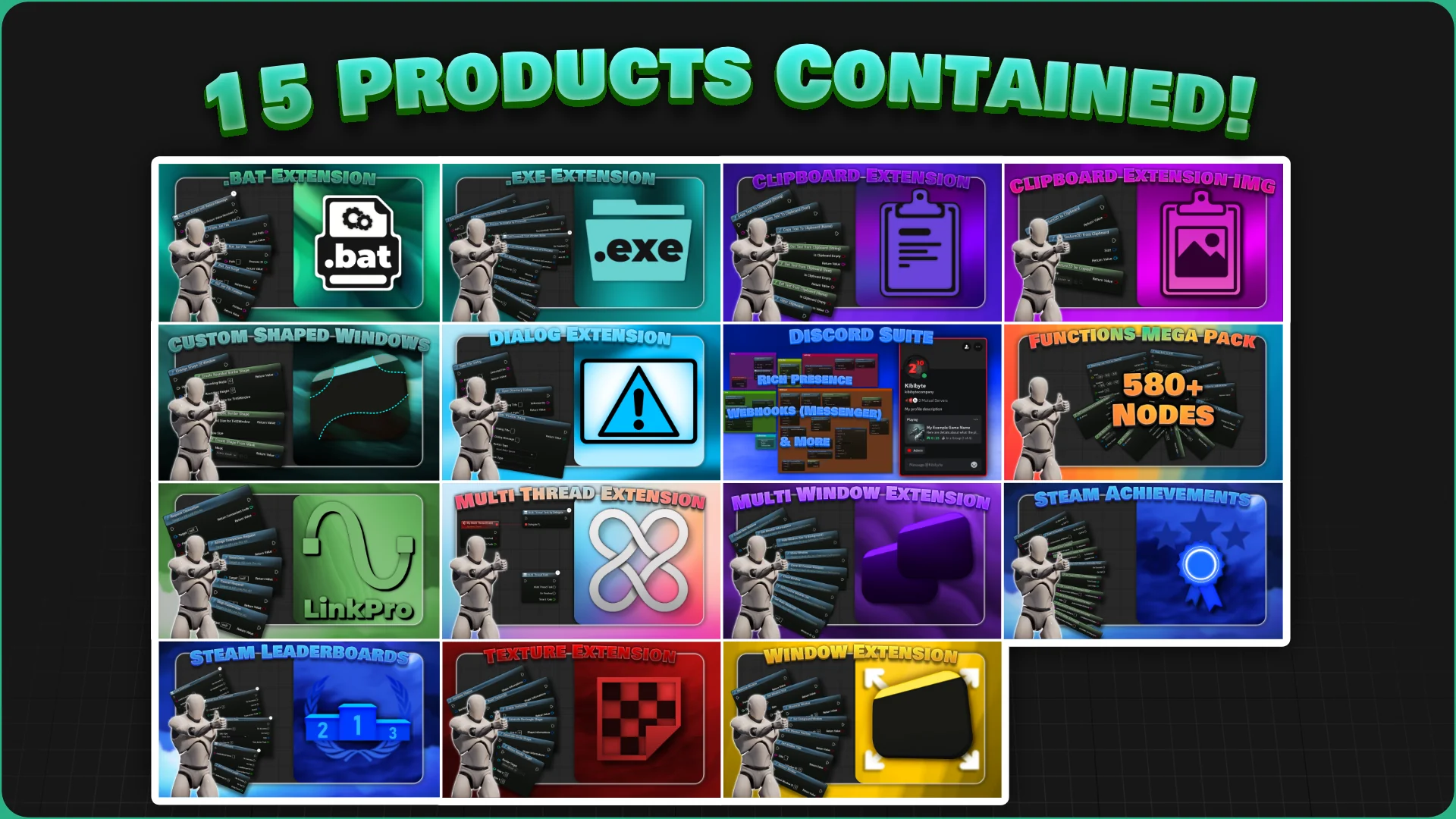
Nodes (Bundle) unifies fifteen specialized functional plugins into a single, cohesive development library containing over 650 individual nodes. With compatibility spanning Unreal Engine 5.1 through Unreal Engine 5.7, this collection provides access to both Blueprint and C++ implementations built upon an organized codebase exceeding 8,600 lines of code. It comes with full source code access, enabling teams to study, extend, or directly integrate its underlying architectures into both commercial and non-commercial production pipelines without external runtime limitations.
Fifteen Integrated Plugins in the Nodes Library
The primary utility of the bundle comes from bringing together fifteen standalone toolsets under a unified implementation footprint. When scaling a project, managing separate third-party plugins for each missing system call often creates version conflicts, overlapping header dependencies, and fragmented Blueprint palettes. By grouping related extensions together, the suite covers an extensive range of desktop and external platform functionalities in one place.
The included components address specialized technical requirements across several categories:
Operating System & Process Control: The.bat Extension,.exe Extension & Process Management, and Dialog Extension allow developers to launch executables, run script tasks, manage running system processes, and trigger native platform dialog boxes directly from gameplay logic.
Clipboard Operations: The Clipboard Extension alongside the specialized Clipboard Extension for Images allows projects to read and write text data as well as raw image buffers directly to and from the user operating system clipboard.
Windowing & Desktop Presentation: Deep control over operating system windows is handled via the Window Extension, Multi Window Extension, and Custom Shaped Windows, allowing applications to drive multiple viewports, non-standard window frames, and specialized multi-monitor desktop experiences.
Platform Integrations: Dedicated network interfaces connect external community networks via the Discord Suite and provide native game-service pipelines through Steam Achievements and Steam Leaderboards.
Core Engine Utilities: The Multi Thread Extension, Texture Extension, LinkPro: Project Connector, and the comprehensive Functions Mega Pack expand runtime data handling, parallel processing pathways, asset manipulation, and node utility sets.
Expanding Engine Capabilities Across Operating Systems and Windows
Desktop software built inside modern game engines often demands interface paradigms that diverge sharply from standard full-screen or bordered-window game formats. Applications like arch-viz configurators, launcher utilities, productivity applications, and multi-display simulator rigs require granular control over operating system window styling, multiple screen coordinate spaces, and process boundaries.
Through the bundled Window Extension and Multi Window Extension, developers can spawn and orchestrate supplemental windows from within a running project. This allows secondary viewports, custom debugging monitors, or detachable user interfaces to exist simultaneously across different desktop displays. When combined with Custom Shaped Windows, standard rectangular frame requirements are completely bypassed, permitting irregular UI forms, transparent desktop overlays, and stylized borders that conform to custom application graphics. The Dialog Extension complements these windowing setups by exposing native platform dialog options, ensuring file browsing prompts, confirmation notices, and warning popups match the native design conventions of the host operating system.
Direct machine-level communication is reinforced through the.exe Extension & Process Management and.bat Extension nodes. Complex production utilities can invoke external helper processes, orchestrate secondary command scripts, track running background instances, and exchange runtime execution statuses without leaving Unreal Engine's visual scripting framework. Data interchange is further augmented by both the Clipboard Extension and the Clipboard Extension for Images, granting runtime logic the ability to copy rendered screens, dynamic texture data, or string outputs straight to the host machine clipboard, as well as read incoming user clipboard buffers dynamically.
Platform Services and Performance in Nodes (Bundle)
Modern gaming titles rely heavily on social ecosystems and achievements to drive player retention and multi-user interaction. Nodes (Bundle) bridges the gap between external public APIs and internal game states by providing standalone interfaces for Discord and Steam. The Discord Suite ties into the Discord SDK, enabling developers to incorporate rich presence, profile handshakes, and public network hooks directly into visual node trees.
For platform achievements and community rankings, the package provides focused integration via the Steam Achievements and Steam Leaderboards components. These nodes utilize the public SteamAPI provided by Valve to submit player progress, pull remote leaderboard statistics, unlock specific achievement milestones, and handle player scoring records without requiring custom manual wrappers for Valve public interfaces. Neither Discord nor Valve is affiliated with this bundle, as both extensions work strictly via publicly distributed SDK interfaces made for third-party client integrations.
Underpinning these player-facing hooks are general performance and computation utilities. The Multi Thread Extension enables developers to branch heavy tasks off the primary game thread, helping avoid UI hitching and main-loop execution drops during intensive calculation periods. The Texture Extension facilitates runtime texture manipulation and data processing, while the Functions Mega Pack supplies an extensive raster of general mathematical, logical, and transformation nodes to clean up complex Blueprint spaghetti.
Version Compatibility and Engine Integration Architecture
Version support is split across distinct releases to account for internal engine changes across Unreal Engine 5 updates. Version 5.1 of the plugin is made for modern engine updates ranging from UE5.2 through UE5.7, providing access to the complete suite of nodes, the newer Blueprint Generator AI tool, and all fifteen constituent extensions. For projects remaining on Unreal Engine 5.1, the bundle provides Version 3.0, though certain plugins present in the modern release are absent from the UE5.1 build.
Because the bundle delivers over 8,600 lines of clean, organized code along with full source code distribution, integration is equally viable whether working exclusively within Blueprint graphs or compiling through a native C++ project pipeline. Developers retain the freedom to check specific nodes manually and inspect the underlying implementations directly. Licensing operates on a per-seat model, granting permission to utilize the suite across any number of commercial and non-commercial productions while prohibiting direct reselling of the plugin files themselves.
Future updates that add functional node rasters to the developer collection are integrated directly into the bundle without separate add-on requirements, ensuring that the library continues expanding alongside future engine capabilities. Whether building multi-screen installation tools, complex procedural systems that demand background threading, or standard desktop games that require full Steam achievement integration, the bundle acts as an all-in-one utility bridge between Unreal Engine and the underlying platform.
 Engine Tools
 Engine Tools
 Engine Tools