"148d1066ed74e216"{"id":"1002932","slug":"not-yet-dialogue-plugin-system","title":"Not Yet: Dialogue Plugin System","category":"Dialog Systems","engine":"4.27 - 5.6","assetVersion":"Asset Version: 16.0.2 - 18.0.3","engineVersion":"Engine Version: 4.27 - 5.6","tag":"Dialog Systems","accent":"blue","visual":"mech","summary":"Explore the Dialogue Plugin System, a graph editor tool for authoring linear and multi-branch character conversations in games like The Ascent and Backbone.","platform":"Unreal Engine","indexPolicy":"index","publishedAt":"2026-11-21T23:09:07.422Z","updatedAt":"2026-11-21T23:09:07.422Z","sourceNotes":[],"fileContents":[],"compatibility":["Unreal Engine","Asset Version: 16.0.2 - 18.0.3","Engine Version: 4.27 - 5.6"],"featuredImage":{"alt":"Not Yet: Dialogue Plugin System","src":"/wp-content/uploads/published/2026/11/9fe83bcb1fae-251e37b1-033e-4e3d-a6e2-6f3971d23763-8308094d9b.webp"},"fileSizeBytes":31942677,"hasDownloadLink":true,"downloads":0,"terms":[{"taxonomy":"category","slug":"dialog-systems-tools-and-plugins","name":"Dialog Systems"}],"galleryImages":[{"src":"/wp-content/uploads/published/2026/11/5898c891c786-fd12e17f-f550-4b0e-aa1e-abb7caf23de0-24c7ea0ba5.webp","alt":"Not Yet: Dialogue Plugin System"},{"src":"/wp-content/uploads/published/2026/11/4f0ffb98541d-654828e0-2a32-46a9-85d3-f7d1faf9c1f5-c750ed0347.webp","alt":"Not Yet: Dialogue Plugin System"},{"src":"/wp-content/uploads/published/2026/11/a5949fcf87c1-04b90243-44a0-4f01-86b3-805d73219969-58402125c8.webp","alt":"Not Yet: Dialogue Plugin System"},{"src":"/wp-content/uploads/published/2026/11/9994f4038db1-8e8c768f-4ca6-4de5-91d2-16545c0f6625-f70f385343.webp","alt":"Not Yet: Dialogue Plugin System"},{"src":"/wp-content/uploads/published/2026/11/130fa29af766-ca98d9a3-1fe5-49cd-a1e9-cf77cacedcc2-4cf10f08ae.webp","alt":"Not Yet: Dialogue Plugin System"},{"src":"/wp-content/uploads/published/2026/11/0ef8b30b51b3-7ead4eeb-f55c-4b96-b6a8-7b86010d1092-adfee0e0eb.webp","alt":"Not Yet: Dialogue Plugin System"},{"src":"/wp-content/uploads/published/2026/11/08d983f660c0-43b3aa0f-9978-4b1b-8f82-092ebf467262-0c4d570aed.webp","alt":"Not Yet: Dialogue Plugin System"}],"accessPanel":{"kind":"resource","title":"Get this resource","safetyNote":"Resources are manually reviewed before listing to improve quality and reduce obvious risks.","fileName":"Not Yet Dialogue Plugin System.7z","resourceType":"Resource archive","versions":[]},"contentHtml":"\u003cp\u003eCharacter dialogue serves as a primary conduit for conveying lore, imparting gameplay objectives, and defining narrative tone. Without a dedicated toolset, constructing interactive conversations often requires cobbling together disparate tables, nested text arrays, or rigid custom scripts that prove difficult to read, iterate upon, and maintain. The Dialogue Plugin System resolves these development bottlenecks by providing a specialized graph editor built specifically for authoring character conversations. Acting as an editor tool and utility system, it enables developers to bridge underlying code logic with visual Blueprint workflows to manage interactive character communication efficiently.\u003c/p\u003e \u003ch2\u003eStructuring Interactive Narrative via the Dialogue Plugin System\u003c/h2\u003e\n\u003cp\u003eAt the center of the Dialogue Plugin System is its dedicated graph editor workspace. Rather than asking narrative designers and gameplay programmers to manage narrative progression through disconnected data sheets or complex code matrices, the tool presents conversation structures visually. Nodes within the graph editor represent individual conversational beats, spoken dialogue passages, and interaction transitions. By visually connecting these nodes, creators establish the structural flow of character interactions directly within the editor interface.\u003c/p\u003e\n\u003cp\u003eThe visual arrangement of conversation pathways provides instant structural clarity. When working within the graph editor, a designer can observe the direct trajectory of an exchange from the opening line delivered by an NPC to the subsequent responses accessible to the player. Because the system operates natively as an editor plugin, it facilitates direct coordination between character Blueprints and core game code. This structure ensures that dialogue data is not isolated from gameplay systems but can communicate with character logic, trigger events, and respond to the broader game state.\u003c/p\u003e \u003ch2\u003eGraph Editor Capabilities for Branch and Linear Dialogue Flows\u003c/h2\u003e\n\u003cp\u003eDialogue structures across game projects vary significantly depending on narrative scope and genre mechanics. The Dialogue Plugin System accommodates these distinct requirements by supporting both simple linear dialogues and complicated multi-branch dialogues within the same unified graph interface.\u003c/p\u003e\n\u003cp\u003eFor straightforward exchanges, the system permits clean, sequential node arrangements:\u003c/p\u003e\n\u003cul\u003e \u003cli\u003e\u003cstrong\u003eSimple Linear Dialogues:\u003c/strong\u003e In scenarios where non-player characters deliver monologues, relay ambient environmental commentary, or hand down straightforward quest objectives, conversational complexity is minimal. For these interactions, the graph editor allows developers to chain dialogue lines in a direct, forward sequence. This keeps the conversational graph clean and ensures minimal performance overhead, avoiding convoluted branching logic where only a linear exchange is required.\u003c/li\u003e \u003cli\u003e\u003cstrong\u003eComplicated Multi-Branch Dialogues:\u003c/strong\u003e In moments that require active player agency, interrogation, or high-stakes roleplaying choices, conversations must branch dynamically. The graph editor supports intricate node branching where a single dialogue prompt can diverge into multiple distinct responses. These pathways can further splinter into deeper inquiries, conditional dialog options, or separate conversation branches before reconverging or concluding. Handling this level of narrative density within a spatial graph environment prevents broken logic chains, orphaned text entries, and progression dead-ends that frequently occur when managing branching narrative manually.\u003c/li\u003e\n\u003c/ul\u003e\n\u003cp\u003eWhether handling a brief merchant line or a deeply nested conversational encounter, the easy-to-use graph editor ensures that the visual complexity of the layout corresponds directly to the functional complexity of the conversation itself.\u003c/p\u003e \u003ch2\u003eProven Commercial Deployments of the Dialogue Plugin\u003c/h2\u003e\n\u003cp\u003eThe practical utility of the Dialogue Plugin System is demonstrated through its integration into commercial video game releases across several completely distinct genres and production scales:\u003c/p\u003e\n\u003cul\u003e \u003cli\u003e\u003cstrong\u003eThe Ascent:\u003c/strong\u003e A cyberpunk action-shooter RPG. In an action-heavy cyberpunk environment, dialogue tools must juggle dense worldbuilding, rapid mission directives, and character interactions in crowded urban hubs without impeding the high-intensity combat pace of an isometric shooter RPG.\u003c/li\u003e \u003cli\u003e\u003cstrong\u003eBackbone:\u003c/strong\u003e A roleplaying detective adventure. Investigative adventure games place conversational interaction at the absolute center of their mechanical loop. With its focus on deduction, suspect interrogation, and narrative-driven roleplaying, this type of project relies heavily on complicated multi-branch dialogues where individual conversational choices dictate the flow of investigative encounters.\u003c/li\u003e \u003cli\u003e\u003cstrong\u003eWarriOrb:\u003c/strong\u003e A Souls-like platformer metroidvania. In a demanding genre defined by precision movement and atmospheric tension, dialogue interactions must remain concise, evocative, and tightly integrated with character positioning, ensuring lore delivery never interrupts platforming momentum.\u003c/li\u003e \u003cli\u003e\u003cstrong\u003eRevolution: Path of a Weaponsmith:\u003c/strong\u003e A third-person stealth shooter. Stealth-oriented action titles require targeted, context-dependent communication, where dialogue systems deliver tactical information, narrative stakes, and mission briefings between stealth encounters and combat sequences.\u003c/li\u003e\n\u003c/ul\u003e\n\u003cp\u003eThe successful execution of dialogue systems across these varied commercial titles confirms that the plugin is not constrained to a single narrative structure. Its underlying graph architecture easily scales from fast-paced action games to extensive, narrative-focused adventure titles.\u003c/p\u003e \u003ch2\u003eDeveloper Integration Resources and System Documentation\u003c/h2\u003e\n\u003cp\u003eAdopting an editor tool into an active development pipeline requires clear reference implementations and thorough instructional materials. The Dialogue Plugin System includes a comprehensive onboarding and maintenance toolkit designed to accelerate setup and long-term project stability:\u003c/p\u003e\n\u003cp\u003eTo assist developers in evaluating the interface before implementation, the package offers a Feature Showcase. This showcase demonstrates the operational capabilities of the graph editor in real time, illustrating how conversational nodes are organized, linked, and navigated. For teams ready to integrate the tool directly, the provided Example Project serves as a practical, working template. By exploring the Example Project within the editor, developers can dissect functional dialogue graphs, observe how dialogue nodes link with character Blueprints, and review the methods used to connect spoken exchanges with underlying game code.\u003c/p\u003e\n\u003cp\u003eComprehensive written Documentation provides clear technical explanations of the system's architecture, node behaviors, and Blueprint integration steps. Complementing the written guides, dedicated Video Tutorials walk creators through node placement, conversational branching setups, and workflow best practices visually. Furthermore, ongoing maintenance and updates are tracked systematically through detailed Patch Notes, giving development teams continuous visibility into system refinements, improvements, and fixes across the plugin lifecycle.\u003c/p\u003e\n\n\u003ch2\u003eExplore Similar Assets\u003c/h2\u003e\n\u003cul\u003e\n\u003cli\u003e\u003ca href=\"https://3dcghub.com/dialogue-builder/\" rel=\"noopener noreferrer\"\u003eDialogue Builder\u003c/a\u003e\u003c/li\u003e\n\u003cli\u003e\u003ca href=\"https://3dcghub.com/ascent-toolset-ats-v-2-2-quests-dialogues-and-state-machine/\" rel=\"noopener noreferrer\"\u003eAscent Toolset (ATS) V 2.2 - Quests, Dialogues and State Machine\u003c/a\u003e\u003c/li\u003e\n\u003cli\u003e\u003ca href=\"https://3dcghub.com/dialogue-plugin/\" rel=\"noopener noreferrer\"\u003eDialogue Plugin\u003c/a\u003e\u003c/li\u003e\n\u003cli\u003e\u003ca href=\"https://3dcghub.com/ogs-dialogue-quest-master/\" rel=\"noopener noreferrer\"\u003eOGS - Dialogue \u0026amp; Quest Master\u003c/a\u003e\u003c/li\u003e\n\u003cli\u003e\u003ca href=\"https://3dcghub.com/narrative-tales-node-based-quests-and-dialogue/\" rel=\"noopener noreferrer\"\u003eNarrative Tales - Node Based Quests and Dialogue\u003c/a\u003e\u003c/li\u003e\n\u003c/ul\u003e","contentTextLength":7320,"navigation":{"current":40,"total":4890,"previous":{"id":"1002933","slug":"operation-file-read-write","title":"Operation File [ Read / Write ]","category":"Engine Tools","platform":"Unreal Engine","updatedAt":"2026-11-21T23:16:41.766Z"},"next":{"id":"1002931","slug":"nodes-bundle","title":"Nodes (Bundle)","category":"Engine Tools","platform":"Unreal Engine","updatedAt":"2026-11-21T23:08:25.672Z"}},"relatedResources":[{"id":"1002921","slug":"dialogue-builder","title":"Dialogue Builder","category":"Dialog Systems","engine":"4.25 - 5.6","assetVersion":"Asset Version: 1.2 - 1.10","engineVersion":"Engine Version: 4.25 - 5.6","tag":"Dialog Systems","accent":"blue","visual":"mech","summary":"Build character conversations in Unreal Engine 5 with Dialogue Builder, featuring Blueprint Editor workflows, dual animation variables, and localization.","platform":"Unreal Engine","indexPolicy":"index","publishedAt":"2026-11-21T22:44:59.391Z","updatedAt":"2026-11-21T22:44:59.391Z","sourceNotes":[],"fileContents":[],"compatibility":["Unreal Engine","Asset Version: 1.2 - 1.10","Engine Version: 4.25 - 5.6"],"featuredImage":{"alt":"Dialogue Builder","src":"/wp-content/uploads/published/2026/11/c6e8fb94b483-625d1a17-f89f-4076-b2c9-5f2883d078c5-67069c13ce.webp"},"fileSizeBytes":5516937,"hasDownloadLink":true,"downloads":0},{"id":"1002918","slug":"ascent-toolset-ats-v-2-2-quests-dialogues-and-state-machine","title":"Ascent Toolset (ATS) V 2.2 - Quests, Dialogues and State Machine","category":"Dialog Systems","engine":"4.26 - 5.6","assetVersion":"Asset Version: 1.2.1 - 2.2","engineVersion":"Engine Version: 4.26 - 5.6","tag":"Dialog Systems","accent":"blue","visual":"mech","summary":"Ascent Toolset brings node-based quest design, branching dialogues, and generic finite state machines to Unreal Engine with full network replication.","platform":"Unreal Engine","indexPolicy":"index","publishedAt":"2026-11-21T22:23:53.599Z","updatedAt":"2026-11-21T22:23:53.599Z","sourceNotes":[],"fileContents":[],"compatibility":["Unreal Engine","Asset Version: 1.2.1 - 2.2","Engine Version: 4.26 - 5.6"],"featuredImage":{"alt":"Ascent Toolset (ATS) V 2.2 - Quests, Dialogues and State Machine","src":"/wp-content/uploads/published/2026/11/98218e5b8616-6d518ab6-a13b-4835-9c81-3e9b0d4504ba-96c5b4ea03.webp"},"fileSizeBytes":5842249,"hasDownloadLink":true,"downloads":0},{"id":"13636","slug":"dialogue-plugin","title":"Dialogue Plugin","category":"Dialog Systems","engine":"4.26 - 5.6","assetVersion":"Asset Version: 1.4 - 1.5","engineVersion":"Engine Version: 4.26 - 5.6","tag":"Dialog Systems","accent":"blue","visual":"mech","summary":"The Dialogue Plugin is a robust tool for Unreal Engine 5 that simplifies the creation of branching conversations. With a custom node-based editor and optional AI integration, it provides a professional solution for narrative-driven games.","platform":"Unreal Engine","indexPolicy":"noindex","publishedAt":"2026-03-11T09:23:26.000Z","updatedAt":"2026-11-21T19:04:51.413Z","sourceNotes":[],"fileContents":[],"compatibility":["Unreal Engine","Asset Version: 1.4 - 1.5","Engine Version: 4.26 - 5.6"],"featuredImage":{"alt":"Dialogue Plugin","src":"https://3dcghub.com/wp-content/uploads/2026/03/936120c3-4bdc-4cff-88bf-810e4facaedd.webp"},"fileSizeBytes":92563546,"hasDownloadLink":true,"downloads":0}]}[{"id":4225,"sourceId":4225,"taxonomyId":4225,"taxonomy":"category","slug":"asset-library","name":"Asset Library","parentId":null,"count":4744,"hasChildren":true,"href":"/","seoTitle":"Free Game Assets Library | 3DCGHUB","seoDescription":"Browse free Unreal Engine, Unity, Blender assets and game development tutorials on 3DCGHUB with previews, compatibility notes, and secure downloads.","sitemapEnabled":true,"children":[{"id":4227,"sourceId":4227,"taxonomyId":4227,"taxonomy":"category","slug":"blender-add-ons-plugins","name":"Blender Add-ons \u0026 Plugins","parentId":4225,"count":10,"hasChildren":false,"href":"/category/blender-add-ons-plugins/","seoTitle":"Free Blender Add-ons \u0026 Plugins | 3DCGHUB","seoDescription":"Browse free Blender Add-ons \u0026 Plugins tools for Blender on 3DCGHUB: curated downloads with preview images, compatibility notes and secure download access.","sitemapEnabled":true},{"id":514,"sourceId":514,"taxonomyId":514,"taxonomy":"category","slug":"unity-2","name":"Unity","parentId":4225,"count":453,"hasChildren":true,"href":"/category/unity-2/","seoTitle":"Free Unity Assets | 3DCGHUB","seoDescription":"Browse free Unity resources on 3DCGHUB: curated downloads with preview images, compatibility notes and secure download access.","sitemapEnabled":true,"children":[{"id":523,"sourceId":523,"taxonomyId":523,"taxonomy":"category","slug":"2d","name":"2D","parentId":514,"count":1,"hasChildren":true,"href":"/category/2d/","seoTitle":"Free Unity 2D | 3DCGHUB","seoDescription":"Browse free 2D assets for Unity on 3DCGHUB: curated downloads with preview images, compatibility notes and secure download access.","sitemapEnabled":true},{"id":515,"sourceId":515,"taxonomyId":515,"taxonomy":"category","slug":"3d-unity-2","name":"3D","parentId":514,"count":162,"hasChildren":true,"href":"/category/3d-unity-2/","seoTitle":"Free Unity 3D Assets | 3DCGHUB","seoDescription":"Browse free 3D assets for Unity on 3DCGHUB: curated downloads with preview images, compatibility notes and secure download access.","sitemapEnabled":true},{"id":565,"sourceId":565,"taxonomyId":565,"taxonomy":"category","slug":"add-ons","name":"Add-Ons","parentId":514,"count":2,"hasChildren":false,"href":"/category/add-ons/","seoTitle":"Free Unity Add-Ons | 3DCGHUB","seoDescription":"Browse free Add-Ons assets for Unity on 3DCGHUB: curated downloads with preview images, compatibility notes and secure download access.","sitemapEnabled":true},{"id":529,"sourceId":529,"taxonomyId":529,"taxonomy":"category","slug":"audio-unity-2","name":"Audio","parentId":514,"count":1,"hasChildren":true,"href":"/category/audio-unity-2/","seoTitle":"Free Unity Audio | 3DCGHUB","seoDescription":"Browse free Audio for Unity on 3DCGHUB: curated downloads with preview images, compatibility notes and secure download access.","sitemapEnabled":true},{"id":557,"sourceId":557,"taxonomyId":557,"taxonomy":"category","slug":"templates","name":"Templates","parentId":514,"count":36,"hasChildren":true,"href":"/category/templates/","seoTitle":"Free Unity Templates | 3DCGHUB","seoDescription":"Browse free Unity project templates on 3DCGHUB. Starter kits with previews, compatibility notes, and secure download access.","sitemapEnabled":true},{"id":533,"sourceId":533,"taxonomyId":533,"taxonomy":"category","slug":"tools-unity-2","name":"Tools","parentId":514,"count":0,"hasChildren":true,"href":"/category/tools-unity-2/","sitemapEnabled":true},{"id":554,"sourceId":554,"taxonomyId":554,"taxonomy":"category","slug":"vfx-unity-2","name":"VFX","parentId":514,"count":4,"hasChildren":true,"href":"/category/vfx-unity-2/","seoTitle":"Free Unity VFX | 3DCGHUB","seoDescription":"Browse free VFX for Unity on 3DCGHUB: curated downloads with preview images, compatibility notes and secure download access.","sitemapEnabled":true}]},{"id":511,"sourceId":511,"taxonomyId":511,"taxonomy":"category","slug":"unreal-engine-2","name":"Unreal Engine","parentId":4225,"count":4282,"hasChildren":true,"href":"/category/unreal-engine-2/","seoTitle":"Free Unreal Engine Assets | 3DCGHUB","seoDescription":"Browse free Unreal Engine resources on 3DCGHUB: curated downloads with preview images, compatibility notes and secure download access.","sitemapEnabled":true,"children":[{"id":54,"sourceId":54,"taxonomyId":54,"taxonomy":"category","slug":"3d","name":"3D","parentId":511,"count":2428,"hasChildren":true,"href":"/category/3d/","seoTitle":"Free Unreal Engine 3D | 3DCGHUB","seoDescription":"Browse free 3D assets for Unreal Engine on 3DCGHUB: curated downloads with preview images, compatibility notes and secure download access.","sitemapEnabled":true},{"id":441,"sourceId":441,"taxonomyId":441,"taxonomy":"category","slug":"animations","name":"Animations","parentId":511,"count":245,"hasChildren":true,"href":"/category/animations/","seoTitle":"Free Unreal Engine Animations | 3DCGHUB","seoDescription":"Browse free Animations for Unreal Engine on 3DCGHUB: curated downloads with preview images, compatibility notes and secure download access.","sitemapEnabled":true},{"id":446,"sourceId":446,"taxonomyId":446,"taxonomy":"category","slug":"audio","name":"Audio","parentId":511,"count":63,"hasChildren":true,"href":"/category/audio/","seoTitle":"Free Unreal Engine Audio Resources | 3DCGHUB","seoDescription":"Browse free Unreal Engine audio resources including sound effects, voices, dialogue, and ambient sounds. Curated free downloads on 3DCGHUB.","sitemapEnabled":true},{"id":466,"sourceId":466,"taxonomyId":466,"taxonomy":"category","slug":"game-systems","name":"Game Systems","parentId":511,"count":356,"hasChildren":true,"href":"/category/game-systems/","seoTitle":"Free Unreal Engine Game Systems | 3DCGHUB","seoDescription":"Browse free Game Systems tools for Unreal Engine on 3DCGHUB: curated downloads with preview images, compatibility notes and secure download access.","sitemapEnabled":true},{"id":478,"sourceId":478,"taxonomyId":478,"taxonomy":"category","slug":"game-templates","name":"Game Templates","parentId":511,"count":150,"hasChildren":true,"href":"/category/game-templates/","seoTitle":"Free Unreal Engine Game Templates | 3DCGHUB","seoDescription":"Browse free Game Templates for Unreal Engine on 3DCGHUB: curated downloads with preview images, compatibility notes and secure download access.","sitemapEnabled":true},{"id":432,"sourceId":432,"taxonomyId":432,"taxonomy":"category","slug":"hdri","name":"HDRI","parentId":511,"count":6,"hasChildren":true,"href":"/category/hdri/","seoTitle":"Free Unreal Engine HDRI | 3DCGHUB","seoDescription":"Browse free Unreal Engine HDRI skies and lighting maps on 3DCGHUB. Environment lighting with previews and secure downloads.","sitemapEnabled":true},{"id":228,"sourceId":228,"taxonomyId":228,"taxonomy":"category","slug":"material-and-textures","name":"Material \u0026 Textures","parentId":511,"count":172,"hasChildren":true,"href":"/category/material-and-textures/","seoTitle":"Free Unreal Engine Material \u0026 Textures | 3DCGHUB","seoDescription":"Browse free Material \u0026 Textures for Unreal Engine on 3DCGHUB: curated downloads with preview images, compatibility notes and secure download access.","sitemapEnabled":true},{"id":298,"sourceId":298,"taxonomyId":298,"taxonomy":"category","slug":"sprites-and-flipbooks","name":"Sprites \u0026 Flipbooks","parentId":511,"count":17,"hasChildren":true,"href":"/category/sprites-and-flipbooks/","seoTitle":"Free Unreal Engine Sprites \u0026 Flipbooks | 3DCGHUB","seoDescription":"Browse free Sprites \u0026 Flipbooks assets for Unreal Engine on 3DCGHUB: curated downloads with preview images, compatibility notes and secure download access.","sitemapEnabled":true},{"id":489,"sourceId":489,"taxonomyId":489,"taxonomy":"category","slug":"tools-and-plugins","name":"Tools \u0026 Plugins","parentId":511,"count":390,"hasChildren":true,"href":"/category/tools-and-plugins/","seoTitle":"Free Unreal Engine Tools \u0026 Plugins | 3DCGHUB","seoDescription":"Browse free Tools \u0026 Plugins for Unreal Engine on 3DCGHUB: curated downloads with preview images, compatibility notes and secure download access.","sitemapEnabled":true},{"id":459,"sourceId":459,"taxonomyId":459,"taxonomy":"category","slug":"ui","name":"UI","parentId":511,"count":43,"hasChildren":true,"href":"/category/ui/","seoTitle":"Free Unreal Engine UI | 3DCGHUB","seoDescription":"Browse free UI for Unreal Engine on 3DCGHUB: curated downloads with preview images, compatibility notes and secure download access.","sitemapEnabled":true},{"id":450,"sourceId":450,"taxonomyId":450,"taxonomy":"category","slug":"vfx","name":"VFX","parentId":511,"count":412,"hasChildren":true,"href":"/category/vfx/","seoTitle":"Free Unreal Engine VFX | 3DCGHUB","seoDescription":"Browse free VFX for Unreal Engine on 3DCGHUB: curated downloads with preview images, compatibility notes and secure download access.","sitemapEnabled":true}]}]},{"id":4222,"sourceId":4222,"taxonomyId":4222,"taxonomy":"category","slug":"tutorial-library","name":"Tutorial Library","parentId":null,"count":117,"hasChildren":false,"href":"/tutorials/","seoTitle":"Free Game Development Tutorial Library | 3DCGHUB","seoDescription":"Browse free game development tutorials for Unreal Engine, Unity, Blender, and more on 3DCGHUB with practical workflows and secure downloads.","sitemapEnabled":true}]
Resource screenshots
1 / 7
Join our channel
Follow 3DCGHUB on Telegram for new resource drops, migration updates, and community notices.
Resources are manually reviewed before listing to improve quality and reduce obvious risks.
No account required
Dialog Systems
Not Yet: Dialogue Plugin System
Explore the Dialogue Plugin System, a graph editor tool for authoring linear and multi-branch character conversations in games like The Ascent and Backbone.
Character dialogue serves as a primary conduit for conveying lore, imparting gameplay objectives, and defining narrative tone. Without a dedicated toolset, constructing interactive conversations often requires cobbling together disparate tables, nested text arrays, or rigid custom scripts that prove difficult to read, iterate upon, and maintain. The Dialogue Plugin System resolves these development bottlenecks by providing a specialized graph editor built specifically for authoring character conversations. Acting as an editor tool and utility system, it enables developers to bridge underlying code logic with visual Blueprint workflows to manage interactive character communication efficiently.
Structuring Interactive Narrative via the Dialogue Plugin System
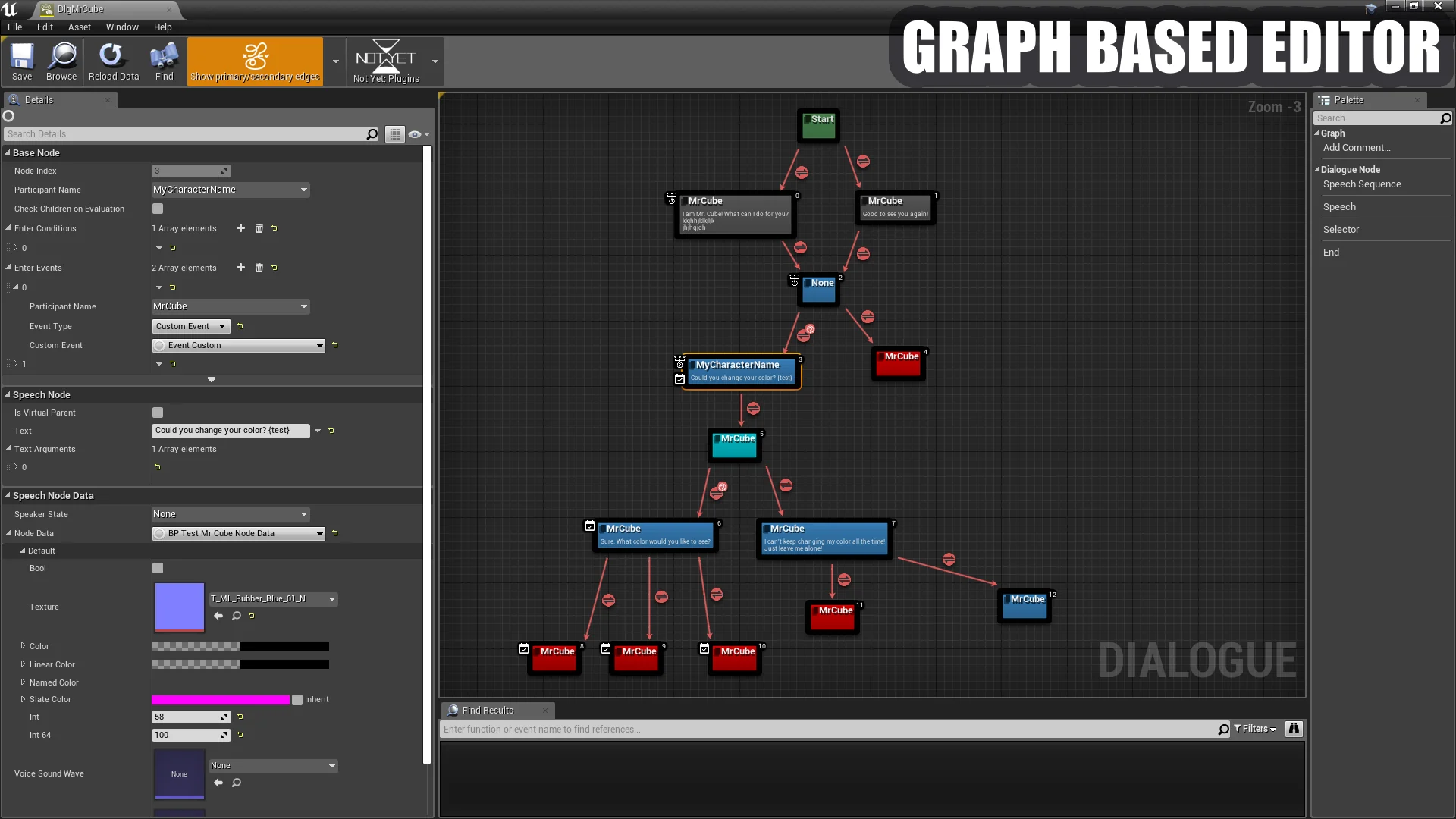
At the center of the Dialogue Plugin System is its dedicated graph editor workspace. Rather than asking narrative designers and gameplay programmers to manage narrative progression through disconnected data sheets or complex code matrices, the tool presents conversation structures visually. Nodes within the graph editor represent individual conversational beats, spoken dialogue passages, and interaction transitions. By visually connecting these nodes, creators establish the structural flow of character interactions directly within the editor interface.
The visual arrangement of conversation pathways provides instant structural clarity. When working within the graph editor, a designer can observe the direct trajectory of an exchange from the opening line delivered by an NPC to the subsequent responses accessible to the player. Because the system operates natively as an editor plugin, it facilitates direct coordination between character Blueprints and core game code. This structure ensures that dialogue data is not isolated from gameplay systems but can communicate with character logic, trigger events, and respond to the broader game state.
Graph Editor Capabilities for Branch and Linear Dialogue Flows
Dialogue structures across game projects vary significantly depending on narrative scope and genre mechanics. The Dialogue Plugin System accommodates these distinct requirements by supporting both simple linear dialogues and complicated multi-branch dialogues within the same unified graph interface.
For straightforward exchanges, the system permits clean, sequential node arrangements:
Simple Linear Dialogues: In scenarios where non-player characters deliver monologues, relay ambient environmental commentary, or hand down straightforward quest objectives, conversational complexity is minimal. For these interactions, the graph editor allows developers to chain dialogue lines in a direct, forward sequence. This keeps the conversational graph clean and ensures minimal performance overhead, avoiding convoluted branching logic where only a linear exchange is required.
Complicated Multi-Branch Dialogues: In moments that require active player agency, interrogation, or high-stakes roleplaying choices, conversations must branch dynamically. The graph editor supports intricate node branching where a single dialogue prompt can diverge into multiple distinct responses. These pathways can further splinter into deeper inquiries, conditional dialog options, or separate conversation branches before reconverging or concluding. Handling this level of narrative density within a spatial graph environment prevents broken logic chains, orphaned text entries, and progression dead-ends that frequently occur when managing branching narrative manually.
Whether handling a brief merchant line or a deeply nested conversational encounter, the easy-to-use graph editor ensures that the visual complexity of the layout corresponds directly to the functional complexity of the conversation itself.
Proven Commercial Deployments of the Dialogue Plugin
The practical utility of the Dialogue Plugin System is demonstrated through its integration into commercial video game releases across several completely distinct genres and production scales:
The Ascent: A cyberpunk action-shooter RPG. In an action-heavy cyberpunk environment, dialogue tools must juggle dense worldbuilding, rapid mission directives, and character interactions in crowded urban hubs without impeding the high-intensity combat pace of an isometric shooter RPG.
Backbone: A roleplaying detective adventure. Investigative adventure games place conversational interaction at the absolute center of their mechanical loop. With its focus on deduction, suspect interrogation, and narrative-driven roleplaying, this type of project relies heavily on complicated multi-branch dialogues where individual conversational choices dictate the flow of investigative encounters.
WarriOrb: A Souls-like platformer metroidvania. In a demanding genre defined by precision movement and atmospheric tension, dialogue interactions must remain concise, evocative, and tightly integrated with character positioning, ensuring lore delivery never interrupts platforming momentum.
Revolution: Path of a Weaponsmith: A third-person stealth shooter. Stealth-oriented action titles require targeted, context-dependent communication, where dialogue systems deliver tactical information, narrative stakes, and mission briefings between stealth encounters and combat sequences.
The successful execution of dialogue systems across these varied commercial titles confirms that the plugin is not constrained to a single narrative structure. Its underlying graph architecture easily scales from fast-paced action games to extensive, narrative-focused adventure titles.
Developer Integration Resources and System Documentation
Adopting an editor tool into an active development pipeline requires clear reference implementations and thorough instructional materials. The Dialogue Plugin System includes a comprehensive onboarding and maintenance toolkit designed to accelerate setup and long-term project stability:
To assist developers in evaluating the interface before implementation, the package offers a Feature Showcase. This showcase demonstrates the operational capabilities of the graph editor in real time, illustrating how conversational nodes are organized, linked, and navigated. For teams ready to integrate the tool directly, the provided Example Project serves as a practical, working template. By exploring the Example Project within the editor, developers can dissect functional dialogue graphs, observe how dialogue nodes link with character Blueprints, and review the methods used to connect spoken exchanges with underlying game code.
Comprehensive written Documentation provides clear technical explanations of the system's architecture, node behaviors, and Blueprint integration steps. Complementing the written guides, dedicated Video Tutorials walk creators through node placement, conversational branching setups, and workflow best practices visually. Furthermore, ongoing maintenance and updates are tracked systematically through detailed Patch Notes, giving development teams continuous visibility into system refinements, improvements, and fixes across the plugin lifecycle.
 Dialog Systems
 Dialog Systems
 Dialog Systems