"148d1066ed74e216"{"id":"1002921","slug":"dialogue-builder","title":"Dialogue Builder","category":"Dialog Systems","engine":"4.25 - 5.6","assetVersion":"Asset Version: 1.2 - 1.10","engineVersion":"Engine Version: 4.25 - 5.6","tag":"Dialog Systems","accent":"blue","visual":"mech","summary":"Build character conversations in Unreal Engine 5 with Dialogue Builder, featuring Blueprint Editor workflows, dual animation variables, and localization.","platform":"Unreal Engine","indexPolicy":"index","publishedAt":"2026-11-21T22:44:59.391Z","updatedAt":"2026-11-21T22:44:59.391Z","sourceNotes":[],"fileContents":[],"compatibility":["Unreal Engine","Asset Version: 1.2 - 1.10","Engine Version: 4.25 - 5.6"],"featuredImage":{"alt":"Dialogue Builder","src":"/wp-content/uploads/published/2026/11/c6e8fb94b483-625d1a17-f89f-4076-b2c9-5f2883d078c5-67069c13ce.webp"},"fileSizeBytes":5516937,"hasDownloadLink":true,"downloads":0,"terms":[{"taxonomy":"category","slug":"dialog-systems-tools-and-plugins","name":"Dialog Systems"}],"galleryImages":[{"src":"/wp-content/uploads/published/2026/11/b174f57c9adb-28357a62-578b-40dc-974b-9fdc1d143185-631fe4fbf1.webp","alt":"Dialogue Builder"},{"src":"/wp-content/uploads/published/2026/11/479a6e60c6eb-dabbcdbf-88c1-4cad-bbf8-43c6345e2962-f9e2bd34a3.webp","alt":"Dialogue Builder"},{"src":"/wp-content/uploads/published/2026/11/d33343983167-9f32f6c1-4f03-45ac-b657-4e5286727fbf-eff65c3597.webp","alt":"Dialogue Builder"},{"src":"/wp-content/uploads/published/2026/11/c5a218c2b8da-0b0f13e4-760c-4f13-aab8-fd09de724209-1eb5f14fa3.webp","alt":"Dialogue Builder"},{"src":"/wp-content/uploads/published/2026/11/6586d0f515e2-19c0acdd-ac0a-4ffb-85f6-ee2978eeba3a-dd8bac2c56.webp","alt":"Dialogue Builder"}],"accessPanel":{"kind":"resource","title":"Get this resource","safetyNote":"Resources are manually reviewed before listing to improve quality and reduce obvious risks.","fileName":"Dialogue Builder.7z","resourceType":"Resource archive","versions":[]},"contentHtml":"\u003ch2\u003eConsolidating Dialogue Authoring Inside the Blueprint Editor\u003c/h2\u003e\u003cp\u003eNarrative design within Unreal Engine 5 often encounters friction when dialogue systems rely on external script files, detached tables, or third-party graph editors. Dialogue Builder centralizes conversation creation directly within the native Unreal Engine Blueprint Editor. Instead of requiring developers to balance multiple disconnected plugins or custom narrative scripting languages, the asset houses all necessary dialogue functionality inside a single unified structure.\u003c/p\u003e\u003cp\u003eBy centering conversation development around a common, simple developer experience, technical designers and narrative writers can leverage the native visual scripting tools they already use daily. Branching trees, conversational decisions, speaker prompts, and player interaction triggers are authored as standard Blueprint elements. Because all conversation features reside in one asset, teams do not need to create bridge scripts between external conversation graphs and engine gameplay classes. This consolidated workflow allows developers to iterate on branching narrative logic, evaluate dialogue trees, and link conversational events straight into Unreal Engine 5 gameplay mechanics with minimal friction.\u003c/p\u003e\u003ch2\u003eConfiguring Dual Body and Face Animation Variables in Dialogue Builder\u003c/h2\u003e\u003cp\u003eVisual realism during character interactions depends heavily on how animations are coordinated during speech. In many interaction systems, characters are restricted to a single monolithic animation track, forcing animators to pre-bake hundreds of bespoke clips where body movement and facial expressions are fused together. Dialogue Builder resolves this limitation through an update introduced in version 1.9, which added a second animation variable to independently govern body and face animations.\u003c/p\u003e\u003cp\u003eWith two distinct animation variables available within the dialogue system, character setups can separate broad physical movement from detailed facial acting. Developers can assign one animation variable to direct full-body poses, idling shifts, or physical gestures, while the second animation variable drives facial expressions, brow movements, and phonemes. This split-track approach gives teams the flexibility to adjust an actor's emotional tone or speech performance without altering their physical posture. Decoupling facial performances from physical body animations within the dialogue graph eliminates redundant animation baking, streamlines asset pipelines, and provides narrative teams with granular control over character delivery across multi-branch conversations.\u003c/p\u003e\u003ch2\u003eEvaluating Interactive Environments with DemoEditor and MultiplayerDemoEditor\u003c/h2\u003e\u003cp\u003eManaging dialogue across single-player and multiplayer environments presents distinct architectural challenges. In single-player titles, dialogue logic primarily manages character attention, audio playback, and interface choices. In networked games, however, conversations must replicate accurately across servers and connected clients without desynchronizing story states or displaying prompt anomalies.\u003c/p\u003e\u003cp\u003eDialogue Builder provides dedicated testing environments to help creators navigate these differences, including a standard Demo, a DemoEditor, a MultiplayerOverview, and a MultiplayerDemoEditor. Developers building standalone narrative experiences can explore the Demo and DemoEditor to see how dialogue sequences are initialized, choices are routed, and character events are triggered in real-time. For networked productions, the MultiplayerOverview and MultiplayerDemoEditor supply direct working examples of how conversation logic operates in replicated scenarios. Technical designers can inspect the node configurations inside the MultiplayerDemoEditor to examine how dialogue authority, client displays, and networked state synchronization are handled. These inspection environments provide accessible, transparent references, allowing teams to test and debug their interactive dialogue flows before deploying them into full gameplay production.\u003c/p\u003e\u003ch2\u003eLocalization Workflows and Shipment Mode Packaging Fixes\u003c/h2\u003e\u003cp\u003eDeploying a narrative-driven game to international audiences requires an accessible localization framework. Hardcoded strings and rigid conversation graphs can severely complicate translation passes, leading to delays and localization bugs. Dialogue Builder addresses this through integrated localization support introduced in update v1.9. By incorporating localization directly into the dialogue creation toolset, teams can organize, extract, and translate conversational text without breaking underlying node logic or corrupting actor references. Dialogue nodes preserve their structure across multiple language sets, streamlining the path from script writing to multilingual voice and text delivery.\u003c/p\u003e\u003cp\u003eIn addition to localization functionality, version 1.9 introduced a critical shipment mode package fix. During the development cycle, Unreal Engine projects often compile cleanly in editor play modes despite containing loose references or unhandled dependencies. However, cooking and packaging a final build in shipment mode frequently causes fatal compilation errors if editor modules or unverified asset references are present. The shipment mode package fix resolves these build-level conflicts within the dialogue framework, ensuring that projects can package cleanly for distribution without cooking failures tied to dialogue assets.\u003c/p\u003e\u003ch2\u003eTutorial Resources, Documentation, and Upgrading the Dialogue Builder Plugin\u003c/h2\u003e\u003cp\u003eMaintaining narrative systems across active project timelines requires accessible learning materials and structured upgrade pathways. Dialogue Builder includes comprehensive documentation, an initial tutorial, a dedicated video overview, and a focused UE5 overview to guide users through initial setup and day-to-day conversation authoring. These onboarding materials outline the core mechanics of the asset, demonstrating how to construct conversation trees, route animation variables, and manage interaction logic directly in the Blueprint Editor.\u003c/p\u003e\u003cp\u003eAs production progresses, developers often need to incorporate new releases and upcoming updates without endangering their existing narrative work. The documentation specifically addresses the update process, detailing how to update the plugin when a project already has an earlier version installed. Following these structured update guidelines ensures that active conversation files, dual animation assignments, and localization tables remain intact when transitioning to updated releases like v1.9 or subsequent software patches. Categorized under system, dialogue, and character tools, Dialogue Builder delivers a complete, cohesive framework for Unreal Engine 5 developers seeking to craft interactive character conversations within an all-in-one Blueprint workflow.\u003c/p\u003e\n\n\u003ch2\u003eContinue Browsing Similar Packs\u003c/h2\u003e\n\u003cul\u003e\n\u003cli\u003e\u003ca href=\"https://3dcghub.com/ascent-toolset-ats-v-2-2-quests-dialogues-and-state-machine/\" rel=\"noopener noreferrer\"\u003eAscent Toolset (ATS) V 2.2 - Quests, Dialogues and State Machine\u003c/a\u003e\u003c/li\u003e\n\u003cli\u003e\u003ca href=\"https://3dcghub.com/dialogue-plugin/\" rel=\"noopener noreferrer\"\u003eDialogue Plugin\u003c/a\u003e\u003c/li\u003e\n\u003cli\u003e\u003ca href=\"https://3dcghub.com/ogs-dialogue-quest-master/\" rel=\"noopener noreferrer\"\u003eOGS - Dialogue \u0026amp; Quest Master\u003c/a\u003e\u003c/li\u003e\n\u003cli\u003e\u003ca href=\"https://3dcghub.com/spline-grind-rail-builder-v2-grinding-and-zipline-movement-system/\" rel=\"noopener noreferrer\"\u003eSpline Grind Rail Builder v2 - Grinding \u0026amp; Zipline Movement System\u003c/a\u003e\u003c/li\u003e\n\u003cli\u003e\u003ca href=\"https://3dcghub.com/hero-character-voices-warrior-voice-pack/\" rel=\"noopener noreferrer\"\u003eHero Character Voices: Warrior Voice Pack\u003c/a\u003e\u003c/li\u003e\n\u003c/ul\u003e","contentTextLength":7092,"navigation":{"current":51,"total":4890,"previous":{"id":"1002922","slug":"easycsv","title":"easyCSV","category":"Engine Tools","platform":"Unreal Engine","updatedAt":"2026-11-21T22:45:27.847Z"},"next":{"id":"1002920","slug":"easy-colliders","title":"Easy Colliders","category":"Engine Tools","platform":"Unreal Engine","updatedAt":"2026-11-21T22:25:04.059Z"}},"relatedResources":[{"id":"1002932","slug":"not-yet-dialogue-plugin-system","title":"Not Yet: Dialogue Plugin System","category":"Dialog Systems","engine":"4.27 - 5.6","assetVersion":"Asset Version: 16.0.2 - 18.0.3","engineVersion":"Engine Version: 4.27 - 5.6","tag":"Dialog Systems","accent":"blue","visual":"mech","summary":"Explore the Dialogue Plugin System, a graph editor tool for authoring linear and multi-branch character conversations in games like The Ascent and Backbone.","platform":"Unreal Engine","indexPolicy":"index","publishedAt":"2026-11-21T23:09:07.422Z","updatedAt":"2026-11-21T23:09:07.422Z","sourceNotes":[],"fileContents":[],"compatibility":["Unreal Engine","Asset Version: 16.0.2 - 18.0.3","Engine Version: 4.27 - 5.6"],"featuredImage":{"alt":"Not Yet: Dialogue Plugin System","src":"/wp-content/uploads/published/2026/11/9fe83bcb1fae-251e37b1-033e-4e3d-a6e2-6f3971d23763-8308094d9b.webp"},"fileSizeBytes":31942677,"hasDownloadLink":true,"downloads":0},{"id":"1002918","slug":"ascent-toolset-ats-v-2-2-quests-dialogues-and-state-machine","title":"Ascent Toolset (ATS) V 2.2 - Quests, Dialogues and State Machine","category":"Dialog Systems","engine":"4.26 - 5.6","assetVersion":"Asset Version: 1.2.1 - 2.2","engineVersion":"Engine Version: 4.26 - 5.6","tag":"Dialog Systems","accent":"blue","visual":"mech","summary":"Ascent Toolset brings node-based quest design, branching dialogues, and generic finite state machines to Unreal Engine with full network replication.","platform":"Unreal Engine","indexPolicy":"index","publishedAt":"2026-11-21T22:23:53.599Z","updatedAt":"2026-11-21T22:23:53.599Z","sourceNotes":[],"fileContents":[],"compatibility":["Unreal Engine","Asset Version: 1.2.1 - 2.2","Engine Version: 4.26 - 5.6"],"featuredImage":{"alt":"Ascent Toolset (ATS) V 2.2 - Quests, Dialogues and State Machine","src":"/wp-content/uploads/published/2026/11/98218e5b8616-6d518ab6-a13b-4835-9c81-3e9b0d4504ba-96c5b4ea03.webp"},"fileSizeBytes":5842249,"hasDownloadLink":true,"downloads":0},{"id":"13636","slug":"dialogue-plugin","title":"Dialogue Plugin","category":"Dialog Systems","engine":"4.26 - 5.6","assetVersion":"Asset Version: 1.4 - 1.5","engineVersion":"Engine Version: 4.26 - 5.6","tag":"Dialog Systems","accent":"blue","visual":"mech","summary":"The Dialogue Plugin is a robust tool for Unreal Engine 5 that simplifies the creation of branching conversations. With a custom node-based editor and optional AI integration, it provides a professional solution for narrative-driven games.","platform":"Unreal Engine","indexPolicy":"noindex","publishedAt":"2026-03-11T09:23:26.000Z","updatedAt":"2026-11-21T19:04:51.413Z","sourceNotes":[],"fileContents":[],"compatibility":["Unreal Engine","Asset Version: 1.4 - 1.5","Engine Version: 4.26 - 5.6"],"featuredImage":{"alt":"Dialogue Plugin","src":"https://3dcghub.com/wp-content/uploads/2026/03/936120c3-4bdc-4cff-88bf-810e4facaedd.webp"},"fileSizeBytes":92563546,"hasDownloadLink":true,"downloads":0}]}[{"id":4225,"sourceId":4225,"taxonomyId":4225,"taxonomy":"category","slug":"asset-library","name":"Asset Library","parentId":null,"count":4744,"hasChildren":true,"href":"/","seoTitle":"Free Game Assets Library | 3DCGHUB","seoDescription":"Browse free Unreal Engine, Unity, Blender assets and game development tutorials on 3DCGHUB with previews, compatibility notes, and secure downloads.","sitemapEnabled":true,"children":[{"id":4227,"sourceId":4227,"taxonomyId":4227,"taxonomy":"category","slug":"blender-add-ons-plugins","name":"Blender Add-ons \u0026 Plugins","parentId":4225,"count":10,"hasChildren":false,"href":"/category/blender-add-ons-plugins/","seoTitle":"Free Blender Add-ons \u0026 Plugins | 3DCGHUB","seoDescription":"Browse free Blender Add-ons \u0026 Plugins tools for Blender on 3DCGHUB: curated downloads with preview images, compatibility notes and secure download access.","sitemapEnabled":true},{"id":514,"sourceId":514,"taxonomyId":514,"taxonomy":"category","slug":"unity-2","name":"Unity","parentId":4225,"count":453,"hasChildren":true,"href":"/category/unity-2/","seoTitle":"Free Unity Assets | 3DCGHUB","seoDescription":"Browse free Unity resources on 3DCGHUB: curated downloads with preview images, compatibility notes and secure download access.","sitemapEnabled":true,"children":[{"id":523,"sourceId":523,"taxonomyId":523,"taxonomy":"category","slug":"2d","name":"2D","parentId":514,"count":1,"hasChildren":true,"href":"/category/2d/","seoTitle":"Free Unity 2D | 3DCGHUB","seoDescription":"Browse free 2D assets for Unity on 3DCGHUB: curated downloads with preview images, compatibility notes and secure download access.","sitemapEnabled":true},{"id":515,"sourceId":515,"taxonomyId":515,"taxonomy":"category","slug":"3d-unity-2","name":"3D","parentId":514,"count":162,"hasChildren":true,"href":"/category/3d-unity-2/","seoTitle":"Free Unity 3D Assets | 3DCGHUB","seoDescription":"Browse free 3D assets for Unity on 3DCGHUB: curated downloads with preview images, compatibility notes and secure download access.","sitemapEnabled":true},{"id":565,"sourceId":565,"taxonomyId":565,"taxonomy":"category","slug":"add-ons","name":"Add-Ons","parentId":514,"count":2,"hasChildren":false,"href":"/category/add-ons/","seoTitle":"Free Unity Add-Ons | 3DCGHUB","seoDescription":"Browse free Add-Ons assets for Unity on 3DCGHUB: curated downloads with preview images, compatibility notes and secure download access.","sitemapEnabled":true},{"id":529,"sourceId":529,"taxonomyId":529,"taxonomy":"category","slug":"audio-unity-2","name":"Audio","parentId":514,"count":1,"hasChildren":true,"href":"/category/audio-unity-2/","seoTitle":"Free Unity Audio | 3DCGHUB","seoDescription":"Browse free Audio for Unity on 3DCGHUB: curated downloads with preview images, compatibility notes and secure download access.","sitemapEnabled":true},{"id":557,"sourceId":557,"taxonomyId":557,"taxonomy":"category","slug":"templates","name":"Templates","parentId":514,"count":36,"hasChildren":true,"href":"/category/templates/","seoTitle":"Free Unity Templates | 3DCGHUB","seoDescription":"Browse free Unity project templates on 3DCGHUB. Starter kits with previews, compatibility notes, and secure download access.","sitemapEnabled":true},{"id":533,"sourceId":533,"taxonomyId":533,"taxonomy":"category","slug":"tools-unity-2","name":"Tools","parentId":514,"count":0,"hasChildren":true,"href":"/category/tools-unity-2/","sitemapEnabled":true},{"id":554,"sourceId":554,"taxonomyId":554,"taxonomy":"category","slug":"vfx-unity-2","name":"VFX","parentId":514,"count":4,"hasChildren":true,"href":"/category/vfx-unity-2/","seoTitle":"Free Unity VFX | 3DCGHUB","seoDescription":"Browse free VFX for Unity on 3DCGHUB: curated downloads with preview images, compatibility notes and secure download access.","sitemapEnabled":true}]},{"id":511,"sourceId":511,"taxonomyId":511,"taxonomy":"category","slug":"unreal-engine-2","name":"Unreal Engine","parentId":4225,"count":4282,"hasChildren":true,"href":"/category/unreal-engine-2/","seoTitle":"Free Unreal Engine Assets | 3DCGHUB","seoDescription":"Browse free Unreal Engine resources on 3DCGHUB: curated downloads with preview images, compatibility notes and secure download access.","sitemapEnabled":true,"children":[{"id":54,"sourceId":54,"taxonomyId":54,"taxonomy":"category","slug":"3d","name":"3D","parentId":511,"count":2428,"hasChildren":true,"href":"/category/3d/","seoTitle":"Free Unreal Engine 3D | 3DCGHUB","seoDescription":"Browse free 3D assets for Unreal Engine on 3DCGHUB: curated downloads with preview images, compatibility notes and secure download access.","sitemapEnabled":true},{"id":441,"sourceId":441,"taxonomyId":441,"taxonomy":"category","slug":"animations","name":"Animations","parentId":511,"count":245,"hasChildren":true,"href":"/category/animations/","seoTitle":"Free Unreal Engine Animations | 3DCGHUB","seoDescription":"Browse free Animations for Unreal Engine on 3DCGHUB: curated downloads with preview images, compatibility notes and secure download access.","sitemapEnabled":true},{"id":446,"sourceId":446,"taxonomyId":446,"taxonomy":"category","slug":"audio","name":"Audio","parentId":511,"count":63,"hasChildren":true,"href":"/category/audio/","seoTitle":"Free Unreal Engine Audio Resources | 3DCGHUB","seoDescription":"Browse free Unreal Engine audio resources including sound effects, voices, dialogue, and ambient sounds. Curated free downloads on 3DCGHUB.","sitemapEnabled":true},{"id":466,"sourceId":466,"taxonomyId":466,"taxonomy":"category","slug":"game-systems","name":"Game Systems","parentId":511,"count":356,"hasChildren":true,"href":"/category/game-systems/","seoTitle":"Free Unreal Engine Game Systems | 3DCGHUB","seoDescription":"Browse free Game Systems tools for Unreal Engine on 3DCGHUB: curated downloads with preview images, compatibility notes and secure download access.","sitemapEnabled":true},{"id":478,"sourceId":478,"taxonomyId":478,"taxonomy":"category","slug":"game-templates","name":"Game Templates","parentId":511,"count":150,"hasChildren":true,"href":"/category/game-templates/","seoTitle":"Free Unreal Engine Game Templates | 3DCGHUB","seoDescription":"Browse free Game Templates for Unreal Engine on 3DCGHUB: curated downloads with preview images, compatibility notes and secure download access.","sitemapEnabled":true},{"id":432,"sourceId":432,"taxonomyId":432,"taxonomy":"category","slug":"hdri","name":"HDRI","parentId":511,"count":6,"hasChildren":true,"href":"/category/hdri/","seoTitle":"Free Unreal Engine HDRI | 3DCGHUB","seoDescription":"Browse free Unreal Engine HDRI skies and lighting maps on 3DCGHUB. Environment lighting with previews and secure downloads.","sitemapEnabled":true},{"id":228,"sourceId":228,"taxonomyId":228,"taxonomy":"category","slug":"material-and-textures","name":"Material \u0026 Textures","parentId":511,"count":172,"hasChildren":true,"href":"/category/material-and-textures/","seoTitle":"Free Unreal Engine Material \u0026 Textures | 3DCGHUB","seoDescription":"Browse free Material \u0026 Textures for Unreal Engine on 3DCGHUB: curated downloads with preview images, compatibility notes and secure download access.","sitemapEnabled":true},{"id":298,"sourceId":298,"taxonomyId":298,"taxonomy":"category","slug":"sprites-and-flipbooks","name":"Sprites \u0026 Flipbooks","parentId":511,"count":17,"hasChildren":true,"href":"/category/sprites-and-flipbooks/","seoTitle":"Free Unreal Engine Sprites \u0026 Flipbooks | 3DCGHUB","seoDescription":"Browse free Sprites \u0026 Flipbooks assets for Unreal Engine on 3DCGHUB: curated downloads with preview images, compatibility notes and secure download access.","sitemapEnabled":true},{"id":489,"sourceId":489,"taxonomyId":489,"taxonomy":"category","slug":"tools-and-plugins","name":"Tools \u0026 Plugins","parentId":511,"count":390,"hasChildren":true,"href":"/category/tools-and-plugins/","seoTitle":"Free Unreal Engine Tools \u0026 Plugins | 3DCGHUB","seoDescription":"Browse free Tools \u0026 Plugins for Unreal Engine on 3DCGHUB: curated downloads with preview images, compatibility notes and secure download access.","sitemapEnabled":true},{"id":459,"sourceId":459,"taxonomyId":459,"taxonomy":"category","slug":"ui","name":"UI","parentId":511,"count":43,"hasChildren":true,"href":"/category/ui/","seoTitle":"Free Unreal Engine UI | 3DCGHUB","seoDescription":"Browse free UI for Unreal Engine on 3DCGHUB: curated downloads with preview images, compatibility notes and secure download access.","sitemapEnabled":true},{"id":450,"sourceId":450,"taxonomyId":450,"taxonomy":"category","slug":"vfx","name":"VFX","parentId":511,"count":412,"hasChildren":true,"href":"/category/vfx/","seoTitle":"Free Unreal Engine VFX | 3DCGHUB","seoDescription":"Browse free VFX for Unreal Engine on 3DCGHUB: curated downloads with preview images, compatibility notes and secure download access.","sitemapEnabled":true}]}]},{"id":4222,"sourceId":4222,"taxonomyId":4222,"taxonomy":"category","slug":"tutorial-library","name":"Tutorial Library","parentId":null,"count":117,"hasChildren":false,"href":"/tutorials/","seoTitle":"Free Game Development Tutorial Library | 3DCGHUB","seoDescription":"Browse free game development tutorials for Unreal Engine, Unity, Blender, and more on 3DCGHUB with practical workflows and secure downloads.","sitemapEnabled":true}]
Resource screenshots
1 / 5
Join our channel
Follow 3DCGHUB on Telegram for new resource drops, migration updates, and community notices.
Resources are manually reviewed before listing to improve quality and reduce obvious risks.
No account required
Dialog Systems
Dialogue Builder
Build character conversations in Unreal Engine 5 with Dialogue Builder, featuring Blueprint Editor workflows, dual animation variables, and localization.
Consolidating Dialogue Authoring Inside the Blueprint Editor
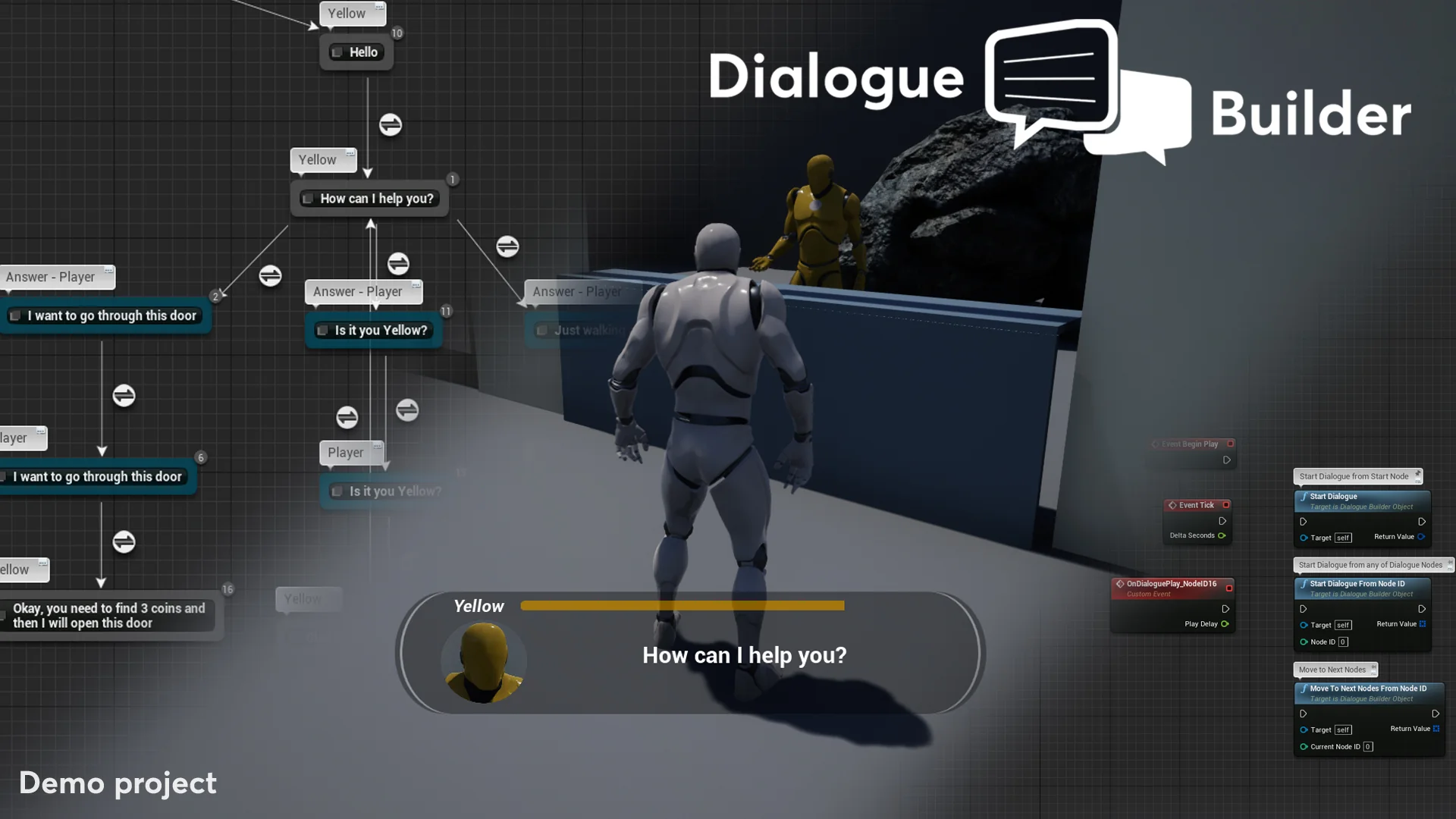
Narrative design within Unreal Engine 5 often encounters friction when dialogue systems rely on external script files, detached tables, or third-party graph editors. Dialogue Builder centralizes conversation creation directly within the native Unreal Engine Blueprint Editor. Instead of requiring developers to balance multiple disconnected plugins or custom narrative scripting languages, the asset houses all necessary dialogue functionality inside a single unified structure.
By centering conversation development around a common, simple developer experience, technical designers and narrative writers can leverage the native visual scripting tools they already use daily. Branching trees, conversational decisions, speaker prompts, and player interaction triggers are authored as standard Blueprint elements. Because all conversation features reside in one asset, teams do not need to create bridge scripts between external conversation graphs and engine gameplay classes. This consolidated workflow allows developers to iterate on branching narrative logic, evaluate dialogue trees, and link conversational events straight into Unreal Engine 5 gameplay mechanics with minimal friction.
Configuring Dual Body and Face Animation Variables in Dialogue Builder
Visual realism during character interactions depends heavily on how animations are coordinated during speech. In many interaction systems, characters are restricted to a single monolithic animation track, forcing animators to pre-bake hundreds of bespoke clips where body movement and facial expressions are fused together. Dialogue Builder resolves this limitation through an update introduced in version 1.9, which added a second animation variable to independently govern body and face animations.
With two distinct animation variables available within the dialogue system, character setups can separate broad physical movement from detailed facial acting. Developers can assign one animation variable to direct full-body poses, idling shifts, or physical gestures, while the second animation variable drives facial expressions, brow movements, and phonemes. This split-track approach gives teams the flexibility to adjust an actor's emotional tone or speech performance without altering their physical posture. Decoupling facial performances from physical body animations within the dialogue graph eliminates redundant animation baking, streamlines asset pipelines, and provides narrative teams with granular control over character delivery across multi-branch conversations.
Evaluating Interactive Environments with DemoEditor and MultiplayerDemoEditor
Managing dialogue across single-player and multiplayer environments presents distinct architectural challenges. In single-player titles, dialogue logic primarily manages character attention, audio playback, and interface choices. In networked games, however, conversations must replicate accurately across servers and connected clients without desynchronizing story states or displaying prompt anomalies.
Dialogue Builder provides dedicated testing environments to help creators navigate these differences, including a standard Demo, a DemoEditor, a MultiplayerOverview, and a MultiplayerDemoEditor. Developers building standalone narrative experiences can explore the Demo and DemoEditor to see how dialogue sequences are initialized, choices are routed, and character events are triggered in real-time. For networked productions, the MultiplayerOverview and MultiplayerDemoEditor supply direct working examples of how conversation logic operates in replicated scenarios. Technical designers can inspect the node configurations inside the MultiplayerDemoEditor to examine how dialogue authority, client displays, and networked state synchronization are handled. These inspection environments provide accessible, transparent references, allowing teams to test and debug their interactive dialogue flows before deploying them into full gameplay production.
Localization Workflows and Shipment Mode Packaging Fixes
Deploying a narrative-driven game to international audiences requires an accessible localization framework. Hardcoded strings and rigid conversation graphs can severely complicate translation passes, leading to delays and localization bugs. Dialogue Builder addresses this through integrated localization support introduced in update v1.9. By incorporating localization directly into the dialogue creation toolset, teams can organize, extract, and translate conversational text without breaking underlying node logic or corrupting actor references. Dialogue nodes preserve their structure across multiple language sets, streamlining the path from script writing to multilingual voice and text delivery.
In addition to localization functionality, version 1.9 introduced a critical shipment mode package fix. During the development cycle, Unreal Engine projects often compile cleanly in editor play modes despite containing loose references or unhandled dependencies. However, cooking and packaging a final build in shipment mode frequently causes fatal compilation errors if editor modules or unverified asset references are present. The shipment mode package fix resolves these build-level conflicts within the dialogue framework, ensuring that projects can package cleanly for distribution without cooking failures tied to dialogue assets.
Tutorial Resources, Documentation, and Upgrading the Dialogue Builder Plugin
Maintaining narrative systems across active project timelines requires accessible learning materials and structured upgrade pathways. Dialogue Builder includes comprehensive documentation, an initial tutorial, a dedicated video overview, and a focused UE5 overview to guide users through initial setup and day-to-day conversation authoring. These onboarding materials outline the core mechanics of the asset, demonstrating how to construct conversation trees, route animation variables, and manage interaction logic directly in the Blueprint Editor.
As production progresses, developers often need to incorporate new releases and upcoming updates without endangering their existing narrative work. The documentation specifically addresses the update process, detailing how to update the plugin when a project already has an earlier version installed. Following these structured update guidelines ensures that active conversation files, dual animation assignments, and localization tables remain intact when transitioning to updated releases like v1.9 or subsequent software patches. Categorized under system, dialogue, and character tools, Dialogue Builder delivers a complete, cohesive framework for Unreal Engine 5 developers seeking to craft interactive character conversations within an all-in-one Blueprint workflow.
 Dialog Systems
 Dialog Systems
 Dialog Systems