"efaa631e936fd3ee"{"id":"1002208","slug":"spline-grind-rail-builder-v2-grinding-and-zipline-movement-system","title":"Spline Grind Rail Builder v2 - Grinding \u0026 Zipline Movement System","category":"Game Mechanics","engine":"4.27,5.0+","assetVersion":"","engineVersion":"Engine Version: 4.27,5.0+","tag":"Game Mechanics","accent":"blue","visual":"mech","summary":"Configure spline grind rails, loop rails, and zipline movement systems in Unreal Engine with automated height adaptation and Blueprint character logic.","platform":"Unreal Engine","publishedAt":"2026-10-29T14:51:31.163Z","updatedAt":"2026-10-29T14:51:31.163Z","sourceNotes":[],"fileContents":[],"compatibility":["Unreal Engine","Engine Version: 4.27,5.0+"],"featuredImage":{"alt":"Spline Grind Rail Builder v2 - Grinding \u0026 Zipline Movement System","src":"/wp-content/uploads/published/2026/10/63e2a634bb2c-59302988-8dc9-4827-bcbc-64f027a7f562-0c0dcc7b82.webp"},"hasDownloadLink":true,"downloads":0,"terms":[{"taxonomy":"category","slug":"game-mechanics","name":"Game Mechanics"}],"galleryImages":[{"src":"/wp-content/uploads/published/2026/10/378f1d128c1e-6cbacf39-df39-44ca-9ea3-54ca93cb9e7e-a5f612302a.webp","alt":"Spline Grind Rail Builder v2 - Grinding \u0026 Zipline Movement System"},{"src":"/wp-content/uploads/published/2026/10/66792ed84fc7-b02a8442-f37b-45ed-929e-2d91bb6169b7-7f4e6e874f.webp","alt":"Spline Grind Rail Builder v2 - Grinding \u0026 Zipline Movement System"},{"src":"/wp-content/uploads/published/2026/10/94b05385698f-384755c0-ceeb-4bfd-94a3-166c422564b0-56d0581a8c.webp","alt":"Spline Grind Rail Builder v2 - Grinding \u0026 Zipline Movement System"},{"src":"/wp-content/uploads/published/2026/10/f2a721770c77-9c20ce04-7361-4b59-837e-bd1cc669f904-508c0ee002.webp","alt":"Spline Grind Rail Builder v2 - Grinding \u0026 Zipline Movement System"},{"src":"/wp-content/uploads/published/2026/10/3eb8025ceccf-8de4c06e-0979-492d-8892-7ebcf12e8104-7cde2e117e.webp","alt":"Spline Grind Rail Builder v2 - Grinding \u0026 Zipline Movement System"},{"src":"/wp-content/uploads/published/2026/10/de7dd2cd79e2-b8d35728-7815-40d5-9181-766bc6ab1d20-cd33b00c77.webp","alt":"Spline Grind Rail Builder v2 - Grinding \u0026 Zipline Movement System"},{"src":"/wp-content/uploads/published/2026/10/87c46ab1eed2-c5c4d469-231c-4878-b40a-7037f1f1a718-8e60935812.webp","alt":"Spline Grind Rail Builder v2 - Grinding \u0026 Zipline Movement System"},{"src":"/wp-content/uploads/published/2026/10/c426e6f7f973-404b56c0-1ed6-4507-9909-77901ce54091-84660fa41a.webp","alt":"Spline Grind Rail Builder v2 - Grinding \u0026 Zipline Movement System"},{"src":"/wp-content/uploads/published/2026/10/1741d9990ee9-4a538e12-3489-440e-b0f5-6bf0c0ea12ab-db1a53a2f6.webp","alt":"Spline Grind Rail Builder v2 - Grinding \u0026 Zipline Movement System"}],"accessPanel":{"kind":"resource","title":"Download this resource","eyebrow":"Free Download","message":"Log in or create a free account to start your download.","fileName":"Spline Grind Rail Builder v2 - Grinding \u0026 Zipline Movement System.7z","safetyNote":"Resources are manually reviewed before listing to improve quality and reduce obvious risks.","actionLabel":"Download Free","resourceType":"Resource archive"},"contentHtml":"\u003cp\u003eTraversing complex level geometry often hinges on how fluidly a character transitions between free movement and guided pathways. Spline Grind Rail Builder v2 tackles this interaction by generating procedural grind rails, continuous loops, and overhead ziplines directly from spline curves. When a character jumps onto a rail surface or leaps beneath a suspended cable, the included movement logic detects the overlap and locks the character into the path automatically.\u003c/p\u003e \u003ch2\u003eSpline Generation and Height-Adaptive Geometry\u003c/h2\u003e\n\u003cp\u003ePlacing navigation splines across uneven terrain or vertical level architecture can quickly become tedious if each support post and bend requires manual mesh alignment. This system handles the procedural construction along the curve automatically. Level designers lay out splines throughout a map, and the tool builds the matching grind rail, loop rail, or zipline geometry to fit that path.\u003c/p\u003e \u003cp\u003eBecause these rails automatically adapt to varying ground clearance and elevation differences, they can be draped across rooftops, suspended over open chasms, or routed through indoor sci-fi corridors without manually calculating support heights. Whether laying out a straightforward downhill grind, a winding loop rail that sends the player through full vertical inversions, or a descending zipline across an open canyon, the underlying procedural spline generation remains consistent.\u003c/p\u003e \u003ch2\u003eCharacter Blueprint Integration via Dedicated Component\u003c/h2\u003e\n\u003cp\u003eRather than forcing developers to migrate their entire project into a rigid, custom character base class, the architecture isolates all movement mathematics and rail-tracking behavior into a modular Actor Component. Hooking the mechanic into an existing player setup involves placing this component onto the player character and wiring a small set of execution nodes inside the Character Blueprint.\u003c/p\u003e \u003cp\u003eOnce wired together, the component listens for positional triggers:\u003c/p\u003e\n\u003cul\u003e \u003cli\u003e\u003cstrong\u003eGrind Rails:\u003c/strong\u003e Triggered whenever the character drops or lands directly onto the upper surface of the rail spline.\u003c/li\u003e \u003cli\u003e\u003cstrong\u003eLoop Rails:\u003c/strong\u003e Continuous tracks that maintain character momentum through full loops and curved transitions.\u003c/li\u003e \u003cli\u003e\u003cstrong\u003eZiplines:\u003c/strong\u003e Engaged when the character jumps up underneath an overhead cable spline, automatically catching the pulley.\u003c/li\u003e\n\u003c/ul\u003e \u003cp\u003eThe separation of concerns keeps the player character Blueprint clean. All state tracking, curve sampling, and directional alignment stay confined to the component logic, leaving core combat or standard platforming graphs untouched.\u003c/p\u003e \u003ch2\u003eFine-Tuning Sliding Speed and Launch Velocity\u003c/h2\u003e\n\u003cp\u003eEvery platformer or action title balances momentum differently. Spline Grind Rail Builder v2 exposes key locomotion variables directly inside the component settings, allowing designers to calibrate the exact feel of each traverse without diving into raw mathematical formulas.\u003c/p\u003e \u003cp\u003eSliding speed controls how quickly a character navigates the spline from start to end, which is essential when balancing relaxed exploratory travel against fast-paced action sequences with boost mechanics. Launch velocity settings dictate the momentum transferred into the air when a player jumps off a rail or releases their grip at the tail end of a zipline. By adjusting these values, creators can tune short, snappy dismounts for precision platforming or powerful forward ejection velocities that launch characters into distant level areas.\u003c/p\u003e \u003ch2\u003eUE4 and UE5 Mannequin Skeletons and Pulley Alignment\u003c/h2\u003e\n\u003cp\u003eMovement on a zipline requires visual credibility, specifically how the hands meet the suspension gear. The system includes custom zipline animations built specifically around standard Unreal Engine 4 and Unreal Engine 5 mannequin skeletons. When bringing custom player meshes into the project, retargeting against these standard mannequin proportions is required to preserve the intended hang and travel postures.\u003c/p\u003e \u003cp\u003eBecause the included poses assume standard mannequin arm spans and head sizes, physical proportions matter. Characters with non-standard anatomy—such as disproportionately short arms or unusually large head meshes—may not align perfectly with the handles of the zipline pulley mesh. Verifying retargeting results on stylized or non-humanoid meshes ensures that grip points match the visual position of the overhead traveler before finalizing level layouts.\u003c/p\u003e \u003ch2\u003eSingle-Player Architecture and Practical Level Applications\u003c/h2\u003e\n\u003cp\u003eThe system is explicitly not replicated out of the box, positioning it firmly as a tool for single-player action titles, platformers, and narrative adventure experiences. Because movement state, spline tracking, and velocity handoffs run locally without network authority synchronization, developers working on multiplayer projects would need to build their own replication layer over the component logic.\u003c/p\u003e \u003cp\u003eFor single-player productions across low-poly platformers, modern urban traversal environments, or futuristic adventure titles, the package functions as an out-of-the-box solution to verticality. Instead of hardcoding rail trigger volumes and writing custom curve evaluations, teams can drop the spline actors into their maps, tweak launch velocities in the component inspector, and establish rapid traversal corridors in minutes.\u003c/p\u003e\n\n\u003ch2\u003eContinue Browsing Similar Packs\u003c/h2\u003e\n\u003cul\u003e\n\u003cli\u003e\u003ca href=\"https://3dcghub.com/runtime-spline-builder/\" title=\"Runtime Spline Builder\"\u003eRuntime Spline Builder\u003c/a\u003e\u003c/li\u003e\n\u003cli\u003e\u003ca href=\"https://3dcghub.com/formation-system-v2/\" title=\"Formation System v2\"\u003eFormation System v2\u003c/a\u003e\u003c/li\u003e\n\u003cli\u003e\u003ca href=\"https://3dcghub.com/uaim-advanced-lock-on-targeting-and-prediction-system/\" title=\"uAim - Advanced Lock-On Targeting and Prediction System\"\u003euAim - Advanced Lock-On Targeting and Prediction System\u003c/a\u003e\u003c/li\u003e\n\u003cli\u003e\u003ca href=\"https://3dcghub.com/sliding-movement-component/\" title=\"Sliding Movement Component\"\u003eSliding Movement Component\u003c/a\u003e\u003c/li\u003e\n\u003cli\u003e\u003ca href=\"https://3dcghub.com/replicated-modular-vehicle-v2/\" title=\"Replicated Modular Vehicle V2\"\u003eReplicated Modular Vehicle V2\u003c/a\u003e\u003c/li\u003e\n\u003c/ul\u003e","contentTextLength":5366,"navigation":{"current":77,"total":4209,"previous":{"id":"1002209","slug":"spray-painting-animations","title":"Spray Painting Animations","category":"Combat","platform":"Unreal Engine","updatedAt":"2026-10-29T14:52:43.545Z"},"next":{"id":"1002207","slug":"splatter-decals","title":"Splatter Decals","category":"Variety","platform":"Unreal Engine","updatedAt":"2026-10-29T14:50:41.168Z"}},"relatedResources":[{"id":"10448","slug":"runtime-spline-builder","title":"Runtime Spline Builder","category":"Game Mechanics","engine":"4.26+,5.0+","assetVersion":"Engine version: 4.26+,5.0+","engineVersion":"4.26","tag":"Game Mechanics","accent":"blue","visual":"audio","summary":"Runtime Spline Builder is a beginner-friendly tool designed for creating and editing spline meshes during gameplay. It is ideal for RTS projects requiring dynamic walls, paths, or fences.","platform":"Unreal Engine","publishedAt":"2026-03-03T15:24:38.000Z","updatedAt":"2026-04-19T15:50:01.000Z","sourceNotes":[],"fileContents":[],"compatibility":["Unreal Engine","Engine version: 4.26+,5.0+"],"featuredImage":{"alt":"Runtime Spline Builder","src":"https://3dcghub.com/wp-content/uploads/2026/03/f2d685a1-a9e1-4e2b-8048-d82429d9ae87.webp"},"hasDownloadLink":true,"downloads":0},{"id":"14880","slug":"formation-system-v2","title":"Formation System v2","category":"Game Mechanics","engine":"5.3","assetVersion":"Engine version: 5.3","engineVersion":"Asset Version:2.0","tag":"Game Mechanics","accent":"blue","visual":"audio","summary":"Organize your AI characters with Formation System v2. This Unreal Engine tool supports multiplayer, RTS-style movements, and customizable formation spreads.","platform":"Unreal Engine","publishedAt":"2026-03-11T19:56:18.000Z","updatedAt":"2026-04-19T15:45:39.000Z","sourceNotes":[],"fileContents":[],"compatibility":["Unreal Engine","Engine version: 5.3","Asset Version: 2.0"],"featuredImage":{"alt":"Formation System v2","src":"https://3dcghub.com/wp-content/uploads/2026/03/154c81e9-0147-495e-8723-a32ce680f854.webp"},"hasDownloadLink":true,"downloads":0},{"id":"1000445","slug":"uaim-advanced-lock-on-targeting-and-prediction-system","title":"uAim - Advanced Lock-On Targeting and Prediction System","category":"Game Mechanics","engine":"5.7","assetVersion":"Asset Version: 1.0","engineVersion":"Engine Version: 5.7","tag":"Game Mechanics","accent":"blue","visual":"mech","summary":"uAim is a C++ lock-on targeting and movement prediction system for Unreal Engine, covering character camera lock-on, turrets, homing projectiles, and procedural","platform":"Unreal Engine","publishedAt":"2026-07-11T00:18:00.368Z","updatedAt":"2026-07-11T00:18:00.368Z","sourceNotes":[],"fileContents":[],"compatibility":["Unreal Engine","Asset Version: 1.0","Engine Version: 5.7"],"featuredImage":{"alt":"uAim - Advanced Lock-On Targeting and Prediction System","src":"/wp-content/uploads/published/2026/07/207da5fa5aa8-68d32af6-9231-4022-8483-b4902303679b-9fcd15de94.webp"},"hasDownloadLink":true,"downloads":0}]}
Game Mechanics
Spline Grind Rail Builder v2 - Grinding & Zipline Movement System
Configure spline grind rails, loop rails, and zipline movement systems in Unreal Engine with automated height adaptation and Blueprint character logic.
Category:Unreal Engine,Game MechanicsPlatform: Unreal EngineEngine Version: 4.27,5.0+Published: Oct 29, 2026
Game Mechanics
Resource overview
Traversing complex level geometry often hinges on how fluidly a character transitions between free movement and guided pathways. Spline Grind Rail Builder v2 tackles this interaction by generating procedural grind rails, continuous loops, and overhead ziplines directly from spline curves. When a character jumps onto a rail surface or leaps beneath a suspended cable, the included movement logic detects the overlap and locks the character into the path automatically.
Spline Generation and Height-Adaptive Geometry
Placing navigation splines across uneven terrain or vertical level architecture can quickly become tedious if each support post and bend requires manual mesh alignment. This system handles the procedural construction along the curve automatically. Level designers lay out splines throughout a map, and the tool builds the matching grind rail, loop rail, or zipline geometry to fit that path.
Because these rails automatically adapt to varying ground clearance and elevation differences, they can be draped across rooftops, suspended over open chasms, or routed through indoor sci-fi corridors without manually calculating support heights. Whether laying out a straightforward downhill grind, a winding loop rail that sends the player through full vertical inversions, or a descending zipline across an open canyon, the underlying procedural spline generation remains consistent.
Character Blueprint Integration via Dedicated Component
Rather than forcing developers to migrate their entire project into a rigid, custom character base class, the architecture isolates all movement mathematics and rail-tracking behavior into a modular Actor Component. Hooking the mechanic into an existing player setup involves placing this component onto the player character and wiring a small set of execution nodes inside the Character Blueprint.
Once wired together, the component listens for positional triggers:
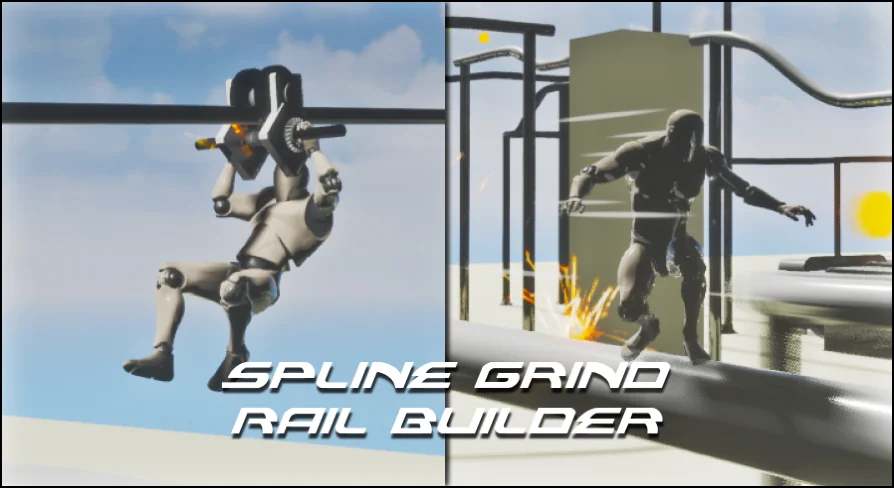
Grind Rails: Triggered whenever the character drops or lands directly onto the upper surface of the rail spline.
Loop Rails: Continuous tracks that maintain character momentum through full loops and curved transitions.
Ziplines: Engaged when the character jumps up underneath an overhead cable spline, automatically catching the pulley.
The separation of concerns keeps the player character Blueprint clean. All state tracking, curve sampling, and directional alignment stay confined to the component logic, leaving core combat or standard platforming graphs untouched.
Fine-Tuning Sliding Speed and Launch Velocity
Every platformer or action title balances momentum differently. Spline Grind Rail Builder v2 exposes key locomotion variables directly inside the component settings, allowing designers to calibrate the exact feel of each traverse without diving into raw mathematical formulas.
Sliding speed controls how quickly a character navigates the spline from start to end, which is essential when balancing relaxed exploratory travel against fast-paced action sequences with boost mechanics. Launch velocity settings dictate the momentum transferred into the air when a player jumps off a rail or releases their grip at the tail end of a zipline. By adjusting these values, creators can tune short, snappy dismounts for precision platforming or powerful forward ejection velocities that launch characters into distant level areas.
UE4 and UE5 Mannequin Skeletons and Pulley Alignment
Movement on a zipline requires visual credibility, specifically how the hands meet the suspension gear. The system includes custom zipline animations built specifically around standard Unreal Engine 4 and Unreal Engine 5 mannequin skeletons. When bringing custom player meshes into the project, retargeting against these standard mannequin proportions is required to preserve the intended hang and travel postures.
Because the included poses assume standard mannequin arm spans and head sizes, physical proportions matter. Characters with non-standard anatomy—such as disproportionately short arms or unusually large head meshes—may not align perfectly with the handles of the zipline pulley mesh. Verifying retargeting results on stylized or non-humanoid meshes ensures that grip points match the visual position of the overhead traveler before finalizing level layouts.
Single-Player Architecture and Practical Level Applications
The system is explicitly not replicated out of the box, positioning it firmly as a tool for single-player action titles, platformers, and narrative adventure experiences. Because movement state, spline tracking, and velocity handoffs run locally without network authority synchronization, developers working on multiplayer projects would need to build their own replication layer over the component logic.
For single-player productions across low-poly platformers, modern urban traversal environments, or futuristic adventure titles, the package functions as an out-of-the-box solution to verticality. Instead of hardcoding rail trigger volumes and writing custom curve evaluations, teams can drop the spline actors into their maps, tweak launch velocities in the component inspector, and establish rapid traversal corridors in minutes.
 Game Mechanics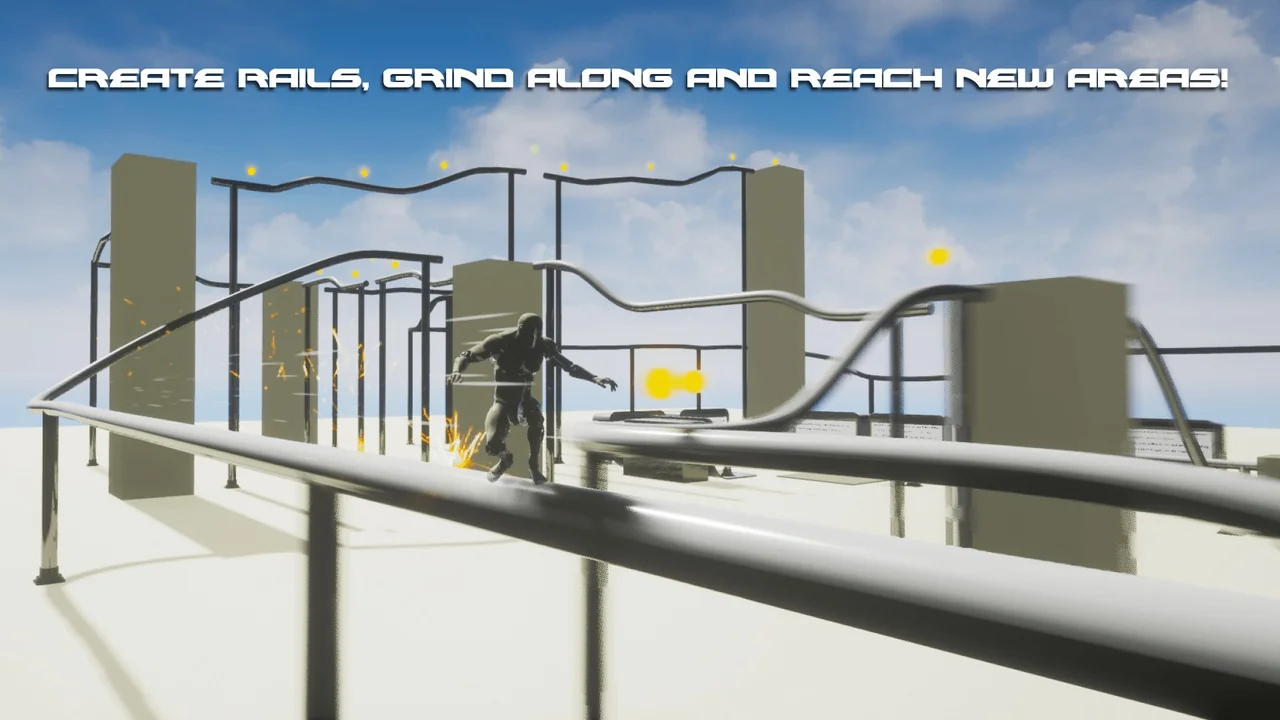
 Game Mechanics
 Game Mechanics
 Game Mechanics