"efaa631e936fd3ee"{"id":"1002207","slug":"splatter-decals","title":"Splatter Decals","category":"Variety","engine":"4.26+,5.0+","assetVersion":"","engineVersion":"Engine Version: 4.26+,5.0+","tag":"Variety","accent":"blue","visual":"mech","summary":"Splatter Decals delivers 15 customizable blood and liquid material instances with dual normal map controls, emissive settings, and Weapon Impact FX pairing.","platform":"Unreal Engine","publishedAt":"2026-10-29T14:50:41.168Z","updatedAt":"2026-10-29T14:50:41.168Z","sourceNotes":[],"fileContents":[],"compatibility":["Unreal Engine","Engine Version: 4.26+,5.0+"],"featuredImage":{"alt":"Splatter Decals","src":"/wp-content/uploads/published/2026/10/d781ef019a58-85be6303-0065-4ca4-92b8-0155bfb5fb1e-96b47607e4.webp"},"hasDownloadLink":true,"downloads":0,"terms":[{"taxonomy":"category","slug":"variety","name":"Variety"}],"galleryImages":[{"src":"/wp-content/uploads/published/2026/10/a01d31fc8ab5-652e0d9b-50e1-493e-a599-bde00298e476-069a2a4fb5.webp","alt":"Splatter Decals"},{"src":"/wp-content/uploads/published/2026/10/1e0e821eab6d-78a385fc-86d7-45f4-91f8-421590a61b44-e4ecccbac0.webp","alt":"Splatter Decals"},{"src":"/wp-content/uploads/published/2026/10/1454fe8b4270-04e7bdf4-1281-4a5a-8fc9-12d0e5ae649e-320ade1390.webp","alt":"Splatter Decals"},{"src":"/wp-content/uploads/published/2026/10/55bbc591299b-e78bde91-30f1-4320-a880-32ad71488c14-f2db179471.webp","alt":"Splatter Decals"},{"src":"/wp-content/uploads/published/2026/10/f14f90031946-f1e967e2-a38a-421e-9e1e-be4c5e743a0f-19b597c627.webp","alt":"Splatter Decals"},{"src":"/wp-content/uploads/published/2026/10/f1109032ebe9-434285f8-df12-47db-918c-243e3455f086-da7ebb29b4.webp","alt":"Splatter Decals"}],"accessPanel":{"kind":"resource","title":"Download this resource","eyebrow":"Free Download","message":"Log in or create a free account to start your download.","fileName":"Content.7z","safetyNote":"Resources are manually reviewed before listing to improve quality and reduce obvious risks.","actionLabel":"Download Free","resourceType":"Resource archive"},"contentHtml":"\u003cp\u003eSplatter Decals provides a collection of 15 blood and liquid decal material instances driven by a single master material. Built for environmental dressing, combat feedback, and horror scene decoration, the package focuses on surface-conforming fluid residue with adjustable physical and optical properties. By routing multiple presets through a unified master shader architecture, the collection balances ready-to-place splatters with direct parameter controls for tinting, surface wetness, transparency falloff, and normal map relief.\u003c/p\u003e \u003ch2\u003eMaterial Architecture Across 15 Splatter Decal Instances\u003c/h2\u003e\n\u003cp\u003eThe foundation of the package relies on one central master material that feeds all 15 material instances. Rather than utilizing isolated, static shaders for each texture sheet or pattern, the master material consolidates the underlying mathematical instructions for projections, blending operations, and lighting responses. The 15 included instances represent pre-configured variations designed around blood and fluid splatter distributions, ranging from focused directional drops to scattered liquid impacts.\u003c/p\u003e\n\u003cp\u003eBecause these variations exist as material instances rather than separate shaders, changes made to individual parameters propagate instantly without requiring full shader recompilation. This structure is particularly relevant when scattering decals across diverse level geometry, as level designers can pull from the 15 baseline shapes while tuning surface properties to match dry rock, polished tile, weathered wood, or industrial metal.\u003c/p\u003e \u003ch2\u003eColor Blending, Specularity, and Emissive Parameter Adjustments\u003c/h2\u003e\n\u003cp\u003eEach of the 15 instances includes dedicated scalar and vector parameters governing the core look of the fluid. Color and color blend controls allow users to define both the primary liquid tone and secondary gradient transitions across the decal footprint. This makes it possible to shift a clean red pool toward darker, oxygenated venous blood, coagulating crimson patches, murky sewer drainage, or completely non-biological fluids like petroleum or chemical run-off. The color blend parameter allows transitions from the dense center of a splatter to its thin, feathered perimeters.\u003c/p\u003e\n\u003cp\u003eAlpha controls dictate opacity, edge sharpness, and overall transparency. Modulating the alpha values changes the apparent density of the fluid, representing either a thick, opaque biological spill or a diluted, translucent splash. Specularity parameters dictate how light catches the surface of the decal. Increasing specularity produces a fresh, high-gloss wet look with sharp specular highlights, whereas lowering the value simulates drying, matte fluid that has partially absorbed into the underlying geometry.\u003c/p\u003e\n\u003cp\u003eFor specialized scenarios, emissive parameters introduce luminance directly into the decal material. This allows developers working on horror, fantasy, or sci-fi projects to turn standard liquid splatters into glowing biological substances, radioactive waste, venomous alien ichor, or magical residue that casts visible brightness into dark scenes.\u003c/p\u003e \u003ch2\u003eDual Normal Map Control for Liquid Depth and Scale\u003c/h2\u003e\n\u003cp\u003eSurface relief in the package is governed through extensive normal map parameters, offering the ability to manipulate either one or two normal maps simultaneously. Liquids rarely lay completely flat, especially in violent splatters where surface tension, pooling, and droplet beads produce distinct physical edges. The inclusion of normal map depth adjustments enables artists to control how aggressively light catches the perimeter of each splatter drop, creating the illusion of real physical volume above the target surface.\u003c/p\u003e\n\u003cp\u003eThe system provides explicit controls over the scale and position of the normal maps. When deploying a primary normal map, scale adjustments control the frequency and density of the fluid ripples and droplet edges across the projection. Position parameters allow fine translational shifting of the normal data relative to the base color and alpha masks, aligning directional splash lines or offsetting surface tension artifacts.\u003c/p\u003e\n\u003cp\u003eWhen activating a second normal map within the instance parameters, users can blend macro-level splatter shapes with micro-level surface breakup. A broad liquid puddle can retain its macro volume through the primary normal, while a secondary normal map introduces fine ripples, granular coagulations, or secondary droplet rings across the fluid surface. This dual-layer approach prevents decals from appearing flat or painted-on when viewed up close by the player.\u003c/p\u003e \u003ch2\u003eIntegration with Weapon Impact FX and Horror Production\u003c/h2\u003e\n\u003cp\u003eBeyond static level detailing, Splatter Decals is structured to integrate alongside Weapon Impact FX pipelines. Combat systems requiring dynamic splatter responses—such as projectile hits, slashing melee strikes, and explosive liquid bursts—rely on responsive decal spawning at hit locations. Because the package emphasizes realistic bloody and liquid profiles, it serves as the physical aftermath to weapon impacts, stamping persistent splatters against surrounding walls, floors, and props.\u003c/p\u003e\n\u003cp\u003eIn horror environments, environmental storytelling often depends on varied fluid markings to communicate past violence or contamination. Having 15 distinct instances ensures that repeated impacts or trails do not exhibit immediate, obvious visual repetition. A corridor can feature small droplet sprays near high-velocity bullet impacts, heavier pooling on horizontal flooring, and running splatter instances positioned along vertical walls.\u003c/p\u003e \u003ch2\u003ePractical Surface Dressing Workflow\u003c/h2\u003e\n\u003cp\u003eDeploying the package into a production scene involves selecting an instance that matches the desired splatter distribution, projecting it onto target geometry, and dialing in the instance properties to correspond with ambient scene lighting. If a scene takes place in a damp basement, increasing the specularity ensures the decal reflects ambient point lights alongside the wet environment. If the scene takes place in an arid exterior, pulling back the specularity and softening the alpha produces an aged stain baked into the ground.\u003c/p\u003e\n\u003cp\u003eBy pairing master material efficiency with granular controls over alpha, color blending, dual normal maps, and emissive output, Splatter Decals functions as a focused toolkit for realistic fluid, blood, and splatter projection across combat and atmospheric scenes.\u003c/p\u003e\n\n\u003ch2\u003eMore From The Same Workflow\u003c/h2\u003e\n\u003cul\u003e\n\u003cli\u003e\u003ca href=\"https://3dcghub.com/1000-mega-decal-package-ai-sources/\" title=\"1000+ Mega Decal Package / AI SOURCES\"\u003e1000+ Mega Decal Package / AI SOURCES\u003c/a\u003e\u003c/li\u003e\n\u003cli\u003e\u003ca href=\"https://3dcghub.com/magiccircle-decal-30/\" title=\"MagicCircle Decal 30\"\u003eMagicCircle Decal 30\u003c/a\u003e\u003c/li\u003e\n\u003cli\u003e\u003ca href=\"https://3dcghub.com/advanced-rvt-decals/\" title=\"Advanced RVT Decals\"\u003eAdvanced RVT Decals\u003c/a\u003e\u003c/li\u003e\n\u003cli\u003e\u003ca href=\"https://3dcghub.com/animated-blood-decals-realistic/\" title=\"Animated Blood Decals - Realistic\"\u003eAnimated Blood Decals - Realistic\u003c/a\u003e\u003c/li\u003e\n\u003cli\u003e\u003ca href=\"https://3dcghub.com/shiny-things/\" title=\"Shiny Things\"\u003eShiny Things\u003c/a\u003e\u003c/li\u003e\n\u003c/ul\u003e","contentTextLength":6509,"navigation":{"current":78,"total":4209,"previous":{"id":"1002208","slug":"spline-grind-rail-builder-v2-grinding-and-zipline-movement-system","title":"Spline Grind Rail Builder v2 - Grinding \u0026 Zipline Movement System","category":"Game Mechanics","platform":"Unreal Engine","updatedAt":"2026-10-29T14:51:31.163Z"},"next":{"id":"1002206","slug":"space-explosion-pack","title":"Space Explosion Pack","category":"Game Development Resource","platform":"Unreal Engine","updatedAt":"2026-10-29T14:49:52.434Z"}},"relatedResources":[{"id":"1000144","slug":"1000-mega-decal-package-ai-sources","title":"1000+ Mega Decal Package / AI SOURCES","category":"Variety","engine":"4.26+,5.0+","assetVersion":"","engineVersion":"Engine Version: 4.26+,5.0+","tag":"Variety","accent":"blue","visual":"mech","summary":"A high-quality customizable decal pack with texture-driven flexibility, combined or separate use, and access to main vector drawing files.","platform":"Unreal Engine","publishedAt":"2026-06-12T18:37:30.067Z","updatedAt":"2026-10-03T14:08:24.863Z","sourceNotes":[],"fileContents":[],"compatibility":["Unreal Engine","Engine Version: 4.26+,5.0+"],"featuredImage":{"alt":"1000+ Mega Decal Package / AI SOURCES","src":"/wp-content/uploads/published/2026/06/c65003b15164-8cfb9e15-1251-4bec-a5db-4031508b2f53-10a82d485f.webp"},"hasDownloadLink":true,"downloads":1},{"id":"1002099","slug":"magiccircle-decal-30","title":"MagicCircle Decal 30","category":"Variety","engine":"5.0+","assetVersion":"","engineVersion":"Engine Version: 5.0+","tag":"Variety","accent":"blue","visual":"mech","summary":"Explore MagicCircle Decal 30, featuring several customizable magic circle decal materials configured for material instances and Projectile FX with Blueprint.","platform":"Unreal Engine","publishedAt":"2026-10-29T08:45:04.738Z","updatedAt":"2026-10-29T08:45:04.738Z","sourceNotes":[],"fileContents":[],"compatibility":["Unreal Engine","Engine Version: 5.0+"],"featuredImage":{"alt":"MagicCircle Decal 30","src":"/wp-content/uploads/published/2026/10/f3f391c425bf-001ae368-518c-4a3c-821e-2681dedcdba6-229032e328.webp"},"hasDownloadLink":true,"downloads":0},{"id":"1000764","slug":"advanced-rvt-decals","title":"Advanced RVT Decals","category":"Variety","engine":"5.6+","assetVersion":"","engineVersion":"Engine Version: 5.6+","tag":"Variety","accent":"blue","visual":"mech","summary":"A performant Runtime Virtual Texture decal system for blending textures into RVT landscapes, supporting Nanite displacement and Custom Primitive Data.","platform":"Unreal Engine","publishedAt":"2026-07-28T09:33:55.712Z","updatedAt":"2026-07-28T09:33:55.712Z","sourceNotes":[],"fileContents":[],"compatibility":["Unreal Engine","Engine Version: 5.6+"],"featuredImage":{"alt":"Advanced RVT Decals","src":"/wp-content/uploads/published/2026/07/79b9ced7cf48-95bee9b5-bb31-4e56-b65d-be66379fa15c-75ebfcf2ea.webp"},"hasDownloadLink":true,"downloads":1}]}
Variety
Splatter Decals
Splatter Decals delivers 15 customizable blood and liquid material instances with dual normal map controls, emissive settings, and Weapon Impact FX pairing.
Category:Unreal Engine,VarietyPlatform: Unreal EngineEngine Version: 4.26+,5.0+Published: Oct 29, 2026
Variety
Resource overview
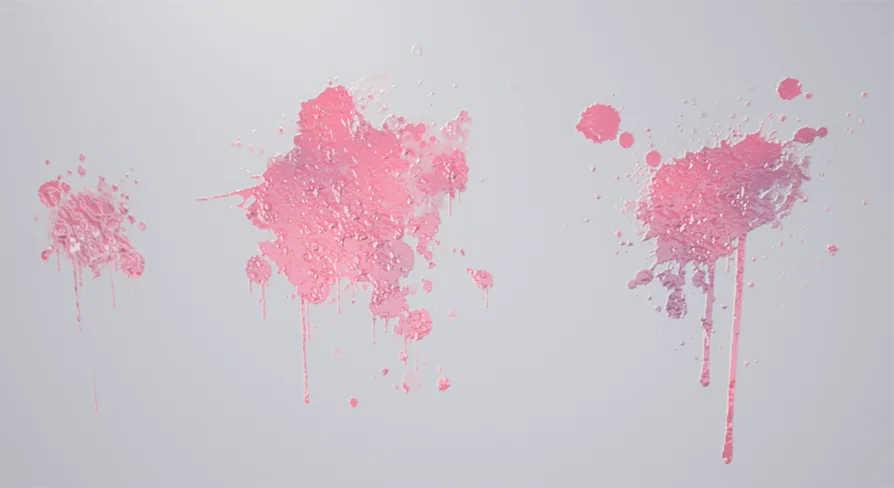
Splatter Decals provides a collection of 15 blood and liquid decal material instances driven by a single master material. Built for environmental dressing, combat feedback, and horror scene decoration, the package focuses on surface-conforming fluid residue with adjustable physical and optical properties. By routing multiple presets through a unified master shader architecture, the collection balances ready-to-place splatters with direct parameter controls for tinting, surface wetness, transparency falloff, and normal map relief.
Material Architecture Across 15 Splatter Decal Instances
The foundation of the package relies on one central master material that feeds all 15 material instances. Rather than utilizing isolated, static shaders for each texture sheet or pattern, the master material consolidates the underlying mathematical instructions for projections, blending operations, and lighting responses. The 15 included instances represent pre-configured variations designed around blood and fluid splatter distributions, ranging from focused directional drops to scattered liquid impacts.
Because these variations exist as material instances rather than separate shaders, changes made to individual parameters propagate instantly without requiring full shader recompilation. This structure is particularly relevant when scattering decals across diverse level geometry, as level designers can pull from the 15 baseline shapes while tuning surface properties to match dry rock, polished tile, weathered wood, or industrial metal.
Color Blending, Specularity, and Emissive Parameter Adjustments
Each of the 15 instances includes dedicated scalar and vector parameters governing the core look of the fluid. Color and color blend controls allow users to define both the primary liquid tone and secondary gradient transitions across the decal footprint. This makes it possible to shift a clean red pool toward darker, oxygenated venous blood, coagulating crimson patches, murky sewer drainage, or completely non-biological fluids like petroleum or chemical run-off. The color blend parameter allows transitions from the dense center of a splatter to its thin, feathered perimeters.
Alpha controls dictate opacity, edge sharpness, and overall transparency. Modulating the alpha values changes the apparent density of the fluid, representing either a thick, opaque biological spill or a diluted, translucent splash. Specularity parameters dictate how light catches the surface of the decal. Increasing specularity produces a fresh, high-gloss wet look with sharp specular highlights, whereas lowering the value simulates drying, matte fluid that has partially absorbed into the underlying geometry.
For specialized scenarios, emissive parameters introduce luminance directly into the decal material. This allows developers working on horror, fantasy, or sci-fi projects to turn standard liquid splatters into glowing biological substances, radioactive waste, venomous alien ichor, or magical residue that casts visible brightness into dark scenes.
Dual Normal Map Control for Liquid Depth and Scale
Surface relief in the package is governed through extensive normal map parameters, offering the ability to manipulate either one or two normal maps simultaneously. Liquids rarely lay completely flat, especially in violent splatters where surface tension, pooling, and droplet beads produce distinct physical edges. The inclusion of normal map depth adjustments enables artists to control how aggressively light catches the perimeter of each splatter drop, creating the illusion of real physical volume above the target surface.
The system provides explicit controls over the scale and position of the normal maps. When deploying a primary normal map, scale adjustments control the frequency and density of the fluid ripples and droplet edges across the projection. Position parameters allow fine translational shifting of the normal data relative to the base color and alpha masks, aligning directional splash lines or offsetting surface tension artifacts.
When activating a second normal map within the instance parameters, users can blend macro-level splatter shapes with micro-level surface breakup. A broad liquid puddle can retain its macro volume through the primary normal, while a secondary normal map introduces fine ripples, granular coagulations, or secondary droplet rings across the fluid surface. This dual-layer approach prevents decals from appearing flat or painted-on when viewed up close by the player.
Integration with Weapon Impact FX and Horror Production
Beyond static level detailing, Splatter Decals is structured to integrate alongside Weapon Impact FX pipelines. Combat systems requiring dynamic splatter responses—such as projectile hits, slashing melee strikes, and explosive liquid bursts—rely on responsive decal spawning at hit locations. Because the package emphasizes realistic bloody and liquid profiles, it serves as the physical aftermath to weapon impacts, stamping persistent splatters against surrounding walls, floors, and props.
In horror environments, environmental storytelling often depends on varied fluid markings to communicate past violence or contamination. Having 15 distinct instances ensures that repeated impacts or trails do not exhibit immediate, obvious visual repetition. A corridor can feature small droplet sprays near high-velocity bullet impacts, heavier pooling on horizontal flooring, and running splatter instances positioned along vertical walls.
Practical Surface Dressing Workflow
Deploying the package into a production scene involves selecting an instance that matches the desired splatter distribution, projecting it onto target geometry, and dialing in the instance properties to correspond with ambient scene lighting. If a scene takes place in a damp basement, increasing the specularity ensures the decal reflects ambient point lights alongside the wet environment. If the scene takes place in an arid exterior, pulling back the specularity and softening the alpha produces an aged stain baked into the ground.
By pairing master material efficiency with granular controls over alpha, color blending, dual normal maps, and emissive output, Splatter Decals functions as a focused toolkit for realistic fluid, blood, and splatter projection across combat and atmospheric scenes.
 Variety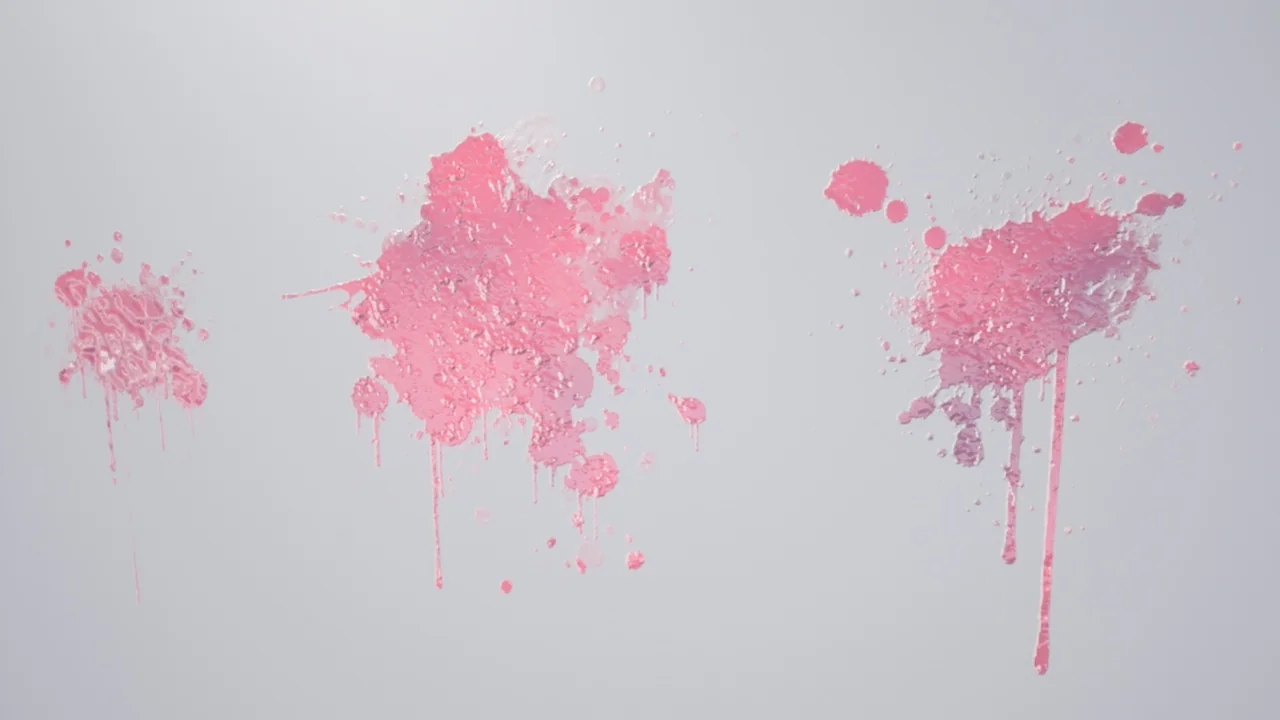
 Variety
 Variety
 Variety