"d4769ebd8b229f47"{"id":"1002099","slug":"magiccircle-decal-30","title":"MagicCircle Decal 30","category":"Variety","engine":"5.0+","assetVersion":"","engineVersion":"Engine Version: 5.0+","tag":"Variety","accent":"blue","visual":"mech","summary":"Explore MagicCircle Decal 30, featuring several customizable magic circle decal materials configured for material instances and Projectile FX with Blueprint.","platform":"Unreal Engine","publishedAt":"2026-10-29T08:45:04.738Z","updatedAt":"2026-10-29T08:45:04.738Z","sourceNotes":[],"fileContents":[],"compatibility":["Unreal Engine","Engine Version: 5.0+"],"featuredImage":{"alt":"MagicCircle Decal 30","src":"/wp-content/uploads/published/2026/10/f3f391c425bf-001ae368-518c-4a3c-821e-2681dedcdba6-229032e328.webp"},"hasDownloadLink":true,"downloads":0,"terms":[{"taxonomy":"category","slug":"variety","name":"Variety"}],"galleryImages":[{"src":"/wp-content/uploads/published/2026/10/9ed2b42dc4c0-ec716c2d-2e32-4ad0-a424-657185a311f6-a6445d4d40.webp","alt":"MagicCircle Decal 30"},{"src":"/wp-content/uploads/published/2026/10/6f4d4ad01cb6-28d55fdc-9a28-43b8-928a-58b1ce5dcd65-ad3fa9bef9.webp","alt":"MagicCircle Decal 30"},{"src":"/wp-content/uploads/published/2026/10/e404ee2c7bb8-203f47f7-6265-40fd-9c9d-b782c1da4e82-06f6c4ea61.webp","alt":"MagicCircle Decal 30"},{"src":"/wp-content/uploads/published/2026/10/0eb6d225b2cc-0fde6dbc-243e-4316-8e2d-8b6225f02162-420c4ebd35.webp","alt":"MagicCircle Decal 30"},{"src":"/wp-content/uploads/published/2026/10/32ddc7624d7c-1dffc160-c4c7-449b-a965-e54518c2e088-a95a48d43d.webp","alt":"MagicCircle Decal 30"}],"accessPanel":{"kind":"resource","title":"Download this resource","eyebrow":"Free Download","message":"Log in or create a free account to start your download.","fileName":"Content.7z","safetyNote":"Resources are manually reviewed before listing to improve quality and reduce obvious risks.","actionLabel":"Download Free","resourceType":"Resource archive"},"contentHtml":"\u003ch2\u003eDeploying Magic Circle Decal Materials in Scene Geometry\u003c/h2\u003e\u003cp\u003eIntegrating decals directly into an interactive level begins at the surface projection stage. MagicCircle Decal 30 provides several types of magic circle decal materials that can be projected across floors, walls, and irregular environmental geometry. Rather than relying on custom modeled geometry or complex planar meshes that risk clipping against rough terrain, decal materials conform cleanly across whatever surfaces intersect their projection volume.\u003c/p\u003e\u003cp\u003ePlacing these decals allows level artists and gameplay designers to visually mark mystical locations, define casting perimeters, or highlight summon zones. Because the pack focuses on rune and magical themes, the projected circles bring immediate visual identity to otherwise neutral stonework, wood, or dirt surfaces. The materials wrap over cracks, stairs, and debris without requiring manual mesh deformation, keeping the staging process fast and responsive during level passes.\u003c/p\u003e\u003ch2\u003eCustomization Workflow in the Material Instance\u003c/h2\u003e\u003cp\u003eFine-tuning the appearance of each magical ring takes place through material instances. Working inside a material instance rather than recompiling base shaders keeps the iteration loop tight and non-destructive. Artists can derive multiple specialized instances from the master decal materials to serve different scenes, gameplay states, or spell schools without creating redundant assets.\u003c/p\u003e\u003cp\u003eInstance-based adjustments allow teams to dial in specific aesthetic requirements directly in the viewport. Parameter tweaks can alter how distinctly the magic runes display against dark or light environments, making sure that intricate line work and peripheral glyphs remain legible from player cameras. By relying on material instances, adjustments can be made on the fly, enabling rapid variations of magical circles across dungeons, arenas, and open-world ritual sites while maintaining unified shader architecture.\u003c/p\u003e\u003ch2\u003eRune Variations and Magical Types\u003c/h2\u003e\u003cp\u003eThe pack is structured around several distinct types of magic circle decal materials, offering an assortment of rune configurations and magical symbology. Visual variety is crucial when building spellcasting mechanics or staging different factions within a magical setting. Having multiple designs ensures that defensive wards, offensive spell matrices, and summoning patterns do not share identical glyph layouts.\u003c/p\u003e\u003cp\u003eEach decal type presents a distinct arrangement of runes, concentric rings, and geometric patterns characteristic of arcane circles. Some configurations present dense, complex arrangements suitable for high-tier incantations or ritual focal points, while other variants emphasize cleaner, simpler line art that works well as subtle indicators or repetitive ground effects. Selecting among the available decal types gives creators the ability to establish clear visual hierarchies between minor magical interactions and major spell events.\u003c/p\u003e\u003ch2\u003eIntegrating with Projectile FX with Blueprint\u003c/h2\u003e\u003cp\u003eBeyond static scene dressing, MagicCircle Decal 30 maintains compatibility with Projectile FX with Blueprint. This compatibility expands the decals from passive environmental art into dynamic gameplay response assets. When a magical projectile connects with a surface, the underlying Blueprint logic can trace the impact point, capture the surface normal, and spawn a corresponding magic circle decal instantly at the hit location.\u003c/p\u003e\u003cp\u003eThis workflow enables a direct link between projectile behavior and environmental feedback:\u003c/p\u003e\u003cul\u003e\u003cli\u003eProjectiles traveling through the air trigger an impact event inside the Blueprint upon striking collision geometry.\u003c/li\u003e\u003cli\u003eThe Blueprint spawns the magic circle decal oriented flush with the impacted surface normal, whether on horizontal ground or vertical barriers.\u003c/li\u003e\u003cli\u003eMaterial instances can be swapped or assigned dynamically through Blueprint script to match the specific projectile type that generated the hit.\u003c/li\u003e\u003cli\u003eResidual runic markings linger on the surface, communicating lingering magical energy or marking areas where secondary spell effects will trigger.\u003c/li\u003e\u003c/ul\u003e\u003cp\u003eTying the decal system directly to Blueprint-driven projectiles eliminates guesswork during gameplay implementation. Designers can build reactive combat abilities where spell impacts leave glowing arcane footprints that ground the action into the immediate environment.\u003c/p\u003e\u003ch2\u003eIterative Production and Gameplay Staging\u003c/h2\u003e\u003cp\u003eUsing customizable decal materials within a modular production pipeline keeps both technical overhead and asset management minimal. Because the pack centers on several distinct magic circle materials adjusted via material instances, teams do not need to manage sprawling texture folders or detached shader networks for individual spells. Everything funnels through the established instance parameters, ensuring consistent performance characteristics across various scenes.\u003c/p\u003e\u003cp\u003eWhether used as lingering blast marks for Projectile FX with Blueprint or as persistent runes inside ancient chambers, MagicCircle Decal 30 covers core arcane projection needs. Its combination of multiple rune types, fast instance-level customization, and ready implementation for interactive projectiles makes it a dependable toolkit for magic-focused worldbuilding and gameplay prototyping.\u003c/p\u003e\n\n\u003ch2\u003eRelated Resources Worth Checking\u003c/h2\u003e\n\u003cul\u003e\n\u003cli\u003e\u003ca href=\"https://3dcghub.com/advanced-rvt-decals/\" title=\"Advanced RVT Decals\"\u003eAdvanced RVT Decals\u003c/a\u003e\u003c/li\u003e\n\u003cli\u003e\u003ca href=\"https://3dcghub.com/1000-mega-decal-package-ai-sources/\" title=\"1000+ Mega Decal Package / AI SOURCES\"\u003e1000+ Mega Decal Package / AI SOURCES\u003c/a\u003e\u003c/li\u003e\n\u003cli\u003e\u003ca href=\"https://3dcghub.com/shiny-things/\" title=\"Shiny Things\"\u003eShiny Things\u003c/a\u003e\u003c/li\u003e\n\u003cli\u003e\u003ca href=\"https://3dcghub.com/hologram-shader/\" title=\"Hologram Shader\"\u003eHologram Shader\u003c/a\u003e\u003c/li\u003e\n\u003cli\u003e\u003ca href=\"https://3dcghub.com/ep-master-materials/\" title=\"EP Master Materials\"\u003eEP Master Materials\u003c/a\u003e\u003c/li\u003e\n\u003c/ul\u003e","contentTextLength":5383,"navigation":{"current":39,"total":4063,"previous":{"id":"1002100","slug":"maskedrockshader","title":"MaskedRockShader","category":"Variety","platform":"Unreal Engine","updatedAt":"2026-10-29T08:45:44.720Z"},"next":{"id":"1002098","slug":"magicalanimset","title":"MagicalAnimSet","category":"Variety","platform":"Unreal Engine","updatedAt":"2026-10-29T08:44:24.485Z"}},"relatedResources":[{"id":"1000764","slug":"advanced-rvt-decals","title":"Advanced RVT Decals","category":"Variety","engine":"5.6+","assetVersion":"","engineVersion":"Engine Version: 5.6+","tag":"Variety","accent":"blue","visual":"mech","summary":"A performant Runtime Virtual Texture decal system for blending textures into RVT landscapes, supporting Nanite displacement and Custom Primitive Data.","platform":"Unreal Engine","publishedAt":"2026-07-28T09:33:55.712Z","updatedAt":"2026-07-28T09:33:55.712Z","sourceNotes":[],"fileContents":[],"compatibility":["Unreal Engine","Engine Version: 5.6+"],"featuredImage":{"alt":"Advanced RVT Decals","src":"/wp-content/uploads/published/2026/07/79b9ced7cf48-95bee9b5-bb31-4e56-b65d-be66379fa15c-75ebfcf2ea.webp"},"hasDownloadLink":true,"downloads":1},{"id":"1000144","slug":"1000-mega-decal-package-ai-sources","title":"1000+ Mega Decal Package / AI SOURCES","category":"Variety","engine":"4.26+,5.0+","assetVersion":"","engineVersion":"Engine Version: 4.26+,5.0+","tag":"Variety","accent":"blue","visual":"mech","summary":"A high-quality customizable decal pack with texture-driven flexibility, combined or separate use, and access to main vector drawing files.","platform":"Unreal Engine","publishedAt":"2026-06-12T18:37:30.067Z","updatedAt":"2026-10-03T14:08:24.863Z","sourceNotes":[],"fileContents":[],"compatibility":["Unreal Engine","Engine Version: 4.26+,5.0+"],"featuredImage":{"alt":"1000+ Mega Decal Package / AI SOURCES","src":"/wp-content/uploads/published/2026/06/c65003b15164-8cfb9e15-1251-4bec-a5db-4031508b2f53-10a82d485f.webp"},"hasDownloadLink":true,"downloads":1},{"id":"13240","slug":"shiny-things","title":"Shiny Things","category":"Variety","engine":"4.27,5.0+","assetVersion":"Engine version: 4.27,5.0+","engineVersion":"4.27","tag":"Variety","accent":"blue","visual":"luts","summary":"Enhance your projects with Shiny Things, a modular material pack featuring realistic holographic, prismatic, and glitter effects. This collection includes decals, widgets, and templates designed to react dynamically to camera movement.","platform":"Unreal Engine","publishedAt":"2026-03-10T16:35:57.000Z","updatedAt":"2026-04-19T15:46:30.000Z","sourceNotes":[],"fileContents":[],"compatibility":["Unreal Engine","Engine version: 4.27,5.0+"],"featuredImage":{"alt":"Shiny Things","src":"https://3dcghub.com/wp-content/uploads/2026/03/9f8f0de1-c05b-4e7c-bbb7-9b5430bc204d.webp"},"hasDownloadLink":true,"downloads":0}]}
Variety
MagicCircle Decal 30
Explore MagicCircle Decal 30, featuring several customizable magic circle decal materials configured for material instances and Projectile FX with Blueprint.
Category:Unreal Engine,VarietyPlatform: Unreal EngineEngine Version: 5.0+Published: Oct 29, 2026
Variety
Resource overview
Deploying Magic Circle Decal Materials in Scene Geometry
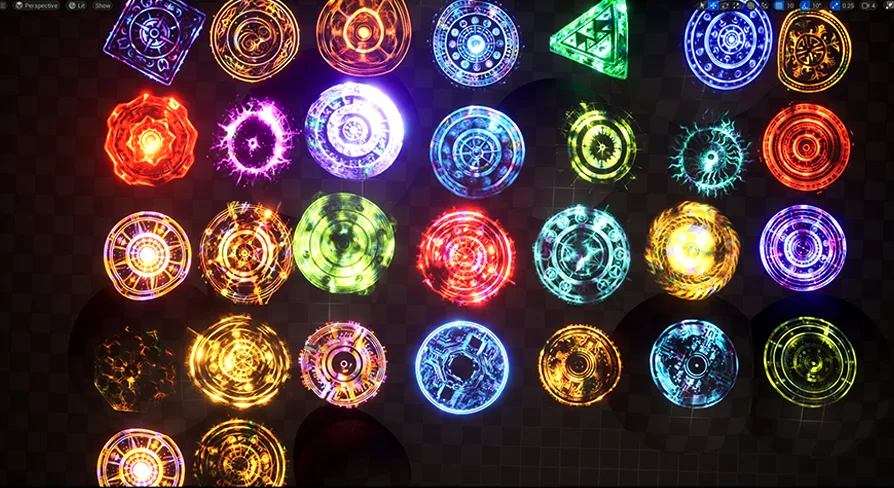
Integrating decals directly into an interactive level begins at the surface projection stage. MagicCircle Decal 30 provides several types of magic circle decal materials that can be projected across floors, walls, and irregular environmental geometry. Rather than relying on custom modeled geometry or complex planar meshes that risk clipping against rough terrain, decal materials conform cleanly across whatever surfaces intersect their projection volume.
Placing these decals allows level artists and gameplay designers to visually mark mystical locations, define casting perimeters, or highlight summon zones. Because the pack focuses on rune and magical themes, the projected circles bring immediate visual identity to otherwise neutral stonework, wood, or dirt surfaces. The materials wrap over cracks, stairs, and debris without requiring manual mesh deformation, keeping the staging process fast and responsive during level passes.
Customization Workflow in the Material Instance
Fine-tuning the appearance of each magical ring takes place through material instances. Working inside a material instance rather than recompiling base shaders keeps the iteration loop tight and non-destructive. Artists can derive multiple specialized instances from the master decal materials to serve different scenes, gameplay states, or spell schools without creating redundant assets.
Instance-based adjustments allow teams to dial in specific aesthetic requirements directly in the viewport. Parameter tweaks can alter how distinctly the magic runes display against dark or light environments, making sure that intricate line work and peripheral glyphs remain legible from player cameras. By relying on material instances, adjustments can be made on the fly, enabling rapid variations of magical circles across dungeons, arenas, and open-world ritual sites while maintaining unified shader architecture.
Rune Variations and Magical Types
The pack is structured around several distinct types of magic circle decal materials, offering an assortment of rune configurations and magical symbology. Visual variety is crucial when building spellcasting mechanics or staging different factions within a magical setting. Having multiple designs ensures that defensive wards, offensive spell matrices, and summoning patterns do not share identical glyph layouts.
Each decal type presents a distinct arrangement of runes, concentric rings, and geometric patterns characteristic of arcane circles. Some configurations present dense, complex arrangements suitable for high-tier incantations or ritual focal points, while other variants emphasize cleaner, simpler line art that works well as subtle indicators or repetitive ground effects. Selecting among the available decal types gives creators the ability to establish clear visual hierarchies between minor magical interactions and major spell events.
Integrating with Projectile FX with Blueprint
Beyond static scene dressing, MagicCircle Decal 30 maintains compatibility with Projectile FX with Blueprint. This compatibility expands the decals from passive environmental art into dynamic gameplay response assets. When a magical projectile connects with a surface, the underlying Blueprint logic can trace the impact point, capture the surface normal, and spawn a corresponding magic circle decal instantly at the hit location.
This workflow enables a direct link between projectile behavior and environmental feedback:
Projectiles traveling through the air trigger an impact event inside the Blueprint upon striking collision geometry.
The Blueprint spawns the magic circle decal oriented flush with the impacted surface normal, whether on horizontal ground or vertical barriers.
Material instances can be swapped or assigned dynamically through Blueprint script to match the specific projectile type that generated the hit.
Residual runic markings linger on the surface, communicating lingering magical energy or marking areas where secondary spell effects will trigger.
Tying the decal system directly to Blueprint-driven projectiles eliminates guesswork during gameplay implementation. Designers can build reactive combat abilities where spell impacts leave glowing arcane footprints that ground the action into the immediate environment.
Iterative Production and Gameplay Staging
Using customizable decal materials within a modular production pipeline keeps both technical overhead and asset management minimal. Because the pack centers on several distinct magic circle materials adjusted via material instances, teams do not need to manage sprawling texture folders or detached shader networks for individual spells. Everything funnels through the established instance parameters, ensuring consistent performance characteristics across various scenes.
Whether used as lingering blast marks for Projectile FX with Blueprint or as persistent runes inside ancient chambers, MagicCircle Decal 30 covers core arcane projection needs. Its combination of multiple rune types, fast instance-level customization, and ready implementation for interactive projectiles makes it a dependable toolkit for magic-focused worldbuilding and gameplay prototyping.
 Variety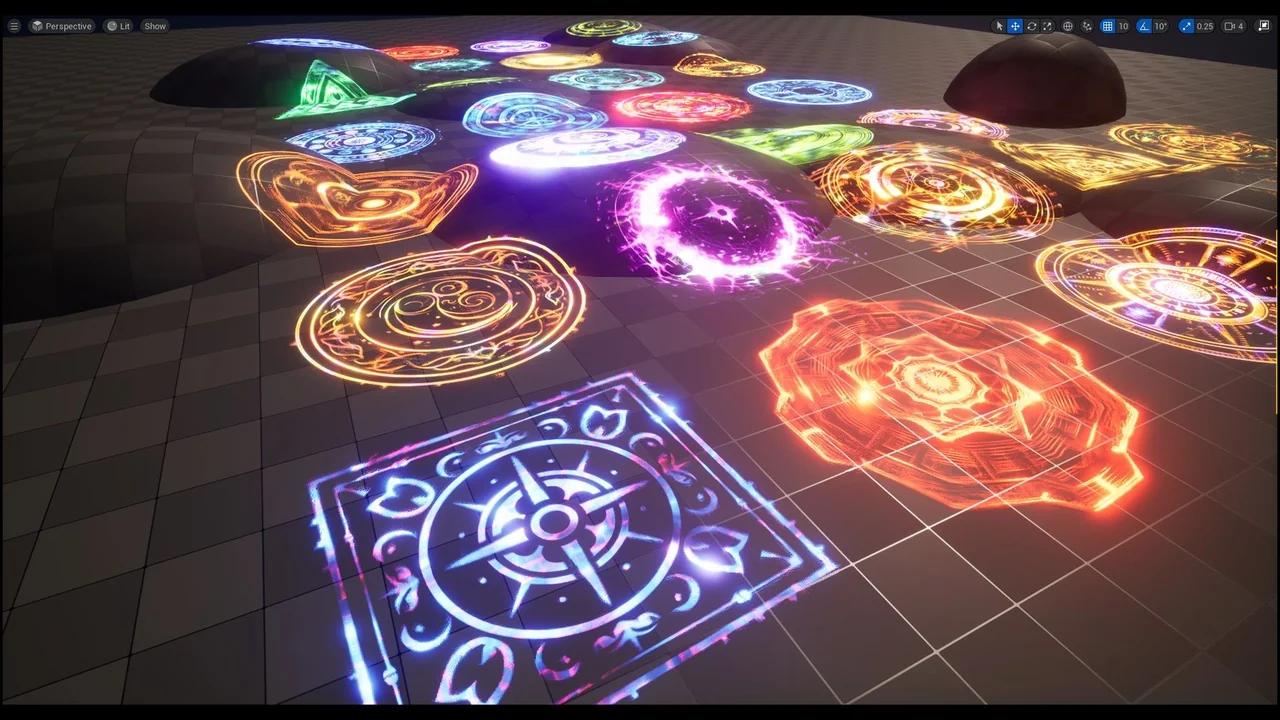
 Variety
 Variety
 Variety