"6f9bd6df1f44a86f"{"id":"1001217","slug":"hologram-shader","title":"Hologram Shader","category":"Variety","engine":"5.2+","assetVersion":"","engineVersion":"Engine Version: 5.2+","tag":"Variety","accent":"blue","visual":"mech","summary":"Explore Hologram Shader for Unreal Engine 5, featuring 65 pattern options, custom image support, material instance controls, and stylized or realistic rendering","platform":"Unreal Engine","indexPolicy":"index","publishedAt":"2026-09-19T09:00:05.221Z","updatedAt":"2026-09-19T09:00:05.221Z","sourceNotes":[],"fileContents":[],"compatibility":["Unreal Engine","Engine Version: 5.2+"],"featuredImage":{"alt":"Hologram Shader","src":"/wp-content/uploads/published/2026/09/08aafa1aafe4-05685ce7-aa12-46f7-b08c-5908a21e4827-3e46fefebe.webp"},"hasDownloadLink":true,"downloads":0,"terms":[{"taxonomy":"category","slug":"variety","name":"Variety"}],"galleryImages":[{"src":"/wp-content/uploads/published/2026/09/eff00b024390-c4457471-2dfe-496d-9900-13835f00b668-007658a02c.webp","alt":"Hologram Shader"},{"src":"/wp-content/uploads/published/2026/09/6cdfb6aa8d2f-f02ddfb7-9184-4134-aae0-37e3ddae8d28-4a12997376.webp","alt":"Hologram Shader"},{"src":"/wp-content/uploads/published/2026/09/76709bbb9c64-cf6bb1c4-5937-4c88-93e9-f6cd4861c0f5-6f6378f941.webp","alt":"Hologram Shader"},{"src":"/wp-content/uploads/published/2026/09/e3fee68f2ad2-2aec17eb-52b7-4641-b92f-bf8a75584e25-17db306892.webp","alt":"Hologram Shader"},{"src":"/wp-content/uploads/published/2026/09/433a2995b931-b46b15e0-e541-4f83-86b8-d5d2bdf5055c-5db8208319.webp","alt":"Hologram Shader"},{"src":"/wp-content/uploads/published/2026/09/a41bb379e662-7c8e961f-8e70-4364-b544-112053cc0d56-a756323902.webp","alt":"Hologram Shader"},{"src":"/wp-content/uploads/published/2026/09/934d2cb3a1cb-66f79bb8-b527-430e-8f88-06ef8a80dbc6-11e230bd5d.webp","alt":"Hologram Shader"},{"src":"/wp-content/uploads/published/2026/09/3a7e4746a3c5-e2f8dd0c-1531-478b-85d5-7559211c8e75-63419b575c.webp","alt":"Hologram Shader"}],"accessPanel":{"kind":"resource","title":"Download this resource","eyebrow":"Free Download","message":"Log in or create a free account to start your download.","fileName":"Content.7z","safetyNote":"Resources are manually reviewed before listing to improve quality and reduce obvious risks.","actionLabel":"Download Free","resourceType":"Resource archive"},"contentHtml":"\u003ch2\u003eRendering Stylized and Realistic Projections\u003c/h2\u003e\u003cp\u003eHolographic surfaces often require a delicate balance between emissive light, surface transparency, and digital interference. Hologram Shader addresses this by allowing real-time scenes to display both stylized and realistic visual output. Rather than locking an environment or asset into a rigid aesthetic, the shader can adjust between high-tech realism and exaggerated, cartoon-style presentation. That visual versatility makes it practical whether a scene is destined for interactive gameplay or framed inside a high-resolution cinematic video sequence.\u003c/p\u003e\u003cp\u003eBecause the core material logic accommodates multiple visual targets, artists working on futuristic sci-fi projects can shift from clean, subtle holographic interfaces to noisy, flickering digital artifacts without swapping master assets. The same principles apply to fantasy worlds requiring magical projections or stylized titles needing bright, readable silhouettes with a distinctly illustrated edge.\u003c/p\u003e\u003ch2\u003eConfiguring 65 Patterns and Custom Image Textures\u003c/h2\u003e\u003cp\u003eAt the center of the shader's flexibility is an included library of 65 distinct patterns. These pre-configured designs provide the foundational scanlines, geometric grids, noise distributions, and visual frequencies that define how light breaks across the underlying mesh. Switching between these patterns dramatically alters the character of the projection, providing instant variations that mimic standard digital readouts, complex tech telemetry, or ethereal energy surfaces.\u003c/p\u003e\u003cp\u003eBeyond the built-in library, the material allows developers to feed in custom images directly. Inserting custom texture masks, typography, insignia, or user interface graphics lets teams tailor the projection to exact narrative or brand needs within an environment. By combining an imported image with the available pattern layering, assets can display tailored computer readouts, alien typography, or stylized user interfaces while still benefiting from the automated distortion, scanline sweeps, and glow parameters handled by the shader logic.\u003c/p\u003e\u003ch2\u003eMaterial Instance Controls and Workflow Integration\u003c/h2\u003e\u003cp\u003eQuick iteration is critical when establishing the mood of a game level or lighting a complex cinematic frame. Setting up a material instance using this shader is intentionally straightforward. Rather than forcing artists to dive into the core material graph to tweak values or recompile shaders, individual instances expose parameters that can be adjusted interactively in the viewport.\u003c/p\u003e\u003cp\u003eMaterial instances allow fast tuning of color channels, opacity values, edge illumination, scan speed, and pattern scale. This procedural control lets a single master material drive dozens of unique scene elements simultaneously. A technical artist can instance the shader once to create a low-power, translucent security terminal on a desk, and instance it again to generate a blinding, high-contrast holographic billboard suspended across a city skyline.\u003c/p\u003e\u003ch2\u003eUnreal Engine 5 Cyberpunk Holograms and Energy Barriers\u003c/h2\u003e\u003cp\u003eIn modern production pipelines structured through Unreal Engine 5 (UE5), holographic materials often interact with complex world lighting and high-density geometry. The shader adapts cleanly to specific genre requirements, serving as a dedicated Cyberpunk hologram shader within dense urban spaces or taking on structural roles in combat systems.\u003c/p\u003e\u003cp\u003eThrough compatible setups demonstrated across associated tutorials, the underlying principles extend toward specialized defensive effects:\u003c/p\u003e\u003cul\u003e\u003cli\u003e\u003cstrong\u003eCyberpunk Holograms:\u003c/strong\u003e High-saturation projections made for urban signage, character statues, diagnostic screens, and interactive prop terminals.\u003c/li\u003e\u003cli\u003e\u003cstrong\u003eSci-Fi Force Fields (Dome Shader):\u003c/strong\u003e Radial and hemispherical projections that track energy distribution across large defensive domes, covering military bases or planetary shelters.\u003c/li\u003e\u003cli\u003e\u003cstrong\u003eEnergy Shield Effects (Barrier Shader):\u003c/strong\u003e Planar, dynamic boundaries designed to read as protective barriers, deflecting fire or blocking entryways with shifting pattern intensity.\u003c/li\u003e\u003c/ul\u003e\u003cp\u003eBy shifting how the patterns scale across curved or flat geometry, artists can turn standard primitive shapes into reactive gameplay boundaries or narrative set dressing without authoring entirely separate material families.\u003c/p\u003e\u003ch2\u003ePart of the Stylized Shaders Collection\u003c/h2\u003e\u003cp\u003eDeveloped by the team of EYSON, Meiman, and RinKatakakuru, Hologram Shader belongs to a broader ecosystem of specialized visual effects tools. The collection includes dedicated releases such as Stylized Domes Shader, Barriers Shader, the combined Hologram and Domes pack, and the comprehensive Stylized Shaders Pack. It also works in harmony with companion effects such as the Stylized Volumetric Clouds Shader.\u003c/p\u003e\u003cp\u003eThis shared development lineage ensures visual cohesion across different environmental effects. When building an expansive fantasy arena or a science-fiction installation, using materials derived from the same asset collection helps energy shields, atmospheric dome volumes, floating digital projections, and skybox clouds share a unified visual language. The instance controls remain consistent across packages, reducing the learning curve for environment artists who need to populate complex scenes quickly.\u003c/p\u003e\u003ch2\u003eEvaluating the Asset for Game and Cinematic Pipelines\u003c/h2\u003e\u003cp\u003eFor teams evaluating real-time shader solutions, the value of this package lies in its direct balance between pre-built visual diversity and straightforward customization. The combination of 65 modular patterns and custom texture inputs eliminates the need to build specialized projection graphs from scratch, while easy instancing protects workflow speed. Whether deployed to build flickering cyberpunk signage in UE5, protective energy barriers for interactive combat, or stylized holographic displays for cinematic sequences, the shader delivers reliable visual feedback with minimal setup friction.\u003c/p\u003e\n\n\u003ch2\u003eContinue Browsing Similar Packs\u003c/h2\u003e\n\u003cul\u003e\n\u003cli\u003e\u003ca href=\"https://3dcghub.com/art-of-shader-film-and-special-effects/\" rel=\"noopener noreferrer\"\u003eArt of Shader - Film And Special Effects\u003c/a\u003e\u003c/li\u003e\n\u003cli\u003e\u003ca href=\"https://3dcghub.com/fantastical-resource-shader/\" rel=\"noopener noreferrer\"\u003eFantastical Resource Shader\u003c/a\u003e\u003c/li\u003e\n\u003cli\u003e\u003ca href=\"https://3dcghub.com/hologram-vfx-with-niagara/\" rel=\"noopener noreferrer\"\u003eHOLOGRAM VFX With Niagara\u003c/a\u003e\u003c/li\u003e\n\u003cli\u003e\u003ca href=\"https://3dcghub.com/hologram-display-pack/\" rel=\"noopener noreferrer\"\u003eHOLOGRAM DISPLAY Pack\u003c/a\u003e\u003c/li\u003e\n\u003cli\u003e\u003ca href=\"https://3dcghub.com/ep-master-materials/\" rel=\"noopener noreferrer\"\u003eEP Master Materials\u003c/a\u003e\u003c/li\u003e\n\u003c/ul\u003e","contentTextLength":6037,"navigation":{"current":1129,"total":4218,"previous":{"id":"1001218","slug":"led-screen-effect","title":"LED Screen Effect","category":"Variety","platform":"Unreal Engine","updatedAt":"2026-09-19T09:04:05.992Z"},"next":{"id":"1001216","slug":"ep-master-materials","title":"EP Master Materials","category":"Variety","platform":"Unreal Engine","updatedAt":"2026-09-19T08:57:25.445Z"}},"relatedResources":[{"id":"1001221","slug":"stylized-domes-shader","title":"Stylized Domes Shader","category":"Variety","engine":"5.2+","assetVersion":"","engineVersion":"Engine Version: 5.2+","tag":"Variety","accent":"blue","visual":"mech","summary":"Examine setup, controls, and technical constraints for the Stylized Domes Shader in Unreal Engine 5, from force fields to atmospheric boundaries.","platform":"Unreal Engine","indexPolicy":"index","publishedAt":"2026-09-19T09:08:49.457Z","updatedAt":"2026-09-19T09:08:49.457Z","sourceNotes":[],"fileContents":[],"compatibility":["Unreal Engine","Engine Version: 5.2+"],"featuredImage":{"alt":"Stylized Domes Shader","src":"/wp-content/uploads/published/2026/09/18d1223c0b09-8df68d81-cb65-41f1-85ba-05264a9d34d9-51e3b29605.webp"},"hasDownloadLink":true,"downloads":0},{"id":"1001220","slug":"stylized-barrier-shader","title":"Stylized Barrier Shader","category":"Variety","engine":"5.0+","assetVersion":"","engineVersion":"Engine Version: 5.0+","tag":"Variety","accent":"blue","visual":"mech","summary":"Deploy animated energy shields, shelters, enemy spawn barriers, and portals in Unreal Engine 5 with the versatile Stylized Barrier Shader.","platform":"Unreal Engine","indexPolicy":"index","publishedAt":"2026-09-19T09:07:13.200Z","updatedAt":"2026-09-19T09:07:13.200Z","sourceNotes":[],"fileContents":[],"compatibility":["Unreal Engine","Engine Version: 5.0+"],"featuredImage":{"alt":"Stylized Barrier Shader","src":"/wp-content/uploads/published/2026/09/75a4627030cf-2aedc77e-0596-4cfe-aa8d-45ee9961137a-59bdb352ab.webp"},"hasDownloadLink":true,"downloads":0},{"id":"28564","slug":"art-of-shader-film-and-special-effects","title":"Art of Shader - Film And Special Effects","category":"Variety","engine":"5.1+","assetVersion":"Engine version: 5.1+","engineVersion":"","tag":"Variety","accent":"blue","visual":"luts","summary":"Art of Shader - Film And Special Effects focuses on cinematic image treatment through advanced post-process materials. Its Blueprint-driven workflow makes it easier to combine, blend, and group effects while keeping each look highly adjustable.","platform":"Unreal Engine","indexPolicy":"index","publishedAt":"2026-05-17T13:13:44.000Z","updatedAt":"2026-05-17T13:13:54.000Z","sourceNotes":[],"fileContents":[],"compatibility":["Unreal Engine","Engine version: 5.1+"],"featuredImage":{"alt":"Art of Shader - Film And Special Effects","src":"https://3dcghub.com/wp-content/uploads/2026/05/0d2392df6753_a14b78aa-9364-4758-b087-a9276d782faf.webp"},"hasDownloadLink":true,"downloads":0}]}
Variety
Hologram Shader
Explore Hologram Shader for Unreal Engine 5, featuring 65 pattern options, custom image support, material instance controls, and stylized or realistic rendering
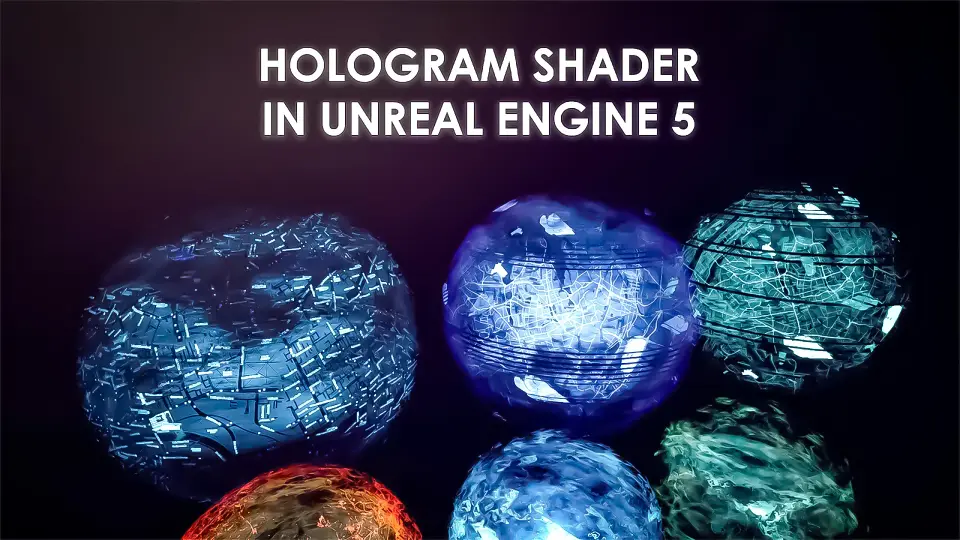
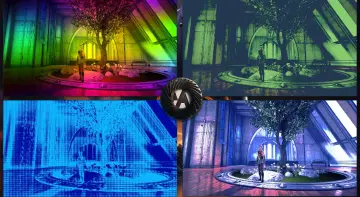
Holographic surfaces often require a delicate balance between emissive light, surface transparency, and digital interference. Hologram Shader addresses this by allowing real-time scenes to display both stylized and realistic visual output. Rather than locking an environment or asset into a rigid aesthetic, the shader can adjust between high-tech realism and exaggerated, cartoon-style presentation. That visual versatility makes it practical whether a scene is destined for interactive gameplay or framed inside a high-resolution cinematic video sequence.
Because the core material logic accommodates multiple visual targets, artists working on futuristic sci-fi projects can shift from clean, subtle holographic interfaces to noisy, flickering digital artifacts without swapping master assets. The same principles apply to fantasy worlds requiring magical projections or stylized titles needing bright, readable silhouettes with a distinctly illustrated edge.
Configuring 65 Patterns and Custom Image Textures
At the center of the shader's flexibility is an included library of 65 distinct patterns. These pre-configured designs provide the foundational scanlines, geometric grids, noise distributions, and visual frequencies that define how light breaks across the underlying mesh. Switching between these patterns dramatically alters the character of the projection, providing instant variations that mimic standard digital readouts, complex tech telemetry, or ethereal energy surfaces.
Beyond the built-in library, the material allows developers to feed in custom images directly. Inserting custom texture masks, typography, insignia, or user interface graphics lets teams tailor the projection to exact narrative or brand needs within an environment. By combining an imported image with the available pattern layering, assets can display tailored computer readouts, alien typography, or stylized user interfaces while still benefiting from the automated distortion, scanline sweeps, and glow parameters handled by the shader logic.
Material Instance Controls and Workflow Integration
Quick iteration is critical when establishing the mood of a game level or lighting a complex cinematic frame. Setting up a material instance using this shader is intentionally straightforward. Rather than forcing artists to dive into the core material graph to tweak values or recompile shaders, individual instances expose parameters that can be adjusted interactively in the viewport.
Material instances allow fast tuning of color channels, opacity values, edge illumination, scan speed, and pattern scale. This procedural control lets a single master material drive dozens of unique scene elements simultaneously. A technical artist can instance the shader once to create a low-power, translucent security terminal on a desk, and instance it again to generate a blinding, high-contrast holographic billboard suspended across a city skyline.
Unreal Engine 5 Cyberpunk Holograms and Energy Barriers
In modern production pipelines structured through Unreal Engine 5 (UE5), holographic materials often interact with complex world lighting and high-density geometry. The shader adapts cleanly to specific genre requirements, serving as a dedicated Cyberpunk hologram shader within dense urban spaces or taking on structural roles in combat systems.
Through compatible setups demonstrated across associated tutorials, the underlying principles extend toward specialized defensive effects:
Cyberpunk Holograms: High-saturation projections made for urban signage, character statues, diagnostic screens, and interactive prop terminals.
Sci-Fi Force Fields (Dome Shader): Radial and hemispherical projections that track energy distribution across large defensive domes, covering military bases or planetary shelters.
Energy Shield Effects (Barrier Shader): Planar, dynamic boundaries designed to read as protective barriers, deflecting fire or blocking entryways with shifting pattern intensity.
By shifting how the patterns scale across curved or flat geometry, artists can turn standard primitive shapes into reactive gameplay boundaries or narrative set dressing without authoring entirely separate material families.
Part of the Stylized Shaders Collection
Developed by the team of EYSON, Meiman, and RinKatakakuru, Hologram Shader belongs to a broader ecosystem of specialized visual effects tools. The collection includes dedicated releases such as Stylized Domes Shader, Barriers Shader, the combined Hologram and Domes pack, and the comprehensive Stylized Shaders Pack. It also works in harmony with companion effects such as the Stylized Volumetric Clouds Shader.
This shared development lineage ensures visual cohesion across different environmental effects. When building an expansive fantasy arena or a science-fiction installation, using materials derived from the same asset collection helps energy shields, atmospheric dome volumes, floating digital projections, and skybox clouds share a unified visual language. The instance controls remain consistent across packages, reducing the learning curve for environment artists who need to populate complex scenes quickly.
Evaluating the Asset for Game and Cinematic Pipelines
For teams evaluating real-time shader solutions, the value of this package lies in its direct balance between pre-built visual diversity and straightforward customization. The combination of 65 modular patterns and custom texture inputs eliminates the need to build specialized projection graphs from scratch, while easy instancing protects workflow speed. Whether deployed to build flickering cyberpunk signage in UE5, protective energy barriers for interactive combat, or stylized holographic displays for cinematic sequences, the shader delivers reliable visual feedback with minimal setup friction.
 Variety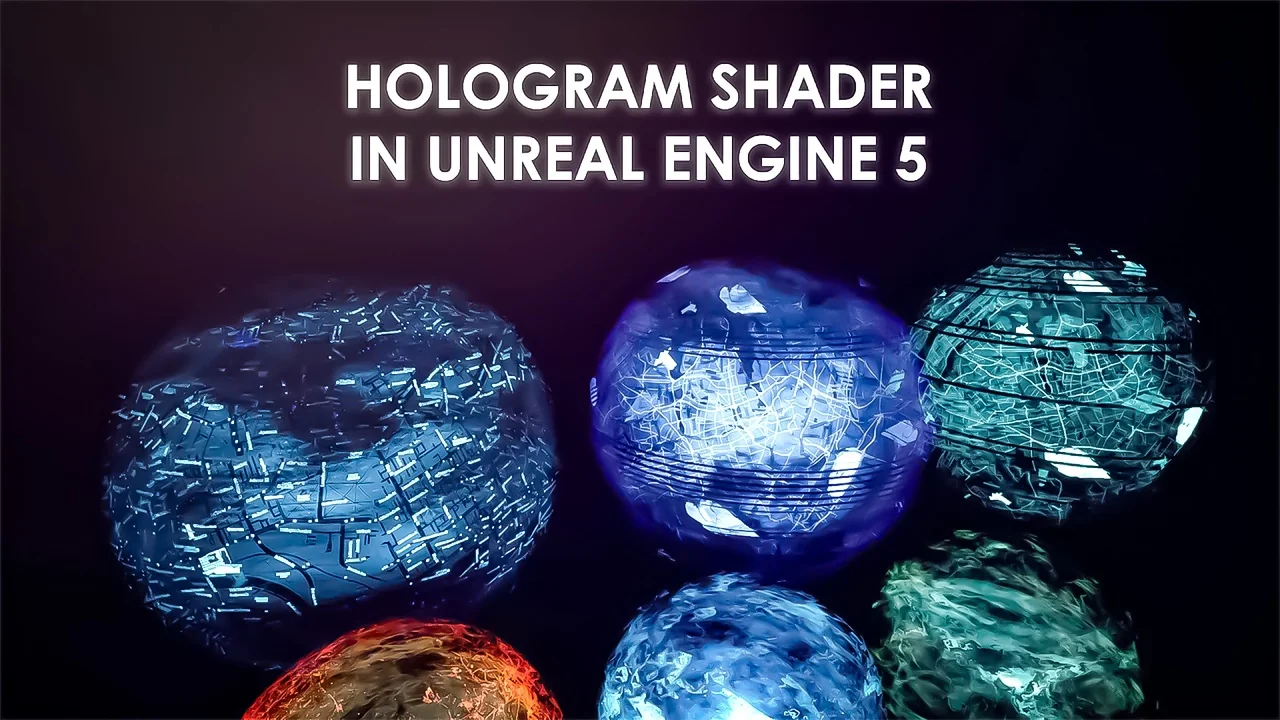
 Variety
 Variety
 Variety