"6f9bd6df1f44a86f"{"id":"1001220","slug":"stylized-barrier-shader","title":"Stylized Barrier Shader","category":"Variety","engine":"5.0+","assetVersion":"","engineVersion":"Engine Version: 5.0+","tag":"Variety","accent":"blue","visual":"mech","summary":"Deploy animated energy shields, shelters, enemy spawn barriers, and portals in Unreal Engine 5 with the versatile Stylized Barrier Shader.","platform":"Unreal Engine","indexPolicy":"index","publishedAt":"2026-09-19T09:07:13.200Z","updatedAt":"2026-09-19T09:07:13.200Z","sourceNotes":[],"fileContents":[],"compatibility":["Unreal Engine","Engine Version: 5.0+"],"featuredImage":{"alt":"Stylized Barrier Shader","src":"/wp-content/uploads/published/2026/09/75a4627030cf-2aedc77e-0596-4cfe-aa8d-45ee9961137a-59bdb352ab.webp"},"hasDownloadLink":true,"downloads":0,"terms":[{"taxonomy":"category","slug":"variety","name":"Variety"}],"galleryImages":[{"src":"/wp-content/uploads/published/2026/09/56bd54073b9b-65d51672-a0ea-4738-9bcf-cd3148dde719-ed1a7a3fd4.webp","alt":"Stylized Barrier Shader"},{"src":"/wp-content/uploads/published/2026/09/d6b102123ae1-c2bbf537-5751-4f55-98bc-ef5ab9f922dd-d08c7f9e59.webp","alt":"Stylized Barrier Shader"},{"src":"/wp-content/uploads/published/2026/09/26b9d7d284a7-bf82dd2b-0ac2-408a-9cea-7eaf63eee98c-0b95daa2c7.webp","alt":"Stylized Barrier Shader"},{"src":"/wp-content/uploads/published/2026/09/b9fbec19c7c4-f63638d3-a72f-4261-adc7-9c2c534d5323-e8222d5a7b.webp","alt":"Stylized Barrier Shader"},{"src":"/wp-content/uploads/published/2026/09/8f07ad982065-0ec0ef3d-1952-4f64-9b0d-6df04eaea09a-61bda8cbb5.webp","alt":"Stylized Barrier Shader"},{"src":"/wp-content/uploads/published/2026/09/952fc83f6742-ab0d1102-0d36-4639-a2c7-61052470346b-16af5da0a1.webp","alt":"Stylized Barrier Shader"},{"src":"/wp-content/uploads/published/2026/09/9867014bff43-a5c024e0-839c-4fcf-9d3b-5d2401d31a5c-3769799494.webp","alt":"Stylized Barrier Shader"},{"src":"/wp-content/uploads/published/2026/09/a199e5cc612a-0623fb2b-d6a4-4dc6-aa49-efc9218b0abd-a5eff1e96e.webp","alt":"Stylized Barrier Shader"},{"src":"/wp-content/uploads/published/2026/09/fc57db5c81c7-ef1f9d0e-b71b-4822-aedc-67478b937f35-5ff9583ba5.webp","alt":"Stylized Barrier Shader"},{"src":"/wp-content/uploads/published/2026/09/72ec66cbe5b8-b0931ec9-0eb1-429a-9fa2-642b2d9abc07-7de9490d29.webp","alt":"Stylized Barrier Shader"}],"accessPanel":{"kind":"resource","title":"Download this resource","eyebrow":"Free Download","message":"Log in or create a free account to start your download.","fileName":"Content.7z","safetyNote":"Resources are manually reviewed before listing to improve quality and reduce obvious risks.","actionLabel":"Download Free","resourceType":"Resource archive"},"contentHtml":"\u003ch2\u003eDynamic Surface Animation for Force Fields and Shelters\u003c/h2\u003e\u003cp\u003eConstructing reactive, animated surfaces for defensive barriers often requires dedicated material setups that balance motion with readability. Stylized Barrier Shader addresses this challenge by providing an animated material system tailored for energy shield effects and physical shelters in Unreal Engine 5.\u003c/p\u003e\u003cp\u003eIn interactive environments, defensive structures must signal their state clearly to players. By utilizing procedural motion and stylized surface properties, the shader establishes a distinct boundary layer suitable for combat shelters, defensive force fields, and protective wards. The animation across the surface reinforces the sense of an active barrier holding against incoming impact or defining a safe gameplay zone.\u003c/p\u003e\u003ch2\u003eVisualizing Enemy Spawning Points, Portals, and Fantasy Spells\u003c/h2\u003e\u003cp\u003eBeyond defensive equipment, world spaces frequently require clear spatial thresholds to signal incoming encounters or transitional zones.\u003c/p\u003e\u003cp\u003eThe animated characteristics of the barrier material adapt naturally to enemy spawn markers. Level designers can place barriers over spawn thresholds, signaling to players where encounters originate through energized surface motion. Similarly, the shader functions as an active portal face or dimensional rift, turning standard polygon geometry into a swirling or pulsing event horizon. In magic-focused gameplay, the material translates directly into cast spell zones, area-of-effect enclosures, and arcane seals that demand immediate visual priority.\u003c/p\u003e\u003ch2\u003eIntegrating with the Stylized Shaders Pack and Companion Domes\u003c/h2\u003e\u003cp\u003eStylized Barrier Shader does not operate in total isolation; it belongs to a cohesive lineage of surface materials created to standardize stylized and sci-fi visuals.\u003c/p\u003e\u003cp\u003eWithin the broader collection, the shader sits alongside dedicated assets such as the Hologram Shader, Stylized Domes Shader, and the combined Stylized Shaders Pack. When paired together, developers can maintain visual coherence across different visual effects, matching planar barriers to rounded sci-fi dome fields and holographic user interfaces. The material also maintains compatibility with the Stylized Volumetric Clouds Shader, allowing open-air fantasy environments and stylized skies to coexist smoothly with shimmering defensive structures and energy perimeters.\u003c/p\u003e\u003ch2\u003eProduction Deployment Across Stylized and Cinematic Sequences\u003c/h2\u003e\u003cp\u003eShaders that serve gameplay needs must also hold up under cinematic scrutiny during cutscenes and scripted narrative sequences.\u003c/p\u003e\u003cp\u003eBecause the shader balances stylized aesthetics with sharp, animated definition, it transitions effectively from active gameplay to cinematic framing. Directors can capture close-up interactions where characters approach an energy wall or cross a shimmering fantasy barrier without exposing low-resolution visual artifacts. The motion profiles remain controlled and readable, whether seen from standard gameplay camera distances or tight cinematic angles.\u003c/p\u003e\u003ch2\u003eWorkflow Fit for Game Systems\u003c/h2\u003e\u003cp\u003eImplementing the barrier shader fits neatly into standard technical art pipelines for combat mechanics and world building. VFX artists and gameplay programmers looking to communicate spatial boundaries, shield health states, or enemy entry points can apply the material to custom meshes without reworking underlying rendering configurations.\u003c/p\u003e\n\n\u003ch2\u003eRelated Resources Worth Checking\u003c/h2\u003e\n\u003cul\u003e\n\u003cli\u003e\u003ca href=\"https://3dcghub.com/hologram-shader/\" rel=\"noopener noreferrer\"\u003eHologram Shader\u003c/a\u003e\u003c/li\u003e\n\u003cli\u003e\u003ca href=\"https://3dcghub.com/fantastical-resource-shader/\" rel=\"noopener noreferrer\"\u003eFantastical Resource Shader\u003c/a\u003e\u003c/li\u003e\n\u003cli\u003e\u003ca href=\"https://3dcghub.com/art-of-shader-film-and-special-effects/\" rel=\"noopener noreferrer\"\u003eArt of Shader - Film And Special Effects\u003c/a\u003e\u003c/li\u003e\n\u003cli\u003e\u003ca href=\"https://3dcghub.com/stylized-volumetric-clouds-shader/\" rel=\"noopener noreferrer\"\u003eStylized Volumetric Clouds Shader\u003c/a\u003e\u003c/li\u003e\n\u003cli\u003e\u003ca href=\"https://3dcghub.com/stylized-animated-lava-material-pack-85-pcs/\" rel=\"noopener noreferrer\"\u003eStylized Animated Lava Material Pack 85 Pcs\u003c/a\u003e\u003c/li\u003e\n\u003c/ul\u003e","contentTextLength":3561,"navigation":{"current":1126,"total":4218,"previous":{"id":"1001221","slug":"stylized-domes-shader","title":"Stylized Domes Shader","category":"Variety","platform":"Unreal Engine","updatedAt":"2026-09-19T09:08:49.457Z"},"next":{"id":"1001219","slug":"necro-s-utility-material-pack","title":"Necro's Utility Material Pack","category":"Variety","platform":"Unreal Engine","updatedAt":"2026-09-19T09:05:32.482Z"}},"relatedResources":[{"id":"1001221","slug":"stylized-domes-shader","title":"Stylized Domes Shader","category":"Variety","engine":"5.2+","assetVersion":"","engineVersion":"Engine Version: 5.2+","tag":"Variety","accent":"blue","visual":"mech","summary":"Examine setup, controls, and technical constraints for the Stylized Domes Shader in Unreal Engine 5, from force fields to atmospheric boundaries.","platform":"Unreal Engine","indexPolicy":"index","publishedAt":"2026-09-19T09:08:49.457Z","updatedAt":"2026-09-19T09:08:49.457Z","sourceNotes":[],"fileContents":[],"compatibility":["Unreal Engine","Engine Version: 5.2+"],"featuredImage":{"alt":"Stylized Domes Shader","src":"/wp-content/uploads/published/2026/09/18d1223c0b09-8df68d81-cb65-41f1-85ba-05264a9d34d9-51e3b29605.webp"},"hasDownloadLink":true,"downloads":0},{"id":"1001217","slug":"hologram-shader","title":"Hologram Shader","category":"Variety","engine":"5.2+","assetVersion":"","engineVersion":"Engine Version: 5.2+","tag":"Variety","accent":"blue","visual":"mech","summary":"Explore Hologram Shader for Unreal Engine 5, featuring 65 pattern options, custom image support, material instance controls, and stylized or realistic rendering","platform":"Unreal Engine","indexPolicy":"index","publishedAt":"2026-09-19T09:00:05.221Z","updatedAt":"2026-09-19T09:00:05.221Z","sourceNotes":[],"fileContents":[],"compatibility":["Unreal Engine","Engine Version: 5.2+"],"featuredImage":{"alt":"Hologram Shader","src":"/wp-content/uploads/published/2026/09/08aafa1aafe4-05685ce7-aa12-46f7-b08c-5908a21e4827-3e46fefebe.webp"},"hasDownloadLink":true,"downloads":0},{"id":"13126","slug":"fantastical-resource-shader","title":"Fantastical Resource Shader","category":"Variety","engine":"4.26+,5.0+","assetVersion":"Engine version: 4.26+,5.0+","engineVersion":"4.18","tag":"Variety","accent":"blue","visual":"luts","summary":"Enhance your game's interface with the Fantastical Resource Shader. This versatile tool allows for deep customization of resource orbs, potions, and magical effects using over 45 parameters.","platform":"Unreal Engine","indexPolicy":"index","publishedAt":"2026-03-10T15:54:25.000Z","updatedAt":"2026-04-19T15:46:31.000Z","sourceNotes":[],"fileContents":[],"compatibility":["Unreal Engine","Engine version: 4.26+,5.0+"],"featuredImage":{"alt":"Fantastical Resource Shader","src":"https://3dcghub.com/wp-content/uploads/2026/03/8dab64b5-a820-4d69-b557-63fd42ff3760.webp"},"hasDownloadLink":true,"downloads":0}]}
Variety
Stylized Barrier Shader
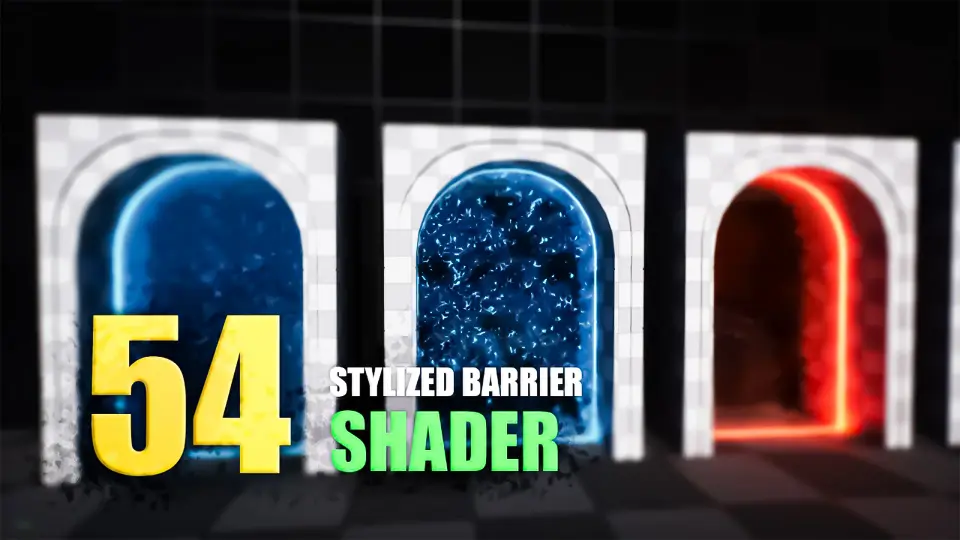
Deploy animated energy shields, shelters, enemy spawn barriers, and portals in Unreal Engine 5 with the versatile Stylized Barrier Shader.
Dynamic Surface Animation for Force Fields and Shelters
Constructing reactive, animated surfaces for defensive barriers often requires dedicated material setups that balance motion with readability. Stylized Barrier Shader addresses this challenge by providing an animated material system tailored for energy shield effects and physical shelters in Unreal Engine 5.
In interactive environments, defensive structures must signal their state clearly to players. By utilizing procedural motion and stylized surface properties, the shader establishes a distinct boundary layer suitable for combat shelters, defensive force fields, and protective wards. The animation across the surface reinforces the sense of an active barrier holding against incoming impact or defining a safe gameplay zone.
Visualizing Enemy Spawning Points, Portals, and Fantasy Spells
Beyond defensive equipment, world spaces frequently require clear spatial thresholds to signal incoming encounters or transitional zones.
The animated characteristics of the barrier material adapt naturally to enemy spawn markers. Level designers can place barriers over spawn thresholds, signaling to players where encounters originate through energized surface motion. Similarly, the shader functions as an active portal face or dimensional rift, turning standard polygon geometry into a swirling or pulsing event horizon. In magic-focused gameplay, the material translates directly into cast spell zones, area-of-effect enclosures, and arcane seals that demand immediate visual priority.
Integrating with the Stylized Shaders Pack and Companion Domes
Stylized Barrier Shader does not operate in total isolation; it belongs to a cohesive lineage of surface materials created to standardize stylized and sci-fi visuals.
Within the broader collection, the shader sits alongside dedicated assets such as the Hologram Shader, Stylized Domes Shader, and the combined Stylized Shaders Pack. When paired together, developers can maintain visual coherence across different visual effects, matching planar barriers to rounded sci-fi dome fields and holographic user interfaces. The material also maintains compatibility with the Stylized Volumetric Clouds Shader, allowing open-air fantasy environments and stylized skies to coexist smoothly with shimmering defensive structures and energy perimeters.
Production Deployment Across Stylized and Cinematic Sequences
Shaders that serve gameplay needs must also hold up under cinematic scrutiny during cutscenes and scripted narrative sequences.
Because the shader balances stylized aesthetics with sharp, animated definition, it transitions effectively from active gameplay to cinematic framing. Directors can capture close-up interactions where characters approach an energy wall or cross a shimmering fantasy barrier without exposing low-resolution visual artifacts. The motion profiles remain controlled and readable, whether seen from standard gameplay camera distances or tight cinematic angles.
Workflow Fit for Game Systems
Implementing the barrier shader fits neatly into standard technical art pipelines for combat mechanics and world building. VFX artists and gameplay programmers looking to communicate spatial boundaries, shield health states, or enemy entry points can apply the material to custom meshes without reworking underlying rendering configurations.
 Variety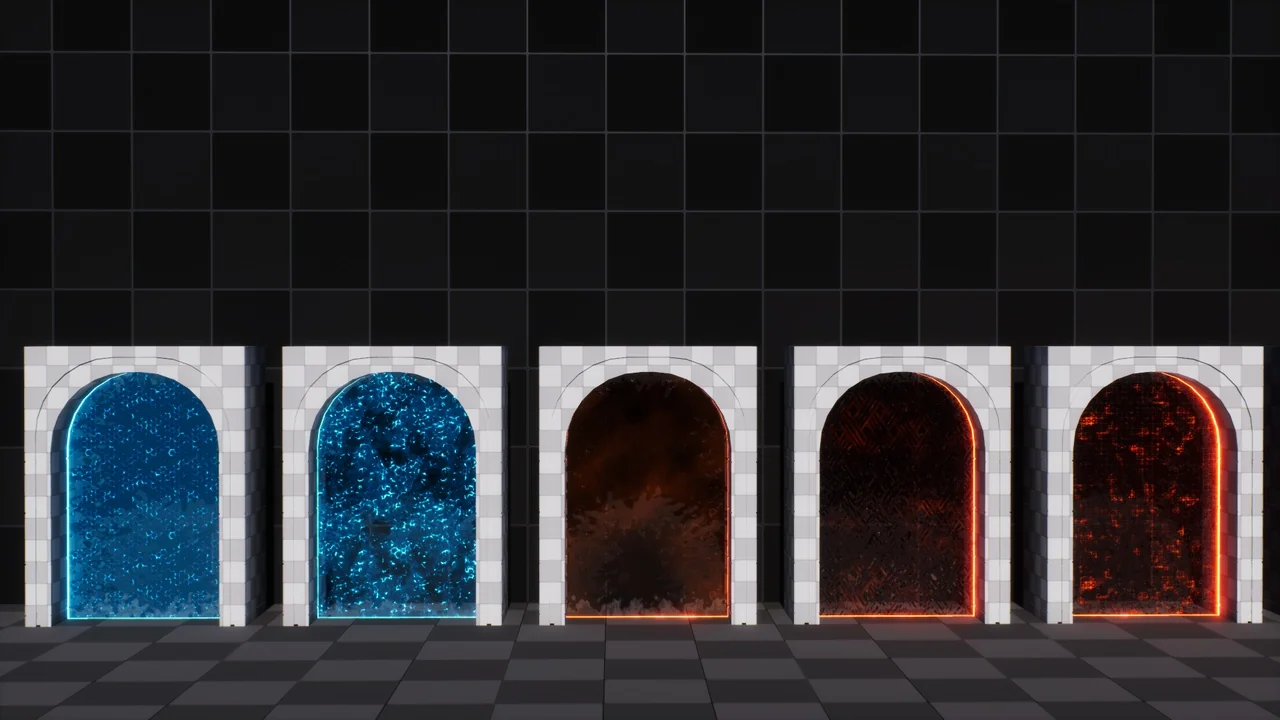
 Variety
 Variety
 Variety