"6f9bd6df1f44a86f"{"id":"1001219","slug":"necro-s-utility-material-pack","title":"Necro's Utility Material Pack","category":"Variety","engine":"5.0+","assetVersion":"","engineVersion":"Engine Version: 5.0+","tag":"Variety","accent":"blue","visual":"luts","summary":"Necro's Utility Material Pack brings parameterized master materials to Unreal Engine, featuring custom photo textures, sculpted normals, and vertex painting.","platform":"Unreal Engine","indexPolicy":"index","publishedAt":"2026-09-19T09:05:32.482Z","updatedAt":"2026-09-19T09:05:32.482Z","sourceNotes":[],"fileContents":[],"compatibility":["Unreal Engine","Engine Version: 5.0+"],"featuredImage":{"alt":"Necro's Utility Material Pack","src":"/wp-content/uploads/published/2026/09/bbaf3b6f9ecb-26703fa4-b260-4dc4-8daf-fa4b2f8f01af-e880551a27.webp"},"hasDownloadLink":true,"downloads":0,"terms":[{"taxonomy":"category","slug":"variety","name":"Variety"}],"galleryImages":[{"src":"/wp-content/uploads/published/2026/09/58b795d7d3ae-52b441e4-2789-45d8-bdb1-3674cb09ce0a-a7a73fa223.webp","alt":"Necro's Utility Material Pack"},{"src":"/wp-content/uploads/published/2026/09/9d8d8f256709-020851d3-31ad-4cfb-ad15-2a9624fc2b73-3523229c34.webp","alt":"Necro's Utility Material Pack"},{"src":"/wp-content/uploads/published/2026/09/a2c2732a9fe5-e0942c83-a17c-42c6-b41a-7c17d85de68a-11502221ab.webp","alt":"Necro's Utility Material Pack"},{"src":"/wp-content/uploads/published/2026/09/aa05a012a4a8-6152516a-707a-4c5e-8611-adc2411f797c-becb33a0b3.webp","alt":"Necro's Utility Material Pack"},{"src":"/wp-content/uploads/published/2026/09/e9244927a0ee-e2b30fcb-5efd-48d3-9d55-20e95b06af3b-afece5f4c7.webp","alt":"Necro's Utility Material Pack"},{"src":"/wp-content/uploads/published/2026/09/448d11b545b5-cd1d7660-2bb8-44c0-a3e4-35ac6e51970a-ca49198699.webp","alt":"Necro's Utility Material Pack"},{"src":"/wp-content/uploads/published/2026/09/431a81dffa8a-5e5f951f-9cf1-4e19-a95c-a8135880f41e-cfa4b75b80.webp","alt":"Necro's Utility Material Pack"},{"src":"/wp-content/uploads/published/2026/09/f8c4d79d8888-e88166ed-2fb6-45cb-b472-12e6750ce09b-268c1d9d29.webp","alt":"Necro's Utility Material Pack"},{"src":"/wp-content/uploads/published/2026/09/0c95e5b50dc3-660cd471-5e66-4b78-b55e-277358e179fa-10766f63e7.webp","alt":"Necro's Utility Material Pack"}],"accessPanel":{"kind":"resource","title":"Download this resource","eyebrow":"Free Download","message":"Log in or create a free account to start your download.","fileName":"Content.7z","safetyNote":"Resources are manually reviewed before listing to improve quality and reduce obvious risks.","actionLabel":"Download Free","resourceType":"Resource archive"},"contentHtml":"\u003ch2\u003eDeploying Parameterized Master Materials in Environment Pipelines\u003c/h2\u003e\u003cp\u003eSetting up architectural surfaces in real-time scenes often stalls on the repetitive task of assembling everyday shaders from scratch. Integrating Necro's Utility Material Pack into an Unreal Engine project bypasses that bottleneck by providing a collection of parameterized master materials ready for immediate instance creation. Instead of wiring texture samples, coordinate scalers, and blend nodes for every new room, corridor, or exterior structure, environment artists work directly with established shader graphs. The exposed parameters govern core surface behaviors, making it simple to map material instances across varied geometry while preserving visual consistency across an entire level.\u003c/p\u003e\u003cp\u003eStarting an environment pass with master materials shifts the production focus from graph maintenance to aesthetic calibration. Shaders handle baseline architectural needs, allowing level designers and artists to assign material instances across static meshes and immediately tune parameters without modifying underlying code. The core logic handles baseline coordinate scales and layer distributions right out of the box, reducing the repetitive setup usually required to author foundational construction assets.\u003c/p\u003e\u003ch2\u003eSurface Foundations: Brick Walls, Ceramic Tiles, and Metal Roofs\u003c/h2\u003e\u003cp\u003eVirtual environments rely heavily on standard materials that appear repeatedly across residential, commercial, and industrial settings. The pack focuses on structural surface types specifically designated for floor, roof, and general construction workflows. Brick walls provide the masonry base needed for exterior building facades, partition boundaries, and weathered outdoor structures. Ceramic tiles address finished interior flooring, sanitary spaces, kitchen splashbacks, and commercial walkways where clean surface finishes are required. Metal roofs cover industrial hangars, utility sheds, residential roofing panels, and outdoor shelters that demand distinct metallic characteristics.\u003c/p\u003e\u003cp\u003eBuilding these three material groups from the ground up typically involves balancing diffuse reflectance, surface roughness, and normal distribution over and over again. By providing these specific categories in a parameterized format, the pack gives artists immediate structural coverage. A project requiring an expansive warehouse can draw directly from the metal roof setups for exterior roofing planes, while using brick materials along structural supports and ceramic tiles throughout adjoining office or maintenance corridors.\u003c/p\u003e\u003ch2\u003eCapturing Relief with Sculpted Normals and Custom Photo Sources\u003c/h2\u003e\u003cp\u003eSurface detail in the collection originates from two distinct capture and authoring pathways. Many surfaces originate from custom photo sources, preserving the organic variation, authentic color balance, and natural wear patterns found on real-world structures. Photographed materials capture nuances that procedural nodes often miss, providing high-fidelity references for granular masonry, grout lines in tiling, and weathered paint finishes on metal.\u003c/p\u003e\u003cp\u003eTo complement the photographic pipeline, select materials feature normals sculpted inside dedicated 3D software. Sculpting normals within 3D modeling tools allows for deliberate control over bevel depths, sharp structural seams, deep mortar gaps, and clean edge definition that camera captures cannot cleanly isolate. This dual approach pairs authentic natural surfaces with structurally exaggerated normal relief, ensuring that directional lighting reacts convincingly across both subtle planar variations and pronounced structural edges.\u003c/p\u003e\u003ch2\u003eAdding Grime and Rust with Vertex Painting\u003c/h2\u003e\u003cp\u003eReal architectural materials rarely remain in clean, unblemished states. Several master materials in the pack incorporate dedicated vertex painting setups, granting direct manual control over secondary wear passes. Rather than baking dirt, oxidation, or weathering directly into static texture maps, artists use vertex color channels on individual meshes to paint localized detail directly in the Unreal Engine viewport.\u003c/p\u003e\u003cp\u003eThis feature provides two primary decay modes:\u003c/p\u003e\u003cul\u003e\u003cli\u003eGrime layers applied to low-lying corners, baseboards, grout joints, and water run-off paths across brick walls and ceramic tiles to break up uniform surface highlights.\u003c/li\u003e\u003cli\u003eRust overlays painted onto metallic roofs, structural flashings, and exposed metal seams to simulate oxidation, age, and exposure to moisture.\u003c/li\u003e\u003c/ul\u003e\u003cp\u003eUsing vertex color blending keeps texture memory budgets low because multiple assets can share identical master material instances while looking distinct through unique per-vertex paint strokes. A single brick wall mesh can appear spotless at one end of a street and heavily degraded by grime at the base of another, simply through viewport painting passes.\u003c/p\u003e\u003ch2\u003eConstruction Layering and Necro's Bone Box Integration\u003c/h2\u003e\u003cp\u003eMaterial management within extended Unreal Engine productions benefits from standardized shader structures. Featured as part of the November 2018 Unreal Engine Sponsored Content within the Permanent Collection, Necro's Utility Material Pack functions as an evergreen construction toolkit. Its workflow naturally aligns with companion assets from the developer, notably sharing project-level compatibility with Necro's Bone Box.\u003c/p\u003e\u003cp\u003eWhen combining these assets in active staging environments, artists can pair the pack's architectural surfaces—flooring tiles, brick masonry, and corrugated or panelized metal roofs—directly alongside structural framework or anatomical elements provided by the Bone Box. Because the materials are built to serve permanent utility roles, they can be maintained across changing level configurations and adjusted whenever lighting conditions shift, ensuring a stable baseline for construction and environment dressing.\u003c/p\u003e\n\n\u003ch2\u003eMore From The Same Workflow\u003c/h2\u003e\n\u003cul\u003e\n\u003cli\u003e\u003ca href=\"https://3dcghub.com/ep-master-materials/\" rel=\"noopener noreferrer\"\u003eEP Master Materials\u003c/a\u003e\u003c/li\u003e\n\u003cli\u003e\u003ca href=\"https://3dcghub.com/hologram-shader/\" rel=\"noopener noreferrer\"\u003eHologram Shader\u003c/a\u003e\u003c/li\u003e\n\u003cli\u003e\u003ca href=\"https://3dcghub.com/elias-wick-advanced-fog/\" rel=\"noopener noreferrer\"\u003eElias Wick – Advanced Fog\u003c/a\u003e\u003c/li\u003e\n\u003cli\u003e\u003ca href=\"https://3dcghub.com/multi-color-masking/\" rel=\"noopener noreferrer\"\u003eMulti Color Masking\u003c/a\u003e\u003c/li\u003e\n\u003cli\u003e\u003ca href=\"https://3dcghub.com/led-screen-effect/\" rel=\"noopener noreferrer\"\u003eLED Screen Effect\u003c/a\u003e\u003c/li\u003e\n\u003c/ul\u003e","contentTextLength":5938,"navigation":{"current":1127,"total":4218,"previous":{"id":"1001220","slug":"stylized-barrier-shader","title":"Stylized Barrier Shader","category":"Variety","platform":"Unreal Engine","updatedAt":"2026-09-19T09:07:13.200Z"},"next":{"id":"1001218","slug":"led-screen-effect","title":"LED Screen Effect","category":"Variety","platform":"Unreal Engine","updatedAt":"2026-09-19T09:04:05.992Z"}},"relatedResources":[{"id":"1001216","slug":"ep-master-materials","title":"EP Master Materials","category":"Variety","engine":"5.0+","assetVersion":"","engineVersion":"Engine Version: 5.0+","tag":"Variety","accent":"blue","visual":"luts","summary":"EP Master Materials delivers an optimized PBR shader system for PC and VR, featuring 80 material instances, POM, vertex paint, and tessellation.","platform":"Unreal Engine","indexPolicy":"index","publishedAt":"2026-09-19T08:57:25.445Z","updatedAt":"2026-09-19T08:57:25.445Z","sourceNotes":[],"fileContents":[],"compatibility":["Unreal Engine","Engine Version: 5.0+"],"featuredImage":{"alt":"EP Master Materials","src":"/wp-content/uploads/published/2026/09/e28b3c3a0069-7af3d985-bf3b-4663-bd08-0b6332821e01-86ce146760.webp"},"hasDownloadLink":true,"downloads":0},{"id":"1002099","slug":"magiccircle-decal-30","title":"MagicCircle Decal 30","category":"Variety","engine":"5.0+","assetVersion":"","engineVersion":"Engine Version: 5.0+","tag":"Variety","accent":"blue","visual":"mech","summary":"Explore MagicCircle Decal 30, featuring several customizable magic circle decal materials configured for material instances and Projectile FX with Blueprint.","platform":"Unreal Engine","indexPolicy":"index","publishedAt":"2026-10-29T08:45:04.738Z","updatedAt":"2026-10-29T08:45:04.738Z","sourceNotes":[],"fileContents":[],"compatibility":["Unreal Engine","Engine Version: 5.0+"],"featuredImage":{"alt":"MagicCircle Decal 30","src":"/wp-content/uploads/published/2026/10/f3f391c425bf-001ae368-518c-4a3c-821e-2681dedcdba6-229032e328.webp"},"hasDownloadLink":true,"downloads":0},{"id":"1001217","slug":"hologram-shader","title":"Hologram Shader","category":"Variety","engine":"5.2+","assetVersion":"","engineVersion":"Engine Version: 5.2+","tag":"Variety","accent":"blue","visual":"mech","summary":"Explore Hologram Shader for Unreal Engine 5, featuring 65 pattern options, custom image support, material instance controls, and stylized or realistic rendering","platform":"Unreal Engine","indexPolicy":"index","publishedAt":"2026-09-19T09:00:05.221Z","updatedAt":"2026-09-19T09:00:05.221Z","sourceNotes":[],"fileContents":[],"compatibility":["Unreal Engine","Engine Version: 5.2+"],"featuredImage":{"alt":"Hologram Shader","src":"/wp-content/uploads/published/2026/09/08aafa1aafe4-05685ce7-aa12-46f7-b08c-5908a21e4827-3e46fefebe.webp"},"hasDownloadLink":true,"downloads":0}]}
Variety
Necro's Utility Material Pack
Necro's Utility Material Pack brings parameterized master materials to Unreal Engine, featuring custom photo textures, sculpted normals, and vertex painting.
Deploying Parameterized Master Materials in Environment Pipelines
Setting up architectural surfaces in real-time scenes often stalls on the repetitive task of assembling everyday shaders from scratch. Integrating Necro's Utility Material Pack into an Unreal Engine project bypasses that bottleneck by providing a collection of parameterized master materials ready for immediate instance creation. Instead of wiring texture samples, coordinate scalers, and blend nodes for every new room, corridor, or exterior structure, environment artists work directly with established shader graphs. The exposed parameters govern core surface behaviors, making it simple to map material instances across varied geometry while preserving visual consistency across an entire level.
Starting an environment pass with master materials shifts the production focus from graph maintenance to aesthetic calibration. Shaders handle baseline architectural needs, allowing level designers and artists to assign material instances across static meshes and immediately tune parameters without modifying underlying code. The core logic handles baseline coordinate scales and layer distributions right out of the box, reducing the repetitive setup usually required to author foundational construction assets.
Surface Foundations: Brick Walls, Ceramic Tiles, and Metal Roofs
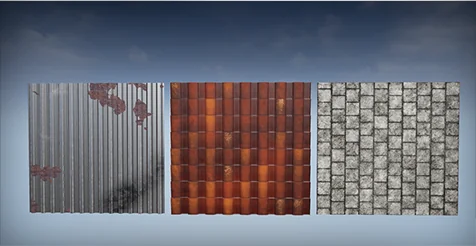
Virtual environments rely heavily on standard materials that appear repeatedly across residential, commercial, and industrial settings. The pack focuses on structural surface types specifically designated for floor, roof, and general construction workflows. Brick walls provide the masonry base needed for exterior building facades, partition boundaries, and weathered outdoor structures. Ceramic tiles address finished interior flooring, sanitary spaces, kitchen splashbacks, and commercial walkways where clean surface finishes are required. Metal roofs cover industrial hangars, utility sheds, residential roofing panels, and outdoor shelters that demand distinct metallic characteristics.
Building these three material groups from the ground up typically involves balancing diffuse reflectance, surface roughness, and normal distribution over and over again. By providing these specific categories in a parameterized format, the pack gives artists immediate structural coverage. A project requiring an expansive warehouse can draw directly from the metal roof setups for exterior roofing planes, while using brick materials along structural supports and ceramic tiles throughout adjoining office or maintenance corridors.
Capturing Relief with Sculpted Normals and Custom Photo Sources
Surface detail in the collection originates from two distinct capture and authoring pathways. Many surfaces originate from custom photo sources, preserving the organic variation, authentic color balance, and natural wear patterns found on real-world structures. Photographed materials capture nuances that procedural nodes often miss, providing high-fidelity references for granular masonry, grout lines in tiling, and weathered paint finishes on metal.
To complement the photographic pipeline, select materials feature normals sculpted inside dedicated 3D software. Sculpting normals within 3D modeling tools allows for deliberate control over bevel depths, sharp structural seams, deep mortar gaps, and clean edge definition that camera captures cannot cleanly isolate. This dual approach pairs authentic natural surfaces with structurally exaggerated normal relief, ensuring that directional lighting reacts convincingly across both subtle planar variations and pronounced structural edges.
Adding Grime and Rust with Vertex Painting
Real architectural materials rarely remain in clean, unblemished states. Several master materials in the pack incorporate dedicated vertex painting setups, granting direct manual control over secondary wear passes. Rather than baking dirt, oxidation, or weathering directly into static texture maps, artists use vertex color channels on individual meshes to paint localized detail directly in the Unreal Engine viewport.
This feature provides two primary decay modes:
Grime layers applied to low-lying corners, baseboards, grout joints, and water run-off paths across brick walls and ceramic tiles to break up uniform surface highlights.
Rust overlays painted onto metallic roofs, structural flashings, and exposed metal seams to simulate oxidation, age, and exposure to moisture.
Using vertex color blending keeps texture memory budgets low because multiple assets can share identical master material instances while looking distinct through unique per-vertex paint strokes. A single brick wall mesh can appear spotless at one end of a street and heavily degraded by grime at the base of another, simply through viewport painting passes.
Construction Layering and Necro's Bone Box Integration
Material management within extended Unreal Engine productions benefits from standardized shader structures. Featured as part of the November 2018 Unreal Engine Sponsored Content within the Permanent Collection, Necro's Utility Material Pack functions as an evergreen construction toolkit. Its workflow naturally aligns with companion assets from the developer, notably sharing project-level compatibility with Necro's Bone Box.
When combining these assets in active staging environments, artists can pair the pack's architectural surfaces—flooring tiles, brick masonry, and corrugated or panelized metal roofs—directly alongside structural framework or anatomical elements provided by the Bone Box. Because the materials are built to serve permanent utility roles, they can be maintained across changing level configurations and adjusted whenever lighting conditions shift, ensuring a stable baseline for construction and environment dressing.
 Variety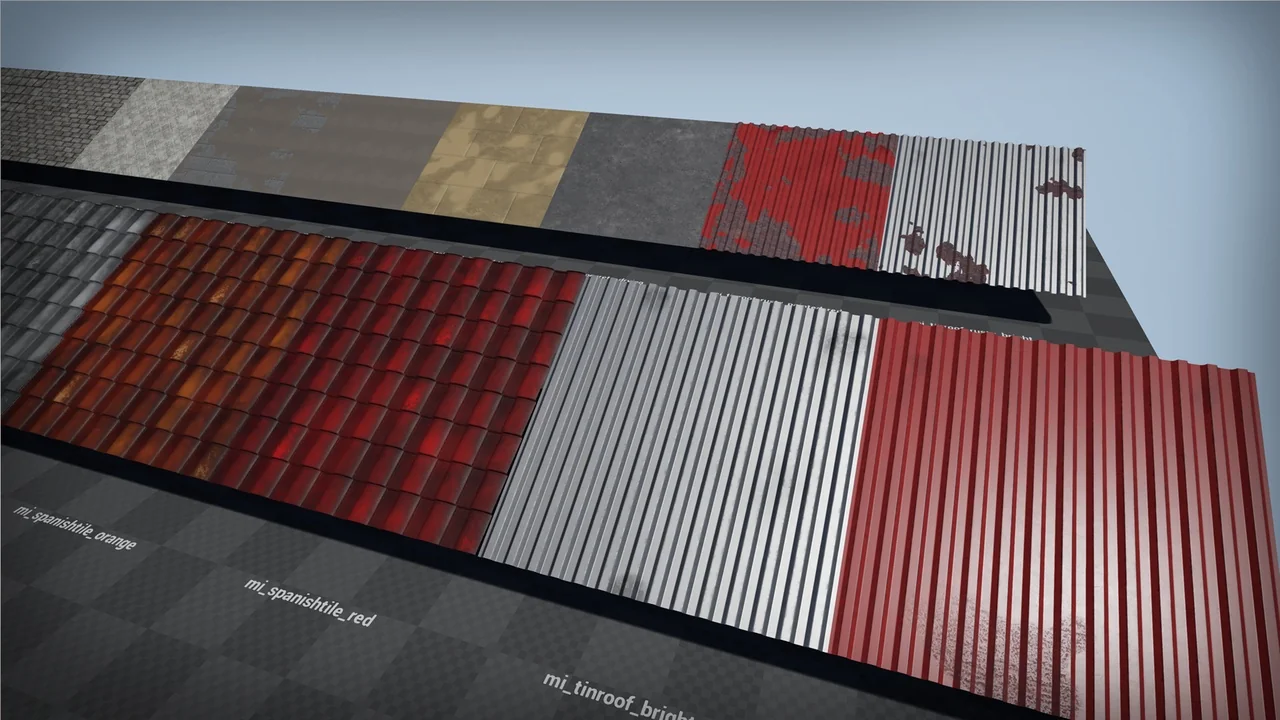
 Variety
 Variety
 Variety