"6f9bd6df1f44a86f"{"id":"1001221","slug":"stylized-domes-shader","title":"Stylized Domes Shader","category":"Variety","engine":"5.2+","assetVersion":"","engineVersion":"Engine Version: 5.2+","tag":"Variety","accent":"blue","visual":"mech","summary":"Examine setup, controls, and technical constraints for the Stylized Domes Shader in Unreal Engine 5, from force fields to atmospheric boundaries.","platform":"Unreal Engine","indexPolicy":"index","publishedAt":"2026-09-19T09:08:49.457Z","updatedAt":"2026-09-19T09:08:49.457Z","sourceNotes":[],"fileContents":[],"compatibility":["Unreal Engine","Engine Version: 5.2+"],"featuredImage":{"alt":"Stylized Domes Shader","src":"/wp-content/uploads/published/2026/09/18d1223c0b09-8df68d81-cb65-41f1-85ba-05264a9d34d9-51e3b29605.webp"},"hasDownloadLink":true,"downloads":0,"terms":[{"taxonomy":"category","slug":"variety","name":"Variety"}],"galleryImages":[{"src":"/wp-content/uploads/published/2026/09/fd890a0b23f0-b3e10f83-e627-412e-a7ab-9b2ba7b5db1f-639790156a.webp","alt":"Stylized Domes Shader"},{"src":"/wp-content/uploads/published/2026/09/eda12b18f70b-09424bfa-1623-46d7-8f63-bfc6158c1293-23dcad98a1.webp","alt":"Stylized Domes Shader"},{"src":"/wp-content/uploads/published/2026/09/356edb1dd4c7-e314b591-b322-4de1-a364-5915194fdf0a-a9d833f0cb.webp","alt":"Stylized Domes Shader"},{"src":"/wp-content/uploads/published/2026/09/382f16b3604b-fd1c282b-5e8f-44b9-b654-7006fa394b05-0c1245a14a.webp","alt":"Stylized Domes Shader"},{"src":"/wp-content/uploads/published/2026/09/988f8cd857c5-10836d28-ab2a-4bbb-8f56-df455616385e-097206fda6.webp","alt":"Stylized Domes Shader"},{"src":"/wp-content/uploads/published/2026/09/4be0272762a1-0e681068-f847-474a-8a9e-89fd259acc86-051e3d2b6a.webp","alt":"Stylized Domes Shader"}],"accessPanel":{"kind":"resource","title":"Download this resource","eyebrow":"Free Download","message":"Log in or create a free account to start your download.","fileName":"Content.7z","safetyNote":"Resources are manually reviewed before listing to improve quality and reduce obvious risks.","actionLabel":"Download Free","resourceType":"Resource archive"},"contentHtml":"\u003ch2\u003eDeploying the Stylized Domes Shader in Unreal Engine 5 Environments\u003c/h2\u003e\u003cp\u003eIntegrating the Stylized Domes Shader into an Unreal Engine 5 level begins with placing a hemispherical or spherical mesh over the targeted playable space. Rather than relying on procedural sky systems, the shader functions directly as an applied surface material designed to give levels an immediate fantasy or sci-fi visual identity. Setup requires assigning the material or its instances to geometry scaled to fit the boundaries of the scene, whether that boundary represents a localized encounter zone, a base perimeter, or an overarching aesthetic enclosure.\u003c/p\u003e\u003cp\u003eBecause the shader is developed around stylized aesthetics, its surface treatment favors distinct shapes, energy patterns, and stylized color gradients over photorealistic dispersion. Level designers can establish clear thematic framing across distinct biomes by swapping the base parameters. When staging scenes that shift between high-tech settlements and magical sanctums, setting up instance parameters allows the surface to alternate between hard-edged technological barriers and softer, arcane sky boundaries.\u003c/p\u003e\u003ch2\u003eInteractive Controls and Animation Previewing via Key Bindings\u003c/h2\u003e\u003cp\u003eTesting different visual variations within an active scene is handled through integrated input controls. The setup includes dedicated keyboard shortcuts that streamline live iteration:\u003c/p\u003e\u003cul\u003e\u003cli\u003e\u003cstrong\u003eA / D Keys:\u003c/strong\u003e Step backward and forward through available dome shader variants to compare aesthetic styles directly in runtime.\u003c/li\u003e\u003cli\u003e\u003cstrong\u003eSpacebar:\u003c/strong\u003e Trigger and start the shader's internal animations, putting dynamic elements such as surface sweeps, energy pulses, and motion lines into motion.\u003c/li\u003e\u003c/ul\u003e\u003cp\u003eUsing these runtime inputs removes the friction of repeatedly stopping simulation to reassign material instances in the viewport. When previewing how a sequence transitions from dormant state to active defense mode, pressing the spacebar lets artists verify how motion speed, panning textures, and pulsing effects read at scale from player eye level. The stepping controls mapped to the A and D keys similarly allow rapid side-by-side evaluation of color schemes and pattern densities while the camera moves through the environment.\u003c/p\u003e\u003ch2\u003eSky Atmosphere Separation and Environmental Boundaries in UE5\u003c/h2\u003e\u003cp\u003eA critical technical boundary of the Stylized Domes Shader centers on how it handles lighting and environmental systems within Unreal Engine 5. This shader does not interact with the UE5 Sky Atmosphere component, does not track sun position calculations, and operates completely outside standard sky-related subsystems. It is not designed to function as a full-fledged sky solution or dynamic celestial model.\u003c/p\u003e\u003cp\u003eBecause it operates independently of planetary atmospheric scattering and sun angle drivers, lighting beneath the dome must be handled deliberately:\u003c/p\u003e\u003cul\u003e\u003cli\u003eDirectional lighting and sky light captures do not automatically pass through or modulate based on dome surface density.\u003c/li\u003e\u003cli\u003eTime-of-day changes driven by default engine sky rigs will not dynamically tint the dome surface; the shader requires its own material adjustments to reflect shifting ambient moods.\u003c/li\u003e\u003cli\u003eLocal lighting, volumetric fog, and post-process volumes serve as the primary methods to harmonize the enclosed play area with the surrounding dome mesh.\u003c/li\u003e\u003c/ul\u003e\u003cp\u003eFor scenes that require layered stylized sky elements, the material maintains compatibility with the Stylized Volumetric Clouds Shader. Running both together enables layered artistic skies where volumetric cloud forms sit beneath or alongside the stylized outer perimeter without breaking the artistic direction of the scene.\u003c/p\u003e\u003ch2\u003eStylized Domes Shader Variations for Night, Day, and Interior Views\u003c/h2\u003e\u003cp\u003eLighting conditions drastically change the visual profile of hemispherical shaders. Under daytime conditions, the dome material must balance internal brightness against environmental visibility, keeping surface patterns legible without completely washing out the backdrop. In night setups, the material properties shift focus toward emissive clarity, allowing glowing lines, energy rims, and stylized constellations or runes to stand out sharply against darkened terrain.\u003c/p\u003e\u003cp\u003eViewing the shader from the inside requires careful attention to internal camera distance and surface curvature. When the player stands beneath the apex of the dome, UV layout and pattern tiling can deform if not balanced against the dome mesh geometry. Looking directly upward reveals the primary convergence point of the shader effects, while looking horizontally toward the horizon line tests how the base edge blends against terrain meshes or distant mountains.\u003c/p\u003e\u003cp\u003eCamera positioning directly against the inner wall tests depth perception. Because the surface is frequently utilized to convey physical containment, ensuring the patterns read clearly from acute angles helps ground the player inside the space without obscuring combat encounters or navigational landmarks.\u003c/p\u003e\u003ch2\u003eSci-Fi Force Fields, Energy Shields, and the Broader Shaders Pack\u003c/h2\u003e\u003cp\u003eThe core logic driving the Stylized Domes Shader connects closely with several procedural barrier workflows demonstrated in dedicated production tutorials. The same shader principles scale down to generate sci-fi force fields, localized cyberpunk hologram materials, and defensive energy shield barriers inside UE5. Instead of enveloping an entire world partition, applying related barrier logic to smaller static or skeletal meshes lets artists create defensive rings, security walls, and interactive vehicle shielding.\u003c/p\u003e\u003cp\u003eThe material belongs to a broader ecosystem built by the development team, comprising EYSON, Meiman, and RinKatakakuru. Within this development lineup, the dome asset sits alongside several focused tools:\u003c/p\u003e\u003cul\u003e\u003cli\u003e\u003cstrong\u003eHologram Shader:\u003c/strong\u003e Geared toward floating readouts, stylized projections, and futuristic displays.\u003c/li\u003e\u003cli\u003e\u003cstrong\u003eBarriers Shader:\u003c/strong\u003e Focused on localized energy shields, combat barriers, and force field perimeters.\u003c/li\u003e\u003cli\u003e\u003cstrong\u003eHologram and Domes:\u003c/strong\u003e A paired grouping targeting complex sci-fi compound environments.\u003c/li\u003e\u003cli\u003e\u003cstrong\u003eStylized Shaders Pack:\u003c/strong\u003e An expanded asset collection containing the full suite of stylized surface tools.\u003c/li\u003e\u003c/ul\u003e\u003cp\u003eBy relying on a shared design framework across these assets, teams building fantasy worlds or stylized sci-fi titles can maintain visual coherence across giant sky enclosures down to individual hand-held energy shields.\u003c/p\u003e\n\n\u003ch2\u003eExplore Similar Assets\u003c/h2\u003e\n\u003cul\u003e\n\u003cli\u003e\u003ca href=\"https://3dcghub.com/stylized-barrier-shader/\" rel=\"noopener noreferrer\"\u003eStylized Barrier Shader\u003c/a\u003e\u003c/li\u003e\n\u003cli\u003e\u003ca href=\"https://3dcghub.com/hologram-shader/\" rel=\"noopener noreferrer\"\u003eHologram Shader\u003c/a\u003e\u003c/li\u003e\n\u003cli\u003e\u003ca href=\"https://3dcghub.com/fantastical-resource-shader/\" rel=\"noopener noreferrer\"\u003eFantastical Resource Shader\u003c/a\u003e\u003c/li\u003e\n\u003cli\u003e\u003ca href=\"https://3dcghub.com/art-of-shader-film-and-special-effects/\" rel=\"noopener noreferrer\"\u003eArt of Shader - Film And Special Effects\u003c/a\u003e\u003c/li\u003e\n\u003cli\u003e\u003ca href=\"https://3dcghub.com/stylized-volumetric-clouds-shader/\" rel=\"noopener noreferrer\"\u003eStylized Volumetric Clouds Shader\u003c/a\u003e\u003c/li\u003e\n\u003c/ul\u003e","contentTextLength":6492,"navigation":{"current":1125,"total":4218,"previous":{"id":"1001222","slug":"the-vagrant-background-construction-pack-01","title":"The Vagrant: Background Construction Pack 01","category":"Environments","platform":"Unreal Engine","updatedAt":"2026-09-19T09:15:19.959Z"},"next":{"id":"1001220","slug":"stylized-barrier-shader","title":"Stylized Barrier Shader","category":"Variety","platform":"Unreal Engine","updatedAt":"2026-09-19T09:07:13.200Z"}},"relatedResources":[{"id":"1001220","slug":"stylized-barrier-shader","title":"Stylized Barrier Shader","category":"Variety","engine":"5.0+","assetVersion":"","engineVersion":"Engine Version: 5.0+","tag":"Variety","accent":"blue","visual":"mech","summary":"Deploy animated energy shields, shelters, enemy spawn barriers, and portals in Unreal Engine 5 with the versatile Stylized Barrier Shader.","platform":"Unreal Engine","indexPolicy":"index","publishedAt":"2026-09-19T09:07:13.200Z","updatedAt":"2026-09-19T09:07:13.200Z","sourceNotes":[],"fileContents":[],"compatibility":["Unreal Engine","Engine Version: 5.0+"],"featuredImage":{"alt":"Stylized Barrier Shader","src":"/wp-content/uploads/published/2026/09/75a4627030cf-2aedc77e-0596-4cfe-aa8d-45ee9961137a-59bdb352ab.webp"},"hasDownloadLink":true,"downloads":0},{"id":"1001217","slug":"hologram-shader","title":"Hologram Shader","category":"Variety","engine":"5.2+","assetVersion":"","engineVersion":"Engine Version: 5.2+","tag":"Variety","accent":"blue","visual":"mech","summary":"Explore Hologram Shader for Unreal Engine 5, featuring 65 pattern options, custom image support, material instance controls, and stylized or realistic rendering","platform":"Unreal Engine","indexPolicy":"index","publishedAt":"2026-09-19T09:00:05.221Z","updatedAt":"2026-09-19T09:00:05.221Z","sourceNotes":[],"fileContents":[],"compatibility":["Unreal Engine","Engine Version: 5.2+"],"featuredImage":{"alt":"Hologram Shader","src":"/wp-content/uploads/published/2026/09/08aafa1aafe4-05685ce7-aa12-46f7-b08c-5908a21e4827-3e46fefebe.webp"},"hasDownloadLink":true,"downloads":0},{"id":"13126","slug":"fantastical-resource-shader","title":"Fantastical Resource Shader","category":"Variety","engine":"4.26+,5.0+","assetVersion":"Engine version: 4.26+,5.0+","engineVersion":"4.18","tag":"Variety","accent":"blue","visual":"luts","summary":"Enhance your game's interface with the Fantastical Resource Shader. This versatile tool allows for deep customization of resource orbs, potions, and magical effects using over 45 parameters.","platform":"Unreal Engine","indexPolicy":"index","publishedAt":"2026-03-10T15:54:25.000Z","updatedAt":"2026-04-19T15:46:31.000Z","sourceNotes":[],"fileContents":[],"compatibility":["Unreal Engine","Engine version: 4.26+,5.0+"],"featuredImage":{"alt":"Fantastical Resource Shader","src":"https://3dcghub.com/wp-content/uploads/2026/03/8dab64b5-a820-4d69-b557-63fd42ff3760.webp"},"hasDownloadLink":true,"downloads":0}]}
Variety
Stylized Domes Shader
Examine setup, controls, and technical constraints for the Stylized Domes Shader in Unreal Engine 5, from force fields to atmospheric boundaries.
Deploying the Stylized Domes Shader in Unreal Engine 5 Environments
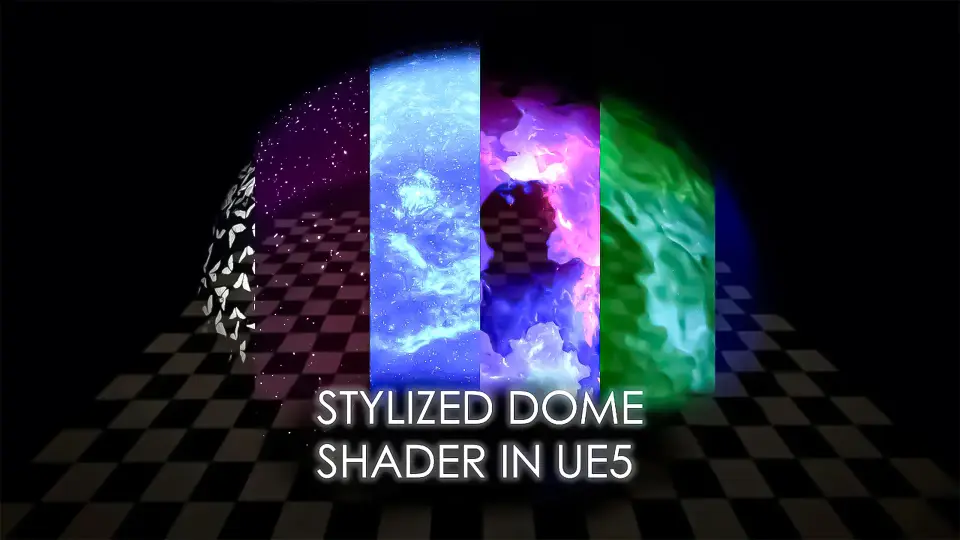
Integrating the Stylized Domes Shader into an Unreal Engine 5 level begins with placing a hemispherical or spherical mesh over the targeted playable space. Rather than relying on procedural sky systems, the shader functions directly as an applied surface material designed to give levels an immediate fantasy or sci-fi visual identity. Setup requires assigning the material or its instances to geometry scaled to fit the boundaries of the scene, whether that boundary represents a localized encounter zone, a base perimeter, or an overarching aesthetic enclosure.
Because the shader is developed around stylized aesthetics, its surface treatment favors distinct shapes, energy patterns, and stylized color gradients over photorealistic dispersion. Level designers can establish clear thematic framing across distinct biomes by swapping the base parameters. When staging scenes that shift between high-tech settlements and magical sanctums, setting up instance parameters allows the surface to alternate between hard-edged technological barriers and softer, arcane sky boundaries.
Interactive Controls and Animation Previewing via Key Bindings
Testing different visual variations within an active scene is handled through integrated input controls. The setup includes dedicated keyboard shortcuts that streamline live iteration:
A / D Keys: Step backward and forward through available dome shader variants to compare aesthetic styles directly in runtime.
Spacebar: Trigger and start the shader's internal animations, putting dynamic elements such as surface sweeps, energy pulses, and motion lines into motion.
Using these runtime inputs removes the friction of repeatedly stopping simulation to reassign material instances in the viewport. When previewing how a sequence transitions from dormant state to active defense mode, pressing the spacebar lets artists verify how motion speed, panning textures, and pulsing effects read at scale from player eye level. The stepping controls mapped to the A and D keys similarly allow rapid side-by-side evaluation of color schemes and pattern densities while the camera moves through the environment.
Sky Atmosphere Separation and Environmental Boundaries in UE5
A critical technical boundary of the Stylized Domes Shader centers on how it handles lighting and environmental systems within Unreal Engine 5. This shader does not interact with the UE5 Sky Atmosphere component, does not track sun position calculations, and operates completely outside standard sky-related subsystems. It is not designed to function as a full-fledged sky solution or dynamic celestial model.
Because it operates independently of planetary atmospheric scattering and sun angle drivers, lighting beneath the dome must be handled deliberately:
Directional lighting and sky light captures do not automatically pass through or modulate based on dome surface density.
Time-of-day changes driven by default engine sky rigs will not dynamically tint the dome surface; the shader requires its own material adjustments to reflect shifting ambient moods.
Local lighting, volumetric fog, and post-process volumes serve as the primary methods to harmonize the enclosed play area with the surrounding dome mesh.
For scenes that require layered stylized sky elements, the material maintains compatibility with the Stylized Volumetric Clouds Shader. Running both together enables layered artistic skies where volumetric cloud forms sit beneath or alongside the stylized outer perimeter without breaking the artistic direction of the scene.
Stylized Domes Shader Variations for Night, Day, and Interior Views
Lighting conditions drastically change the visual profile of hemispherical shaders. Under daytime conditions, the dome material must balance internal brightness against environmental visibility, keeping surface patterns legible without completely washing out the backdrop. In night setups, the material properties shift focus toward emissive clarity, allowing glowing lines, energy rims, and stylized constellations or runes to stand out sharply against darkened terrain.
Viewing the shader from the inside requires careful attention to internal camera distance and surface curvature. When the player stands beneath the apex of the dome, UV layout and pattern tiling can deform if not balanced against the dome mesh geometry. Looking directly upward reveals the primary convergence point of the shader effects, while looking horizontally toward the horizon line tests how the base edge blends against terrain meshes or distant mountains.
Camera positioning directly against the inner wall tests depth perception. Because the surface is frequently utilized to convey physical containment, ensuring the patterns read clearly from acute angles helps ground the player inside the space without obscuring combat encounters or navigational landmarks.
Sci-Fi Force Fields, Energy Shields, and the Broader Shaders Pack
The core logic driving the Stylized Domes Shader connects closely with several procedural barrier workflows demonstrated in dedicated production tutorials. The same shader principles scale down to generate sci-fi force fields, localized cyberpunk hologram materials, and defensive energy shield barriers inside UE5. Instead of enveloping an entire world partition, applying related barrier logic to smaller static or skeletal meshes lets artists create defensive rings, security walls, and interactive vehicle shielding.
The material belongs to a broader ecosystem built by the development team, comprising EYSON, Meiman, and RinKatakakuru. Within this development lineup, the dome asset sits alongside several focused tools:
Barriers Shader: Focused on localized energy shields, combat barriers, and force field perimeters.
Hologram and Domes: A paired grouping targeting complex sci-fi compound environments.
Stylized Shaders Pack: An expanded asset collection containing the full suite of stylized surface tools.
By relying on a shared design framework across these assets, teams building fantasy worlds or stylized sci-fi titles can maintain visual coherence across giant sky enclosures down to individual hand-held energy shields.
 Variety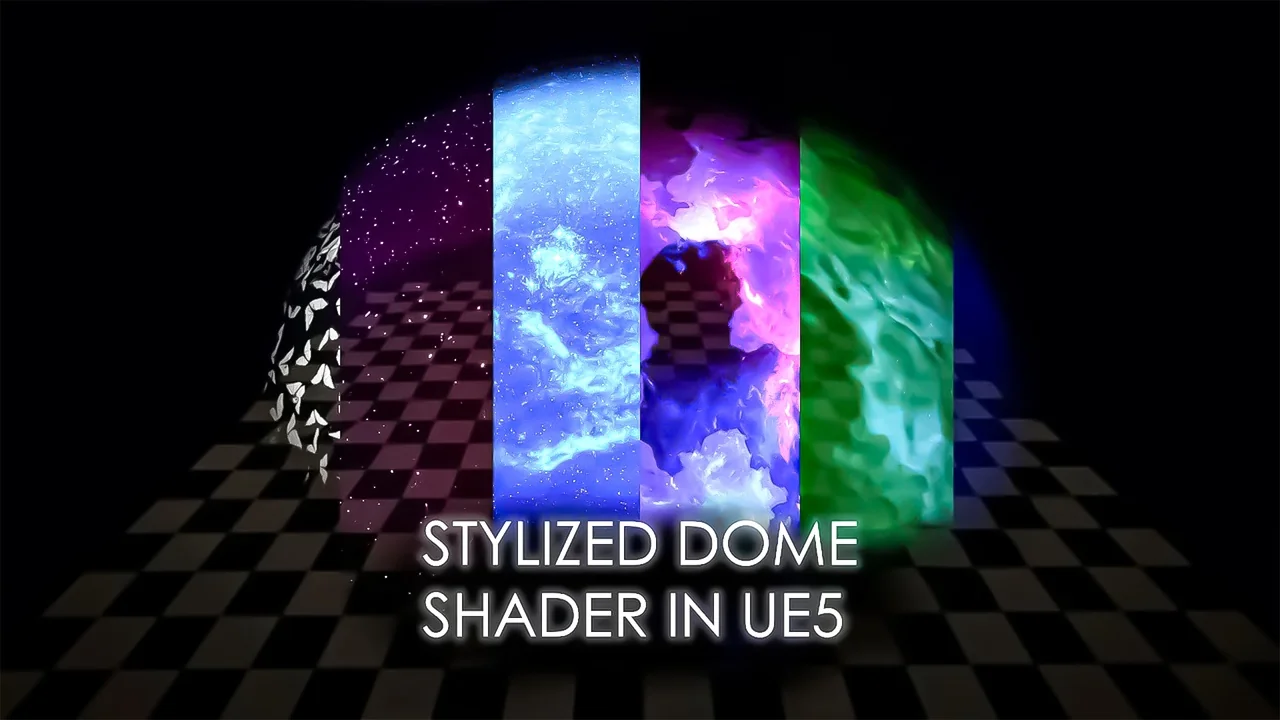
 Variety
 Variety
 Variety