"031373f479d9561a"{"id":"1000224","slug":"hologram-vfx-with-niagara","title":"HOLOGRAM VFX With Niagara","category":"Shaders","engine":"4.26+,5.0+","assetVersion":"","engineVersion":"Engine Version: 4.26+,5.0+","tag":"Shaders","accent":"blue","visual":"mech","summary":"A comprehensive breakdown of the HOLOGRAM VFX With Niagara toolset, featuring customizable material functions, modular particle systems, and sci-fi display asse","platform":"Unreal Engine","publishedAt":"2026-06-26T19:06:03.405Z","updatedAt":"2026-06-26T19:06:03.405Z","sourceNotes":[],"fileContents":[],"compatibility":["Unreal Engine","Engine Version: 4.26+,5.0+"],"featuredImage":{"alt":"HOLOGRAM VFX With Niagara","src":"/wp-content/uploads/published/2026/06/3bf059e2e341-14756eff-4717-4ee5-b29d-b2361008c6fd-f1f069dcae.webp"},"hasDownloadLink":true,"downloads":0,"terms":[{"taxonomy":"category","slug":"shaders","name":"Shaders"}],"galleryImages":[{"src":"/wp-content/uploads/published/2026/06/c2326368636d-96730f53-60f0-412a-9e24-8ed76669650a-22a79ad4dc.webp","alt":"HOLOGRAM VFX With Niagara"},{"src":"/wp-content/uploads/published/2026/06/81e7bb95e363-69082ff6-1952-4486-b7e6-7d9bd44869fc-16b893f70d.webp","alt":"HOLOGRAM VFX With Niagara"},{"src":"/wp-content/uploads/published/2026/06/d686c5839239-95685f44-7617-41cf-85e9-3125211f412f-8cfd8d0b7b.webp","alt":"HOLOGRAM VFX With Niagara"},{"src":"/wp-content/uploads/published/2026/06/5c32ed6220e9-1883b3b5-292d-4c94-807a-3a0b04c519ed-22a473b323.webp","alt":"HOLOGRAM VFX With Niagara"},{"src":"/wp-content/uploads/published/2026/06/a7fe0445e217-82fe74c3-5831-451d-91c0-4f12d4299321-a78e027631.webp","alt":"HOLOGRAM VFX With Niagara"},{"src":"/wp-content/uploads/published/2026/06/b907a4592a0b-0774b739-0c35-4ff4-95b1-911021e5ffdb-2d93315849.webp","alt":"HOLOGRAM VFX With Niagara"},{"src":"/wp-content/uploads/published/2026/06/b8cc17d4ddfc-4fac9e16-3dcc-430f-b74e-01349fb1dd31-93060cddc2.webp","alt":"HOLOGRAM VFX With Niagara"},{"src":"/wp-content/uploads/published/2026/06/8cd5c73d2fe0-561c391b-789b-4253-898f-7769b9ca97fc-0add03be6b.webp","alt":"HOLOGRAM VFX With Niagara"},{"src":"/wp-content/uploads/published/2026/06/12bd953e4eb9-e49f70d7-28bf-4316-ba6a-835652ce5f9a-9c5a5ab832.webp","alt":"HOLOGRAM VFX With Niagara"},{"src":"/wp-content/uploads/published/2026/06/aa7b1a79c2e3-e1e11700-32bd-45b3-83fa-72e24a5b904c-efe990266d.webp","alt":"HOLOGRAM VFX With Niagara"}],"accessPanel":{"kind":"resource","title":"Download this resource","eyebrow":"Free Download","message":"Log in or create a free account to start your download.","fileName":"Content.7z","safetyNote":"Resources are manually reviewed before listing to improve quality and reduce obvious risks.","actionLabel":"Download Free","resourceType":"Resource archive"},"contentHtml":"\u003ch2\u003eEmissive Holographic Behavior in Sci-Fi Scenes\u003c/h2\u003e\n\u003cp\u003eImplementing futuristic displays requires a delicate balance between atmospheric light and readable interface elements. The HOLOGRAM VFX With Niagara toolset approaches this by treating holographic projections as fully functional, multi-layered visual effects. Rather than relying on simple translucent textures mapped to a flat plane, this system utilizes a combination of blueprint-driven behaviors, complex scattering materials, and modular particle systems to ground the holograms within a scene.\u003c/p\u003e\n\u003cp\u003eWhen placed into an environment, these holographic setups immediately introduce a stylized, emissive presence. The visual style leans heavily into futuristic and sci-fi aesthetics, providing the necessary glow, atmospheric scattering, and technological visual cues expected from advanced display systems. To help developers understand how these various elements interact, the environment comes populated with 32+ distinct Hologram VFX Examples. These examples serve as a practical baseline, allowing technical artists and level designers to observe how the effects behave under different lighting conditions and how they integrate with physical meshes like drones or control panels before building their own custom variations.\u003c/p\u003e\n\u003ch2\u003eMaterial Instances and Scattering Functions\u003c/h2\u003e\n\u003cp\u003eThe foundation of any convincing hologram lies in its shading network. This resource handles the underlying surface behavior through a robust library of 27+ Materials and Material Instances. By utilizing an instance-based workflow, developers can maintain a highly optimized pipeline, making rapid adjustments to the visual output without needing to recompile complex master materials for every unique display in their project.\u003c/p\u003e\n\u003cp\u003eDriving these materials are 3+ specific Material Functions. In a modular shading pipeline, material functions handle the complex mathematical operations—such as calculating edge falloff, managing the emissive pulse, or simulating the light scattering inherent to holographic projections. By isolating these behaviors into reusable functions, the developers ensure that the core holographic aesthetic remains consistent across all 27+ material variations. Whether the material is applied to a flat UI screen, a volumetric projection, or a complex 3D drone model, the underlying functions maintain the stylized, futuristic visual language while keeping the material graph organized and scalable.\u003c/p\u003e\n\u003ch2\u003eDriving Displays with Niagara Particles and Modules\u003c/h2\u003e\n\u003cp\u003eWhile the materials define how the surface of the hologram looks, the actual movement, energy, and atmospheric integration are driven by the Niagara visual effects system. The toolset includes 10+ distinct Niagara Particles, which dictate the overall shape, spawn rate, and lifecycle of the holographic energy. These particle systems are essential for creating the illusion that the hologram is actively being projected into the air, rather than just existing as a static mesh.\u003c/p\u003e\n\u003cp\u003eTo provide deeper control over the particle behavior, the system incorporates 6+ Niagara Modules. These modular components can be stacked and swapped within the Niagara editor to alter how the particles behave over time. A developer might use one module to introduce jitter or glitching effects, while another module could control how the particles scatter and fade as they reach the upper limits of the projection volume. This modular approach to VFX allows teams to mix and match behaviors, tailoring the particle emission to fit specific gameplay events, such as a display turning on, a drone malfunctioning, or an alarm triggering.\u003c/p\u003e\n\u003ch2\u003eCustomizing Timing, Gradation, and Textures\u003c/h2\u003e\n\u003cp\u003eA major focus of the HOLOGRAM VFX setup is granular customization, ensuring that the effects can be adapted to various artistic directions without requiring custom code. Every provided holographic example exposes a wide array of parameters directly to the user. Developers can easily swap out the underlying model or apply a different texture to completely change the physical shape and informational content of the display.\u003c/p\u003e\n\u003cp\u003eBeyond structural changes, the visual pacing of the holograms is highly adjustable. Timing parameters allow developers to dictate the speed of animations, the frequency of emissive pulses, or the rate at which textures pan across the projection surface. This is critical for differentiating between a calm, ambient data display and a high-alert, rapidly flickering warning screen. Additionally, precise controls for emissive intensity and color ensure that the holograms can be balanced against the lighting of any environment. Gradation settings further refine the look, giving developers the ability to control the transition from the brightest core of the projection to the soft, scattered edges that fade into the surrounding air. By tweaking these exposed variables, users can easily author entirely new holographic materials and effects tailored to their specific project requirements.\u003c/p\u003e\n\u003ch2\u003eIntegrating Sci-Fi Level Design Modules and UI Icons\u003c/h2\u003e\n\u003cp\u003eHolograms do not exist in a vacuum; they require physical hardware to project them and a cohesive environment to contextualize them. To facilitate immediate scene integration, the toolset provides 2+ Display Model Sets. These meshes act as the physical anchor points—the mechanical bases, projector lenses, or sci-fi pedestals from which the holographic energy emits.\u003c/p\u003e\n\u003cp\u003eTo further establish the futuristic setting, developers can utilize the included 4+ Sci-Fi Level Design Modules and a dedicated Space Skybox. These modular environment pieces allow for the rapid construction of a testing facility, spaceship bridge, or futuristic laboratory, providing the perfect dark, high-contrast backdrop against which the emissive holograms can stand out. \u003c/p\u003e\n\u003cp\u003eFinally, the communication aspect of the displays is handled through a collection of 44+ UI Icons. These stylized graphical elements can be fed into the material instances or Niagara systems to populate the holograms with readable data, crosshairs, warning symbols, and interface menus. The combination of blueprint-driven physical projectors, customizable particle systems, and a rich library of UI icons provides a complete, end-to-end solution for implementing dynamic, highly stylized holographic displays in any futuristic project.\u003c/p\u003e\n\n\u003ch2\u003eContinue Browsing Similar Packs\u003c/h2\u003e\n\u003cul\u003e\n\u003cli\u003e\u003ca href=\"https://3dcghub.com/wormhole-vfx-pack-sci-fi-version/\" title=\"Wormhole VFX Pack ( Sci-Fi Version )\"\u003eWormhole VFX Pack ( Sci-Fi Version )\u003c/a\u003e\u003c/li\u003e\n\u003cli\u003e\u003ca href=\"https://3dcghub.com/crystal-vfx-pack/\" title=\"Crystal VFX Pack\"\u003eCrystal VFX Pack\u003c/a\u003e\u003c/li\u003e\n\u003cli\u003e\u003ca href=\"https://3dcghub.com/energy-ball-vfx-pack/\" title=\"Energy Ball VFX Pack\"\u003eEnergy Ball VFX Pack\u003c/a\u003e\u003c/li\u003e\n\u003cli\u003e\u003ca href=\"https://3dcghub.com/dissolution-vfx-pack-using-niagara/\" title=\"Dissolution VFX Pack using Niagara\"\u003eDissolution VFX Pack using Niagara\u003c/a\u003e\u003c/li\u003e\n\u003cli\u003e\u003ca href=\"https://3dcghub.com/geometry-fireworks-vfx-pack/\" title=\"Geometry Fireworks VFX Pack\"\u003eGeometry Fireworks VFX Pack\u003c/a\u003e\u003c/li\u003e\n\u003c/ul\u003e","contentTextLength":6473,"navigation":{"current":1125,"total":3223,"previous":{"id":"1000225","slug":"how-to-create-an-online-base-claim-system-with-ue5","title":"How to create an Online Base Claim System with UE5","category":"Unreal Engine","platform":"Unreal Engine","updatedAt":"2026-06-27T14:32:52.012Z"},"next":{"id":"1000223","slug":"death-animations-mocap-pack","title":"Death Animations - MoCap Pack","category":"Combat","platform":"Unreal Engine","updatedAt":"2026-06-26T18:55:57.191Z"}},"relatedResources":[{"id":"1000844","slug":"liquid-materials-vfx-pack","title":"LIQUID MATERIALS : VFX Pack","category":"Shaders","engine":"5.1+","assetVersion":"","engineVersion":"Engine Version: 5.1+","tag":"Shaders","accent":"blue","visual":"luts","summary":"LIQUID MATERIALS: VFX Pack provides 23 meshes, 13 glass materials, and 13 liquid materials with automatic Niagara-based real-time fluid animation for Unreal Eng","platform":"Unreal Engine","publishedAt":"2026-08-04T07:08:15.893Z","updatedAt":"2026-08-04T07:08:15.893Z","sourceNotes":[],"fileContents":[],"compatibility":["Unreal Engine","Engine Version: 5.1+"],"featuredImage":{"alt":"LIQUID MATERIALS : VFX Pack","src":"/wp-content/uploads/published/2026/08/031b6a53ab5b-856b12c0-66b3-4f90-9a63-103fd8b06400-4230560477.webp"},"hasDownloadLink":true,"downloads":2},{"id":"1001017","slug":"star-vfx-pack","title":"Star VFX Pack","category":"Shaders","engine":"5.0+","assetVersion":"","engineVersion":"Engine Version: 5.0+","tag":"Shaders","accent":"blue","visual":"mech","summary":"Customizable star VFX pack with 28+ Niagara systems, 45+ dynamic materials, 22+ textures, and 17+ models. Includes a Win64bit demo and Discord support.","platform":"Unreal Engine","publishedAt":"2026-08-22T16:14:20.964Z","updatedAt":"2026-08-22T16:14:20.964Z","sourceNotes":[],"fileContents":[],"compatibility":["Unreal Engine","Engine Version: 5.0+"],"featuredImage":{"alt":"Star VFX Pack","src":"/wp-content/uploads/published/2026/08/6c8b512b96a6-338ff890-24aa-4c23-9f1e-be692219540d-2d18fd0080.webp"},"hasDownloadLink":true,"downloads":0},{"id":"1000603","slug":"fluid-portal-vfx-pack","title":"Fluid Portal VFX Pack","category":"Shaders","engine":"5.3+","assetVersion":"","engineVersion":"Engine Version: 5.3+","tag":"Shaders","accent":"blue","visual":"mech","summary":"Interactive Fluid Portal VFX Pack with 14+ Niagara Fluids effects, customizable portal sets, materials, 4K textures, and a playable Win64 demo.","platform":"Unreal Engine","publishedAt":"2026-07-20T16:20:21.021Z","updatedAt":"2026-07-20T16:20:21.021Z","sourceNotes":[],"fileContents":[],"compatibility":["Unreal Engine","Engine Version: 5.3+"],"featuredImage":{"alt":"Fluid Portal VFX Pack","src":"/wp-content/uploads/published/2026/07/b656f5664f46-54ebd946-c6e0-452f-8bf1-e4b5f0c89b7b-2145f679bc.webp"},"hasDownloadLink":true,"downloads":1}]}
Shaders
HOLOGRAM VFX With Niagara
A comprehensive breakdown of the HOLOGRAM VFX With Niagara toolset, featuring customizable material functions, modular particle systems, and sci-fi display asse
Category:Unreal Engine,ShadersPlatform: Unreal EngineEngine Version: 4.26+,5.0+Published: Jun 26, 2026
Shaders
Resource overview
Emissive Holographic Behavior in Sci-Fi Scenes
Implementing futuristic displays requires a delicate balance between atmospheric light and readable interface elements. The HOLOGRAM VFX With Niagara toolset approaches this by treating holographic projections as fully functional, multi-layered visual effects. Rather than relying on simple translucent textures mapped to a flat plane, this system utilizes a combination of blueprint-driven behaviors, complex scattering materials, and modular particle systems to ground the holograms within a scene.
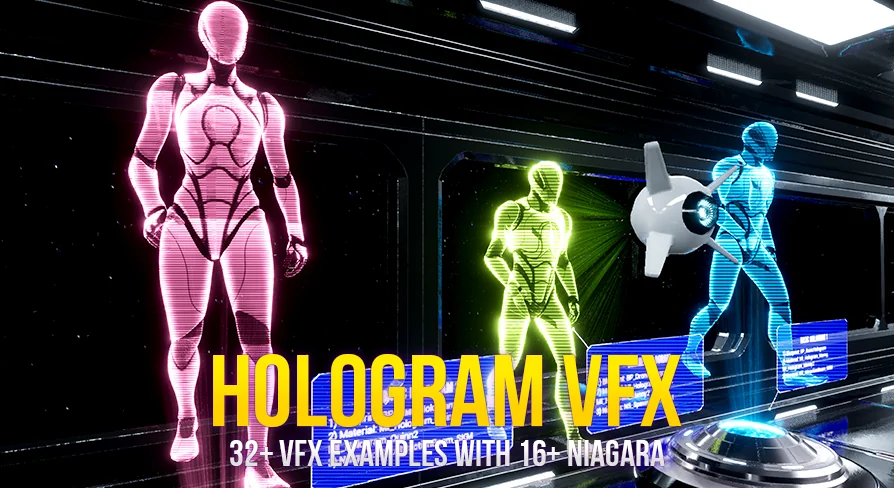
When placed into an environment, these holographic setups immediately introduce a stylized, emissive presence. The visual style leans heavily into futuristic and sci-fi aesthetics, providing the necessary glow, atmospheric scattering, and technological visual cues expected from advanced display systems. To help developers understand how these various elements interact, the environment comes populated with 32+ distinct Hologram VFX Examples. These examples serve as a practical baseline, allowing technical artists and level designers to observe how the effects behave under different lighting conditions and how they integrate with physical meshes like drones or control panels before building their own custom variations.
Material Instances and Scattering Functions
The foundation of any convincing hologram lies in its shading network. This resource handles the underlying surface behavior through a robust library of 27+ Materials and Material Instances. By utilizing an instance-based workflow, developers can maintain a highly optimized pipeline, making rapid adjustments to the visual output without needing to recompile complex master materials for every unique display in their project.
Driving these materials are 3+ specific Material Functions. In a modular shading pipeline, material functions handle the complex mathematical operations—such as calculating edge falloff, managing the emissive pulse, or simulating the light scattering inherent to holographic projections. By isolating these behaviors into reusable functions, the developers ensure that the core holographic aesthetic remains consistent across all 27+ material variations. Whether the material is applied to a flat UI screen, a volumetric projection, or a complex 3D drone model, the underlying functions maintain the stylized, futuristic visual language while keeping the material graph organized and scalable.
Driving Displays with Niagara Particles and Modules
While the materials define how the surface of the hologram looks, the actual movement, energy, and atmospheric integration are driven by the Niagara visual effects system. The toolset includes 10+ distinct Niagara Particles, which dictate the overall shape, spawn rate, and lifecycle of the holographic energy. These particle systems are essential for creating the illusion that the hologram is actively being projected into the air, rather than just existing as a static mesh.
To provide deeper control over the particle behavior, the system incorporates 6+ Niagara Modules. These modular components can be stacked and swapped within the Niagara editor to alter how the particles behave over time. A developer might use one module to introduce jitter or glitching effects, while another module could control how the particles scatter and fade as they reach the upper limits of the projection volume. This modular approach to VFX allows teams to mix and match behaviors, tailoring the particle emission to fit specific gameplay events, such as a display turning on, a drone malfunctioning, or an alarm triggering.
Customizing Timing, Gradation, and Textures
A major focus of the HOLOGRAM VFX setup is granular customization, ensuring that the effects can be adapted to various artistic directions without requiring custom code. Every provided holographic example exposes a wide array of parameters directly to the user. Developers can easily swap out the underlying model or apply a different texture to completely change the physical shape and informational content of the display.
Beyond structural changes, the visual pacing of the holograms is highly adjustable. Timing parameters allow developers to dictate the speed of animations, the frequency of emissive pulses, or the rate at which textures pan across the projection surface. This is critical for differentiating between a calm, ambient data display and a high-alert, rapidly flickering warning screen. Additionally, precise controls for emissive intensity and color ensure that the holograms can be balanced against the lighting of any environment. Gradation settings further refine the look, giving developers the ability to control the transition from the brightest core of the projection to the soft, scattered edges that fade into the surrounding air. By tweaking these exposed variables, users can easily author entirely new holographic materials and effects tailored to their specific project requirements.
Integrating Sci-Fi Level Design Modules and UI Icons
Holograms do not exist in a vacuum; they require physical hardware to project them and a cohesive environment to contextualize them. To facilitate immediate scene integration, the toolset provides 2+ Display Model Sets. These meshes act as the physical anchor points—the mechanical bases, projector lenses, or sci-fi pedestals from which the holographic energy emits.
To further establish the futuristic setting, developers can utilize the included 4+ Sci-Fi Level Design Modules and a dedicated Space Skybox. These modular environment pieces allow for the rapid construction of a testing facility, spaceship bridge, or futuristic laboratory, providing the perfect dark, high-contrast backdrop against which the emissive holograms can stand out.
Finally, the communication aspect of the displays is handled through a collection of 44+ UI Icons. These stylized graphical elements can be fed into the material instances or Niagara systems to populate the holograms with readable data, crosshairs, warning symbols, and interface menus. The combination of blueprint-driven physical projectors, customizable particle systems, and a rich library of UI icons provides a complete, end-to-end solution for implementing dynamic, highly stylized holographic displays in any futuristic project.
 Shaders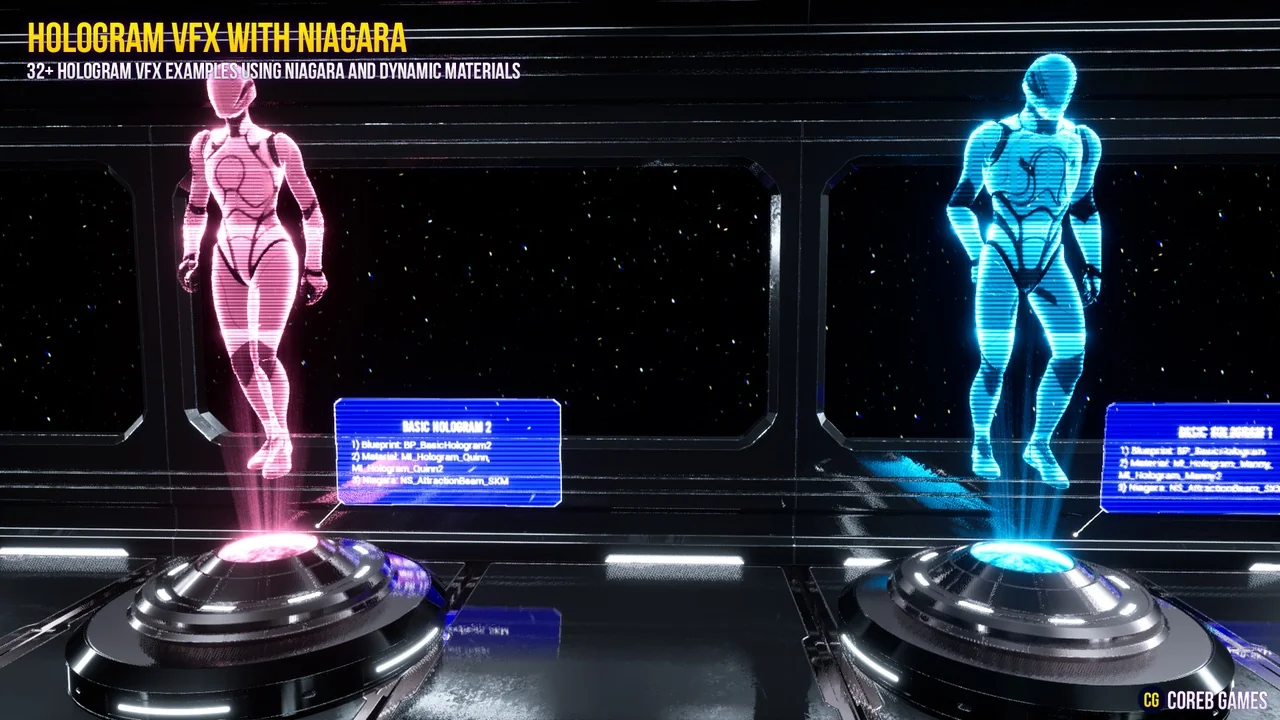
 Shaders
 Shaders
 Shaders