"0341a2901a4ae9aa"{"id":"1000764","slug":"advanced-rvt-decals","title":"Advanced RVT Decals","category":"Variety","engine":"5.6+","assetVersion":"","engineVersion":"Engine Version: 5.6+","tag":"Variety","accent":"blue","visual":"mech","summary":"A performant Runtime Virtual Texture decal system for blending textures into RVT landscapes, supporting Nanite displacement and Custom Primitive Data.","platform":"Unreal Engine","publishedAt":"2026-07-28T09:33:55.712Z","updatedAt":"2026-07-28T09:33:55.712Z","sourceNotes":[],"fileContents":[],"compatibility":["Unreal Engine","Engine Version: 5.6+"],"featuredImage":{"alt":"Advanced RVT Decals","src":"/wp-content/uploads/published/2026/07/79b9ced7cf48-95bee9b5-bb31-4e56-b65d-be66379fa15c-75ebfcf2ea.webp"},"hasDownloadLink":true,"downloads":1,"terms":[{"taxonomy":"category","slug":"variety","name":"Variety"}],"galleryImages":[{"src":"/wp-content/uploads/published/2026/07/38163d397277-1eeda4d4-81a2-4a84-abe7-3713f420e2e1-4536a25f41.webp","alt":"Advanced RVT Decals"},{"src":"/wp-content/uploads/published/2026/07/4b72b8ab38db-9245ff6f-9bb3-4bdd-b36a-caa483627d9a-4112646f7c.webp","alt":"Advanced RVT Decals"},{"src":"/wp-content/uploads/published/2026/07/dd90eae40049-8cb5801a-8373-45ac-a397-693e2e7f9d3c-001f96d612.webp","alt":"Advanced RVT Decals"},{"src":"/wp-content/uploads/published/2026/07/f2943127ee76-5d67a2b4-1196-4644-b3eb-5d15a053e101-c4c30479e8.webp","alt":"Advanced RVT Decals"},{"src":"/wp-content/uploads/published/2026/07/8c0b0e2b30f6-6d6433dc-f1dc-4faf-be17-7054aab1c72a-caa1dd1322.webp","alt":"Advanced RVT Decals"},{"src":"/wp-content/uploads/published/2026/07/7d0efdbd854c-5e49b52c-de8a-4898-8f43-3d67cc66122e-32be75bb9b.webp","alt":"Advanced RVT Decals"},{"src":"/wp-content/uploads/published/2026/07/aa65e2f18ff0-98311e36-c851-4eff-843e-48cfbc23658c-c0de3727f5.webp","alt":"Advanced RVT Decals"},{"src":"/wp-content/uploads/published/2026/07/5694316d20f7-82baae91-a665-43f1-a093-b7df7efafb99-83a0a611af.webp","alt":"Advanced RVT Decals"}],"accessPanel":{"kind":"resource","title":"Download this resource","eyebrow":"Free Download","message":"Log in or create a free account to start your download.","fileName":"Content.7z","safetyNote":"Resources are manually reviewed before listing to improve quality and reduce obvious risks.","actionLabel":"Download Free","resourceType":"Resource archive"},"contentHtml":"\u003cp\u003eSetting up detailed terrain in Unreal Engine often requires projecting textures directly onto the landscape to break up visual repetition. \u003cem\u003eAdvanced RVT Decals\u003c/em\u003e operates as a Runtime Virtual Texture (RVT) decal system built specifically for this task. The setup workflow integrates directly with RVT landscapes, allowing developers to blend complex dirt paths, localized puddle systems, and varied ground details directly into the terrain. Instead of relying on flat projection, the system is built to interact with the landscape's geometry, providing a method to break up tiling while maintaining high visual fidelity across large environments.\u003c/p\u003e\n\n\u003ch2\u003eRVT Decal Actors and Spline Implementation\u003c/h2\u003e\n\u003cp\u003eThe system provides two primary methods for placing decals across a landscape. Standard RVT Decal Actors handle localized detail, allowing artists to stamp specific textures exactly where needed. For continuous elements like paths, roads, or natural borders, the pack includes RVT Decal Splines. These spline-based tools enable the creation of flowing, continuous blended textures that follow a drawn path.\u003c/p\u003e\n\n\u003cp\u003eTo break up repetition across both actors and splines, the system includes customizable UV tiling methods. Artists can choose between world-space UVs or spline-aligned UVs depending on the specific requirements of the ground detail being painted. This control over UV tiling ensures that continuous paths and stamped decals do not display obvious texture repetition, integrating the painted elements more naturally into the underlying terrain.\u003c/p\u003e\n\n\u003ch2\u003ePer-Instance Customization via Custom Primitive Data\u003c/h2\u003e\n\u003cp\u003eA major focus of the system is optimization without sacrificing customization. \u003cem\u003eAdvanced RVT Decals\u003c/em\u003e leverages Custom Primitive Data (\u003ccode\u003eCPD\u003c/code\u003e) to drive per-instance variations. By utilizing \u003ccode\u003eCPD\u003c/code\u003e, artists can adjust the scale, color tint, and opacity of individual decal instances directly. This customized variation is achieved without creating new Material Instances, which eliminates the associated overhead typically caused by spawning multiple material variations across a scene.\u003c/p\u003e\n\n\u003cp\u003eThe material controls are designed to be intuitive, allowing for deep customization of how each decal blends and is displaced without overcomplicating the Material Graph. Developers can easily implement new textures into the existing material framework, adjusting the blending behavior to suit the specific texture being introduced to the landscape.\u003c/p\u003e\n\n\u003ch2\u003eNanite Displacement and Virtual Heightfield Meshes\u003c/h2\u003e\n\u003cp\u003eTo achieve geometric blending rather than simple flat texture projection, the system fully supports Nanite Displacement and Virtual Heightfield Meshes (\u003ccode\u003eVHM\u003c/code\u003e). Nanite Displacement allows the projected decals to interact with the physical geometry of the landscape, creating true surface displacement. This is combined with \u003ccode\u003eVHM\u003c/code\u003e support to provide high-quality landscape blending across any project.\u003c/p\u003e\n\n\u003cp\u003eThe inclusion of these next-generation displacement features means that the decals operate on a physical level, displacing the terrain geometry to match the texture being applied. The Material Functions are designed to manage how this displacement occurs, ensuring that the integration of the decal matches the height and depth of the surrounding landscape features.\u003c/p\u003e\n\n\u003ch2\u003eRendering Control and Material Functions\u003c/h2\u003e\n\u003cp\u003eManaging overlapping decals is handled by built-in sort ordering. This ensures that when multiple RVT Decals or Splines overlap on the same landscape area, they render exactly as intended, preventing flickering or incorrect blending priorities. The system also provides countless blending modes, giving artists precise control over how the decal textures interact with the base Landscape Material.\u003c/p\u003e\n\n\u003cp\u003eThe pack ships with an example Landscape Material that serves as a functional starting point for RVT terrain setup. This example material includes several integrated Material Functions. Among these are Distance Blending, Snow Glint, Height-Blended Pixel Depth Offset, and Puddle Normals. These functions provide immediate, practical examples of how to construct complex landscape layers and can be expanded upon to build custom RVT landscapes and materials.\u003c/p\u003e\n\n\u003ch2\u003ePractical Application in Landscape Workflows\u003c/h2\u003e\n\u003cp\u003eIn a production environment, \u003cem\u003eAdvanced RVT Decals\u003c/em\u003e serves as both a detailing and an optimization tool. It allows environment artists to stamp highly detailed ground variations into large terrains while relying on the RVT system to manage the rendering load. The ability to use splines for roads and paths, combined with the per-instance control offered by Custom Primitive Data, means that large stretches of terrain can be modified quickly. The included rendering controls and Material Functions make it a comprehensive toolkit for integrating complex, displaced ground details into Unreal Engine landscapes.\u003c/p\u003e\n\n\u003ch2\u003eRelated Resources Worth Checking\u003c/h2\u003e\n\u003cul\u003e\n\u003cli\u003e\u003ca href=\"https://3dcghub.com/1000-mega-decal-package-ai-sources/\" title=\"1000+ Mega Decal Package / AI SOURCES\"\u003e1000+ Mega Decal Package / AI SOURCES\u003c/a\u003e\u003c/li\u003e\n\u003cli\u003e\u003ca href=\"https://3dcghub.com/shiny-things/\" title=\"Shiny Things\"\u003eShiny Things\u003c/a\u003e\u003c/li\u003e\n\u003cli\u003e\u003ca href=\"https://3dcghub.com/meshblend-next-generation-mesh-blending-without-rvt/\" title=\"MeshBlend - Next generation mesh blending without RVT\"\u003eMeshBlend - Next generation mesh blending without RVT\u003c/a\u003e\u003c/li\u003e\n\u003cli\u003e\u003ca href=\"https://3dcghub.com/edge-decal-tools-1-2/\" title=\"Edge Decal Tools 1.2\"\u003eEdge Decal Tools 1.2\u003c/a\u003e\u003c/li\u003e\n\u003cli\u003e\u003ca href=\"https://3dcghub.com/art-of-shader-film-and-special-effects/\" title=\"Art of Shader - Film And Special Effects\"\u003eArt of Shader - Film And Special Effects\u003c/a\u003e\u003c/li\u003e\n\u003c/ul\u003e","contentTextLength":4987,"navigation":{"current":1400,"total":4017,"previous":{"id":"1000765","slug":"cemetery","title":"Cemetery","category":"Abandoned","platform":"Unreal Engine","updatedAt":"2026-07-28T16:49:36.862Z"},"next":{"id":"1000763","slug":"astronauts-flight-suits-metahuman-clothing","title":"Astronauts Flight Suits (Metahuman clothing)","category":"Clothing","platform":"Unreal Engine","updatedAt":"2026-07-28T09:29:36.499Z"}},"relatedResources":[{"id":"1000144","slug":"1000-mega-decal-package-ai-sources","title":"1000+ Mega Decal Package / AI SOURCES","category":"Variety","engine":"4.26+,5.0+","assetVersion":"","engineVersion":"Engine Version: 4.26+,5.0+","tag":"Variety","accent":"blue","visual":"mech","summary":"A high-quality customizable decal pack with texture-driven flexibility, combined or separate use, and access to main vector drawing files.","platform":"Unreal Engine","publishedAt":"2026-06-12T18:37:30.067Z","updatedAt":"2026-10-03T14:08:24.863Z","sourceNotes":[],"fileContents":[],"compatibility":["Unreal Engine","Engine Version: 4.26+,5.0+"],"featuredImage":{"alt":"1000+ Mega Decal Package / AI SOURCES","src":"/wp-content/uploads/published/2026/06/c65003b15164-8cfb9e15-1251-4bec-a5db-4031508b2f53-10a82d485f.webp"},"hasDownloadLink":true,"downloads":1},{"id":"1002015","slug":"exland","title":"EXLAND","category":"Variety","engine":"4.26+,5.0+","assetVersion":"","engineVersion":"Engine Version: 4.26+,5.0+","tag":"Variety","accent":"blue","visual":"mech","summary":"Exland delivers an auto landscape material system with procedural and painted blending, Extile noise algorithms, RVT support, and multi-layered setups.","platform":"Unreal Engine","publishedAt":"2026-10-26T12:54:33.246Z","updatedAt":"2026-10-26T12:54:33.246Z","sourceNotes":[],"fileContents":[],"compatibility":["Unreal Engine","Engine Version: 4.26+,5.0+"],"featuredImage":{"alt":"EXLAND","src":"/wp-content/uploads/published/2026/10/ee5252dfa362-c544e796-d568-4b52-ace9-99ed32bb3a30-78d3c8d768.webp"},"hasDownloadLink":true,"downloads":0},{"id":"1000816","slug":"easy-decal-roads-rvt","title":"Easy Decal Roads RVT","category":"Procedural Systems","engine":"5.4+","assetVersion":"","engineVersion":"Engine Version: 5.4+","tag":"Procedural Systems","accent":"blue","visual":"mech","summary":"Easy Decal Roads RVT is a road creation tool for Unreal Engine using Runtime Virtual Texturing to build roads and intersections without mesh clipping or Z-fight","platform":"Unreal Engine","publishedAt":"2026-07-31T11:21:23.146Z","updatedAt":"2026-07-31T11:21:41.063Z","sourceNotes":[],"fileContents":[],"compatibility":["Unreal Engine","Engine Version: 5.4+"],"featuredImage":{"alt":"Easy Decal Roads RVT","src":"/wp-content/uploads/published/2026/07/e4482c7d4a89-d67b2e8a-2aff-490a-8ae1-253b1bf2996d-2896d9aeb8.webp"},"hasDownloadLink":true,"downloads":1}]}
Variety
Advanced RVT Decals
A performant Runtime Virtual Texture decal system for blending textures into RVT landscapes, supporting Nanite displacement and Custom Primitive Data.
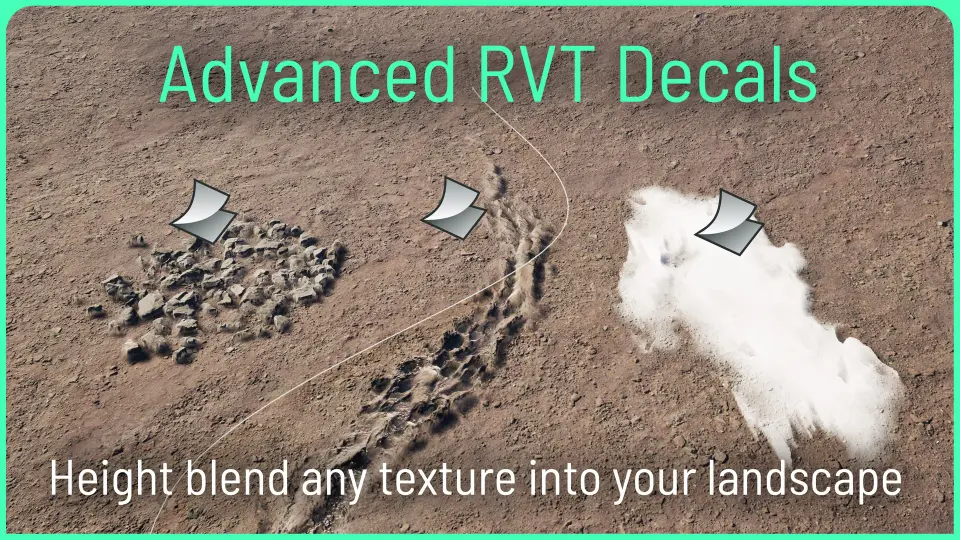
Setting up detailed terrain in Unreal Engine often requires projecting textures directly onto the landscape to break up visual repetition. Advanced RVT Decals operates as a Runtime Virtual Texture (RVT) decal system built specifically for this task. The setup workflow integrates directly with RVT landscapes, allowing developers to blend complex dirt paths, localized puddle systems, and varied ground details directly into the terrain. Instead of relying on flat projection, the system is built to interact with the landscape's geometry, providing a method to break up tiling while maintaining high visual fidelity across large environments.
RVT Decal Actors and Spline Implementation
The system provides two primary methods for placing decals across a landscape. Standard RVT Decal Actors handle localized detail, allowing artists to stamp specific textures exactly where needed. For continuous elements like paths, roads, or natural borders, the pack includes RVT Decal Splines. These spline-based tools enable the creation of flowing, continuous blended textures that follow a drawn path.
To break up repetition across both actors and splines, the system includes customizable UV tiling methods. Artists can choose between world-space UVs or spline-aligned UVs depending on the specific requirements of the ground detail being painted. This control over UV tiling ensures that continuous paths and stamped decals do not display obvious texture repetition, integrating the painted elements more naturally into the underlying terrain.
Per-Instance Customization via Custom Primitive Data
A major focus of the system is optimization without sacrificing customization. Advanced RVT Decals leverages Custom Primitive Data (CPD) to drive per-instance variations. By utilizing CPD, artists can adjust the scale, color tint, and opacity of individual decal instances directly. This customized variation is achieved without creating new Material Instances, which eliminates the associated overhead typically caused by spawning multiple material variations across a scene.
The material controls are designed to be intuitive, allowing for deep customization of how each decal blends and is displaced without overcomplicating the Material Graph. Developers can easily implement new textures into the existing material framework, adjusting the blending behavior to suit the specific texture being introduced to the landscape.
Nanite Displacement and Virtual Heightfield Meshes
To achieve geometric blending rather than simple flat texture projection, the system fully supports Nanite Displacement and Virtual Heightfield Meshes (VHM). Nanite Displacement allows the projected decals to interact with the physical geometry of the landscape, creating true surface displacement. This is combined with VHM support to provide high-quality landscape blending across any project.
The inclusion of these next-generation displacement features means that the decals operate on a physical level, displacing the terrain geometry to match the texture being applied. The Material Functions are designed to manage how this displacement occurs, ensuring that the integration of the decal matches the height and depth of the surrounding landscape features.
Rendering Control and Material Functions
Managing overlapping decals is handled by built-in sort ordering. This ensures that when multiple RVT Decals or Splines overlap on the same landscape area, they render exactly as intended, preventing flickering or incorrect blending priorities. The system also provides countless blending modes, giving artists precise control over how the decal textures interact with the base Landscape Material.
The pack ships with an example Landscape Material that serves as a functional starting point for RVT terrain setup. This example material includes several integrated Material Functions. Among these are Distance Blending, Snow Glint, Height-Blended Pixel Depth Offset, and Puddle Normals. These functions provide immediate, practical examples of how to construct complex landscape layers and can be expanded upon to build custom RVT landscapes and materials.
Practical Application in Landscape Workflows
In a production environment, Advanced RVT Decals serves as both a detailing and an optimization tool. It allows environment artists to stamp highly detailed ground variations into large terrains while relying on the RVT system to manage the rendering load. The ability to use splines for roads and paths, combined with the per-instance control offered by Custom Primitive Data, means that large stretches of terrain can be modified quickly. The included rendering controls and Material Functions make it a comprehensive toolkit for integrating complex, displaced ground details into Unreal Engine landscapes.
 Variety
 Variety
 Variety
 Procedural Systems