"6f9bd6df1f44a86f"{"id":"1000816","slug":"easy-decal-roads-rvt","title":"Easy Decal Roads RVT","category":"Procedural Systems","engine":"5.4+","assetVersion":"","engineVersion":"Engine Version: 5.4+","tag":"Procedural Systems","accent":"blue","visual":"mech","summary":"Easy Decal Roads RVT is a road creation tool for Unreal Engine using Runtime Virtual Texturing to build roads and intersections without mesh clipping or Z-fight","platform":"Unreal Engine","indexPolicy":"index","publishedAt":"2026-07-31T11:21:23.146Z","updatedAt":"2026-07-31T11:21:41.063Z","sourceNotes":[],"fileContents":[],"compatibility":["Unreal Engine","Engine Version: 5.4+"],"featuredImage":{"alt":"Easy Decal Roads RVT","src":"/wp-content/uploads/published/2026/07/e4482c7d4a89-d67b2e8a-2aff-490a-8ae1-253b1bf2996d-2896d9aeb8.webp"},"hasDownloadLink":true,"downloads":1,"terms":[{"taxonomy":"category","slug":"procedural-systems","name":"Procedural Systems"}],"galleryImages":[{"src":"/wp-content/uploads/published/2026/07/df2756f7eefd-07f2c417-3d7b-497d-9355-c32152154218-6e24427394.webp","alt":"Easy Decal Roads RVT"},{"src":"/wp-content/uploads/published/2026/07/e3e74e081dd1-5c316d76-ae9f-4f6e-affb-f963498773ee-7445643251.webp","alt":"Easy Decal Roads RVT"},{"src":"/wp-content/uploads/published/2026/07/0916ddf95a3f-8d20c9c2-8cbb-43c7-9212-855072b2d25b-115b9e7255.webp","alt":"Easy Decal Roads RVT"},{"src":"/wp-content/uploads/published/2026/07/f937aaf5aa70-fd037dba-3576-4bb4-8fbe-136f2601368c-161f4e52ed.webp","alt":"Easy Decal Roads RVT"},{"src":"/wp-content/uploads/published/2026/07/ef7ca3351588-e12c6cee-52e2-4a6c-a750-15d6ba262775-44084d3a08.webp","alt":"Easy Decal Roads RVT"},{"src":"/wp-content/uploads/published/2026/07/fcf0bfdb30b1-2f61558c-f1b0-48e8-8a7e-9c76faaeb1ff-0847c062c1.webp","alt":"Easy Decal Roads RVT"},{"src":"/wp-content/uploads/published/2026/07/702aec604e6c-a8329ae5-3d5d-4a39-b8a6-97f50b947f08-973b79a28b.webp","alt":"Easy Decal Roads RVT"},{"src":"/wp-content/uploads/published/2026/07/979e6fc616da-37f20540-f683-4259-a5f8-aca47f8a50f6-283deeb2b7.webp","alt":"Easy Decal Roads RVT"},{"src":"/wp-content/uploads/published/2026/07/ad86d592edd9-ed72aa6b-3353-437d-abc8-c1da956a5761-47e210c3e7.webp","alt":"Easy Decal Roads RVT"},{"src":"/wp-content/uploads/published/2026/07/5aecbcdf4581-962b1f23-067c-4f8c-b3ef-ec98da105e48-2c55c1458d.webp","alt":"Easy Decal Roads RVT"}],"accessPanel":{"kind":"resource","title":"Download this resource","eyebrow":"Free Download","message":"Log in or create a free account to start your download.","fileName":"Content.7z","safetyNote":"Resources are manually reviewed before listing to improve quality and reduce obvious risks.","actionLabel":"Download Free","resourceType":"Resource archive"},"contentHtml":"\u003cp\u003eBuilding believable streets and intersections inside Unreal Engine usually means juggling mesh road tiles, hand-placed decal markings, and constant height adjustments to keep everything sitting cleanly on the landscape. \u003cem\u003eEasy Decal Roads RVT\u003c/em\u003e approaches that problem from a different angle. The tool uses spline-based drag-and-drop authoring combined with Runtime Virtual Texturing (RVT) to render road surfaces directly into a virtual texture layer. That combination matters for environment artists who need road networks that follow terrain, branch into intersections, and stay free of the visual artifacts that normally come from overlapping meshes and decals.\u003c/p\u003e\n\n\u003ch2\u003eHow Easy Decal Roads RVT Renders Road Surfaces\u003c/h2\u003e\n\u003cp\u003eThe core technical decision behind \u003cem\u003eEasy Decal Roads RVT\u003c/em\u003e is its use of Runtime Virtual Texturing for the road layer itself. Roads are not represented as static mesh strips that have to be carefully aligned with the ground. They are rendered into a Runtime Virtual Texture, which means the road surface is composited into the virtual texture at runtime. This avoids two persistent problems in road authoring: mesh clipping and Z-fighting. Because the road lives in the \u003ccode\u003eRVT\u003c/code\u003e rather than fighting for the same depth buffer space as the landscape mesh, the tool can place road geometry directly on or near the terrain without the flickering or depth-sorting errors that typically appear when decal stripes and mesh road pieces overlap.\u003c/p\u003e\n\n\u003cp\u003eThe system is also notable for what it does not require. The landscape Material does not need to participate in Runtime Virtual Texturing. \u003ccode\u003eRVT\u003c/code\u003e can be enabled solely for the road layer, leaving the landscape Material untouched. That is a practical distinction for projects where the existing terrain setup is already finalized or where adding full \u003ccode\u003eRVT\u003c/code\u003e support to the landscape would introduce unwanted complexity or performance cost. Road rendering is isolated to its own virtual texture stream.\u003c/p\u003e\n\n\u003ch3\u003eDrag-and-Drop Spline Authoring and Custom Road Types\u003c/h3\u003e\n\u003cp\u003eRoads are laid out through a drag-and-drop system based on splines. The workflow is designed to be fast: drop a road Actor into the Level, shape the spline, and the road generates along the path. The system supports presets, so common road configurations can be saved and reused rather than rebuilt from scratch each time.\u003c/p\u003e\n\n\u003cp\u003eCustom road types can also be added using your own textures. The tool is not locked to a fixed set of road appearances. New road types can be defined with custom road textures, which gives the system flexibility for different visual environments—urban asphalt, rural dirt, suburban concrete, or any surface treatment the project calls for.\u003c/p\u003e\n\n\u003ch3\u003eSeparating Road Markings from Road Textures\u003c/h3\u003e\n\u003cp\u003eOne of the more workflow-relevant design choices in \u003cem\u003eEasy Decal Roads RVT\u003c/em\u003e is the separation of road markings from the base road texture. In many traditional road setups, lane lines, crosswalks, and edge markings are baked into the road texture itself. That means every marking variant requires a separate texture, and changing a marking means swapping materials or creating a new texture map.\u003c/p\u003e\n\n\u003cp\u003e\u003cem\u003eEasy Decal Roads RVT\u003c/em\u003e breaks that coupling. You only need a base road texture. Road markings are handled as selectable and adjustable elements that can be changed at any point in the process. This means the same road texture can serve a plain highway, a multi-lane city street, or a marked intersection without duplicating the underlying surface texture. Markings become a parameter, not a baked attribute, which simplifies iteration when road layouts change during Level Design.\u003c/p\u003e\n\n\u003cp\u003eThe Version 1.1 update expanded this system further. A \u003ccode\u003eMarkings Only\u003c/code\u003e mode was added, and it can now also draw side lines, not just center or lane markings. This gives finer control over how road edges are defined without requiring a separate edge-line texture variant.\u003c/p\u003e\n\n\u003ch2\u003eLandscape Deformation and Painting Under Roads\u003c/h2\u003e\n\u003cp\u003eGetting roads to sit correctly on terrain is often a multi-step process: lay out the road, adjust the landscape height, smooth the ground, repaint the terrain texture where the road meets the dirt, and repeat. \u003cem\u003eEasy Decal Roads RVT\u003c/em\u003e includes landscape deformation and painting tools so that this adjustment can be handled directly within the road workflow. The terrain under a road can be deformed and painted quickly, reducing the back-and-forth between landscape editing modes and road placement.\u003c/p\u003e\n\n\u003cp\u003eThis is particularly relevant for spline-based roads that follow hilly or uneven terrain. Instead of manually cutting the landscape to fit the road path or building custom blend materials at every road edge, the tool integrates the terrain adjustment step into the road authoring flow.\u003c/p\u003e\n\n\u003ch2\u003eAutomatic Intersection Generation\u003c/h2\u003e\n\u003cp\u003eIntersections are one of the most time-consuming parts of road network construction. Matching road widths, aligning lane markings, blending corners, and avoiding visible seams between crossing roads requires careful manual work. \u003cem\u003eEasy Decal Roads RVT\u003c/em\u003e includes automatic intersection creation, added in the Version 1.1 update, which generates intersections in a flexible and procedural way.\u003c/p\u003e\n\n\u003cp\u003eThe automatic generation is designed to handle the intersection geometry so that roads meeting at a junction connect cleanly without requiring manual stitching. Because the system is built on splines and \u003ccode\u003eRVT\u003c/code\u003e-composited surfaces, intersections can be treated as procedural connections between road paths rather than as hand-placed mesh assets that have to be rotated and snapped into position.\u003c/p\u003e\n\n\u003ch2\u003eDebug, Roll Calculation, and Engine Compatibility Fixes\u003c/h2\u003e\n\u003cp\u003eThe Version 1.1.1 update introduced a new \u003ccode\u003eSpline Debug\u003c/code\u003e mode, which gives better visibility into the spline structure when diagnosing or adjusting road paths. Roll calculations were improved in the same update, which affects how road geometry banks along spline curves—a key factor for roads on sloped terrain or cloverleaf-style ramps where the road surface should tilt into a curve.\u003c/p\u003e\n\n\u003cp\u003eThe update also addressed a specific rendering error: black roads appearing in Unreal Engine 5.0.3. This kind of engine-version-specific fix is important for teams working on Unreal Engine 5.0.x builds who may have encountered the issue when integrating \u003ccode\u003eRVT\u003c/code\u003e-based road systems.\u003c/p\u003e\n\n\u003ch2\u003eBundled CC0 Texture Assets\u003c/h2\u003e\n\u003cp\u003e\u003cem\u003eEasy Decal Roads RVT\u003c/em\u003e contains assets from CC0Textures.com, licensed under CC0 1.0 Universal. This means the tool ships with road textures that can be used without licensing restrictions typically associated with proprietary asset packs. These textures can serve as the base road surface or as reference material for defining custom road types with your own texture sets.\u003c/p\u003e\n\n\u003ch2\u003eWhere Easy Decal Roads RVT Fits in a Production Workflow\u003c/h2\u003e\n\u003cp\u003eThis tool is built for a specific production need: creating road networks that follow spline paths, adapt to landscape, generate intersections, and render without Z-fighting or mesh clipping—all without requiring the landscape Material to adopt Runtime Virtual Texturing. Because \u003ccode\u003eRVT\u003c/code\u003e is used only for the road layer, the system can be dropped into projects with existing terrain setups that may not be ready for full \u003ccode\u003eRVT\u003c/code\u003e integration.\u003c/p\u003e\n\n\u003cp\u003eThe separation of markings from road textures, the automatic intersection generation, and the integrated landscape deformation tools point toward a workflow where roads are authored as living spline networks rather than as static mesh placements. For projects that need roads to change layout during design iteration—widening lanes, rerouting paths, adding intersections—the tool reduces the cost of those revisions by keeping the road properties adjustable rather than baked.\u003c/p\u003e\n\n\u003ch2\u003eA Practical Note Before Integrating\u003c/h2\u003e\n\u003cp\u003e\u003cem\u003eEasy Decal Roads RVT\u003c/em\u003e is compatible with the \u003cem\u003eTraffic AI System\u003c/em\u003e, which is worth noting for projects that need both road geometry and traffic simulation. The spline-based road network and the procedural intersection system align with the kind of structured path data that traffic systems typically consume. If the project calls for AI-driven vehicles, road authoring with \u003cem\u003eEasy Decal Roads RVT\u003c/em\u003e can provide the physical road network while the \u003cem\u003eTraffic AI System\u003c/em\u003e handles the behavioral layer on top of it.\u003c/p\u003e\n\n\u003cp\u003eFor teams evaluating the tool, the most relevant consideration is whether the project’s road needs lean toward network-style spline paths with dynamic intersections and adjustable markings rather than fixed mesh-based road prefabs. The \u003ccode\u003eRVT\u003c/code\u003e rendering approach and the landscape independence of the system are the two factors that distinguish it from manually placed road mesh workflows.\u003c/p\u003e","contentTextLength":8487,"navigation":{"current":1548,"total":4218,"previous":{"id":"1000817","slug":"easy-nameplate","title":"Easy Nameplate","category":"Characters \u0026 Creatures","platform":"Unreal Engine","updatedAt":"2026-07-31T11:25:26.400Z"},"next":{"id":"1000815","slug":"dynamic-grass-system","title":"Dynamic Grass System","category":"Gameplay Features","platform":"Unreal Engine","updatedAt":"2026-07-31T11:15:55.604Z"}},"relatedResources":[{"id":"25129","slug":"road-creator-pro","title":"Road Creator Pro","category":"Procedural Systems","engine":"5.6+","assetVersion":"Engine version: 5.6+","engineVersion":"","tag":"Procedural Systems","accent":"blue","visual":"city","summary":"Road Creator Pro brings roads, intersections, bridges, tunnels, and roadside details into Unreal Engine through a spline-based workflow. It also adds terrain deformation, snapping, traffic signals, signage, and day-night visibility tools for practical scene...","platform":"Unreal Engine","indexPolicy":"index","publishedAt":"2026-04-19T06:27:25.000Z","updatedAt":"2026-04-20T06:12:32.000Z","sourceNotes":[],"fileContents":[],"compatibility":["Unreal Engine","Engine version: 5.6+"],"featuredImage":{"alt":"Road Creator Pro","src":"https://3dcghub.com/wp-content/uploads/2026/04/c012b5395914_ed21df1f-da93-448a-b233-0700745ec894.webp"},"hasDownloadLink":true,"downloads":6},{"id":"1001522","slug":"interactive-procedural-city-generator","title":"Interactive Procedural City Generator","category":"Procedural Systems","engine":"5.1+","assetVersion":"","engineVersion":"Engine Version: 5.1+","tag":"Procedural Systems","accent":"blue","visual":"city","summary":"Generate custom urban environments in Unreal Engine with the Interactive Procedural City Creator, featuring modular roads, grammar-based buildings, and Data Lay","platform":"Unreal Engine","indexPolicy":"index","publishedAt":"2026-10-09T13:34:43.038Z","updatedAt":"2026-10-09T13:34:43.038Z","sourceNotes":[],"fileContents":[],"compatibility":["Unreal Engine","Engine Version: 5.1+"],"featuredImage":{"alt":"Interactive Procedural City Generator","src":"/wp-content/uploads/published/2026/10/9d51a3d4b98c-9afe2843-cc4d-4de0-81d0-38721ad9d314-b5e158ce4d.webp"},"hasDownloadLink":true,"downloads":1},{"id":"28604","slug":"crossroad-generator","title":"Crossroad Generator","category":"Procedural Systems","engine":"5.2+","assetVersion":"Engine version: 5.2+","engineVersion":"","tag":"Procedural Systems","accent":"blue","visual":"animation","summary":"Crossroad Generator turns road layout work into a fast in-editor workflow inside Unreal Engine 5. It focuses on procedural street infrastructure, from crossroads and bridges to sidewalks, guardrails, signs, and power lines, while also supporting landscape d...","platform":"Unreal Engine","indexPolicy":"index","publishedAt":"2026-05-17T14:06:52.000Z","updatedAt":"2026-05-17T14:06:53.000Z","sourceNotes":[],"fileContents":[],"compatibility":["Unreal Engine","Engine version: 5.2+"],"featuredImage":{"alt":"Crossroad Generator","src":"https://3dcghub.com/wp-content/uploads/2026/05/1d8705b678ec_331a5188-8aeb-45e7-98d2-a7863a4aab3f.webp"},"hasDownloadLink":true,"downloads":4}]}
Procedural Systems
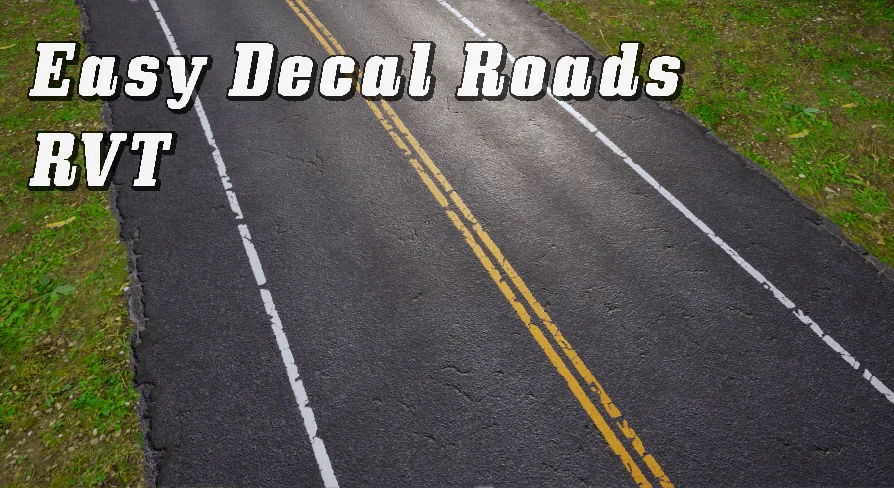
Easy Decal Roads RVT
Easy Decal Roads RVT is a road creation tool for Unreal Engine using Runtime Virtual Texturing to build roads and intersections without mesh clipping or Z-fight
Building believable streets and intersections inside Unreal Engine usually means juggling mesh road tiles, hand-placed decal markings, and constant height adjustments to keep everything sitting cleanly on the landscape. Easy Decal Roads RVT approaches that problem from a different angle. The tool uses spline-based drag-and-drop authoring combined with Runtime Virtual Texturing (RVT) to render road surfaces directly into a virtual texture layer. That combination matters for environment artists who need road networks that follow terrain, branch into intersections, and stay free of the visual artifacts that normally come from overlapping meshes and decals.
How Easy Decal Roads RVT Renders Road Surfaces
The core technical decision behind Easy Decal Roads RVT is its use of Runtime Virtual Texturing for the road layer itself. Roads are not represented as static mesh strips that have to be carefully aligned with the ground. They are rendered into a Runtime Virtual Texture, which means the road surface is composited into the virtual texture at runtime. This avoids two persistent problems in road authoring: mesh clipping and Z-fighting. Because the road lives in the RVT rather than fighting for the same depth buffer space as the landscape mesh, the tool can place road geometry directly on or near the terrain without the flickering or depth-sorting errors that typically appear when decal stripes and mesh road pieces overlap.
The system is also notable for what it does not require. The landscape Material does not need to participate in Runtime Virtual Texturing. RVT can be enabled solely for the road layer, leaving the landscape Material untouched. That is a practical distinction for projects where the existing terrain setup is already finalized or where adding full RVT support to the landscape would introduce unwanted complexity or performance cost. Road rendering is isolated to its own virtual texture stream.
Drag-and-Drop Spline Authoring and Custom Road Types
Roads are laid out through a drag-and-drop system based on splines. The workflow is designed to be fast: drop a road Actor into the Level, shape the spline, and the road generates along the path. The system supports presets, so common road configurations can be saved and reused rather than rebuilt from scratch each time.
Custom road types can also be added using your own textures. The tool is not locked to a fixed set of road appearances. New road types can be defined with custom road textures, which gives the system flexibility for different visual environments—urban asphalt, rural dirt, suburban concrete, or any surface treatment the project calls for.
Separating Road Markings from Road Textures
One of the more workflow-relevant design choices in Easy Decal Roads RVT is the separation of road markings from the base road texture. In many traditional road setups, lane lines, crosswalks, and edge markings are baked into the road texture itself. That means every marking variant requires a separate texture, and changing a marking means swapping materials or creating a new texture map.
Easy Decal Roads RVT breaks that coupling. You only need a base road texture. Road markings are handled as selectable and adjustable elements that can be changed at any point in the process. This means the same road texture can serve a plain highway, a multi-lane city street, or a marked intersection without duplicating the underlying surface texture. Markings become a parameter, not a baked attribute, which simplifies iteration when road layouts change during Level Design.
The Version 1.1 update expanded this system further. A Markings Only mode was added, and it can now also draw side lines, not just center or lane markings. This gives finer control over how road edges are defined without requiring a separate edge-line texture variant.
Landscape Deformation and Painting Under Roads
Getting roads to sit correctly on terrain is often a multi-step process: lay out the road, adjust the landscape height, smooth the ground, repaint the terrain texture where the road meets the dirt, and repeat. Easy Decal Roads RVT includes landscape deformation and painting tools so that this adjustment can be handled directly within the road workflow. The terrain under a road can be deformed and painted quickly, reducing the back-and-forth between landscape editing modes and road placement.
This is particularly relevant for spline-based roads that follow hilly or uneven terrain. Instead of manually cutting the landscape to fit the road path or building custom blend materials at every road edge, the tool integrates the terrain adjustment step into the road authoring flow.
Automatic Intersection Generation
Intersections are one of the most time-consuming parts of road network construction. Matching road widths, aligning lane markings, blending corners, and avoiding visible seams between crossing roads requires careful manual work. Easy Decal Roads RVT includes automatic intersection creation, added in the Version 1.1 update, which generates intersections in a flexible and procedural way.
The automatic generation is designed to handle the intersection geometry so that roads meeting at a junction connect cleanly without requiring manual stitching. Because the system is built on splines and RVT-composited surfaces, intersections can be treated as procedural connections between road paths rather than as hand-placed mesh assets that have to be rotated and snapped into position.
Debug, Roll Calculation, and Engine Compatibility Fixes
The Version 1.1.1 update introduced a new Spline Debug mode, which gives better visibility into the spline structure when diagnosing or adjusting road paths. Roll calculations were improved in the same update, which affects how road geometry banks along spline curves—a key factor for roads on sloped terrain or cloverleaf-style ramps where the road surface should tilt into a curve.
The update also addressed a specific rendering error: black roads appearing in Unreal Engine 5.0.3. This kind of engine-version-specific fix is important for teams working on Unreal Engine 5.0.x builds who may have encountered the issue when integrating RVT-based road systems.
Bundled CC0 Texture Assets
Easy Decal Roads RVT contains assets from CC0Textures.com, licensed under CC0 1.0 Universal. This means the tool ships with road textures that can be used without licensing restrictions typically associated with proprietary asset packs. These textures can serve as the base road surface or as reference material for defining custom road types with your own texture sets.
Where Easy Decal Roads RVT Fits in a Production Workflow
This tool is built for a specific production need: creating road networks that follow spline paths, adapt to landscape, generate intersections, and render without Z-fighting or mesh clipping—all without requiring the landscape Material to adopt Runtime Virtual Texturing. Because RVT is used only for the road layer, the system can be dropped into projects with existing terrain setups that may not be ready for full RVT integration.
The separation of markings from road textures, the automatic intersection generation, and the integrated landscape deformation tools point toward a workflow where roads are authored as living spline networks rather than as static mesh placements. For projects that need roads to change layout during design iteration—widening lanes, rerouting paths, adding intersections—the tool reduces the cost of those revisions by keeping the road properties adjustable rather than baked.
A Practical Note Before Integrating
Easy Decal Roads RVT is compatible with the Traffic AI System, which is worth noting for projects that need both road geometry and traffic simulation. The spline-based road network and the procedural intersection system align with the kind of structured path data that traffic systems typically consume. If the project calls for AI-driven vehicles, road authoring with Easy Decal Roads RVT can provide the physical road network while the Traffic AI System handles the behavioral layer on top of it.
For teams evaluating the tool, the most relevant consideration is whether the project’s road needs lean toward network-style spline paths with dynamic intersections and adjustable markings rather than fixed mesh-based road prefabs. The RVT rendering approach and the landscape independence of the system are the two factors that distinguish it from manually placed road mesh workflows.
Preview Gallery
Resource screenshots
10 curated preview images
1 / 10
Free Download
Download this resource
Free download. No 3DCGHUB account needed — get it with the EduQuill plugin or from EduQuill Studio.
 Procedural Systems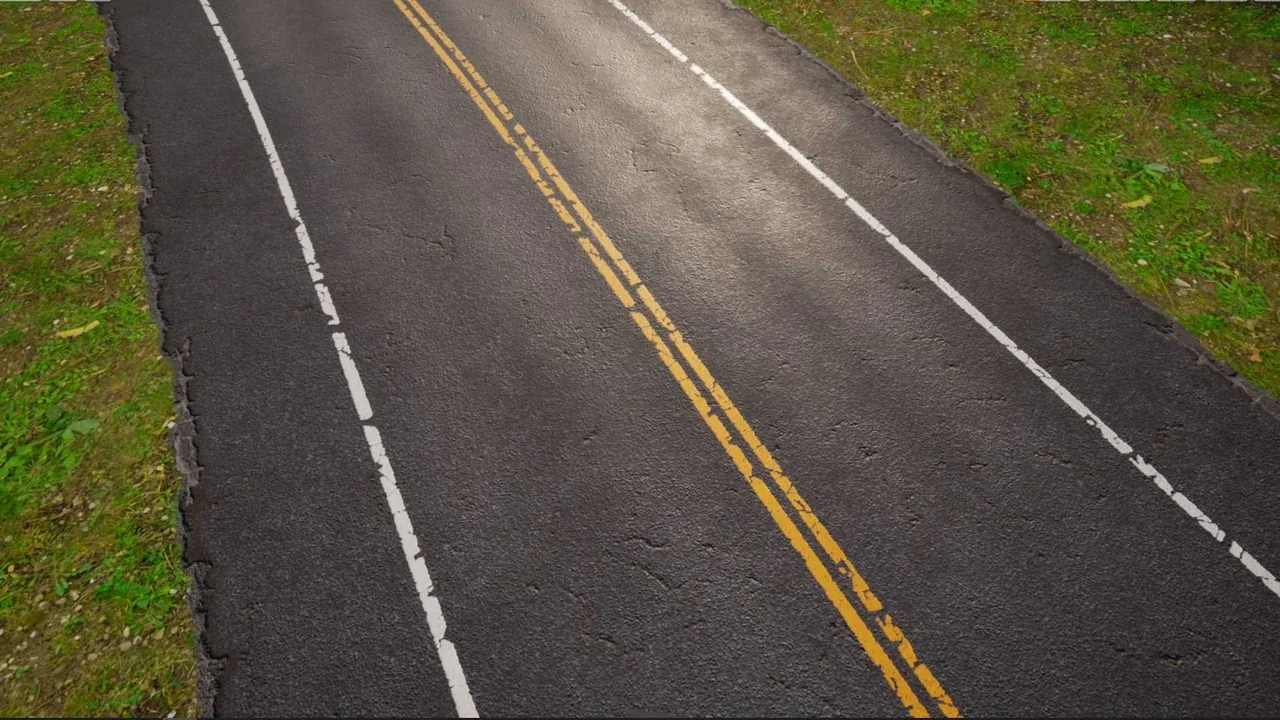
 Procedural Systems
 Procedural Systems
 Procedural Systems