"120d4d938bde251c"{"id":"28604","slug":"crossroad-generator","title":"Crossroad Generator","category":"Procedural Systems","engine":"5.2+","assetVersion":"Engine version: 5.2+","engineVersion":"","tag":"Procedural Systems","accent":"blue","visual":"animation","summary":"Crossroad Generator turns road layout work into a fast in-editor workflow inside Unreal Engine 5. It focuses on procedural street infrastructure, from crossroads and bridges to sidewalks, guardrails, signs, and power lines, while also supporting landscape d...","platform":"Unreal Engine","publishedAt":"2026-05-17T14:06:52.000Z","updatedAt":"2026-05-17T14:06:53.000Z","sourceNotes":[],"fileContents":[],"compatibility":["Unreal Engine","Engine version: 5.2+"],"featuredImage":{"alt":"Crossroad Generator","src":"https://3dcghub.com/wp-content/uploads/2026/05/1d8705b678ec_331a5188-8aeb-45e7-98d2-a7863a4aab3f.webp"},"hasDownloadLink":true,"downloads":4,"terms":[{"taxonomy":"category","slug":"procedural-systems","name":"Procedural Systems"},{"taxonomy":"post_tag","slug":"environment","name":"Environment"},{"taxonomy":"post_tag","slug":"tools","name":"Tools"},{"taxonomy":"post_tag","slug":"unreal-engine-5","name":"Unreal Engine 5"}],"galleryImages":[{"src":"https://3dcghub.com/wp-content/uploads/2026/05/593fd33d2510_71ed11bd-16bb-4966-b0be-e9a66c2d68d6.webp","alt":"Crossroad Generator"},{"src":"https://3dcghub.com/wp-content/uploads/2026/05/805eaf086123_bd0b0c09-3a4a-48b3-9c86-fbd9bff9c613.webp","alt":"Crossroad Generator"},{"src":"https://3dcghub.com/wp-content/uploads/2026/05/9640bad4bb71_70f3d183-4e60-458a-bfbc-0638c35a163f.webp","alt":"Crossroad Generator"},{"src":"https://3dcghub.com/wp-content/uploads/2026/05/f0b6a912a803_f0f05e86-f77a-4ae1-8aae-08da0a469f1d.webp","alt":"Crossroad Generator"},{"src":"https://3dcghub.com/wp-content/uploads/2026/05/a1554cccc49d_338a4f27-89cb-45c2-a329-d5cac59de96d.webp","alt":"Crossroad Generator"},{"src":"https://3dcghub.com/wp-content/uploads/2026/05/60cbaedcff47_087ebe6a-bbe9-4d45-bf02-6eafa2ea530c.webp","alt":"Crossroad Generator"},{"src":"https://3dcghub.com/wp-content/uploads/2026/05/ca2001253668_3f84a4cc-2d28-460c-8e56-2dbeb3cde03b.webp","alt":"Crossroad Generator"},{"src":"https://3dcghub.com/wp-content/uploads/2026/05/0ce0dbe7ef9d_57a29984-3d0a-4f00-88dc-97a1c25a5d05.webp","alt":"Crossroad Generator"},{"src":"https://3dcghub.com/wp-content/uploads/2026/05/aa970acca7ba_6622ecb5-4025-4bf3-8638-da5b733cc6cb.webp","alt":"Crossroad Generator"},{"src":"https://3dcghub.com/wp-content/uploads/2026/05/d84b4bcbbe0c_8d96bccb-84ac-4443-bbd7-e871abd49827.webp","alt":"Crossroad Generator"}],"accessPanel":{"kind":"resource","title":"Access this resource","eyebrow":"Free Download","message":"Log in or create a free account to start your download.","fileName":"Content.7z","safetyNote":"All resources are 100% manually reviewed to eliminate all risks.","actionLabel":"Download Free","resourceType":"Resource archive"},"contentHtml":"\u003cp\u003eA road network starts taking shape almost immediately with Crossroad Generator. Instead of placing one street element at a time, the blueprint-based actor assembles procedural road infrastructure in Unreal Engine 5 with a few clicks, giving teams a faster way to block out and refine intersections, connecting roads, and related roadside structures for games or cinematic scenes.\u003c/p\u003e \u003cp\u003eThe package is focused on realistic and dynamic road construction. It is meant to accelerate a part of environment production that often becomes repetitive when handled manually. Complex road systems that would usually take hours of individual asset placement can be produced much more quickly, while still offering control over how modules are arranged, aligned, and customized in the scene.\u003c/p\u003e \u003ch2\u003eCrossroad Generator as a blueprint actor in Unreal Engine 5\u003c/h2\u003e\n\u003cp\u003eCrossroad Generator operates as a blueprint-based actor, which makes its workflow especially tied to scene assembly inside Unreal Engine. Its role is not limited to one road mesh or one type of crossing. It acts as a generator loaded with high-quality modules that cover various road and crossroad types, giving it a broader reach across urban, roadside, and highway-style setups.\u003c/p\u003e \u003cp\u003eAll assets have been rendered in Unreal Engine 5.4, and the tool itself is presented for Unreal Engine 5 production. That places it clearly in a modern UE5 environment workflow, where artists and level builders may want procedural control without losing access to scene-specific adjustments. The package is positioned for both game projects and cinematic work, which fits the need for road layouts that can read well from gameplay distances as well as from composed camera views.\u003c/p\u003e \u003cp\u003eThe underlying idea is speed without turning everything into a fixed preset. A simple UI is part of that promise. The system is structured so users can move from initial placement into refinement without making the setup process the main task.\u003c/p\u003e \u003ch2\u003eRoad snapping, automatic spawning, and grouped placement\u003c/h2\u003e\n\u003cp\u003eThe most concrete workflow features are the ones that control how roads connect and settle into place. A unique road snapping system is included, alongside an automatic spawning system that supports precise placement and alignment. The emphasis here is not just on creating roads quickly, but on creating an orderly arrangement where parts connect tightly instead of feeling loosely scattered across the level.\u003c/p\u003e \u003cp\u003eThat matters most in scenes where continuity is visible: intersections that need to read cleanly, parallel road runs that should feel deliberate, or extended street layouts where small alignment issues become obvious. The automatic placement and snapping tools reduce that kind of cleanup work by focusing on controlled connections from the start.\u003c/p\u003e \u003cp\u003eA custom grouping system extends that workflow beyond individual pieces. Grouping makes sense in road-building because the network often behaves like a connected set rather than a collection of unrelated props. When crossroads, road segments, and attached details need to stay organized during editing, grouping becomes part of maintaining a manageable scene.\u003c/p\u003e \u003cp\u003eA performance mode is also included for faster editing. In larger road setups, editing speed can become as important as rendering quality, especially while iterating on layout. The presence of a dedicated performance mode points to a workflow where users may be handling more than a single isolated intersection and need the editor to remain responsive while shaping the network.\u003c/p\u003e \u003ch2\u003eCrossroads, bridges, power lines, sidewalks, and guardrails\u003c/h2\u003e\n\u003cp\u003eThe package extends well beyond basic asphalt strips. Crossroad Generator supports the creation of crossroads, roads, bridges, power lines, road signs, curbs, sidewalks, and guardrails with only a few clicks. That list gives a much clearer picture of the intended scene scope: not just driving lanes, but a fuller roadside infrastructure layer.\u003c/p\u003e \u003cp\u003eCrossroads are naturally at the center of the tool, yet the supporting elements are what help a generated network feel like part of a believable environment. Sidewalks and curbs push layouts toward street-level urban reads. Guardrails help frame roadside or elevated stretches. Road signs and power lines add recognizable functional detail. Bridges expand the system beyond flat ground connections and into more varied route building.\u003c/p\u003e \u003cp\u003eTags associated with the package reinforce that direction, pointing toward signs, highways, intersections, traffic, sidewalks, streetlights, driveways, freeways, and roads. Together they suggest a resource that is useful anywhere a project needs structured transport routes and the surrounding details that make those routes feel complete in context.\u003c/p\u003e \u003cp\u003eModules include customizable settings and mesh variations, which gives users room to adapt the generated structures instead of treating them as one locked combination. The article cannot claim specific variation counts or exact module libraries, but the stated presence of customization and mesh variations indicates that the system is meant to support different scene arrangements and visual outcomes while staying within the same road-building framework.\u003c/p\u003e \u003ch2\u003eLandscape deformation, road projection, and baking to static mesh or Nanite\u003c/h2\u003e\n\u003cp\u003eCrossroad Generator does more than place infrastructure on top of the world. It integrates with landscape deformation and includes road projection options, which is important for making roads sit more naturally within terrain-driven environments. A road network often looks unfinished when it ignores the ground beneath it. Deformation and projection tools help bridge that gap by bringing the landscape and the generated road system into a closer relationship.\u003c/p\u003e \u003cp\u003eThat makes the tool relevant for more than flat city blocks. Rural roads, raised routes, sloped connections, and terrain-cut intersections all benefit when the road workflow can respond to landform changes rather than requiring purely manual terrain correction around every segment.\u003c/p\u003e \u003cp\u003eAdvanced settings are also available for material overrides, collisions, shadow casting, and culling distance. Those controls move the tool beyond simple layout generation into scene management and optimization. Material overrides can support project-specific look adjustments. Collision settings matter when the road network is part of gameplay space. Shadow casting and culling distance matter when the environment must balance visual fidelity and runtime considerations.\u003c/p\u003e \u003cp\u003eOnce the generated arrangement is ready, the package includes baking to static mesh or Nanite through a utility widget. That gives teams a path from procedural editing into a more finalized asset state, which can be useful when a road system has reached the stage where it needs to be locked down for production or integrated into broader environment assembly.\u003c/p\u003e \u003ch2\u003ePCG integration in UE 5.2 and UE 5.5\u003c/h2\u003e\n\u003cp\u003eThe tool is not isolated from wider Unreal Engine workflows. Crossroad Generator can be combined with the Procedural Content Generation framework for additional possibilities, and tutorial material specifically references PCG integration in UE 5.2 and PCG integration in UE 5.5. That places the generator inside a larger procedural environment-building pipeline rather than limiting it to hand-guided editing alone.\u003c/p\u003e \u003cp\u003ePCG integration becomes especially useful when roads are only one layer of the environment. After the infrastructure has been established, surrounding elements can fill in the scene more efficiently. Quixel Megascans assets are mentioned as a way to populate areas quickly with foliage, leaves, grass, and trees, helping road corridors and intersections sit inside more complete natural or mixed environments.\u003c/p\u003e \u003cp\u003eFor teams building large worlds, roadside stretches, or cinematic flythrough spaces, this matters because roads rarely exist in isolation. A generator that connects with PCG can act as a structural backbone, while additional environment assets add the surface richness around it. The road system defines flow and direction; PCG-assisted dressing helps finish the frame.\u003c/p\u003e \u003ch2\u003eProject notes, setup requirements, and who gets the most from it\u003c/h2\u003e\n\u003cp\u003eTwo setup requirements are clearly stated: virtual texturing support and the Geometry Script plugin need to be enabled in the project. Those are practical checks to make before bringing the tool into production, especially for teams that are testing it in an existing Unreal Engine setup rather than a fresh project.\u003c/p\u003e \u003cp\u003eThe package includes only the 3D assets and does not include environment maps. That keeps the scope focused on the road-building content itself rather than surrounding presentation scenes or full environment backdrops. It is also stated to be free of legal issues for safe use in commercial projects.\u003c/p\u003e \u003cp\u003eA tutorial series accompanies the tool, covering fundamentals, spawning and snapping, road building, bridges, power-lines, landscape deformations, PCG integration in UE 5.2, new features in v1.2, customization, baking to static mesh and Nanite, and PCG integration in UE 5.5. That range reflects the actual working areas users are expected to engage with: first layout, then structure, then terrain response, then baking and broader procedural integration.\u003c/p\u003e \u003cp\u003eCrossroad Generator will be most useful to developers and artists who need road infrastructure to come together quickly without reducing the scene to a single repeated setup. Its strongest advantage is the way it combines procedural layout, snapping, roadside detail generation, terrain-aware options, and a path to baking, making it a practical fit for anyone evaluating a UE5 road tool for intersections, connected street networks, and larger environment assembly.\u003c/p\u003e","contentTextLength":9673,"navigation":{"current":1359,"total":3225,"previous":{"id":"28608","slug":"custom-ar-15-style-rifle","title":"Custom AR-15 Style Rifle","category":"Guns","platform":"Unreal Engine","updatedAt":"2026-05-17T14:14:08.000Z"},"next":{"id":"28577","slug":"bren-light-machine-gun-lmg","title":"Bren Light Machine Gun LMG","category":"Action-Adventure","platform":"Unreal Engine","updatedAt":"2026-05-17T13:14:20.000Z"}},"relatedResources":[{"id":"25129","slug":"road-creator-pro","title":"Road Creator Pro","category":"Procedural Systems","engine":"5.6+","assetVersion":"Engine version: 5.6+","engineVersion":"","tag":"Procedural Systems","accent":"blue","visual":"city","summary":"Road Creator Pro brings roads, intersections, bridges, tunnels, and roadside details into Unreal Engine through a spline-based workflow. It also adds terrain deformation, snapping, traffic signals, signage, and day-night visibility tools for practical scene...","platform":"Unreal Engine","publishedAt":"2026-04-19T06:27:25.000Z","updatedAt":"2026-04-20T06:12:32.000Z","sourceNotes":[],"fileContents":[],"compatibility":["Unreal Engine","Engine version: 5.6+"],"featuredImage":{"alt":"Road Creator Pro","src":"https://3dcghub.com/wp-content/uploads/2026/04/c012b5395914_ed21df1f-da93-448a-b233-0700745ec894.webp"},"hasDownloadLink":true,"downloads":2},{"id":"15225","slug":"crazy-ivy-realistic-ivy-generator-vine-plugin-grow-procedural-plants-in-editor","title":"Crazy Ivy Realistic Ivy Generator Vine Plugin - Grow Procedural Plants in Editor","category":"Procedural Systems","engine":"5.0 - 5.4","assetVersion":"Engine version: 5.0 - 5.4","engineVersion":"4.27","tag":"Procedural Systems","accent":"blue","visual":"animation","summary":"Crazy Ivy is a powerful procedural tool designed to grow realistic ivy directly within your editor. By automatically detecting static meshes, this plugin allows for the creation of unique, optimized vegetation systems.","platform":"Unreal Engine","publishedAt":"2026-03-12T08:22:47.000Z","updatedAt":"2026-04-19T15:44:52.000Z","sourceNotes":[],"fileContents":[],"compatibility":["Unreal Engine","Engine version: 5.0 - 5.4"],"featuredImage":{"alt":"Crazy Ivy Realistic Ivy Generator Vine Plugin - Grow Procedural Plants in Editor","src":"https://3dcghub.com/wp-content/uploads/2026/03/82ad95ba-cc8c-422c-b4cc-dff51937564d.webp"},"hasDownloadLink":true,"downloads":0},{"id":"15315","slug":"procedural-nature-generator","title":"Procedural Nature Generator","category":"Procedural Systems","engine":"5.3","assetVersion":"Engine version: 5.3","engineVersion":"4.26","tag":"Procedural Systems","accent":"blue","visual":"character","summary":"The Procedural Nature Generator is a powerful editor plugin for creating dense natural environments. It allows developers to populate landscapes with thousands of actors in seconds using custom assets.","platform":"Unreal Engine","publishedAt":"2026-03-12T08:35:35.000Z","updatedAt":"2026-04-19T15:44:50.000Z","sourceNotes":[],"fileContents":[],"compatibility":["Unreal Engine","Engine version: 5.3"],"featuredImage":{"alt":"Procedural Nature Generator","src":"https://3dcghub.com/wp-content/uploads/2026/03/9983a12a-a0ea-4b90-aef5-8d43cf058002.webp"},"hasDownloadLink":true,"downloads":0}]}
Procedural Systems
Crossroad Generator
Crossroad Generator turns road layout work into a fast in-editor workflow inside Unreal Engine 5. It focuses on procedural street infrastructure, from crossroads and bridges to sidewalks, guardrails, signs, and power lines, while also supporting landscape d...
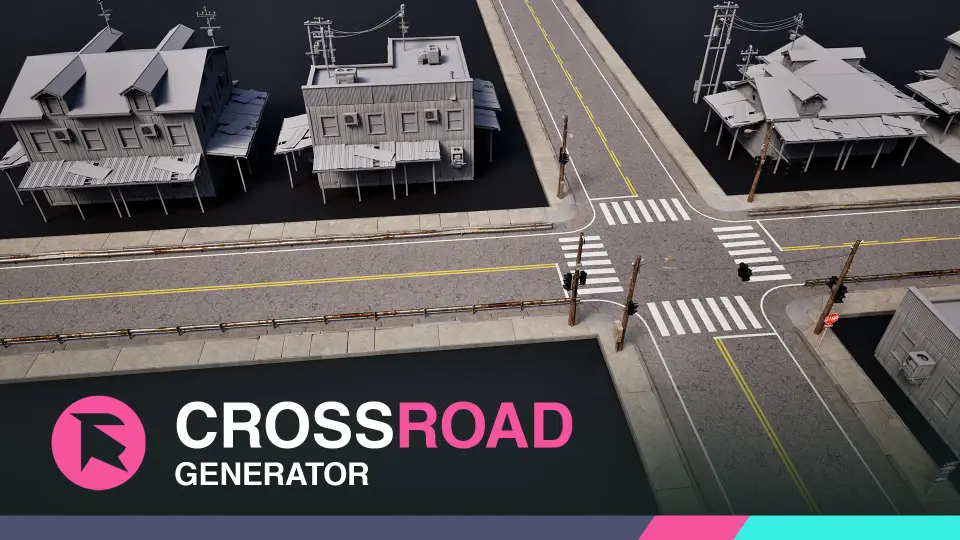
A road network starts taking shape almost immediately with Crossroad Generator. Instead of placing one street element at a time, the blueprint-based actor assembles procedural road infrastructure in Unreal Engine 5 with a few clicks, giving teams a faster way to block out and refine intersections, connecting roads, and related roadside structures for games or cinematic scenes.
The package is focused on realistic and dynamic road construction. It is meant to accelerate a part of environment production that often becomes repetitive when handled manually. Complex road systems that would usually take hours of individual asset placement can be produced much more quickly, while still offering control over how modules are arranged, aligned, and customized in the scene.
Crossroad Generator as a blueprint actor in Unreal Engine 5
Crossroad Generator operates as a blueprint-based actor, which makes its workflow especially tied to scene assembly inside Unreal Engine. Its role is not limited to one road mesh or one type of crossing. It acts as a generator loaded with high-quality modules that cover various road and crossroad types, giving it a broader reach across urban, roadside, and highway-style setups.
All assets have been rendered in Unreal Engine 5.4, and the tool itself is presented for Unreal Engine 5 production. That places it clearly in a modern UE5 environment workflow, where artists and level builders may want procedural control without losing access to scene-specific adjustments. The package is positioned for both game projects and cinematic work, which fits the need for road layouts that can read well from gameplay distances as well as from composed camera views.
The underlying idea is speed without turning everything into a fixed preset. A simple UI is part of that promise. The system is structured so users can move from initial placement into refinement without making the setup process the main task.
Road snapping, automatic spawning, and grouped placement
The most concrete workflow features are the ones that control how roads connect and settle into place. A unique road snapping system is included, alongside an automatic spawning system that supports precise placement and alignment. The emphasis here is not just on creating roads quickly, but on creating an orderly arrangement where parts connect tightly instead of feeling loosely scattered across the level.
That matters most in scenes where continuity is visible: intersections that need to read cleanly, parallel road runs that should feel deliberate, or extended street layouts where small alignment issues become obvious. The automatic placement and snapping tools reduce that kind of cleanup work by focusing on controlled connections from the start.
A custom grouping system extends that workflow beyond individual pieces. Grouping makes sense in road-building because the network often behaves like a connected set rather than a collection of unrelated props. When crossroads, road segments, and attached details need to stay organized during editing, grouping becomes part of maintaining a manageable scene.
A performance mode is also included for faster editing. In larger road setups, editing speed can become as important as rendering quality, especially while iterating on layout. The presence of a dedicated performance mode points to a workflow where users may be handling more than a single isolated intersection and need the editor to remain responsive while shaping the network.
Crossroads, bridges, power lines, sidewalks, and guardrails
The package extends well beyond basic asphalt strips. Crossroad Generator supports the creation of crossroads, roads, bridges, power lines, road signs, curbs, sidewalks, and guardrails with only a few clicks. That list gives a much clearer picture of the intended scene scope: not just driving lanes, but a fuller roadside infrastructure layer.
Crossroads are naturally at the center of the tool, yet the supporting elements are what help a generated network feel like part of a believable environment. Sidewalks and curbs push layouts toward street-level urban reads. Guardrails help frame roadside or elevated stretches. Road signs and power lines add recognizable functional detail. Bridges expand the system beyond flat ground connections and into more varied route building.
Tags associated with the package reinforce that direction, pointing toward signs, highways, intersections, traffic, sidewalks, streetlights, driveways, freeways, and roads. Together they suggest a resource that is useful anywhere a project needs structured transport routes and the surrounding details that make those routes feel complete in context.
Modules include customizable settings and mesh variations, which gives users room to adapt the generated structures instead of treating them as one locked combination. The article cannot claim specific variation counts or exact module libraries, but the stated presence of customization and mesh variations indicates that the system is meant to support different scene arrangements and visual outcomes while staying within the same road-building framework.
Landscape deformation, road projection, and baking to static mesh or Nanite
Crossroad Generator does more than place infrastructure on top of the world. It integrates with landscape deformation and includes road projection options, which is important for making roads sit more naturally within terrain-driven environments. A road network often looks unfinished when it ignores the ground beneath it. Deformation and projection tools help bridge that gap by bringing the landscape and the generated road system into a closer relationship.
That makes the tool relevant for more than flat city blocks. Rural roads, raised routes, sloped connections, and terrain-cut intersections all benefit when the road workflow can respond to landform changes rather than requiring purely manual terrain correction around every segment.
Advanced settings are also available for material overrides, collisions, shadow casting, and culling distance. Those controls move the tool beyond simple layout generation into scene management and optimization. Material overrides can support project-specific look adjustments. Collision settings matter when the road network is part of gameplay space. Shadow casting and culling distance matter when the environment must balance visual fidelity and runtime considerations.
Once the generated arrangement is ready, the package includes baking to static mesh or Nanite through a utility widget. That gives teams a path from procedural editing into a more finalized asset state, which can be useful when a road system has reached the stage where it needs to be locked down for production or integrated into broader environment assembly.
PCG integration in UE 5.2 and UE 5.5
The tool is not isolated from wider Unreal Engine workflows. Crossroad Generator can be combined with the Procedural Content Generation framework for additional possibilities, and tutorial material specifically references PCG integration in UE 5.2 and PCG integration in UE 5.5. That places the generator inside a larger procedural environment-building pipeline rather than limiting it to hand-guided editing alone.
PCG integration becomes especially useful when roads are only one layer of the environment. After the infrastructure has been established, surrounding elements can fill in the scene more efficiently. Quixel Megascans assets are mentioned as a way to populate areas quickly with foliage, leaves, grass, and trees, helping road corridors and intersections sit inside more complete natural or mixed environments.
For teams building large worlds, roadside stretches, or cinematic flythrough spaces, this matters because roads rarely exist in isolation. A generator that connects with PCG can act as a structural backbone, while additional environment assets add the surface richness around it. The road system defines flow and direction; PCG-assisted dressing helps finish the frame.
Project notes, setup requirements, and who gets the most from it
Two setup requirements are clearly stated: virtual texturing support and the Geometry Script plugin need to be enabled in the project. Those are practical checks to make before bringing the tool into production, especially for teams that are testing it in an existing Unreal Engine setup rather than a fresh project.
The package includes only the 3D assets and does not include environment maps. That keeps the scope focused on the road-building content itself rather than surrounding presentation scenes or full environment backdrops. It is also stated to be free of legal issues for safe use in commercial projects.
A tutorial series accompanies the tool, covering fundamentals, spawning and snapping, road building, bridges, power-lines, landscape deformations, PCG integration in UE 5.2, new features in v1.2, customization, baking to static mesh and Nanite, and PCG integration in UE 5.5. That range reflects the actual working areas users are expected to engage with: first layout, then structure, then terrain response, then baking and broader procedural integration.
Crossroad Generator will be most useful to developers and artists who need road infrastructure to come together quickly without reducing the scene to a single repeated setup. Its strongest advantage is the way it combines procedural layout, snapping, roadside detail generation, terrain-aware options, and a path to baking, making it a practical fit for anyone evaluating a UE5 road tool for intersections, connected street networks, and larger environment assembly.
Preview Gallery
Resource screenshots
10 curated preview images
1 / 10
Free Download
Download this resource
Log in or create a free account to start your download.
All resources are 100% manually reviewed to eliminate all risks.
 Procedural Systems
 Procedural Systems
 Procedural Systems
 Procedural Systems