"c68a05d5e51405b3"{"id":"25129","slug":"road-creator-pro","title":"Road Creator Pro","category":"Procedural Systems","engine":"5.6+","assetVersion":"Engine version: 5.6+","engineVersion":"","tag":"Procedural Systems","accent":"blue","visual":"city","summary":"Road Creator Pro brings roads, intersections, bridges, tunnels, and roadside details into Unreal Engine through a spline-based workflow. It also adds terrain deformation, snapping, traffic signals, signage, and day-night visibility tools for practical scene...","platform":"Unreal Engine","publishedAt":"2026-04-19T06:27:25.000Z","updatedAt":"2026-04-20T06:12:32.000Z","sourceNotes":[],"fileContents":[],"compatibility":["Unreal Engine","Engine version: 5.6+"],"featuredImage":{"alt":"Road Creator Pro","src":"https://3dcghub.com/wp-content/uploads/2026/04/c012b5395914_ed21df1f-da93-448a-b233-0700745ec894.webp"},"hasDownloadLink":true,"downloads":5,"terms":[{"taxonomy":"category","slug":"procedural-systems","name":"Procedural Systems"},{"taxonomy":"post_tag","slug":"environment","name":"Environment"},{"taxonomy":"post_tag","slug":"tools","name":"Tools"},{"taxonomy":"post_tag","slug":"unreal-engine-5","name":"Unreal Engine 5"}],"galleryImages":[{"src":"https://3dcghub.com/wp-content/uploads/2026/04/da1ec6493ffb_e7071aef-db98-450c-8ae3-28204d9c3763.webp","alt":"Road Creator Pro"},{"src":"https://3dcghub.com/wp-content/uploads/2026/04/b50a8525867f_9e0b5188-f808-49d9-ab37-bda8ef423ee4.webp","alt":"Road Creator Pro"},{"src":"https://3dcghub.com/wp-content/uploads/2026/04/182914115794_b135ecd9-c0cd-49fb-8b30-11d15e05cf01.webp","alt":"Road Creator Pro"},{"src":"https://3dcghub.com/wp-content/uploads/2026/04/cd4c17ffed32_e88ff2dd-9e1e-4ae4-b4e7-110494624bae.webp","alt":"Road Creator Pro"},{"src":"https://3dcghub.com/wp-content/uploads/2026/04/02055f2610d6_81c60a96-ce4e-4532-ae56-c5d0c32db18f.webp","alt":"Road Creator Pro"},{"src":"https://3dcghub.com/wp-content/uploads/2026/04/57e69133b45a_275021c6-c896-4215-9b42-676954605e9f.webp","alt":"Road Creator Pro"},{"src":"https://3dcghub.com/wp-content/uploads/2026/04/9abb332ae000_8b50599b-b6fa-4082-b318-358aa4c21614.webp","alt":"Road Creator Pro"},{"src":"https://3dcghub.com/wp-content/uploads/2026/04/40258eb149c4_927745f1-a867-4aa0-b827-5093665021e8.webp","alt":"Road Creator Pro"},{"src":"https://3dcghub.com/wp-content/uploads/2026/04/9c0dffe8fe82_46578088-c342-4c6d-a738-7ab1d41a4eaf.webp","alt":"Road Creator Pro"},{"src":"https://3dcghub.com/wp-content/uploads/2026/04/85e14e145a73_807ec12a-a083-4e20-b40a-bb91a3df7b95.webp","alt":"Road Creator Pro"}],"accessPanel":{"kind":"resource","title":"Access this resource","eyebrow":"Free Download","message":"Log in or create a free account to start your download.","fileName":"Road Creator Pro.7z","safetyNote":"All resources are 100% manually reviewed to eliminate all risks.","actionLabel":"Download Free","resourceType":"Resource archive"},"contentHtml":"\u003ch2\u003eRoads that move from city blocks to long-distance routes\u003c/h2\u003e\u003cp\u003eRoad Creator Pro is aimed at scenes that need roads to do more than simply connect two points. It can be used for city streets, gravel roads, large highways, bridges, intersections, tunnels, and overpasses, with a spline-based workflow that keeps layout work flexible while the network is still being shaped. Roads can range from 1 to 8 lanes, and migration from other road systems is supported.\u003c/p\u003e\u003cp\u003eThat range makes it useful for projects that need different road scales in the same world. A dense downtown block, a rural access road, and a multi-lane highway can all sit under the same system, which helps when a level has to move from tight street corners to open transport corridors without changing tools.\u003c/p\u003e\u003ch2\u003eIntersections, roundabouts, and traffic flow\u003c/h2\u003e\u003cp\u003eIntersections are handled with pre-made junctions, three roundabout types, and highway merges, all with automatic road snapping. Road markings, road signs, stop lines, and pedestrian crossings can be customized, which gives each junction enough control to match the surrounding scene rather than feeling repeated from one area to the next.\u003c/p\u003e\u003cp\u003eThe traffic layer extends beyond the road surface. Customizable traffic lights include adjustable sequencing and pedestrian signals, while road signs cover physics-enabled basic European and American signs as well as destination signs with text. The road network can therefore carry visual traffic cues that are clear enough for gameplay, simulation, or cinematic staging.\u003c/p\u003e\u003ch2\u003eBridges, tunnels, and roadside structure\u003c/h2\u003e\u003cp\u003eBridges can be shaped with support for different styles, including overpasses and cable-stayed bridges with pylons and cables. Support spacing and height can be changed, and abutments can be added. Expansion joints with sound are included for vehicle interaction, which helps these structures feel less static when cars pass over them.\u003c/p\u003e\u003cp\u003eTunnels are also part of the system, with portals, lighting, and working fans. Around the road itself, the tool includes guardrails, fences, concrete barriers, breakable poles, sidewalks, pedestrian paths, lampposts, noise barriers, cat\u0026apos;s eyes, anti-glare screens, gravel shoulders, utility poles, and tactile paving. Each element can be adjusted for size, material, and placement, so roadside construction can stay consistent across different environments.\u003c/p\u003e\u003ch3\u003eIncluded blueprints and prop instancers\u003c/h3\u003e\u003cp\u003eSeveral ready-made blueprints are included for placing and organizing pieces of the road scene, including Road Creator, Pedestrian Path, Retaining Wall, Lamp Post, Sidewalk, Aviation Obstruction Light, Day Night Cycle, Destination Sign, Road Sign, Expansion Joint, Junction Placer, Tape Measure, Spotlight, and Traffic Light.\u003c/p\u003e\u003cp\u003eProp instancers cover barrier concrete pieces, barrier cones, delineator poles, barrier poles, reflector poles, barrier sidewalk fence, barrier wall, curb, grass pavers, guardrail, noise barrier, retaining wall, sidewalk, and wheel stopper. Later additions also bring in boom barrier, benches, trash can, painted curb, chevron road signs, utility poles, and power transmission line blueprints.\u003c/p\u003e\u003ch2\u003eSnapping, terrain deformation, and render-friendly setup\u003c/h2\u003e\u003cp\u003eRoads, intersections, junctions, and roundabouts connect through a snapping system, which makes network editing feel more direct when pieces need to meet cleanly. Tools are included for splitting and merging roads, placing junctions, measuring clearances, and checking whether slopes and curvatures comply with international guidelines. A Google Satellite or OSM map image backdrop can also be used to help with layout planning.\u003c/p\u003e\u003cp\u003eThe road system conforms to landscapes automatically, and the landscape can be deformed with adjustable height offsets and terrain painting so the road blends into its surroundings. For larger scenes, performance is supported through instanced static meshes, LOD-based optimization, proper texture sizes, and scalable materials. Roads can also be merged into one mesh, and the system is compatible with Static, Lumen, Mobile, and Path Tracer lighting types.\u003c/p\u003e\u003ch2\u003eNight visibility, demo content, and ongoing additions\u003c/h2\u003e\u003cp\u003eLighting control ties the road system into a day-night cycle with automatic sun movement, moon movement, and streetlights that switch based on time of day. Retroreflective road markings and elements improve nighttime visibility, while light billboards on lampposts add another layer of readable detail after dark.\u003c/p\u003e\u003cp\u003eThe included demo level contains three pre-built cities with European, American, and British-style roads, and the level features 44.5 km of roads ready to drive. Later updates add road turn meshes, edge ripple and gravel shoulder corner meshes, sidewalk variations, additional intersections, a small roundabout road mesh, breakable poles, improved skid marks, a new traffic light arrow mesh, better noise barrier and fence alignment, a wider-gap handling improvement, a closed-loop landscape deformation fix, a fast editing mode road width fix, a longer tunnel portal mesh, a slope visualization text improvement, separate left and right offsets for lampposts, random lean for parts, broken lamppost lamps, a tape measure tool, a road part width multiplier, decal spline line mode, an align-to-terrain option for some parts, and a merge-to-one-road checkbox.\u003c/p\u003e\u003cp\u003eFor projects that need roads to read clearly at gameplay distance and still hold together in close-up shots, Road Creator Pro gives a practical foundation for transport-heavy environments, roadside dressing, and traffic-aware level layouts.\u003c/p\u003e\n\n\u003ch2\u003eMore From The Same Workflow\u003c/h2\u003e\n\u003cul\u003e\n\u003cli\u003e\u003ca href=\"https://3dcghub.com/advanced-unreal-engine-5-multiplayer-gameplay-programming/\" title=\"Advanced Unreal Engine 5 Multiplayer Gameplay Programming\"\u003eAdvanced Unreal Engine 5 Multiplayer Gameplay Programming\u003c/a\u003e\u003c/li\u003e\n\u003cli\u003e\u003ca href=\"https://3dcghub.com/niagara-beginners-to-advanced-in-unreal-engine-5/\" title=\"Niagara Beginners to advanced in Unreal Engine 5\"\u003eNiagara Beginners to advanced in Unreal Engine 5\u003c/a\u003e\u003c/li\u003e\n\u003cli\u003e\u003ca href=\"https://3dcghub.com/create-zelda-like-skills-with-c-in-unreal-engine-5-2/\" title=\"Create Zelda-like skills with C++ in unreal engine 5\"\u003eCreate Zelda-like skills with C++ in unreal engine 5\u003c/a\u003e\u003c/li\u003e\n\u003cli\u003e\u003ca href=\"https://3dcghub.com/main-menus-beginner-class-unreal-engine-5/\" title=\"Main Menus Beginner Class – Unreal Engine 5\"\u003eMain Menus Beginner Class – Unreal Engine 5\u003c/a\u003e\u003c/li\u003e\n\u003cli\u003e\u003ca href=\"https://3dcghub.com/create-zelda-like-skills-with-c-in-unreal-engine-5/\" title=\"Create Zelda-like skills with C++ in unreal engine 5\"\u003eCreate Zelda-like skills with C++ in unreal engine 5\u003c/a\u003e\u003c/li\u003e\n\u003c/ul\u003e\n\n\u003ch2\u003eAsset Gallery\u003c/h2\u003e","contentTextLength":5851,"navigation":{"current":2219,"total":3860,"previous":{"id":"25140","slug":"severe-injury-animations","title":"Severe Injury Animations","category":"Variety","platform":"Unreal Engine","updatedAt":"2026-04-20T06:12:32.000Z"},"next":{"id":"25115","slug":"replicated-modular-vehicle-v2","title":"Replicated Modular Vehicle V2","category":"Game Mechanics","platform":"Unreal Engine","updatedAt":"2026-04-20T06:12:32.000Z"}},"relatedResources":[{"id":"1001522","slug":"interactive-procedural-city-generator","title":"Interactive Procedural City Generator","category":"Procedural Systems","engine":"5.1+","assetVersion":"","engineVersion":"Engine Version: 5.1+","tag":"Procedural Systems","accent":"blue","visual":"city","summary":"Generate custom urban environments in Unreal Engine with the Interactive Procedural City Creator, featuring modular roads, grammar-based buildings, and Data Lay","platform":"Unreal Engine","publishedAt":"2026-10-09T13:34:43.038Z","updatedAt":"2026-10-09T13:34:43.038Z","sourceNotes":[],"fileContents":[],"compatibility":["Unreal Engine","Engine Version: 5.1+"],"featuredImage":{"alt":"Interactive Procedural City Generator","src":"/wp-content/uploads/published/2026/10/9d51a3d4b98c-9afe2843-cc4d-4de0-81d0-38721ad9d314-b5e158ce4d.webp"},"hasDownloadLink":true,"downloads":1},{"id":"28604","slug":"crossroad-generator","title":"Crossroad Generator","category":"Procedural Systems","engine":"5.2+","assetVersion":"Engine version: 5.2+","engineVersion":"","tag":"Procedural Systems","accent":"blue","visual":"animation","summary":"Crossroad Generator turns road layout work into a fast in-editor workflow inside Unreal Engine 5. It focuses on procedural street infrastructure, from crossroads and bridges to sidewalks, guardrails, signs, and power lines, while also supporting landscape d...","platform":"Unreal Engine","publishedAt":"2026-05-17T14:06:52.000Z","updatedAt":"2026-05-17T14:06:53.000Z","sourceNotes":[],"fileContents":[],"compatibility":["Unreal Engine","Engine version: 5.2+"],"featuredImage":{"alt":"Crossroad Generator","src":"https://3dcghub.com/wp-content/uploads/2026/05/1d8705b678ec_331a5188-8aeb-45e7-98d2-a7863a4aab3f.webp"},"hasDownloadLink":true,"downloads":4},{"id":"1000816","slug":"easy-decal-roads-rvt","title":"Easy Decal Roads RVT","category":"Procedural Systems","engine":"5.4+","assetVersion":"","engineVersion":"Engine Version: 5.4+","tag":"Procedural Systems","accent":"blue","visual":"mech","summary":"Easy Decal Roads RVT is a road creation tool for Unreal Engine using Runtime Virtual Texturing to build roads and intersections without mesh clipping or Z-fight","platform":"Unreal Engine","publishedAt":"2026-07-31T11:21:23.146Z","updatedAt":"2026-07-31T11:21:41.063Z","sourceNotes":[],"fileContents":[],"compatibility":["Unreal Engine","Engine Version: 5.4+"],"featuredImage":{"alt":"Easy Decal Roads RVT","src":"/wp-content/uploads/published/2026/07/e4482c7d4a89-d67b2e8a-2aff-490a-8ae1-253b1bf2996d-2896d9aeb8.webp"},"hasDownloadLink":true,"downloads":1}]}
Procedural Systems
Road Creator Pro
Road Creator Pro brings roads, intersections, bridges, tunnels, and roadside details into Unreal Engine through a spline-based workflow. It also adds terrain deformation, snapping, traffic signals, signage, and day-night visibility tools for practical scene...
Roads that move from city blocks to long-distance routes
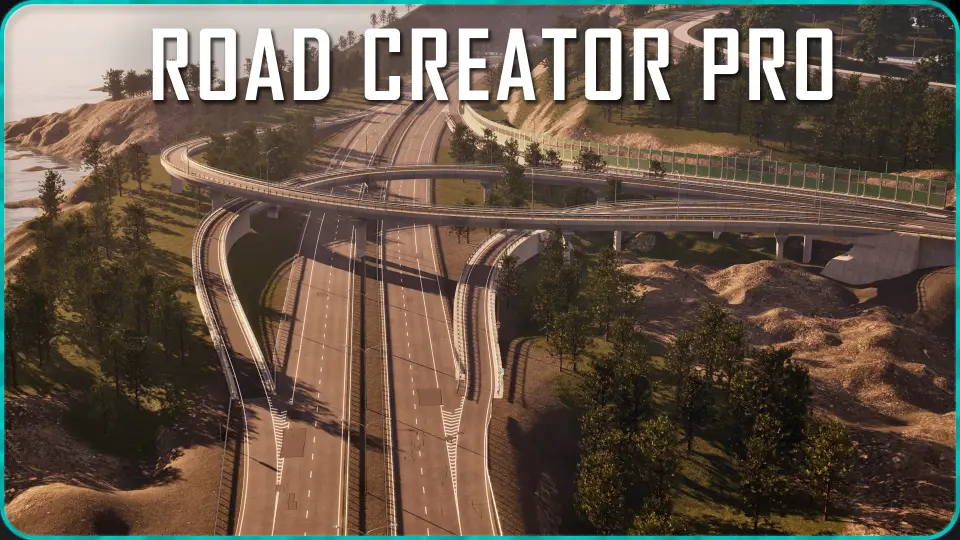
Road Creator Pro is aimed at scenes that need roads to do more than simply connect two points. It can be used for city streets, gravel roads, large highways, bridges, intersections, tunnels, and overpasses, with a spline-based workflow that keeps layout work flexible while the network is still being shaped. Roads can range from 1 to 8 lanes, and migration from other road systems is supported.
That range makes it useful for projects that need different road scales in the same world. A dense downtown block, a rural access road, and a multi-lane highway can all sit under the same system, which helps when a level has to move from tight street corners to open transport corridors without changing tools.
Intersections, roundabouts, and traffic flow
Intersections are handled with pre-made junctions, three roundabout types, and highway merges, all with automatic road snapping. Road markings, road signs, stop lines, and pedestrian crossings can be customized, which gives each junction enough control to match the surrounding scene rather than feeling repeated from one area to the next.
The traffic layer extends beyond the road surface. Customizable traffic lights include adjustable sequencing and pedestrian signals, while road signs cover physics-enabled basic European and American signs as well as destination signs with text. The road network can therefore carry visual traffic cues that are clear enough for gameplay, simulation, or cinematic staging.
Bridges, tunnels, and roadside structure
Bridges can be shaped with support for different styles, including overpasses and cable-stayed bridges with pylons and cables. Support spacing and height can be changed, and abutments can be added. Expansion joints with sound are included for vehicle interaction, which helps these structures feel less static when cars pass over them.
Tunnels are also part of the system, with portals, lighting, and working fans. Around the road itself, the tool includes guardrails, fences, concrete barriers, breakable poles, sidewalks, pedestrian paths, lampposts, noise barriers, cat's eyes, anti-glare screens, gravel shoulders, utility poles, and tactile paving. Each element can be adjusted for size, material, and placement, so roadside construction can stay consistent across different environments.
Included blueprints and prop instancers
Several ready-made blueprints are included for placing and organizing pieces of the road scene, including Road Creator, Pedestrian Path, Retaining Wall, Lamp Post, Sidewalk, Aviation Obstruction Light, Day Night Cycle, Destination Sign, Road Sign, Expansion Joint, Junction Placer, Tape Measure, Spotlight, and Traffic Light.
Prop instancers cover barrier concrete pieces, barrier cones, delineator poles, barrier poles, reflector poles, barrier sidewalk fence, barrier wall, curb, grass pavers, guardrail, noise barrier, retaining wall, sidewalk, and wheel stopper. Later additions also bring in boom barrier, benches, trash can, painted curb, chevron road signs, utility poles, and power transmission line blueprints.
Snapping, terrain deformation, and render-friendly setup
Roads, intersections, junctions, and roundabouts connect through a snapping system, which makes network editing feel more direct when pieces need to meet cleanly. Tools are included for splitting and merging roads, placing junctions, measuring clearances, and checking whether slopes and curvatures comply with international guidelines. A Google Satellite or OSM map image backdrop can also be used to help with layout planning.
The road system conforms to landscapes automatically, and the landscape can be deformed with adjustable height offsets and terrain painting so the road blends into its surroundings. For larger scenes, performance is supported through instanced static meshes, LOD-based optimization, proper texture sizes, and scalable materials. Roads can also be merged into one mesh, and the system is compatible with Static, Lumen, Mobile, and Path Tracer lighting types.
Night visibility, demo content, and ongoing additions
Lighting control ties the road system into a day-night cycle with automatic sun movement, moon movement, and streetlights that switch based on time of day. Retroreflective road markings and elements improve nighttime visibility, while light billboards on lampposts add another layer of readable detail after dark.
The included demo level contains three pre-built cities with European, American, and British-style roads, and the level features 44.5 km of roads ready to drive. Later updates add road turn meshes, edge ripple and gravel shoulder corner meshes, sidewalk variations, additional intersections, a small roundabout road mesh, breakable poles, improved skid marks, a new traffic light arrow mesh, better noise barrier and fence alignment, a wider-gap handling improvement, a closed-loop landscape deformation fix, a fast editing mode road width fix, a longer tunnel portal mesh, a slope visualization text improvement, separate left and right offsets for lampposts, random lean for parts, broken lamppost lamps, a tape measure tool, a road part width multiplier, decal spline line mode, an align-to-terrain option for some parts, and a merge-to-one-road checkbox.
For projects that need roads to read clearly at gameplay distance and still hold together in close-up shots, Road Creator Pro gives a practical foundation for transport-heavy environments, roadside dressing, and traffic-aware level layouts.
 Procedural Systems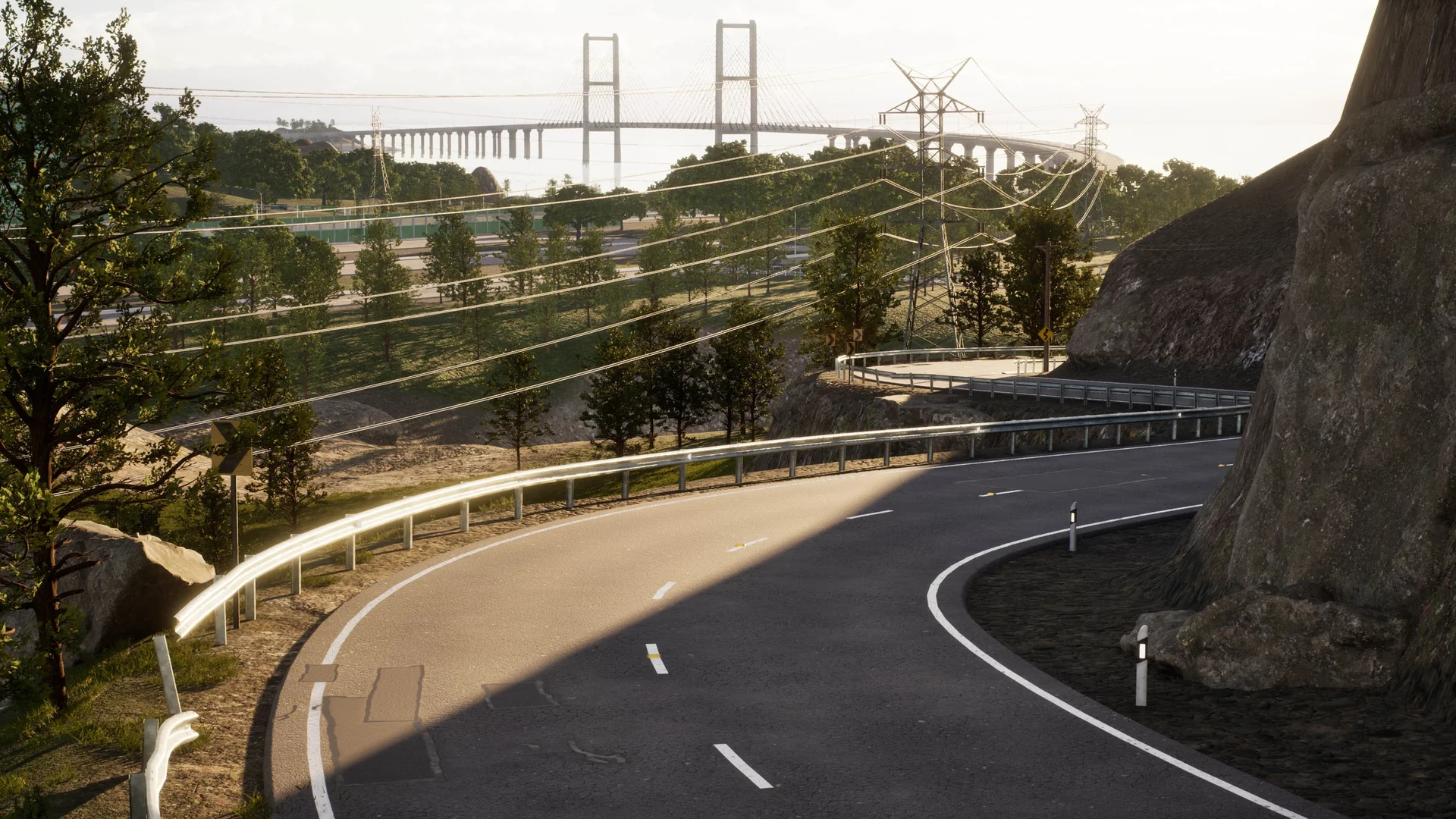
 Procedural Systems
 Procedural Systems
 Procedural Systems