"148d1066ed74e216"{"id":"1002922","slug":"easycsv","title":"easyCSV","category":"Engine Tools","engine":"4.26 - 5.6","assetVersion":"Asset Version: 4.26.2 - 5.6.2025.06.28","engineVersion":"Engine Version: 4.26 - 5.6","tag":"Engine Tools","accent":"blue","visual":"mech","summary":"Load external spreadsheet data at runtime with easyCSV. Discover how plain text files convert into engine types using Blueprint and C++ from string methods.","platform":"Unreal Engine","indexPolicy":"index","publishedAt":"2026-11-21T22:45:27.847Z","updatedAt":"2026-11-21T22:45:27.847Z","sourceNotes":[],"fileContents":[],"compatibility":["Unreal Engine","Asset Version: 4.26.2 - 5.6.2025.06.28","Engine Version: 4.26 - 5.6"],"featuredImage":{"alt":"easyCSV","src":"/wp-content/uploads/published/2026/11/3ae1d45679bb-d15ff904-90eb-4b5a-98b1-704f60263c9d-51e37ccb2d.webp"},"fileSizeBytes":10171898,"hasDownloadLink":true,"downloads":0,"terms":[{"taxonomy":"category","slug":"engine-tools-tools-and-plugins","name":"Engine Tools"}],"galleryImages":[{"src":"/wp-content/uploads/published/2026/11/e08b3649db6c-ab70a546-e0dd-4fc4-a445-6b79dbc1f53a-d1cc830356.webp","alt":"easyCSV"}],"accessPanel":{"kind":"resource","title":"Get this resource","safetyNote":"Resources are manually reviewed before listing to improve quality and reduce obvious risks.","fileName":"easyCSV.7z","resourceType":"Resource archive","versions":[]},"contentHtml":"\u003ch2\u003eHandling External Plain Text for Game Objects and Save Data\u003c/h2\u003e\u003cp\u003eModern games and applications deal with substantial volumes of data. Managing attributes, balances, entity configurations, and player progression directly within engine windows is not always ideal. External spreadsheets provide an accessible format for editing, inspecting, and organizing this information outside of the application build. A simple plain text file organized into rows and columns allows developers and designers to adjust values rapidly without having to open the project workspace or rebuild compiled assets.\u003c/p\u003e\u003cp\u003eThis plain text approach works well across several distinct data categories. Character statistics, equipment metrics, dialogue keys, and interactive object properties can all live in an external sheet. Outside editors make it straightforward to compare parallel data rows, calculate statistical curves, and balance numbers across an entire roster of entities. Beyond initial game properties, plain text files also serve as an intuitive medium for storing save data. Writing save records out to plain text or reading them back into an active session makes progression files inspectable, straightforward to back up, and simple to manage externally.\u003c/p\u003e\u003cp\u003eBringing that external data into the engine requires an active communication line between the file system and running gameplay code. While plain text spreadsheets are easy to edit, the application needs a method to pull those text streams into internal memory so gameplay systems can read what has been written.\u003c/p\u003e\u003ch2\u003eString Retrieval at Runtime with easyCSV\u003c/h2\u003e\u003cp\u003eThe standard development workflow inside the engine provides native Data Tables. These built-in tables allow developers to import and export structured records using CSV files alongside other supported formats. That standard import and export behavior is strictly an offline toolset. Native Data Table importing functions when working in the editor, but it is not available when in-game. Once a build is running or an active play session begins, standard engine Data Tables cannot ingest external CSV files on demand.\u003c/p\u003e\u003cp\u003eThis is where easyCSV alters the workflow. Instead of being restricted to pre-play asset compilation, easyCSV enables projects to retrieve data in a string format at any time. When a project needs to read an external table during active execution, easyCSV loads the raw plain text from the file system directly into the game session. The runtime availability of this data ensures that files modified on disk after compilation can still supply updated information to the running application.\u003c/p\u003e\u003cp\u003eBecause easyCSV returns data in a string format, it avoids rigid schema constraints during the initial read. The plugin does not require immediate, predefined asset mappings to access the text. It exposes the raw contents of the CSV file as string data, handing that information directly to your code logic whenever the game demands an update.\u003c/p\u003e\u003ch2\u003eConverting Data via Blueprint and C++ from String Methods in easyCSV\u003c/h2\u003e\u003cp\u003eOnce easyCSV retrieves data as a string, that text must be parsed into the specific data types required by your gameplay systems. The engine provides dedicated \u0026ldquo;from string\u0026rdquo; conversion methods across both visual scripting and native C++. By routing the strings extracted by easyCSV through these conversion routines, developers can transform basic text into actionable variables.\u003c/p\u003e\u003cp\u003eBlueprint scripting offers native conversion nodes that take a string input and turn it into standard types such as integers, floats, booleans, names, text blocks, and vector values. In C++, equivalent string conversion functions parse characters into primitives, enumerations, or custom struct fields. Because easyCSV supplies the underlying string data at runtime, you can pass individual cells or entries directly into these conversion methods to populate your gameplay objects on the fly.\u003c/p\u003e\u003cp\u003eHandling conversions through explicit Blueprint nodes or C++ routines provides complete authority over edge cases and fallback logic. If an external spreadsheet contains unexpected formatting, missing values, or modified column orders, your implementation logic can validate the string before applying the converted result to an object. This separation of concerns ensures that the retrieval of the file remains lightweight, while the interpretation of the data conforms strictly to the validation rules written in your project's code.\u003c/p\u003e\u003ch2\u003eContrasting easyCSV with Runtime DataTable and GSheets Operator\u003c/h2\u003e\u003cp\u003eSelecting the right external data tool depends on the level of automation and connectivity a project requires. The ecosystem includes three distinct solutions intended for handling external tabular information: easyCSV, Runtime DataTable, and GSheets Operator. Each targets a specific stage of external data processing.\u003c/p\u003e\u003cp\u003eThe role of easyCSV is driven by simplicity and control. It brings data into the engine as a string at any point during gameplay, leaving the type conversion to your own Blueprint or C++ \u0026ldquo;from string\u0026rdquo; calls. This makes it ideal for setups where you want direct access to the raw text without overhead, enabling custom parsing pipelines for specific gameplay needs.\u003c/p\u003e\u003cp\u003eRuntime DataTable takes a different approach by automating data reconstruction. If your project needs to convert a CSV into your game's data types automatically at runtime without manually hooking up individual string conversion methods, Runtime DataTable handles that process directly. Runtime DataTable also supports two-way data flows that easyCSV does not manage natively: exporting a local CSV file directly from your game's internal data, and downloading spreadsheet data dynamically from a public Google Sheet. While easyCSV relies on local files and manual conversion logic, Runtime DataTable automates type mapping and network fetching.\u003c/p\u003e\u003cp\u003eGSheets Operator forms the third entry in this comparison, providing another alternative for projects oriented around cloud-based spreadsheet integration. Understanding the differences among these three options ensures that you choose the plugin matched to your technical requirements, whether you require low-level string access through easyCSV, automated type mapping and export through Runtime DataTable, or online sheet integration.\u003c/p\u003e\u003ch2\u003eRuntime Code Integration and Implementation Workflows\u003c/h2\u003e\u003cp\u003eOperating under the Code and Table categorization, easyCSV fits neatly into modular programming architectures. Because its primary deliverable is string data, you can build modular data loaders that isolate file reading from gameplay execution. A single loader actor or subsystem can invoke easyCSV to read character balancing sheets upon entering a level, parse the resulting strings through Blueprint or C++ functions, and assign the values to active characters without restarting the game.\u003c/p\u003e\u003cp\u003eThis setup also supports user-generated content and modding workflows. Because the plugin reads plain text files from disk at runtime, players or external testers can tweak configuration files in standard spreadsheet software. When the game launches or reloads a scene, easyCSV pulls the updated plain text, converts the fields using the established \u0026ldquo;from string\u0026rdquo; functions, and applies the changes instantly. The game gains the flexibility of data-driven tuning without requiring users to install the engine editor or understand internal asset cooking pipelines.\u003c/p\u003e\u003cp\u003eBy maintaining a clean bridge between raw external plain text files and internal type conversion methods, easyCSV provides an uncomplicated, runtime-ready mechanism for driving game variables from spreadsheets whenever the application is running.\u003c/p\u003e\n\n\u003ch2\u003eExplore Similar Assets\u003c/h2\u003e\n\u003cul\u003e\n\u003cli\u003e\u003ca href=\"https://3dcghub.com/mesh-ops-mesh-operations-plugin/\" rel=\"noopener noreferrer\"\u003eMesh Ops - Mesh Operations Plugin\u003c/a\u003e\u003c/li\u003e\n\u003cli\u003e\u003ca href=\"https://3dcghub.com/directexcel/\" rel=\"noopener noreferrer\"\u003eDirectExcel\u003c/a\u003e\u003c/li\u003e\n\u003cli\u003e\u003ca href=\"https://3dcghub.com/root-motion-guide/\" rel=\"noopener noreferrer\"\u003eRoot Motion Guide\u003c/a\u003e\u003c/li\u003e\n\u003cli\u003e\u003ca href=\"https://3dcghub.com/pak-loader-plugin/\" rel=\"noopener noreferrer\"\u003ePak Loader Plugin\u003c/a\u003e\u003c/li\u003e\n\u003cli\u003e\u003ca href=\"https://3dcghub.com/file-helper-plugin/\" rel=\"noopener noreferrer\"\u003eFile Helper Plugin\u003c/a\u003e\u003c/li\u003e\n\u003c/ul\u003e","contentTextLength":7767,"navigation":{"current":50,"total":4890,"previous":{"id":"1002923","slug":"interactive-objects-system","title":"Interactive Objects System","category":"Action-Adventure","platform":"Unreal Engine","updatedAt":"2026-11-21T22:49:10.238Z"},"next":{"id":"1002921","slug":"dialogue-builder","title":"Dialogue Builder","category":"Dialog Systems","platform":"Unreal Engine","updatedAt":"2026-11-21T22:44:59.391Z"}},"relatedResources":[{"id":"1001493","slug":"mesh-ops-mesh-operations-plugin","title":"Mesh Ops - Mesh Operations Plugin","category":"Engine Tools","engine":"4.26 - 5.6","assetVersion":"Asset Version: 1.05 - 1.06","engineVersion":"Engine Version: 4.26 - 5.6","tag":"Engine Tools","accent":"blue","visual":"mech","summary":"Explore Mesh Ops for Unreal Engine, featuring over 300 Blueprint nodes, runtime procedural mesh generation, mesh booleans, and decoupled mesh data structures.","platform":"Unreal Engine","indexPolicy":"index","publishedAt":"2026-10-08T12:57:50.878Z","updatedAt":"2026-11-20T19:38:51.401Z","sourceNotes":[],"fileContents":[],"compatibility":["Unreal Engine","Asset Version: 1.05 - 1.06","Engine Version: 4.26 - 5.6"],"featuredImage":{"alt":"Mesh Ops - Mesh Operations Plugin","src":"/wp-content/uploads/published/2026/10/5651ec88feb3-03acd46c-7f60-4653-b597-c698c58d1dc1-c9693dc857.webp"},"fileSizeBytes":86653212,"hasDownloadLink":true,"downloads":0},{"id":"25066","slug":"directexcel","title":"DirectExcel","category":"Engine Tools","engine":"4.27, 5.0 - 5.4, 5.6 - 5.7","assetVersion":"Asset Version: 3.3 - 3.5","engineVersion":"Engine Version: 4.27, 5.0 - 5.4, 5.6 - 5.7","tag":"Engine Tools","accent":"blue","visual":"luts","summary":"DirectExcel connects Unreal projects to Excel files through Blueprints and C++, letting developers read and write sheet data without converting it into CSV first. It also handles sheet editing, cell values, appearance data, and file-change notifications for...","platform":"Unreal Engine","indexPolicy":"index","publishedAt":"2026-04-18T16:40:31.000Z","updatedAt":"2026-11-21T06:25:47.725Z","sourceNotes":[],"fileContents":[],"compatibility":["Unreal Engine","Asset Version: 3.3 - 3.5","Engine Version: 4.27, 5.0 - 5.4, 5.6 - 5.7"],"featuredImage":{"alt":"DirectExcel","src":"https://3dcghub.com/wp-content/uploads/2026/04/0a2fd4260f89_1d6b08b4-7174-4f78-bfec-17b20c8fa55e.webp"},"fileSizeBytes":235750225,"hasDownloadLink":true,"downloads":0},{"id":"1002895","slug":"root-motion-guide","title":"Root Motion Guide","category":"Engine Tools","engine":"4.26 - 5.6","assetVersion":"Asset Version: 1.0","engineVersion":"Engine Version: 4.26 - 5.6","tag":"Engine Tools","accent":"blue","visual":"mech","summary":"Integrate Mixamo animations smoothly using Root Motion Guide, shifting complex traversal logic to maps while enabling multiplayer and hanging mechanics.","platform":"Unreal Engine","indexPolicy":"index","publishedAt":"2026-11-21T02:08:26.554Z","updatedAt":"2026-11-21T02:08:26.554Z","sourceNotes":[],"fileContents":[],"compatibility":["Unreal Engine","Asset Version: 1.0","Engine Version: 4.26 - 5.6"],"featuredImage":{"alt":"Root Motion Guide","src":"/wp-content/uploads/published/2026/11/a36eacd7a420-a1263599-e1a4-497e-821b-7e826ea4ddf6-1379e14630.webp"},"fileSizeBytes":179374771,"hasDownloadLink":true,"downloads":0}]}[{"id":4225,"sourceId":4225,"taxonomyId":4225,"taxonomy":"category","slug":"asset-library","name":"Asset Library","parentId":null,"count":4744,"hasChildren":true,"href":"/","seoTitle":"Free Game Assets Library | 3DCGHUB","seoDescription":"Browse free Unreal Engine, Unity, Blender assets and game development tutorials on 3DCGHUB with previews, compatibility notes, and secure downloads.","sitemapEnabled":true,"children":[{"id":4227,"sourceId":4227,"taxonomyId":4227,"taxonomy":"category","slug":"blender-add-ons-plugins","name":"Blender Add-ons \u0026 Plugins","parentId":4225,"count":10,"hasChildren":false,"href":"/category/blender-add-ons-plugins/","seoTitle":"Free Blender Add-ons \u0026 Plugins | 3DCGHUB","seoDescription":"Browse free Blender Add-ons \u0026 Plugins tools for Blender on 3DCGHUB: curated downloads with preview images, compatibility notes and secure download access.","sitemapEnabled":true},{"id":514,"sourceId":514,"taxonomyId":514,"taxonomy":"category","slug":"unity-2","name":"Unity","parentId":4225,"count":453,"hasChildren":true,"href":"/category/unity-2/","seoTitle":"Free Unity Assets | 3DCGHUB","seoDescription":"Browse free Unity resources on 3DCGHUB: curated downloads with preview images, compatibility notes and secure download access.","sitemapEnabled":true,"children":[{"id":523,"sourceId":523,"taxonomyId":523,"taxonomy":"category","slug":"2d","name":"2D","parentId":514,"count":1,"hasChildren":true,"href":"/category/2d/","seoTitle":"Free Unity 2D | 3DCGHUB","seoDescription":"Browse free 2D assets for Unity on 3DCGHUB: curated downloads with preview images, compatibility notes and secure download access.","sitemapEnabled":true},{"id":515,"sourceId":515,"taxonomyId":515,"taxonomy":"category","slug":"3d-unity-2","name":"3D","parentId":514,"count":162,"hasChildren":true,"href":"/category/3d-unity-2/","seoTitle":"Free Unity 3D Assets | 3DCGHUB","seoDescription":"Browse free 3D assets for Unity on 3DCGHUB: curated downloads with preview images, compatibility notes and secure download access.","sitemapEnabled":true},{"id":565,"sourceId":565,"taxonomyId":565,"taxonomy":"category","slug":"add-ons","name":"Add-Ons","parentId":514,"count":2,"hasChildren":false,"href":"/category/add-ons/","seoTitle":"Free Unity Add-Ons | 3DCGHUB","seoDescription":"Browse free Add-Ons assets for Unity on 3DCGHUB: curated downloads with preview images, compatibility notes and secure download access.","sitemapEnabled":true},{"id":529,"sourceId":529,"taxonomyId":529,"taxonomy":"category","slug":"audio-unity-2","name":"Audio","parentId":514,"count":1,"hasChildren":true,"href":"/category/audio-unity-2/","seoTitle":"Free Unity Audio | 3DCGHUB","seoDescription":"Browse free Audio for Unity on 3DCGHUB: curated downloads with preview images, compatibility notes and secure download access.","sitemapEnabled":true},{"id":557,"sourceId":557,"taxonomyId":557,"taxonomy":"category","slug":"templates","name":"Templates","parentId":514,"count":36,"hasChildren":true,"href":"/category/templates/","seoTitle":"Free Unity Templates | 3DCGHUB","seoDescription":"Browse free Unity project templates on 3DCGHUB. Starter kits with previews, compatibility notes, and secure download access.","sitemapEnabled":true},{"id":533,"sourceId":533,"taxonomyId":533,"taxonomy":"category","slug":"tools-unity-2","name":"Tools","parentId":514,"count":0,"hasChildren":true,"href":"/category/tools-unity-2/","sitemapEnabled":true},{"id":554,"sourceId":554,"taxonomyId":554,"taxonomy":"category","slug":"vfx-unity-2","name":"VFX","parentId":514,"count":4,"hasChildren":true,"href":"/category/vfx-unity-2/","seoTitle":"Free Unity VFX | 3DCGHUB","seoDescription":"Browse free VFX for Unity on 3DCGHUB: curated downloads with preview images, compatibility notes and secure download access.","sitemapEnabled":true}]},{"id":511,"sourceId":511,"taxonomyId":511,"taxonomy":"category","slug":"unreal-engine-2","name":"Unreal Engine","parentId":4225,"count":4282,"hasChildren":true,"href":"/category/unreal-engine-2/","seoTitle":"Free Unreal Engine Assets | 3DCGHUB","seoDescription":"Browse free Unreal Engine resources on 3DCGHUB: curated downloads with preview images, compatibility notes and secure download access.","sitemapEnabled":true,"children":[{"id":54,"sourceId":54,"taxonomyId":54,"taxonomy":"category","slug":"3d","name":"3D","parentId":511,"count":2428,"hasChildren":true,"href":"/category/3d/","seoTitle":"Free Unreal Engine 3D | 3DCGHUB","seoDescription":"Browse free 3D assets for Unreal Engine on 3DCGHUB: curated downloads with preview images, compatibility notes and secure download access.","sitemapEnabled":true},{"id":441,"sourceId":441,"taxonomyId":441,"taxonomy":"category","slug":"animations","name":"Animations","parentId":511,"count":245,"hasChildren":true,"href":"/category/animations/","seoTitle":"Free Unreal Engine Animations | 3DCGHUB","seoDescription":"Browse free Animations for Unreal Engine on 3DCGHUB: curated downloads with preview images, compatibility notes and secure download access.","sitemapEnabled":true},{"id":446,"sourceId":446,"taxonomyId":446,"taxonomy":"category","slug":"audio","name":"Audio","parentId":511,"count":63,"hasChildren":true,"href":"/category/audio/","seoTitle":"Free Unreal Engine Audio Resources | 3DCGHUB","seoDescription":"Browse free Unreal Engine audio resources including sound effects, voices, dialogue, and ambient sounds. Curated free downloads on 3DCGHUB.","sitemapEnabled":true},{"id":466,"sourceId":466,"taxonomyId":466,"taxonomy":"category","slug":"game-systems","name":"Game Systems","parentId":511,"count":356,"hasChildren":true,"href":"/category/game-systems/","seoTitle":"Free Unreal Engine Game Systems | 3DCGHUB","seoDescription":"Browse free Game Systems tools for Unreal Engine on 3DCGHUB: curated downloads with preview images, compatibility notes and secure download access.","sitemapEnabled":true},{"id":478,"sourceId":478,"taxonomyId":478,"taxonomy":"category","slug":"game-templates","name":"Game Templates","parentId":511,"count":150,"hasChildren":true,"href":"/category/game-templates/","seoTitle":"Free Unreal Engine Game Templates | 3DCGHUB","seoDescription":"Browse free Game Templates for Unreal Engine on 3DCGHUB: curated downloads with preview images, compatibility notes and secure download access.","sitemapEnabled":true},{"id":432,"sourceId":432,"taxonomyId":432,"taxonomy":"category","slug":"hdri","name":"HDRI","parentId":511,"count":6,"hasChildren":true,"href":"/category/hdri/","seoTitle":"Free Unreal Engine HDRI | 3DCGHUB","seoDescription":"Browse free Unreal Engine HDRI skies and lighting maps on 3DCGHUB. Environment lighting with previews and secure downloads.","sitemapEnabled":true},{"id":228,"sourceId":228,"taxonomyId":228,"taxonomy":"category","slug":"material-and-textures","name":"Material \u0026 Textures","parentId":511,"count":172,"hasChildren":true,"href":"/category/material-and-textures/","seoTitle":"Free Unreal Engine Material \u0026 Textures | 3DCGHUB","seoDescription":"Browse free Material \u0026 Textures for Unreal Engine on 3DCGHUB: curated downloads with preview images, compatibility notes and secure download access.","sitemapEnabled":true},{"id":298,"sourceId":298,"taxonomyId":298,"taxonomy":"category","slug":"sprites-and-flipbooks","name":"Sprites \u0026 Flipbooks","parentId":511,"count":17,"hasChildren":true,"href":"/category/sprites-and-flipbooks/","seoTitle":"Free Unreal Engine Sprites \u0026 Flipbooks | 3DCGHUB","seoDescription":"Browse free Sprites \u0026 Flipbooks assets for Unreal Engine on 3DCGHUB: curated downloads with preview images, compatibility notes and secure download access.","sitemapEnabled":true},{"id":489,"sourceId":489,"taxonomyId":489,"taxonomy":"category","slug":"tools-and-plugins","name":"Tools \u0026 Plugins","parentId":511,"count":390,"hasChildren":true,"href":"/category/tools-and-plugins/","seoTitle":"Free Unreal Engine Tools \u0026 Plugins | 3DCGHUB","seoDescription":"Browse free Tools \u0026 Plugins for Unreal Engine on 3DCGHUB: curated downloads with preview images, compatibility notes and secure download access.","sitemapEnabled":true},{"id":459,"sourceId":459,"taxonomyId":459,"taxonomy":"category","slug":"ui","name":"UI","parentId":511,"count":43,"hasChildren":true,"href":"/category/ui/","seoTitle":"Free Unreal Engine UI | 3DCGHUB","seoDescription":"Browse free UI for Unreal Engine on 3DCGHUB: curated downloads with preview images, compatibility notes and secure download access.","sitemapEnabled":true},{"id":450,"sourceId":450,"taxonomyId":450,"taxonomy":"category","slug":"vfx","name":"VFX","parentId":511,"count":412,"hasChildren":true,"href":"/category/vfx/","seoTitle":"Free Unreal Engine VFX | 3DCGHUB","seoDescription":"Browse free VFX for Unreal Engine on 3DCGHUB: curated downloads with preview images, compatibility notes and secure download access.","sitemapEnabled":true}]}]},{"id":4222,"sourceId":4222,"taxonomyId":4222,"taxonomy":"category","slug":"tutorial-library","name":"Tutorial Library","parentId":null,"count":117,"hasChildren":false,"href":"/tutorials/","seoTitle":"Free Game Development Tutorial Library | 3DCGHUB","seoDescription":"Browse free game development tutorials for Unreal Engine, Unity, Blender, and more on 3DCGHUB with practical workflows and secure downloads.","sitemapEnabled":true}]
Resource screenshots
1 / 1
Join our channel
Follow 3DCGHUB on Telegram for new resource drops, migration updates, and community notices.
Resources are manually reviewed before listing to improve quality and reduce obvious risks.
No account required
Engine Tools
easyCSV
Load external spreadsheet data at runtime with easyCSV. Discover how plain text files convert into engine types using Blueprint and C++ from string methods.
Handling External Plain Text for Game Objects and Save Data
Modern games and applications deal with substantial volumes of data. Managing attributes, balances, entity configurations, and player progression directly within engine windows is not always ideal. External spreadsheets provide an accessible format for editing, inspecting, and organizing this information outside of the application build. A simple plain text file organized into rows and columns allows developers and designers to adjust values rapidly without having to open the project workspace or rebuild compiled assets.
This plain text approach works well across several distinct data categories. Character statistics, equipment metrics, dialogue keys, and interactive object properties can all live in an external sheet. Outside editors make it straightforward to compare parallel data rows, calculate statistical curves, and balance numbers across an entire roster of entities. Beyond initial game properties, plain text files also serve as an intuitive medium for storing save data. Writing save records out to plain text or reading them back into an active session makes progression files inspectable, straightforward to back up, and simple to manage externally.
Bringing that external data into the engine requires an active communication line between the file system and running gameplay code. While plain text spreadsheets are easy to edit, the application needs a method to pull those text streams into internal memory so gameplay systems can read what has been written.
String Retrieval at Runtime with easyCSV
The standard development workflow inside the engine provides native Data Tables. These built-in tables allow developers to import and export structured records using CSV files alongside other supported formats. That standard import and export behavior is strictly an offline toolset. Native Data Table importing functions when working in the editor, but it is not available when in-game. Once a build is running or an active play session begins, standard engine Data Tables cannot ingest external CSV files on demand.
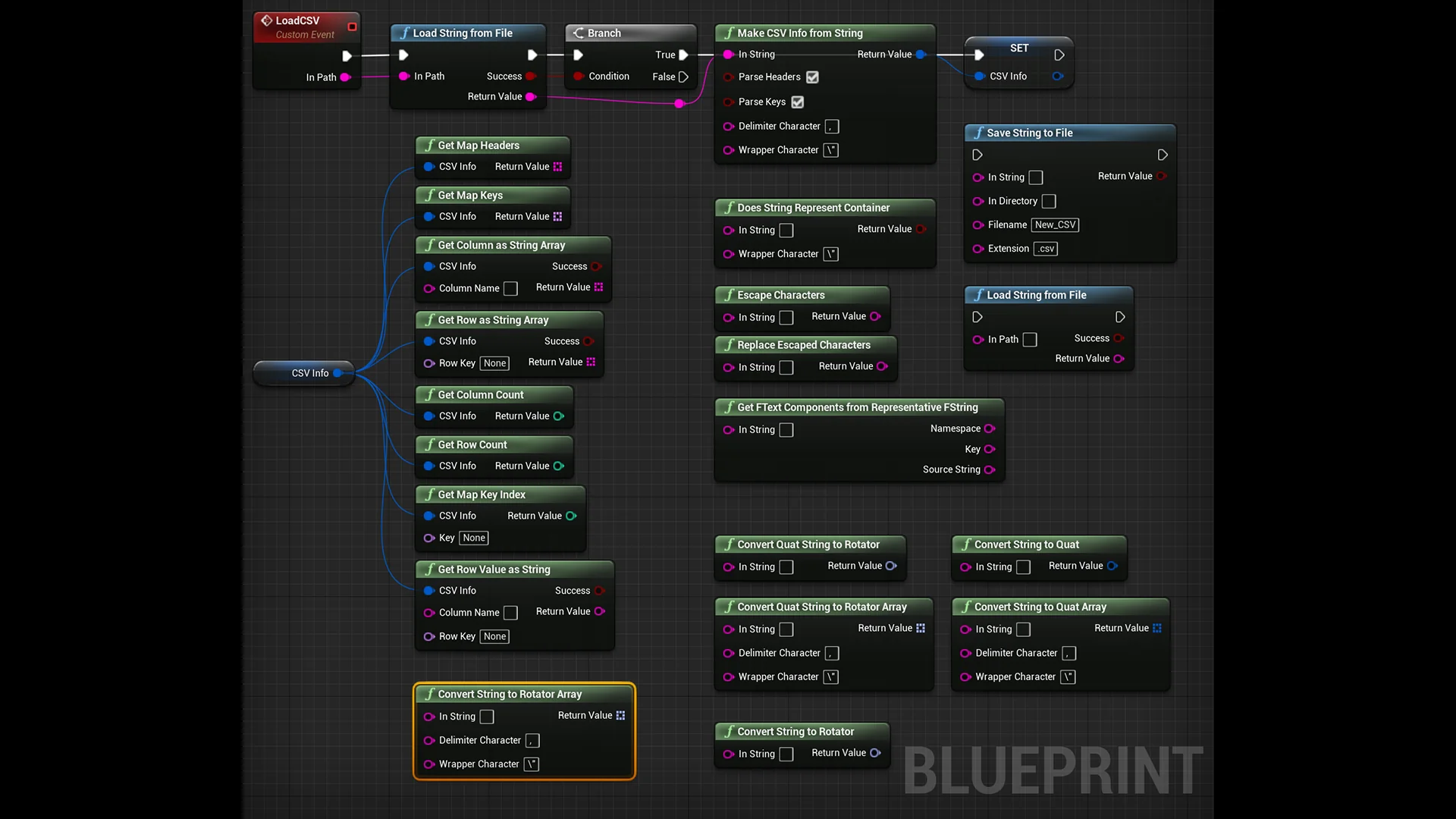
This is where easyCSV alters the workflow. Instead of being restricted to pre-play asset compilation, easyCSV enables projects to retrieve data in a string format at any time. When a project needs to read an external table during active execution, easyCSV loads the raw plain text from the file system directly into the game session. The runtime availability of this data ensures that files modified on disk after compilation can still supply updated information to the running application.
Because easyCSV returns data in a string format, it avoids rigid schema constraints during the initial read. The plugin does not require immediate, predefined asset mappings to access the text. It exposes the raw contents of the CSV file as string data, handing that information directly to your code logic whenever the game demands an update.
Converting Data via Blueprint and C++ from String Methods in easyCSV
Once easyCSV retrieves data as a string, that text must be parsed into the specific data types required by your gameplay systems. The engine provides dedicated “from string” conversion methods across both visual scripting and native C++. By routing the strings extracted by easyCSV through these conversion routines, developers can transform basic text into actionable variables.
Blueprint scripting offers native conversion nodes that take a string input and turn it into standard types such as integers, floats, booleans, names, text blocks, and vector values. In C++, equivalent string conversion functions parse characters into primitives, enumerations, or custom struct fields. Because easyCSV supplies the underlying string data at runtime, you can pass individual cells or entries directly into these conversion methods to populate your gameplay objects on the fly.
Handling conversions through explicit Blueprint nodes or C++ routines provides complete authority over edge cases and fallback logic. If an external spreadsheet contains unexpected formatting, missing values, or modified column orders, your implementation logic can validate the string before applying the converted result to an object. This separation of concerns ensures that the retrieval of the file remains lightweight, while the interpretation of the data conforms strictly to the validation rules written in your project's code.
Contrasting easyCSV with Runtime DataTable and GSheets Operator
Selecting the right external data tool depends on the level of automation and connectivity a project requires. The ecosystem includes three distinct solutions intended for handling external tabular information: easyCSV, Runtime DataTable, and GSheets Operator. Each targets a specific stage of external data processing.
The role of easyCSV is driven by simplicity and control. It brings data into the engine as a string at any point during gameplay, leaving the type conversion to your own Blueprint or C++ “from string” calls. This makes it ideal for setups where you want direct access to the raw text without overhead, enabling custom parsing pipelines for specific gameplay needs.
Runtime DataTable takes a different approach by automating data reconstruction. If your project needs to convert a CSV into your game's data types automatically at runtime without manually hooking up individual string conversion methods, Runtime DataTable handles that process directly. Runtime DataTable also supports two-way data flows that easyCSV does not manage natively: exporting a local CSV file directly from your game's internal data, and downloading spreadsheet data dynamically from a public Google Sheet. While easyCSV relies on local files and manual conversion logic, Runtime DataTable automates type mapping and network fetching.
GSheets Operator forms the third entry in this comparison, providing another alternative for projects oriented around cloud-based spreadsheet integration. Understanding the differences among these three options ensures that you choose the plugin matched to your technical requirements, whether you require low-level string access through easyCSV, automated type mapping and export through Runtime DataTable, or online sheet integration.
Runtime Code Integration and Implementation Workflows
Operating under the Code and Table categorization, easyCSV fits neatly into modular programming architectures. Because its primary deliverable is string data, you can build modular data loaders that isolate file reading from gameplay execution. A single loader actor or subsystem can invoke easyCSV to read character balancing sheets upon entering a level, parse the resulting strings through Blueprint or C++ functions, and assign the values to active characters without restarting the game.
This setup also supports user-generated content and modding workflows. Because the plugin reads plain text files from disk at runtime, players or external testers can tweak configuration files in standard spreadsheet software. When the game launches or reloads a scene, easyCSV pulls the updated plain text, converts the fields using the established “from string” functions, and applies the changes instantly. The game gains the flexibility of data-driven tuning without requiring users to install the engine editor or understand internal asset cooking pipelines.
By maintaining a clean bridge between raw external plain text files and internal type conversion methods, easyCSV provides an uncomplicated, runtime-ready mechanism for driving game variables from spreadsheets whenever the application is running.
 Engine Tools
 Engine Tools
 Engine Tools