"2596237520a17fbf"{"id":"1002903","slug":"file-helper-plugin","title":"File Helper Plugin","category":"Engine Tools","engine":"4.26","assetVersion":"Asset Version: 1.0","engineVersion":"Engine Version: 4.26","tag":"Engine Tools","accent":"blue","visual":"mech","summary":"Examine the File Helper Plugin for Unreal Engine 4, covering Blueprint reading, creating, and deleting operations for plain-text formats like.txt,.php, and.cpp.","platform":"Unreal Engine","indexPolicy":"index","publishedAt":"2026-11-21T04:50:02.963Z","updatedAt":"2026-11-21T04:50:02.963Z","sourceNotes":[],"fileContents":[],"compatibility":["Unreal Engine","Asset Version: 1.0","Engine Version: 4.26"],"featuredImage":{"alt":"File Helper Plugin","src":"/wp-content/uploads/published/2026/11/dbce49b268b4-f69b44e3-6014-4b59-aa38-ce526edca78a-4eaf7fbfbc.webp"},"fileSizeBytes":5687593,"hasDownloadLink":true,"downloads":0,"terms":[{"taxonomy":"category","slug":"engine-tools-tools-and-plugins","name":"Engine Tools"}],"galleryImages":[{"src":"/wp-content/uploads/published/2026/11/7a7b7d07c761-c52c1b5f-747c-4abe-931d-c6f539aa1bc1-91af811348.webp","alt":"File Helper Plugin"}],"contentHtml":"\u003cp\u003eDirect filesystem interaction within Unreal Engine 4 typically requires dropping into native C++ code to handle basic input and output streams. The File Helper Plugin bridges that gap by packaging file handling routines into a dedicated Blueprint library. Once active within a project, visual scripting graphs gain direct access to disk-level file manipulation tools. Developers work directly with plain-text files using Blueprint nodes, bypassing the need to compile custom C++ wrappers merely to inspect, write, or clean up disk files during development or runtime execution.\u003c/p\u003e \u003ch2\u003eBlueprint Implementation with the File Helper Plugin\u003c/h2\u003e\n\u003cp\u003eIntegrating file operations into an Unreal Engine 4 project begins by incorporating the plugin into the project's dependency structure. As a Blueprint library, the tool exposes functional nodes across standard graph environments, including Level Blueprints, Actor Blueprints, and custom Blueprint function libraries. The primary operational focus centers on plain-text files. The underlying logic handles varied text extensions, specifically covering.txt,.php, and.cpp formats, alongside other plain-text variants that rely on standard text encoding.\u003c/p\u003e \u003cp\u003eWorking with text files through visual scripting eliminates several common hurdles in UE4 logic construction. Instead of hardcoding static variables or routing data through heavyweight asset pipelines, graphs can point directly to file paths on disk. Because the plugin accommodates extensions such as.cpp and.php alongside standard.txt files, blueprints can interact with source code files, script files, or raw logs interchangeably. The system treats these extensions as raw text data streams, ensuring that file formats containing code or markup can be accessed, read, or modified under the exact same conventions applied to ordinary notes and documents.\u003c/p\u003e \u003ch2\u003eReading and Creating Assets via File Helper Nodes\u003c/h2\u003e\n\u003cp\u003eThe core capabilities provided by the library revolve around fundamental file lifecycle management: creating files, reading their contents, and deleting them from the filesystem. Each of these operations serves a distinct role in constructing a functional data pipeline inside Unreal Engine 4.\u003c/p\u003e \u003cp\u003eFile creation nodes allow graphs to write string data to designated paths on disk. When generating a new file, the plugin creates the target document at the specified destination, applying the required file extension whether it is a basic.txt file, a.cpp document, or a.php script. This functionality makes it possible to generate text-based records on demand. If a gameplay sequence, tool utility, or editor script produces character data that must persist outside the engine's internal asset format, the creation routines commit that data directly to the host filesystem.\u003c/p\u003e \u003cp\u003eReading functionality operates in reverse, pulling text from an existing file into the Blueprint environment. When a read node targets a valid path, the contents of the file become accessible within the graph as usable data. Graph nodes can then evaluate, split, parse, or display the resulting text across the project's runtime logic. Reading plain-text files directly gives developers the freedom to update text contents outside of the Unreal Editor—using any basic text editor—and observe the engine consume those updates upon executing the read instruction.\u003c/p\u003e \u003cp\u003eDeletion routines complete the foundational file management loop. Through dedicated delete operations, Blueprints can remove files that are no longer necessary. This is particularly relevant for temporary caches, intermediate export steps, or disposable logs that should not persist indefinitely on the user's hard drive. Having deletion nodes accessible directly in visual script graphs ensures that cleanup operations remain aligned with project execution states without requiring manual file removal through external operating system tools.\u003c/p\u003e \u003ch2\u003eIntegrating External Data into Unreal Engine 4\u003c/h2\u003e\n\u003cp\u003eImporting information into an active engine session is a primary motivation for deploying file management tools. The File Helper Plugin handles incoming data by opening channels between local directory structures and Unreal Engine 4's internal runtime. Because the plugin works with plain-text formats, any external application or workflow capable of generating.txt,.php,.cpp, or similar files can act as an external data supplier for the engine.\u003c/p\u003e \u003cp\u003eConsider an architecture where project configurations, dialogue tables, or balance values are prepared in external text editors or generated by external server scripts. Through the plugin's reading nodes, the project can read those files directly from disk at runtime. The contents are ingested into Blueprint variables, allowing the game or simulation to configure its state according to the text found within those external documents. This eliminates the need to re-import assets or recompile packages whenever minor textual adjustments occur in plain-text source files.\u003c/p\u003e \u003cp\u003eThe ability to read.cpp and.php files also introduces utility in production setups where source files or web scripts must be inspected programmatically. Tools constructed inside Unreal Engine 4 can parse external codebases, verify configuration blocks, or retrieve information embedded in script headers, converting external text-based workflows into direct inputs for Blueprint execution graphs.\u003c/p\u003e \u003ch2\u003eExporting Engine Data through File Helper Operations\u003c/h2\u003e\n\u003cp\u003eData flow is equally important in the outward direction. The File Helper Plugin functions as an export utility, allowing Unreal Engine 4 projects to write internal information directly out to local storage. By supplying text data to the file creation and writing nodes, systems running in UE4 can produce detailed plain-text outputs on demand.\u003c/p\u003e \u003cp\u003eExporting data from UE4 using this library serves multiple practical tasks. Visual scripts can output run logs, record performance metrics, save player preferences in human-readable plain text, or dump internal game states for diagnostic reviews. Because output paths and file names are managed within the Blueprint graph, developers can establish custom directory layouts and choose between.txt,.cpp,.php, or alternative text extensions based on what the downstream consumer expects.\u003c/p\u003e \u003cp\u003eGenerating files in formats like.php or.cpp directly out of Unreal Engine 4 provides specialized utility for pipeline tooling. An editor utility Blueprint can assemble boilerplate code, generate code templates, or output web-ready script configurations based on parameters defined inside the Unreal Editor. Once the Blueprint runs its export logic, the generated code files exist immediately on disk, ready to be compiled, executed, or uploaded by external toolchains.\u003c/p\u003e \u003ch2\u003eStructuring Blueprint File Logic in Unreal Engine 4\u003c/h2\u003e\n\u003cp\u003eMaintaining a clean implementation requires careful coordination of the plugin's file operations within visual scripting graphs. Because disk operations interact with the local operating system, Blueprint graphs benefit from structured logic flow when reading, creating, and deleting items. Verifying paths before executing read or delete actions helps ensure that graph execution remains stable and predictable.\u003c/p\u003e \u003cp\u003eBy centralizing plain-text input and output within the File Helper Plugin's Blueprint library, Unreal Engine 4 developers gain direct control over external data exchange. The tool provides a direct, node-based mechanism for reading plain text, creating documents across formats like.txt,.php, and.cpp, and purging unwanted files, delivering a self-contained solution for data integration and export within the visual scripting ecosystem.\u003c/p\u003e\n\n\u003ch2\u003eExplore Similar Assets\u003c/h2\u003e\n\u003cul\u003e\n\u003cli\u003e\u003ca href=\"https://3dcghub.com/json-parser-plugin/\" rel=\"noopener noreferrer\"\u003eJSON Parser Plugin\u003c/a\u003e\u003c/li\u003e\n\u003cli\u003e\u003ca href=\"https://3dcghub.com/pak-loader-plugin/\" rel=\"noopener noreferrer\"\u003ePak Loader Plugin\u003c/a\u003e\u003c/li\u003e\n\u003cli\u003e\u003ca href=\"https://3dcghub.com/runtime-files-downloader/\" rel=\"noopener noreferrer\"\u003eRuntime Files Downloader\u003c/a\u003e\u003c/li\u003e\n\u003cli\u003e\u003ca href=\"https://3dcghub.com/blueprint-array-helper/\" rel=\"noopener noreferrer\"\u003e[Blueprint] Array Helper\u003c/a\u003e\u003c/li\u003e\n\u003cli\u003e\u003ca href=\"https://3dcghub.com/blend-file-importer/\" rel=\"noopener noreferrer\"\u003eBlend File Importer\u003c/a\u003e\u003c/li\u003e\n\u003c/ul\u003e","contentTextLength":7711,"navigation":{"current":21,"total":4839,"previous":{"id":"1002904","slug":"cinematic-bike-rig-motorcycle-rigging-and-animation-blueprint","title":"Cinematic Bike Rig: Motorcycle Rigging \u0026 Animation Blueprint","category":"Procedural Systems","platform":"Unreal Engine","updatedAt":"2026-11-21T05:08:18.415Z"},"next":{"id":"1002902","slug":"custom-movement","title":"Custom Movement","category":"Gameplay Features","platform":"Unreal Engine","updatedAt":"2026-11-21T04:49:36.981Z"}},"relatedResources":[{"id":"25066","slug":"directexcel","title":"DirectExcel","category":"Engine Tools","engine":"4.27, 5.0 - 5.4, 5.6 - 5.7","assetVersion":"Asset Version: 3.3 - 3.5","engineVersion":"Engine Version: 4.27, 5.0 - 5.4, 5.6 - 5.7","tag":"Engine Tools","accent":"blue","visual":"luts","summary":"DirectExcel connects Unreal projects to Excel files through Blueprints and C++, letting developers read and write sheet data without converting it into CSV first. It also handles sheet editing, cell values, appearance data, and file-change notifications for...","platform":"Unreal Engine","indexPolicy":"index","publishedAt":"2026-04-18T16:40:31.000Z","updatedAt":"2026-11-21T06:25:47.725Z","sourceNotes":[],"fileContents":[],"compatibility":["Unreal Engine","Asset Version: 3.3 - 3.5","Engine Version: 4.27, 5.0 - 5.4, 5.6 - 5.7"],"featuredImage":{"alt":"DirectExcel","src":"https://3dcghub.com/wp-content/uploads/2026/04/0a2fd4260f89_1d6b08b4-7174-4f78-bfec-17b20c8fa55e.webp"},"fileSizeBytes":235750225,"hasDownloadLink":true,"downloads":0},{"id":"1002888","slug":"json-parser-plugin","title":"JSON Parser Plugin","category":"Engine Tools","engine":"4.27 - 5.5","assetVersion":"Asset Version: 2.8","engineVersion":"Engine Version: 4.27 - 5.5","tag":"Engine Tools","accent":"blue","visual":"mech","summary":"Work with JSON natively in Unreal Engine Blueprints using struct conversion, Base64 file transfer, compression, and asynchronous parsing nodes.","platform":"Unreal Engine","indexPolicy":"index","publishedAt":"2026-11-21T01:58:38.450Z","updatedAt":"2026-11-21T01:58:38.450Z","sourceNotes":[],"fileContents":[],"compatibility":["Unreal Engine","Asset Version: 2.8","Engine Version: 4.27 - 5.5"],"featuredImage":{"alt":"JSON Parser Plugin","src":"/wp-content/uploads/published/2026/11/d34c696e3344-110bc68a-6e7d-499b-9e71-3668d25b2ce1-100cc58e1a.webp"},"fileSizeBytes":115440288,"hasDownloadLink":true,"downloads":0},{"id":"1002884","slug":"pak-loader-plugin","title":"Pak Loader Plugin","category":"Engine Tools","engine":"4.24 - 5.5","assetVersion":"Asset Version: 1.2 - 1.7","engineVersion":"Engine Version: 4.24 - 5.5","tag":"Engine Tools","accent":"blue","visual":"mech","summary":"Load Unreal Engine pak files at runtime using Blueprint or C++ with HTTP downloads, mount point management, and asset validation utilities.","platform":"Unreal Engine","indexPolicy":"index","publishedAt":"2026-11-21T01:51:42.694Z","updatedAt":"2026-11-21T01:51:42.694Z","sourceNotes":[],"fileContents":[],"compatibility":["Unreal Engine","Asset Version: 1.2 - 1.7","Engine Version: 4.24 - 5.5"],"featuredImage":{"alt":"Pak Loader Plugin","src":"/wp-content/uploads/published/2026/11/6fb11927f86c-86c5aec4-1791-4bcd-bb67-789c5fe2184b-e75a759da4.webp"},"fileSizeBytes":173356999,"hasDownloadLink":true,"downloads":0}]}
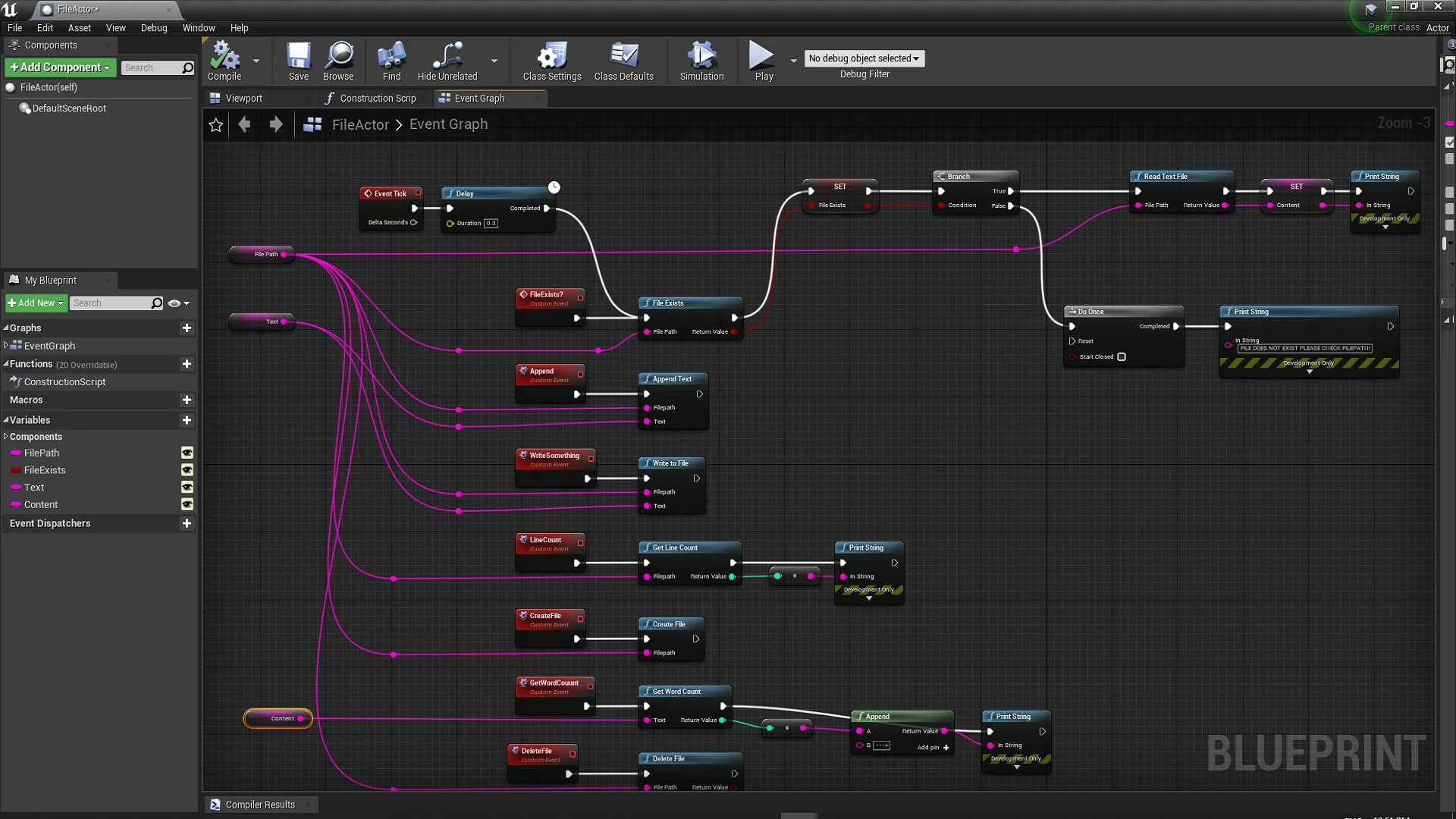
Resource screenshots
1 / 1
Join our channel
Follow 3DCGHUB on Telegram for new resource drops, migration updates, and community notices.
Direct filesystem interaction within Unreal Engine 4 typically requires dropping into native C++ code to handle basic input and output streams. The File Helper Plugin bridges that gap by packaging file handling routines into a dedicated Blueprint library. Once active within a project, visual scripting graphs gain direct access to disk-level file manipulation tools. Developers work directly with plain-text files using Blueprint nodes, bypassing the need to compile custom C++ wrappers merely to inspect, write, or clean up disk files during development or runtime execution.
Blueprint Implementation with the File Helper Plugin
Integrating file operations into an Unreal Engine 4 project begins by incorporating the plugin into the project's dependency structure. As a Blueprint library, the tool exposes functional nodes across standard graph environments, including Level Blueprints, Actor Blueprints, and custom Blueprint function libraries. The primary operational focus centers on plain-text files. The underlying logic handles varied text extensions, specifically covering.txt,.php, and.cpp formats, alongside other plain-text variants that rely on standard text encoding.
Working with text files through visual scripting eliminates several common hurdles in UE4 logic construction. Instead of hardcoding static variables or routing data through heavyweight asset pipelines, graphs can point directly to file paths on disk. Because the plugin accommodates extensions such as.cpp and.php alongside standard.txt files, blueprints can interact with source code files, script files, or raw logs interchangeably. The system treats these extensions as raw text data streams, ensuring that file formats containing code or markup can be accessed, read, or modified under the exact same conventions applied to ordinary notes and documents.
Reading and Creating Assets via File Helper Nodes
The core capabilities provided by the library revolve around fundamental file lifecycle management: creating files, reading their contents, and deleting them from the filesystem. Each of these operations serves a distinct role in constructing a functional data pipeline inside Unreal Engine 4.
File creation nodes allow graphs to write string data to designated paths on disk. When generating a new file, the plugin creates the target document at the specified destination, applying the required file extension whether it is a basic.txt file, a.cpp document, or a.php script. This functionality makes it possible to generate text-based records on demand. If a gameplay sequence, tool utility, or editor script produces character data that must persist outside the engine's internal asset format, the creation routines commit that data directly to the host filesystem.
Reading functionality operates in reverse, pulling text from an existing file into the Blueprint environment. When a read node targets a valid path, the contents of the file become accessible within the graph as usable data. Graph nodes can then evaluate, split, parse, or display the resulting text across the project's runtime logic. Reading plain-text files directly gives developers the freedom to update text contents outside of the Unreal Editor—using any basic text editor—and observe the engine consume those updates upon executing the read instruction.
Deletion routines complete the foundational file management loop. Through dedicated delete operations, Blueprints can remove files that are no longer necessary. This is particularly relevant for temporary caches, intermediate export steps, or disposable logs that should not persist indefinitely on the user's hard drive. Having deletion nodes accessible directly in visual script graphs ensures that cleanup operations remain aligned with project execution states without requiring manual file removal through external operating system tools.
Integrating External Data into Unreal Engine 4
Importing information into an active engine session is a primary motivation for deploying file management tools. The File Helper Plugin handles incoming data by opening channels between local directory structures and Unreal Engine 4's internal runtime. Because the plugin works with plain-text formats, any external application or workflow capable of generating.txt,.php,.cpp, or similar files can act as an external data supplier for the engine.
Consider an architecture where project configurations, dialogue tables, or balance values are prepared in external text editors or generated by external server scripts. Through the plugin's reading nodes, the project can read those files directly from disk at runtime. The contents are ingested into Blueprint variables, allowing the game or simulation to configure its state according to the text found within those external documents. This eliminates the need to re-import assets or recompile packages whenever minor textual adjustments occur in plain-text source files.
The ability to read.cpp and.php files also introduces utility in production setups where source files or web scripts must be inspected programmatically. Tools constructed inside Unreal Engine 4 can parse external codebases, verify configuration blocks, or retrieve information embedded in script headers, converting external text-based workflows into direct inputs for Blueprint execution graphs.
Exporting Engine Data through File Helper Operations
Data flow is equally important in the outward direction. The File Helper Plugin functions as an export utility, allowing Unreal Engine 4 projects to write internal information directly out to local storage. By supplying text data to the file creation and writing nodes, systems running in UE4 can produce detailed plain-text outputs on demand.
Exporting data from UE4 using this library serves multiple practical tasks. Visual scripts can output run logs, record performance metrics, save player preferences in human-readable plain text, or dump internal game states for diagnostic reviews. Because output paths and file names are managed within the Blueprint graph, developers can establish custom directory layouts and choose between.txt,.cpp,.php, or alternative text extensions based on what the downstream consumer expects.
Generating files in formats like.php or.cpp directly out of Unreal Engine 4 provides specialized utility for pipeline tooling. An editor utility Blueprint can assemble boilerplate code, generate code templates, or output web-ready script configurations based on parameters defined inside the Unreal Editor. Once the Blueprint runs its export logic, the generated code files exist immediately on disk, ready to be compiled, executed, or uploaded by external toolchains.
Structuring Blueprint File Logic in Unreal Engine 4
Maintaining a clean implementation requires careful coordination of the plugin's file operations within visual scripting graphs. Because disk operations interact with the local operating system, Blueprint graphs benefit from structured logic flow when reading, creating, and deleting items. Verifying paths before executing read or delete actions helps ensure that graph execution remains stable and predictable.
By centralizing plain-text input and output within the File Helper Plugin's Blueprint library, Unreal Engine 4 developers gain direct control over external data exchange. The tool provides a direct, node-based mechanism for reading plain text, creating documents across formats like.txt,.php, and.cpp, and purging unwanted files, delivering a self-contained solution for data integration and export within the visual scripting ecosystem.
 Engine Tools
 Engine Tools
 Engine Tools