"148d1066ed74e216"{"id":"1002923","slug":"interactive-objects-system","title":"Interactive Objects System","category":"Action-Adventure","engine":"5.1+","assetVersion":"","engineVersion":"Engine Version: 5.1+","tag":"Action-Adventure","accent":"blue","visual":"mech","summary":"Explore the Interactive Objects System for Unreal Engine, featuring modular Blueprints for doors, elevators, inventory, inspection, and multiple camera views.","platform":"Unreal Engine","indexPolicy":"index","publishedAt":"2026-11-21T22:49:10.238Z","updatedAt":"2026-11-21T22:49:10.238Z","sourceNotes":[],"fileContents":[],"compatibility":["Unreal Engine","Engine Version: 5.1+"],"featuredImage":{"alt":"Interactive Objects System","src":"/wp-content/uploads/published/2026/11/ef54332009eb-ad629992-2a77-49e6-874d-da8fc3babfa9-dd1df1c563.webp"},"fileSizeBytes":284732023,"hasDownloadLink":true,"downloads":0,"terms":[{"taxonomy":"category","slug":"action-adventure","name":"Action-Adventure"}],"galleryImages":[{"src":"/wp-content/uploads/published/2026/11/0082b77493ab-94170732-f9c4-4bd4-ac61-4c9e8982945d-6b846b13fa.webp","alt":"Interactive Objects System"},{"src":"/wp-content/uploads/published/2026/11/9afa5ea29fd0-d898b52f-7177-4c2d-a903-869bbafbfe7a-bedf7b15f4.webp","alt":"Interactive Objects System"},{"src":"/wp-content/uploads/published/2026/11/e4c937f048cd-2a6c0ece-d81f-43a1-9958-9614de066ce5-0efc60ac17.webp","alt":"Interactive Objects System"},{"src":"/wp-content/uploads/published/2026/11/2699e6c9c7e9-74652703-c46b-42bd-964f-fd854b7d8ed6-648de510e7.webp","alt":"Interactive Objects System"},{"src":"/wp-content/uploads/published/2026/11/d53a6a292c23-85751212-5bf9-49ec-bf25-ce1361e67e60-0eb48d1317.webp","alt":"Interactive Objects System"},{"src":"/wp-content/uploads/published/2026/11/1a330db3f3d4-4345f6e7-c577-4950-8ed1-ee94ec05e54d-c2793db995.webp","alt":"Interactive Objects System"},{"src":"/wp-content/uploads/published/2026/11/0c44b10e00ee-769d2832-d35e-4055-a041-49f6cfca63d9-c152e3219e.webp","alt":"Interactive Objects System"},{"src":"/wp-content/uploads/published/2026/11/8facb523d41f-94cf5727-f6d0-40e1-96c9-839cb44370cd-3ca678c67b.webp","alt":"Interactive Objects System"},{"src":"/wp-content/uploads/published/2026/11/78c78cac663d-cfe9e71f-e9bd-46c9-8578-7bde517d777d-a52485e10f.webp","alt":"Interactive Objects System"},{"src":"/wp-content/uploads/published/2026/11/1119b0239070-a1cf23f9-3493-4b3b-981d-2184e4a1285e-082a18fe1d.webp","alt":"Interactive Objects System"}],"accessPanel":{"kind":"resource","title":"Get this resource","safetyNote":"Resources are manually reviewed before listing to improve quality and reduce obvious risks.","fileName":"Interactive Objects System.7z","resourceType":"Resource archive","versions":[]},"contentHtml":"\u003cp\u003eTriggers, actions, physical props, doors, windows, elevators, and inventory management form the baseline operational layer of modern 3D gameplay. Interactive Objects System gathers these elements into a single modular framework built on Blueprints for Unreal Engine 4 and Unreal Engine 5. Rather than requiring developers to engineer custom collision checks, interaction prompts, and state machines for every prop in a level, the package establishes a standardized logic flow that links player inputs directly to world reactions across first-person, third-person, and top-down perspectives.\u003c/p\u003e \u003ch2\u003eArchitecture of the Interactive Objects System\u003c/h2\u003e\n\u003cp\u003eAt the center of the package is a decoupled interaction model where interactive objects and player actions communicate through customizable parameters. Triggers define the spatial boundaries or conditions under which an interaction becomes viable, while actions govern the subsequent gameplay result. Because the framework is fully modular, an interactive object can range from an inert set dressing prop to a complex multi-state machine without altering the underlying communication pipeline.\u003c/p\u003e\n\u003cp\u003eLevel designers can configure object behaviors directly inside the editor by adjusting Blueprint parameters. This approach isolates interaction rules from visual meshes, allowing the same trigger logic to govern a broad array of items, containers, and structural assets. Whether an object requires an instantaneous button press, a continuous physical hold, or a sequenced state transition, the core system coordinates the input events without creating rigid dependencies between specific character classes and environment props.\u003c/p\u003e \u003ch2\u003eEnvironmental Navigation with Doors, Windows, Elevators, and Splines\u003c/h2\u003e\n\u003cp\u003eWorld traversal relies heavily on moving geometry, and the framework addresses this through specialized modules for doors, windows, furniture, and elevators. Doors and windows support state switching between open, closed, and transitional states, fitting naturally into architectural visualization, narrative exploration, or survival horror scenes. Furniture assets can be configured to respond to player presence, acting as functional stations, hiding spots, or operational points of interest within an interior environment.\u003c/p\u003e\n\u003cp\u003eElevator mechanics expand vertical navigation, utilizing spline components to govern motion paths. Splines provide predictable, mathematically smooth transit tracks, ensuring that elevator platforms, motorized lifts, or moving traversal elements follow precise paths through multi-level environments. By combining spline logic with trigger volumes, the system accommodates complex call-and-ride sequences where platforms move between multiple floors, halt at predetermined stops, and coordinate door states upon arrival.\u003c/p\u003e \u003ch2\u003eHandling Items in the Inventory, Weapon, and Journal System\u003c/h2\u003e\n\u003cp\u003eItem management extends beyond simple physical touch, requiring dedicated data structures to track ownership, examination, and utilization. Interactive Objects System incorporates an inventory layer that receives collected items from the world and organizes them for player use. Pickups can be stored, retrieved, or channeled into active equipment slots depending on how the game loop handles character loadouts.\u003c/p\u003e\n\u003cp\u003eWeapons integrate directly into this cycle, allowing props resting on surfaces to transition from static world objects into functional player gear. Alongside combat or utility items, the package includes an inspection mechanic. Inspection allows players to isolate an item in a dedicated viewport, rotate it, examine visual details, and extract information before committing it to inventory storage or discarding it back into the scene.\u003c/p\u003e\n\u003cp\u003eComplementing physical acquisition is the journal module. The journal serves as a centralized record-keeping interface for notes, lore, logs, or operational instructions discovered throughout a level. When a player interacts with readable surfaces, documents, or data terminals, the information can be logged into the journal, linking physical environmental discovery with long-term gameplay progression.\u003c/p\u003e \u003ch2\u003eCamera Perspective Versatility from First-Person to Top-Down\u003c/h2\u003e\n\u003cp\u003eGameplay frameworks frequently falter when forced into perspectives different from the one they were prototyped in. Interactive Objects System circumvents this limitation by natively supporting first-person, third-person, and top-down viewports. In first-person setups, interactions prioritize precise center-screen targeting and fine line-of-sight traces, which matches the visual fidelity required for close-quarters item inspection and door manipulation.\u003c/p\u003e\n\u003cp\u003eIn third-person configurations, the framework accommodates an offset camera by evaluating proximity, character orientation, and contextual forward vectors. This ensures players interact smoothly with world objects even when the character mesh sits between the camera and the target prop. For top-down gameplay, the interaction interface shifts emphasis toward cursor targeting, screen-to-world raycasts, and proximity ranges, making the system equally capable in strategy, isometric role-playing, or tactical exploration titles without rewriting the base Blueprints.\u003c/p\u003e \u003ch2\u003ePhysics Interactions and Modular Blueprint Setup\u003c/h2\u003e\n\u003cp\u003eDynamic scenes demand that physical items react convincingly to forces rather than existing solely as static colliders. The system integrates physics-driven interaction logic, permitting objects to be pushed, moved, dropped, or manipulated within Unreal Engine's physics simulation. This capability turns standard scene clutter into reactive environmental elements that contribute to spatial puzzles, barricades, or physics-based challenges.\u003c/p\u003e\n\u003cp\u003eBecause the implementation relies entirely on native Blueprints, creators working across Unreal Engine 4 and Unreal Engine 5 can extend the framework without compiling external C++ binaries. New interactive object classes can be spawned as children of base templates, inheriting core trigger and action functionality while introducing unique visual assets, audio cues, or custom logic paths. This architectural separation makes the system adaptable for developers building complex narrative adventures, atmospheric survival scenarios, or systemic simulation sandboxes.\u003c/p\u003e\n\n\u003ch2\u003eRelated Resources Worth Checking\u003c/h2\u003e\n\u003cul\u003e\n\u003cli\u003e\u003ca href=\"https://3dcghub.com/the-immersive-template/\" rel=\"noopener noreferrer\"\u003eThe Immersive Template\u003c/a\u003e\u003c/li\u003e\n\u003cli\u003e\u003ca href=\"https://3dcghub.com/island-challenge-game/\" rel=\"noopener noreferrer\"\u003eIsland Challenge Game\u003c/a\u003e\u003c/li\u003e\n\u003cli\u003e\u003ca href=\"https://3dcghub.com/interaction-system/\" rel=\"noopener noreferrer\"\u003eInteraction System\u003c/a\u003e\u003c/li\u003e\n\u003cli\u003e\u003ca href=\"https://3dcghub.com/interaction-animations-interactive-animated-pack/\" rel=\"noopener noreferrer\"\u003eInteraction Animations | Interactive Animated Pack\u003c/a\u003e\u003c/li\u003e\n\u003cli\u003e\u003ca href=\"https://3dcghub.com/working-safes-minigame/\" rel=\"noopener noreferrer\"\u003eWorking Safes Minigame\u003c/a\u003e\u003c/li\u003e\n\u003c/ul\u003e","contentTextLength":6408,"navigation":{"current":49,"total":4890,"previous":{"id":"1002924","slug":"miss-no-hit","title":"Miss No Hit","category":"Engine Tools","platform":"Unreal Engine","updatedAt":"2026-11-21T22:49:53.601Z"},"next":{"id":"1002922","slug":"easycsv","title":"easyCSV","category":"Engine Tools","platform":"Unreal Engine","updatedAt":"2026-11-21T22:45:27.847Z"}},"relatedResources":[{"id":"1001245","slug":"the-immersive-template","title":"The Immersive Template","category":"Action-Adventure","engine":"5.0+","assetVersion":"","engineVersion":"Engine Version: 5.0+","tag":"Action-Adventure","accent":"blue","visual":"mech","summary":"Explore The Immersive Template, a Blueprint system featuring dynamic pickups, Hand IK, interactive doors, chairs, beds, and locomotion in Unreal Engine.","platform":"Unreal Engine","indexPolicy":"index","publishedAt":"2026-09-23T15:01:06.039Z","updatedAt":"2026-09-23T15:01:06.039Z","sourceNotes":[],"fileContents":[],"compatibility":["Unreal Engine","Engine Version: 5.0+"],"featuredImage":{"alt":"The Immersive Template","src":"/wp-content/uploads/published/2026/09/4da98abe5112-2bcd5738-ab2e-4ef6-9512-8332b4c165ea-ac9125931b.webp"},"fileSizeBytes":94587683,"hasDownloadLink":true,"downloads":0},{"id":"11658","slug":"island-challenge-game","title":"Island Challenge Game","category":"Action-Adventure","engine":"5.1+","assetVersion":"Engine version: 5.1+","engineVersion":"5.1","tag":"Action-Adventure","accent":"blue","visual":"animation","summary":"Build vibrant environments and interactive experiences with the Island Challenge Game. This pack features stylized island art assets and a functional blueprint framework for game development.","platform":"Unreal Engine","indexPolicy":"noindex","publishedAt":"2026-03-05T18:12:40.000Z","updatedAt":"2026-04-19T15:48:08.000Z","sourceNotes":[],"fileContents":[],"compatibility":["Unreal Engine","Engine version: 5.1+"],"featuredImage":{"alt":"Island Challenge Game","src":"https://3dcghub.com/wp-content/uploads/2026/03/a38fe8c3-a5b1-4bf7-8377-a2fcda6b0a05.webp"},"fileSizeBytes":668453610,"hasDownloadLink":true,"downloads":1},{"id":"1002949","slug":"smart-projectile","title":"Smart Projectile","category":"Action-Adventure","engine":"4.26+,5.0+","assetVersion":"","engineVersion":"Engine Version: 4.26+,5.0+","tag":"Action-Adventure","accent":"blue","visual":"mech","summary":"Smart Projectile delivers an interactive Blueprint with obstacle avoidance, target tracking, Niagara systems, materials, and target mode post-processing.","platform":"Unreal Engine","indexPolicy":"index","publishedAt":"2026-11-22T06:28:01.725Z","updatedAt":"2026-11-22T06:28:01.725Z","sourceNotes":[],"fileContents":[],"compatibility":["Unreal Engine","Engine Version: 4.26+,5.0+"],"featuredImage":{"alt":"Smart Projectile","src":"/wp-content/uploads/published/2026/11/63429ee1fac6-5310e334-678f-4065-83da-957f0d47fa0c-6b37f80e85.webp"},"fileSizeBytes":147183234,"hasDownloadLink":true,"downloads":0}]}[{"id":4225,"sourceId":4225,"taxonomyId":4225,"taxonomy":"category","slug":"asset-library","name":"Asset Library","parentId":null,"count":4744,"hasChildren":true,"href":"/","seoTitle":"Free Game Assets Library | 3DCGHUB","seoDescription":"Browse free Unreal Engine, Unity, Blender assets and game development tutorials on 3DCGHUB with previews, compatibility notes, and secure downloads.","sitemapEnabled":true,"children":[{"id":4227,"sourceId":4227,"taxonomyId":4227,"taxonomy":"category","slug":"blender-add-ons-plugins","name":"Blender Add-ons \u0026 Plugins","parentId":4225,"count":10,"hasChildren":false,"href":"/category/blender-add-ons-plugins/","seoTitle":"Free Blender Add-ons \u0026 Plugins | 3DCGHUB","seoDescription":"Browse free Blender Add-ons \u0026 Plugins tools for Blender on 3DCGHUB: curated downloads with preview images, compatibility notes and secure download access.","sitemapEnabled":true},{"id":514,"sourceId":514,"taxonomyId":514,"taxonomy":"category","slug":"unity-2","name":"Unity","parentId":4225,"count":453,"hasChildren":true,"href":"/category/unity-2/","seoTitle":"Free Unity Assets | 3DCGHUB","seoDescription":"Browse free Unity resources on 3DCGHUB: curated downloads with preview images, compatibility notes and secure download access.","sitemapEnabled":true,"children":[{"id":523,"sourceId":523,"taxonomyId":523,"taxonomy":"category","slug":"2d","name":"2D","parentId":514,"count":1,"hasChildren":true,"href":"/category/2d/","seoTitle":"Free Unity 2D | 3DCGHUB","seoDescription":"Browse free 2D assets for Unity on 3DCGHUB: curated downloads with preview images, compatibility notes and secure download access.","sitemapEnabled":true},{"id":515,"sourceId":515,"taxonomyId":515,"taxonomy":"category","slug":"3d-unity-2","name":"3D","parentId":514,"count":162,"hasChildren":true,"href":"/category/3d-unity-2/","seoTitle":"Free Unity 3D Assets | 3DCGHUB","seoDescription":"Browse free 3D assets for Unity on 3DCGHUB: curated downloads with preview images, compatibility notes and secure download access.","sitemapEnabled":true},{"id":565,"sourceId":565,"taxonomyId":565,"taxonomy":"category","slug":"add-ons","name":"Add-Ons","parentId":514,"count":2,"hasChildren":false,"href":"/category/add-ons/","seoTitle":"Free Unity Add-Ons | 3DCGHUB","seoDescription":"Browse free Add-Ons assets for Unity on 3DCGHUB: curated downloads with preview images, compatibility notes and secure download access.","sitemapEnabled":true},{"id":529,"sourceId":529,"taxonomyId":529,"taxonomy":"category","slug":"audio-unity-2","name":"Audio","parentId":514,"count":1,"hasChildren":true,"href":"/category/audio-unity-2/","seoTitle":"Free Unity Audio | 3DCGHUB","seoDescription":"Browse free Audio for Unity on 3DCGHUB: curated downloads with preview images, compatibility notes and secure download access.","sitemapEnabled":true},{"id":557,"sourceId":557,"taxonomyId":557,"taxonomy":"category","slug":"templates","name":"Templates","parentId":514,"count":36,"hasChildren":true,"href":"/category/templates/","seoTitle":"Free Unity Templates | 3DCGHUB","seoDescription":"Browse free Unity project templates on 3DCGHUB. Starter kits with previews, compatibility notes, and secure download access.","sitemapEnabled":true},{"id":533,"sourceId":533,"taxonomyId":533,"taxonomy":"category","slug":"tools-unity-2","name":"Tools","parentId":514,"count":0,"hasChildren":true,"href":"/category/tools-unity-2/","sitemapEnabled":true},{"id":554,"sourceId":554,"taxonomyId":554,"taxonomy":"category","slug":"vfx-unity-2","name":"VFX","parentId":514,"count":4,"hasChildren":true,"href":"/category/vfx-unity-2/","seoTitle":"Free Unity VFX | 3DCGHUB","seoDescription":"Browse free VFX for Unity on 3DCGHUB: curated downloads with preview images, compatibility notes and secure download access.","sitemapEnabled":true}]},{"id":511,"sourceId":511,"taxonomyId":511,"taxonomy":"category","slug":"unreal-engine-2","name":"Unreal Engine","parentId":4225,"count":4282,"hasChildren":true,"href":"/category/unreal-engine-2/","seoTitle":"Free Unreal Engine Assets | 3DCGHUB","seoDescription":"Browse free Unreal Engine resources on 3DCGHUB: curated downloads with preview images, compatibility notes and secure download access.","sitemapEnabled":true,"children":[{"id":54,"sourceId":54,"taxonomyId":54,"taxonomy":"category","slug":"3d","name":"3D","parentId":511,"count":2428,"hasChildren":true,"href":"/category/3d/","seoTitle":"Free Unreal Engine 3D | 3DCGHUB","seoDescription":"Browse free 3D assets for Unreal Engine on 3DCGHUB: curated downloads with preview images, compatibility notes and secure download access.","sitemapEnabled":true},{"id":441,"sourceId":441,"taxonomyId":441,"taxonomy":"category","slug":"animations","name":"Animations","parentId":511,"count":245,"hasChildren":true,"href":"/category/animations/","seoTitle":"Free Unreal Engine Animations | 3DCGHUB","seoDescription":"Browse free Animations for Unreal Engine on 3DCGHUB: curated downloads with preview images, compatibility notes and secure download access.","sitemapEnabled":true},{"id":446,"sourceId":446,"taxonomyId":446,"taxonomy":"category","slug":"audio","name":"Audio","parentId":511,"count":63,"hasChildren":true,"href":"/category/audio/","seoTitle":"Free Unreal Engine Audio Resources | 3DCGHUB","seoDescription":"Browse free Unreal Engine audio resources including sound effects, voices, dialogue, and ambient sounds. Curated free downloads on 3DCGHUB.","sitemapEnabled":true},{"id":466,"sourceId":466,"taxonomyId":466,"taxonomy":"category","slug":"game-systems","name":"Game Systems","parentId":511,"count":356,"hasChildren":true,"href":"/category/game-systems/","seoTitle":"Free Unreal Engine Game Systems | 3DCGHUB","seoDescription":"Browse free Game Systems tools for Unreal Engine on 3DCGHUB: curated downloads with preview images, compatibility notes and secure download access.","sitemapEnabled":true},{"id":478,"sourceId":478,"taxonomyId":478,"taxonomy":"category","slug":"game-templates","name":"Game Templates","parentId":511,"count":150,"hasChildren":true,"href":"/category/game-templates/","seoTitle":"Free Unreal Engine Game Templates | 3DCGHUB","seoDescription":"Browse free Game Templates for Unreal Engine on 3DCGHUB: curated downloads with preview images, compatibility notes and secure download access.","sitemapEnabled":true},{"id":432,"sourceId":432,"taxonomyId":432,"taxonomy":"category","slug":"hdri","name":"HDRI","parentId":511,"count":6,"hasChildren":true,"href":"/category/hdri/","seoTitle":"Free Unreal Engine HDRI | 3DCGHUB","seoDescription":"Browse free Unreal Engine HDRI skies and lighting maps on 3DCGHUB. Environment lighting with previews and secure downloads.","sitemapEnabled":true},{"id":228,"sourceId":228,"taxonomyId":228,"taxonomy":"category","slug":"material-and-textures","name":"Material \u0026 Textures","parentId":511,"count":172,"hasChildren":true,"href":"/category/material-and-textures/","seoTitle":"Free Unreal Engine Material \u0026 Textures | 3DCGHUB","seoDescription":"Browse free Material \u0026 Textures for Unreal Engine on 3DCGHUB: curated downloads with preview images, compatibility notes and secure download access.","sitemapEnabled":true},{"id":298,"sourceId":298,"taxonomyId":298,"taxonomy":"category","slug":"sprites-and-flipbooks","name":"Sprites \u0026 Flipbooks","parentId":511,"count":17,"hasChildren":true,"href":"/category/sprites-and-flipbooks/","seoTitle":"Free Unreal Engine Sprites \u0026 Flipbooks | 3DCGHUB","seoDescription":"Browse free Sprites \u0026 Flipbooks assets for Unreal Engine on 3DCGHUB: curated downloads with preview images, compatibility notes and secure download access.","sitemapEnabled":true},{"id":489,"sourceId":489,"taxonomyId":489,"taxonomy":"category","slug":"tools-and-plugins","name":"Tools \u0026 Plugins","parentId":511,"count":390,"hasChildren":true,"href":"/category/tools-and-plugins/","seoTitle":"Free Unreal Engine Tools \u0026 Plugins | 3DCGHUB","seoDescription":"Browse free Tools \u0026 Plugins for Unreal Engine on 3DCGHUB: curated downloads with preview images, compatibility notes and secure download access.","sitemapEnabled":true},{"id":459,"sourceId":459,"taxonomyId":459,"taxonomy":"category","slug":"ui","name":"UI","parentId":511,"count":43,"hasChildren":true,"href":"/category/ui/","seoTitle":"Free Unreal Engine UI | 3DCGHUB","seoDescription":"Browse free UI for Unreal Engine on 3DCGHUB: curated downloads with preview images, compatibility notes and secure download access.","sitemapEnabled":true},{"id":450,"sourceId":450,"taxonomyId":450,"taxonomy":"category","slug":"vfx","name":"VFX","parentId":511,"count":412,"hasChildren":true,"href":"/category/vfx/","seoTitle":"Free Unreal Engine VFX | 3DCGHUB","seoDescription":"Browse free VFX for Unreal Engine on 3DCGHUB: curated downloads with preview images, compatibility notes and secure download access.","sitemapEnabled":true}]}]},{"id":4222,"sourceId":4222,"taxonomyId":4222,"taxonomy":"category","slug":"tutorial-library","name":"Tutorial Library","parentId":null,"count":117,"hasChildren":false,"href":"/tutorials/","seoTitle":"Free Game Development Tutorial Library | 3DCGHUB","seoDescription":"Browse free game development tutorials for Unreal Engine, Unity, Blender, and more on 3DCGHUB with practical workflows and secure downloads.","sitemapEnabled":true}]
Resource screenshots
1 / 10
Join our channel
Follow 3DCGHUB on Telegram for new resource drops, migration updates, and community notices.
Resources are manually reviewed before listing to improve quality and reduce obvious risks.
No account required
Action-Adventure
Interactive Objects System
Explore the Interactive Objects System for Unreal Engine, featuring modular Blueprints for doors, elevators, inventory, inspection, and multiple camera views.
Triggers, actions, physical props, doors, windows, elevators, and inventory management form the baseline operational layer of modern 3D gameplay. Interactive Objects System gathers these elements into a single modular framework built on Blueprints for Unreal Engine 4 and Unreal Engine 5. Rather than requiring developers to engineer custom collision checks, interaction prompts, and state machines for every prop in a level, the package establishes a standardized logic flow that links player inputs directly to world reactions across first-person, third-person, and top-down perspectives.
Architecture of the Interactive Objects System
At the center of the package is a decoupled interaction model where interactive objects and player actions communicate through customizable parameters. Triggers define the spatial boundaries or conditions under which an interaction becomes viable, while actions govern the subsequent gameplay result. Because the framework is fully modular, an interactive object can range from an inert set dressing prop to a complex multi-state machine without altering the underlying communication pipeline.
Level designers can configure object behaviors directly inside the editor by adjusting Blueprint parameters. This approach isolates interaction rules from visual meshes, allowing the same trigger logic to govern a broad array of items, containers, and structural assets. Whether an object requires an instantaneous button press, a continuous physical hold, or a sequenced state transition, the core system coordinates the input events without creating rigid dependencies between specific character classes and environment props.
Environmental Navigation with Doors, Windows, Elevators, and Splines
World traversal relies heavily on moving geometry, and the framework addresses this through specialized modules for doors, windows, furniture, and elevators. Doors and windows support state switching between open, closed, and transitional states, fitting naturally into architectural visualization, narrative exploration, or survival horror scenes. Furniture assets can be configured to respond to player presence, acting as functional stations, hiding spots, or operational points of interest within an interior environment.
Elevator mechanics expand vertical navigation, utilizing spline components to govern motion paths. Splines provide predictable, mathematically smooth transit tracks, ensuring that elevator platforms, motorized lifts, or moving traversal elements follow precise paths through multi-level environments. By combining spline logic with trigger volumes, the system accommodates complex call-and-ride sequences where platforms move between multiple floors, halt at predetermined stops, and coordinate door states upon arrival.
Handling Items in the Inventory, Weapon, and Journal System
Item management extends beyond simple physical touch, requiring dedicated data structures to track ownership, examination, and utilization. Interactive Objects System incorporates an inventory layer that receives collected items from the world and organizes them for player use. Pickups can be stored, retrieved, or channeled into active equipment slots depending on how the game loop handles character loadouts.
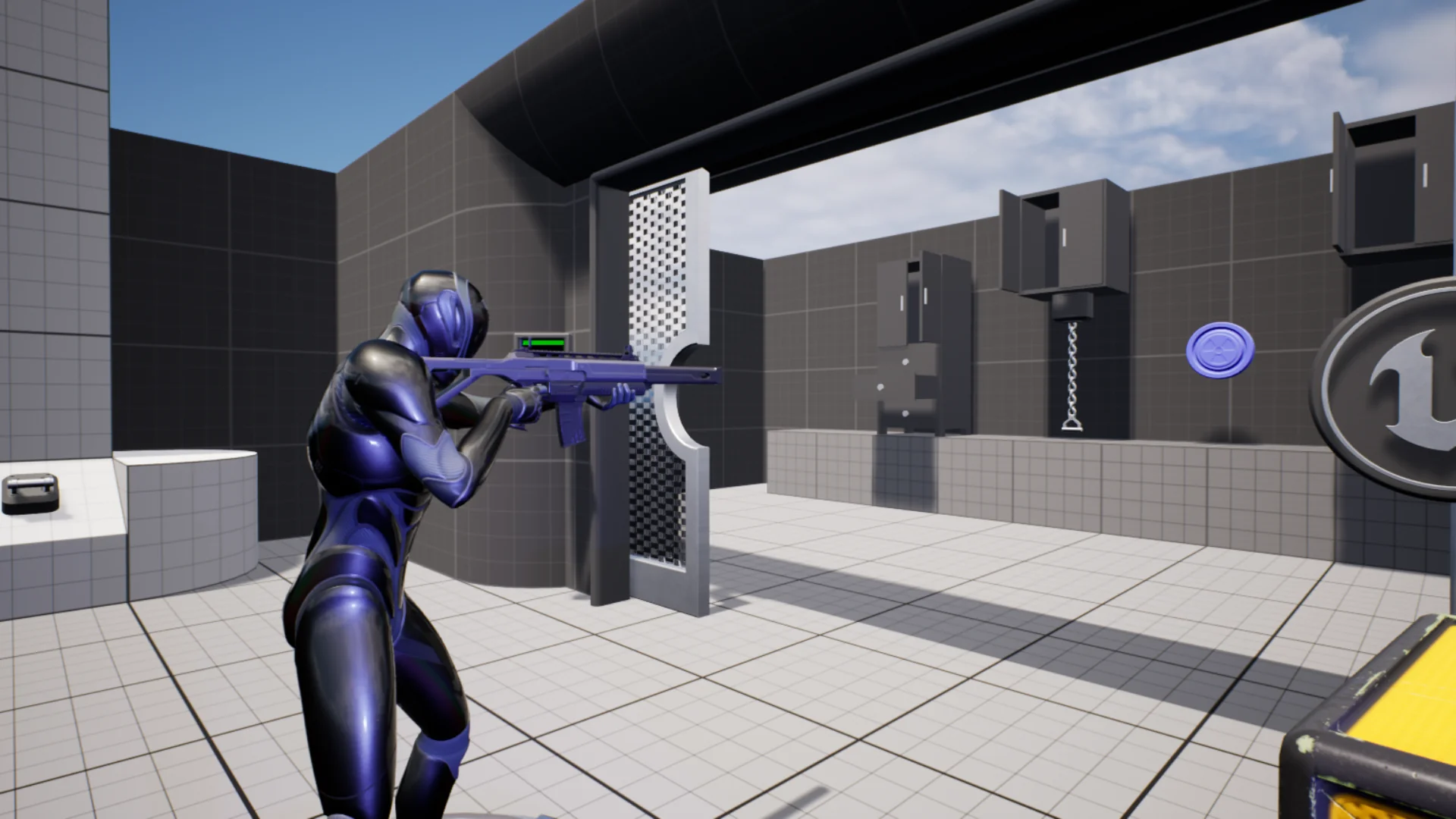
Weapons integrate directly into this cycle, allowing props resting on surfaces to transition from static world objects into functional player gear. Alongside combat or utility items, the package includes an inspection mechanic. Inspection allows players to isolate an item in a dedicated viewport, rotate it, examine visual details, and extract information before committing it to inventory storage or discarding it back into the scene.
Complementing physical acquisition is the journal module. The journal serves as a centralized record-keeping interface for notes, lore, logs, or operational instructions discovered throughout a level. When a player interacts with readable surfaces, documents, or data terminals, the information can be logged into the journal, linking physical environmental discovery with long-term gameplay progression.
Camera Perspective Versatility from First-Person to Top-Down
Gameplay frameworks frequently falter when forced into perspectives different from the one they were prototyped in. Interactive Objects System circumvents this limitation by natively supporting first-person, third-person, and top-down viewports. In first-person setups, interactions prioritize precise center-screen targeting and fine line-of-sight traces, which matches the visual fidelity required for close-quarters item inspection and door manipulation.
In third-person configurations, the framework accommodates an offset camera by evaluating proximity, character orientation, and contextual forward vectors. This ensures players interact smoothly with world objects even when the character mesh sits between the camera and the target prop. For top-down gameplay, the interaction interface shifts emphasis toward cursor targeting, screen-to-world raycasts, and proximity ranges, making the system equally capable in strategy, isometric role-playing, or tactical exploration titles without rewriting the base Blueprints.
Physics Interactions and Modular Blueprint Setup
Dynamic scenes demand that physical items react convincingly to forces rather than existing solely as static colliders. The system integrates physics-driven interaction logic, permitting objects to be pushed, moved, dropped, or manipulated within Unreal Engine's physics simulation. This capability turns standard scene clutter into reactive environmental elements that contribute to spatial puzzles, barricades, or physics-based challenges.
Because the implementation relies entirely on native Blueprints, creators working across Unreal Engine 4 and Unreal Engine 5 can extend the framework without compiling external C++ binaries. New interactive object classes can be spawned as children of base templates, inheriting core trigger and action functionality while introducing unique visual assets, audio cues, or custom logic paths. This architectural separation makes the system adaptable for developers building complex narrative adventures, atmospheric survival scenarios, or systemic simulation sandboxes.
 Action-Adventure
 Action-Adventure
 Action-Adventure