"148d1066ed74e216"{"id":"1002949","slug":"smart-projectile","title":"Smart Projectile","category":"Action-Adventure","engine":"4.26+,5.0+","assetVersion":"","engineVersion":"Engine Version: 4.26+,5.0+","tag":"Action-Adventure","accent":"blue","visual":"mech","summary":"Smart Projectile delivers an interactive Blueprint with obstacle avoidance, target tracking, Niagara systems, materials, and target mode post-processing.","platform":"Unreal Engine","indexPolicy":"index","publishedAt":"2026-11-22T06:28:01.725Z","updatedAt":"2026-11-22T06:28:01.725Z","sourceNotes":[],"fileContents":[],"compatibility":["Unreal Engine","Engine Version: 4.26+,5.0+"],"featuredImage":{"alt":"Smart Projectile","src":"/wp-content/uploads/published/2026/11/63429ee1fac6-5310e334-678f-4065-83da-957f0d47fa0c-6b37f80e85.webp"},"fileSizeBytes":147183234,"hasDownloadLink":true,"downloads":0,"terms":[{"taxonomy":"category","slug":"action-adventure","name":"Action-Adventure"}],"galleryImages":[{"src":"/wp-content/uploads/published/2026/11/33afdeca79eb-bfc3b70c-8dae-4147-af78-7aabb589166e-81a8353769.webp","alt":"Smart Projectile"},{"src":"/wp-content/uploads/published/2026/11/65a28a2dae0a-7e8e4d8f-6d0f-4d4e-ab11-0c507d055f39-743d139922.webp","alt":"Smart Projectile"},{"src":"/wp-content/uploads/published/2026/11/bdbb7f35ec19-c72941b5-9516-4f40-9516-0f69e9304f49-80be2c5311.webp","alt":"Smart Projectile"},{"src":"/wp-content/uploads/published/2026/11/7d72254c81b1-8440d63e-078d-4261-b277-aeb088e13846-a2f2e590d4.webp","alt":"Smart Projectile"},{"src":"/wp-content/uploads/published/2026/11/aaac0c9e48b4-bcbc0744-50c2-44a1-9fc0-3f5d4a54ba67-0cac527383.webp","alt":"Smart Projectile"},{"src":"/wp-content/uploads/published/2026/11/467f7410482c-a481b9eb-c7ee-406d-a3bd-03f10356c10f-66b2eea6c1.webp","alt":"Smart Projectile"},{"src":"/wp-content/uploads/published/2026/11/ace13eebf67f-0fe30826-6b08-4d35-8096-a7295c28cdba-d3cb23d6f0.webp","alt":"Smart Projectile"},{"src":"/wp-content/uploads/published/2026/11/a434ffcfd9e0-2b65cef0-c52f-4511-bdcb-a58a367acb5f-399265d392.webp","alt":"Smart Projectile"},{"src":"/wp-content/uploads/published/2026/11/1f9a6f55fd7b-0250e79e-ed91-4ac3-a449-c32be0eb91cb-70bd6493b5.webp","alt":"Smart Projectile"},{"src":"/wp-content/uploads/published/2026/11/27fb3cb21f41-2232ecdb-5540-4d71-8e28-5e5b5e0a1b78-978b5fe30e.webp","alt":"Smart Projectile"}],"accessPanel":{"kind":"resource","title":"Get this resource","safetyNote":"Resources are manually reviewed before listing to improve quality and reduce obvious risks.","fileName":"Smart Projectile.7z","resourceType":"Resource archive","versions":[]},"contentHtml":"\u003ch2\u003eBlueprint Logic and Core Smart Projectile Behaviors\u003c/h2\u003e\n\u003cp\u003eGuiding a projectile through a dynamic environment requires balancing accurate trajectory tracking with environmental collision management. The core component of this package is a fully functional, interactive Blueprint that handles target hitting alongside automated obstacle avoidance. Instead of relying on rigid, linear vectors or purely cosmetic homing curves, the underlying Blueprint architecture actively computes steering adjustments to bypass objects that interrupt its line of travel toward a designated objective.\u003c/p\u003e\n\u003cp\u003eThis reactive pathing model adapts directly to scenarios involving missiles, rockets, launched munitions, or bomb drops deployed from bomber-style platforms. When a launcher initiates fire, the Blueprint processes both the location of the intended target and the physical presence of intervening barriers. By steering the projectile around geometry while continuously re-orienting toward the objective, the system solves common clipping and collision failures typical of basic tracking scripts. The logic remains completely interactive, allowing direct configuration of projectile tracking intensity, avoidance parameters, and navigation behavior directly within the Blueprint environment.\u003c/p\u003e \u003ch2\u003eVisual FX Architecture with Niagara Systems and Effect Static Meshes\u003c/h2\u003e\n\u003cp\u003eReal-time visual feedback for high-speed tracking elements requires tailored particle dynamics. The package supplies more than 26 distinct projectile Niagara systems, creating a diverse library of flight displays, engine burns, thruster plumes, and exhaust signatures. Each Niagara system is constructed to handle the distinct motion characteristics generated by the steering logic, ensuring that particle emitters react convincingly as the projectile curves, accelerates, or maneuvers past obstacles.\u003c/p\u003e\n\u003cp\u003eAccompanying the particle emitters are four or more effect static meshes designed to serve as the physical or visual foundations of the projectiles. These meshes integrate directly with the particle emitters, functioning as missile bodies, bomb casings, energy cores, or geometric collision proxies. By tying the static meshes into the Niagara particle hierarchy, the system maintains visual cohesion between the physical munition and the dynamic thruster emissions trailing behind it. This structure gives creators immediate building blocks for depicting heavy rocket thrusters, rapid-fire launcher rounds, or guided explosive payloads without having to construct separate visual elements from scratch.\u003c/p\u003e \u003ch2\u003eShading Setup with Materials, Instances, and Functions\u003c/h2\u003e\n\u003cp\u003eVisual variety across multiple weapon classes depends heavily on an adaptable shading pipeline. The collection provides 27 or more effect materials and material instances, driven by a foundational library of 26 or more effect textures and at least one dedicated material function. The material function centralizes reusable mathematical operations, visual blending routines, or UV coordinate manipulations, ensuring that global updates can be pushed across multiple shaders cleanly.\u003c/p\u003e\n\u003cp\u003eThrough the extensive lineup of material instances, visual properties such as emissive intensity, surface distortion, heat gradients, and mask thresholds can be quickly adjusted. The included effect textures supply the necessary noise fields, procedural gradients, smoke density masks, and particle patterns required to power realistic thruster outputs and missile glows. Because the materials are organized into parent and instance relationships, modifying the coloration or thermal profile of an engine plume does not require recompiling master shaders or rebuilding complex node graphs, simplifying asset maintenance across production.\u003c/p\u003e \u003ch2\u003eTargeting Feedback and Post Process Visuals for Smart Projectile Systems\u003c/h2\u003e\n\u003cp\u003eEffective tracking mechanics rely on clear visual communication, both from the perspective of the guided munition and the player directing it. This setup includes two or more post-process materials featuring a dedicated target mode with an outline effect. When target mode is active, the post-process stage renders high-contrast outlines around acquired targets, making target identification instantaneous even against visually dense environments or complex level geometry.\u003c/p\u003e\n\u003cp\u003eWorking in tandem with the post-process outline shaders is a specialized UMG widget user interface. The UMG widget handles on-screen reticles, lock indicators, and system feedback necessary to communicate lock-on states and flight tracking to the operator. By pairing screen-space UMG elements with scene-space post-process outlines, the system establishes a complete targeting loop: the interface marks the intended recipient, the post-process pass highlights its silhouette in the world, and the interactive Blueprint guides the projectile through the obstacle-laden path to complete the strike.\u003c/p\u003e \u003ch2\u003eAssembly and Customization of Smart Projectile VFX Sets\u003c/h2\u003e\n\u003cp\u003eBeyond functioning as a ready-to-run guidance setup, the package serves as an authoring framework for generating customized projectile effects. Every component—the guiding Blueprint logic, the 26+ Niagara systems, the static mesh components, the shading instances, and the post-process outlines—is modular. Creators can construct unique variations by linking custom mesh components to alternative Niagara thruster networks or assigning modified material instances to alter the aesthetic from a conventional mechanical rocket to a specialized energy beam or bomber-dropped munition.\u003c/p\u003e\n\u003cp\u003eSwapping visual modules within the interactive Blueprint requires minimal reconfiguration due to the standardized setup of the underlying scripts and emitters. Whether adjusting the turning radius for rapid air-to-air missile simulations, setting up sluggish free-falling bombs that rely on slight thrust corrections, or assembling futuristic launcher effects complete with custom UI targeting brackets, the assets supply all necessary logic, rendering, and interface tools in a single unified system.\u003c/p\u003e\n\n\u003ch2\u003eMore From The Same Workflow\u003c/h2\u003e\n\u003cul\u003e\n\u003cli\u003e\u003ca href=\"https://3dcghub.com/smart-shooting-npc-and-player-projectile-target-prediction-and-ballistic-system/\" rel=\"noopener noreferrer\"\u003eSmart Shooting - NPC \u0026amp; Player Projectile Target Prediction \u0026amp; Ballistic System\u003c/a\u003e\u003c/li\u003e\n\u003cli\u003e\u003ca href=\"https://3dcghub.com/ultimate-game-ready-character-and-enemy-ai/\" rel=\"noopener noreferrer\"\u003eUltimate Game Ready Character and Enemy AI\u003c/a\u003e\u003c/li\u003e\n\u003cli\u003e\u003ca href=\"https://3dcghub.com/vhs-project-2-5/\" rel=\"noopener noreferrer\"\u003eVHS Project 2.5\u003c/a\u003e\u003c/li\u003e\n\u003cli\u003e\u003ca href=\"https://3dcghub.com/toon-projectiles-vol-1/\" rel=\"noopener noreferrer\"\u003eToon Projectiles Vol. 1\u003c/a\u003e\u003c/li\u003e\n\u003cli\u003e\u003ca href=\"https://3dcghub.com/niagara-toon-projectiles-2/\" rel=\"noopener noreferrer\"\u003eNiagara Toon Projectiles 2\u003c/a\u003e\u003c/li\u003e\n\u003c/ul\u003e","contentTextLength":6228,"navigation":{"current":23,"total":4890,"previous":{"id":"1002950","slug":"sport-car-aunardi-multiplayer-ue5","title":"🏆 Sport Car Aunardi 🚥 Multiplayer 🚥 UE5","category":"Cars \u0026 Trucks","platform":"Unreal Engine","updatedAt":"2026-11-22T06:31:35.188Z"},"next":{"id":"1002948","slug":"roguelike-deckbuilder-toolkit","title":"Roguelike Deckbuilder Toolkit","category":"RPG","platform":"Unreal Engine","updatedAt":"2026-11-22T06:25:32.636Z"}},"relatedResources":[{"id":"1000341","slug":"smart-shooting-npc-and-player-projectile-target-prediction-and-ballistic-system","title":"Smart Shooting - NPC \u0026 Player Projectile Target Prediction \u0026 Ballistic System","category":"Game Mechanics","engine":"5.4 - 5.5,5.7","assetVersion":"Asset Version: 1.0.6 - 1.1.0","engineVersion":"Engine Version: 5.4 - 5.5,5.7","tag":"Game Mechanics","accent":"blue","visual":"mech","summary":"A comprehensive Unreal Engine shooting system featuring target prediction, parabolic trajectories, and C++ optimized background calculations for NPCs and player","platform":"Unreal Engine","indexPolicy":"index","publishedAt":"2026-07-05T08:36:29.188Z","updatedAt":"2026-07-23T16:54:01.327Z","sourceNotes":[],"fileContents":[],"compatibility":["Unreal Engine","Asset Version: 1.0.6 - 1.1.0","Engine Version: 5.4 - 5.5,5.7"],"featuredImage":{"alt":"Smart Shooting - NPC \u0026 Player Projectile Target Prediction \u0026 Ballistic System","src":"/wp-content/uploads/published/2026/07/051ba082f09c-1bc7df8d-34b4-4ea9-95a1-58ea32b1439e-fa9fc2ec39.webp"},"fileSizeBytes":64485128,"hasDownloadLink":true,"downloads":1},{"id":"1001473","slug":"ultimate-game-ready-character-and-enemy-ai","title":"Ultimate Game Ready Character and Enemy AI","category":"Action-Adventure","engine":"5.4+","assetVersion":"","engineVersion":"Engine Version: 5.4+","tag":"Action-Adventure","accent":"blue","visual":"character","summary":"Explore the mechanics of Ultimate Game Ready Character and Enemy AI, featuring Behavior Tree combatants, Niagara VFX, and modular player systems.","platform":"Unreal Engine","indexPolicy":"index","publishedAt":"2026-10-08T08:24:45.975Z","updatedAt":"2026-10-08T08:24:45.975Z","sourceNotes":[],"fileContents":[],"compatibility":["Unreal Engine","Engine Version: 5.4+"],"featuredImage":{"alt":"Ultimate Game Ready Character and Enemy AI","src":"https://media.fab.com/image_previews/gallery_images/179897da-4b4e-4fd2-a0e2-f27677b2278e/daaa7fc3-a13a-4879-80a9-5bfe18feb434.png"},"fileSizeBytes":321354554,"hasDownloadLink":true,"downloads":2},{"id":"1000713","slug":"vhs-project-2-5","title":"VHS Project 2.5","category":"Action-Adventure","engine":"5.5+","assetVersion":"Asset Version: v2.0","engineVersion":"Engine Version: 5.5+","tag":"Action-Adventure","accent":"blue","visual":"mech","summary":"VHS Project 2.5 is a complete Unreal Engine remake featuring an improved post-process VHS shader with screen warping, tracking lines, and first-person horror me","platform":"Unreal Engine","indexPolicy":"index","publishedAt":"2026-07-24T02:42:53.418Z","updatedAt":"2026-07-24T02:42:53.418Z","sourceNotes":[],"fileContents":[],"compatibility":["Unreal Engine","Asset Version: v2.0","Engine Version: 5.5+"],"featuredImage":{"alt":"VHS Project 2.5","src":"/wp-content/uploads/published/2026/07/f56136406ef4-fb20dc2b-4ebf-48f0-84c5-d9d5c3643837-05329032f9.webp"},"fileSizeBytes":911236705,"hasDownloadLink":true,"downloads":6}]}[{"id":4225,"sourceId":4225,"taxonomyId":4225,"taxonomy":"category","slug":"asset-library","name":"Asset Library","parentId":null,"count":4744,"hasChildren":true,"href":"/","seoTitle":"Free Game Assets Library | 3DCGHUB","seoDescription":"Browse free Unreal Engine, Unity, Blender assets and game development tutorials on 3DCGHUB with previews, compatibility notes, and secure downloads.","sitemapEnabled":true,"children":[{"id":4227,"sourceId":4227,"taxonomyId":4227,"taxonomy":"category","slug":"blender-add-ons-plugins","name":"Blender Add-ons \u0026 Plugins","parentId":4225,"count":10,"hasChildren":false,"href":"/category/blender-add-ons-plugins/","seoTitle":"Free Blender Add-ons \u0026 Plugins | 3DCGHUB","seoDescription":"Browse free Blender Add-ons \u0026 Plugins tools for Blender on 3DCGHUB: curated downloads with preview images, compatibility notes and secure download access.","sitemapEnabled":true},{"id":514,"sourceId":514,"taxonomyId":514,"taxonomy":"category","slug":"unity-2","name":"Unity","parentId":4225,"count":453,"hasChildren":true,"href":"/category/unity-2/","seoTitle":"Free Unity Assets | 3DCGHUB","seoDescription":"Browse free Unity resources on 3DCGHUB: curated downloads with preview images, compatibility notes and secure download access.","sitemapEnabled":true,"children":[{"id":523,"sourceId":523,"taxonomyId":523,"taxonomy":"category","slug":"2d","name":"2D","parentId":514,"count":1,"hasChildren":true,"href":"/category/2d/","seoTitle":"Free Unity 2D | 3DCGHUB","seoDescription":"Browse free 2D assets for Unity on 3DCGHUB: curated downloads with preview images, compatibility notes and secure download access.","sitemapEnabled":true},{"id":515,"sourceId":515,"taxonomyId":515,"taxonomy":"category","slug":"3d-unity-2","name":"3D","parentId":514,"count":162,"hasChildren":true,"href":"/category/3d-unity-2/","seoTitle":"Free Unity 3D Assets | 3DCGHUB","seoDescription":"Browse free 3D assets for Unity on 3DCGHUB: curated downloads with preview images, compatibility notes and secure download access.","sitemapEnabled":true},{"id":565,"sourceId":565,"taxonomyId":565,"taxonomy":"category","slug":"add-ons","name":"Add-Ons","parentId":514,"count":2,"hasChildren":false,"href":"/category/add-ons/","seoTitle":"Free Unity Add-Ons | 3DCGHUB","seoDescription":"Browse free Add-Ons assets for Unity on 3DCGHUB: curated downloads with preview images, compatibility notes and secure download access.","sitemapEnabled":true},{"id":529,"sourceId":529,"taxonomyId":529,"taxonomy":"category","slug":"audio-unity-2","name":"Audio","parentId":514,"count":1,"hasChildren":true,"href":"/category/audio-unity-2/","seoTitle":"Free Unity Audio | 3DCGHUB","seoDescription":"Browse free Audio for Unity on 3DCGHUB: curated downloads with preview images, compatibility notes and secure download access.","sitemapEnabled":true},{"id":557,"sourceId":557,"taxonomyId":557,"taxonomy":"category","slug":"templates","name":"Templates","parentId":514,"count":36,"hasChildren":true,"href":"/category/templates/","seoTitle":"Free Unity Templates | 3DCGHUB","seoDescription":"Browse free Unity project templates on 3DCGHUB. Starter kits with previews, compatibility notes, and secure download access.","sitemapEnabled":true},{"id":533,"sourceId":533,"taxonomyId":533,"taxonomy":"category","slug":"tools-unity-2","name":"Tools","parentId":514,"count":0,"hasChildren":true,"href":"/category/tools-unity-2/","sitemapEnabled":true},{"id":554,"sourceId":554,"taxonomyId":554,"taxonomy":"category","slug":"vfx-unity-2","name":"VFX","parentId":514,"count":4,"hasChildren":true,"href":"/category/vfx-unity-2/","seoTitle":"Free Unity VFX | 3DCGHUB","seoDescription":"Browse free VFX for Unity on 3DCGHUB: curated downloads with preview images, compatibility notes and secure download access.","sitemapEnabled":true}]},{"id":511,"sourceId":511,"taxonomyId":511,"taxonomy":"category","slug":"unreal-engine-2","name":"Unreal Engine","parentId":4225,"count":4282,"hasChildren":true,"href":"/category/unreal-engine-2/","seoTitle":"Free Unreal Engine Assets | 3DCGHUB","seoDescription":"Browse free Unreal Engine resources on 3DCGHUB: curated downloads with preview images, compatibility notes and secure download access.","sitemapEnabled":true,"children":[{"id":54,"sourceId":54,"taxonomyId":54,"taxonomy":"category","slug":"3d","name":"3D","parentId":511,"count":2428,"hasChildren":true,"href":"/category/3d/","seoTitle":"Free Unreal Engine 3D | 3DCGHUB","seoDescription":"Browse free 3D assets for Unreal Engine on 3DCGHUB: curated downloads with preview images, compatibility notes and secure download access.","sitemapEnabled":true},{"id":441,"sourceId":441,"taxonomyId":441,"taxonomy":"category","slug":"animations","name":"Animations","parentId":511,"count":245,"hasChildren":true,"href":"/category/animations/","seoTitle":"Free Unreal Engine Animations | 3DCGHUB","seoDescription":"Browse free Animations for Unreal Engine on 3DCGHUB: curated downloads with preview images, compatibility notes and secure download access.","sitemapEnabled":true},{"id":446,"sourceId":446,"taxonomyId":446,"taxonomy":"category","slug":"audio","name":"Audio","parentId":511,"count":63,"hasChildren":true,"href":"/category/audio/","seoTitle":"Free Unreal Engine Audio Resources | 3DCGHUB","seoDescription":"Browse free Unreal Engine audio resources including sound effects, voices, dialogue, and ambient sounds. Curated free downloads on 3DCGHUB.","sitemapEnabled":true},{"id":466,"sourceId":466,"taxonomyId":466,"taxonomy":"category","slug":"game-systems","name":"Game Systems","parentId":511,"count":356,"hasChildren":true,"href":"/category/game-systems/","seoTitle":"Free Unreal Engine Game Systems | 3DCGHUB","seoDescription":"Browse free Game Systems tools for Unreal Engine on 3DCGHUB: curated downloads with preview images, compatibility notes and secure download access.","sitemapEnabled":true},{"id":478,"sourceId":478,"taxonomyId":478,"taxonomy":"category","slug":"game-templates","name":"Game Templates","parentId":511,"count":150,"hasChildren":true,"href":"/category/game-templates/","seoTitle":"Free Unreal Engine Game Templates | 3DCGHUB","seoDescription":"Browse free Game Templates for Unreal Engine on 3DCGHUB: curated downloads with preview images, compatibility notes and secure download access.","sitemapEnabled":true},{"id":432,"sourceId":432,"taxonomyId":432,"taxonomy":"category","slug":"hdri","name":"HDRI","parentId":511,"count":6,"hasChildren":true,"href":"/category/hdri/","seoTitle":"Free Unreal Engine HDRI | 3DCGHUB","seoDescription":"Browse free Unreal Engine HDRI skies and lighting maps on 3DCGHUB. Environment lighting with previews and secure downloads.","sitemapEnabled":true},{"id":228,"sourceId":228,"taxonomyId":228,"taxonomy":"category","slug":"material-and-textures","name":"Material \u0026 Textures","parentId":511,"count":172,"hasChildren":true,"href":"/category/material-and-textures/","seoTitle":"Free Unreal Engine Material \u0026 Textures | 3DCGHUB","seoDescription":"Browse free Material \u0026 Textures for Unreal Engine on 3DCGHUB: curated downloads with preview images, compatibility notes and secure download access.","sitemapEnabled":true},{"id":298,"sourceId":298,"taxonomyId":298,"taxonomy":"category","slug":"sprites-and-flipbooks","name":"Sprites \u0026 Flipbooks","parentId":511,"count":17,"hasChildren":true,"href":"/category/sprites-and-flipbooks/","seoTitle":"Free Unreal Engine Sprites \u0026 Flipbooks | 3DCGHUB","seoDescription":"Browse free Sprites \u0026 Flipbooks assets for Unreal Engine on 3DCGHUB: curated downloads with preview images, compatibility notes and secure download access.","sitemapEnabled":true},{"id":489,"sourceId":489,"taxonomyId":489,"taxonomy":"category","slug":"tools-and-plugins","name":"Tools \u0026 Plugins","parentId":511,"count":390,"hasChildren":true,"href":"/category/tools-and-plugins/","seoTitle":"Free Unreal Engine Tools \u0026 Plugins | 3DCGHUB","seoDescription":"Browse free Tools \u0026 Plugins for Unreal Engine on 3DCGHUB: curated downloads with preview images, compatibility notes and secure download access.","sitemapEnabled":true},{"id":459,"sourceId":459,"taxonomyId":459,"taxonomy":"category","slug":"ui","name":"UI","parentId":511,"count":43,"hasChildren":true,"href":"/category/ui/","seoTitle":"Free Unreal Engine UI | 3DCGHUB","seoDescription":"Browse free UI for Unreal Engine on 3DCGHUB: curated downloads with preview images, compatibility notes and secure download access.","sitemapEnabled":true},{"id":450,"sourceId":450,"taxonomyId":450,"taxonomy":"category","slug":"vfx","name":"VFX","parentId":511,"count":412,"hasChildren":true,"href":"/category/vfx/","seoTitle":"Free Unreal Engine VFX | 3DCGHUB","seoDescription":"Browse free VFX for Unreal Engine on 3DCGHUB: curated downloads with preview images, compatibility notes and secure download access.","sitemapEnabled":true}]}]},{"id":4222,"sourceId":4222,"taxonomyId":4222,"taxonomy":"category","slug":"tutorial-library","name":"Tutorial Library","parentId":null,"count":117,"hasChildren":false,"href":"/tutorials/","seoTitle":"Free Game Development Tutorial Library | 3DCGHUB","seoDescription":"Browse free game development tutorials for Unreal Engine, Unity, Blender, and more on 3DCGHUB with practical workflows and secure downloads.","sitemapEnabled":true}]
Resource screenshots
1 / 10
Join our channel
Follow 3DCGHUB on Telegram for new resource drops, migration updates, and community notices.
Blueprint Logic and Core Smart Projectile Behaviors
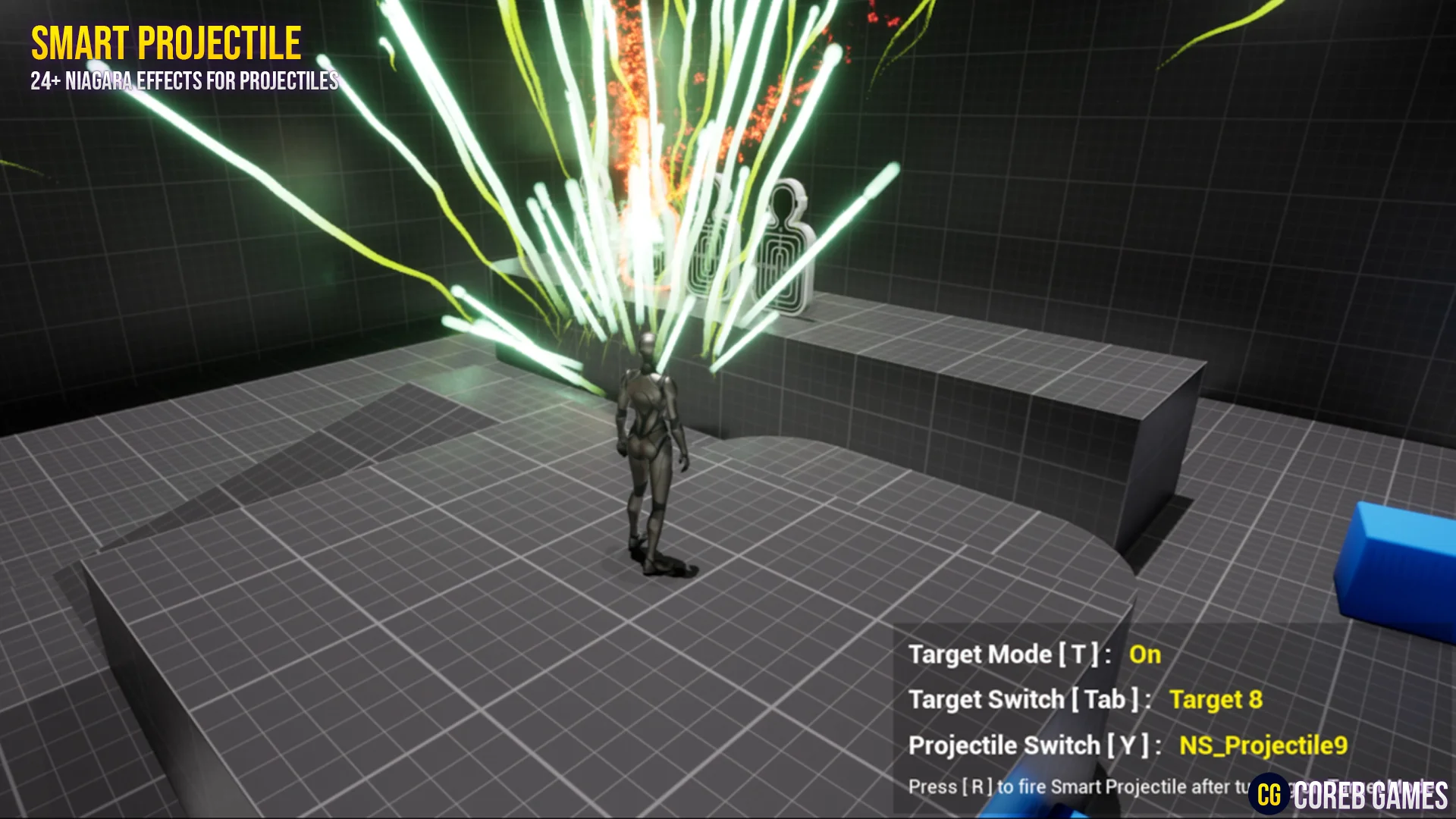
Guiding a projectile through a dynamic environment requires balancing accurate trajectory tracking with environmental collision management. The core component of this package is a fully functional, interactive Blueprint that handles target hitting alongside automated obstacle avoidance. Instead of relying on rigid, linear vectors or purely cosmetic homing curves, the underlying Blueprint architecture actively computes steering adjustments to bypass objects that interrupt its line of travel toward a designated objective.
This reactive pathing model adapts directly to scenarios involving missiles, rockets, launched munitions, or bomb drops deployed from bomber-style platforms. When a launcher initiates fire, the Blueprint processes both the location of the intended target and the physical presence of intervening barriers. By steering the projectile around geometry while continuously re-orienting toward the objective, the system solves common clipping and collision failures typical of basic tracking scripts. The logic remains completely interactive, allowing direct configuration of projectile tracking intensity, avoidance parameters, and navigation behavior directly within the Blueprint environment.
Visual FX Architecture with Niagara Systems and Effect Static Meshes
Real-time visual feedback for high-speed tracking elements requires tailored particle dynamics. The package supplies more than 26 distinct projectile Niagara systems, creating a diverse library of flight displays, engine burns, thruster plumes, and exhaust signatures. Each Niagara system is constructed to handle the distinct motion characteristics generated by the steering logic, ensuring that particle emitters react convincingly as the projectile curves, accelerates, or maneuvers past obstacles.
Accompanying the particle emitters are four or more effect static meshes designed to serve as the physical or visual foundations of the projectiles. These meshes integrate directly with the particle emitters, functioning as missile bodies, bomb casings, energy cores, or geometric collision proxies. By tying the static meshes into the Niagara particle hierarchy, the system maintains visual cohesion between the physical munition and the dynamic thruster emissions trailing behind it. This structure gives creators immediate building blocks for depicting heavy rocket thrusters, rapid-fire launcher rounds, or guided explosive payloads without having to construct separate visual elements from scratch.
Shading Setup with Materials, Instances, and Functions
Visual variety across multiple weapon classes depends heavily on an adaptable shading pipeline. The collection provides 27 or more effect materials and material instances, driven by a foundational library of 26 or more effect textures and at least one dedicated material function. The material function centralizes reusable mathematical operations, visual blending routines, or UV coordinate manipulations, ensuring that global updates can be pushed across multiple shaders cleanly.
Through the extensive lineup of material instances, visual properties such as emissive intensity, surface distortion, heat gradients, and mask thresholds can be quickly adjusted. The included effect textures supply the necessary noise fields, procedural gradients, smoke density masks, and particle patterns required to power realistic thruster outputs and missile glows. Because the materials are organized into parent and instance relationships, modifying the coloration or thermal profile of an engine plume does not require recompiling master shaders or rebuilding complex node graphs, simplifying asset maintenance across production.
Targeting Feedback and Post Process Visuals for Smart Projectile Systems
Effective tracking mechanics rely on clear visual communication, both from the perspective of the guided munition and the player directing it. This setup includes two or more post-process materials featuring a dedicated target mode with an outline effect. When target mode is active, the post-process stage renders high-contrast outlines around acquired targets, making target identification instantaneous even against visually dense environments or complex level geometry.
Working in tandem with the post-process outline shaders is a specialized UMG widget user interface. The UMG widget handles on-screen reticles, lock indicators, and system feedback necessary to communicate lock-on states and flight tracking to the operator. By pairing screen-space UMG elements with scene-space post-process outlines, the system establishes a complete targeting loop: the interface marks the intended recipient, the post-process pass highlights its silhouette in the world, and the interactive Blueprint guides the projectile through the obstacle-laden path to complete the strike.
Assembly and Customization of Smart Projectile VFX Sets
Beyond functioning as a ready-to-run guidance setup, the package serves as an authoring framework for generating customized projectile effects. Every component—the guiding Blueprint logic, the 26+ Niagara systems, the static mesh components, the shading instances, and the post-process outlines—is modular. Creators can construct unique variations by linking custom mesh components to alternative Niagara thruster networks or assigning modified material instances to alter the aesthetic from a conventional mechanical rocket to a specialized energy beam or bomber-dropped munition.
Swapping visual modules within the interactive Blueprint requires minimal reconfiguration due to the standardized setup of the underlying scripts and emitters. Whether adjusting the turning radius for rapid air-to-air missile simulations, setting up sluggish free-falling bombs that rely on slight thrust corrections, or assembling futuristic launcher effects complete with custom UI targeting brackets, the assets supply all necessary logic, rendering, and interface tools in a single unified system.
 Game Mechanics
 Action-Adventure
 Action-Adventure