"e9c335e082208b17"{"id":"1002895","slug":"root-motion-guide","title":"Root Motion Guide","category":"Engine Tools","engine":"4.26 - 5.6","assetVersion":"Asset Version: 1.0","engineVersion":"Engine Version: 4.26 - 5.6","tag":"Engine Tools","accent":"blue","visual":"mech","summary":"Integrate Mixamo animations smoothly using Root Motion Guide, shifting complex traversal logic to maps while enabling multiplayer and hanging mechanics.","platform":"Unreal Engine","indexPolicy":"index","publishedAt":"2026-11-21T02:08:26.554Z","updatedAt":"2026-11-21T02:08:26.554Z","sourceNotes":[],"fileContents":[],"compatibility":["Unreal Engine","Asset Version: 1.0","Engine Version: 4.26 - 5.6"],"featuredImage":{"alt":"Root Motion Guide","src":"/wp-content/uploads/published/2026/11/a36eacd7a420-a1263599-e1a4-497e-821b-7e826ea4ddf6-1379e14630.webp"},"fileSizeBytes":179374771,"hasDownloadLink":true,"downloads":0,"terms":[{"taxonomy":"category","slug":"engine-tools-tools-and-plugins","name":"Engine Tools"}],"galleryImages":[{"src":"/wp-content/uploads/published/2026/11/cad83f295b49-feced77a-7031-4185-8f7d-b064fbde3dc6-d1c0989e11.webp","alt":"Root Motion Guide"},{"src":"/wp-content/uploads/published/2026/11/5c764f1c4788-39771ff7-0056-4bd9-b19e-84c3978541b4-aabb55311e.webp","alt":"Root Motion Guide"},{"src":"/wp-content/uploads/published/2026/11/6856a742e188-069fb0c7-56cc-42bb-b08b-98e76e94aa7d-d57d2f88e1.webp","alt":"Root Motion Guide"},{"src":"/wp-content/uploads/published/2026/11/343629b0cd1a-3f8bac28-f58b-42c0-9be5-959b88ec7d00-2de2445a3d.webp","alt":"Root Motion Guide"},{"src":"/wp-content/uploads/published/2026/11/64504e1553a6-ce445f19-12b9-4fcb-b427-c6664675b089-0aea99de16.webp","alt":"Root Motion Guide"},{"src":"/wp-content/uploads/published/2026/11/996e3aa7d8d1-7b9e2905-c15d-4ff2-986d-d964e7d83aa2-560fa53b8e.webp","alt":"Root Motion Guide"},{"src":"/wp-content/uploads/published/2026/11/815541f7f248-c8717482-8fde-45ca-a9ee-24c109de427b-e430f51236.webp","alt":"Root Motion Guide"},{"src":"/wp-content/uploads/published/2026/11/6b4737e43634-86c0f796-8cdf-4419-b599-057b12f3ac49-bb6ec9791a.webp","alt":"Root Motion Guide"},{"src":"/wp-content/uploads/published/2026/11/672ea6bc1c03-f4bb879c-1b33-491b-abfa-4c47d4e49a4a-ae74a339c6.webp","alt":"Root Motion Guide"},{"src":"/wp-content/uploads/published/2026/11/feeb006242e7-0b1f429d-fea2-431b-a227-97f30bcbd81e-17087425d9.webp","alt":"Root Motion Guide"}],"contentHtml":"\u003ch2\u003eSetting Up Root Motion Guide in the Character Blueprint\u003c/h2\u003e\u003cp\u003eWorking with Mixamo animation assets in active game environments often presents immediate technical friction. While Mixamo provides a vast library of high-quality character motions, adapting those clips to drive real-time gameplay locomotion requires dedicated handling. Root Motion Guide provides a framework designed specifically to bridge this gap, enabling projects to deploy root motion animation smoothly across player and non-player entities.\u003c/p\u003e\u003cp\u003eImplementation begins at the character Blueprint level. Rather than burying endless state switches, branch nodes, and specialized transform calculations directly inside the primary character class, the system establishes a clean separation between base character input and specialized movement states. The initial setup requires configuring the character Blueprint to communicate with the system's core movement architecture. By paring down the character's internal logic, developers avoid the common pitfall of turning the main player class into an unmanageable hub for edge-case animation triggers.\u003c/p\u003e\u003cp\u003eOnce the basic character Blueprint is wired to accept root motion overrides, importing Mixamo animations becomes a systematic routine rather than an asset-by-asset technical hurdle. The toolkit provides specific utilities tailored to process Mixamo clips, adjusting them so their embedded displacement and rotation data translate accurately into in-engine velocity and spatial positioning.\u003c/p\u003e\u003ch2\u003eShifting Traversal Logic into the Map with Root Motion Guide\u003c/h2\u003e\u003cp\u003eA central design philosophy behind Root Motion Guide is relocating complex animation and spatial logic away from the character pawn and directly into the map. In conventional character movement implementations, the character actor must anticipate every conceivable interactive surface, ledge type, and vault height through heavy runtime line tracing and deep state machines. This quickly clutters the character graph with situational data that is only relevant in tiny portions of a level.\u003c/p\u003e\u003cp\u003eBy offloading character movement logic to the map environment itself, individual zones, ledges, and level geometry take ownership of the specific actions they demand. When a character approaches a specialized traversal point, the map-bound logic dictates which animation sequence to invoke, how the transform should align, and how the motion will execute from entry to exit. This approach delivers several practical advantages in production:\u003c/p\u003e\u003cul\u003e\u003cli\u003eThe core character Blueprint remains lightweight, responsive, and easy to maintain throughout production.\u003c/li\u003e\u003cli\u003eMovement rules can be customized for individual maps or environmental themes without risking regressions in global character physics.\u003c/li\u003e\u003cli\u003eLevel designers gain fine-grained authority over how actors navigate unique structural geometry.\u003c/li\u003e\u003cli\u003eEdge-case interactions remain isolated within the specific environments where they occur.\u003c/li\u003e\u003c/ul\u003e\u003ch2\u003eSmooth Motion Interpolation through RootMotionMovement\u003c/h2\u003e\u003cp\u003eAt the center of runtime execution sits the RootMotionMovement module. When transitioning from capsule-driven physics to full root motion, games frequently suffer from visible hitches, rotational snapping, or abrupt changes in character momentum. RootMotionMovement addresses this instability by acting as an intelligent mediator between environmental queries and playback execution.\u003c/p\u003e\u003cp\u003eThe module evaluates the spatial context of the interaction and automatically selects the appropriate root motion clip needed to bridge the character's current position with the target state. Once an animation is chosen, the system applies interpolation across translation and rotation. Instead of jarring the actor instantly into an alignment point, RootMotionMovement blends the actor smoothly into the motion's trajectory, preserving physical plausibility and visual continuity.\u003c/p\u003e\u003cp\u003eThis dynamic selection and smoothing process is especially vital when handling varied traversal heights or entry angles. Because Mixamo assets are authored at static scales and fixed vectors, raw playback against uneven game environments often creates clipping or floating artifacts. RootMotionMovement dynamically accommodates these spatial variances, ensuring that character limbs, contact points, and paths align cleanly with surrounding surfaces throughout the entire movement window.\u003c/p\u003e\u003ch2\u003eImplementing Free Hang and Braced Hang Systems\u003c/h2\u003e\u003cp\u003eThe system expands beyond simple horizontal mantling and ground-level root motion by supporting advanced vertical traversal states, including free hang and braced hang movements. These two states represent common requirements in modern character action systems, each demanding distinct spatial alignment and animation handling.\u003c/p\u003e\u003cp\u003eFree hang setups govern situations where a character grips a ledge or overhead traverse without foot contact against a wall. The system orchestrates the transition into the hang, stabilizes the character's transform relative to the ledge edge, and processes traversal along the boundary using dedicated root motion sequences. Because the motion calculations are tied directly to environmental anchors, the character remains locked to the geometry without drifting due to floating-point physics inaccuracies.\u003c/p\u003e\u003cp\u003eBraced hang setups introduce secondary surface constraints, where the character's feet plant against a vertical wall while the hands hold the ledge above. Root Motion Guide accounts for the additional geometry collision, interpolating the character posture to ensure feet and hands align correctly against the wall face. Advanced configurations permit smooth hand-over-hand shimming, corner rounding, and transitions between free and braced hang states, allowing actors to respond naturally to changing wall structures beneath a continuous ledge.\u003c/p\u003e\u003ch2\u003eMultiplayer Synchronization, AI Navigation, and System Extension\u003c/h2\u003e\u003cp\u003eReplicating root motion reliably across network environments is notoriously difficult due to latency and client-side prediction mismatches. Root Motion Guide accounts for networked requirements by offering a dedicated multiplayer character Blueprint setup. By synchronizing root motion states and mapping logic cleanly across server-authoritative connections, the framework prevents desynchronization and jitter during complex obstacle traversals in multiplayer matches.\u003c/p\u003e\u003cp\u003eThe toolkit also extends directly to artificial intelligence. Because movement logic can reside within map-placed actors, AI pawns can interface with the exact same traversal nodes used by human-controlled characters. Non-player characters can execute precise root motion climbing, vaulting, and hanging sequences along defined level geometry without requiring bespoke, heavyweight navigation meshes or artificial teleportation tricks.\u003c/p\u003e\u003cp\u003eDevelopers looking to tailor the framework to bespoke gameplay mechanics can extend Root Motion Guide through custom logic blueprints. Whether introducing dynamic swinging, pole navigation, or specialized combat maneuvers, the system's exposed parameters and modular movement components provide a flexible foundation. Support is maintained directly by the developer to assist creators with ongoing implementation needs across single-player and networked projects.\u003c/p\u003e\n\n\u003ch2\u003eExplore Similar Assets\u003c/h2\u003e\n\u003cul\u003e\n\u003cli\u003e\u003ca href=\"https://3dcghub.com/riding-system-in-blueprints-multiplayer/\" rel=\"noopener noreferrer\"\u003eRiding System in Blueprints (Multiplayer)\u003c/a\u003e\u003c/li\u003e\n\u003cli\u003e\u003ca href=\"https://3dcghub.com/dynamic-ai-system/\" rel=\"noopener noreferrer\"\u003eDynamic AI System\u003c/a\u003e\u003c/li\u003e\n\u003cli\u003e\u003ca href=\"https://3dcghub.com/web-socket-client/\" rel=\"noopener noreferrer\"\u003eWeb Socket Client\u003c/a\u003e\u003c/li\u003e\n\u003cli\u003e\u003ca href=\"https://3dcghub.com/udp-socket-server-and-client/\" rel=\"noopener noreferrer\"\u003eUDP Socket Server And Client\u003c/a\u003e\u003c/li\u003e\n\u003cli\u003e\u003ca href=\"https://3dcghub.com/http-and-json/\" rel=\"noopener noreferrer\"\u003eHTTP AND JSON\u003c/a\u003e\u003c/li\u003e\n\u003c/ul\u003e","contentTextLength":7336,"navigation":{"current":40,"total":4839,"previous":{"id":"1002896","slug":"horse-riding-system","title":"Horse Riding System","category":"Characters \u0026 Creatures","platform":"Unreal Engine","updatedAt":"2026-11-21T02:38:36.684Z"},"next":{"id":"1002894","slug":"igtoolspp-speedtree-to-pivot-painter-2-0","title":"IGToolsPP: Speedtree to Pivot Painter 2.0","category":"Engine Tools","platform":"Unreal Engine","updatedAt":"2026-11-21T02:07:09.797Z"}},"relatedResources":[{"id":"11082","slug":"riding-system-in-blueprints-multiplayer","title":"Riding System in Blueprints (Multiplayer)","category":"Gameplay Features","engine":"4.27,5.0+","assetVersion":"Engine version: 4.27,5.0+","engineVersion":"4.27","tag":"Gameplay Features","accent":"blue","visual":"character","summary":"Discover a complete riding system built entirely in Blueprints for Unreal Engine. This asset supports multiplayer and offers both root motion and in-place animation systems.","platform":"Unreal Engine","indexPolicy":"noindex","publishedAt":"2026-03-03T16:54:10.000Z","updatedAt":"2026-04-19T15:49:50.000Z","sourceNotes":[],"fileContents":[],"compatibility":["Unreal Engine","Engine version: 4.27,5.0+"],"featuredImage":{"alt":"Riding System in Blueprints (Multiplayer)","src":"https://3dcghub.com/wp-content/uploads/2026/03/7f218b97-f418-448f-84e0-59300436f931.webp"},"fileSizeBytes":470707255,"hasDownloadLink":true,"downloads":0},{"id":"25001","slug":"simple-procedural-walk","title":"Simple Procedural Walk","category":"Engine Tools","engine":"4.26 - 5.0, 5.3 - 5.5","assetVersion":"Asset Version: 1.3.0 - 2025.1.14","engineVersion":"Engine Version: 4.26 - 5.0, 5.3 - 5.5","tag":"Engine Tools","accent":"blue","visual":"animation","summary":"Simple Procedural Walk gives skeletal meshes a real-time walking cycle without relying on pre-recorded animation. It is strongest on robotic or insectoid characters, with mechs also supported, while organic characters are left to motion-capture style movement.","platform":"Unreal Engine","indexPolicy":"noindex","publishedAt":"2026-04-18T15:47:18.000Z","updatedAt":"2026-11-21T20:55:00.040Z","sourceNotes":[],"fileContents":[],"compatibility":["Unreal Engine","Asset Version: 1.3.0 - 2025.1.14","Engine Version: 4.26 - 5.0, 5.3 - 5.5"],"featuredImage":{"alt":"Simple Procedural Walk","src":"https://3dcghub.com/wp-content/uploads/2026/04/3f2c1025b72b_a9e4b4f7-6fe2-488e-872a-1cc50cd404eb.webp"},"fileSizeBytes":23364125,"hasDownloadLink":true,"downloads":0},{"id":"13862","slug":"dynamic-ai-system","title":"Dynamic AI System","category":"Engine Tools","engine":"4.26 - 5.8","assetVersion":"Asset Version: 1.0","engineVersion":"Engine version: 4.26 - 5.8","tag":"Engine Tools","accent":"blue","visual":"city","summary":"Enhance your game with the Dynamic AI System, a scalable solution for managing complex NPC behaviors and movement paths. This tool allows characters to react to world changes and perform specific actions effortlessly.","platform":"Unreal Engine","indexPolicy":"noindex","publishedAt":"2026-03-11T10:28:11.000Z","updatedAt":"2026-08-27T11:07:36.100Z","sourceNotes":[],"fileContents":[],"compatibility":["Unreal Engine","Asset Version: 1.0","Engine version: 4.26 - 5.8"],"featuredImage":{"alt":"Dynamic AI System","src":"https://3dcghub.com/wp-content/uploads/2026/03/2aac77c2-7e98-497e-8922-45b7233bb3c1.webp"},"fileSizeBytes":289399036,"hasDownloadLink":true,"downloads":2}]}
Resource screenshots
1 / 10
Join our channel
Follow 3DCGHUB on Telegram for new resource drops, migration updates, and community notices.
Integrate Mixamo animations smoothly using Root Motion Guide, shifting complex traversal logic to maps while enabling multiplayer and hanging mechanics.
Setting Up Root Motion Guide in the Character Blueprint
Working with Mixamo animation assets in active game environments often presents immediate technical friction. While Mixamo provides a vast library of high-quality character motions, adapting those clips to drive real-time gameplay locomotion requires dedicated handling. Root Motion Guide provides a framework designed specifically to bridge this gap, enabling projects to deploy root motion animation smoothly across player and non-player entities.
Implementation begins at the character Blueprint level. Rather than burying endless state switches, branch nodes, and specialized transform calculations directly inside the primary character class, the system establishes a clean separation between base character input and specialized movement states. The initial setup requires configuring the character Blueprint to communicate with the system's core movement architecture. By paring down the character's internal logic, developers avoid the common pitfall of turning the main player class into an unmanageable hub for edge-case animation triggers.
Once the basic character Blueprint is wired to accept root motion overrides, importing Mixamo animations becomes a systematic routine rather than an asset-by-asset technical hurdle. The toolkit provides specific utilities tailored to process Mixamo clips, adjusting them so their embedded displacement and rotation data translate accurately into in-engine velocity and spatial positioning.
Shifting Traversal Logic into the Map with Root Motion Guide
A central design philosophy behind Root Motion Guide is relocating complex animation and spatial logic away from the character pawn and directly into the map. In conventional character movement implementations, the character actor must anticipate every conceivable interactive surface, ledge type, and vault height through heavy runtime line tracing and deep state machines. This quickly clutters the character graph with situational data that is only relevant in tiny portions of a level.
By offloading character movement logic to the map environment itself, individual zones, ledges, and level geometry take ownership of the specific actions they demand. When a character approaches a specialized traversal point, the map-bound logic dictates which animation sequence to invoke, how the transform should align, and how the motion will execute from entry to exit. This approach delivers several practical advantages in production:
The core character Blueprint remains lightweight, responsive, and easy to maintain throughout production.
Movement rules can be customized for individual maps or environmental themes without risking regressions in global character physics.
Level designers gain fine-grained authority over how actors navigate unique structural geometry.
Edge-case interactions remain isolated within the specific environments where they occur.
Smooth Motion Interpolation through RootMotionMovement
At the center of runtime execution sits the RootMotionMovement module. When transitioning from capsule-driven physics to full root motion, games frequently suffer from visible hitches, rotational snapping, or abrupt changes in character momentum. RootMotionMovement addresses this instability by acting as an intelligent mediator between environmental queries and playback execution.
The module evaluates the spatial context of the interaction and automatically selects the appropriate root motion clip needed to bridge the character's current position with the target state. Once an animation is chosen, the system applies interpolation across translation and rotation. Instead of jarring the actor instantly into an alignment point, RootMotionMovement blends the actor smoothly into the motion's trajectory, preserving physical plausibility and visual continuity.
This dynamic selection and smoothing process is especially vital when handling varied traversal heights or entry angles. Because Mixamo assets are authored at static scales and fixed vectors, raw playback against uneven game environments often creates clipping or floating artifacts. RootMotionMovement dynamically accommodates these spatial variances, ensuring that character limbs, contact points, and paths align cleanly with surrounding surfaces throughout the entire movement window.
Implementing Free Hang and Braced Hang Systems
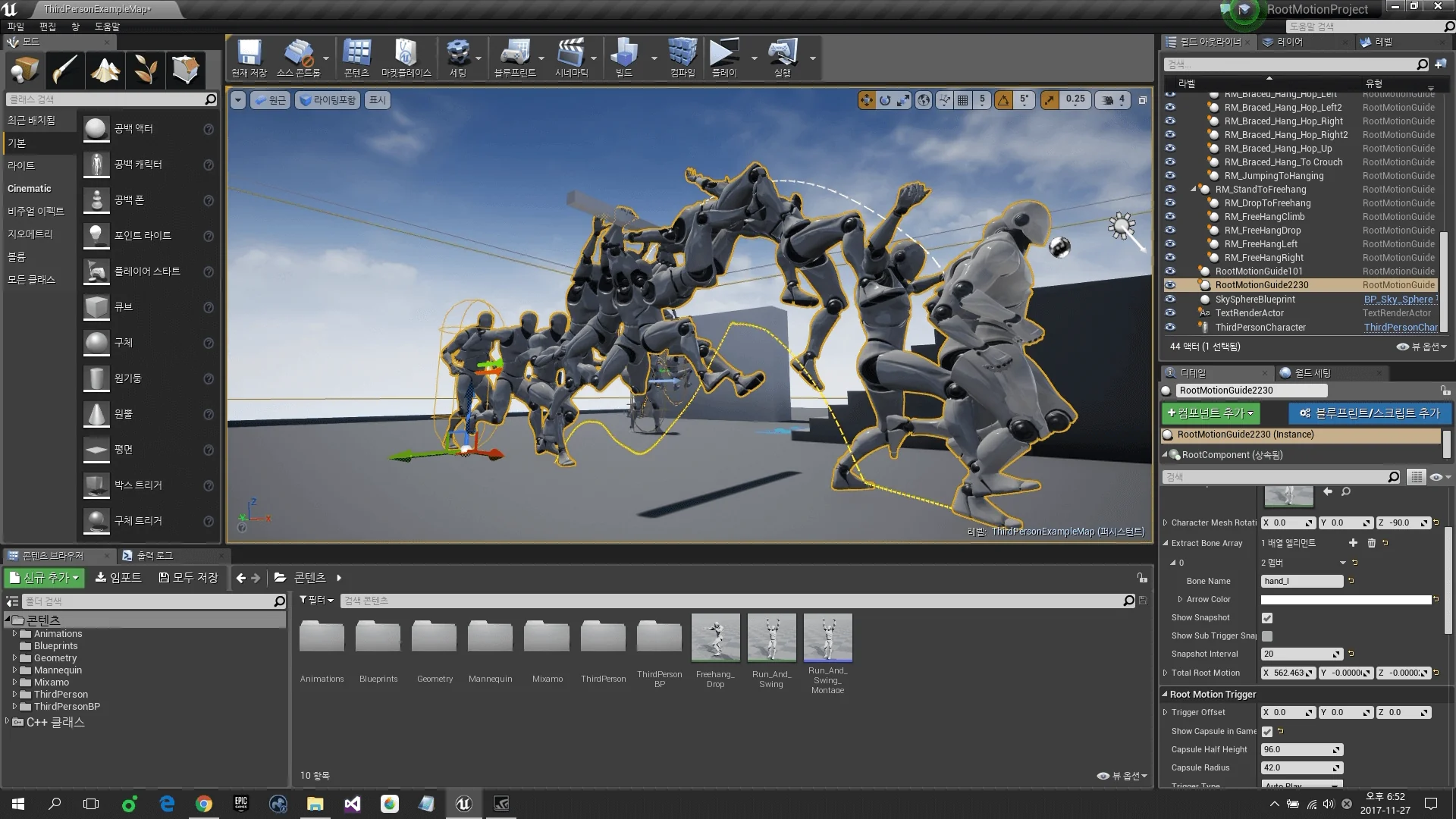
The system expands beyond simple horizontal mantling and ground-level root motion by supporting advanced vertical traversal states, including free hang and braced hang movements. These two states represent common requirements in modern character action systems, each demanding distinct spatial alignment and animation handling.
Free hang setups govern situations where a character grips a ledge or overhead traverse without foot contact against a wall. The system orchestrates the transition into the hang, stabilizes the character's transform relative to the ledge edge, and processes traversal along the boundary using dedicated root motion sequences. Because the motion calculations are tied directly to environmental anchors, the character remains locked to the geometry without drifting due to floating-point physics inaccuracies.
Braced hang setups introduce secondary surface constraints, where the character's feet plant against a vertical wall while the hands hold the ledge above. Root Motion Guide accounts for the additional geometry collision, interpolating the character posture to ensure feet and hands align correctly against the wall face. Advanced configurations permit smooth hand-over-hand shimming, corner rounding, and transitions between free and braced hang states, allowing actors to respond naturally to changing wall structures beneath a continuous ledge.
Multiplayer Synchronization, AI Navigation, and System Extension
Replicating root motion reliably across network environments is notoriously difficult due to latency and client-side prediction mismatches. Root Motion Guide accounts for networked requirements by offering a dedicated multiplayer character Blueprint setup. By synchronizing root motion states and mapping logic cleanly across server-authoritative connections, the framework prevents desynchronization and jitter during complex obstacle traversals in multiplayer matches.
The toolkit also extends directly to artificial intelligence. Because movement logic can reside within map-placed actors, AI pawns can interface with the exact same traversal nodes used by human-controlled characters. Non-player characters can execute precise root motion climbing, vaulting, and hanging sequences along defined level geometry without requiring bespoke, heavyweight navigation meshes or artificial teleportation tricks.
Developers looking to tailor the framework to bespoke gameplay mechanics can extend Root Motion Guide through custom logic blueprints. Whether introducing dynamic swinging, pole navigation, or specialized combat maneuvers, the system's exposed parameters and modular movement components provide a flexible foundation. Support is maintained directly by the developer to assist creators with ongoing implementation needs across single-player and networked projects.
 Gameplay Features
 Engine Tools
 Engine Tools