"e9c335e082208b17"{"id":"1002894","slug":"igtoolspp-speedtree-to-pivot-painter-2-0","title":"IGToolsPP: Speedtree to Pivot Painter 2.0","category":"Engine Tools","engine":"5.3","assetVersion":"Asset Version: 1.5","engineVersion":"Engine Version: 5.3","tag":"Engine Tools","accent":"blue","visual":"mech","summary":"Convert custom SpeedTree models into Unreal Engine foliage with IGToolsPP, using Pivot Painter 2.0 wind animation, Nanite support, and UDIM textures.","platform":"Unreal Engine","indexPolicy":"index","publishedAt":"2026-11-21T02:07:09.797Z","updatedAt":"2026-11-21T02:07:09.797Z","sourceNotes":[],"fileContents":[],"compatibility":["Unreal Engine","Asset Version: 1.5","Engine Version: 5.3"],"featuredImage":{"alt":"IGToolsPP: Speedtree to Pivot Painter 2.0","src":"/wp-content/uploads/published/2026/11/8a16acc23e5e-733e812c-7237-4668-80b3-2762badc6241-8fe9a297ee.webp"},"fileSizeBytes":7785569,"hasDownloadLink":true,"downloads":0,"terms":[{"taxonomy":"category","slug":"engine-tools-tools-and-plugins","name":"Engine Tools"}],"galleryImages":[{"src":"/wp-content/uploads/published/2026/11/7130fac7d001-49b89e4d-ee9a-4fb3-82e6-9a805ff99498-46f50646f9.webp","alt":"IGToolsPP: Speedtree to Pivot Painter 2.0"},{"src":"/wp-content/uploads/published/2026/11/c482cd030193-1a4d3d29-2344-4659-82e6-e765ea28b538-3309dc87a3.webp","alt":"IGToolsPP: Speedtree to Pivot Painter 2.0"},{"src":"/wp-content/uploads/published/2026/11/ecf467b73887-46575bcd-1fcb-4032-8c79-ab0b0ef37974-3641af8f82.webp","alt":"IGToolsPP: Speedtree to Pivot Painter 2.0"},{"src":"/wp-content/uploads/published/2026/11/293e1e37736e-5eede566-0fc4-45e1-9bb3-c85226d27dea-361a9746ee.webp","alt":"IGToolsPP: Speedtree to Pivot Painter 2.0"},{"src":"/wp-content/uploads/published/2026/11/e450fffc1cb8-59f3aa81-2aae-455d-ba8b-aec695fd6668-0cf583bff6.webp","alt":"IGToolsPP: Speedtree to Pivot Painter 2.0"},{"src":"/wp-content/uploads/published/2026/11/a73c0625e7e1-f697aa17-b04c-4a61-a2db-f6189a173eca-879d522b05.webp","alt":"IGToolsPP: Speedtree to Pivot Painter 2.0"},{"src":"/wp-content/uploads/published/2026/11/856435d00440-3d2ca102-cbc5-48a6-ba39-6b0405743c5b-7eef526af0.webp","alt":"IGToolsPP: Speedtree to Pivot Painter 2.0"},{"src":"/wp-content/uploads/published/2026/11/75e90f312852-30c202fa-da80-48b5-bc9c-bead24e1ff5f-79109a3817.webp","alt":"IGToolsPP: Speedtree to Pivot Painter 2.0"}],"contentHtml":"\u003ch2\u003eDynamic Forest Pipelines with IGToolsPP\u003c/h2\u003e\u003cp\u003ePopulating large-scale outdoor environments with believable vegetation requires balancing natural kinetic motion against engine rendering budgets. While procedural foliage generation allows for intricate canopy structures, bringing those structures into a real-time engine with convincing wind behavior often creates technical bottlenecks. IGToolsPP operates at this junction by connecting trees created inside SpeedTree to the Pivot Painter 2.0 system within Unreal Engine. Rather than relying on rigid, pre-authored foliage assets, this workflow allows technical artists to design arbitrary botanic forms, export them through the Universal Scene Description format, and reconstitute them as fully animated engine assets.\u003c/p\u003e\u003cp\u003eThe bridge focuses on generating the data structures necessary to simulate multi-tiered foliage movement. When a tree model is imported via the plugin, it outputs a ready-to-use static mesh, the auxiliary UV coordinates required for pivot calculations, and the corresponding hierarchy textures. Because the system outputs standard engine data, these elements can drive dynamic branch sway, trunk bending, and localized leaf flutter directly within Unreal Engine's shading pipeline without resorting to external skeletal rigs.\u003c/p\u003e\u003ch2\u003eSpeedtree Data Extraction and Mesh Synthesis\u003c/h2\u003e\u003cp\u003eThe import mechanism relies on Universal Scene Description (USD) files exported directly from SpeedTree. Once brought into Unreal Engine, IGToolsPP processes the underlying tree hierarchy through an integrated user interface. This interface allows the user to explicitly map SpeedTree generators to specific Pivot Painter 2 hierarchy levels, establishing which geometric clusters represent primary trunks, major limbs, structural twigs, or foliage cards.\u003c/p\u003e\u003cp\u003eThe plugin generates a static mesh asset that can be configured to use Nanite or remain as a conventional mesh. Beyond basic vertex data, the generation step authors an additional UV channel and compiles two small textures carrying the transformation and pivot location details needed for 4-level hierarchy calculations. The asset creation pipeline also handles structural variations that often break traditional importers:\u003c/p\u003e\u003cul\u003e\u003cli\u003eSeparation of geometry into multi-part static meshes, allowing foliage elements like leaves to exist on a mesh discrete from the primary trunk and branches.\u003c/li\u003e\u003cli\u003eProcessing of multi-trunk botanic species where growth splits into separate structural pillars near the ground.\u003c/li\u003e\u003cli\u003eTranslation of lower-tier vegetation models, including field grass and groundcover plants.\u003c/li\u003e\u003cli\u003eUV adjustments configured to work with UDIM tile layouts, which consolidate texture space and reduce the total number of material slots required across complex canopies.\u003c/li\u003e\u003c/ul\u003e\u003ch2\u003eOvercoming Wind Pipeline Constraints in Nanite\u003c/h2\u003e\u003cp\u003eIntegrating complex tree movement alongside Nanite geometry has historically exposed significant trade-offs. The standard SpeedTree import process translates wind dynamics using up to five additional UV channels in combination with vertex color channels. This volume of vertex-level metadata conflicts with Nanite optimization patterns and simultaneously caps motion complexity at two hierarchical levels. Heavy vertex data footprints bloat mesh memory and restrict how fluidly canopy layers respond to directional turbulence.\u003c/p\u003e\u003cp\u003eIGToolsPP replaces that vertex overhead by shifting the motion data storage entirely into texture space. By utilizing only one supplementary UV channel alongside two compact pivot textures, the tool provides four distinct levels of wind animation while maintaining full Nanite compatibility. This setup preserves geometric fidelity across millions of micro-polygons without discarding the micro-movements of outermost foliage tips. Because the data structure operates through standard Pivot Painter textures, projects are not strictly bound to the default 4-level material structure; artists can generate pivot textures across an arbitrary number of levels to drive custom foliage shaders or feed external systems like Niagara particle simulations.\u003c/p\u003e\u003ch2\u003ePivot Painter Material Layers and Directional Control\u003c/h2\u003e\u003cp\u003eMotion execution inside the engine relies on a modular shading architecture. IGToolsPP supplies a modified implementation of the Pivot Painter 2 wind material organized cleanly into material layers. This layer-based distribution enables creators to blend kinetic behavior onto their surfaces while maintaining isolated base materials for trunk bark, boughs, and leaf surfaces.\u003c/p\u003e\u003cp\u003eGlobal wind behavior across an entire environment is managed through a Material Parameter Collection. This collection bridges directly with Unreal Engine's Directional Wind Actor, standardizing wind vectors, gusts, and global turbulence values across all instances in a scene. For studios that prefer distinct shading systems, the generated assets remain fully backwards-compatible with the original Pivot Painter 2 materials found inside Unreal Engine's Content Examples, or they can be dropped straight into in-house environmental master shaders.\u003c/p\u003e\u003ch2\u003eAsset Setup and Technical Configuration\u003c/h2\u003e\u003cp\u003eTo operate smoothly, the plugin depends on three core systems native to Unreal Engine 5: the USD Importer, Python Scripting, and Geometry Scripting. These foundational components allow the tool to read scene hierarchies, automate data parsing, and generate procedural static meshes directly inside the editor project.\u003c/p\u003e\u003cp\u003eSurface texturing is deliberately uncoupled from the initial geometry synthesis. IGToolsPP does not automatically import SpeedTree's native base color or surface textures. Instead, the workflow assumes modern visual targets require original high-fidelity PBR assets, such as Quixel material libraries or custom surface scans. Artists assign their own PBR texture maps directly to the generated mesh materials, ensuring complete control over surface roughness, albedo fidelity, and normal accuracy while the plugin manages the underlying animation coordinates and material layer logic.\u003c/p\u003e\n\n\u003ch2\u003eExplore Similar Assets\u003c/h2\u003e\n\u003cul\u003e\n\u003cli\u003e\u003ca href=\"https://3dcghub.com/landscaping-aquatic-plants/\" rel=\"noopener noreferrer\"\u003eLandscaping Aquatic Plants\u003c/a\u003e\u003c/li\u003e\n\u003cli\u003e\u003ca href=\"https://3dcghub.com/dynamic-real-water/\" rel=\"noopener noreferrer\"\u003eDynamic Real Water\u003c/a\u003e\u003c/li\u003e\n\u003cli\u003e\u003ca href=\"https://3dcghub.com/zxing-for-unreal/\" rel=\"noopener noreferrer\"\u003eZXing For Unreal\u003c/a\u003e\u003c/li\u003e\n\u003cli\u003e\u003ca href=\"https://3dcghub.com/shadersource-landscape-material-tool/\" rel=\"noopener noreferrer\"\u003eSHADERSOURCE - Landscape Material Tool\u003c/a\u003e\u003c/li\u003e\n\u003cli\u003e\u003ca href=\"https://3dcghub.com/landscaping-medium-trees-vol-1/\" rel=\"noopener noreferrer\"\u003eLandscaping Medium Trees Vol. 1\u003c/a\u003e\u003c/li\u003e\n\u003c/ul\u003e","contentTextLength":6145,"navigation":{"current":41,"total":4839,"previous":{"id":"1002895","slug":"root-motion-guide","title":"Root Motion Guide","category":"Engine Tools","platform":"Unreal Engine","updatedAt":"2026-11-21T02:08:26.554Z"},"next":{"id":"1002893","slug":"interactive-lighter","title":"Interactive Lighter","category":"Gameplay Features","platform":"Unreal Engine","updatedAt":"2026-11-21T02:03:26.276Z"}},"relatedResources":[{"id":"1280","slug":"landscaping-aquatic-plants","title":"Landscaping Aquatic Plants","category":"Buildings \u0026 Architecture","engine":"5.1+","assetVersion":"Engine version: 5.1+","engineVersion":"5.1","tag":"Buildings","accent":"blue","visual":"audio","summary":"Enhance your digital environments with realistic aquatic plants. Features Nanite support, Pivot Painter 2.0 for fluid movement, and Lumen-ready PBR materials.","platform":"Unreal Engine","indexPolicy":"noindex","publishedAt":"2026-02-06T17:33:13.000Z","updatedAt":"2026-04-19T15:58:12.000Z","sourceNotes":[],"fileContents":[],"compatibility":["Unreal Engine","Engine version: 5.1+"],"featuredImage":{"alt":"Landscaping Aquatic Plants","src":"https://3dcghub.com/wp-content/uploads/2026/02/2902db8c-8257-4918-8d2a-d17da271bfa3.png"},"fileSizeBytes":544080717,"hasDownloadLink":true,"downloads":4},{"id":"13883","slug":"dynamic-real-water","title":"Dynamic Real Water","category":"Engine Tools","engine":"5.8","assetVersion":"Asset Version: 2.0","engineVersion":"Engine Version: 5.8","tag":"Engine Tools","accent":"blue","visual":"mech","summary":"Enhance your Unreal Engine 5 environments with Dynamic Real Water, a high-performance FFT simulation plugin. It offers realistic wave dynamics, advanced buoyancy physics, and seamless replication for multiplayer projects.","platform":"Unreal Engine","indexPolicy":"noindex","publishedAt":"2026-03-11T10:30:53.000Z","updatedAt":"2026-10-07T10:02:19.555Z","sourceNotes":[],"fileContents":[],"compatibility":["Unreal Engine","Asset Version: 2.0","Engine Version: 5.8"],"featuredImage":{"alt":"Dynamic Real Water","src":"https://3dcghub.com/wp-content/uploads/2026/03/8532c421-bf8f-4903-bbfc-9e94a063892e.webp"},"fileSizeBytes":445845459,"hasDownloadLink":true,"downloads":4},{"id":"14851","slug":"zxing-for-unreal","title":"ZXing For Unreal","category":"Engine Tools","engine":"5.1,5.3 - 5.4","assetVersion":"Engine version: 5.1,5.3 - 5.4","engineVersion":"Asset Version:2.0","tag":"Engine Tools","accent":"blue","visual":"luts","summary":"A specialized plugin for Unreal Engine that enables the reading and decoding of barcodes and QR codes from texture assets and render targets.","platform":"Unreal Engine","indexPolicy":"index","publishedAt":"2026-03-11T19:37:11.000Z","updatedAt":"2026-04-19T15:45:39.000Z","sourceNotes":[],"fileContents":[],"compatibility":["Unreal Engine","Engine version: 5.1,5.3 - 5.4","Asset Version: 2.0"],"featuredImage":{"alt":"ZXing For Unreal","src":"https://3dcghub.com/wp-content/uploads/2026/03/5abf3548-b6d7-465e-916e-58114352f366.webp"},"fileSizeBytes":83801994,"hasDownloadLink":true,"downloads":0}]}
Resource screenshots
1 / 8
Join our channel
Follow 3DCGHUB on Telegram for new resource drops, migration updates, and community notices.
Populating large-scale outdoor environments with believable vegetation requires balancing natural kinetic motion against engine rendering budgets. While procedural foliage generation allows for intricate canopy structures, bringing those structures into a real-time engine with convincing wind behavior often creates technical bottlenecks. IGToolsPP operates at this junction by connecting trees created inside SpeedTree to the Pivot Painter 2.0 system within Unreal Engine. Rather than relying on rigid, pre-authored foliage assets, this workflow allows technical artists to design arbitrary botanic forms, export them through the Universal Scene Description format, and reconstitute them as fully animated engine assets.
The bridge focuses on generating the data structures necessary to simulate multi-tiered foliage movement. When a tree model is imported via the plugin, it outputs a ready-to-use static mesh, the auxiliary UV coordinates required for pivot calculations, and the corresponding hierarchy textures. Because the system outputs standard engine data, these elements can drive dynamic branch sway, trunk bending, and localized leaf flutter directly within Unreal Engine's shading pipeline without resorting to external skeletal rigs.
Speedtree Data Extraction and Mesh Synthesis
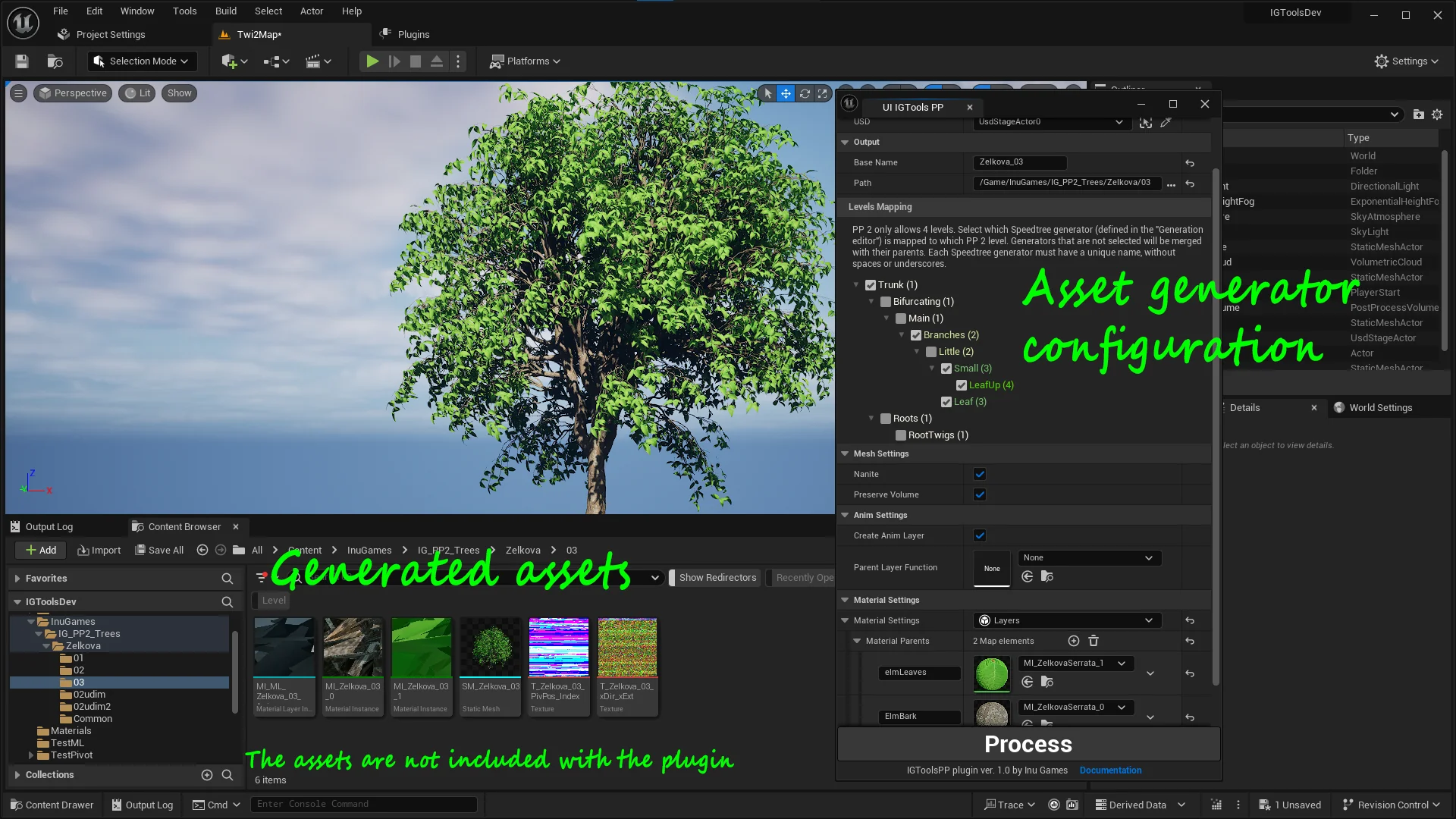
The import mechanism relies on Universal Scene Description (USD) files exported directly from SpeedTree. Once brought into Unreal Engine, IGToolsPP processes the underlying tree hierarchy through an integrated user interface. This interface allows the user to explicitly map SpeedTree generators to specific Pivot Painter 2 hierarchy levels, establishing which geometric clusters represent primary trunks, major limbs, structural twigs, or foliage cards.
The plugin generates a static mesh asset that can be configured to use Nanite or remain as a conventional mesh. Beyond basic vertex data, the generation step authors an additional UV channel and compiles two small textures carrying the transformation and pivot location details needed for 4-level hierarchy calculations. The asset creation pipeline also handles structural variations that often break traditional importers:
Separation of geometry into multi-part static meshes, allowing foliage elements like leaves to exist on a mesh discrete from the primary trunk and branches.
Processing of multi-trunk botanic species where growth splits into separate structural pillars near the ground.
Translation of lower-tier vegetation models, including field grass and groundcover plants.
UV adjustments configured to work with UDIM tile layouts, which consolidate texture space and reduce the total number of material slots required across complex canopies.
Overcoming Wind Pipeline Constraints in Nanite
Integrating complex tree movement alongside Nanite geometry has historically exposed significant trade-offs. The standard SpeedTree import process translates wind dynamics using up to five additional UV channels in combination with vertex color channels. This volume of vertex-level metadata conflicts with Nanite optimization patterns and simultaneously caps motion complexity at two hierarchical levels. Heavy vertex data footprints bloat mesh memory and restrict how fluidly canopy layers respond to directional turbulence.
IGToolsPP replaces that vertex overhead by shifting the motion data storage entirely into texture space. By utilizing only one supplementary UV channel alongside two compact pivot textures, the tool provides four distinct levels of wind animation while maintaining full Nanite compatibility. This setup preserves geometric fidelity across millions of micro-polygons without discarding the micro-movements of outermost foliage tips. Because the data structure operates through standard Pivot Painter textures, projects are not strictly bound to the default 4-level material structure; artists can generate pivot textures across an arbitrary number of levels to drive custom foliage shaders or feed external systems like Niagara particle simulations.
Pivot Painter Material Layers and Directional Control
Motion execution inside the engine relies on a modular shading architecture. IGToolsPP supplies a modified implementation of the Pivot Painter 2 wind material organized cleanly into material layers. This layer-based distribution enables creators to blend kinetic behavior onto their surfaces while maintaining isolated base materials for trunk bark, boughs, and leaf surfaces.
Global wind behavior across an entire environment is managed through a Material Parameter Collection. This collection bridges directly with Unreal Engine's Directional Wind Actor, standardizing wind vectors, gusts, and global turbulence values across all instances in a scene. For studios that prefer distinct shading systems, the generated assets remain fully backwards-compatible with the original Pivot Painter 2 materials found inside Unreal Engine's Content Examples, or they can be dropped straight into in-house environmental master shaders.
Asset Setup and Technical Configuration
To operate smoothly, the plugin depends on three core systems native to Unreal Engine 5: the USD Importer, Python Scripting, and Geometry Scripting. These foundational components allow the tool to read scene hierarchies, automate data parsing, and generate procedural static meshes directly inside the editor project.
Surface texturing is deliberately uncoupled from the initial geometry synthesis. IGToolsPP does not automatically import SpeedTree's native base color or surface textures. Instead, the workflow assumes modern visual targets require original high-fidelity PBR assets, such as Quixel material libraries or custom surface scans. Artists assign their own PBR texture maps directly to the generated mesh materials, ensuring complete control over surface roughness, albedo fidelity, and normal accuracy while the plugin manages the underlying animation coordinates and material layer logic.
 Buildings
 Engine Tools
 Engine Tools