"148d1066ed74e216"{"id":"1002918","slug":"ascent-toolset-ats-v-2-2-quests-dialogues-and-state-machine","title":"Ascent Toolset (ATS) V 2.2 - Quests, Dialogues and State Machine","category":"Dialog Systems","engine":"4.26 - 5.6","assetVersion":"Asset Version: 1.2.1 - 2.2","engineVersion":"Engine Version: 4.26 - 5.6","tag":"Dialog Systems","accent":"blue","visual":"mech","summary":"Ascent Toolset brings node-based quest design, branching dialogues, and generic finite state machines to Unreal Engine with full network replication.","platform":"Unreal Engine","indexPolicy":"index","publishedAt":"2026-11-21T22:23:53.599Z","updatedAt":"2026-11-21T22:23:53.599Z","sourceNotes":[],"fileContents":[],"compatibility":["Unreal Engine","Asset Version: 1.2.1 - 2.2","Engine Version: 4.26 - 5.6"],"featuredImage":{"alt":"Ascent Toolset (ATS) V 2.2 - Quests, Dialogues and State Machine","src":"/wp-content/uploads/published/2026/11/98218e5b8616-6d518ab6-a13b-4835-9c81-3e9b0d4504ba-96c5b4ea03.webp"},"fileSizeBytes":5842249,"hasDownloadLink":true,"downloads":0,"terms":[{"taxonomy":"category","slug":"dialog-systems-tools-and-plugins","name":"Dialog Systems"}],"galleryImages":[{"src":"/wp-content/uploads/published/2026/11/7180ac65e9c9-6c79e18f-2382-4ee0-9c16-68eaf4939acf-a5e22cdf6c.webp","alt":"Ascent Toolset (ATS) V 2.2 - Quests, Dialogues and State Machine"},{"src":"/wp-content/uploads/published/2026/11/31935597fcd8-f1a5cd73-c77c-4b79-8446-1ee40d90b88f-b04523b200.webp","alt":"Ascent Toolset (ATS) V 2.2 - Quests, Dialogues and State Machine"},{"src":"/wp-content/uploads/published/2026/11/57b717eccb9d-2fe80dae-42ac-4491-962e-0684c52a4282-283677e9a3.webp","alt":"Ascent Toolset (ATS) V 2.2 - Quests, Dialogues and State Machine"},{"src":"/wp-content/uploads/published/2026/11/468d81c95248-58e47082-01bf-4ec4-9805-473ac98fb5c6-9b038934df.webp","alt":"Ascent Toolset (ATS) V 2.2 - Quests, Dialogues and State Machine"},{"src":"/wp-content/uploads/published/2026/11/4bbd50a27979-2a289b92-ad66-4ff9-8e3b-1b629e8d2c3c-d44ce75745.webp","alt":"Ascent Toolset (ATS) V 2.2 - Quests, Dialogues and State Machine"},{"src":"/wp-content/uploads/published/2026/11/d711e3b74a52-07ecb8a3-7f88-41ad-a16c-dde69f0ee7a4-eedbf9a68f.webp","alt":"Ascent Toolset (ATS) V 2.2 - Quests, Dialogues and State Machine"},{"src":"/wp-content/uploads/published/2026/11/9e485cf06394-1a31a362-1431-4038-95c1-8f40c7f2197f-769917b107.webp","alt":"Ascent Toolset (ATS) V 2.2 - Quests, Dialogues and State Machine"},{"src":"/wp-content/uploads/published/2026/11/03f91f5734a6-5c300b40-36ad-4b38-b312-f118551f8acf-5e7e89d3ba.webp","alt":"Ascent Toolset (ATS) V 2.2 - Quests, Dialogues and State Machine"},{"src":"/wp-content/uploads/published/2026/11/3c9a9d7d3b06-17325dbc-179e-40e1-80a4-4b5e6a119870-7839cb8d61.webp","alt":"Ascent Toolset (ATS) V 2.2 - Quests, Dialogues and State Machine"},{"src":"/wp-content/uploads/published/2026/11/686a3a83ec4c-4a3c739e-ff3e-400d-bf1c-e0b764022ca5-cd8d9bec94.webp","alt":"Ascent Toolset (ATS) V 2.2 - Quests, Dialogues and State Machine"}],"accessPanel":{"kind":"resource","title":"Get this resource","safetyNote":"Resources are manually reviewed before listing to improve quality and reduce obvious risks.","fileName":"Ascent Toolset (ATS) V 2.2 - Quests, Dialogues and State Machine.7z","resourceType":"Resource archive","versions":[]},"contentHtml":"\u003cp\u003eWhen dialogue starts, a narrative camera frames the speakers while facial tracks, audio cues, and body animations trigger directly from a visual node graph. Simultaneously, mission flags update across the game instance, and internal system states transition smoothly. Ascent Toolset provides the underlying infrastructure for these interactions inside Unreal Engine, unifying quest logic, spoken exchanges, and finite state architecture into modular, component-based node editors.\u003c/p\u003e \u003ch2\u003eStructuring Narrative Graphs with the Ascent Toolset Node Editors\u003c/h2\u003e\n\u003cp\u003eAt the center of narrative production in the Ascent Toolset is an intuitive graph workflow. Rather than scattering storytelling logic across disparate Blueprints, trigger volumes, and UI widgets, writers and technical designers work directly within dedicated node editors. The visual canvas allows teams to lay out quest progression, dialogue branches, and state shifts as legible networks where dependencies and conditions remain clear at a glance.\u003c/p\u003e \u003cp\u003eThe node interface received extensive revisions to streamline how creators draft scenarios. Navigating dense graphs, arranging node hierarchies, and wiring branching choices together benefits from specialized tools tailored specifically to the rhythms of quest and conversation authoring. Because stories shift dynamically based on player choices, the editing environment minimizes friction when testing alternate narrative branches, inserting unexpected diversions, or re-linking objectives during iterative design phases.\u003c/p\u003e \u003ch2\u003eBranching Dialogues and Audio-Visual Synchronization\u003c/h2\u003e\n\u003cp\u003eThe Dialogue Tool is structured to drive cinematic storytelling without requiring custom scripting for every spoken line. Within each dialogue graph, nodes handle multi-layered branches that respond to player decisions. These nodes are not simple string deliverers; they coordinate the broader sensory presentation of the scene, firing sound cues, launching cinematic camera sequences, and triggering matching body movements.\u003c/p\u003e \u003cp\u003eFacial performances and character delivery tie directly into the dialogue sequence. The system accommodates complex character rigs, including MetaHuman assets, aligning vocal delivery with realistic facial articulation and physical gesture. With the integration of world dialogues, conversations can step outside traditional locked camera sequences and unfold directly in the ambient environment. AI-powered non-player characters expand these interactions further, utilizing runtime lipsync to articulate lines dynamically in the game world.\u003c/p\u003e \u003cp\u003eHandling dynamic character names, changing item tallies, or variable faction ranks often complicates dialogue setup. Ascent Toolset resolves this through Runtime Text Variables. Authors can define text keys that dynamically inject runtime data directly into player-facing text lines, ensuring that dialogue boxes and subtitles display live gameplay context without breaking authorial flow.\u003c/p\u003e \u003ch2\u003eMission Design Through the Quest Tool\u003c/h2\u003e\n\u003cp\u003eMissions demand structure, progression checks, and clear objectives that can diverge based on player actions. The Quest Tool manages these operational requirements across simple errands and intricate multi-stage narrative arcs. Using the dedicated quest graph, developers assemble branched mission paths that branch or converge based on how objectives are resolved in the field.\u003c/p\u003e \u003cp\u003eTo reduce repetitive setup work, the quest system includes a library of pre-made objectives out of the box. These stock nodes cover standard operational demands such as location tracking, item gathering, interaction checks, and combat milestones. When a project demands bespoke mechanics, developers are not locked into predefined parameters. Custom objectives can be authored natively within Blueprints or written in C++, giving technical teams the freedom to establish specialized win conditions, failure states, or branching triggers that speak directly to unique gameplay mechanics.\u003c/p\u003e \u003ch2\u003eImplementing the State Pattern with the State Machine Editor\u003c/h2\u003e\n\u003cp\u003eBeyond conversational text and mission trackers, modern gameplay loops rely heavily on state management. The Ascent Toolset Finite State Machine (FSM) tool provides a generic state machine editor shaped by the classic software engineering state pattern. Instead of hardcoding conditional branching statements into monolithic actor classes, developers can model state flow through a clean visual graph.\u003c/p\u003e \u003cp\u003eBecause the FSM is completely generic, its utility extends across virtually any system that transitions between defined operating states. It can govern enemy artificial intelligence patterns, combat phases, user interface states, atmospheric environment rules, or overarching game modes. Nodes represent distinct states, while transitions dictate the rules, conditions, and events necessary to move from one state to another. Visualizing these rules in an editor keeps systemic code isolated, maintainable, and significantly easier to debug when unexpected behavior occurs.\u003c/p\u003e \u003ch2\u003eComponent Foundation, Network Replication, and Blueprint Usability\u003c/h2\u003e\n\u003cp\u003eUnder the hood, Ascent Toolset is engineered in C++ to maintain low computational overhead and execution speed. Despite this native foundation, the entire suite is built to be 100% usable in Blueprint-only projects. Designers, scripters, and indie creators can access every node, configure variables, and build complete questlines without compiling code or touching a development environment.\u003c/p\u003e \u003cp\u003eModularity dictates how the systems interface with your project. Every tool relies on an actor component workflow, allowing developers to attach quest tracking, dialogue reception, or state management directly to any character, controller, or world entity without altering existing class inheritance hierarchies. This component-based model prevents architectural lock-in, enabling clean integration into both new prototypes and established production pipelines.\u003c/p\u003e \u003cp\u003eMultiplayer projects are natively accommodated through built-in network replication. Dialogue triggers, active quest objectives, completion states, and state machine transitions replicate across the network, ensuring consistency between servers and connected clients in cooperative or competitive multiplayer settings.\u003c/p\u003e \u003cp\u003eThe toolset also connects directly into a broader ecosystem of game creation utilities. It forms a central component within ACF ULTIMATE, the comprehensive action RPG framework, providing the narrative and mission backbone for expansive role-playing projects. For teams seeking assistance during framework implementation, the YARIN AI developer assistant offers interactive development guidance tailored to the underlying architecture.\u003c/p\u003e \u003ch2\u003eCore System Takeaway\u003c/h2\u003e\n\u003cp\u003eAscent Toolset delivers a unified narrative and structural toolkit for Unreal Engine developers who need to organize complex gameplay without building custom backend systems from scratch. By supplying specialized node editors for quests and branching dialogue alongside a generic state machine, it bridges the gap between high-level creative storytelling and low-level game architecture, offering out-of-the-box network replication, component flexibility, and complete Blueprint accessibility.\u003c/p\u003e\n\n\u003ch2\u003eExplore Similar Assets\u003c/h2\u003e\n\u003cul\u003e\n\u003cli\u003e\u003ca href=\"https://3dcghub.com/ogs-dialogue-quest-master/\" rel=\"noopener noreferrer\"\u003eOGS - Dialogue \u0026amp; Quest Master\u003c/a\u003e\u003c/li\u003e\n\u003cli\u003e\u003ca href=\"https://3dcghub.com/ascent-finite-state-machine-fsm/\" rel=\"noopener noreferrer\"\u003eAscent Finite State Machine (FSM)\u003c/a\u003e\u003c/li\u003e\n\u003cli\u003e\u003ca href=\"https://3dcghub.com/quest-editor-plugin/\" rel=\"noopener noreferrer\"\u003eQuest Editor Plugin\u003c/a\u003e\u003c/li\u003e\n\u003cli\u003e\u003ca href=\"https://3dcghub.com/dialogue-plugin/\" rel=\"noopener noreferrer\"\u003eDialogue Plugin\u003c/a\u003e\u003c/li\u003e\n\u003cli\u003e\u003ca href=\"https://3dcghub.com/logic-driver-pro-blueprint-editor-for-dialogue-quest-combat-and-fsm-systems/\" rel=\"noopener noreferrer\"\u003eLogic Driver Pro - Blueprint Editor for Dialogue, Quest, Combat \u0026amp; FSM Systems\u003c/a\u003e\u003c/li\u003e\n\u003c/ul\u003e","contentTextLength":7373,"navigation":{"current":54,"total":4890,"previous":{"id":"1002919","slug":"collision-preset-filter-in-editor-collision-preset-debugging-tool","title":"Collision Preset Filter - In Editor Collision Preset Debugging Tool","category":"Engine Tools","platform":"Unreal Engine","updatedAt":"2026-11-21T22:24:30.675Z"},"next":{"id":"1001160","slug":"operating-system-simulator-plugin","title":"Operating System Simulator Plugin","category":"Game Mechanics","platform":"Unreal Engine","updatedAt":"2026-11-21T20:55:15.898Z"}},"relatedResources":[{"id":"1002932","slug":"not-yet-dialogue-plugin-system","title":"Not Yet: Dialogue Plugin System","category":"Dialog Systems","engine":"4.27 - 5.6","assetVersion":"Asset Version: 16.0.2 - 18.0.3","engineVersion":"Engine Version: 4.27 - 5.6","tag":"Dialog Systems","accent":"blue","visual":"mech","summary":"Explore the Dialogue Plugin System, a graph editor tool for authoring linear and multi-branch character conversations in games like The Ascent and Backbone.","platform":"Unreal Engine","indexPolicy":"index","publishedAt":"2026-11-21T23:09:07.422Z","updatedAt":"2026-11-21T23:09:07.422Z","sourceNotes":[],"fileContents":[],"compatibility":["Unreal Engine","Asset Version: 16.0.2 - 18.0.3","Engine Version: 4.27 - 5.6"],"featuredImage":{"alt":"Not Yet: Dialogue Plugin System","src":"/wp-content/uploads/published/2026/11/9fe83bcb1fae-251e37b1-033e-4e3d-a6e2-6f3971d23763-8308094d9b.webp"},"fileSizeBytes":31942677,"hasDownloadLink":true,"downloads":0},{"id":"27100","slug":"ogs-dialogue-quest-master","title":"OGS - Dialogue \u0026 Quest Master","category":"Dialog Systems","engine":"5.5 - 5.6","assetVersion":"Engine version: 5.5 - 5.6","engineVersion":"Asset Version:2.1.3","tag":"Dialog Systems","accent":"blue","visual":"mech","summary":"Dialogue \u0026 Quest Master turns Unreal Engine 5 into a structured workspace for interactive stories, quests, and cinematic conversations. It brings dialogue editing, quest logic, statistics, and save handling into one extensible framework built with C++ and B...","platform":"Unreal Engine","indexPolicy":"index","publishedAt":"2026-04-21T10:12:23.000Z","updatedAt":"2026-04-21T10:12:25.000Z","sourceNotes":[],"fileContents":[],"compatibility":["Unreal Engine","Engine version: 5.5 - 5.6","Asset Version: 2.1.3"],"featuredImage":{"alt":"OGS - Dialogue \u0026 Quest Master","src":"https://3dcghub.com/wp-content/uploads/2026/04/48a41fb58a32_582b3097-a5c8-4066-8891-d6d8924e4ecc-4.webp"},"fileSizeBytes":81907168,"hasDownloadLink":true,"downloads":1},{"id":"1002899","slug":"ascent-finite-state-machine-fsm","title":"Ascent Finite State Machine (FSM)","category":"Engine Tools","engine":"4.26","assetVersion":"Asset Version: 1.1","engineVersion":"Engine Version: 4.26","tag":"Engine Tools","accent":"blue","visual":"mech","summary":"A visual finite state machine for Unreal Engine, delivering C++ performance, complete Blueprint exposure, and synched transitions for multiplayer.","platform":"Unreal Engine","indexPolicy":"index","publishedAt":"2026-11-21T04:47:16.312Z","updatedAt":"2026-11-21T04:47:16.312Z","sourceNotes":[],"fileContents":[],"compatibility":["Unreal Engine","Asset Version: 1.1","Engine Version: 4.26"],"featuredImage":{"alt":"Ascent Finite State Machine (FSM)","src":"/wp-content/uploads/published/2026/11/bcdad90d040c-e3c9cf97-9d19-477f-a932-35d0b0cca9c7-f7f2b48271.webp"},"fileSizeBytes":25064979,"hasDownloadLink":true,"downloads":0}]}[{"id":4225,"sourceId":4225,"taxonomyId":4225,"taxonomy":"category","slug":"asset-library","name":"Asset Library","parentId":null,"count":4744,"hasChildren":true,"href":"/","seoTitle":"Free Game Assets Library | 3DCGHUB","seoDescription":"Browse free Unreal Engine, Unity, Blender assets and game development tutorials on 3DCGHUB with previews, compatibility notes, and secure downloads.","sitemapEnabled":true,"children":[{"id":4227,"sourceId":4227,"taxonomyId":4227,"taxonomy":"category","slug":"blender-add-ons-plugins","name":"Blender Add-ons \u0026 Plugins","parentId":4225,"count":10,"hasChildren":false,"href":"/category/blender-add-ons-plugins/","seoTitle":"Free Blender Add-ons \u0026 Plugins | 3DCGHUB","seoDescription":"Browse free Blender Add-ons \u0026 Plugins tools for Blender on 3DCGHUB: curated downloads with preview images, compatibility notes and secure download access.","sitemapEnabled":true},{"id":514,"sourceId":514,"taxonomyId":514,"taxonomy":"category","slug":"unity-2","name":"Unity","parentId":4225,"count":453,"hasChildren":true,"href":"/category/unity-2/","seoTitle":"Free Unity Assets | 3DCGHUB","seoDescription":"Browse free Unity resources on 3DCGHUB: curated downloads with preview images, compatibility notes and secure download access.","sitemapEnabled":true,"children":[{"id":523,"sourceId":523,"taxonomyId":523,"taxonomy":"category","slug":"2d","name":"2D","parentId":514,"count":1,"hasChildren":true,"href":"/category/2d/","seoTitle":"Free Unity 2D | 3DCGHUB","seoDescription":"Browse free 2D assets for Unity on 3DCGHUB: curated downloads with preview images, compatibility notes and secure download access.","sitemapEnabled":true},{"id":515,"sourceId":515,"taxonomyId":515,"taxonomy":"category","slug":"3d-unity-2","name":"3D","parentId":514,"count":162,"hasChildren":true,"href":"/category/3d-unity-2/","seoTitle":"Free Unity 3D Assets | 3DCGHUB","seoDescription":"Browse free 3D assets for Unity on 3DCGHUB: curated downloads with preview images, compatibility notes and secure download access.","sitemapEnabled":true},{"id":565,"sourceId":565,"taxonomyId":565,"taxonomy":"category","slug":"add-ons","name":"Add-Ons","parentId":514,"count":2,"hasChildren":false,"href":"/category/add-ons/","seoTitle":"Free Unity Add-Ons | 3DCGHUB","seoDescription":"Browse free Add-Ons assets for Unity on 3DCGHUB: curated downloads with preview images, compatibility notes and secure download access.","sitemapEnabled":true},{"id":529,"sourceId":529,"taxonomyId":529,"taxonomy":"category","slug":"audio-unity-2","name":"Audio","parentId":514,"count":1,"hasChildren":true,"href":"/category/audio-unity-2/","seoTitle":"Free Unity Audio | 3DCGHUB","seoDescription":"Browse free Audio for Unity on 3DCGHUB: curated downloads with preview images, compatibility notes and secure download access.","sitemapEnabled":true},{"id":557,"sourceId":557,"taxonomyId":557,"taxonomy":"category","slug":"templates","name":"Templates","parentId":514,"count":36,"hasChildren":true,"href":"/category/templates/","seoTitle":"Free Unity Templates | 3DCGHUB","seoDescription":"Browse free Unity project templates on 3DCGHUB. Starter kits with previews, compatibility notes, and secure download access.","sitemapEnabled":true},{"id":533,"sourceId":533,"taxonomyId":533,"taxonomy":"category","slug":"tools-unity-2","name":"Tools","parentId":514,"count":0,"hasChildren":true,"href":"/category/tools-unity-2/","sitemapEnabled":true},{"id":554,"sourceId":554,"taxonomyId":554,"taxonomy":"category","slug":"vfx-unity-2","name":"VFX","parentId":514,"count":4,"hasChildren":true,"href":"/category/vfx-unity-2/","seoTitle":"Free Unity VFX | 3DCGHUB","seoDescription":"Browse free VFX for Unity on 3DCGHUB: curated downloads with preview images, compatibility notes and secure download access.","sitemapEnabled":true}]},{"id":511,"sourceId":511,"taxonomyId":511,"taxonomy":"category","slug":"unreal-engine-2","name":"Unreal Engine","parentId":4225,"count":4282,"hasChildren":true,"href":"/category/unreal-engine-2/","seoTitle":"Free Unreal Engine Assets | 3DCGHUB","seoDescription":"Browse free Unreal Engine resources on 3DCGHUB: curated downloads with preview images, compatibility notes and secure download access.","sitemapEnabled":true,"children":[{"id":54,"sourceId":54,"taxonomyId":54,"taxonomy":"category","slug":"3d","name":"3D","parentId":511,"count":2428,"hasChildren":true,"href":"/category/3d/","seoTitle":"Free Unreal Engine 3D | 3DCGHUB","seoDescription":"Browse free 3D assets for Unreal Engine on 3DCGHUB: curated downloads with preview images, compatibility notes and secure download access.","sitemapEnabled":true},{"id":441,"sourceId":441,"taxonomyId":441,"taxonomy":"category","slug":"animations","name":"Animations","parentId":511,"count":245,"hasChildren":true,"href":"/category/animations/","seoTitle":"Free Unreal Engine Animations | 3DCGHUB","seoDescription":"Browse free Animations for Unreal Engine on 3DCGHUB: curated downloads with preview images, compatibility notes and secure download access.","sitemapEnabled":true},{"id":446,"sourceId":446,"taxonomyId":446,"taxonomy":"category","slug":"audio","name":"Audio","parentId":511,"count":63,"hasChildren":true,"href":"/category/audio/","seoTitle":"Free Unreal Engine Audio Resources | 3DCGHUB","seoDescription":"Browse free Unreal Engine audio resources including sound effects, voices, dialogue, and ambient sounds. Curated free downloads on 3DCGHUB.","sitemapEnabled":true},{"id":466,"sourceId":466,"taxonomyId":466,"taxonomy":"category","slug":"game-systems","name":"Game Systems","parentId":511,"count":356,"hasChildren":true,"href":"/category/game-systems/","seoTitle":"Free Unreal Engine Game Systems | 3DCGHUB","seoDescription":"Browse free Game Systems tools for Unreal Engine on 3DCGHUB: curated downloads with preview images, compatibility notes and secure download access.","sitemapEnabled":true},{"id":478,"sourceId":478,"taxonomyId":478,"taxonomy":"category","slug":"game-templates","name":"Game Templates","parentId":511,"count":150,"hasChildren":true,"href":"/category/game-templates/","seoTitle":"Free Unreal Engine Game Templates | 3DCGHUB","seoDescription":"Browse free Game Templates for Unreal Engine on 3DCGHUB: curated downloads with preview images, compatibility notes and secure download access.","sitemapEnabled":true},{"id":432,"sourceId":432,"taxonomyId":432,"taxonomy":"category","slug":"hdri","name":"HDRI","parentId":511,"count":6,"hasChildren":true,"href":"/category/hdri/","seoTitle":"Free Unreal Engine HDRI | 3DCGHUB","seoDescription":"Browse free Unreal Engine HDRI skies and lighting maps on 3DCGHUB. Environment lighting with previews and secure downloads.","sitemapEnabled":true},{"id":228,"sourceId":228,"taxonomyId":228,"taxonomy":"category","slug":"material-and-textures","name":"Material \u0026 Textures","parentId":511,"count":172,"hasChildren":true,"href":"/category/material-and-textures/","seoTitle":"Free Unreal Engine Material \u0026 Textures | 3DCGHUB","seoDescription":"Browse free Material \u0026 Textures for Unreal Engine on 3DCGHUB: curated downloads with preview images, compatibility notes and secure download access.","sitemapEnabled":true},{"id":298,"sourceId":298,"taxonomyId":298,"taxonomy":"category","slug":"sprites-and-flipbooks","name":"Sprites \u0026 Flipbooks","parentId":511,"count":17,"hasChildren":true,"href":"/category/sprites-and-flipbooks/","seoTitle":"Free Unreal Engine Sprites \u0026 Flipbooks | 3DCGHUB","seoDescription":"Browse free Sprites \u0026 Flipbooks assets for Unreal Engine on 3DCGHUB: curated downloads with preview images, compatibility notes and secure download access.","sitemapEnabled":true},{"id":489,"sourceId":489,"taxonomyId":489,"taxonomy":"category","slug":"tools-and-plugins","name":"Tools \u0026 Plugins","parentId":511,"count":390,"hasChildren":true,"href":"/category/tools-and-plugins/","seoTitle":"Free Unreal Engine Tools \u0026 Plugins | 3DCGHUB","seoDescription":"Browse free Tools \u0026 Plugins for Unreal Engine on 3DCGHUB: curated downloads with preview images, compatibility notes and secure download access.","sitemapEnabled":true},{"id":459,"sourceId":459,"taxonomyId":459,"taxonomy":"category","slug":"ui","name":"UI","parentId":511,"count":43,"hasChildren":true,"href":"/category/ui/","seoTitle":"Free Unreal Engine UI | 3DCGHUB","seoDescription":"Browse free UI for Unreal Engine on 3DCGHUB: curated downloads with preview images, compatibility notes and secure download access.","sitemapEnabled":true},{"id":450,"sourceId":450,"taxonomyId":450,"taxonomy":"category","slug":"vfx","name":"VFX","parentId":511,"count":412,"hasChildren":true,"href":"/category/vfx/","seoTitle":"Free Unreal Engine VFX | 3DCGHUB","seoDescription":"Browse free VFX for Unreal Engine on 3DCGHUB: curated downloads with preview images, compatibility notes and secure download access.","sitemapEnabled":true}]}]},{"id":4222,"sourceId":4222,"taxonomyId":4222,"taxonomy":"category","slug":"tutorial-library","name":"Tutorial Library","parentId":null,"count":117,"hasChildren":false,"href":"/tutorials/","seoTitle":"Free Game Development Tutorial Library | 3DCGHUB","seoDescription":"Browse free game development tutorials for Unreal Engine, Unity, Blender, and more on 3DCGHUB with practical workflows and secure downloads.","sitemapEnabled":true}]
Resource screenshots
1 / 10
Join our channel
Follow 3DCGHUB on Telegram for new resource drops, migration updates, and community notices.
When dialogue starts, a narrative camera frames the speakers while facial tracks, audio cues, and body animations trigger directly from a visual node graph. Simultaneously, mission flags update across the game instance, and internal system states transition smoothly. Ascent Toolset provides the underlying infrastructure for these interactions inside Unreal Engine, unifying quest logic, spoken exchanges, and finite state architecture into modular, component-based node editors.
Structuring Narrative Graphs with the Ascent Toolset Node Editors
At the center of narrative production in the Ascent Toolset is an intuitive graph workflow. Rather than scattering storytelling logic across disparate Blueprints, trigger volumes, and UI widgets, writers and technical designers work directly within dedicated node editors. The visual canvas allows teams to lay out quest progression, dialogue branches, and state shifts as legible networks where dependencies and conditions remain clear at a glance.
The node interface received extensive revisions to streamline how creators draft scenarios. Navigating dense graphs, arranging node hierarchies, and wiring branching choices together benefits from specialized tools tailored specifically to the rhythms of quest and conversation authoring. Because stories shift dynamically based on player choices, the editing environment minimizes friction when testing alternate narrative branches, inserting unexpected diversions, or re-linking objectives during iterative design phases.
Branching Dialogues and Audio-Visual Synchronization
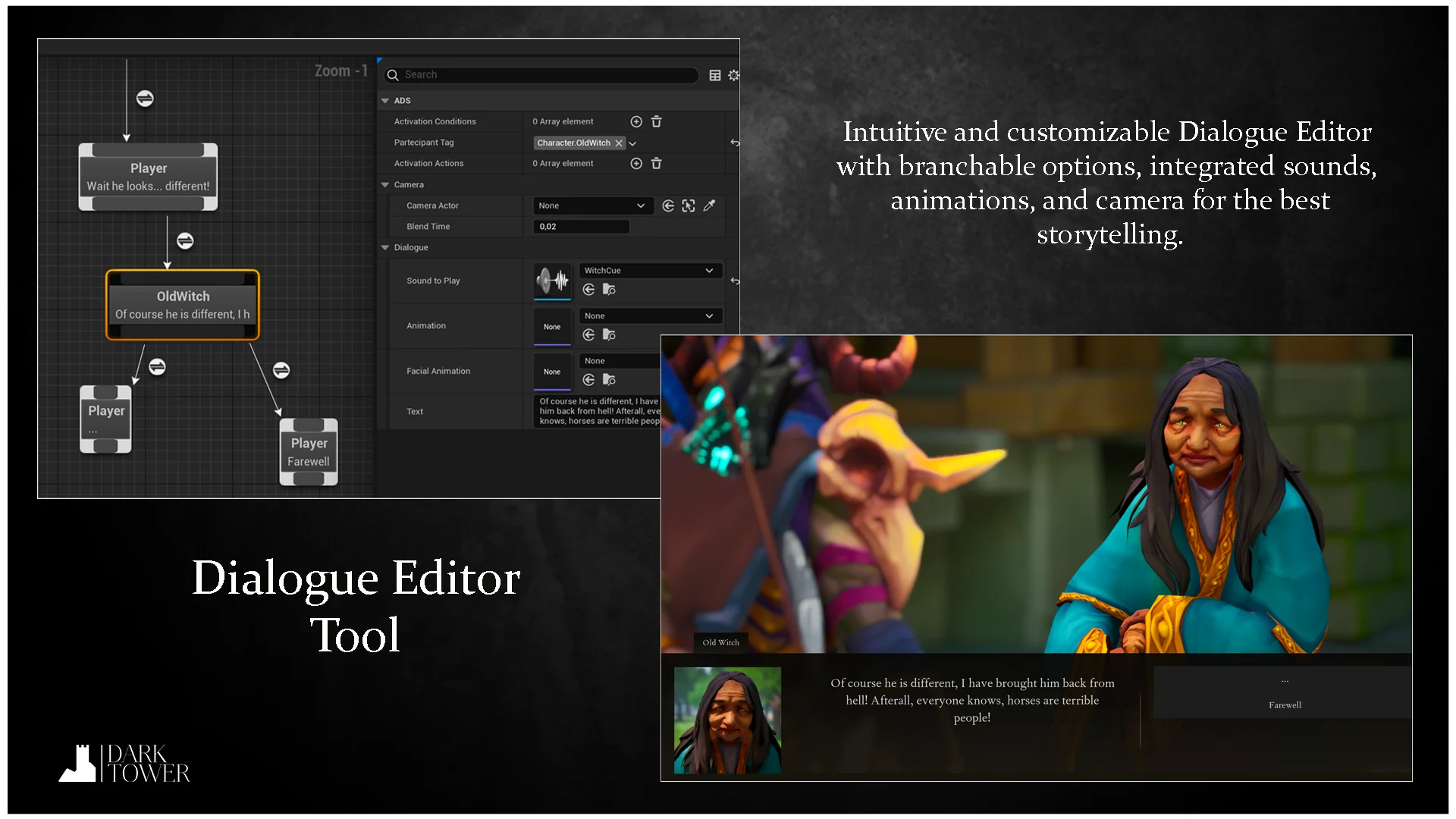
The Dialogue Tool is structured to drive cinematic storytelling without requiring custom scripting for every spoken line. Within each dialogue graph, nodes handle multi-layered branches that respond to player decisions. These nodes are not simple string deliverers; they coordinate the broader sensory presentation of the scene, firing sound cues, launching cinematic camera sequences, and triggering matching body movements.
Facial performances and character delivery tie directly into the dialogue sequence. The system accommodates complex character rigs, including MetaHuman assets, aligning vocal delivery with realistic facial articulation and physical gesture. With the integration of world dialogues, conversations can step outside traditional locked camera sequences and unfold directly in the ambient environment. AI-powered non-player characters expand these interactions further, utilizing runtime lipsync to articulate lines dynamically in the game world.
Handling dynamic character names, changing item tallies, or variable faction ranks often complicates dialogue setup. Ascent Toolset resolves this through Runtime Text Variables. Authors can define text keys that dynamically inject runtime data directly into player-facing text lines, ensuring that dialogue boxes and subtitles display live gameplay context without breaking authorial flow.
Mission Design Through the Quest Tool
Missions demand structure, progression checks, and clear objectives that can diverge based on player actions. The Quest Tool manages these operational requirements across simple errands and intricate multi-stage narrative arcs. Using the dedicated quest graph, developers assemble branched mission paths that branch or converge based on how objectives are resolved in the field.
To reduce repetitive setup work, the quest system includes a library of pre-made objectives out of the box. These stock nodes cover standard operational demands such as location tracking, item gathering, interaction checks, and combat milestones. When a project demands bespoke mechanics, developers are not locked into predefined parameters. Custom objectives can be authored natively within Blueprints or written in C++, giving technical teams the freedom to establish specialized win conditions, failure states, or branching triggers that speak directly to unique gameplay mechanics.
Implementing the State Pattern with the State Machine Editor
Beyond conversational text and mission trackers, modern gameplay loops rely heavily on state management. The Ascent Toolset Finite State Machine (FSM) tool provides a generic state machine editor shaped by the classic software engineering state pattern. Instead of hardcoding conditional branching statements into monolithic actor classes, developers can model state flow through a clean visual graph.
Because the FSM is completely generic, its utility extends across virtually any system that transitions between defined operating states. It can govern enemy artificial intelligence patterns, combat phases, user interface states, atmospheric environment rules, or overarching game modes. Nodes represent distinct states, while transitions dictate the rules, conditions, and events necessary to move from one state to another. Visualizing these rules in an editor keeps systemic code isolated, maintainable, and significantly easier to debug when unexpected behavior occurs.
Component Foundation, Network Replication, and Blueprint Usability
Under the hood, Ascent Toolset is engineered in C++ to maintain low computational overhead and execution speed. Despite this native foundation, the entire suite is built to be 100% usable in Blueprint-only projects. Designers, scripters, and indie creators can access every node, configure variables, and build complete questlines without compiling code or touching a development environment.
Modularity dictates how the systems interface with your project. Every tool relies on an actor component workflow, allowing developers to attach quest tracking, dialogue reception, or state management directly to any character, controller, or world entity without altering existing class inheritance hierarchies. This component-based model prevents architectural lock-in, enabling clean integration into both new prototypes and established production pipelines.
Multiplayer projects are natively accommodated through built-in network replication. Dialogue triggers, active quest objectives, completion states, and state machine transitions replicate across the network, ensuring consistency between servers and connected clients in cooperative or competitive multiplayer settings.
The toolset also connects directly into a broader ecosystem of game creation utilities. It forms a central component within ACF ULTIMATE, the comprehensive action RPG framework, providing the narrative and mission backbone for expansive role-playing projects. For teams seeking assistance during framework implementation, the YARIN AI developer assistant offers interactive development guidance tailored to the underlying architecture.
Core System Takeaway
Ascent Toolset delivers a unified narrative and structural toolkit for Unreal Engine developers who need to organize complex gameplay without building custom backend systems from scratch. By supplying specialized node editors for quests and branching dialogue alongside a generic state machine, it bridges the gap between high-level creative storytelling and low-level game architecture, offering out-of-the-box network replication, component flexibility, and complete Blueprint accessibility.
 Dialog Systems
 Dialog Systems
 Engine Tools