"2596237520a17fbf"{"id":"1002899","slug":"ascent-finite-state-machine-fsm","title":"Ascent Finite State Machine (FSM)","category":"Engine Tools","engine":"4.26","assetVersion":"Asset Version: 1.1","engineVersion":"Engine Version: 4.26","tag":"Engine Tools","accent":"blue","visual":"mech","summary":"A visual finite state machine for Unreal Engine, delivering C++ performance, complete Blueprint exposure, and synched transitions for multiplayer.","platform":"Unreal Engine","indexPolicy":"index","publishedAt":"2026-11-21T04:47:16.312Z","updatedAt":"2026-11-21T04:47:16.312Z","sourceNotes":[],"fileContents":[],"compatibility":["Unreal Engine","Asset Version: 1.1","Engine Version: 4.26"],"featuredImage":{"alt":"Ascent Finite State Machine (FSM)","src":"/wp-content/uploads/published/2026/11/bcdad90d040c-e3c9cf97-9d19-477f-a932-35d0b0cca9c7-f7f2b48271.webp"},"fileSizeBytes":25064979,"hasDownloadLink":true,"downloads":0,"terms":[{"taxonomy":"category","slug":"engine-tools-tools-and-plugins","name":"Engine Tools"}],"galleryImages":[{"src":"/wp-content/uploads/published/2026/11/f22e69fb988c-989ab401-07ed-4e7a-abac-3677ea82a86d-4cb5a562f2.webp","alt":"Ascent Finite State Machine (FSM)"},{"src":"/wp-content/uploads/published/2026/11/bbd5624a3878-0de8fa1d-74de-42b5-b852-f25585b9cf87-f6bebed257.webp","alt":"Ascent Finite State Machine (FSM)"},{"src":"/wp-content/uploads/published/2026/11/d2e585327e03-e0320864-8fab-4037-aeec-bf0766db82a1-15ee9b3449.webp","alt":"Ascent Finite State Machine (FSM)"}],"contentHtml":"\u003ch2\u003eVisual Graph Workflows with the Ascent Tooling\u003c/h2\u003e\u003cp\u003eGame architecture often falters under the weight of sprawling conditional statements, cascading booleans, and entangled tick functions. Ascent Finite State Machine addresses this persistent engineering challenge by providing a dedicated visual graph tool designed to implement the classic State Pattern directly within the engine environment. Instead of maintaining sprawling logic trees inside character blueprints or code classes, developers can map discrete states and transitions using an intuitive node-based graph interface. This visual representation turns abstract behavioral logic into transparent, readable diagrams that both programmers and designers can readily track, evaluate, and modify.\u003c/p\u003e\u003cp\u003eBy transforming state logic into distinct nodes connected by formal rules, the tool isolates individual behaviors into modular units. A character, system, or entity exists in exactly one clearly defined state at any given moment, with transitions governed by explicit conditions. This containment eliminates the accidental side effects common to monolithic scripting, where a change made to accommodate one gameplay mechanic inadvertently breaks another. Whether handling complex character locomotion modes, environmental puzzle sequences, or interactive scene elements, having a visual graph brings organizational clarity to every stage of development.\u003c/p\u003e\u003ch2\u003eImplementing the State Pattern Across Blueprints and C++\u003c/h2\u003e\u003cp\u003eUnder the hood, Ascent Finite State Machine is implemented entirely in native C++, guaranteeing the low overhead, execution speed, and architectural stability necessary for demanding titles. At the same time, every operational layer of the system is exposed directly to Blueprints. This dual-access architecture removes the traditional friction between engineering and design teams, allowing both disciplines to work within the exact same structural foundation without compromise.\u003c/p\u003e\u003cp\u003eProgrammers who prefer writing native code can build complex underlying systems in C++ while leaving state definitions or transition triggers open for Blueprint scripting. Technical designers can draft, prototype, and ship entire behavioral structures using node networks without having to write or recompile C++ code. The system maintains clean separation of concerns: state logic can execute performance-critical computations natively while exposing event dispatches, entry triggers, and exit conditions to the visual scripting environment. This balance preserves project-wide architectural hygiene without sacrificing accessibility or rapid iteration.\u003c/p\u003e\u003ch2\u003eMultiplayer Synchronization and Synched Transitions\u003c/h2\u003e\u003cp\u003eNetworked gameplay introduces substantial friction when managing entity states across server and client boundaries. Desynchronization between remote clients, late-arriving packets, and conflicting transition events can easily cause characters to display divergent animations, drop inputs, or enter illegal gameplay conditions. Ascent Finite State Machine addresses this network layer directly through built-in support for synched transitions.\u003c/p\u003e\u003cp\u003eBy treating transitions as synchronized network events, the framework ensures that state shifts remain deterministic and coordinated across all participating peers. When a gameplay entity meets the parameters to leave its current state and enter a new one, the transition logic propagates across the network, keeping the server authority and client proxies aligned. This built-in synchronization saves teams from having to manually write, debug, and replicate bespoke remote procedure calls or state verification routines for every new actor type introduced into the project. From combat stances to synchronized environmental interactions, network replication is handled at the state machine level.\u003c/p\u003e\u003ch2\u003eUnifying Logic in the Ascent Finite State Machine Framework\u003c/h2\u003e\u003cp\u003eScalability in complex game production depends heavily on codebase cleanliness. As features compound over production milestones, uncoordinated systems tend to duplicate logic across actors, controller classes, and animation graphs. Using a standardized finite state machine establishes a uniform pattern across the entire project repository. New team members can inspect any state graph and immediately understand the operational rules governing an entity without tracing through lines of disconnected script.\u003c/p\u003e\u003cp\u003eBecause the implementation is generic, it is not restricted to character control alone. The same graph tools and transition mechanics can govern overall game loop phases, enemy encounter triggers, user interface states, quest progression stages, or localized world mechanics. Modularity ensures that individual states can be tested, refactored, or replaced in total isolation. If a specific state exhibits a defect, isolation within the state graph confines debugging efforts to a single node and its inbound or outbound transitions, preventing cascading regressions throughout the rest of the project codebase.\u003c/p\u003e\u003ch2\u003eEcosystem Compatibility Across ACF and Broader Production Pipelines\u003c/h2\u003e\u003cp\u003eAscent Finite State Machine is engineered to operate harmoniously alongside established frameworks, including ACF (Action RPG Creator), as well as being packaged within Ascent Toolset and ACF Ultimate. For teams building action role-playing games or expansive character-driven experiences, this native compatibility provides a ready-to-use bridge between high-level RPG mechanics and low-level behavioral control.\u003c/p\u003e\u003cp\u003eWithin an ACF-powered production, the state machine effortlessly coordinates complex combat flows, stance shifts, ability execution chains, and defensive reactions. Because it functions as a modular component within this broader ecosystem, teams can rely on a singular, unified design pattern rather than attempting to bridge disparate third-party logic solutions. That leaves a more resilient production pipeline where code maintenance requirements diminish, visual clarity increases, and gameplay mechanics deploy cleanly into both single-player and multiplayer titles.\u003c/p\u003e\n\n\u003ch2\u003eContinue Browsing Similar Packs\u003c/h2\u003e\n\u003cul\u003e\n\u003cli\u003e\u003ca href=\"https://3dcghub.com/logic-driver-pro-blueprint-editor-for-dialogue-quest-combat-and-fsm-systems/\" rel=\"noopener noreferrer\"\u003eLogic Driver Pro - Blueprint Editor for Dialogue, Quest, Combat \u0026amp; FSM Systems\u003c/a\u003e\u003c/li\u003e\n\u003cli\u003e\u003ca href=\"https://3dcghub.com/udp-socket-server-and-client/\" rel=\"noopener noreferrer\"\u003eUDP Socket Server And Client\u003c/a\u003e\u003c/li\u003e\n\u003cli\u003e\u003ca href=\"https://3dcghub.com/root-motion-guide/\" rel=\"noopener noreferrer\"\u003eRoot Motion Guide\u003c/a\u003e\u003c/li\u003e\n\u003cli\u003e\u003ca href=\"https://3dcghub.com/http-and-json/\" rel=\"noopener noreferrer\"\u003eHTTP AND JSON\u003c/a\u003e\u003c/li\u003e\n\u003cli\u003e\u003ca href=\"https://3dcghub.com/dynamic-ai-system/\" rel=\"noopener noreferrer\"\u003eDynamic AI System\u003c/a\u003e\u003c/li\u003e\n\u003c/ul\u003e","contentTextLength":6219,"navigation":{"current":24,"total":4839,"previous":{"id":"1002900","slug":"auto-material-setup","title":"Auto Material Setup","category":"Automations","platform":"Unreal Engine","updatedAt":"2026-11-21T04:47:53.189Z"},"next":{"id":"1002898","slug":"ambulance-premium-drivable-and-interactable","title":"Ambulance - Premium - Drivable and Interactable","category":"Vehicles \u0026 Transportation","platform":"Unreal Engine","updatedAt":"2026-11-21T04:46:56.252Z"}},"relatedResources":[{"id":"1001056","slug":"logic-driver-pro-blueprint-editor-for-dialogue-quest-combat-and-fsm-systems","title":"Logic Driver Pro - Blueprint Editor for Dialogue, Quest, Combat \u0026 FSM Systems","category":"Engine Tools","engine":"4.22 - 5.6","assetVersion":"Asset Version: 1.6 - 2.9.3","engineVersion":"Engine Version: 4.22 - 5.6","tag":"Engine Tools","accent":"blue","visual":"mech","summary":"Logic Driver Pro is a node-based state machine editor for Unreal Engine. Build custom nodes in blueprints or C++, then author AI, dialogue, quests, and combat f","platform":"Unreal Engine","indexPolicy":"index","publishedAt":"2026-08-30T14:36:58.563Z","updatedAt":"2026-11-21T10:49:34.067Z","sourceNotes":[],"fileContents":[],"compatibility":["Unreal Engine","Asset Version: 1.6 - 2.9.3","Engine Version: 4.22 - 5.6"],"featuredImage":{"alt":"Logic Driver Pro - Blueprint Editor for Dialogue, Quest, Combat \u0026 FSM Systems","src":"/wp-content/uploads/published/2026/08/9c80a1e57566-a7733abf-eb2c-4a09-9e80-e6485475e449-f947997ebc.webp"},"fileSizeBytes":527145388,"hasDownloadLink":true,"downloads":1},{"id":"14695","slug":"udp-socket-server-and-client","title":"UDP Socket Server And Client","category":"Engine Tools","engine":"4.26 - 5.8","assetVersion":"Asset Version:1.1 - 2.0","engineVersion":"Engine version: 4.26 - 5.8","tag":"Engine Tools","accent":"blue","visual":"city","summary":"UDP Socket Server And Client is an Unreal Engine plugin for Blueprint-facing UDP data communication, combining server and client components for sending and receiving messages.","platform":"Unreal Engine","indexPolicy":"noindex","publishedAt":"2026-03-11T19:00:59.000Z","updatedAt":"2026-09-30T03:08:35.970Z","sourceNotes":[],"fileContents":[],"compatibility":["Unreal Engine","Asset Version:1.1 - 2.0","Engine version: 4.26 - 5.8"],"featuredImage":{"alt":"UDP Socket Server And Client","src":"https://3dcghub.com/wp-content/uploads/2026/03/476d920b-e32b-4bbc-b437-2a91aca5e181.webp"},"fileSizeBytes":109174423,"hasDownloadLink":true,"downloads":1},{"id":"1002895","slug":"root-motion-guide","title":"Root Motion Guide","category":"Engine Tools","engine":"4.26 - 5.6","assetVersion":"Asset Version: 1.0","engineVersion":"Engine Version: 4.26 - 5.6","tag":"Engine Tools","accent":"blue","visual":"mech","summary":"Integrate Mixamo animations smoothly using Root Motion Guide, shifting complex traversal logic to maps while enabling multiplayer and hanging mechanics.","platform":"Unreal Engine","indexPolicy":"index","publishedAt":"2026-11-21T02:08:26.554Z","updatedAt":"2026-11-21T02:08:26.554Z","sourceNotes":[],"fileContents":[],"compatibility":["Unreal Engine","Asset Version: 1.0","Engine Version: 4.26 - 5.6"],"featuredImage":{"alt":"Root Motion Guide","src":"/wp-content/uploads/published/2026/11/a36eacd7a420-a1263599-e1a4-497e-821b-7e826ea4ddf6-1379e14630.webp"},"fileSizeBytes":179374771,"hasDownloadLink":true,"downloads":0}]}
Resource screenshots
1 / 3
Join our channel
Follow 3DCGHUB on Telegram for new resource drops, migration updates, and community notices.
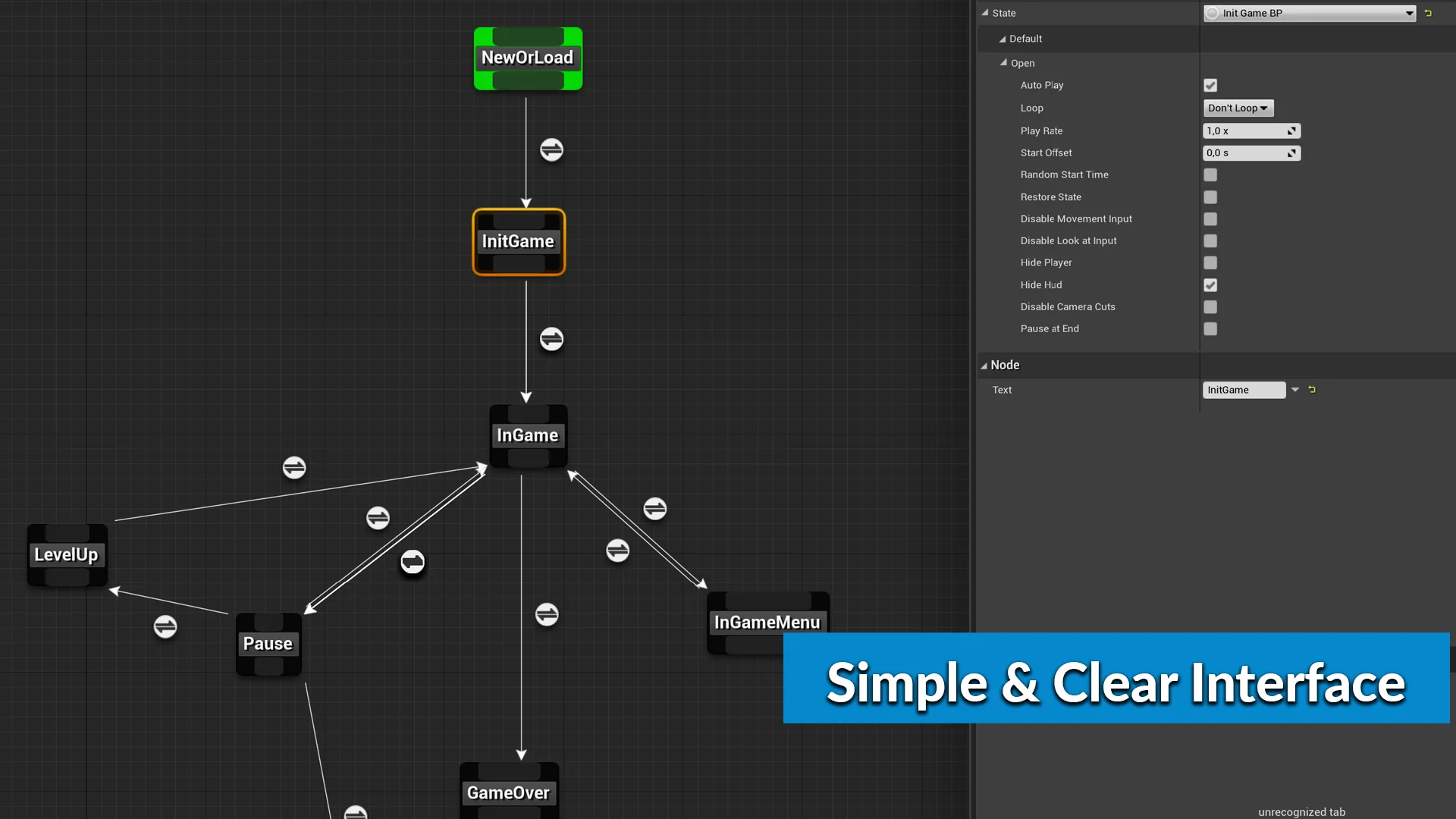
Game architecture often falters under the weight of sprawling conditional statements, cascading booleans, and entangled tick functions. Ascent Finite State Machine addresses this persistent engineering challenge by providing a dedicated visual graph tool designed to implement the classic State Pattern directly within the engine environment. Instead of maintaining sprawling logic trees inside character blueprints or code classes, developers can map discrete states and transitions using an intuitive node-based graph interface. This visual representation turns abstract behavioral logic into transparent, readable diagrams that both programmers and designers can readily track, evaluate, and modify.
By transforming state logic into distinct nodes connected by formal rules, the tool isolates individual behaviors into modular units. A character, system, or entity exists in exactly one clearly defined state at any given moment, with transitions governed by explicit conditions. This containment eliminates the accidental side effects common to monolithic scripting, where a change made to accommodate one gameplay mechanic inadvertently breaks another. Whether handling complex character locomotion modes, environmental puzzle sequences, or interactive scene elements, having a visual graph brings organizational clarity to every stage of development.
Implementing the State Pattern Across Blueprints and C++
Under the hood, Ascent Finite State Machine is implemented entirely in native C++, guaranteeing the low overhead, execution speed, and architectural stability necessary for demanding titles. At the same time, every operational layer of the system is exposed directly to Blueprints. This dual-access architecture removes the traditional friction between engineering and design teams, allowing both disciplines to work within the exact same structural foundation without compromise.
Programmers who prefer writing native code can build complex underlying systems in C++ while leaving state definitions or transition triggers open for Blueprint scripting. Technical designers can draft, prototype, and ship entire behavioral structures using node networks without having to write or recompile C++ code. The system maintains clean separation of concerns: state logic can execute performance-critical computations natively while exposing event dispatches, entry triggers, and exit conditions to the visual scripting environment. This balance preserves project-wide architectural hygiene without sacrificing accessibility or rapid iteration.
Multiplayer Synchronization and Synched Transitions
Networked gameplay introduces substantial friction when managing entity states across server and client boundaries. Desynchronization between remote clients, late-arriving packets, and conflicting transition events can easily cause characters to display divergent animations, drop inputs, or enter illegal gameplay conditions. Ascent Finite State Machine addresses this network layer directly through built-in support for synched transitions.
By treating transitions as synchronized network events, the framework ensures that state shifts remain deterministic and coordinated across all participating peers. When a gameplay entity meets the parameters to leave its current state and enter a new one, the transition logic propagates across the network, keeping the server authority and client proxies aligned. This built-in synchronization saves teams from having to manually write, debug, and replicate bespoke remote procedure calls or state verification routines for every new actor type introduced into the project. From combat stances to synchronized environmental interactions, network replication is handled at the state machine level.
Unifying Logic in the Ascent Finite State Machine Framework
Scalability in complex game production depends heavily on codebase cleanliness. As features compound over production milestones, uncoordinated systems tend to duplicate logic across actors, controller classes, and animation graphs. Using a standardized finite state machine establishes a uniform pattern across the entire project repository. New team members can inspect any state graph and immediately understand the operational rules governing an entity without tracing through lines of disconnected script.
Because the implementation is generic, it is not restricted to character control alone. The same graph tools and transition mechanics can govern overall game loop phases, enemy encounter triggers, user interface states, quest progression stages, or localized world mechanics. Modularity ensures that individual states can be tested, refactored, or replaced in total isolation. If a specific state exhibits a defect, isolation within the state graph confines debugging efforts to a single node and its inbound or outbound transitions, preventing cascading regressions throughout the rest of the project codebase.
Ecosystem Compatibility Across ACF and Broader Production Pipelines
Ascent Finite State Machine is engineered to operate harmoniously alongside established frameworks, including ACF (Action RPG Creator), as well as being packaged within Ascent Toolset and ACF Ultimate. For teams building action role-playing games or expansive character-driven experiences, this native compatibility provides a ready-to-use bridge between high-level RPG mechanics and low-level behavioral control.
Within an ACF-powered production, the state machine effortlessly coordinates complex combat flows, stance shifts, ability execution chains, and defensive reactions. Because it functions as a modular component within this broader ecosystem, teams can rely on a singular, unified design pattern rather than attempting to bridge disparate third-party logic solutions. That leaves a more resilient production pipeline where code maintenance requirements diminish, visual clarity increases, and gameplay mechanics deploy cleanly into both single-player and multiplayer titles.
 Engine Tools
 Engine Tools
 Engine Tools