"2596237520a17fbf"{"id":"1002900","slug":"auto-material-setup","title":"Auto Material Setup","category":"Automations","engine":"4.26+,5.0+","assetVersion":"","engineVersion":"Engine Version: 4.26+,5.0+","tag":"Automations","accent":"blue","visual":"luts","summary":"Automate Unreal Engine PBR material creation from selected textures with Auto Material Setup, featuring ARM support, SimplePBR instances, and clean naming.","platform":"Unreal Engine","indexPolicy":"index","publishedAt":"2026-11-21T04:47:53.189Z","updatedAt":"2026-11-21T04:47:53.189Z","sourceNotes":[],"fileContents":[],"compatibility":["Unreal Engine","Engine Version: 4.26+,5.0+"],"featuredImage":{"alt":"Auto Material Setup","src":"/wp-content/uploads/published/2026/11/867989f90a9d-fd71dd7c-d6e1-4537-9e74-f33a3247c250-94b86575a0.webp"},"fileSizeBytes":65282482,"hasDownloadLink":true,"downloads":0,"terms":[{"taxonomy":"category","slug":"automations-tools-and-plugins","name":"Automations"}],"galleryImages":[{"src":"/wp-content/uploads/published/2026/11/cdef29159204-2e3dd4d0-4909-43c3-9a12-6001c5bc1dcd-6f3ea4f2e0.webp","alt":"Auto Material Setup"},{"src":"/wp-content/uploads/published/2026/11/13b3aa39d3a8-f5368cf6-400e-443c-93ee-b30702345c5b-e3c6790e12.webp","alt":"Auto Material Setup"},{"src":"/wp-content/uploads/published/2026/11/6a55563cfb0d-c10edf36-43b8-47ba-aea3-8ae6edb338b6-9f9745cf00.webp","alt":"Auto Material Setup"},{"src":"/wp-content/uploads/published/2026/11/9cbf0c8ca593-ce8a3eb9-6e10-4e46-a424-67b1e3d61f0d-e9672efca3.webp","alt":"Auto Material Setup"},{"src":"/wp-content/uploads/published/2026/11/bebeaf0e5da9-b7c36427-f0fd-43d4-977e-afd292877179-9571cfc622.webp","alt":"Auto Material Setup"},{"src":"/wp-content/uploads/published/2026/11/db173c7e46fb-222893c2-17b0-4014-b316-07e5ce403210-2b6f0f40fe.webp","alt":"Auto Material Setup"},{"src":"/wp-content/uploads/published/2026/11/6e237b78f5ce-a995ba48-bbad-40ad-88f7-a92599815856-b090c279fe.webp","alt":"Auto Material Setup"}],"contentHtml":"\u003cp\u003eImporting massive batches of texture maps into Unreal Engine typically leaves developers with a tedious chore: manually creating individual material assets, dragging texture samples into the graph, and routing channels by hand. Auto Material Setup functions as an editor utility designed to bypass this repetitive wiring. Mirroring the behavior familiar to 3D artists who rely on Blender’s Node Wrangler add-on, this tool evaluates selected texture assets, builds appropriate material networks, and connects every PBR input automatically.\u003c/p\u003e \u003ch2\u003eExecuting Auto Material Setup in the Unreal Engine Browser\u003c/h2\u003e\n\u003cp\u003eThe core utility operates directly inside the Unreal Engine Content Browser, anchoring into standard context menus to speed up daily import routines. Once texture assets are dragged into a project directory, the user selects the full collection of maps intended for assembly, right-clicks any file within the selection, and invokes the tool via the context menu dropdown.\u003c/p\u003e \u003cp\u003eChoosing the standard execution triggers an automated scan of the selected files. If the textures adhere to standard conventions with supported identifier extensions, such as designated color or albedo tags, new materials are generated immediately within the exact same folder. There is no requirement to build empty master materials first or manually place Texture Sample nodes into an open graph. Every recognized texture is assigned and wired instantly, giving artists immediate visual results inside the content directory without interrupting their import flow.\u003c/p\u003e \u003ch2\u003eSet Recognition, Packing Support, and Metadata Cleaning\u003c/h2\u003e\n\u003cp\u003eLarge projects rarely import assets one by one. When multiple props or environment kits arrive simultaneously, dozens of unrelated texture sets often sit dumped inside a single folder. Auto Material Setup incorporates a large internal naming database that identifies which texture files belong to which asset groups. Rather than dumping all selected maps into a single jumbled network, the tool segregates multiple texture sets from a single batch selection and generates distinct, isolated materials for each individual asset.\u003c/p\u003e \u003cp\u003eTexture packing conventions are fully factored into the evaluation logic. Packed textures—specifically ARM maps combining Ambient Occlusion, Roughness, and Metallic information across the Red, Green, and Blue channels—are recognized and wired appropriately to their corresponding material input pins. This prevents artists from having to open complex graphs solely to route channel splits from a single packed file.\u003c/p\u003e \u003cp\u003eBeyond mapping channels, the utility automatically cleans up material naming. Source textures frequently arrive stamped with export flags, resolution tags, bit-depth labels, or color profile indicators. The setup tool filters these out, stripping unwanted metadata strings such as:\u003c/p\u003e\n\u003cul\u003e \u003cli\u003e_2k\u003c/li\u003e \u003cli\u003e512\u003c/li\u003e \u003cli\u003eDx\u003c/li\u003e \u003cli\u003eSRGB\u003c/li\u003e \u003cli\u003eRaw\u003c/li\u003e\n\u003c/ul\u003e\n\u003cp\u003eBy purging these technical suffixes during creation, the resulting material assets receive clean, readable names that align with production organization standards without requiring manual renaming passes.\u003c/p\u003e \u003ch2\u003eTexture Sampler Assignment and Material Editor Node Layout\u003c/h2\u003e\n\u003cp\u003eCreating materials programmatically often results in overlapping nodes or incorrect texture interpretation, requiring technical artists to go back and clean up the material editor canvas. Auto Material Setup addresses graph cleanliness directly. Upon generating a material, it sorts and positions the texture sample nodes within the Material Editor so they do not overlap, maintaining clear readability if an artist later opens the graph to add custom logic.\u003c/p\u003e \u003cp\u003eTechnical texture settings are adjusted automatically during the process to avoid common visual bugs. Color data and mathematical mask data require fundamentally different color space treatments inside Unreal Engine. When non-color data like roughness is wired, the utility ensures the texture asset's sRGB checkbox is properly toggled off, preventing distorted specular responses caused by accidental gamma correction.\u003c/p\u003e \u003cp\u003eInside the material graph itself, the utility configures the sampler type parameters on each Texture Sample node to match the nature of the incoming data. Linear color maps receive the Linear Color sampler designation, while surface vectors are assigned the Normal sampler type. This eliminates common material compilation errors and ensures that normal vectors, roughness values, and color channels render with correct shading characteristics straight out of the box.\u003c/p\u003e \u003ch2\u003eDeploying the SimplePBR Base with Auto Material Setup Instances\u003c/h2\u003e\n\u003cp\u003eFor scenarios where complex bespoke graphs are unnecessary, creating completely unique material graphs for every mesh can introduce performance overhead and clutter. To streamline asset management, the utility includes an optimized base master material named SimplePBR alongside an alternative execution command: Auto Material Setup - Instance.\u003c/p\u003e \u003cp\u003eWhen artists choose the instance workflow from the right-click menu, the system skips constructing raw graphs and instead creates lightweight Material Instances derived from the parent SimplePBR shader. This option is explicitly recommended whenever an asset does not require heavy, custom node modifications. SimplePBR is engineered with built-in parameter switches and modifier inputs, granting immediate access to practical controls directly on the instance:\u003c/p\u003e\n\u003cul\u003e \u003cli\u003eUV tiling adjustments for scaling patterns across geometric surfaces\u003c/li\u003e \u003cli\u003eNormal map intensity scaling to dial surface depth up or down\u003c/li\u003e \u003cli\u003eTexture rotation controls to reorient patterns without editing raw texture files\u003c/li\u003e\n\u003c/ul\u003e\n\u003cp\u003eThis dual approach provides flexibility: users can generate fully editable raw graphs for complex assets that need unique node logic, or rapidly generate lightweight SimplePBR instances for props that only require standard PBR parameter tuning.\u003c/p\u003e \u003ch2\u003eSlot Matching and USD Import Interoperability\u003c/h2\u003e\n\u003cp\u003eThe tool's functionality extends beyond generating brand-new assets from raw files. It can also search for and populate textures within existing materials, as well as wire maps based on mesh slot naming conventions. By matching texture names to the target slots on imported meshes, artists can reconnect detached textures back into established shading setups without manual assignment passes.\u003c/p\u003e \u003cp\u003eFor productions leveraging broader data exchange standards, the included SimplePBR material architecture maintains direct compatibility with the Unreal Engine 5 USD import framework. This ensures that assets passing through Universal Scene Description interchange pipelines can preserve their shading assignments and basic surface properties cleanly when transitioning into Unreal Engine scenes. The tool is actively maintained, with bug reports and operational issues handled with turnarounds typically within a few days, keeping automated material assembly dependable across evolving production pipelines.\u003c/p\u003e\n\n\u003ch2\u003eRelated Resources Worth Checking\u003c/h2\u003e\n\u003cul\u003e\n\u003cli\u003e\u003ca href=\"https://3dcghub.com/ultimate-engine-copilot-formerly-ultimate-blueprint-generator/\" rel=\"noopener noreferrer\"\u003eUltimate Engine CoPilot (formerly Ultimate Blueprint Generator)\u003c/a\u003e\u003c/li\u003e\n\u003cli\u003e\u003ca href=\"https://3dcghub.com/auto-node-arranger/\" rel=\"noopener noreferrer\"\u003eAuto Node Arranger\u003c/a\u003e\u003c/li\u003e\n\u003cli\u003e\u003ca href=\"https://3dcghub.com/compiler-booster/\" rel=\"noopener noreferrer\"\u003eCompiler Booster\u003c/a\u003e\u003c/li\u003e\n\u003cli\u003e\u003ca href=\"https://3dcghub.com/advanced-texture-tool/\" rel=\"noopener noreferrer\"\u003eAdvanced Texture Tool\u003c/a\u003e\u003c/li\u003e\n\u003cli\u003e\u003ca href=\"https://3dcghub.com/landscape-pro-2-0-auto-generated-material/\" rel=\"noopener noreferrer\"\u003eLandscape Pro 2.0 Auto-Generated Material\u003c/a\u003e\u003c/li\u003e\n\u003c/ul\u003e","contentTextLength":7021,"navigation":{"current":23,"total":4839,"previous":{"id":"1002902","slug":"custom-movement","title":"Custom Movement","category":"Gameplay Features","platform":"Unreal Engine","updatedAt":"2026-11-21T04:49:36.981Z"},"next":{"id":"1002899","slug":"ascent-finite-state-machine-fsm","title":"Ascent Finite State Machine (FSM)","category":"Engine Tools","platform":"Unreal Engine","updatedAt":"2026-11-21T04:47:16.312Z"}},"relatedResources":[{"id":"27256","slug":"ultimate-engine-copilot-formerly-ultimate-blueprint-generator","title":"Ultimate Engine CoPilot (formerly Ultimate Blueprint Generator)","category":"Automations","engine":"0.3.5 - 1.3.5","assetVersion":"Engine version: 5.4 - 5.7","engineVersion":"Asset Version:0.3.5 - 1.3.5","tag":"Automations","accent":"blue","visual":"city","summary":"Ultimate Engine CoPilot keeps Blueprint setup, VFX work, UI creation, and other editor tasks inside Unreal Engine. It responds to natural language, supports voice input, and can run multiple AI agents while you work.","platform":"Unreal Engine","indexPolicy":"index","publishedAt":"2026-04-23T06:55:26.000Z","updatedAt":"2026-07-05T09:41:32.225Z","sourceNotes":[],"fileContents":[],"compatibility":["Unreal Engine","Engine version: 5.4 - 5.7","Asset Version:0.3.5 - 1.3.5"],"featuredImage":{"alt":"Ultimate Engine CoPilot (formerly Ultimate Blueprint Generator)","src":"https://3dcghub.com/wp-content/uploads/2026/04/fd75d459aa77_025b3508-1406-4cd3-96bf-9537f34d3d5f.webp"},"fileSizeBytes":306349024,"hasDownloadLink":true,"downloads":23},{"id":"1002295","slug":"auto-node-arranger","title":"Auto Node Arranger","category":"Automations","engine":"4.25 - 5.6","assetVersion":"Asset Version: 3.0.4 - 5.0.2","engineVersion":"Engine Version: 4.25 - 5.6","tag":"Automations","accent":"blue","visual":"mech","summary":"Auto Node Arranger is an editor automation tool that arranges graph nodes across all graph types, with a Straight beta, reroute options, and crash fixes.","platform":"Unreal Engine","indexPolicy":"index","publishedAt":"2026-11-04T05:22:47.310Z","updatedAt":"2026-11-21T03:46:03.901Z","sourceNotes":[],"fileContents":[],"compatibility":["Unreal Engine","Asset Version: 3.0.4 - 5.0.2","Engine Version: 4.25 - 5.6"],"featuredImage":{"alt":"Auto Node Arranger","src":"/wp-content/uploads/published/2026/11/9489aac76982-f2553146-4228-46a4-ac07-d98b884f5e73-68e3d39c71.webp"},"fileSizeBytes":9179729,"hasDownloadLink":true,"downloads":1},{"id":"13614","slug":"compiler-booster","title":"Compiler Booster","category":"Automations","engine":"1.1 - 1.2","assetVersion":"Engine version: 4.26 - 5.8","engineVersion":"Asset Version:1.1 - 1.2","tag":"Automations","accent":"blue","visual":"character","summary":"Compiler Booster is a powerful editor plugin designed to significantly reduce shader and light compile times by optimizing CPU priority within Unreal Engine.","platform":"Unreal Engine","indexPolicy":"noindex","publishedAt":"2026-03-11T09:15:50.000Z","updatedAt":"2026-08-25T07:36:59.621Z","sourceNotes":[],"fileContents":[],"compatibility":["Unreal Engine","Engine version: 4.26 - 5.8","Asset Version:1.1 - 1.2"],"featuredImage":{"alt":"Compiler Booster","src":"https://3dcghub.com/wp-content/uploads/2026/03/2cad4408-cc39-4d74-bc73-4ca5ee7e6d98.webp"},"fileSizeBytes":81457299,"hasDownloadLink":true,"downloads":1}]}
Resource screenshots
1 / 7
Join our channel
Follow 3DCGHUB on Telegram for new resource drops, migration updates, and community notices.
Automate Unreal Engine PBR material creation from selected textures with Auto Material Setup, featuring ARM support, SimplePBR instances, and clean naming.
Importing massive batches of texture maps into Unreal Engine typically leaves developers with a tedious chore: manually creating individual material assets, dragging texture samples into the graph, and routing channels by hand. Auto Material Setup functions as an editor utility designed to bypass this repetitive wiring. Mirroring the behavior familiar to 3D artists who rely on Blender’s Node Wrangler add-on, this tool evaluates selected texture assets, builds appropriate material networks, and connects every PBR input automatically.
Executing Auto Material Setup in the Unreal Engine Browser
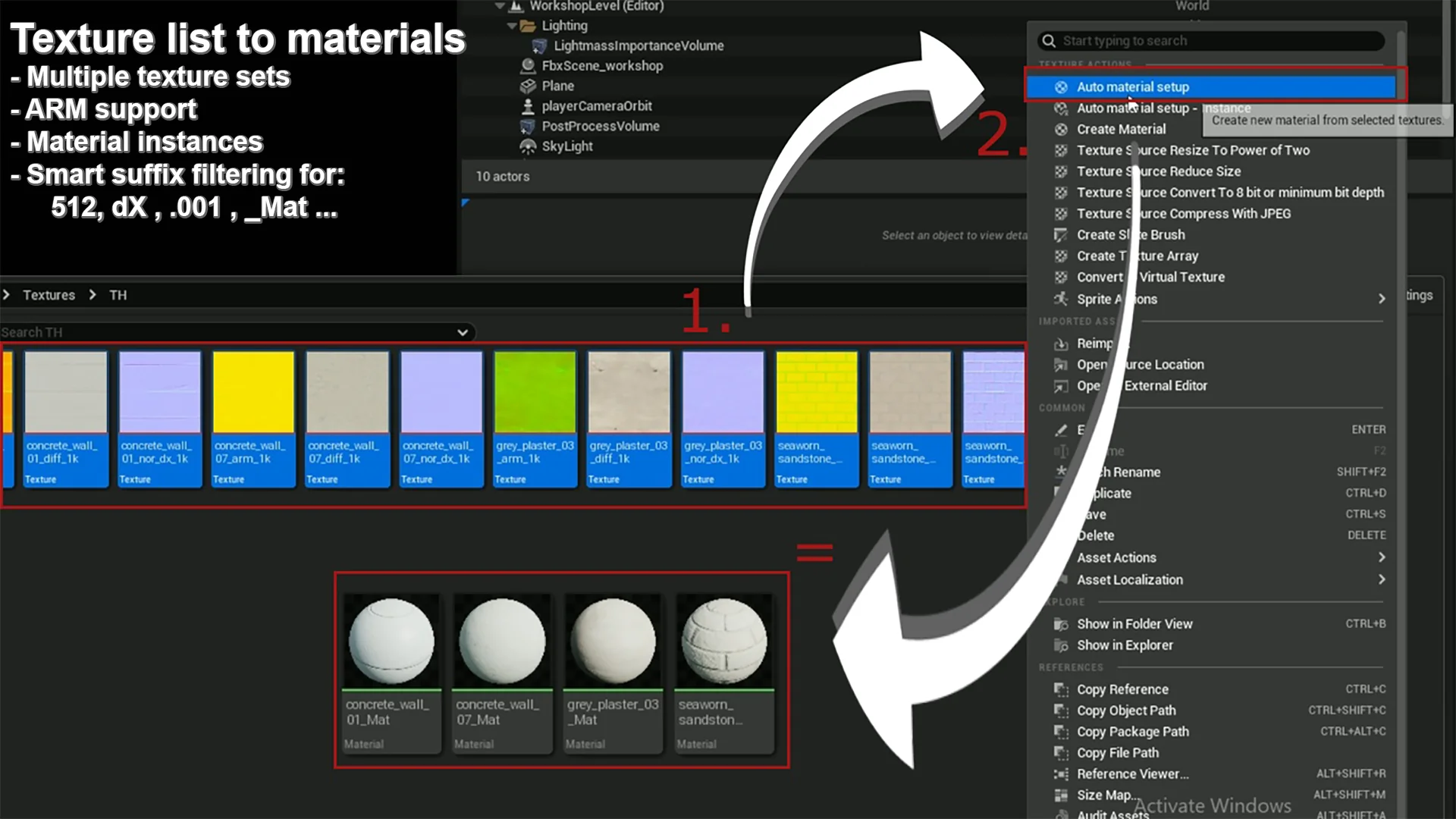
The core utility operates directly inside the Unreal Engine Content Browser, anchoring into standard context menus to speed up daily import routines. Once texture assets are dragged into a project directory, the user selects the full collection of maps intended for assembly, right-clicks any file within the selection, and invokes the tool via the context menu dropdown.
Choosing the standard execution triggers an automated scan of the selected files. If the textures adhere to standard conventions with supported identifier extensions, such as designated color or albedo tags, new materials are generated immediately within the exact same folder. There is no requirement to build empty master materials first or manually place Texture Sample nodes into an open graph. Every recognized texture is assigned and wired instantly, giving artists immediate visual results inside the content directory without interrupting their import flow.
Set Recognition, Packing Support, and Metadata Cleaning
Large projects rarely import assets one by one. When multiple props or environment kits arrive simultaneously, dozens of unrelated texture sets often sit dumped inside a single folder. Auto Material Setup incorporates a large internal naming database that identifies which texture files belong to which asset groups. Rather than dumping all selected maps into a single jumbled network, the tool segregates multiple texture sets from a single batch selection and generates distinct, isolated materials for each individual asset.
Texture packing conventions are fully factored into the evaluation logic. Packed textures—specifically ARM maps combining Ambient Occlusion, Roughness, and Metallic information across the Red, Green, and Blue channels—are recognized and wired appropriately to their corresponding material input pins. This prevents artists from having to open complex graphs solely to route channel splits from a single packed file.
Beyond mapping channels, the utility automatically cleans up material naming. Source textures frequently arrive stamped with export flags, resolution tags, bit-depth labels, or color profile indicators. The setup tool filters these out, stripping unwanted metadata strings such as:
_2k
512
Dx
SRGB
Raw
By purging these technical suffixes during creation, the resulting material assets receive clean, readable names that align with production organization standards without requiring manual renaming passes.
Texture Sampler Assignment and Material Editor Node Layout
Creating materials programmatically often results in overlapping nodes or incorrect texture interpretation, requiring technical artists to go back and clean up the material editor canvas. Auto Material Setup addresses graph cleanliness directly. Upon generating a material, it sorts and positions the texture sample nodes within the Material Editor so they do not overlap, maintaining clear readability if an artist later opens the graph to add custom logic.
Technical texture settings are adjusted automatically during the process to avoid common visual bugs. Color data and mathematical mask data require fundamentally different color space treatments inside Unreal Engine. When non-color data like roughness is wired, the utility ensures the texture asset's sRGB checkbox is properly toggled off, preventing distorted specular responses caused by accidental gamma correction.
Inside the material graph itself, the utility configures the sampler type parameters on each Texture Sample node to match the nature of the incoming data. Linear color maps receive the Linear Color sampler designation, while surface vectors are assigned the Normal sampler type. This eliminates common material compilation errors and ensures that normal vectors, roughness values, and color channels render with correct shading characteristics straight out of the box.
Deploying the SimplePBR Base with Auto Material Setup Instances
For scenarios where complex bespoke graphs are unnecessary, creating completely unique material graphs for every mesh can introduce performance overhead and clutter. To streamline asset management, the utility includes an optimized base master material named SimplePBR alongside an alternative execution command: Auto Material Setup - Instance.
When artists choose the instance workflow from the right-click menu, the system skips constructing raw graphs and instead creates lightweight Material Instances derived from the parent SimplePBR shader. This option is explicitly recommended whenever an asset does not require heavy, custom node modifications. SimplePBR is engineered with built-in parameter switches and modifier inputs, granting immediate access to practical controls directly on the instance:
UV tiling adjustments for scaling patterns across geometric surfaces
Normal map intensity scaling to dial surface depth up or down
Texture rotation controls to reorient patterns without editing raw texture files
This dual approach provides flexibility: users can generate fully editable raw graphs for complex assets that need unique node logic, or rapidly generate lightweight SimplePBR instances for props that only require standard PBR parameter tuning.
Slot Matching and USD Import Interoperability
The tool's functionality extends beyond generating brand-new assets from raw files. It can also search for and populate textures within existing materials, as well as wire maps based on mesh slot naming conventions. By matching texture names to the target slots on imported meshes, artists can reconnect detached textures back into established shading setups without manual assignment passes.
For productions leveraging broader data exchange standards, the included SimplePBR material architecture maintains direct compatibility with the Unreal Engine 5 USD import framework. This ensures that assets passing through Universal Scene Description interchange pipelines can preserve their shading assignments and basic surface properties cleanly when transitioning into Unreal Engine scenes. The tool is actively maintained, with bug reports and operational issues handled with turnarounds typically within a few days, keeping automated material assembly dependable across evolving production pipelines.
 Automations
 Automations
 Automations