"1a1d84d79fdf2879"{"id":"1000998","slug":"landscape-pro-2-0-auto-generated-material","title":"Landscape Pro 2.0 Auto-Generated Material","category":"Nature \u0026 Terrain","engine":"4.26+,5.0+","assetVersion":"","engineVersion":"Engine Version: 4.26+,5.0+","tag":"Nature \u0026 Terrain","accent":"blue","visual":"luts","summary":"Landscape Pro 2.0 auto-generates a high-detail landscape material with tessellated rocks, seven placement layers, and wind-supported vegetation for open world m","platform":"Unreal Engine","publishedAt":"2026-08-19T15:49:37.825Z","updatedAt":"2026-08-19T15:49:37.825Z","sourceNotes":[],"fileContents":[],"compatibility":["Unreal Engine","Engine Version: 4.26+,5.0+"],"featuredImage":{"alt":"Landscape Pro 2.0 Auto-Generated Material","src":"/wp-content/uploads/published/2026/08/c89b95234a93-139ce14e-af3c-4e51-8d55-d06c268a23ff-b6ef0d7bed.webp"},"hasDownloadLink":true,"downloads":2,"terms":[{"taxonomy":"category","slug":"nature-and-terrain","name":"Nature \u0026 Terrain"}],"galleryImages":[{"src":"/wp-content/uploads/published/2026/08/c3573327bf99-09967b68-f67e-4866-9019-f3a5fc1110e7-13087d4d4e.webp","alt":"Landscape Pro 2.0 Auto-Generated Material"},{"src":"/wp-content/uploads/published/2026/08/4b0174ff79f2-95a50f31-ed07-41f5-bf09-223a2c8bfa66-3d5f6b81ac.webp","alt":"Landscape Pro 2.0 Auto-Generated Material"},{"src":"/wp-content/uploads/published/2026/08/8cc88b16687f-a1a01b72-badc-4707-ad15-5639bd3adb92-4c97c48e5f.webp","alt":"Landscape Pro 2.0 Auto-Generated Material"},{"src":"/wp-content/uploads/published/2026/08/63cfe24d4fbf-c67e06b2-71df-4cb1-90d3-035fab04aa5d-a0eaeca34b.webp","alt":"Landscape Pro 2.0 Auto-Generated Material"},{"src":"/wp-content/uploads/published/2026/08/71de7ba71121-93256d0d-a4a4-439e-8d7a-475d5201cba7-dc8564d7aa.webp","alt":"Landscape Pro 2.0 Auto-Generated Material"},{"src":"/wp-content/uploads/published/2026/08/4801882be177-17aa7769-4c80-4c0d-a441-6fe31e12b471-3bbc30515e.webp","alt":"Landscape Pro 2.0 Auto-Generated Material"},{"src":"/wp-content/uploads/published/2026/08/293864390085-a6b39690-eb74-464e-a831-28271efaddb9-47d85e4b3f.webp","alt":"Landscape Pro 2.0 Auto-Generated Material"},{"src":"/wp-content/uploads/published/2026/08/07d83f028d92-57418e36-7478-4ba1-bd91-2b7739d07682-3bc595435f.webp","alt":"Landscape Pro 2.0 Auto-Generated Material"},{"src":"/wp-content/uploads/published/2026/08/e0626c74858f-43821d1f-20da-4139-987a-e38ad8c99c74-44a41a444e.webp","alt":"Landscape Pro 2.0 Auto-Generated Material"},{"src":"/wp-content/uploads/published/2026/08/39206a6ea0b0-98ecf9d0-0be1-4d93-9305-cba530fc8dde-b98bd7e073.webp","alt":"Landscape Pro 2.0 Auto-Generated Material"}],"accessPanel":{"kind":"resource","title":"Download this resource","eyebrow":"Free Download","message":"Log in or create a free account to start your download.","fileName":"Content.7z","safetyNote":"Resources are manually reviewed before listing to improve quality and reduce obvious risks.","actionLabel":"Download Free","resourceType":"Resource archive"},"contentHtml":"\u003cp\u003eDrop Landscape Pro 2.0 onto a terrain and the auto-generated material begins working immediately. Rocks push through the surface and keep their shape even at close range, because tessellation is built directly into the material. Seven landscape layers are already stacked and ready to guide where plants, stones, and other objects appear across the map. This gives a material that performs like a dedicated environment tool rather than a simple terrain shader.\u003c/p\u003e \u003ch2\u003eTwo years of R\u0026D shaped how the material balances performance and detail\u003c/h2\u003e\n\u003cp\u003eThe auto-generated material in Landscape Pro 2.0 is not a quick pass at terrain shading. The developer spent over two years researching and testing techniques to find a combination that is both highly performant and pleasant to look at. That process focused on material efficiency as much as visual output, so a developer does not have to choose between frame rate and appearance when building large environments.\u003c/p\u003e\n\u003cp\u003eThe performance-oriented nature of the material is especially noticeable when the terrain spans long distances. Open world maps demand shader work that scales, and Landscape Pro 2.0 was rebuilt with that exact requirement in mind. The release notes call it “much more optimized for open world maps” compared to the previous version, and the accompanying performance video demonstrates the approach in action.\u003c/p\u003e \u003ch3\u003eTessellation is what keeps rock detail high without pre-modeled geometry\u003c/h3\u003e\n\u003cp\u003eOne of the standout behaviors in the material is how rocks are handled. In the video presentation, rocks are drawn automatically without distortion and maintain high detail when the camera moves in. That is achieved by implementing tessellation within the material itself. Instead of relying on separate rock meshes placed by hand, the material generates the needed geometry on the fly, and because the tessellation is controlled by the material, it stays consistent across the entire landscape surface.\u003c/p\u003e \u003ch2\u003eSeven landscape layers handle prop placement across the terrain\u003c/h2\u003e\n\u003cp\u003eLandscape Pro 2.0 includes a total of seven Landscape Layers, each one set up to assist in placing a different prop group. The layers are not just visual paint layers; they are arranged so that plants, stones, and other objects can be placed naturally across the terrain. That means less time spent hand-scattering props and more time spent on the parts of the scene that need direct attention.\u003c/p\u003e\n\u003cp\u003eBecause the layers are part of the auto-generated material, they work together across the entire map. A stone layer may only allow rocks to appear on certain slopes or heights, while a plant layer follows a separate set of rules. The developer integrated this placement logic into the material so that each prop group gets a predictable area to populate.\u003c/p\u003e \u003ch2\u003eWind-supported trees, ground plants, ferns, grasses, and water materials are bundled in\u003c/h2\u003e\n\u003cp\u003eAlongside the core landscape material, the package includes a set of ready-to-use natural elements. Trees come with wind support, which gives them a natural sway without requiring a separate animation system. Ground plants, ferns, and grasses are also included, giving a terrain an immediate layer of vegetation that responds to the surrounding environment. Water materials are part of the bundle as well, so a scene can move from bare terrain to a fully populated landscape without searching for additional resources.\u003c/p\u003e\n\u003cp\u003eThe included materials are designed to fit into the same workflow as the landscape layers. Foliage and water share the same visual language, which helps a developer keep a consistent look across large open areas. Even though the material is auto-generated, these extra elements are not bolted on; they are meant to work with the landscape material and its layer system.\u003c/p\u003e \u003ch2\u003eLandscape Pro 2.0 accepts custom content without fighting the user\u003c/h2\u003e\n\u003cp\u003eWhile the material comes with a generous set of included assets, the developer stresses that Landscape Pro is highly customizable. Users can feed their own content into the system easily. That means a studio with an existing library of trees, rocks, or ground textures can replace the included items with their own models and still use the auto-generated placement logic. The material does not lock a developer into a fixed art style or a specific asset set.\u003c/p\u003e\n\u003cp\u003eThis customizability is important for teams that already have a visual direction for their game. The 2.0 release is not trying to replace every asset in a project; it is trying to remove the grind of building a landscape material from scratch and tuning it until the props sit correctly. With Landscape Pro 2.0, the material does the heavy lifting, and the developer can concentrate on art direction and gameplay layout.\u003c/p\u003e \u003ch2\u003eOpen world maps get the most out of the release\u003c/h2\u003e\n\u003cp\u003eThe phrase “much more optimized for open world maps” is a central part of the 2.0 announcement. The previous version may have worked well on smaller terrains, but the new release is explicitly built for large, sprawling levels. The combination of tessellated rock detail, seven placement layers, and bundled vegetation means a developer can cover huge areas without manually placing each stone or fern. The performance video is meant to show that the material keeps its visual qualities even when the view distance stretches across the map.\u003c/p\u003e\n\u003cp\u003eFor independent developers, the time savings are direct; for professional studios, the material offers a head start on environment work that can be redirected toward more complex tasks. The developer built this over two years of R\u0026D, and the release note frames it as a way to stop doing every bit of work alone and instead focus on what actually matters: making the game.\u003c/p\u003e\n\u003cp\u003eThe practical takeaway is simple. Landscape Pro 2.0 is a landscape material that feels less like a shader and more like an environment builder. It auto-generates the ground detail, manages prop placement across seven layers, includes wind-responsive vegetation and water, and accepts custom content when a project needs its own assets. Teams working on open worlds can take the material, drop it into a large terrain, and get to the part of development they actually want to spend time on.\u003c/p\u003e\n\n\u003ch2\u003eMore From The Same Workflow\u003c/h2\u003e\n\u003cul\u003e\n\u003cli\u003e\u003ca href=\"https://3dcghub.com/brushify-environment-shaders-pack/\" title=\"Brushify - Environment Shaders Pack\"\u003eBrushify - Environment Shaders Pack\u003c/a\u003e\u003c/li\u003e\n\u003cli\u003e\u003ca href=\"https://3dcghub.com/mw-landscape-auto-material/\" title=\"MW Landscape Auto Material\"\u003eMW Landscape Auto Material\u003c/a\u003e\u003c/li\u003e\n\u003cli\u003e\u003ca href=\"https://3dcghub.com/martian-surface/\" title=\"Martian Surface\"\u003eMartian Surface\u003c/a\u003e\u003c/li\u003e\n\u003cli\u003e\u003ca href=\"https://3dcghub.com/stylized-materials-vol-1/\" title=\"Stylized materials VOL.1\"\u003eStylized materials VOL.1\u003c/a\u003e\u003c/li\u003e\n\u003cli\u003e\u003ca href=\"https://3dcghub.com/brushify-tropical-pack/\" title=\"Brushify - Tropical Pack\"\u003eBrushify - Tropical Pack\u003c/a\u003e\u003c/li\u003e\n\u003c/ul\u003e","contentTextLength":6280,"navigation":{"current":464,"total":3346,"previous":{"id":"1000999","slug":"landscaping-small-trees-1","title":"Landscaping Small Trees 1","category":"Trees","platform":"Unreal Engine","updatedAt":"2026-08-19T16:12:52.291Z"},"next":{"id":"1000997","slug":"kawaii-animations-100","title":"KAWAII ANIMATIONS 100","category":"Variety","platform":"Unreal Engine","updatedAt":"2026-08-19T15:39:04.115Z"}},"relatedResources":[{"id":"1000942","slug":"brushify-environment-shaders-pack","title":"Brushify - Environment Shaders Pack","category":"Nature \u0026 Terrain","engine":"4.26+,5.0+","assetVersion":"","engineVersion":"Engine Version: 4.26+,5.0+","tag":"Nature \u0026 Terrain","accent":"blue","visual":"city","summary":"A shader pack for UE5 that handles landscape auto-material, near-mesh shading, foliage, and atmosphere, with example levels and Nanite/Lumen support.","platform":"Unreal Engine","publishedAt":"2026-08-10T04:39:33.784Z","updatedAt":"2026-08-10T04:39:33.784Z","sourceNotes":[],"fileContents":[],"compatibility":["Unreal Engine","Engine Version: 4.26+,5.0+"],"featuredImage":{"alt":"Brushify - Environment Shaders Pack","src":"/wp-content/uploads/published/2026/08/5f946d4dc268-1824a260-53a7-4b6d-a41e-a2baf144c952-0d994eedec.webp"},"hasDownloadLink":true,"downloads":2},{"id":"12858","slug":"mw-landscape-auto-material","title":"MW Landscape Auto Material","category":"Nature \u0026 Terrain","engine":"4.26+,5.0+","assetVersion":"Engine version: 4.26+,5.0+","engineVersion":"5.2","tag":"Nature \u0026 Terrain","accent":"blue","visual":"luts","summary":"The MW Landscape Auto Material is a smart, modular solution for creating diverse terrains with five procedural layers. It supports custom textures and high-performance prototyping for various biomes.","platform":"Unreal Engine","publishedAt":"2026-03-09T18:01:14.000Z","updatedAt":"2026-04-19T15:46:35.000Z","sourceNotes":[],"fileContents":[],"compatibility":["Unreal Engine"],"featuredImage":{"alt":"MW Landscape Auto Material","src":"https://3dcghub.com/wp-content/uploads/2026/03/9f041517-302c-41d9-83b3-39bab6a4fd5e.webp"},"hasDownloadLink":true,"downloads":3},{"id":"1000232","slug":"martian-surface","title":"Martian Surface","category":"Nature \u0026 Terrain","engine":"4.27,5.0+","assetVersion":"","engineVersion":"Engine Version: 4.27,5.0+","tag":"Nature \u0026 Terrain","accent":"blue","visual":"mech","summary":"A detailed breakdown of the Martian Surface package, focusing on its tessellated landscape material, terrain alpha brushes, and scattered stone meshes.","platform":"Unreal Engine","publishedAt":"2026-06-28T09:00:52.193Z","updatedAt":"2026-06-28T09:00:52.193Z","sourceNotes":[],"fileContents":[],"compatibility":["Unreal Engine","Engine Version: 4.27,5.0+"],"featuredImage":{"alt":"Martian Surface","src":"/wp-content/uploads/published/2026/06/be912a4e5e82-ced5bc2b-1153-4b98-af5e-02e574332a6f-bf3e3e6ee1.webp"},"hasDownloadLink":true,"downloads":1}]}
Nature & Terrain
Landscape Pro 2.0 Auto-Generated Material
Landscape Pro 2.0 auto-generates a high-detail landscape material with tessellated rocks, seven placement layers, and wind-supported vegetation for open world m
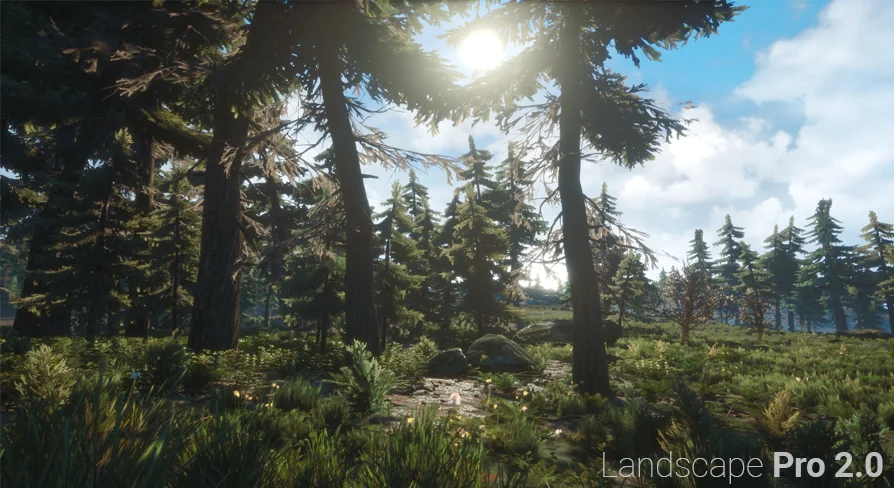
Drop Landscape Pro 2.0 onto a terrain and the auto-generated material begins working immediately. Rocks push through the surface and keep their shape even at close range, because tessellation is built directly into the material. Seven landscape layers are already stacked and ready to guide where plants, stones, and other objects appear across the map. This gives a material that performs like a dedicated environment tool rather than a simple terrain shader.
Two years of R&D shaped how the material balances performance and detail
The auto-generated material in Landscape Pro 2.0 is not a quick pass at terrain shading. The developer spent over two years researching and testing techniques to find a combination that is both highly performant and pleasant to look at. That process focused on material efficiency as much as visual output, so a developer does not have to choose between frame rate and appearance when building large environments.
The performance-oriented nature of the material is especially noticeable when the terrain spans long distances. Open world maps demand shader work that scales, and Landscape Pro 2.0 was rebuilt with that exact requirement in mind. The release notes call it “much more optimized for open world maps” compared to the previous version, and the accompanying performance video demonstrates the approach in action.
Tessellation is what keeps rock detail high without pre-modeled geometry
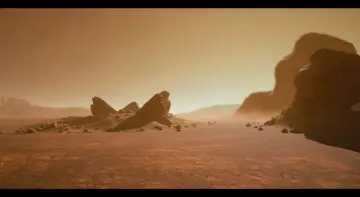
One of the standout behaviors in the material is how rocks are handled. In the video presentation, rocks are drawn automatically without distortion and maintain high detail when the camera moves in. That is achieved by implementing tessellation within the material itself. Instead of relying on separate rock meshes placed by hand, the material generates the needed geometry on the fly, and because the tessellation is controlled by the material, it stays consistent across the entire landscape surface.
Seven landscape layers handle prop placement across the terrain
Landscape Pro 2.0 includes a total of seven Landscape Layers, each one set up to assist in placing a different prop group. The layers are not just visual paint layers; they are arranged so that plants, stones, and other objects can be placed naturally across the terrain. That means less time spent hand-scattering props and more time spent on the parts of the scene that need direct attention.
Because the layers are part of the auto-generated material, they work together across the entire map. A stone layer may only allow rocks to appear on certain slopes or heights, while a plant layer follows a separate set of rules. The developer integrated this placement logic into the material so that each prop group gets a predictable area to populate.
Wind-supported trees, ground plants, ferns, grasses, and water materials are bundled in
Alongside the core landscape material, the package includes a set of ready-to-use natural elements. Trees come with wind support, which gives them a natural sway without requiring a separate animation system. Ground plants, ferns, and grasses are also included, giving a terrain an immediate layer of vegetation that responds to the surrounding environment. Water materials are part of the bundle as well, so a scene can move from bare terrain to a fully populated landscape without searching for additional resources.
The included materials are designed to fit into the same workflow as the landscape layers. Foliage and water share the same visual language, which helps a developer keep a consistent look across large open areas. Even though the material is auto-generated, these extra elements are not bolted on; they are meant to work with the landscape material and its layer system.
Landscape Pro 2.0 accepts custom content without fighting the user
While the material comes with a generous set of included assets, the developer stresses that Landscape Pro is highly customizable. Users can feed their own content into the system easily. That means a studio with an existing library of trees, rocks, or ground textures can replace the included items with their own models and still use the auto-generated placement logic. The material does not lock a developer into a fixed art style or a specific asset set.
This customizability is important for teams that already have a visual direction for their game. The 2.0 release is not trying to replace every asset in a project; it is trying to remove the grind of building a landscape material from scratch and tuning it until the props sit correctly. With Landscape Pro 2.0, the material does the heavy lifting, and the developer can concentrate on art direction and gameplay layout.
Open world maps get the most out of the release
The phrase “much more optimized for open world maps” is a central part of the 2.0 announcement. The previous version may have worked well on smaller terrains, but the new release is explicitly built for large, sprawling levels. The combination of tessellated rock detail, seven placement layers, and bundled vegetation means a developer can cover huge areas without manually placing each stone or fern. The performance video is meant to show that the material keeps its visual qualities even when the view distance stretches across the map.
For independent developers, the time savings are direct; for professional studios, the material offers a head start on environment work that can be redirected toward more complex tasks. The developer built this over two years of R&D, and the release note frames it as a way to stop doing every bit of work alone and instead focus on what actually matters: making the game.
The practical takeaway is simple. Landscape Pro 2.0 is a landscape material that feels less like a shader and more like an environment builder. It auto-generates the ground detail, manages prop placement across seven layers, includes wind-responsive vegetation and water, and accepts custom content when a project needs its own assets. Teams working on open worlds can take the material, drop it into a large terrain, and get to the part of development they actually want to spend time on.
 Nature & Terrain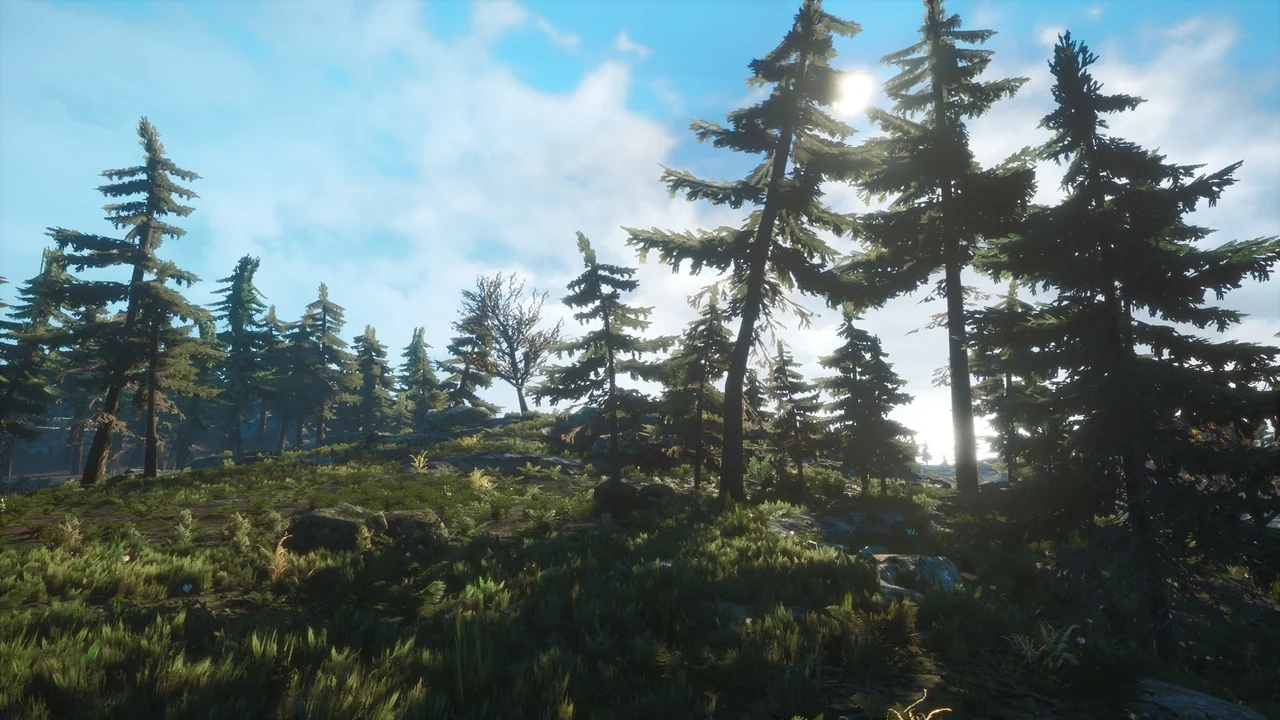
 Nature & Terrain
 Nature & Terrain
 Nature & Terrain