"1f00f67f9253451b"{"id":"1000942","slug":"brushify-environment-shaders-pack","title":"Brushify - Environment Shaders Pack","category":"Nature \u0026 Terrain","engine":"4.26+,5.0+","assetVersion":"","engineVersion":"Engine Version: 4.26+,5.0+","tag":"Nature \u0026 Terrain","accent":"blue","visual":"city","summary":"A shader pack for UE5 that handles landscape auto-material, near-mesh shading, foliage, and atmosphere, with example levels and Nanite/Lumen support.","platform":"Unreal Engine","publishedAt":"2026-08-10T04:39:33.784Z","updatedAt":"2026-08-10T04:39:33.784Z","sourceNotes":[],"fileContents":[],"compatibility":["Unreal Engine","Engine Version: 4.26+,5.0+"],"featuredImage":{"alt":"Brushify - Environment Shaders Pack","src":"/wp-content/uploads/published/2026/08/5f946d4dc268-1824a260-53a7-4b6d-a41e-a2baf144c952-0d994eedec.webp"},"hasDownloadLink":true,"downloads":1,"terms":[{"taxonomy":"category","slug":"nature-and-terrain","name":"Nature \u0026 Terrain"}],"galleryImages":[{"src":"/wp-content/uploads/published/2026/08/c7a8512686cd-dec986a2-d1d6-4efd-93d1-418a463fdabe-7543a049ea.webp","alt":"Brushify - Environment Shaders Pack"},{"src":"/wp-content/uploads/published/2026/08/10e0861a49b9-355111c0-088d-44d9-a9b8-0b22ceb498ac-8193bb3615.webp","alt":"Brushify - Environment Shaders Pack"},{"src":"/wp-content/uploads/published/2026/08/267b1a65be36-5d755284-02bc-4169-8518-8d3881b2cec9-a04d2525d0.webp","alt":"Brushify - Environment Shaders Pack"},{"src":"/wp-content/uploads/published/2026/08/074e61e56892-8a4d7584-f603-45b8-a0b3-e1dc8c86c7df-0d7e7780f7.webp","alt":"Brushify - Environment Shaders Pack"},{"src":"/wp-content/uploads/published/2026/08/3fb23c2acd07-18ec1035-2a0f-4420-a798-7da2908e86b8-ba0afa6951.webp","alt":"Brushify - Environment Shaders Pack"},{"src":"/wp-content/uploads/published/2026/08/5b2d3b2cb988-5802b7af-c2a9-4930-b6c2-6dc3cc91f69c-530cb8e604.webp","alt":"Brushify - Environment Shaders Pack"},{"src":"/wp-content/uploads/published/2026/08/51c076e979a1-1aa10398-6942-4ac4-aae9-74c2d3984b3a-70b8665f96.webp","alt":"Brushify - Environment Shaders Pack"},{"src":"/wp-content/uploads/published/2026/08/76851d055828-729a1841-cf8e-48de-83f3-6be17ad493cd-7b4d878b66.webp","alt":"Brushify - Environment Shaders Pack"},{"src":"/wp-content/uploads/published/2026/08/276af5d70ea5-caa8c571-588a-48eb-a6bd-f7e5db553792-fbfcd941b5.webp","alt":"Brushify - Environment Shaders Pack"},{"src":"/wp-content/uploads/published/2026/08/4aed3ea4b685-6f14572d-f6e3-4236-b901-03312bbeafb3-2ad14ed342.webp","alt":"Brushify - Environment Shaders Pack"}],"accessPanel":{"kind":"resource","title":"Download this resource","eyebrow":"Free Download","message":"Log in or create a free account to start your download.","fileName":"Content.7z","safetyNote":"Resources are manually reviewed before listing to improve quality and reduce obvious risks.","actionLabel":"Download Free","resourceType":"Resource archive"},"contentHtml":"\u003cp\u003eBuilding large, believable environments in Unreal Engine 5 (UE5) usually means juggling Landscape Materials, Mesh Shaders, Foliage, and lighting. The \u003cem\u003eBrushify - Environment Shaders Pack\u003c/em\u003e tackles that pipeline directly: it supplies a set of optimized, easy-to-use Shaders that work with \u003ccode\u003eNanite\u003c/code\u003e and \u003ccode\u003eLumen\u003c/code\u003e, plus a handful of example scenes that show how to assemble them. This pack is strictly Shaders and example content—the Alpha Brushes, Meshes, and Foliage seen in \u003cem\u003eBrushify\u003c/em\u003e tutorials come from the full packs.\u003c/p\u003e\n\n\u003ch2\u003e1 Landscape Material, 11 Automatic Biomes\u003c/h2\u003e\n\n\u003cp\u003eAt the center of the pack is the \u003cem\u003eBrushify Landscape Auto Material\u003c/em\u003e. It is built to texture and populate landscapes automatically, and it scales to massive worlds of \u003ccode\u003e64 km²\u003c/code\u003e or more. Each Biome exists as its own automatic paint layer, and the Material ships with 11 layers to choose from: \u003cem\u003eGrass\u003c/em\u003e, \u003cem\u003eDesert\u003c/em\u003e, \u003cem\u003eForest\u003c/em\u003e, \u003cem\u003eSnow\u003c/em\u003e, \u003cem\u003eBeach\u003c/em\u003e, \u003cem\u003eDunes\u003c/em\u003e, \u003cem\u003eMud\u003c/em\u003e, and \u003cem\u003eCraters\u003c/em\u003e. Once applied, a landscape is automatically textured and covered with optimized rocks and grass that match the selected Biome.\u003c/p\u003e\n\n\u003cp\u003eUnder the hood, the Auto Material makes use of several UE5 rendering techniques. It supports \u003ccode\u003eRuntime Virtual Texturing\u003c/code\u003e (\u003ccode\u003eRVT\u003c/code\u003e), \u003ccode\u003eParallax Occlusion Mapping\u003c/code\u003e (\u003ccode\u003ePOM\u003c/code\u003e), Tri-Planar Mapping, Tessellation/Height, and Roughness. A reduced distance tiling feature helps prevent Texture swimming from far away, and a 3-stage \u003ccode\u003eLevel of Detail\u003c/code\u003e (\u003ccode\u003eLOD\u003c/code\u003e) System (Far, Medium, and Near) keeps performance in check while retaining detail. Flow Mapping and optimized Shader overdraw are also included. Because the entire Shader is modular, functions can be removed or customized to streamline the system for a specific project.\u003c/p\u003e\n\n\u003ch2\u003eNear-Mesh Shading for the Player's Immediate Surroundings\u003c/h2\u003e\n\n\u003cp\u003eObjects that sit close to the player—rocks, cliffs, Props—need a different approach than the landscape. The \u003ccode\u003eNear Mesh Material\u003c/code\u003e is suited to that role. It is flexible and performant, with a couple of game-changing optional tickboxes. \u003ccode\u003eDetail Mapping\u003c/code\u003e adds an extra tiling Texture layer on top of the original, with support for Normal Maps, tweakable visible distance, and a balance control between the base and detail Textures. This works especially well on cliff walls or large landscape pieces.\u003c/p\u003e\n\n\u003cp\u003e\u003ccode\u003eSnow Shading\u003c/code\u003e applies directional snow cover to any Mesh. The system is not limited to snow: the snow Texture can be swapped for sand, mud, moss, or anything else. Users control strength, slope angle, direction, noise, and color, which opens up a range of weather and terrain staining effects beyond winter scenes. \u003ccode\u003eObject Blending\u003c/code\u003e uses dithering to integrate objects smoothly into the landscape. There is also an \u003ccode\u003eRVT\u003c/code\u003e version of \u003ccode\u003eObject Blending\u003c/code\u003e that samples the Virtual Texture to blend objects more realistically.\u003c/p\u003e\n\n\u003ch2\u003eSeparate Wind-Bending Foliage and Lightweight Grass Materials\u003c/h2\u003e\n\n\u003cp\u003eFoliage and grass get 2 distinct Materials. The Foliage Material is built for complex wind bending setups, such as trees with trunks that need to sway believably. The Grass Material is a simplified version aimed at performance, so dense grass fields can be rendered without the extra cost of the full foliage setup.\u003c/p\u003e\n\n\u003ch2\u003eExample Levels That Put the Shaders to Work\u003c/h2\u003e\n\n\u003cp\u003eThe pack includes a set of playable Example Levels. The \u003cem\u003eMulti Biome Example\u003c/em\u003e paints 5 Biomes onto a 1 single Map: \u003cem\u003eGrass\u003c/em\u003e, \u003cem\u003eDesert\u003c/em\u003e, \u003cem\u003eSnow\u003c/em\u003e, \u003cem\u003eBeach\u003c/em\u003e, and \u003cem\u003eDunes\u003c/em\u003e. This is a direct demonstration of how the Auto Material handles transitions without a massive Texture stack. The \u003cem\u003eSnow Shader Example\u003c/em\u003e shows how the \u003ccode\u003eNear Mesh Shader\u003c/code\u003e's \u003ccode\u003eSnow Feature\u003c/code\u003e can be applied to scattered Meshes, providing a clean reference for adding snow to a scene. The \u003cem\u003eRuntime Virtual Texturing Example\u003c/em\u003e showcases \u003ccode\u003eRVT\u003c/code\u003e in action: reduced overdraw, blend effects, and Road Splines integrated into the landscape, all preconfigured with the \u003cem\u003eBrushify Landscape Auto Material\u003c/em\u003e. Finally, a \u003cem\u003eStarter Level\u003c/em\u003e gives a completely blank Level with a landscape already in place, so a project can start without building lighting and terrain setup from scratch.\u003c/p\u003e\n\n\u003ch2\u003eAdditional Materials, Example Scenes, and Merging Packs\u003c/h2\u003e\n\n\u003cp\u003eBeyond the core Landscape and Mesh Shaders, the pack bundles several supporting Materials. There is a \u003ccode\u003eFoliage Master Material\u003c/code\u003e for trees and bushes, a \u003ccode\u003eGrass Master Material\u003c/code\u003e for optimized grass, and a \u003ccode\u003eDistance Mesh Material\u003c/code\u003e for distant Landscape Meshes. The \u003ccode\u003eClouds Material\u003c/code\u003e works as a Light Function for cloud shadows, while the \u003ccode\u003eFake Fog Material\u003c/code\u003e comes with 2 Fog Textures for fog cards. A \u003ccode\u003ePostFX Material\u003c/code\u003e is included for screen-space tuning, and a \u003ccode\u003eRoads Material\u003c/code\u003e ensures compatibility with \u003cem\u003eBrushify\u003c/em\u003e roads packs such as \u003cem\u003enatural roads\u003c/em\u003e and \u003cem\u003ecountry roads\u003c/em\u003e. The \u003ccode\u003eSkydome Material\u003c/code\u003e ships with 6 HDRI Skydomes, and the \u003ccode\u003eWater Material\u003c/code\u003e can be used for oceans and lakes. All Textures are \u003ccode\u003e2048x2048\u003c/code\u003e or greater.\u003c/p\u003e\n\n\u003cp\u003eBecause \u003cem\u003eBrushify\u003c/em\u003e packs share generic objects, Textures, and Shaders, combining them is straightforward: inside the Epic Games Launcher, choose \u003ccode\u003eAdd to project\u003c/code\u003e and then select \u003ccode\u003eOverwrite files\u003c/code\u003e. This allows the Environment Shaders to work alongside full \u003cem\u003eBrushify\u003c/em\u003e packs without asset conflicts.\u003c/p\u003e\n\n\u003cp\u003eThe \u003cem\u003eBrushify - Environment Shaders Pack\u003c/em\u003e is not a full asset library, but it provides the shading foundation for a complete UE5 environment. For developers who already own other \u003cem\u003eBrushify\u003c/em\u003e content, these Shaders fill in the Landscape, Near-Mesh, Foliage, and atmosphere layers. For those starting fresh, the Example Levels demonstrate the intended setup so the Materials can be put to use immediately in playable worlds.\u003c/p\u003e\n\n\u003ch2\u003eRelated Resources Worth Checking\u003c/h2\u003e\n\u003cul\u003e\n\u003cli\u003e\u003ca href=\"https://3dcghub.com/advanced-water-material/\" title=\"Advanced Water Material\"\u003eAdvanced Water Material\u003c/a\u003e\u003c/li\u003e\n\u003cli\u003e\u003ca href=\"https://3dcghub.com/ultimate-water-shader-ue4-and-5/\" title=\"Ultimate Water Shader UE4 and 5\"\u003eUltimate Water Shader UE4 and 5\u003c/a\u003e\u003c/li\u003e\n\u003cli\u003e\u003ca href=\"https://3dcghub.com/lava-shader/\" title=\"Lava Shader\"\u003eLava Shader\u003c/a\u003e\u003c/li\u003e\n\u003cli\u003e\u003ca href=\"https://3dcghub.com/ice-world/\" title=\"Ice World\"\u003eIce World\u003c/a\u003e\u003c/li\u003e\n\u003cli\u003e\u003ca href=\"https://3dcghub.com/brushify-underworld-pack/\" title=\"Brushify - Underworld Pack\"\u003eBrushify - Underworld Pack\u003c/a\u003e\u003c/li\u003e\n\u003c/ul\u003e","contentTextLength":5536,"navigation":{"current":387,"total":3222,"previous":{"id":"8891","slug":"laboratory-research-center","title":"Laboratory - Research Center","category":"Interior","platform":"Unreal Engine","updatedAt":"2026-08-12T15:58:33.532Z"},"next":{"id":"1000941","slug":"brushify-country-roads-pack","title":"Brushify - Country Roads Pack","category":"Streets \u0026 Construction","platform":"Unreal Engine","updatedAt":"2026-08-10T04:31:02.697Z"}},"relatedResources":[{"id":"12622","slug":"advanced-water-material","title":"Advanced Water Material","category":"Nature \u0026 Terrain","engine":"4.26+,5.0+","assetVersion":"Engine version: 4.26+,5.0+","engineVersion":"4.22","tag":"Nature \u0026 Terrain","accent":"blue","visual":"luts","summary":"The Advanced Water Material is a versatile shader designed for creating dynamic liquid surfaces. It features 3D Gerstner Waves and a camera-independent depth opacity function for consistent visual quality.","platform":"Unreal Engine","publishedAt":"2026-03-07T12:58:03.000Z","updatedAt":"2026-04-19T15:46:38.000Z","sourceNotes":[],"fileContents":[],"compatibility":["Unreal Engine","Engine version: 4.26+,5.0+"],"featuredImage":{"alt":"Advanced Water Material","src":"https://3dcghub.com/wp-content/uploads/2026/03/84442f89-43f9-4380-b945-4eb7cc54f363.webp"},"hasDownloadLink":true,"downloads":2},{"id":"1000110","slug":"ultimate-water-shader-ue4-and-5","title":"Ultimate Water Shader UE4 and 5","category":"Nature \u0026 Terrain","engine":"Engine Version: 5.6+","assetVersion":"Engine Version: 5.6+","engineVersion":"","tag":"Nature \u0026 Terrain","accent":"blue","visual":"mech","summary":"A closer look at Ultimate Water Shader UE4 and 5, including the foam switch update, demonstration asset limits, and vertex-paint usage details.","platform":"Unreal Engine","publishedAt":"2026-06-07T23:05:08.990Z","updatedAt":"2026-06-07T23:05:08.990Z","sourceNotes":[],"fileContents":[],"compatibility":["Unreal Engine","Engine Version: 5.6+"],"featuredImage":{"alt":"Ultimate Water Shader UE4 and 5","src":"/wp-content/uploads/published/2026/06/e5b4054377ff-711c52d1-2ae1-456d-bcb4-5cd0d403477f-aa527e6a9f.webp"},"hasDownloadLink":true,"downloads":2},{"id":"12818","slug":"ice-world","title":"Ice World","category":"Nature \u0026 Terrain","engine":"5.1+","assetVersion":"Engine version: 5.1+","engineVersion":"4.14","tag":"Nature \u0026 Terrain","accent":"blue","visual":"luts","summary":"Ice World provides a comprehensive library of ice materials designed for lakes, rivers, and standard lit models. This asset pack features advanced shaders that remove tiling and offer deep customization for realistic or stylized winter scenes.","platform":"Unreal Engine","publishedAt":"2026-03-09T17:38:04.000Z","updatedAt":"2026-04-19T15:46:36.000Z","sourceNotes":[],"fileContents":[],"compatibility":["Unreal Engine","Engine version: 5.1+"],"featuredImage":{"alt":"Ice World","src":"https://3dcghub.com/wp-content/uploads/2026/03/59b80838-ea0a-4fe4-b1cf-79456bfdbe76.webp"},"hasDownloadLink":true,"downloads":0}]}
Nature & Terrain
Brushify - Environment Shaders Pack
A shader pack for UE5 that handles landscape auto-material, near-mesh shading, foliage, and atmosphere, with example levels and Nanite/Lumen support.
Building large, believable environments in Unreal Engine 5 (UE5) usually means juggling Landscape Materials, Mesh Shaders, Foliage, and lighting. The Brushify - Environment Shaders Pack tackles that pipeline directly: it supplies a set of optimized, easy-to-use Shaders that work with Nanite and Lumen, plus a handful of example scenes that show how to assemble them. This pack is strictly Shaders and example content—the Alpha Brushes, Meshes, and Foliage seen in Brushify tutorials come from the full packs.
1 Landscape Material, 11 Automatic Biomes
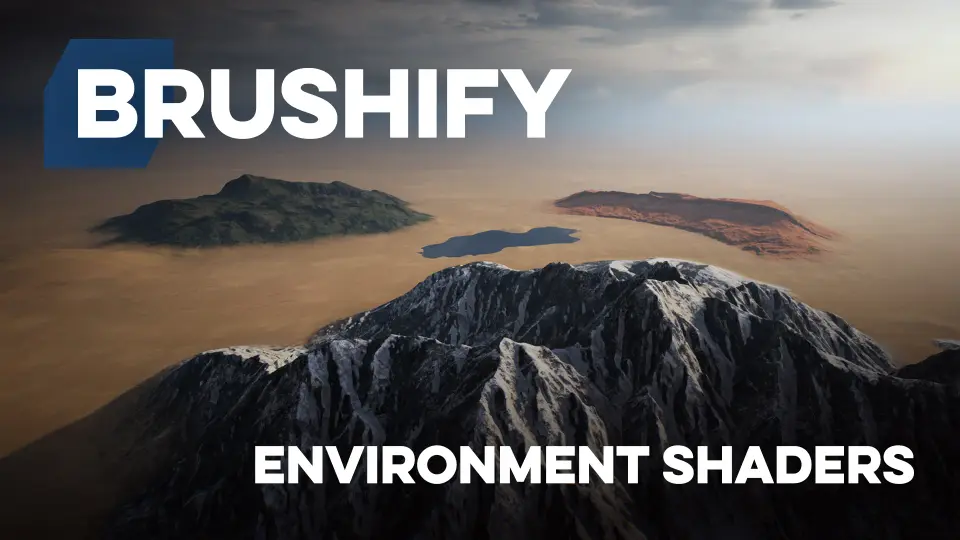
At the center of the pack is the Brushify Landscape Auto Material. It is built to texture and populate landscapes automatically, and it scales to massive worlds of 64 km² or more. Each Biome exists as its own automatic paint layer, and the Material ships with 11 layers to choose from: Grass, Desert, Forest, Snow, Beach, Dunes, Mud, and Craters. Once applied, a landscape is automatically textured and covered with optimized rocks and grass that match the selected Biome.
Under the hood, the Auto Material makes use of several UE5 rendering techniques. It supports Runtime Virtual Texturing (RVT), Parallax Occlusion Mapping (POM), Tri-Planar Mapping, Tessellation/Height, and Roughness. A reduced distance tiling feature helps prevent Texture swimming from far away, and a 3-stage Level of Detail (LOD) System (Far, Medium, and Near) keeps performance in check while retaining detail. Flow Mapping and optimized Shader overdraw are also included. Because the entire Shader is modular, functions can be removed or customized to streamline the system for a specific project.
Near-Mesh Shading for the Player's Immediate Surroundings
Objects that sit close to the player—rocks, cliffs, Props—need a different approach than the landscape. The Near Mesh Material is suited to that role. It is flexible and performant, with a couple of game-changing optional tickboxes. Detail Mapping adds an extra tiling Texture layer on top of the original, with support for Normal Maps, tweakable visible distance, and a balance control between the base and detail Textures. This works especially well on cliff walls or large landscape pieces.
Snow Shading applies directional snow cover to any Mesh. The system is not limited to snow: the snow Texture can be swapped for sand, mud, moss, or anything else. Users control strength, slope angle, direction, noise, and color, which opens up a range of weather and terrain staining effects beyond winter scenes. Object Blending uses dithering to integrate objects smoothly into the landscape. There is also an RVT version of Object Blending that samples the Virtual Texture to blend objects more realistically.
Separate Wind-Bending Foliage and Lightweight Grass Materials
Foliage and grass get 2 distinct Materials. The Foliage Material is built for complex wind bending setups, such as trees with trunks that need to sway believably. The Grass Material is a simplified version aimed at performance, so dense grass fields can be rendered without the extra cost of the full foliage setup.
Example Levels That Put the Shaders to Work
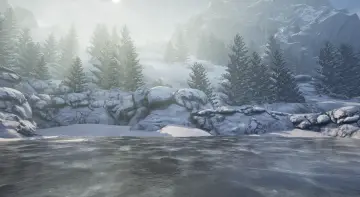
The pack includes a set of playable Example Levels. The Multi Biome Example paints 5 Biomes onto a 1 single Map: Grass, Desert, Snow, Beach, and Dunes. This is a direct demonstration of how the Auto Material handles transitions without a massive Texture stack. The Snow Shader Example shows how the Near Mesh Shader's Snow Feature can be applied to scattered Meshes, providing a clean reference for adding snow to a scene. The Runtime Virtual Texturing Example showcases RVT in action: reduced overdraw, blend effects, and Road Splines integrated into the landscape, all preconfigured with the Brushify Landscape Auto Material. Finally, a Starter Level gives a completely blank Level with a landscape already in place, so a project can start without building lighting and terrain setup from scratch.
Additional Materials, Example Scenes, and Merging Packs
Beyond the core Landscape and Mesh Shaders, the pack bundles several supporting Materials. There is a Foliage Master Material for trees and bushes, a Grass Master Material for optimized grass, and a Distance Mesh Material for distant Landscape Meshes. The Clouds Material works as a Light Function for cloud shadows, while the Fake Fog Material comes with 2 Fog Textures for fog cards. A PostFX Material is included for screen-space tuning, and a Roads Material ensures compatibility with Brushify roads packs such as natural roads and country roads. The Skydome Material ships with 6 HDRI Skydomes, and the Water Material can be used for oceans and lakes. All Textures are 2048x2048 or greater.
Because Brushify packs share generic objects, Textures, and Shaders, combining them is straightforward: inside the Epic Games Launcher, choose Add to project and then select Overwrite files. This allows the Environment Shaders to work alongside full Brushify packs without asset conflicts.
The Brushify - Environment Shaders Pack is not a full asset library, but it provides the shading foundation for a complete UE5 environment. For developers who already own other Brushify content, these Shaders fill in the Landscape, Near-Mesh, Foliage, and atmosphere layers. For those starting fresh, the Example Levels demonstrate the intended setup so the Materials can be put to use immediately in playable worlds.
 Nature & Terrain
 Nature & Terrain
 Nature & Terrain
 Nature & Terrain