"0341a2901a4ae9aa"{"id":"12829","slug":"lava-shader","title":"Lava Shader","category":"Nature \u0026 Terrain","engine":"5.1+","assetVersion":"Engine version: 5.1+","engineVersion":"4.26","tag":"Nature \u0026 Terrain","accent":"blue","visual":"luts","summary":"Enhance your game environments with this comprehensive Lava Shader pack. It features animated materials, Blueprint splines for custom flows, and advanced optimization for modern engine versions.","platform":"Unreal Engine","publishedAt":"2026-03-09T17:39:55.000Z","updatedAt":"2026-04-19T15:46:35.000Z","sourceNotes":[],"fileContents":[],"compatibility":["Unreal Engine","Engine version: 5.1+"],"featuredImage":{"alt":"Lava Shader","src":"https://3dcghub.com/wp-content/uploads/2026/03/44955342-6899-4743-a0e3-168c2bfcaa85.webp"},"hasDownloadLink":true,"downloads":0,"terms":[{"taxonomy":"category","slug":"nature-and-terrain","name":"Nature \u0026 Terrain"},{"taxonomy":"post_tag","slug":"materials","name":"Materials"},{"taxonomy":"post_tag","slug":"plugins","name":"Plugins"},{"taxonomy":"post_tag","slug":"textures","name":"Textures"},{"taxonomy":"post_tag","slug":"tools","name":"Tools"},{"taxonomy":"post_tag","slug":"unreal-engine-5","name":"Unreal Engine 5"},{"taxonomy":"post_tag","slug":"vfx","name":"VFX"}],"galleryImages":[{"src":"https://3dcghub.com/wp-content/uploads/2026/03/75b335d67d61_3c32e90a-9294-404b-ae3d-f747de34c6ac.webp","alt":"Lava Shader"},{"src":"https://3dcghub.com/wp-content/uploads/2026/03/4d8503b1f2cc_6fef4eac-9ff5-4b55-9a5c-ccc77d7b8e7c.webp","alt":"Lava Shader"},{"src":"https://3dcghub.com/wp-content/uploads/2026/03/384992c08d0a_e4712fc7-d236-4cc4-ba01-e47ff4811af0.webp","alt":"Lava Shader"},{"src":"https://3dcghub.com/wp-content/uploads/2026/03/50620753cffe_e1468baf-9de0-4cd5-9f37-542d10b64dfd.webp","alt":"Lava Shader"},{"src":"https://3dcghub.com/wp-content/uploads/2026/03/2862b6f77437_99255cf1-9a22-435b-802b-d6d47f1f3a8d.webp","alt":"Lava Shader"},{"src":"https://3dcghub.com/wp-content/uploads/2026/03/7d3c8fd5d331_6343d2c4-7074-467e-bbb8-0eb7322794e8.webp","alt":"Lava Shader"},{"src":"https://3dcghub.com/wp-content/uploads/2026/03/6b2cc1979b7a_d38cef4a-6582-4b2f-a896-182753829db3.webp","alt":"Lava Shader"},{"src":"https://3dcghub.com/wp-content/uploads/2026/03/de3360978513_29e659bd-5f9a-429f-be78-2b2d19dd89c7.webp","alt":"Lava Shader"}],"accessPanel":{"kind":"free-resource","title":"Access this resource","eyebrow":"Free Download","message":"Log in or create a free account to start your download.","fileName":"Content.7z","safetyNote":"All resources are 100% manually reviewed to eliminate all risks.","actionLabel":"Download Free","resourceType":"Resource archive"},"contentHtml":"\u003ch2\u003eHigh-Quality Animated Volcanic Surfaces\u003c/h2\u003e\n\u003cp\u003eThe \u003cstrong\u003eLava Shader\u003c/strong\u003e pack provides a complete solution for developers looking to add realistic molten surfaces to their projects. This asset collection focuses on high customizability and performance across different engine versions. Consequently, it includes game-ready assets that are ready for immediate implementation in various environments.\u003c/p\u003e\n\n\u003ch2\u003eComprehensive Material Customization\u003c/h2\u003e\n\u003cp\u003eThe core of this pack consists of four highly customizable animated lava shaders. Furthermore, the developer included 14 material instances to help you get started quickly. These master materials offer a wide range of parameters. You can adjust the color, lava glow, and UV tiling to suit your artistic vision.\u003c/p\u003e\n\n\u003cp\u003eIn addition, users can control the lava speed and utilize flow map controls. These features allow you to break up movement patterns effectively. The \u003cstrong\u003eLava Shader\u003c/strong\u003e also includes procedural logic to gather hot, glowing lava at the edges of meshes. You can specifically tune the contrast, distance, and amount of this edge glow to achieve the perfect look.\u003c/p\u003e\n\n\u003ch2\u003eDynamic Flow and Particle Effects\u003c/h2\u003e\n\u003cp\u003eCreating complex environments is easier with the included Blueprint Splines. These tools allow you to create your own custom lava flows throughout a level. To add more variety, the pack provides two dripping lava-falls meshes. These meshes are fully customizable to fit your specific terrain needs. Moreover, the pack includes five molten lava texture variants to provide visual diversity.\u003c/p\u003e\n\n\u003cp\u003eVisual fidelity is further enhanced by specific particle systems. The pack includes two lava-splash effects and one ember particle effect. These elements work together to create a more immersive and dangerous atmosphere. This \u003cstrong\u003eLava Shader\u003c/strong\u003e uses World Position Offset (WPO) and displacement to create a realistic 3D fullness.\u003c/p\u003e\n\n\u003ch2\u003eTechnical Optimization and Nanite Support\u003c/h2\u003e\n\u003cp\u003eThis resource is designed to work efficiently in both UE4 and UE5. In Unreal Engine 4, the shader utilizes displacement and tessellation. Users can tweak these settings to balance performance and visual quality. However, the workflow evolves for Unreal Engine 5 users to take advantage of newer technologies.\u003c/p\u003e\n\n\u003cp\u003eThe pack includes high, medium, and low-resolution meshes. Therefore, you can choose the best mesh for your optimization needs. For those using version 5.4, the developer updated the \u003cstrong\u003eLava Shader\u003c/strong\u003e to support Nanite Tessellation. This update includes more controls and general optimizations for better performance.\u003c/p\u003e\n\n\u003cp\u003eTo ensure the displacement works correctly in 5.4, specific configuration steps are required. You must enable the Nanite Displacement Mesh plugin and enable Tessellation in your materials. Furthermore, you should update your project's configuration files with the following lines:\u003c/p\u003e\n\u003cul\u003e\n\u003cli\u003er.Nanite.AllowTessellation=1\u003c/li\u003e\n\u003cli\u003er.Nanite.Tessellation=1\u003c/li\u003e\n\u003c/ul\u003e\n\u003cp\u003eUsing the default mesh with these settings enabled provides the best results in the latest engine versions.\u003c/p\u003e\n\n\u003ch2\u003eBest Fit\u003c/h2\u003e\n\u003cp\u003eThe Lava Shader pack is a robust toolkit for any environment artist. It combines realistic 3D depth with easy-to-use Blueprint tools. While the demo map is not included, the provided documentation and material instances offer a clear path to creating stunning volcanic landscapes. The combination of animated textures and procedural edge effects ensures your magma looks hot and dynamic.\u003c/p\u003e\n\n\u003ch2\u003eMore From The Same Workflow\u003c/h2\u003e\n\u003cul\u003e\n\u003cli\u003e\u003ca href=\"https://3dcghub.com/ultimate-template-unrealengine-2d-dialogue-inventory-system-save/\" title=\"ULTIMATE Template UnrealEngine || 2D + Dialogue + Inventory system + Save | |\"\u003eULTIMATE Template UnrealEngine || 2D + Dialogue + Inventory system + Save | |\u003c/a\u003e\u003c/li\u003e\n\u003cli\u003e\u003ca href=\"https://3dcghub.com/sci-fi-environment-engine-room/\" title=\"Sci-fi Environment Engine Room\"\u003eSci-fi Environment Engine Room\u003c/a\u003e\u003c/li\u003e\n\u003cli\u003e\u003ca href=\"https://3dcghub.com/stylized-water/\" title=\"Stylized Water\"\u003eStylized Water\u003c/a\u003e\u003c/li\u003e\n\u003cli\u003e\u003ca href=\"https://3dcghub.com/glitter-shader/\" title=\"Glitter Shader\"\u003eGlitter Shader\u003c/a\u003e\u003c/li\u003e\n\u003cli\u003e\u003ca href=\"https://3dcghub.com/56-fabric-textile-materials-4k-pbr-collection/\" title=\"56 Fabric \u0026amp;amp; Textile Materials (4K PBR Collection)\"\u003e56 Fabric \u0026amp; Textile Materials (4K PBR Collection)\u003c/a\u003e\u003c/li\u003e\n\u003c/ul\u003e","contentTextLength":3583,"navigation":{"current":3307,"total":4017,"previous":{"id":"12839","slug":"muddy-materials","title":"Muddy Materials","category":"Nature \u0026 Terrain","platform":"Unreal Engine","updatedAt":"2026-04-19T15:46:35.000Z"},"next":{"id":"13003","slug":"terrain-vol-56-hand-painted-textures","title":"Terrain Vol.56 - Hand Painted Textures","category":"Nature \u0026 Terrain","platform":"Unreal Engine","updatedAt":"2026-04-19T15:46:34.000Z"}},"relatedResources":[{"id":"12818","slug":"ice-world","title":"Ice World","category":"Nature \u0026 Terrain","engine":"5.1+","assetVersion":"Engine version: 5.1+","engineVersion":"4.14","tag":"Nature \u0026 Terrain","accent":"blue","visual":"luts","summary":"Ice World provides a comprehensive library of ice materials designed for lakes, rivers, and standard lit models. This asset pack features advanced shaders that remove tiling and offer deep customization for realistic or stylized winter scenes.","platform":"Unreal Engine","publishedAt":"2026-03-09T17:38:04.000Z","updatedAt":"2026-04-19T15:46:36.000Z","sourceNotes":[],"fileContents":[],"compatibility":["Unreal Engine","Engine version: 5.1+"],"featuredImage":{"alt":"Ice World","src":"https://3dcghub.com/wp-content/uploads/2026/03/59b80838-ea0a-4fe4-b1cf-79456bfdbe76.webp"},"hasDownloadLink":true,"downloads":0},{"id":"12681","slug":"cooled-flowing-lava","title":"Cooled \u0026 Flowing Lava","category":"Nature \u0026 Terrain","engine":"5.0+","assetVersion":"Engine version: 5.0+","engineVersion":"5.0","tag":"Nature \u0026 Terrain","accent":"blue","visual":"luts","summary":"Enhance your digital environments with Cooled \u0026 Flowing Lava. This professional material set offers realistic animations and highly customizable parameters for diverse platforms.","platform":"Unreal Engine","publishedAt":"2026-03-09T16:03:31.000Z","updatedAt":"2026-04-19T15:46:37.000Z","sourceNotes":[],"fileContents":[],"compatibility":["Unreal Engine","Engine version: 5.0+"],"featuredImage":{"alt":"Cooled \u0026 Flowing Lava","src":"https://3dcghub.com/wp-content/uploads/2026/03/d19f8d6d-cdb1-4597-a4a0-0e95481a95d9.webp"},"hasDownloadLink":true,"downloads":0},{"id":"12858","slug":"mw-landscape-auto-material","title":"MW Landscape Auto Material","category":"Nature \u0026 Terrain","engine":"4.26+,5.0+","assetVersion":"Engine version: 4.26+,5.0+","engineVersion":"5.2","tag":"Nature \u0026 Terrain","accent":"blue","visual":"luts","summary":"The MW Landscape Auto Material is a smart, modular solution for creating diverse terrains with five procedural layers. It supports custom textures and high-performance prototyping for various biomes.","platform":"Unreal Engine","publishedAt":"2026-03-09T18:01:14.000Z","updatedAt":"2026-04-19T15:46:35.000Z","sourceNotes":[],"fileContents":[],"compatibility":["Unreal Engine"],"featuredImage":{"alt":"MW Landscape Auto Material","src":"https://3dcghub.com/wp-content/uploads/2026/03/9f041517-302c-41d9-83b3-39bab6a4fd5e.webp"},"hasDownloadLink":true,"downloads":5}]}
Nature & Terrain
Lava Shader
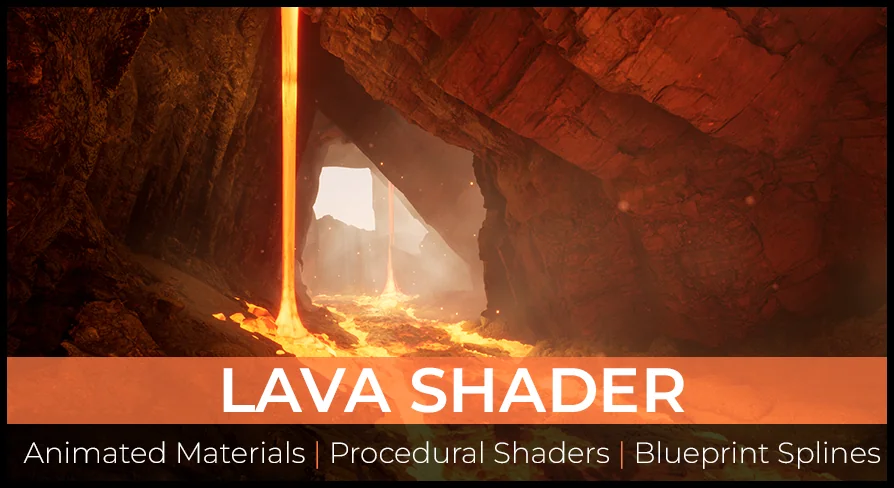
Enhance your game environments with this comprehensive Lava Shader pack. It features animated materials, Blueprint splines for custom flows, and advanced optimization for modern engine versions.
The Lava Shader pack provides a complete solution for developers looking to add realistic molten surfaces to their projects. This asset collection focuses on high customizability and performance across different engine versions. Consequently, it includes game-ready assets that are ready for immediate implementation in various environments.
Comprehensive Material Customization
The core of this pack consists of four highly customizable animated lava shaders. Furthermore, the developer included 14 material instances to help you get started quickly. These master materials offer a wide range of parameters. You can adjust the color, lava glow, and UV tiling to suit your artistic vision.
In addition, users can control the lava speed and utilize flow map controls. These features allow you to break up movement patterns effectively. The Lava Shader also includes procedural logic to gather hot, glowing lava at the edges of meshes. You can specifically tune the contrast, distance, and amount of this edge glow to achieve the perfect look.
Dynamic Flow and Particle Effects
Creating complex environments is easier with the included Blueprint Splines. These tools allow you to create your own custom lava flows throughout a level. To add more variety, the pack provides two dripping lava-falls meshes. These meshes are fully customizable to fit your specific terrain needs. Moreover, the pack includes five molten lava texture variants to provide visual diversity.
Visual fidelity is further enhanced by specific particle systems. The pack includes two lava-splash effects and one ember particle effect. These elements work together to create a more immersive and dangerous atmosphere. This Lava Shader uses World Position Offset (WPO) and displacement to create a realistic 3D fullness.
Technical Optimization and Nanite Support
This resource is designed to work efficiently in both UE4 and UE5. In Unreal Engine 4, the shader utilizes displacement and tessellation. Users can tweak these settings to balance performance and visual quality. However, the workflow evolves for Unreal Engine 5 users to take advantage of newer technologies.
The pack includes high, medium, and low-resolution meshes. Therefore, you can choose the best mesh for your optimization needs. For those using version 5.4, the developer updated the Lava Shader to support Nanite Tessellation. This update includes more controls and general optimizations for better performance.
To ensure the displacement works correctly in 5.4, specific configuration steps are required. You must enable the Nanite Displacement Mesh plugin and enable Tessellation in your materials. Furthermore, you should update your project's configuration files with the following lines:
r.Nanite.AllowTessellation=1
r.Nanite.Tessellation=1
Using the default mesh with these settings enabled provides the best results in the latest engine versions.
Best Fit
The Lava Shader pack is a robust toolkit for any environment artist. It combines realistic 3D depth with easy-to-use Blueprint tools. While the demo map is not included, the provided documentation and material instances offer a clear path to creating stunning volcanic landscapes. The combination of animated textures and procedural edge effects ensures your magma looks hot and dynamic.
 Nature & Terrain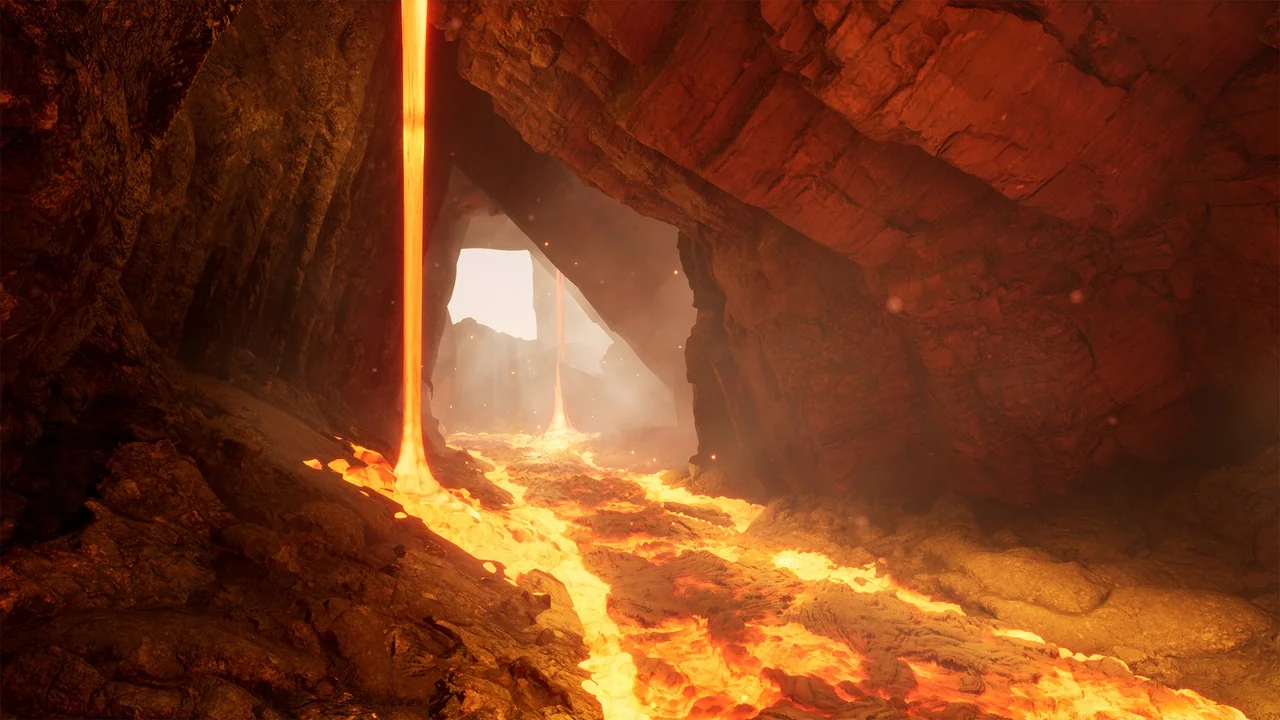
 Nature & Terrain
 Nature & Terrain
 Nature & Terrain