"c68a05d5e51405b3"{"id":"1000110","slug":"ultimate-water-shader-ue4-and-5","title":"Ultimate Water Shader UE4 and 5","category":"Nature \u0026 Terrain","engine":"5.5+","assetVersion":"","engineVersion":"Engine Version: 5.5+","tag":"Nature \u0026 Terrain","accent":"blue","visual":"mech","summary":"A closer look at Ultimate Water Shader UE4 and 5, including the foam switch update, demonstration asset limits, and vertex-paint usage details.","platform":"Unreal Engine","publishedAt":"2026-06-07T23:05:08.990Z","updatedAt":"2026-10-21T04:23:33.864Z","sourceNotes":[],"fileContents":[],"compatibility":["Unreal Engine","Engine Version: 5.5+"],"featuredImage":{"alt":"Ultimate Water Shader UE4 and 5","src":"/wp-content/uploads/published/2026/06/e5b4054377ff-711c52d1-2ae1-456d-bcb4-5cd0d403477f-aa527e6a9f.webp"},"hasDownloadLink":true,"downloads":2,"terms":[{"taxonomy":"category","slug":"nature-and-terrain","name":"Nature \u0026 Terrain"}],"galleryImages":[{"src":"/wp-content/uploads/published/2026/06/71eb2dcadc5c-c68df94f-0290-46aa-802a-6fab1cc64d46-29847770f7.webp","alt":"Ultimate Water Shader UE4 and 5"},{"src":"/wp-content/uploads/published/2026/06/1e43151bf0ec-7e5b81a1-cc4f-4b25-9377-0da68e8adf8f-5bd41c69d6.webp","alt":"Ultimate Water Shader UE4 and 5"},{"src":"/wp-content/uploads/published/2026/06/759cece87b11-a5a50fb6-1116-484e-848d-d580a313e0eb-09076828a8.webp","alt":"Ultimate Water Shader UE4 and 5"},{"src":"/wp-content/uploads/published/2026/06/0cbf5ed157cf-5d253cbe-6d57-4fb0-b895-03611f4dbdb3-60eeae09ae.webp","alt":"Ultimate Water Shader UE4 and 5"},{"src":"/wp-content/uploads/published/2026/06/696ae0f4bf0d-2e25f115-647d-49d5-873b-0012014f5ebe-6e6bb0877f.webp","alt":"Ultimate Water Shader UE4 and 5"},{"src":"/wp-content/uploads/published/2026/06/d1a9162cb0b6-6e237cb4-bf47-40f3-8bdc-01a64732c8a6-5d3dfa8844.webp","alt":"Ultimate Water Shader UE4 and 5"},{"src":"/wp-content/uploads/published/2026/06/7833500e31c6-d78b7d90-f629-4317-8488-b1e01d940077-868aedbc24.webp","alt":"Ultimate Water Shader UE4 and 5"},{"src":"/wp-content/uploads/published/2026/06/53d6c819922a-f69dbe6d-6a91-45a5-ab46-29d60a68804f-dfdce4ecbc.webp","alt":"Ultimate Water Shader UE4 and 5"},{"src":"/wp-content/uploads/published/2026/06/67f857cc31b9-81c57c2f-40a6-41a6-9330-ddaa918c819a-6b2c357fb1.webp","alt":"Ultimate Water Shader UE4 and 5"}],"accessPanel":{"kind":"resource","title":"Access this resource","eyebrow":"Free Download","message":"Log in or create a free account to start your download.","fileName":"Content.7z","safetyNote":"Resources are manually reviewed before listing to improve quality and reduce obvious risks.","actionLabel":"Download Free","resourceType":"Resource archive"},"contentHtml":"\u003cp\u003eOne of the clearest implementation details in Ultimate Water Shader UE4 and 5 is the updated foam control. Under the foam properties, there is a switch labeled \u003cem\u003eFoam 1 or 2?\u003c/em\u003e, and that single choice affects how the water surface reads in motion and across the mesh. The update does not treat foam as a fixed look. Instead, it gives two alternatives with different tradeoffs, which makes setup less about enabling a feature and more about choosing the behavior that fits the scene.\u003c/p\u003e \u003cp\u003eFoam 1 is described as the nicer-looking option, but it can get stretched. Foam 2 avoids stretching artifacts entirely. That distinction is useful in production terms because it frames the decision as a balance between appearance and artifact control. If a scene benefits from the more attractive foam treatment and the stretching is acceptable, Foam 1 is the better visual pick. If stability across the surface matters more, Foam 2 is the safer route.\u003c/p\u003e \u003ch2\u003eFoam 1 or 2? The main control that shapes the water look\u003c/h2\u003e\n\u003cp\u003eThis switch is the most direct window into how the shader is meant to be used. Rather than presenting a single foam style, Ultimate Water Shader UE4 and 5 asks the user to evaluate two outcomes:\u003c/p\u003e \u003cul\u003e\n\u003cli\u003e\u003cstrong\u003eFoam 1\u003c/strong\u003e: visually nicer, but may stretch\u003c/li\u003e\n\u003cli\u003e\u003cstrong\u003eFoam 2\u003c/strong\u003e: no stretching artifact\u003c/li\u003e\n\u003c/ul\u003e \u003cp\u003eThat gives the shader a practical setup path. The choice is not abstract and it is not hidden behind technical language. It is a visible property with a clearly stated result. For artists or teams testing water in different environments, this can simplify iteration. A scene with a close camera and a strong emphasis on surface detail may lean toward the nicer foam appearance. A scene where stretching would be too visible or too distracting can move to the second option.\u003c/p\u003e \u003cp\u003eThe wording around the update also suggests ongoing refinement rather than a static release. The shader is being maintained with visible changes to controls, and the foam switch stands out as a concrete example of that maintenance affecting day-to-day use.\u003c/p\u003e \u003ch2\u003eWhat the demonstration scene shows, and what is actually included\u003c/h2\u003e\n\u003cp\u003eUltimate Water Shader UE4 and 5 makes an important distinction between the water package itself and the environment pieces used to present it. Several foliage items and textures shown alongside the water are there for demonstration purposes and are not included inside the package. That includes grass, mushroom, leaves, and lily-pad textures that come from Megascans.\u003c/p\u003e \u003cp\u003eThis matters during implementation because water shaders are often judged in context. A polished preview scene can make the surrounding assets feel like part of the same resource unless the package boundaries are stated clearly. Here, those boundaries are explicit. If someone is rebuilding the same kind of pond, shoreline, or wetland look, they should not expect all visible foliage and leaf-related textures to ship with the shader itself.\u003c/p\u003e \u003cp\u003eThere is one direct exception: the moss texture is included. That detail gives the package at least one grounded environmental component tied to the visual presentation, while still separating it from the Megascans-based demonstration elements.\u003c/p\u003e \u003ch3\u003eMegascans elements used only for presentation\u003c/h3\u003e\n\u003cp\u003eThe following items are identified as demonstration assets rather than included content:\u003c/p\u003e \u003cul\u003e\n\u003cli\u003eGrass\u003c/li\u003e\n\u003cli\u003eMushroom\u003c/li\u003e\n\u003cli\u003eLeaves textures\u003c/li\u003e\n\u003cli\u003eLily-pad textures\u003c/li\u003e\n\u003c/ul\u003e \u003cp\u003eThat separation is especially relevant for scene planning. If the goal is to reproduce the exact look of the preview environment, the surrounding set dressing will need to be sourced separately where applicable. The shader’s role remains anchored in the water treatment itself rather than the full foliage package around it.\u003c/p\u003e \u003ch2\u003eVertex-paint textures and the surface detail workflow\u003c/h2\u003e\n\u003cp\u003eVertex paint is one of the strongest clues about the intended creative workflow around this resource. The available texture references include vertex-paint textures, specifically leaves texture and Dollarweed Leaves. That points toward a setup where surface blending and localized environmental detail are part of the broader look being demonstrated.\u003c/p\u003e \u003cp\u003eEven without overreaching beyond the stated details, vertex paint clearly belongs to the conversation around how this shader can sit inside a more dressed scene. It connects the water to edge treatment, mossy transitions, or scattered natural detail rather than isolating the surface as a standalone plane. The tag set reinforces that direction through terms such as paint, vertex, moss, water, foam, ripple, wave, and realistic.\u003c/p\u003e \u003cp\u003eThose tags do not need much embellishment to be informative. Together, they point to a resource focused on natural water presentation with layered surface behavior and scene blending in mind. The presence of ripple and wave in the tag set suggests attention to moving water qualities, while foam and moss point toward shoreline or contact-area styling. Vertex paint sits in the middle of that process as a control method for placing or blending visual detail.\u003c/p\u003e \u003ch2\u003eUltimate Water Shader UE4 and 5 in a scene with moss, ripples, and set dressing\u003c/h2\u003e\n\u003cp\u003eThe surrounding asset references help clarify the kind of scenes this shader is being shown in. Alongside the water, the demonstration materials reference Red mushroom, Ribbon grass, Mossy stones pack, Top police car, Crate, and Wood boards. These names do not redefine the shader, but they do show the range of environmental dressing used around it.\u003c/p\u003e \u003cp\u003eSome of those items suggest natural set dressing, especially ribbon grass, mushrooms, mossy stones, leaves, and lily-pad textures. Others, such as a police car, crate, and wood boards, suggest that the water can be placed in more constructed or story-driven spaces as well. The package then offers less a narrow ocean-only or river-only identity and more a flexible scene component that has been shown in mixed environments.\u003c/p\u003e \u003cp\u003eThe tag list adds another useful layer here. Words like master and shader place the resource in a material-focused workflow, while meshing, ripple, wave, and realistic indicate its visual direction. Studio appears among the tags too, which can be read as part of the broader production framing around the resource rather than a specific technical feature. What stands out most is how often the tags circle back to water behavior and environmental blending rather than decorative extras.\u003c/p\u003e \u003ch2\u003eSupport, updates, and practical use going forward\u003c/h2\u003e\n\u003cp\u003eSupport and ongoing updates are part of the package’s visible ecosystem. There is an invitation to join the developer’s Discord for product updates, news, support, and contests. Stripped of the community promotion angle, the practical point is that the shader is not presented as abandoned or one-off. It has a support channel and at least one notable update already called out through the foam switch change.\u003c/p\u003e \u003cp\u003eIt was also identified as a February 2021 UE4 Showcase Pick, which places it in a specific moment of visibility around Unreal Engine 4. That recognition does not change how the shader is implemented, but it does help explain why the presentation puts emphasis on visual demonstration and teaser material.\u003c/p\u003e \u003cp\u003eFor actual use, the most grounded takeaway is straightforward. Start with the foam properties, because that is where the most important visual decision has been made explicit. Decide whether the scene benefits more from Foam 1’s nicer appearance or Foam 2’s lack of stretching artifacts. Keep the package boundaries in mind when rebuilding the preview look, since several foliage and texture elements belong to Megascans and are not included, while the moss texture is included. From there, the shader sits most naturally in a workflow where water, foam, ripples, waves, moss, and vertex-painted detail are all part of the same scene language.\u003c/p\u003e\n\n\u003ch2\u003eContinue Browsing Similar Packs\u003c/h2\u003e\n\u003cul\u003e\n\u003cli\u003e\u003ca href=\"https://3dcghub.com/advanced-water-material/\" title=\"Advanced Water Material\"\u003eAdvanced Water Material\u003c/a\u003e\u003c/li\u003e\n\u003cli\u003e\u003ca href=\"https://3dcghub.com/lava-shader/\" title=\"Lava Shader\"\u003eLava Shader\u003c/a\u003e\u003c/li\u003e\n\u003cli\u003e\u003ca href=\"https://3dcghub.com/ice-world/\" title=\"Ice World\"\u003eIce World\u003c/a\u003e\u003c/li\u003e\n\u003cli\u003e\u003ca href=\"https://3dcghub.com/rain-water-drop-flow-material-fx-system/\" title=\"Rain - Water Drop - Flow Material \u0026amp; FX System\"\u003eRain - Water Drop - Flow Material \u0026amp; FX System\u003c/a\u003e\u003c/li\u003e\n\u003cli\u003e\u003ca href=\"https://3dcghub.com/interactive-water-ocean-and-swim-systems/\" title=\"Interactive Water, Ocean and Swim Systems\"\u003eInteractive Water, Ocean and Swim Systems\u003c/a\u003e\u003c/li\u003e\n\u003c/ul\u003e","contentTextLength":7837,"navigation":{"current":145,"total":3860,"previous":{"id":"1000709","slug":"vehicles-vol-9-future-cars-low-poly","title":"Vehicles VOL.9- Future Cars (Low Poly)","category":"Cars \u0026 Trucks","platform":"Unreal Engine","updatedAt":"2026-10-21T04:23:37.954Z"},"next":{"id":"1000320","slug":"parkway-home-modern-family-house-with-stylish-interior-environment","title":"Parkway Home – Modern Family House with Stylish Interior Environment","category":"Interior","platform":"Unreal Engine","updatedAt":"2026-10-21T02:37:25.757Z"}},"relatedResources":[{"id":"12622","slug":"advanced-water-material","title":"Advanced Water Material","category":"Nature \u0026 Terrain","engine":"4.26+,5.0+","assetVersion":"Engine version: 4.26+,5.0+","engineVersion":"4.22","tag":"Nature \u0026 Terrain","accent":"blue","visual":"luts","summary":"The Advanced Water Material is a versatile shader designed for creating dynamic liquid surfaces. It features 3D Gerstner Waves and a camera-independent depth opacity function for consistent visual quality.","platform":"Unreal Engine","publishedAt":"2026-03-07T12:58:03.000Z","updatedAt":"2026-04-19T15:46:38.000Z","sourceNotes":[],"fileContents":[],"compatibility":["Unreal Engine","Engine version: 4.26+,5.0+"],"featuredImage":{"alt":"Advanced Water Material","src":"https://3dcghub.com/wp-content/uploads/2026/03/84442f89-43f9-4380-b945-4eb7cc54f363.webp"},"hasDownloadLink":true,"downloads":2},{"id":"1001213","slug":"cartoon-water-shader","title":"Cartoon Water Shader","category":"Water","engine":"5.0+","assetVersion":"","engineVersion":"Engine Version: 5.0+","tag":"Water","accent":"blue","visual":"mech","summary":"Explore Cartoon Water Shader, featuring stylized water materials, river and waterfall tools, buoyancy, underwater effects, and tile solver systems.","platform":"Unreal Engine","publishedAt":"2026-09-19T08:51:37.588Z","updatedAt":"2026-09-19T08:51:37.588Z","sourceNotes":[],"fileContents":[],"compatibility":["Unreal Engine","Engine Version: 5.0+"],"featuredImage":{"alt":"Cartoon Water Shader","src":"/wp-content/uploads/published/2026/09/65dfc8ccd016-ae677613-d823-407e-8397-e6f92539e22a-1bb83d5d29.webp"},"hasDownloadLink":true,"downloads":0},{"id":"12642","slug":"rain-water-drop-flow-material-fx-system","title":"Rain - Water Drop - Flow Material \u0026 FX System","category":"Nature \u0026 Terrain","engine":"5.0+","assetVersion":"Engine version: 5.0+","engineVersion":"4.17","tag":"Nature \u0026 Terrain","accent":"blue","visual":"luts","summary":"Discover a comprehensive rain and water flow system for your projects. This pack includes volume-based effects, post-process materials, and streamlined drag-and-drop features.","platform":"Unreal Engine","publishedAt":"2026-03-07T13:01:46.000Z","updatedAt":"2026-04-19T15:46:38.000Z","sourceNotes":[],"fileContents":[],"compatibility":["Unreal Engine","Engine version: 5.0+"],"featuredImage":{"alt":"Rain - Water Drop - Flow Material \u0026 FX System","src":"https://3dcghub.com/wp-content/uploads/2026/03/4ee2ec6f-d9be-40c0-98c1-9a443f3fe2cf.webp"},"hasDownloadLink":true,"downloads":0}]}
Nature & Terrain
Ultimate Water Shader UE4 and 5
A closer look at Ultimate Water Shader UE4 and 5, including the foam switch update, demonstration asset limits, and vertex-paint usage details.
Category:Unreal Engine,Nature & TerrainPlatform: Unreal EngineEngine Version: 5.5+Published: Jun 7, 2026Updated: Oct 21, 2026
Nature & Terrain
Resource overview
One of the clearest implementation details in Ultimate Water Shader UE4 and 5 is the updated foam control. Under the foam properties, there is a switch labeled Foam 1 or 2?, and that single choice affects how the water surface reads in motion and across the mesh. The update does not treat foam as a fixed look. Instead, it gives two alternatives with different tradeoffs, which makes setup less about enabling a feature and more about choosing the behavior that fits the scene.
Foam 1 is described as the nicer-looking option, but it can get stretched. Foam 2 avoids stretching artifacts entirely. That distinction is useful in production terms because it frames the decision as a balance between appearance and artifact control. If a scene benefits from the more attractive foam treatment and the stretching is acceptable, Foam 1 is the better visual pick. If stability across the surface matters more, Foam 2 is the safer route.
Foam 1 or 2? The main control that shapes the water look
This switch is the most direct window into how the shader is meant to be used. Rather than presenting a single foam style, Ultimate Water Shader UE4 and 5 asks the user to evaluate two outcomes:
Foam 1: visually nicer, but may stretch
Foam 2: no stretching artifact
That gives the shader a practical setup path. The choice is not abstract and it is not hidden behind technical language. It is a visible property with a clearly stated result. For artists or teams testing water in different environments, this can simplify iteration. A scene with a close camera and a strong emphasis on surface detail may lean toward the nicer foam appearance. A scene where stretching would be too visible or too distracting can move to the second option.
The wording around the update also suggests ongoing refinement rather than a static release. The shader is being maintained with visible changes to controls, and the foam switch stands out as a concrete example of that maintenance affecting day-to-day use.
What the demonstration scene shows, and what is actually included
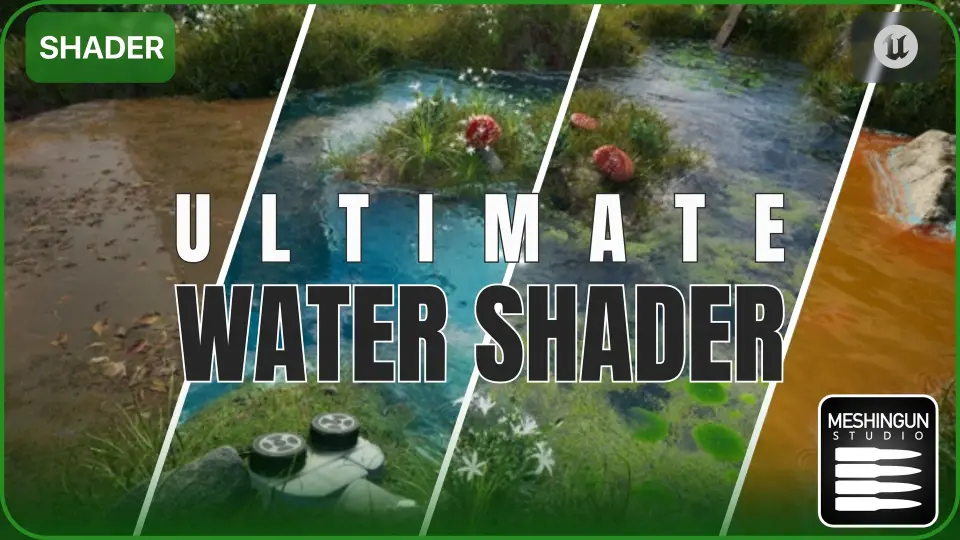
Ultimate Water Shader UE4 and 5 makes an important distinction between the water package itself and the environment pieces used to present it. Several foliage items and textures shown alongside the water are there for demonstration purposes and are not included inside the package. That includes grass, mushroom, leaves, and lily-pad textures that come from Megascans.
This matters during implementation because water shaders are often judged in context. A polished preview scene can make the surrounding assets feel like part of the same resource unless the package boundaries are stated clearly. Here, those boundaries are explicit. If someone is rebuilding the same kind of pond, shoreline, or wetland look, they should not expect all visible foliage and leaf-related textures to ship with the shader itself.
There is one direct exception: the moss texture is included. That detail gives the package at least one grounded environmental component tied to the visual presentation, while still separating it from the Megascans-based demonstration elements.
Megascans elements used only for presentation
The following items are identified as demonstration assets rather than included content:
Grass
Mushroom
Leaves textures
Lily-pad textures
That separation is especially relevant for scene planning. If the goal is to reproduce the exact look of the preview environment, the surrounding set dressing will need to be sourced separately where applicable. The shader’s role remains anchored in the water treatment itself rather than the full foliage package around it.
Vertex-paint textures and the surface detail workflow
Vertex paint is one of the strongest clues about the intended creative workflow around this resource. The available texture references include vertex-paint textures, specifically leaves texture and Dollarweed Leaves. That points toward a setup where surface blending and localized environmental detail are part of the broader look being demonstrated.
Even without overreaching beyond the stated details, vertex paint clearly belongs to the conversation around how this shader can sit inside a more dressed scene. It connects the water to edge treatment, mossy transitions, or scattered natural detail rather than isolating the surface as a standalone plane. The tag set reinforces that direction through terms such as paint, vertex, moss, water, foam, ripple, wave, and realistic.
Those tags do not need much embellishment to be informative. Together, they point to a resource focused on natural water presentation with layered surface behavior and scene blending in mind. The presence of ripple and wave in the tag set suggests attention to moving water qualities, while foam and moss point toward shoreline or contact-area styling. Vertex paint sits in the middle of that process as a control method for placing or blending visual detail.
Ultimate Water Shader UE4 and 5 in a scene with moss, ripples, and set dressing
The surrounding asset references help clarify the kind of scenes this shader is being shown in. Alongside the water, the demonstration materials reference Red mushroom, Ribbon grass, Mossy stones pack, Top police car, Crate, and Wood boards. These names do not redefine the shader, but they do show the range of environmental dressing used around it.
Some of those items suggest natural set dressing, especially ribbon grass, mushrooms, mossy stones, leaves, and lily-pad textures. Others, such as a police car, crate, and wood boards, suggest that the water can be placed in more constructed or story-driven spaces as well. The package then offers less a narrow ocean-only or river-only identity and more a flexible scene component that has been shown in mixed environments.
The tag list adds another useful layer here. Words like master and shader place the resource in a material-focused workflow, while meshing, ripple, wave, and realistic indicate its visual direction. Studio appears among the tags too, which can be read as part of the broader production framing around the resource rather than a specific technical feature. What stands out most is how often the tags circle back to water behavior and environmental blending rather than decorative extras.
Support, updates, and practical use going forward
Support and ongoing updates are part of the package’s visible ecosystem. There is an invitation to join the developer’s Discord for product updates, news, support, and contests. Stripped of the community promotion angle, the practical point is that the shader is not presented as abandoned or one-off. It has a support channel and at least one notable update already called out through the foam switch change.
It was also identified as a February 2021 UE4 Showcase Pick, which places it in a specific moment of visibility around Unreal Engine 4. That recognition does not change how the shader is implemented, but it does help explain why the presentation puts emphasis on visual demonstration and teaser material.
For actual use, the most grounded takeaway is straightforward. Start with the foam properties, because that is where the most important visual decision has been made explicit. Decide whether the scene benefits more from Foam 1’s nicer appearance or Foam 2’s lack of stretching artifacts. Keep the package boundaries in mind when rebuilding the preview look, since several foliage and texture elements belong to Megascans and are not included, while the moss texture is included. From there, the shader sits most naturally in a workflow where water, foam, ripples, waves, moss, and vertex-painted detail are all part of the same scene language.
 Nature & Terrain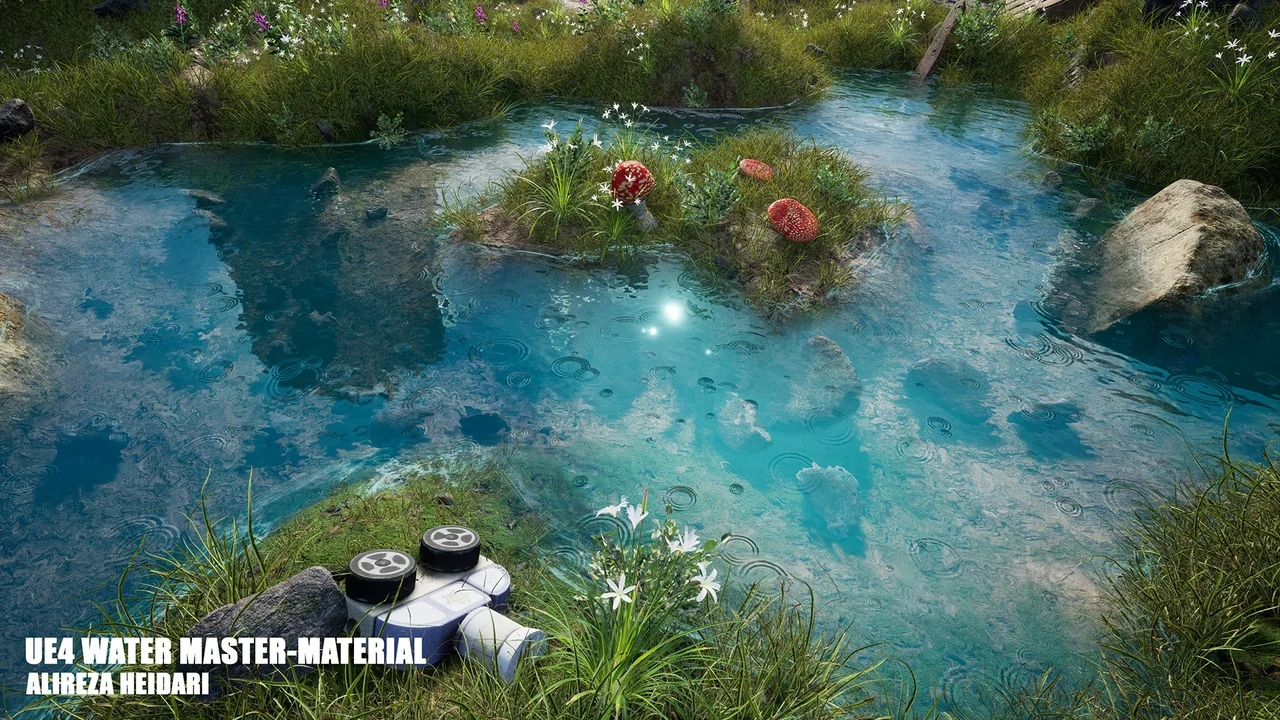
 Nature & Terrain
 Water
Water Nature & Terrain