"c68a05d5e51405b3"{"id":"1000109","slug":"undercity-wonderland-bundle","title":"UnderCity + WonderLand Bundle","category":"Industrial","engine":"Engine Version: 5.0+","assetVersion":"Engine Version: 5.0+","engineVersion":"","tag":"Industrial","accent":"cyan","visual":"city","summary":"UnderCity + WonderLand Bundle combines two named environment themes into one Unreal Engine Marketplace package for scene building across contrasting settings.","platform":"Unity","publishedAt":"2026-06-07T23:00:26.456Z","updatedAt":"2026-06-07T23:00:26.456Z","sourceNotes":[],"fileContents":[],"compatibility":["Unreal Engine","Engine Version: 5.0+"],"featuredImage":{"alt":"UnderCity + WonderLand Bundle","src":"/wp-content/uploads/published/2026/06/beb3c1d06099-1-1920x1080-ee5aee727e38e8b48c0464fffac89b43-65c0a35645.webp"},"hasDownloadLink":true,"downloads":2,"terms":[{"taxonomy":"category","slug":"unity-3d-environments-industrial","name":"Industrial"}],"galleryImages":[{"src":"/wp-content/uploads/published/2026/06/d574a362b4c3-highresscreenshot00003-1920x1080-eff944ac4de01d0a2-cf99d7c108.webp","alt":"UnderCity + WonderLand Bundle"},{"src":"/wp-content/uploads/published/2026/06/9c61ef0de1f3-highresscreenshot00004-1920x1080-9b0f6b4ef94df68ee-cd828760b8.webp","alt":"UnderCity + WonderLand Bundle"},{"src":"/wp-content/uploads/published/2026/06/57f54eace8cb-highresscreenshot00011-1920x1080-1ac96dea08b68b5fe-7f7f2a0a2c.webp","alt":"UnderCity + WonderLand Bundle"},{"src":"/wp-content/uploads/published/2026/06/cb8e9708cfee-highresscreenshot00009-1920x1080-3f6f66229b17f7caa-b67c7f772f.webp","alt":"UnderCity + WonderLand Bundle"},{"src":"/wp-content/uploads/published/2026/06/ec8eac553532-1-1920x1080-d5ead700438bb36e3848e394eaa746ba-afd69024b6.webp","alt":"UnderCity + WonderLand Bundle"},{"src":"/wp-content/uploads/published/2026/06/1c52d6812c4d-2-1920x1080-209271cdaca99ca43c8b6ef3d4a6e526-146ac0b1d2.webp","alt":"UnderCity + WonderLand Bundle"},{"src":"/wp-content/uploads/published/2026/06/5f81cc64dbd4-7-1920x1080-9d0e472d9953ed4558764fea9cd5829e-01db4b073a.webp","alt":"UnderCity + WonderLand Bundle"},{"src":"/wp-content/uploads/published/2026/06/2cdbf45a484a-8-1920x1080-89f75d1138214fcf96fdd9aca6d9c6a8-6115a8a1b9.webp","alt":"UnderCity + WonderLand Bundle"},{"src":"/wp-content/uploads/published/2026/06/b8bf3ebb54dc-9-1920x1080-8049188f2919dea3fcd4cace8b31807a-ef29c444d1.webp","alt":"UnderCity + WonderLand Bundle"},{"src":"/wp-content/uploads/published/2026/06/b74667e952ce-10-1920x1080-6ae799b8d17da96ea03f5282d942a6cf-bdf8b2dc4a.webp","alt":"UnderCity + WonderLand Bundle"}],"accessPanel":{"kind":"resource","title":"Access this resource","eyebrow":"Free Download","message":"Log in or create a free account to start your download.","fileName":"Unreal Cinematic Mastery From Beginner to Cinematic Creator","safetyNote":"Resources are manually reviewed before listing to improve quality and reduce obvious risks.","actionLabel":"Download Free","resourceType":"Resource archive"},"contentHtml":"\u003cp\u003eScenes shift in tone quickly with \u003cstrong\u003eUnderCity + WonderLand Bundle\u003c/strong\u003e. The package brings together \u003cstrong\u003eUnderCity\u003c/strong\u003e And \u003cstrong\u003eWonderLand\u003c/strong\u003e In one Unreal Engine Marketplace bundle, making its most obvious strength the contrast between those two named parts. Rather than pointing in a single visual direction, it suggests a paired setup where one project, prototype, or sequence can move between very different settings while staying inside the same bundled resource.\u003c/p\u003e \u003cp\u003eThe most concrete fact about the package is right in its name: this is a bundle that combines two distinct components, \u003cstrong\u003eUnderCity\u003c/strong\u003e And \u003cstrong\u003eWonderLand\u003c/strong\u003e. That pairing does most of the work in defining how the resource is likely to function in production. A bundle like this is not focused on one isolated environment idea. It is focused on range through combination, with each named part carrying its own identity and helping broaden the kinds of scenes a team may want to assemble.\u003c/p\u003e \u003ch2\u003eUnderCity + WonderLand in one package\u003c/h2\u003e\n\u003cp\u003eThe bundle format matters here because it frames the resource as a joined set beyond one-theme release. \u003cstrong\u003eUnderCity\u003c/strong\u003e And \u003cstrong\u003eWonderLand\u003c/strong\u003e Are presented together, which immediately makes the package useful for creators who do not want to stay locked into only one environmental mood. Even without further technical detail, the structure of the package tells you how to read it: two separately named settings are meant to sit side by side as part of the same working collection.\u003c/p\u003e \u003cp\u003eThat makes the bundle especially straightforward to understand from an editorial point of view. It is less about a narrow specialty and more about the practical value of having both \u003cstrong\u003eUnderCity\u003c/strong\u003e And \u003cstrong\u003eWonderLand\u003c/strong\u003e Available under one resource name. Teams comparing scene directions, testing visual contrast, or laying out projects that need more than one backdrop theme would naturally focus on that dual setup first.\u003c/p\u003e \u003cp\u003eThe short description emphasizes that this is a bundle, and that remains the central point. Nothing in the available detail suggests a single hero asset, a technical toolset, or a niche add-on. The identity of the resource lives in the combination itself. UnderCity and WonderLand are the concrete anchors, and the package is defined by bringing them together.\u003c/p\u003e \u003ch2\u003eHow the UnderCity and WonderLand contrast shapes scene use\u003c/h2\u003e\n\u003cp\u003eBecause the package is split between \u003cstrong\u003eUnderCity\u003c/strong\u003e And \u003cstrong\u003eWonderLand\u003c/strong\u003e, the strongest practical reading is contrast. Those names are different enough in character that they imply clearly separated scene directions. That gives the bundle a direct use in projects that benefit from visual variety, location changes, or alternate world concepts inside the same broader production.\u003c/p\u003e \u003cp\u003eFor a developer blocking out a game or interactive experience, the appeal would be easy to spot. One side of the bundle can serve one environment identity, while the other can support a noticeably different one. That can help when a project needs to present shifts in place, tone, or atmosphere without reducing everything to one repeated backdrop. The package does not need extra framing to communicate that strength; the two-part naming already does it.\u003c/p\u003e \u003cp\u003eThe same applies to presentation work and internal scene exploration. A bundle based on two named worlds or settings offers a natural starting point for comparison. If a team is deciding how broad or how varied a project should feel, having both \u003cstrong\u003eUnderCity\u003c/strong\u003e And \u003cstrong\u003eWonderLand\u003c/strong\u003e In one package makes the conversation less abstract. The resource stands as a practical option for projects that want environmental contrast instead of a single continuous look.\u003c/p\u003e \u003ch2\u003eWhat the bundle clearly emphasizes\u003c/h2\u003e\n\u003cp\u003eThe clearest emphasis is not a technical checklist but the pairing itself. \u003cstrong\u003eUnderCity + WonderLand Bundle\u003c/strong\u003e Highlights two component names and identifies the package as a bundle on the Unreal Engine Marketplace. From that, the most grounded interpretation is that the resource is meant to give users access to both parts together, with the bundle format acting as the main organizing idea.\u003c/p\u003e \u003cp\u003eThat emphasis also changes how the resource is evaluated. Instead of asking only what one environment does on its own, it makes more sense to consider how the two names expand the bundle’s scope. UnderCity contributes one side of that scope, and WonderLand contributes the other. The value of the package, in practical scene terms, is that it can support separate directions within the same production workflow.\u003c/p\u003e \u003cp\u003eThere is also a simplicity to the way the package presents itself. It does not hinge on a complicated concept statement. It is a direct combination resource. That can be useful for teams who prefer a straightforward asset selection process, where the main question is whether the included themes line up with the settings they want to build. In this case, the answer depends primarily on whether \u003cstrong\u003eUnderCity\u003c/strong\u003e And \u003cstrong\u003eWonderLand\u003c/strong\u003e Match the project’s environmental needs.\u003c/p\u003e \u003ch2\u003eUnderCity + WonderLand Bundle for Unreal Engine projects\u003c/h2\u003e\n\u003cp\u003eThis resource belongs to the \u003cstrong\u003eUnreal Engine Marketplace\u003c/strong\u003e, which places it clearly inside an Unreal Engine workflow. That alone makes it relevant to developers, environment artists, and teams already assembling scenes and content inside that ecosystem. The bundle title does not present itself as a general concept document or a stand-alone art idea. It reads as a usable package intended for Unreal Engine users who want access to both named themes.\u003c/p\u003e \u003cp\u003eWithin that context, the most likely use cases remain closely tied to scene variety. A single project may need multiple location identities. A prototype may need to test how players or viewers respond to sharp environmental shifts. A team may simply prefer to evaluate two contrasting directions without managing separate resources. UnderCity + WonderLand Bundle fits that kind of need because its structure is already divided into two named parts.\u003c/p\u003e \u003cp\u003eThat dual identity can also help on projects with different scales of ambition. Smaller productions may look at it as a compact way to cover more than one setting direction in the same package. Larger productions may see it as a convenient paired resource when planning sequences, chapters, or areas that do not all share the same atmosphere. The important point is not scale alone, but the fact that the bundle supports more than one environmental identity under one title.\u003c/p\u003e \u003ch2\u003eWho benefits most from UnderCity and WonderLand together\u003c/h2\u003e\n\u003cp\u003eThe bundle is most relevant for creators who know they want range between settings beyond one environmental lane. If a project calls for only one narrowly defined world, a two-part package may be more than necessary. But if a team wants two distinct named directions available from the start, \u003cstrong\u003eUnderCity + WonderLand Bundle\u003c/strong\u003e Makes immediate sense.\u003c/p\u003e \u003cp\u003eIts strongest concrete takeaway is simple: this Unreal Engine Marketplace package combines \u003cstrong\u003eUnderCity\u003c/strong\u003e And \u003cstrong\u003eWonderLand\u003c/strong\u003e In one bundle, making it a practical pick for teams that want scene contrast and broader environmental choice inside a single resource.\u003c/p\u003e\n\n\u003ch2\u003eContinue Browsing Similar Packs\u003c/h2\u003e\n\u003cul\u003e\n\u003cli\u003e\u003ca href=\"https://3dcghub.com/american-city-packs-bundle/\" title=\"American City Packs (Bundle)\"\u003eAmerican City Packs (Bundle)\u003c/a\u003e\u003c/li\u003e\n\u003cli\u003e\u003ca href=\"https://3dcghub.com/special-ops-modular-character-bundle/\" title=\"Special Ops - Modular Character Bundle\"\u003eSpecial Ops - Modular Character Bundle\u003c/a\u003e\u003c/li\u003e\n\u003cli\u003e\u003ca href=\"https://3dcghub.com/astronova-bundle/\" title=\"Astronova - Bundle\"\u003eAstronova - Bundle\u003c/a\u003e\u003c/li\u003e\n\u003cli\u003e\u003ca href=\"https://3dcghub.com/a-huge-animation-bundle/\" title=\"A Huge Animation Bundle\"\u003eA Huge Animation Bundle\u003c/a\u003e\u003c/li\u003e\n\u003cli\u003e\u003ca href=\"https://3dcghub.com/ghouls-mega-bundle/\" title=\"Ghouls Mega Bundle\"\u003eGhouls Mega Bundle\u003c/a\u003e\u003c/li\u003e\n\u003c/ul\u003e","contentTextLength":7075,"navigation":{"current":1895,"total":3860,"previous":{"id":"1000111","slug":"underground-ossuary","title":"Underground Ossuary","category":"Dungeon","platform":"Unreal Engine","updatedAt":"2026-06-07T23:22:35.386Z"},"next":{"id":"1000108","slug":"the-backroom-5-modular-levels-1","title":"The Backroom 5 Modular levels 1","category":"Horror","platform":"Unreal Engine","updatedAt":"2026-06-07T16:52:31.424Z"}},"relatedResources":[{"id":"1000400","slug":"scifi-railroad-terminal-facility-nanite","title":"Scifi Railroad Terminal Facility (Nanite)","category":"Industrial","engine":"5.0+","assetVersion":"","engineVersion":"Engine Version: 5.0+","tag":"Industrial","accent":"cyan","visual":"mech","summary":"A comprehensive Unreal Engine 5 environment package featuring 383 modular meshes, Nanite geometry, and Lumen lighting for high-end sci-fi transit hubs.","platform":"Unity","publishedAt":"2026-07-07T18:47:57.483Z","updatedAt":"2026-07-07T18:47:57.483Z","sourceNotes":[],"fileContents":[],"compatibility":["Unreal Engine","Engine Version: 5.0+"],"featuredImage":{"alt":"Scifi Railroad Terminal Facility (Nanite)","src":"/wp-content/uploads/published/2026/07/6493e7358832-d461389d-18c9-4920-93cf-6c39d3705eb2-601a9c1318.webp"},"hasDownloadLink":true,"downloads":2},{"id":"1000740","slug":"modular-warehouse-warehouse-industrial-warehouse-hangar-factory-warehouse","title":"Modular Warehouse (Warehouse, Industrial Warehouse, Hangar, Factory, Warehouse)","category":"Industrial","engine":"5.5+","assetVersion":"","engineVersion":"Engine Version: 5.5+","tag":"Industrial","accent":"cyan","visual":"mech","summary":"A fully modular UE5 warehouse, hangar, and factory construction kit featuring spline cable tools, functional doors, decals, props, Lumen, and Nanite support.","platform":"Unity","publishedAt":"2026-07-27T08:45:52.949Z","updatedAt":"2026-07-27T08:45:52.949Z","sourceNotes":[],"fileContents":[],"compatibility":["Unreal Engine","Engine Version: 5.5+"],"featuredImage":{"alt":"Modular Warehouse (Warehouse, Industrial Warehouse, Hangar, Factory, Warehouse)","src":"/wp-content/uploads/published/2026/07/d54aa0962d9c-46ce60b9-4893-430a-a802-017e66669ea6-b637cffc5f.webp"},"hasDownloadLink":true,"downloads":4},{"id":"21102","slug":"industrial-zone-mobile-optimized","title":"Industrial Zone - Mobile optimized","category":"Industrial","engine":"Original Unity version: 2018.4.20","assetVersion":"Original Unity version: 2018.4.20","engineVersion":"Asset Version:1.0","tag":"Industrial","accent":"cyan","visual":"city","summary":"This package offers a modern industrial theme focused on performance efficiency, utilizing low draw calls and a low triangle count suitable for mobile hardware.","platform":"Unity","publishedAt":"2026-03-26T10:36:28.000Z","updatedAt":"2026-04-19T15:42:49.000Z","sourceNotes":[],"fileContents":[],"compatibility":["Unity","Original Unity version: 2018.4.20","Asset Version: 1.0"],"featuredImage":{"alt":"Industrial Zone - Mobile optimized","src":"https://3dcghub.com/wp-content/uploads/2026/03/e4d1948be3ea_70bfadda-81ef-41e1-bfc7-e665426204d0_1280x720_stretch.webp"},"hasDownloadLink":true,"downloads":0}]}
Industrial
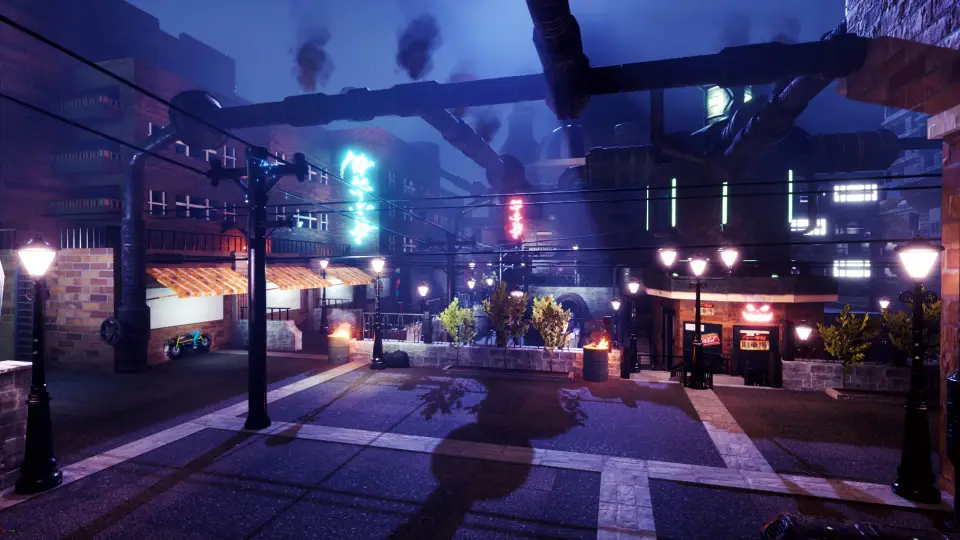
UnderCity + WonderLand Bundle
UnderCity + WonderLand Bundle combines two named environment themes into one Unreal Engine Marketplace package for scene building across contrasting settings.
Category:Unity,IndustrialPlatform: UnityEngine Version: 5.0+Published: Jun 7, 2026
Industrial
Resource overview
Scenes shift in tone quickly with UnderCity + WonderLand Bundle. The package brings together UnderCity And WonderLand In one Unreal Engine Marketplace bundle, making its most obvious strength the contrast between those two named parts. Rather than pointing in a single visual direction, it suggests a paired setup where one project, prototype, or sequence can move between very different settings while staying inside the same bundled resource.
The most concrete fact about the package is right in its name: this is a bundle that combines two distinct components, UnderCity And WonderLand. That pairing does most of the work in defining how the resource is likely to function in production. A bundle like this is not focused on one isolated environment idea. It is focused on range through combination, with each named part carrying its own identity and helping broaden the kinds of scenes a team may want to assemble.
UnderCity + WonderLand in one package
The bundle format matters here because it frames the resource as a joined set beyond one-theme release. UnderCity And WonderLand Are presented together, which immediately makes the package useful for creators who do not want to stay locked into only one environmental mood. Even without further technical detail, the structure of the package tells you how to read it: two separately named settings are meant to sit side by side as part of the same working collection.
That makes the bundle especially straightforward to understand from an editorial point of view. It is less about a narrow specialty and more about the practical value of having both UnderCity And WonderLand Available under one resource name. Teams comparing scene directions, testing visual contrast, or laying out projects that need more than one backdrop theme would naturally focus on that dual setup first.
The short description emphasizes that this is a bundle, and that remains the central point. Nothing in the available detail suggests a single hero asset, a technical toolset, or a niche add-on. The identity of the resource lives in the combination itself. UnderCity and WonderLand are the concrete anchors, and the package is defined by bringing them together.
How the UnderCity and WonderLand contrast shapes scene use
Because the package is split between UnderCity And WonderLand, the strongest practical reading is contrast. Those names are different enough in character that they imply clearly separated scene directions. That gives the bundle a direct use in projects that benefit from visual variety, location changes, or alternate world concepts inside the same broader production.
For a developer blocking out a game or interactive experience, the appeal would be easy to spot. One side of the bundle can serve one environment identity, while the other can support a noticeably different one. That can help when a project needs to present shifts in place, tone, or atmosphere without reducing everything to one repeated backdrop. The package does not need extra framing to communicate that strength; the two-part naming already does it.
The same applies to presentation work and internal scene exploration. A bundle based on two named worlds or settings offers a natural starting point for comparison. If a team is deciding how broad or how varied a project should feel, having both UnderCity And WonderLand In one package makes the conversation less abstract. The resource stands as a practical option for projects that want environmental contrast instead of a single continuous look.
What the bundle clearly emphasizes
The clearest emphasis is not a technical checklist but the pairing itself. UnderCity + WonderLand Bundle Highlights two component names and identifies the package as a bundle on the Unreal Engine Marketplace. From that, the most grounded interpretation is that the resource is meant to give users access to both parts together, with the bundle format acting as the main organizing idea.
That emphasis also changes how the resource is evaluated. Instead of asking only what one environment does on its own, it makes more sense to consider how the two names expand the bundle’s scope. UnderCity contributes one side of that scope, and WonderLand contributes the other. The value of the package, in practical scene terms, is that it can support separate directions within the same production workflow.
There is also a simplicity to the way the package presents itself. It does not hinge on a complicated concept statement. It is a direct combination resource. That can be useful for teams who prefer a straightforward asset selection process, where the main question is whether the included themes line up with the settings they want to build. In this case, the answer depends primarily on whether UnderCity And WonderLand Match the project’s environmental needs.
UnderCity + WonderLand Bundle for Unreal Engine projects
This resource belongs to the Unreal Engine Marketplace, which places it clearly inside an Unreal Engine workflow. That alone makes it relevant to developers, environment artists, and teams already assembling scenes and content inside that ecosystem. The bundle title does not present itself as a general concept document or a stand-alone art idea. It reads as a usable package intended for Unreal Engine users who want access to both named themes.
Within that context, the most likely use cases remain closely tied to scene variety. A single project may need multiple location identities. A prototype may need to test how players or viewers respond to sharp environmental shifts. A team may simply prefer to evaluate two contrasting directions without managing separate resources. UnderCity + WonderLand Bundle fits that kind of need because its structure is already divided into two named parts.
That dual identity can also help on projects with different scales of ambition. Smaller productions may look at it as a compact way to cover more than one setting direction in the same package. Larger productions may see it as a convenient paired resource when planning sequences, chapters, or areas that do not all share the same atmosphere. The important point is not scale alone, but the fact that the bundle supports more than one environmental identity under one title.
Who benefits most from UnderCity and WonderLand together
The bundle is most relevant for creators who know they want range between settings beyond one environmental lane. If a project calls for only one narrowly defined world, a two-part package may be more than necessary. But if a team wants two distinct named directions available from the start, UnderCity + WonderLand Bundle Makes immediate sense.
Its strongest concrete takeaway is simple: this Unreal Engine Marketplace package combines UnderCity And WonderLand In one bundle, making it a practical pick for teams that want scene contrast and broader environmental choice inside a single resource.
 Industrial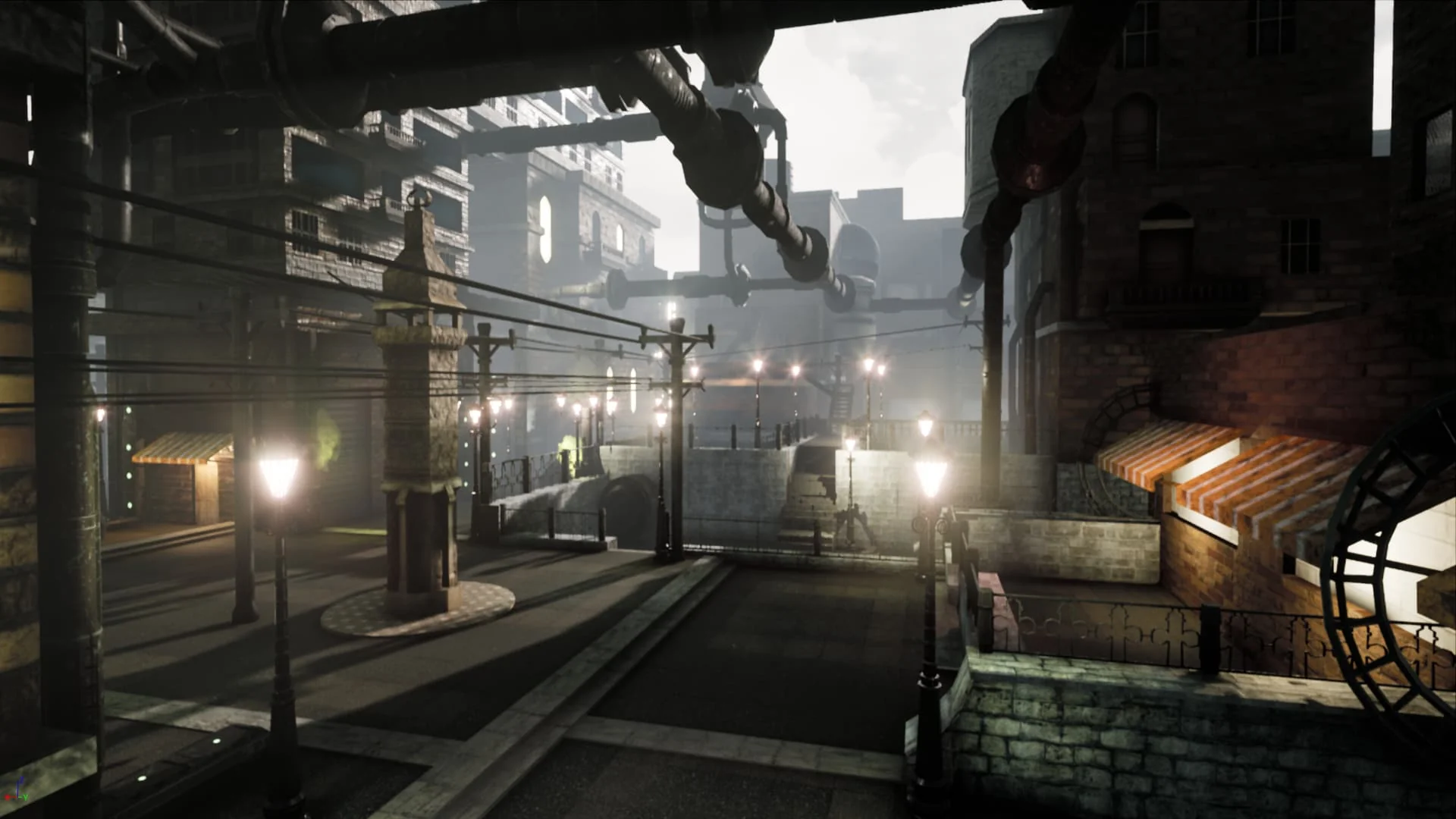
 Industrial
 Industrial
 Industrial