"c68a05d5e51405b3"{"id":"27322","slug":"american-city-packs-bundle","title":"American City Packs (Bundle)","category":"Cities","engine":"5.0+","assetVersion":"Engine version: 5.0+","engineVersion":"","tag":"Cities","accent":"blue","visual":"city","summary":"American City Packs (Bundle) brings downtown, suburbs, and industrial content together in a single city-building workflow. It focuses on editor-based generation, modular control, and the kind of assets that let large urban scenes come together quickly.","platform":"Unreal Engine","publishedAt":"2026-04-24T05:51:42.000Z","updatedAt":"2026-04-24T05:51:43.000Z","sourceNotes":[],"fileContents":[],"compatibility":["Unreal Engine","Engine version: 5.0+"],"featuredImage":{"alt":"American City Packs (Bundle)","src":"https://3dcghub.com/wp-content/uploads/2026/04/e249548065ab_189ac72c-3333-403f-a2e2-9bd95e2a751d.webp"},"hasDownloadLink":true,"downloads":2,"terms":[{"taxonomy":"category","slug":"cities","name":"Cities"},{"taxonomy":"post_tag","slug":"environment","name":"Environment"},{"taxonomy":"post_tag","slug":"tools","name":"Tools"},{"taxonomy":"post_tag","slug":"unreal-engine-5","name":"Unreal Engine 5"}],"galleryImages":[{"src":"https://3dcghub.com/wp-content/uploads/2026/04/2018fd86f9ee_91f4dcab-6832-47d3-bfec-55672a64f1d2.webp","alt":"American City Packs (Bundle)"},{"src":"https://3dcghub.com/wp-content/uploads/2026/04/06a9391319e2_b70e2706-7b09-465b-a89a-71a8645c1e6a.webp","alt":"American City Packs (Bundle)"},{"src":"https://3dcghub.com/wp-content/uploads/2026/04/f104c95254c5_e901b808-0a6f-4047-abdd-51c5112a7608.webp","alt":"American City Packs (Bundle)"},{"src":"https://3dcghub.com/wp-content/uploads/2026/04/7cf56a43e9b8_88db4cdd-08a7-4c56-bb42-a922c35f90ec.webp","alt":"American City Packs (Bundle)"},{"src":"https://3dcghub.com/wp-content/uploads/2026/04/ae3cd2e896ef_48097a16-3e67-48f4-94b3-c6d17bc9da4d.webp","alt":"American City Packs (Bundle)"},{"src":"https://3dcghub.com/wp-content/uploads/2026/04/9a41a5c08680_4c05ca85-fc42-43d8-a0e8-15ce8af1d236.webp","alt":"American City Packs (Bundle)"},{"src":"https://3dcghub.com/wp-content/uploads/2026/04/8f4fd2ad17f5_fa01ec0d-fea0-4231-93ee-af030e2b0230.webp","alt":"American City Packs (Bundle)"},{"src":"https://3dcghub.com/wp-content/uploads/2026/04/a0217d29cb3d_c786f780-d017-42a6-a263-f983c12d2ed0.webp","alt":"American City Packs (Bundle)"},{"src":"https://3dcghub.com/wp-content/uploads/2026/04/4dcbf3231a61_dfdf483e-dc83-4a02-9117-ec87b8595cca.webp","alt":"American City Packs (Bundle)"},{"src":"https://3dcghub.com/wp-content/uploads/2026/04/ddb77f18b1b4_29a4236a-937c-48d5-b519-b9e8d7ae1b6a.webp","alt":"American City Packs (Bundle)"}],"accessPanel":{"kind":"resource","title":"Access this resource","eyebrow":"Free Download","message":"Log in or create a free account to start your download.","fileName":"Content.7z","safetyNote":"All resources are 100% manually reviewed to eliminate all risks.","actionLabel":"Download Free","resourceType":"Resource archive"},"contentHtml":"\u003ch2\u003eThree city environments in one production workflow\u003c/h2\u003e\u003cp\u003eAmerican City Packs (Bundle) combines Downtown - City Pack, Suburbs - City Pack, and Industrial - City Pack into a single urban resource. The focus is on getting a large city into place quickly, while still leaving room to shape the result with blueprints, materials, and modular pieces. Instead of placing every object by hand, the workflow moves a lot of the repetitive work into tools that can generate and organize city elements for you.\u003c/p\u003e\u003cp\u003eThe overall tone of the pack is practical rather than decorative. It is aimed at creating large areas with control over the final look, and the material setup is flexible enough to allow broad customization. The city style is inspired by New York City, with references to Manhattan, Midtown, Brooklyn, and Queens, which gives the bundle a dense American urban identity that can carry across central blocks, outer neighborhoods, and heavier industrial zones.\u003c/p\u003e\u003ch2\u003eBlueprints that handle roads, blocks, and street detail\u003c/h2\u003e\u003cp\u003eThe bundle includes blueprints for roads, sidewalks, roofs and floors, traffic lights, decals, banners, procedural background buildings, modular office and apartment buildings, modular industrial buildings, fences, and wires. That mix covers the basic city structure as well as the smaller pieces that help a scene feel assembled rather than empty.\u003c/p\u003e\u003cp\u003eThose tools are meant to reduce the amount of manual placement needed during environment work. They are described as easy to use, flexible, and editable after generation, which means a scene can be adjusted once the main structure is in place. Modular buildings can be shaped through parameters such as the number of floors, shape, style, and materials, then generated with a button press. Style variations and material changes give the buildings a wide range of looks without requiring each version to be built from scratch.\u003c/p\u003e\u003cp\u003eFor a developer or environment artist, that means a city block can move from a basic layout into a more specific neighborhood identity with less repetition. Roads and sidewalks can define the ground plane, while banners, traffic lights, fences, and wires help carry the scene into something that feels lived in. The same system also supports replacing included meshes with custom meshes such as Quixel Megascans Meshes, and the same applies to materials.\u003c/p\u003e\u003ch2\u003eEditor-only generation and Unreal pipeline notes\u003c/h2\u003e\u003cp\u003eThe blueprints and tools work in the Editor only, not at runtime in play mode. That makes the bundle suited to building scenes inside the editor rather than generating them during gameplay. The latest updates released from June 2023 are exclusively compatible with Unreal version 5.1 or higher, and those versions have better optimization for Nanite and Lumen. The product also supports Lumen and Nanite for Unreal Engine 5.0+.\u003c/p\u003e\u003cp\u003eEditor Scripting Plugin needs to be enabled in the project, and for the UE5+ version it is enabled by default. Another practical note is that the bundle includes both procedural and non-procedural behavior: the Background Procedural Building and Roof blueprints generate procedural mesh, while the remaining blueprints use the 3D models included in the pack. That split gives the scene a mix of generated structure and authored assets, which can be useful when balancing speed and control.\u003c/p\u003e\u003cp\u003eRecent content additions include trees, trash, and more. Those additions fit naturally into the same city-building workflow, especially where a scene needs more small details to break up broad blocks or large streets.\u003c/p\u003e\u003ch2\u003e3D format data and texture setup\u003c/h2\u003e\u003cp\u003eThe 3D formats include FBX and 3ds Max files. The Downtown pack is listed with 11,338,923 polygons and 11,989,729 vertices. Suburbs includes 40,472,374 polygons and 35,333,865 vertices. Industrial includes 21,051,606 polygons and 18,748,368 vertices. The models use real-world scale, and the texture naming is kept practical with meaningful names, stripped texture path names, and descriptive object names.\u003c/p\u003e\u003cp\u003eTextures range from 1024x1024 to 4096x4096 and use PNG format. Physical material textures include base color, metallic, roughness, and normal maps. That gives the pack a straightforward material structure for use in a broader production pipeline, especially where the same city assets may need to be reviewed, adjusted, or exchanged across different scenes.\u003c/p\u003e\u003cp\u003eThe 3ds Max scene closely resembles the Unreal Engine version, although it is not an exact match. Decals such as graffiti and dirt are not included in the 3D formats. If viewport clipping artifacts appear, increasing the minimum clipping value is the suggested fix. In practice, the bundle fits best when the goal is to assemble a city base, block out a neighborhood, or extend a larger American urban setting with modular control and editor-side generation.\u003c/p\u003e\n\n\u003ch2\u003eExplore Similar Assets\u003c/h2\u003e\n\u003cul\u003e\n\u003cli\u003e\u003ca href=\"https://3dcghub.com/shootlikeme-unreal-engine-third-person-shooter-template/\" title=\"ShootLikeMe – Unreal Engine Third Person Shooter Template\"\u003eShootLikeMe – Unreal Engine Third Person Shooter Template\u003c/a\u003e\u003c/li\u003e\n\u003cli\u003e\u003ca href=\"https://3dcghub.com/advanced-unreal-engine-5-multiplayer-gameplay-programming/\" title=\"Advanced Unreal Engine 5 Multiplayer Gameplay Programming\"\u003eAdvanced Unreal Engine 5 Multiplayer Gameplay Programming\u003c/a\u003e\u003c/li\u003e\n\u003cli\u003e\u003ca href=\"https://3dcghub.com/niagara-beginners-to-advanced-in-unreal-engine-5/\" title=\"Niagara Beginners to advanced in Unreal Engine 5\"\u003eNiagara Beginners to advanced in Unreal Engine 5\u003c/a\u003e\u003c/li\u003e\n\u003cli\u003e\u003ca href=\"https://3dcghub.com/create-zelda-like-skills-with-c-in-unreal-engine-5-2/\" title=\"Create Zelda-like skills with C++ in unreal engine 5\"\u003eCreate Zelda-like skills with C++ in unreal engine 5\u003c/a\u003e\u003c/li\u003e\n\u003cli\u003e\u003ca href=\"https://3dcghub.com/main-menus-beginner-class-unreal-engine-5/\" title=\"Main Menus Beginner Class – Unreal Engine 5\"\u003eMain Menus Beginner Class – Unreal Engine 5\u003c/a\u003e\u003c/li\u003e\n\u003c/ul\u003e","contentTextLength":5097,"navigation":{"current":2109,"total":3860,"previous":{"id":"27336","slug":"ancient-cave-ruins-ancient-temple-ruins-ancient-valley","title":"Ancient Cave Ruins (Ancient Temple Ruins, Ancient Valley )","category":"Dungeon","platform":"Unreal Engine","updatedAt":"2026-04-24T06:21:28.000Z"},"next":{"id":"27307","slug":"alchemist-starbase-rover","title":"Alchemist Starbase: Rover","category":"Gameplay Features","platform":"Unreal Engine","updatedAt":"2026-04-24T04:13:18.000Z"}},"relatedResources":[{"id":"4359","slug":"modern-city-bundle","title":"Modern City Bundle","category":"Cities","engine":"4.26+,5.0+","assetVersion":"Engine version: 4.26+,5.0+","engineVersion":"4.22","tag":"Cities","accent":"blue","visual":"city","summary":"Build stunning urban landscapes with the Modern City Bundle. Featuring modular streets, high-fidelity buildings, and optimized performance for game developers.","platform":"Unreal Engine","publishedAt":"2026-02-13T07:35:02.000Z","updatedAt":"2026-04-19T15:57:10.000Z","sourceNotes":[],"fileContents":[],"compatibility":["Unreal Engine"],"featuredImage":{"alt":"Modern City Bundle","src":"https://3dcghub.com/wp-content/uploads/2026/02/a7d454cd-1b52-4514-9950-d39304d96783.webp"},"hasDownloadLink":true,"downloads":4},{"id":"27752","slug":"venice-italian-city","title":"Venice - Italian City","category":"Cities","engine":"5.4+","assetVersion":"Engine version: 5.4+","engineVersion":"","tag":"Cities","accent":"blue","visual":"city","summary":"Venice - Italian City focuses on the kinds of scenes that need canals, stone bridges, narrow streets, courtyards, cafés, and historic squares in one cohesive setting. It combines a detailed production-ready core with modular expansion potential, varied ligh...","platform":"Unreal Engine","publishedAt":"2026-04-28T17:14:53.000Z","updatedAt":"2026-04-28T17:14:54.000Z","sourceNotes":[],"fileContents":[],"compatibility":["Unreal Engine","Engine version: 5.4+"],"featuredImage":{"alt":"Venice - Italian City","src":"https://3dcghub.com/wp-content/uploads/2026/04/ba31257f45d5_b73e861b-d58e-453c-9fba-29ea3529e247.webp"},"hasDownloadLink":true,"downloads":3},{"id":"1000264","slug":"paradise-motel-modular-pack","title":"Paradise Motel - Modular Pack","category":"Cities","engine":"4.26+,5.0+","assetVersion":"","engineVersion":"Engine Version: 4.26+,5.0+","tag":"Cities","accent":"blue","visual":"mech","summary":"A comprehensive modular 3D environment pack featuring 496 unique meshes, 4K textures, and fully optimized assets to build realistic American motel levels.","platform":"Unreal Engine","publishedAt":"2026-07-01T00:42:38.388Z","updatedAt":"2026-07-01T00:42:38.388Z","sourceNotes":[],"fileContents":[],"compatibility":["Unreal Engine","Engine Version: 4.26+,5.0+"],"featuredImage":{"alt":"Paradise Motel - Modular Pack","src":"/wp-content/uploads/published/2026/07/1301a8222d85-59872092-d8aa-4d1c-937b-f2a6f6e8a181-6320eeaa82.webp"},"hasDownloadLink":true,"downloads":3}]}
Cities
American City Packs (Bundle)
American City Packs (Bundle) brings downtown, suburbs, and industrial content together in a single city-building workflow. It focuses on editor-based generation, modular control, and the kind of assets that let large urban scenes come together quickly.
Three city environments in one production workflow
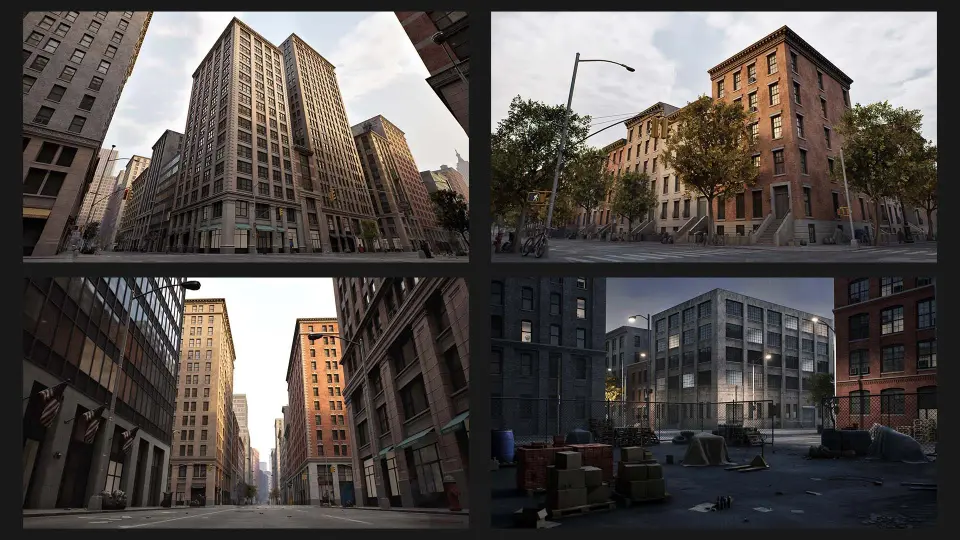
American City Packs (Bundle) combines Downtown - City Pack, Suburbs - City Pack, and Industrial - City Pack into a single urban resource. The focus is on getting a large city into place quickly, while still leaving room to shape the result with blueprints, materials, and modular pieces. Instead of placing every object by hand, the workflow moves a lot of the repetitive work into tools that can generate and organize city elements for you.
The overall tone of the pack is practical rather than decorative. It is aimed at creating large areas with control over the final look, and the material setup is flexible enough to allow broad customization. The city style is inspired by New York City, with references to Manhattan, Midtown, Brooklyn, and Queens, which gives the bundle a dense American urban identity that can carry across central blocks, outer neighborhoods, and heavier industrial zones.
Blueprints that handle roads, blocks, and street detail
The bundle includes blueprints for roads, sidewalks, roofs and floors, traffic lights, decals, banners, procedural background buildings, modular office and apartment buildings, modular industrial buildings, fences, and wires. That mix covers the basic city structure as well as the smaller pieces that help a scene feel assembled rather than empty.
Those tools are meant to reduce the amount of manual placement needed during environment work. They are described as easy to use, flexible, and editable after generation, which means a scene can be adjusted once the main structure is in place. Modular buildings can be shaped through parameters such as the number of floors, shape, style, and materials, then generated with a button press. Style variations and material changes give the buildings a wide range of looks without requiring each version to be built from scratch.
For a developer or environment artist, that means a city block can move from a basic layout into a more specific neighborhood identity with less repetition. Roads and sidewalks can define the ground plane, while banners, traffic lights, fences, and wires help carry the scene into something that feels lived in. The same system also supports replacing included meshes with custom meshes such as Quixel Megascans Meshes, and the same applies to materials.
Editor-only generation and Unreal pipeline notes
The blueprints and tools work in the Editor only, not at runtime in play mode. That makes the bundle suited to building scenes inside the editor rather than generating them during gameplay. The latest updates released from June 2023 are exclusively compatible with Unreal version 5.1 or higher, and those versions have better optimization for Nanite and Lumen. The product also supports Lumen and Nanite for Unreal Engine 5.0+.
Editor Scripting Plugin needs to be enabled in the project, and for the UE5+ version it is enabled by default. Another practical note is that the bundle includes both procedural and non-procedural behavior: the Background Procedural Building and Roof blueprints generate procedural mesh, while the remaining blueprints use the 3D models included in the pack. That split gives the scene a mix of generated structure and authored assets, which can be useful when balancing speed and control.
Recent content additions include trees, trash, and more. Those additions fit naturally into the same city-building workflow, especially where a scene needs more small details to break up broad blocks or large streets.
3D format data and texture setup
The 3D formats include FBX and 3ds Max files. The Downtown pack is listed with 11,338,923 polygons and 11,989,729 vertices. Suburbs includes 40,472,374 polygons and 35,333,865 vertices. Industrial includes 21,051,606 polygons and 18,748,368 vertices. The models use real-world scale, and the texture naming is kept practical with meaningful names, stripped texture path names, and descriptive object names.
Textures range from 1024x1024 to 4096x4096 and use PNG format. Physical material textures include base color, metallic, roughness, and normal maps. That gives the pack a straightforward material structure for use in a broader production pipeline, especially where the same city assets may need to be reviewed, adjusted, or exchanged across different scenes.
The 3ds Max scene closely resembles the Unreal Engine version, although it is not an exact match. Decals such as graffiti and dirt are not included in the 3D formats. If viewport clipping artifacts appear, increasing the minimum clipping value is the suggested fix. In practice, the bundle fits best when the goal is to assemble a city base, block out a neighborhood, or extend a larger American urban setting with modular control and editor-side generation.
 Cities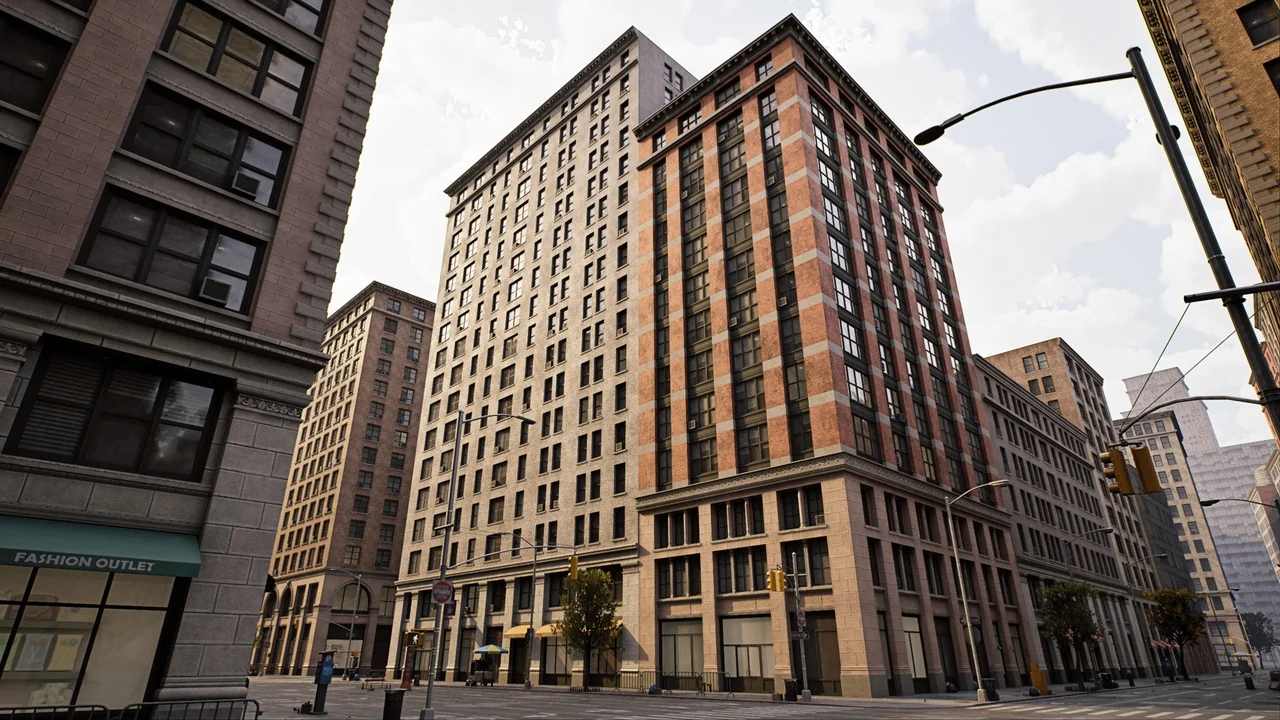
 Cities
 Cities
 Cities