"148d1066ed74e216"{"id":"1002933","slug":"operation-file-read-write","title":"Operation File [ Read / Write ]","category":"Engine Tools","engine":"4.27 - 5.1","assetVersion":"Asset Version: 1.0","engineVersion":"Engine Version: 4.27 - 5.1","tag":"Engine Tools","accent":"blue","visual":"mech","summary":"Examine the capabilities of Operation File [ Read / Write ], offering direct Blueprint nodes for reading, writing, inspecting, and copying disk files.","platform":"Unreal Engine","indexPolicy":"index","publishedAt":"2026-11-21T23:16:41.766Z","updatedAt":"2026-11-21T23:16:41.766Z","sourceNotes":[],"fileContents":[],"compatibility":["Unreal Engine","Asset Version: 1.0","Engine Version: 4.27 - 5.1"],"featuredImage":{"alt":"Operation File [ Read / Write ]","src":"/wp-content/uploads/published/2026/11/5fd2272467b8-c21772a1-4230-47ef-bef6-6f8b49f47ac5-b28e66b408.webp"},"fileSizeBytes":120700,"hasDownloadLink":true,"downloads":0,"terms":[{"taxonomy":"category","slug":"engine-tools-tools-and-plugins","name":"Engine Tools"}],"galleryImages":[{"src":"/wp-content/uploads/published/2026/11/e8337c232a44-cd692be5-8195-4208-98dc-6ad631a87c8a-c2d50e8365.webp","alt":"Operation File [ Read / Write ]"},{"src":"/wp-content/uploads/published/2026/11/95e6167c8537-91be9b10-3401-42ae-b06f-86b50f9ce4b7-a8bae17447.webp","alt":"Operation File [ Read / Write ]"}],"accessPanel":{"kind":"resource","title":"Get this resource","safetyNote":"Resources are manually reviewed before listing to improve quality and reduce obvious risks.","fileName":"Operation File [ Read Write ].7z","resourceType":"Resource archive","versions":[]},"contentHtml":"\u003cp\u003eInteractive environments and technical tools frequently demand a direct line of communication between real-time engine systems and local disk storage. Whether configuring runtime management utilities, saving structured project states, or loading external assets into a level, relying on standard graph logic often runs into barriers when interacting with the host operating system. Operation File [ Read / Write ] bridges this gap by exposing core file system operations directly to the visual scripting environment. Developers can manipulate disk records, query properties, and transfer assets between locations without leaving the Blueprint workspace.\u003c/p\u003e \u003ch2\u003eDirect File Dialogs and Directory Browsing\u003c/h2\u003e\n\u003cp\u003eManual string configuration for storage locations is prone to syntax errors, mismatched path separators, and broken runtime references. The Select File / Folder Window node resolves this challenge by invoking operating system interface windows directly from graph execution. When triggered, the node opens a native browser window that lets an operator or player navigate their physical drive structure visually, choose a specific file, or isolate a target folder.\u003c/p\u003e\n\u003cp\u003eBy capturing the user's manual selection and outputting the absolute path directly into the node graph, downstream logic can proceed without hardcoded directory routes. This mechanism proves particularly useful for tool interfaces, custom editor utilities, and user-facing applications where players or production artists need to import or assign their own local resources. Removing the need for manual text input safeguards the graph against typos and ensures that paths passed to subsequent processing steps correspond to verified physical storage locations.\u003c/p\u003e \u003ch2\u003eBlueprint Read and Write Workflows\u003c/h2\u003e\n\u003cp\u003eAt the center of the utility is the ability to handle raw input and output routines natively. The tool provides dedicated nodes that read files from disk and write data back out to persistent storage. Graph logic can access existing files, pull their contents into memory, and distribute that data across active gameplay systems, UI components, or custom subsystems.\u003c/p\u003e\n\u003cp\u003eOn the output side, write operations permit logic graphs to create new files or overwrite existing assets on the hard drive. Data generated during interactive sessions, configuration adjustments, or tool passes can be routed through write nodes to establish persistent records on the local system. Because these functions exist as native Blueprint nodes, teams can sequence file operations sequentially alongside standard execution chains, triggering writes upon specific game events, system shutdowns, or user prompt confirmations.\u003c/p\u003e \u003ch2\u003eScanning Folders and Batch Discovery\u003c/h2\u003e\n\u003cp\u003eWorking with storage rarely stops at handling individual, isolated files. Many technical implementations require discovering and processing multiple files stored inside a specific directory. The Get Files In Folder function node addresses this requirement by scanning a designated directory path and returning the collection of items contained within it.\u003c/p\u003e\n\u003cp\u003eOnce the node produces the array of discovered files, Blueprint graphs can cycle through the list using standard iteration loops. This opens practical avenues for batch operations, such as:\u003c/p\u003e\n\u003cul\u003e\n\u003cli\u003eEnumerating an entire folder of resources to prepare dynamic selection lists inside user interfaces.\u003c/li\u003e\n\u003cli\u003eScanning predefined directories to locate every matching file before triggering sequential read logic.\u003c/li\u003e\n\u003cli\u003eVerifying whether expected configuration documents or required assets are present within a user-selected folder.\u003c/li\u003e\n\u003cli\u003eProcessing multiple incoming data files consecutively without requiring manual path entry for each item.\u003c/li\u003e\n\u003c/ul\u003e\n\u003cp\u003eAutomating directory discovery through node graphs allows systems to scale dynamically based on the actual contents of the disk rather than rigid, predetermined hierarchies.\u003c/p\u003e \u003ch2\u003eInspecting Basic File Information and Managing File Copy Tasks\u003c/h2\u003e\n\u003cp\u003eRobust file handling requires logic that can assess an item before executing destructive or resource-intensive tasks. The package includes functionality designed to retrieve basic file information, allowing the graph to query essential details about target items on disk. By evaluating this metadata prior to reading or modifying storage, graphs can establish safety checks, verify that targets are valid, and branch execution based on the specific condition of the file.\u003c/p\u003e\n\u003cp\u003eAlongside inspection, file manipulation often involves relocating or duplicating records across different directories. Through built-in copy operations, nodes can duplicate files from an origin path directly to a destination path. This supports automated backup workflows, allowing a graph to preserve existing files before executing a new write pass. It also streamlines staging pipelines, where data must be cloned from a shared project repository into a working directory. Executing copy actions within Blueprint ensures that file movement remains tied directly to the core application logic without depending on external helper scripts.\u003c/p\u003e \u003ch2\u003eImplementation and Dual-Language Guidance\u003c/h2\u003e\n\u003cp\u003eIntegrating file operations into an active production environment requires clear guidance on node inputs, expected parameters, and execution behavior. To support varied development teams, complete documentation is provided in both English and Chinese. This dual-language documentation assists developers in quickly identifying the appropriate nodes for file reading, writing, directory scanning, and modal selection window handling.\u003c/p\u003e\n\u003cp\u003eClear documentation across both languages simplifies troubleshooting when establishing path logic, handling operating system permissions, or debugging copy routines. Teams building custom editor extensions, local persistence tools, or pipeline utilities can review the provided operational reference to ensure nodes are integrated correctly within their Blueprint execution flow.\u003c/p\u003e\n\n\u003ch2\u003eExplore Similar Assets\u003c/h2\u003e\n\u003cul\u003e\n\u003cli\u003e\u003ca href=\"https://3dcghub.com/file-helper-plugin/\" rel=\"noopener noreferrer\"\u003eFile Helper Plugin\u003c/a\u003e\u003c/li\u003e\n\u003cli\u003e\u003ca href=\"https://3dcghub.com/file-system-library/\" rel=\"noopener noreferrer\"\u003eFile System Library\u003c/a\u003e\u003c/li\u003e\n\u003cli\u003e\u003ca href=\"https://3dcghub.com/directexcel/\" rel=\"noopener noreferrer\"\u003eDirectExcel\u003c/a\u003e\u003c/li\u003e\n\u003cli\u003e\u003ca href=\"https://3dcghub.com/mesh-ops-mesh-operations-plugin/\" rel=\"noopener noreferrer\"\u003eMesh Ops - Mesh Operations Plugin\u003c/a\u003e\u003c/li\u003e\n\u003cli\u003e\u003ca href=\"https://3dcghub.com/runtime-files-downloader/\" rel=\"noopener noreferrer\"\u003eRuntime Files Downloader\u003c/a\u003e\u003c/li\u003e\n\u003c/ul\u003e","contentTextLength":5998,"navigation":{"current":39,"total":4890,"previous":{"id":"1002934","slug":"origin-an-actor-evolution-system","title":"Origin - An Actor Evolution System","category":"Engine Tools","platform":"Unreal Engine","updatedAt":"2026-11-21T23:19:16.370Z"},"next":{"id":"1002932","slug":"not-yet-dialogue-plugin-system","title":"Not Yet: Dialogue Plugin System","category":"Dialog Systems","platform":"Unreal Engine","updatedAt":"2026-11-21T23:09:07.422Z"}},"relatedResources":[{"id":"1002903","slug":"file-helper-plugin","title":"File Helper Plugin","category":"Engine Tools","engine":"4.26","assetVersion":"Asset Version: 1.0","engineVersion":"Engine Version: 4.26","tag":"Engine Tools","accent":"blue","visual":"mech","summary":"Examine the File Helper Plugin for Unreal Engine 4, covering Blueprint reading, creating, and deleting operations for plain-text formats like.txt,.php, and.cpp.","platform":"Unreal Engine","indexPolicy":"index","publishedAt":"2026-11-21T04:50:02.963Z","updatedAt":"2026-11-21T04:50:02.963Z","sourceNotes":[],"fileContents":[],"compatibility":["Unreal Engine","Asset Version: 1.0","Engine Version: 4.26"],"featuredImage":{"alt":"File Helper Plugin","src":"/wp-content/uploads/published/2026/11/dbce49b268b4-f69b44e3-6014-4b59-aa38-ce526edca78a-4eaf7fbfbc.webp"},"fileSizeBytes":5687593,"hasDownloadLink":true,"downloads":0},{"id":"13990","slug":"file-system-library","title":"File System Library","category":"Engine Tools","engine":"4.23,4.25 - 5.6","assetVersion":"Engine version: 4.23,4.25 - 5.6","engineVersion":"Asset Version:1.0","tag":"Engine Tools","accent":"blue","visual":"animation","summary":"Manage files and folders directly within Unreal Engine using the File System Library. This cross-platform blueprint tool simplifies complex file operations like moving, copying, and renaming.","platform":"Unreal Engine","indexPolicy":"noindex","publishedAt":"2026-03-11T13:08:00.000Z","updatedAt":"2026-04-19T15:45:56.000Z","sourceNotes":[],"fileContents":[],"compatibility":["Unreal Engine","Engine version: 4.23,4.25 - 5.6","Asset Version: 1.0"],"featuredImage":{"alt":"File System Library","src":"https://3dcghub.com/wp-content/uploads/2026/03/2e340444-d53a-4e1e-bd77-d11ee600a9d4.webp"},"fileSizeBytes":146726851,"hasDownloadLink":true,"downloads":0},{"id":"25066","slug":"directexcel","title":"DirectExcel","category":"Engine Tools","engine":"4.27, 5.0 - 5.4, 5.6 - 5.7","assetVersion":"Asset Version: 3.3 - 3.5","engineVersion":"Engine Version: 4.27, 5.0 - 5.4, 5.6 - 5.7","tag":"Engine Tools","accent":"blue","visual":"luts","summary":"DirectExcel connects Unreal projects to Excel files through Blueprints and C++, letting developers read and write sheet data without converting it into CSV first. It also handles sheet editing, cell values, appearance data, and file-change notifications for...","platform":"Unreal Engine","indexPolicy":"index","publishedAt":"2026-04-18T16:40:31.000Z","updatedAt":"2026-11-21T06:25:47.725Z","sourceNotes":[],"fileContents":[],"compatibility":["Unreal Engine","Asset Version: 3.3 - 3.5","Engine Version: 4.27, 5.0 - 5.4, 5.6 - 5.7"],"featuredImage":{"alt":"DirectExcel","src":"https://3dcghub.com/wp-content/uploads/2026/04/0a2fd4260f89_1d6b08b4-7174-4f78-bfec-17b20c8fa55e.webp"},"fileSizeBytes":235750225,"hasDownloadLink":true,"downloads":0}]}[{"id":4225,"sourceId":4225,"taxonomyId":4225,"taxonomy":"category","slug":"asset-library","name":"Asset Library","parentId":null,"count":4744,"hasChildren":true,"href":"/","seoTitle":"Free Game Assets Library | 3DCGHUB","seoDescription":"Browse free Unreal Engine, Unity, Blender assets and game development tutorials on 3DCGHUB with previews, compatibility notes, and secure downloads.","sitemapEnabled":true,"children":[{"id":4227,"sourceId":4227,"taxonomyId":4227,"taxonomy":"category","slug":"blender-add-ons-plugins","name":"Blender Add-ons \u0026 Plugins","parentId":4225,"count":10,"hasChildren":false,"href":"/category/blender-add-ons-plugins/","seoTitle":"Free Blender Add-ons \u0026 Plugins | 3DCGHUB","seoDescription":"Browse free Blender Add-ons \u0026 Plugins tools for Blender on 3DCGHUB: curated downloads with preview images, compatibility notes and secure download access.","sitemapEnabled":true},{"id":514,"sourceId":514,"taxonomyId":514,"taxonomy":"category","slug":"unity-2","name":"Unity","parentId":4225,"count":453,"hasChildren":true,"href":"/category/unity-2/","seoTitle":"Free Unity Assets | 3DCGHUB","seoDescription":"Browse free Unity resources on 3DCGHUB: curated downloads with preview images, compatibility notes and secure download access.","sitemapEnabled":true,"children":[{"id":523,"sourceId":523,"taxonomyId":523,"taxonomy":"category","slug":"2d","name":"2D","parentId":514,"count":1,"hasChildren":true,"href":"/category/2d/","seoTitle":"Free Unity 2D | 3DCGHUB","seoDescription":"Browse free 2D assets for Unity on 3DCGHUB: curated downloads with preview images, compatibility notes and secure download access.","sitemapEnabled":true},{"id":515,"sourceId":515,"taxonomyId":515,"taxonomy":"category","slug":"3d-unity-2","name":"3D","parentId":514,"count":162,"hasChildren":true,"href":"/category/3d-unity-2/","seoTitle":"Free Unity 3D Assets | 3DCGHUB","seoDescription":"Browse free 3D assets for Unity on 3DCGHUB: curated downloads with preview images, compatibility notes and secure download access.","sitemapEnabled":true},{"id":565,"sourceId":565,"taxonomyId":565,"taxonomy":"category","slug":"add-ons","name":"Add-Ons","parentId":514,"count":2,"hasChildren":false,"href":"/category/add-ons/","seoTitle":"Free Unity Add-Ons | 3DCGHUB","seoDescription":"Browse free Add-Ons assets for Unity on 3DCGHUB: curated downloads with preview images, compatibility notes and secure download access.","sitemapEnabled":true},{"id":529,"sourceId":529,"taxonomyId":529,"taxonomy":"category","slug":"audio-unity-2","name":"Audio","parentId":514,"count":1,"hasChildren":true,"href":"/category/audio-unity-2/","seoTitle":"Free Unity Audio | 3DCGHUB","seoDescription":"Browse free Audio for Unity on 3DCGHUB: curated downloads with preview images, compatibility notes and secure download access.","sitemapEnabled":true},{"id":557,"sourceId":557,"taxonomyId":557,"taxonomy":"category","slug":"templates","name":"Templates","parentId":514,"count":36,"hasChildren":true,"href":"/category/templates/","seoTitle":"Free Unity Templates | 3DCGHUB","seoDescription":"Browse free Unity project templates on 3DCGHUB. Starter kits with previews, compatibility notes, and secure download access.","sitemapEnabled":true},{"id":533,"sourceId":533,"taxonomyId":533,"taxonomy":"category","slug":"tools-unity-2","name":"Tools","parentId":514,"count":0,"hasChildren":true,"href":"/category/tools-unity-2/","sitemapEnabled":true},{"id":554,"sourceId":554,"taxonomyId":554,"taxonomy":"category","slug":"vfx-unity-2","name":"VFX","parentId":514,"count":4,"hasChildren":true,"href":"/category/vfx-unity-2/","seoTitle":"Free Unity VFX | 3DCGHUB","seoDescription":"Browse free VFX for Unity on 3DCGHUB: curated downloads with preview images, compatibility notes and secure download access.","sitemapEnabled":true}]},{"id":511,"sourceId":511,"taxonomyId":511,"taxonomy":"category","slug":"unreal-engine-2","name":"Unreal Engine","parentId":4225,"count":4282,"hasChildren":true,"href":"/category/unreal-engine-2/","seoTitle":"Free Unreal Engine Assets | 3DCGHUB","seoDescription":"Browse free Unreal Engine resources on 3DCGHUB: curated downloads with preview images, compatibility notes and secure download access.","sitemapEnabled":true,"children":[{"id":54,"sourceId":54,"taxonomyId":54,"taxonomy":"category","slug":"3d","name":"3D","parentId":511,"count":2428,"hasChildren":true,"href":"/category/3d/","seoTitle":"Free Unreal Engine 3D | 3DCGHUB","seoDescription":"Browse free 3D assets for Unreal Engine on 3DCGHUB: curated downloads with preview images, compatibility notes and secure download access.","sitemapEnabled":true},{"id":441,"sourceId":441,"taxonomyId":441,"taxonomy":"category","slug":"animations","name":"Animations","parentId":511,"count":245,"hasChildren":true,"href":"/category/animations/","seoTitle":"Free Unreal Engine Animations | 3DCGHUB","seoDescription":"Browse free Animations for Unreal Engine on 3DCGHUB: curated downloads with preview images, compatibility notes and secure download access.","sitemapEnabled":true},{"id":446,"sourceId":446,"taxonomyId":446,"taxonomy":"category","slug":"audio","name":"Audio","parentId":511,"count":63,"hasChildren":true,"href":"/category/audio/","seoTitle":"Free Unreal Engine Audio Resources | 3DCGHUB","seoDescription":"Browse free Unreal Engine audio resources including sound effects, voices, dialogue, and ambient sounds. Curated free downloads on 3DCGHUB.","sitemapEnabled":true},{"id":466,"sourceId":466,"taxonomyId":466,"taxonomy":"category","slug":"game-systems","name":"Game Systems","parentId":511,"count":356,"hasChildren":true,"href":"/category/game-systems/","seoTitle":"Free Unreal Engine Game Systems | 3DCGHUB","seoDescription":"Browse free Game Systems tools for Unreal Engine on 3DCGHUB: curated downloads with preview images, compatibility notes and secure download access.","sitemapEnabled":true},{"id":478,"sourceId":478,"taxonomyId":478,"taxonomy":"category","slug":"game-templates","name":"Game Templates","parentId":511,"count":150,"hasChildren":true,"href":"/category/game-templates/","seoTitle":"Free Unreal Engine Game Templates | 3DCGHUB","seoDescription":"Browse free Game Templates for Unreal Engine on 3DCGHUB: curated downloads with preview images, compatibility notes and secure download access.","sitemapEnabled":true},{"id":432,"sourceId":432,"taxonomyId":432,"taxonomy":"category","slug":"hdri","name":"HDRI","parentId":511,"count":6,"hasChildren":true,"href":"/category/hdri/","seoTitle":"Free Unreal Engine HDRI | 3DCGHUB","seoDescription":"Browse free Unreal Engine HDRI skies and lighting maps on 3DCGHUB. Environment lighting with previews and secure downloads.","sitemapEnabled":true},{"id":228,"sourceId":228,"taxonomyId":228,"taxonomy":"category","slug":"material-and-textures","name":"Material \u0026 Textures","parentId":511,"count":172,"hasChildren":true,"href":"/category/material-and-textures/","seoTitle":"Free Unreal Engine Material \u0026 Textures | 3DCGHUB","seoDescription":"Browse free Material \u0026 Textures for Unreal Engine on 3DCGHUB: curated downloads with preview images, compatibility notes and secure download access.","sitemapEnabled":true},{"id":298,"sourceId":298,"taxonomyId":298,"taxonomy":"category","slug":"sprites-and-flipbooks","name":"Sprites \u0026 Flipbooks","parentId":511,"count":17,"hasChildren":true,"href":"/category/sprites-and-flipbooks/","seoTitle":"Free Unreal Engine Sprites \u0026 Flipbooks | 3DCGHUB","seoDescription":"Browse free Sprites \u0026 Flipbooks assets for Unreal Engine on 3DCGHUB: curated downloads with preview images, compatibility notes and secure download access.","sitemapEnabled":true},{"id":489,"sourceId":489,"taxonomyId":489,"taxonomy":"category","slug":"tools-and-plugins","name":"Tools \u0026 Plugins","parentId":511,"count":390,"hasChildren":true,"href":"/category/tools-and-plugins/","seoTitle":"Free Unreal Engine Tools \u0026 Plugins | 3DCGHUB","seoDescription":"Browse free Tools \u0026 Plugins for Unreal Engine on 3DCGHUB: curated downloads with preview images, compatibility notes and secure download access.","sitemapEnabled":true},{"id":459,"sourceId":459,"taxonomyId":459,"taxonomy":"category","slug":"ui","name":"UI","parentId":511,"count":43,"hasChildren":true,"href":"/category/ui/","seoTitle":"Free Unreal Engine UI | 3DCGHUB","seoDescription":"Browse free UI for Unreal Engine on 3DCGHUB: curated downloads with preview images, compatibility notes and secure download access.","sitemapEnabled":true},{"id":450,"sourceId":450,"taxonomyId":450,"taxonomy":"category","slug":"vfx","name":"VFX","parentId":511,"count":412,"hasChildren":true,"href":"/category/vfx/","seoTitle":"Free Unreal Engine VFX | 3DCGHUB","seoDescription":"Browse free VFX for Unreal Engine on 3DCGHUB: curated downloads with preview images, compatibility notes and secure download access.","sitemapEnabled":true}]}]},{"id":4222,"sourceId":4222,"taxonomyId":4222,"taxonomy":"category","slug":"tutorial-library","name":"Tutorial Library","parentId":null,"count":117,"hasChildren":false,"href":"/tutorials/","seoTitle":"Free Game Development Tutorial Library | 3DCGHUB","seoDescription":"Browse free game development tutorials for Unreal Engine, Unity, Blender, and more on 3DCGHUB with practical workflows and secure downloads.","sitemapEnabled":true}]
Resource screenshots
1 / 2
Join our channel
Follow 3DCGHUB on Telegram for new resource drops, migration updates, and community notices.
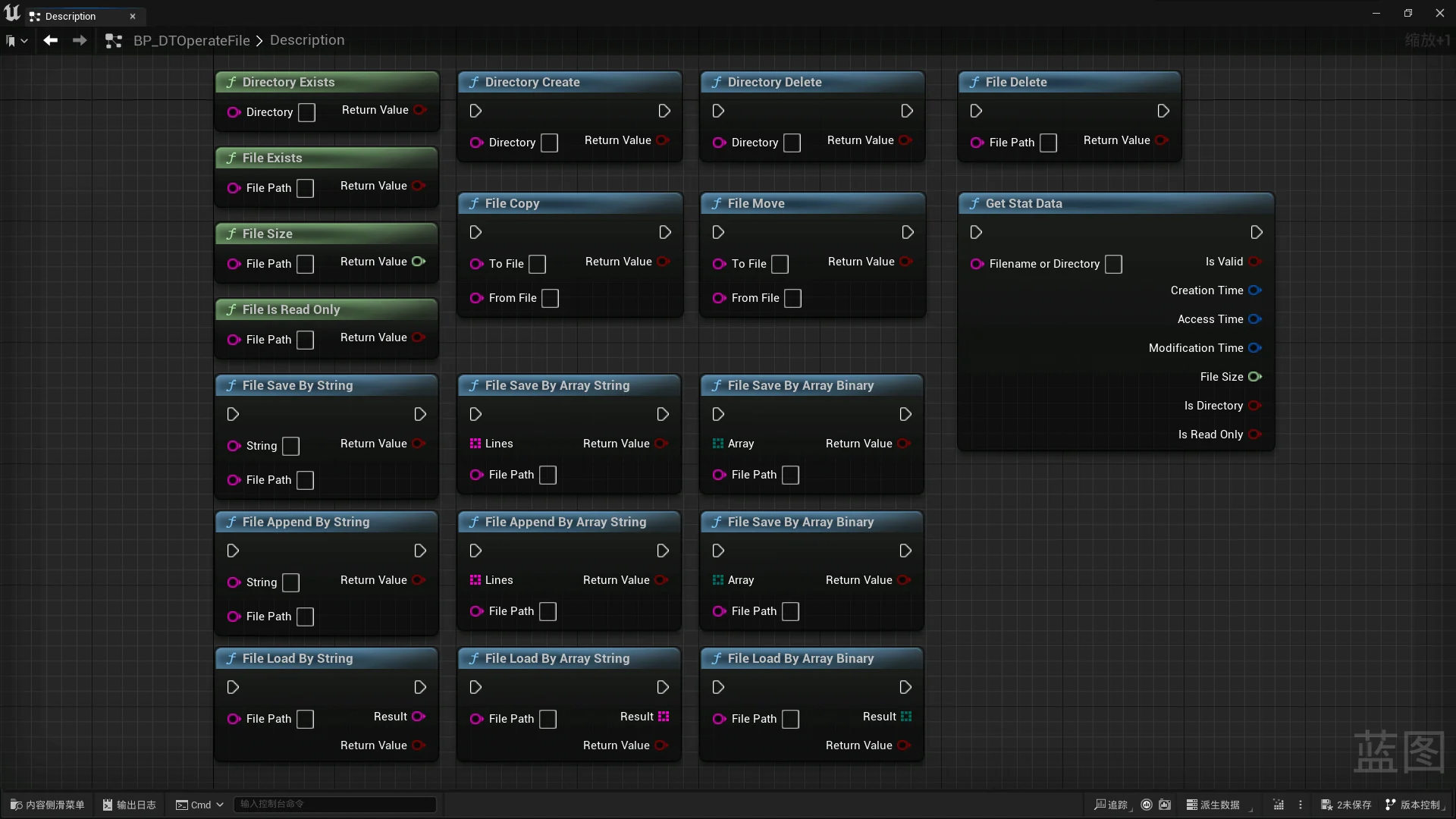
Interactive environments and technical tools frequently demand a direct line of communication between real-time engine systems and local disk storage. Whether configuring runtime management utilities, saving structured project states, or loading external assets into a level, relying on standard graph logic often runs into barriers when interacting with the host operating system. Operation File [ Read / Write ] bridges this gap by exposing core file system operations directly to the visual scripting environment. Developers can manipulate disk records, query properties, and transfer assets between locations without leaving the Blueprint workspace.
Direct File Dialogs and Directory Browsing
Manual string configuration for storage locations is prone to syntax errors, mismatched path separators, and broken runtime references. The Select File / Folder Window node resolves this challenge by invoking operating system interface windows directly from graph execution. When triggered, the node opens a native browser window that lets an operator or player navigate their physical drive structure visually, choose a specific file, or isolate a target folder.
By capturing the user's manual selection and outputting the absolute path directly into the node graph, downstream logic can proceed without hardcoded directory routes. This mechanism proves particularly useful for tool interfaces, custom editor utilities, and user-facing applications where players or production artists need to import or assign their own local resources. Removing the need for manual text input safeguards the graph against typos and ensures that paths passed to subsequent processing steps correspond to verified physical storage locations.
Blueprint Read and Write Workflows
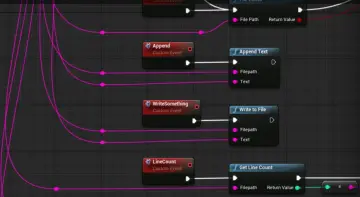
At the center of the utility is the ability to handle raw input and output routines natively. The tool provides dedicated nodes that read files from disk and write data back out to persistent storage. Graph logic can access existing files, pull their contents into memory, and distribute that data across active gameplay systems, UI components, or custom subsystems.
On the output side, write operations permit logic graphs to create new files or overwrite existing assets on the hard drive. Data generated during interactive sessions, configuration adjustments, or tool passes can be routed through write nodes to establish persistent records on the local system. Because these functions exist as native Blueprint nodes, teams can sequence file operations sequentially alongside standard execution chains, triggering writes upon specific game events, system shutdowns, or user prompt confirmations.
Scanning Folders and Batch Discovery
Working with storage rarely stops at handling individual, isolated files. Many technical implementations require discovering and processing multiple files stored inside a specific directory. The Get Files In Folder function node addresses this requirement by scanning a designated directory path and returning the collection of items contained within it.
Once the node produces the array of discovered files, Blueprint graphs can cycle through the list using standard iteration loops. This opens practical avenues for batch operations, such as:
Enumerating an entire folder of resources to prepare dynamic selection lists inside user interfaces.
Scanning predefined directories to locate every matching file before triggering sequential read logic.
Verifying whether expected configuration documents or required assets are present within a user-selected folder.
Processing multiple incoming data files consecutively without requiring manual path entry for each item.
Automating directory discovery through node graphs allows systems to scale dynamically based on the actual contents of the disk rather than rigid, predetermined hierarchies.
Inspecting Basic File Information and Managing File Copy Tasks
Robust file handling requires logic that can assess an item before executing destructive or resource-intensive tasks. The package includes functionality designed to retrieve basic file information, allowing the graph to query essential details about target items on disk. By evaluating this metadata prior to reading or modifying storage, graphs can establish safety checks, verify that targets are valid, and branch execution based on the specific condition of the file.
Alongside inspection, file manipulation often involves relocating or duplicating records across different directories. Through built-in copy operations, nodes can duplicate files from an origin path directly to a destination path. This supports automated backup workflows, allowing a graph to preserve existing files before executing a new write pass. It also streamlines staging pipelines, where data must be cloned from a shared project repository into a working directory. Executing copy actions within Blueprint ensures that file movement remains tied directly to the core application logic without depending on external helper scripts.
Implementation and Dual-Language Guidance
Integrating file operations into an active production environment requires clear guidance on node inputs, expected parameters, and execution behavior. To support varied development teams, complete documentation is provided in both English and Chinese. This dual-language documentation assists developers in quickly identifying the appropriate nodes for file reading, writing, directory scanning, and modal selection window handling.
Clear documentation across both languages simplifies troubleshooting when establishing path logic, handling operating system permissions, or debugging copy routines. Teams building custom editor extensions, local persistence tools, or pipeline utilities can review the provided operational reference to ensure nodes are integrated correctly within their Blueprint execution flow.
 Engine Tools
 Engine Tools
 Engine Tools