"148d1066ed74e216"{"id":"1002934","slug":"origin-an-actor-evolution-system","title":"Origin - An Actor Evolution System","category":"Engine Tools","engine":"5.3","assetVersion":"Asset Version: 1.0","engineVersion":"Engine Version: 5.3","tag":"Engine Tools","accent":"blue","visual":"luts","summary":"A technical look at Origin - An Actor Evolution System, a C++ and Blueprint framework for character history, visual modifiers, and NPC reactions.","platform":"Unreal Engine","indexPolicy":"index","publishedAt":"2026-11-21T23:19:16.370Z","updatedAt":"2026-11-21T23:19:16.370Z","sourceNotes":[],"fileContents":[],"compatibility":["Unreal Engine","Asset Version: 1.0","Engine Version: 5.3"],"featuredImage":{"alt":"Origin - An Actor Evolution System","src":"/wp-content/uploads/published/2026/11/d625c9920f08-d31a0a8a-ee16-4c28-a4cf-1795abeba6c8-7b13459e7b.webp"},"fileSizeBytes":163644,"hasDownloadLink":true,"downloads":0,"terms":[{"taxonomy":"category","slug":"engine-tools-tools-and-plugins","name":"Engine Tools"}],"galleryImages":[{"src":"/wp-content/uploads/published/2026/11/e6137fbce59d-192bb99b-9473-4810-9b3f-1cee89f10fd8-0f45fe5493.webp","alt":"Origin - An Actor Evolution System"},{"src":"/wp-content/uploads/published/2026/11/362ef857a94b-e311adf6-4f79-4e7d-8a47-8192c5904816-f875bba4f2.webp","alt":"Origin - An Actor Evolution System"},{"src":"/wp-content/uploads/published/2026/11/11e191d60392-0e6e7188-570c-4abf-9a30-564c6840bcef-9c527198c0.webp","alt":"Origin - An Actor Evolution System"},{"src":"/wp-content/uploads/published/2026/11/232dc3addb8c-a21db48a-33eb-4933-ab7f-263c8a4db117-f80d09ac0f.webp","alt":"Origin - An Actor Evolution System"},{"src":"/wp-content/uploads/published/2026/11/2a797c285f86-31bf6f6c-585b-4909-b355-7321c07e28de-5f516c3b94.webp","alt":"Origin - An Actor Evolution System"},{"src":"/wp-content/uploads/published/2026/11/400aa33be63f-de834a9c-6b33-4f0f-8678-c0c5061c8a7c-db418cc791.webp","alt":"Origin - An Actor Evolution System"},{"src":"/wp-content/uploads/published/2026/11/04627c677075-aba14c9e-5342-4ff2-bf94-0ccaf6f2fa51-cdb9c3c92e.webp","alt":"Origin - An Actor Evolution System"},{"src":"/wp-content/uploads/published/2026/11/35675480844e-67024380-a139-4f2e-b14c-dddb78b92d3a-0ab18cbbd8.webp","alt":"Origin - An Actor Evolution System"},{"src":"/wp-content/uploads/published/2026/11/aa0385d155ed-91c90ea2-500e-4d90-a8d6-3d8f4ee9a72f-74e5a8c6a4.webp","alt":"Origin - An Actor Evolution System"}],"accessPanel":{"kind":"resource","title":"Get this resource","safetyNote":"Resources are manually reviewed before listing to improve quality and reduce obvious risks.","fileName":"Origin - An Actor Evolution System.7z","resourceType":"Resource archive","versions":[]},"contentHtml":"\u003cp\u003eIn narrative-heavy role-playing games, survival simulations, and dynamic open worlds, characters frequently experience moments that should permanently reshape how they look and how others perceive them. A narrow escape from a predatory creature, prolonged exposure to harsh environmental conditions, or a defining battlefield milestone loses impact when an entity remains completely unaltered. Bridging the gap between historical narrative events, physical appearances, and artificial intelligence reactions often requires stitching together disparate gameplay systems. Origin - An Actor Evolution System establishes an architecture dedicated to that loop, giving characters a way to accumulate traits, display visual adjustments, and provoke specific responses from the surrounding world.\u003c/p\u003e \u003ch2\u003eDynamic Character History and the Origin Concept\u003c/h2\u003e \u003cp\u003eAt its core, the plugin resolves a common structural friction in game development: tracking character history in a way that directly feeds visual systems and artificial intelligence. When an entity endures an encounter, such as surviving an attack by a bear, the event does not have to remain an isolated variable in a save file. Instead, the framework attaches an Origin to that actor. This data construct represents backstory, traits, physical appearance traits, and past experiences.\u003c/p\u003e \u003cp\u003eBy organizing an actor's life experiences into clear definitions, the game world gains a direct pipeline for reaction. Non-player characters and dialogue systems can evaluate an actor's current collection of Origins to alter conversations, greetings, or tactical behaviors. The same survival event that records an encounter also supplies the narrative trigger for an NPC to acknowledge the character's resilience. The system groups identity, visual evidence, and social consequence into a unified flow, preventing background lore from feeling detached from moment-to-moment interactions.\u003c/p\u003e \u003ch2\u003eVisual Transformations Driven by Origin Modifiers\u003c/h2\u003e \u003cp\u003eReflecting an event requires clear visual feedback. The framework handles this through Modifiers, which directly manipulate an actor's visual assets to reflect acquired Origins. Rather than manually wiring individual material changes and morph target triggers in character blueprints for every conceivable event, modifiers standardize how visual shifts occur across meshes.\u003c/p\u003e \u003cp\u003eThe plugin incorporates built-in modifier types that target distinct aspects of an actor's appearance:\u003c/p\u003e \u003cul\u003e\n\u003cli\u003e\u003cstrong\u003eMorph Target Modifier:\u003c/strong\u003e Adjusts morph target values across an actor's mesh. This allows developers to introduce sunken cheeks, muscular definition, facial scarring, or altered silhouettes when a specific Origin is applied.\u003c/li\u003e\n\u003cli\u003e\u003cstrong\u003eScalar Parameter Modifier:\u003c/strong\u003e Targets scalar parameter values on Dynamic Material Instances across a mesh. This handles gradual or instantaneous shifts in surface properties like opacity, roughness, blending values, or weathering.\u003c/li\u003e\n\u003cli\u003e\u003cstrong\u003eVector Parameter Modifier:\u003c/strong\u003e Directly updates vector parameters on Dynamic Material Instances, driving color variations such as bruising, skin paleness, burned tissue, or unnatural eye pigments.\u003c/li\u003e\n\u003c/ul\u003e \u003cp\u003eThe modifier setup also includes Modifier Timelines. Rather than forcing cosmetic changes to snap into place abruptly, timeline support allows developers to animate modifier effects over time. A morph target or material parameter can ease in gently, enabling visible healing, slow corruption, or a sudden wound appearing and settling into a scar. Modifiers can apply their values either instantly upon event assignment or progress along these timeline tracks to fit the staging of a cutscene or active gameplay.\u003c/p\u003e \u003ch2\u003eMaterial Overlay Slot Integration in Actor Appearance\u003c/h2\u003e \u003cp\u003eManaging dynamic character materials can quickly become cumbersome when dealing with layered clothing, complex shader hierarchies, and distinct aesthetic states. In updates to the system, modifier handling expanded to work directly with the Material Overlay Slot. The core Material Modifier, Scalar Parameter Modifier, and Vector Material Parameter Modifier all support this overlay workflow.\u003c/p\u003e \u003cp\u003eSupporting the overlay slot means visual traits do not require altering or complicating the primary base materials of a character mesh. When an Origin applies a visual layer—such as frostbite, magical resonance, blood splatters, or mud—the parameters can drive an overlay material independently. Scalar and vector adjustments can manipulate the parameters within that overlay slot without disrupting underlying texture maps or complex skin shaders. This cleanly isolates visual storytelling effects from base character art assets, maintaining a modular pipeline where visual states can be stacked or stripped away cleanly.\u003c/p\u003e \u003ch2\u003eConditional Rules and the Evolution Framework\u003c/h2\u003e \u003cp\u003eCharacters do not accumulate physical changes or social reputations at random. They evolve based on gameplay thresholds, character class restrictions, previous experiences, and environmental factors. To automate how and when an actor receives a new profile element, the system incorporates Conditional Rules.\u003c/p\u003e \u003cp\u003eConditional Rules allow developers to define clear operational logic for granting Origins to an actor. Rather than writing scattered validation checks throughout disparate gameplay scripts, rules can evaluate the actor's existing state before allowing a new entry to register. If an actor must possess a certain history, lack a conflicting visual attribute, or satisfy specific gameplay criteria, the conditional logic processes those prerequisites cleanly. This automated gating ensures that evolutionary stages remain coherent, preventing conflicting narrative traits or mismatched visual adjustments from being attached to the same entity.\u003c/p\u003e \u003ch2\u003eArchitectural Structure in C++ and Blueprints\u003c/h2\u003e \u003cp\u003ePerformance and extensibility dictate whether a character framework functions effectively in real production scenarios. The plugin is built natively in C++, ensuring that state evaluation, timeline progression, and parameter driving operate with high efficiency. Underlying calculations, data storage, and update loops run at native code speeds, which is vital when a scene contains numerous active characters evaluating dynamic traits.\u003c/p\u003e \u003cp\u003eWhile the core engine logic resides in C++, the system is fully exposed to Blueprints. Designers and gameplay programmers working primarily in visual scripting can configure origins, assign modifiers, build conditional rules, and query history without touching source code. Teams retain the ability to expand upon the base framework by building custom modifiers or authoring specialized rule sets in either C++ or Blueprints. The open access allows projects to integrate custom dialogue engines, unique AI reaction trees, or bespoke particle setups directly into the lifecycle of an Origin.\u003c/p\u003e \u003ch2\u003eProduction Scenarios and Developers Who Benefit Most\u003c/h2\u003e \u003cp\u003eThe system is particularly suited for projects that demand character persistence and deep world reactivity. Role-playing games featuring branching storylines benefit immediately, as quest events can grant origins that permanently adjust player appearance while giving surrounding townspeople specific lines of dialogue in reaction to past deeds. Survival games can use the framework to trace injury, exposure, and physical wear, altering player meshes with scars or discoloration as they endure harsh biomes.\u003c/p\u003e \u003cp\u003eAI programmers and technical designers gain a standardized framework for handling reactive dialogue and non-player character awareness. Instead of querying dozens of unorganized gameplay tags or sprawling boolean variables, NPCs can query the actor's Origin setup directly to determine attitude, dialogue branches, or hostile responses. For technical artists, the combination of morph target modifiers, material parameter controls, timeline animations, and overlay slot support offers a structured method to execute character damage, corruption, or aging without hardcoding custom material logic onto every individual skeletal mesh. Solo developers and mid-sized studios alike can deploy this architecture to create believable, reactive game worlds where every significant event leaves a lasting mark.\u003c/p\u003e\n\n\u003ch2\u003eMore From The Same Workflow\u003c/h2\u003e\n\u003cul\u003e\n\u003cli\u003e\u003ca href=\"https://3dcghub.com/levelcontroller2-transform-levels-at-runtime-in-realtime/\" rel=\"noopener noreferrer\"\u003eLevelController2 (Transform Levels At Runtime In Realtime)\u003c/a\u003e\u003c/li\u003e\n\u003cli\u003e\u003ca href=\"https://3dcghub.com/multi-objects-renaming-tool-rename-assets-and-actors/\" rel=\"noopener noreferrer\"\u003eMulti Objects Renaming Tool (Rename Assets \u0026amp; Actors)\u003c/a\u003e\u003c/li\u003e\n\u003cli\u003e\u003ca href=\"https://3dcghub.com/actor-pool-manager-plugin/\" rel=\"noopener noreferrer\"\u003eActor Pool Manager Plugin\u003c/a\u003e\u003c/li\u003e\n\u003cli\u003e\u003ca href=\"https://3dcghub.com/async-blueprints-extension/\" rel=\"noopener noreferrer\"\u003eAsync Blueprints Extension\u003c/a\u003e\u003c/li\u003e\n\u003cli\u003e\u003ca href=\"https://3dcghub.com/flex-pool-actor-pooling-system/\" rel=\"noopener noreferrer\"\u003eFlex Pool - Actor Pooling System\u003c/a\u003e\u003c/li\u003e\n\u003c/ul\u003e","contentTextLength":8331,"navigation":{"current":38,"total":4890,"previous":{"id":"1002935","slug":"platformer-development-kit-all-in-one","title":"Platformer Development Kit All in One","category":"Platformer","platform":"Unreal Engine","updatedAt":"2026-11-21T23:20:03.917Z"},"next":{"id":"1002933","slug":"operation-file-read-write","title":"Operation File [ Read / Write ]","category":"Engine Tools","platform":"Unreal Engine","updatedAt":"2026-11-21T23:16:41.766Z"}},"relatedResources":[{"id":"1001532","slug":"levelcontroller2-transform-levels-at-runtime-in-realtime","title":"LevelController2 (Transform Levels At Runtime In Realtime)","category":"Engine Tools","engine":"5.1 - 5.4","assetVersion":"Asset Version: 2.1.0","engineVersion":"Engine Version: 5.1 - 5.4","tag":"Engine Tools","accent":"blue","visual":"mech","summary":"Transform Unreal Engine levels and maps in real time using LevelController2 blueprint functions, dynamic origin points, and custom script actors.","platform":"Unreal Engine","indexPolicy":"index","publishedAt":"2026-10-09T17:25:41.854Z","updatedAt":"2026-10-09T17:25:41.854Z","sourceNotes":[],"fileContents":[],"compatibility":["Unreal Engine","Asset Version: 2.1.0","Engine Version: 5.1 - 5.4"],"featuredImage":{"alt":"LevelController2 (Transform Levels At Runtime In Realtime)","src":"/wp-content/uploads/published/2026/10/e55083799225-d316f296-9d30-494e-b533-f4e2dfddc51a-7437c66bae.webp"},"fileSizeBytes":43988480,"hasDownloadLink":true,"downloads":0},{"id":"1002925","slug":"multi-objects-renaming-tool-rename-assets-and-actors","title":"Multi Objects Renaming Tool (Rename Assets \u0026 Actors)","category":"Engine Tools","engine":"4.26 - 5.5","assetVersion":"Asset Version: 3.2","engineVersion":"Engine Version: 4.26 - 5.5","tag":"Engine Tools","accent":"blue","visual":"mech","summary":"Organize World Outliner actors and Content Browser assets efficiently with the Multi Objects Renaming Tool editor utility widget.","platform":"Unreal Engine","indexPolicy":"index","publishedAt":"2026-11-21T22:53:51.900Z","updatedAt":"2026-11-21T22:53:51.900Z","sourceNotes":[],"fileContents":[],"compatibility":["Unreal Engine","Asset Version: 3.2","Engine Version: 4.26 - 5.5"],"featuredImage":{"alt":"Multi Objects Renaming Tool (Rename Assets \u0026 Actors)","src":"/wp-content/uploads/published/2026/11/e4ad1476eaff-d274d83a-bdc9-4f78-acdf-db747eebc9f3-40fb639b66.webp"},"fileSizeBytes":1256849,"hasDownloadLink":true,"downloads":0},{"id":"1002877","slug":"actor-pool-manager-plugin","title":"Actor Pool Manager Plugin","category":"Engine Tools","engine":"4.26 - 5.4","assetVersion":"Asset Version: 1.2 - 1.7","engineVersion":"Engine Version: 4.26 - 5.4","tag":"Engine Tools","accent":"blue","visual":"mech","summary":"Optimize engine performance and framerates by recycling C++ and Blueprint actors using the Actor Pool Manager Plugin and its PoolActorInterface.","platform":"Unreal Engine","indexPolicy":"index","publishedAt":"2026-11-21T01:35:40.505Z","updatedAt":"2026-11-21T01:35:40.505Z","sourceNotes":[],"fileContents":[],"compatibility":["Unreal Engine","Asset Version: 1.2 - 1.7","Engine Version: 4.26 - 5.4"],"featuredImage":{"alt":"Actor Pool Manager Plugin","src":"/wp-content/uploads/published/2026/11/c158887cfeaf-b01dfcab-c4bf-46d3-a358-b31ad7d2ec05-805c656ecb.webp"},"fileSizeBytes":107749035,"hasDownloadLink":true,"downloads":0}]}[{"id":4225,"sourceId":4225,"taxonomyId":4225,"taxonomy":"category","slug":"asset-library","name":"Asset Library","parentId":null,"count":4744,"hasChildren":true,"href":"/","seoTitle":"Free Game Assets Library | 3DCGHUB","seoDescription":"Browse free Unreal Engine, Unity, Blender assets and game development tutorials on 3DCGHUB with previews, compatibility notes, and secure downloads.","sitemapEnabled":true,"children":[{"id":4227,"sourceId":4227,"taxonomyId":4227,"taxonomy":"category","slug":"blender-add-ons-plugins","name":"Blender Add-ons \u0026 Plugins","parentId":4225,"count":10,"hasChildren":false,"href":"/category/blender-add-ons-plugins/","seoTitle":"Free Blender Add-ons \u0026 Plugins | 3DCGHUB","seoDescription":"Browse free Blender Add-ons \u0026 Plugins tools for Blender on 3DCGHUB: curated downloads with preview images, compatibility notes and secure download access.","sitemapEnabled":true},{"id":514,"sourceId":514,"taxonomyId":514,"taxonomy":"category","slug":"unity-2","name":"Unity","parentId":4225,"count":453,"hasChildren":true,"href":"/category/unity-2/","seoTitle":"Free Unity Assets | 3DCGHUB","seoDescription":"Browse free Unity resources on 3DCGHUB: curated downloads with preview images, compatibility notes and secure download access.","sitemapEnabled":true,"children":[{"id":523,"sourceId":523,"taxonomyId":523,"taxonomy":"category","slug":"2d","name":"2D","parentId":514,"count":1,"hasChildren":true,"href":"/category/2d/","seoTitle":"Free Unity 2D | 3DCGHUB","seoDescription":"Browse free 2D assets for Unity on 3DCGHUB: curated downloads with preview images, compatibility notes and secure download access.","sitemapEnabled":true},{"id":515,"sourceId":515,"taxonomyId":515,"taxonomy":"category","slug":"3d-unity-2","name":"3D","parentId":514,"count":162,"hasChildren":true,"href":"/category/3d-unity-2/","seoTitle":"Free Unity 3D Assets | 3DCGHUB","seoDescription":"Browse free 3D assets for Unity on 3DCGHUB: curated downloads with preview images, compatibility notes and secure download access.","sitemapEnabled":true},{"id":565,"sourceId":565,"taxonomyId":565,"taxonomy":"category","slug":"add-ons","name":"Add-Ons","parentId":514,"count":2,"hasChildren":false,"href":"/category/add-ons/","seoTitle":"Free Unity Add-Ons | 3DCGHUB","seoDescription":"Browse free Add-Ons assets for Unity on 3DCGHUB: curated downloads with preview images, compatibility notes and secure download access.","sitemapEnabled":true},{"id":529,"sourceId":529,"taxonomyId":529,"taxonomy":"category","slug":"audio-unity-2","name":"Audio","parentId":514,"count":1,"hasChildren":true,"href":"/category/audio-unity-2/","seoTitle":"Free Unity Audio | 3DCGHUB","seoDescription":"Browse free Audio for Unity on 3DCGHUB: curated downloads with preview images, compatibility notes and secure download access.","sitemapEnabled":true},{"id":557,"sourceId":557,"taxonomyId":557,"taxonomy":"category","slug":"templates","name":"Templates","parentId":514,"count":36,"hasChildren":true,"href":"/category/templates/","seoTitle":"Free Unity Templates | 3DCGHUB","seoDescription":"Browse free Unity project templates on 3DCGHUB. Starter kits with previews, compatibility notes, and secure download access.","sitemapEnabled":true},{"id":533,"sourceId":533,"taxonomyId":533,"taxonomy":"category","slug":"tools-unity-2","name":"Tools","parentId":514,"count":0,"hasChildren":true,"href":"/category/tools-unity-2/","sitemapEnabled":true},{"id":554,"sourceId":554,"taxonomyId":554,"taxonomy":"category","slug":"vfx-unity-2","name":"VFX","parentId":514,"count":4,"hasChildren":true,"href":"/category/vfx-unity-2/","seoTitle":"Free Unity VFX | 3DCGHUB","seoDescription":"Browse free VFX for Unity on 3DCGHUB: curated downloads with preview images, compatibility notes and secure download access.","sitemapEnabled":true}]},{"id":511,"sourceId":511,"taxonomyId":511,"taxonomy":"category","slug":"unreal-engine-2","name":"Unreal Engine","parentId":4225,"count":4282,"hasChildren":true,"href":"/category/unreal-engine-2/","seoTitle":"Free Unreal Engine Assets | 3DCGHUB","seoDescription":"Browse free Unreal Engine resources on 3DCGHUB: curated downloads with preview images, compatibility notes and secure download access.","sitemapEnabled":true,"children":[{"id":54,"sourceId":54,"taxonomyId":54,"taxonomy":"category","slug":"3d","name":"3D","parentId":511,"count":2428,"hasChildren":true,"href":"/category/3d/","seoTitle":"Free Unreal Engine 3D | 3DCGHUB","seoDescription":"Browse free 3D assets for Unreal Engine on 3DCGHUB: curated downloads with preview images, compatibility notes and secure download access.","sitemapEnabled":true},{"id":441,"sourceId":441,"taxonomyId":441,"taxonomy":"category","slug":"animations","name":"Animations","parentId":511,"count":245,"hasChildren":true,"href":"/category/animations/","seoTitle":"Free Unreal Engine Animations | 3DCGHUB","seoDescription":"Browse free Animations for Unreal Engine on 3DCGHUB: curated downloads with preview images, compatibility notes and secure download access.","sitemapEnabled":true},{"id":446,"sourceId":446,"taxonomyId":446,"taxonomy":"category","slug":"audio","name":"Audio","parentId":511,"count":63,"hasChildren":true,"href":"/category/audio/","seoTitle":"Free Unreal Engine Audio Resources | 3DCGHUB","seoDescription":"Browse free Unreal Engine audio resources including sound effects, voices, dialogue, and ambient sounds. Curated free downloads on 3DCGHUB.","sitemapEnabled":true},{"id":466,"sourceId":466,"taxonomyId":466,"taxonomy":"category","slug":"game-systems","name":"Game Systems","parentId":511,"count":356,"hasChildren":true,"href":"/category/game-systems/","seoTitle":"Free Unreal Engine Game Systems | 3DCGHUB","seoDescription":"Browse free Game Systems tools for Unreal Engine on 3DCGHUB: curated downloads with preview images, compatibility notes and secure download access.","sitemapEnabled":true},{"id":478,"sourceId":478,"taxonomyId":478,"taxonomy":"category","slug":"game-templates","name":"Game Templates","parentId":511,"count":150,"hasChildren":true,"href":"/category/game-templates/","seoTitle":"Free Unreal Engine Game Templates | 3DCGHUB","seoDescription":"Browse free Game Templates for Unreal Engine on 3DCGHUB: curated downloads with preview images, compatibility notes and secure download access.","sitemapEnabled":true},{"id":432,"sourceId":432,"taxonomyId":432,"taxonomy":"category","slug":"hdri","name":"HDRI","parentId":511,"count":6,"hasChildren":true,"href":"/category/hdri/","seoTitle":"Free Unreal Engine HDRI | 3DCGHUB","seoDescription":"Browse free Unreal Engine HDRI skies and lighting maps on 3DCGHUB. Environment lighting with previews and secure downloads.","sitemapEnabled":true},{"id":228,"sourceId":228,"taxonomyId":228,"taxonomy":"category","slug":"material-and-textures","name":"Material \u0026 Textures","parentId":511,"count":172,"hasChildren":true,"href":"/category/material-and-textures/","seoTitle":"Free Unreal Engine Material \u0026 Textures | 3DCGHUB","seoDescription":"Browse free Material \u0026 Textures for Unreal Engine on 3DCGHUB: curated downloads with preview images, compatibility notes and secure download access.","sitemapEnabled":true},{"id":298,"sourceId":298,"taxonomyId":298,"taxonomy":"category","slug":"sprites-and-flipbooks","name":"Sprites \u0026 Flipbooks","parentId":511,"count":17,"hasChildren":true,"href":"/category/sprites-and-flipbooks/","seoTitle":"Free Unreal Engine Sprites \u0026 Flipbooks | 3DCGHUB","seoDescription":"Browse free Sprites \u0026 Flipbooks assets for Unreal Engine on 3DCGHUB: curated downloads with preview images, compatibility notes and secure download access.","sitemapEnabled":true},{"id":489,"sourceId":489,"taxonomyId":489,"taxonomy":"category","slug":"tools-and-plugins","name":"Tools \u0026 Plugins","parentId":511,"count":390,"hasChildren":true,"href":"/category/tools-and-plugins/","seoTitle":"Free Unreal Engine Tools \u0026 Plugins | 3DCGHUB","seoDescription":"Browse free Tools \u0026 Plugins for Unreal Engine on 3DCGHUB: curated downloads with preview images, compatibility notes and secure download access.","sitemapEnabled":true},{"id":459,"sourceId":459,"taxonomyId":459,"taxonomy":"category","slug":"ui","name":"UI","parentId":511,"count":43,"hasChildren":true,"href":"/category/ui/","seoTitle":"Free Unreal Engine UI | 3DCGHUB","seoDescription":"Browse free UI for Unreal Engine on 3DCGHUB: curated downloads with preview images, compatibility notes and secure download access.","sitemapEnabled":true},{"id":450,"sourceId":450,"taxonomyId":450,"taxonomy":"category","slug":"vfx","name":"VFX","parentId":511,"count":412,"hasChildren":true,"href":"/category/vfx/","seoTitle":"Free Unreal Engine VFX | 3DCGHUB","seoDescription":"Browse free VFX for Unreal Engine on 3DCGHUB: curated downloads with preview images, compatibility notes and secure download access.","sitemapEnabled":true}]}]},{"id":4222,"sourceId":4222,"taxonomyId":4222,"taxonomy":"category","slug":"tutorial-library","name":"Tutorial Library","parentId":null,"count":117,"hasChildren":false,"href":"/tutorials/","seoTitle":"Free Game Development Tutorial Library | 3DCGHUB","seoDescription":"Browse free game development tutorials for Unreal Engine, Unity, Blender, and more on 3DCGHUB with practical workflows and secure downloads.","sitemapEnabled":true}]
Resource screenshots
1 / 9
Join our channel
Follow 3DCGHUB on Telegram for new resource drops, migration updates, and community notices.
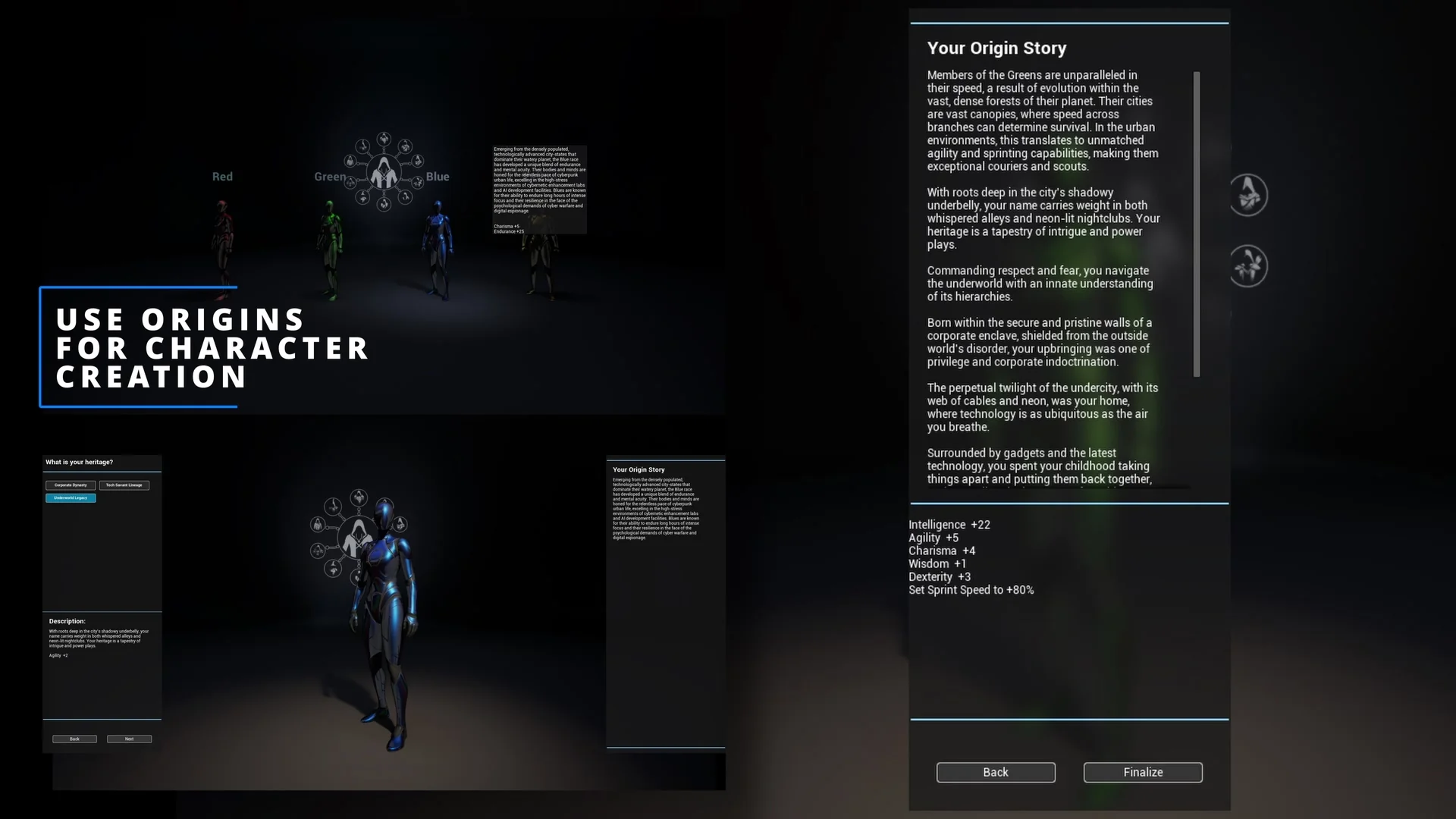
In narrative-heavy role-playing games, survival simulations, and dynamic open worlds, characters frequently experience moments that should permanently reshape how they look and how others perceive them. A narrow escape from a predatory creature, prolonged exposure to harsh environmental conditions, or a defining battlefield milestone loses impact when an entity remains completely unaltered. Bridging the gap between historical narrative events, physical appearances, and artificial intelligence reactions often requires stitching together disparate gameplay systems. Origin - An Actor Evolution System establishes an architecture dedicated to that loop, giving characters a way to accumulate traits, display visual adjustments, and provoke specific responses from the surrounding world.
Dynamic Character History and the Origin Concept
At its core, the plugin resolves a common structural friction in game development: tracking character history in a way that directly feeds visual systems and artificial intelligence. When an entity endures an encounter, such as surviving an attack by a bear, the event does not have to remain an isolated variable in a save file. Instead, the framework attaches an Origin to that actor. This data construct represents backstory, traits, physical appearance traits, and past experiences.
By organizing an actor's life experiences into clear definitions, the game world gains a direct pipeline for reaction. Non-player characters and dialogue systems can evaluate an actor's current collection of Origins to alter conversations, greetings, or tactical behaviors. The same survival event that records an encounter also supplies the narrative trigger for an NPC to acknowledge the character's resilience. The system groups identity, visual evidence, and social consequence into a unified flow, preventing background lore from feeling detached from moment-to-moment interactions.
Visual Transformations Driven by Origin Modifiers
Reflecting an event requires clear visual feedback. The framework handles this through Modifiers, which directly manipulate an actor's visual assets to reflect acquired Origins. Rather than manually wiring individual material changes and morph target triggers in character blueprints for every conceivable event, modifiers standardize how visual shifts occur across meshes.
The plugin incorporates built-in modifier types that target distinct aspects of an actor's appearance:
Morph Target Modifier: Adjusts morph target values across an actor's mesh. This allows developers to introduce sunken cheeks, muscular definition, facial scarring, or altered silhouettes when a specific Origin is applied.
Scalar Parameter Modifier: Targets scalar parameter values on Dynamic Material Instances across a mesh. This handles gradual or instantaneous shifts in surface properties like opacity, roughness, blending values, or weathering.
Vector Parameter Modifier: Directly updates vector parameters on Dynamic Material Instances, driving color variations such as bruising, skin paleness, burned tissue, or unnatural eye pigments.
The modifier setup also includes Modifier Timelines. Rather than forcing cosmetic changes to snap into place abruptly, timeline support allows developers to animate modifier effects over time. A morph target or material parameter can ease in gently, enabling visible healing, slow corruption, or a sudden wound appearing and settling into a scar. Modifiers can apply their values either instantly upon event assignment or progress along these timeline tracks to fit the staging of a cutscene or active gameplay.
Material Overlay Slot Integration in Actor Appearance
Managing dynamic character materials can quickly become cumbersome when dealing with layered clothing, complex shader hierarchies, and distinct aesthetic states. In updates to the system, modifier handling expanded to work directly with the Material Overlay Slot. The core Material Modifier, Scalar Parameter Modifier, and Vector Material Parameter Modifier all support this overlay workflow.
Supporting the overlay slot means visual traits do not require altering or complicating the primary base materials of a character mesh. When an Origin applies a visual layer—such as frostbite, magical resonance, blood splatters, or mud—the parameters can drive an overlay material independently. Scalar and vector adjustments can manipulate the parameters within that overlay slot without disrupting underlying texture maps or complex skin shaders. This cleanly isolates visual storytelling effects from base character art assets, maintaining a modular pipeline where visual states can be stacked or stripped away cleanly.
Conditional Rules and the Evolution Framework
Characters do not accumulate physical changes or social reputations at random. They evolve based on gameplay thresholds, character class restrictions, previous experiences, and environmental factors. To automate how and when an actor receives a new profile element, the system incorporates Conditional Rules.
Conditional Rules allow developers to define clear operational logic for granting Origins to an actor. Rather than writing scattered validation checks throughout disparate gameplay scripts, rules can evaluate the actor's existing state before allowing a new entry to register. If an actor must possess a certain history, lack a conflicting visual attribute, or satisfy specific gameplay criteria, the conditional logic processes those prerequisites cleanly. This automated gating ensures that evolutionary stages remain coherent, preventing conflicting narrative traits or mismatched visual adjustments from being attached to the same entity.
Architectural Structure in C++ and Blueprints
Performance and extensibility dictate whether a character framework functions effectively in real production scenarios. The plugin is built natively in C++, ensuring that state evaluation, timeline progression, and parameter driving operate with high efficiency. Underlying calculations, data storage, and update loops run at native code speeds, which is vital when a scene contains numerous active characters evaluating dynamic traits.
While the core engine logic resides in C++, the system is fully exposed to Blueprints. Designers and gameplay programmers working primarily in visual scripting can configure origins, assign modifiers, build conditional rules, and query history without touching source code. Teams retain the ability to expand upon the base framework by building custom modifiers or authoring specialized rule sets in either C++ or Blueprints. The open access allows projects to integrate custom dialogue engines, unique AI reaction trees, or bespoke particle setups directly into the lifecycle of an Origin.
Production Scenarios and Developers Who Benefit Most
The system is particularly suited for projects that demand character persistence and deep world reactivity. Role-playing games featuring branching storylines benefit immediately, as quest events can grant origins that permanently adjust player appearance while giving surrounding townspeople specific lines of dialogue in reaction to past deeds. Survival games can use the framework to trace injury, exposure, and physical wear, altering player meshes with scars or discoloration as they endure harsh biomes.
AI programmers and technical designers gain a standardized framework for handling reactive dialogue and non-player character awareness. Instead of querying dozens of unorganized gameplay tags or sprawling boolean variables, NPCs can query the actor's Origin setup directly to determine attitude, dialogue branches, or hostile responses. For technical artists, the combination of morph target modifiers, material parameter controls, timeline animations, and overlay slot support offers a structured method to execute character damage, corruption, or aging without hardcoding custom material logic onto every individual skeletal mesh. Solo developers and mid-sized studios alike can deploy this architecture to create believable, reactive game worlds where every significant event leaves a lasting mark.
 Engine Tools
 Engine Tools
 Engine Tools