"ae2217ad8e73450c"{"id":"1003026","slug":"custom-lens-flare-tool","title":"Custom Lens Flare Tool","category":"Gameplay Features","engine":"4.13+,5.0+","assetVersion":"","engineVersion":"Engine Version: 4.13+,5.0+","tag":"Gameplay Features","accent":"blue","visual":"mech","summary":"A blueprint-driven lens flare actor for creating and controlling sprite flare elements through screen space UMG widgets, with 26 textures, 4 materials, and prem","platform":"Unreal Engine","indexPolicy":"index","publishedAt":"2026-11-25T16:30:15.471Z","updatedAt":"2026-11-25T16:30:15.471Z","sourceNotes":[],"fileContents":[],"compatibility":["Unreal Engine","Engine Version: 4.13+,5.0+"],"featuredImage":{"alt":"Custom Lens Flare Tool","src":"/wp-content/uploads/published/2026/11/d35dea2d7229-21d0fc5c-e4ea-4ebb-9fc6-5308b717b1dd-328c3b1867.webp"},"hasDownloadLink":true,"downloads":0,"terms":[{"taxonomy":"category","slug":"gameplay-features","name":"Gameplay Features"}],"galleryImages":[{"src":"/wp-content/uploads/published/2026/11/f60ef76c6050-87bd5fa2-ee05-49d0-a8de-f1e5386f29a2-0b77733836.webp","alt":"Custom Lens Flare Tool"},{"src":"/wp-content/uploads/published/2026/11/e898792d2936-ca287a3b-142e-470e-b4df-4f4e450c3f00-b23f9e77f6.webp","alt":"Custom Lens Flare Tool"},{"src":"/wp-content/uploads/published/2026/11/023e1ec3030e-11faa228-9e51-4c8d-b5af-07cb76c9cbc0-a55042ba60.webp","alt":"Custom Lens Flare Tool"},{"src":"/wp-content/uploads/published/2026/11/25a5061bcfb4-13ee71c1-4cc0-46d3-ad2a-e24022ef94e9-c0b573ca84.webp","alt":"Custom Lens Flare Tool"},{"src":"/wp-content/uploads/published/2026/11/6e87a2113741-3d955dc9-c8a5-4550-bcda-f6bb062582b9-27c22cd3c2.webp","alt":"Custom Lens Flare Tool"},{"src":"/wp-content/uploads/published/2026/11/86d88d64b6f7-0f2d68fe-bcc5-4a27-94b0-a1fd7f8f6a17-81a90874c3.webp","alt":"Custom Lens Flare Tool"}],"accessPanel":{"kind":"resource","title":"Get this resource","safetyNote":"Resources are manually reviewed before listing to improve quality and reduce obvious risks.","fileName":"Content.7z","resourceType":"Resource archive","versions":[]},"contentHtml":"\u003ch2\u003eWhat the Custom Lens Flare Tool actually does\u003c/h2\u003e\n\u003cp\u003eLens flares are one of those camera details that either sell a shot or wreck it. A flare that sits in the wrong place, blooms too hard, or refuses to respond to the camera's movement reads as a decal pasted over the frame. The Custom Lens Flare Tool approaches the problem from the opposite direction: instead of accepting a fixed flare effect, it hands the construction of the flare itself to the artist, element by element.\u003c/p\u003e\n\u003cp\u003eThe core of the pack is a single blueprint object. This lens flare actor creates and draws its own sprite flare elements, and it does so using screen space UMG widgets. That detail is the heart of the whole system. Because the flare is drawn in screen space through UMG, each sprite flare element can be treated as its own piece with its own customizable behavior and appearance, rather than as one indivisible effect. The package then offers a level of customization that allows for true artistic control over every single element in the flare.\u003c/p\u003e\n\u003cp\u003eThat means a flare built with this actor is not one object but a composition. Streaks, orbs, ghosting shapes, and whatever else the artist assembles each exist as individual sprite flare elements, and each can behave and look differently from its neighbors. The tool is tagged for visual effect and camera work, with a realistic intent, which places it squarely in the territory of in-engine cinematography rather than abstract motion graphics.\u003c/p\u003e \u003ch2\u003eInside the Custom Lens Flare Tool package\u003c/h2\u003e\n\u003cp\u003eThe blueprint is the engine of the pack, but it does not arrive alone. Alongside it are 26 custom lens flare textures, giving the artist a starting library of flare imagery to draw from and combine. Four base materials provide the material foundations the flare elements are built on. Four premade complex example lens flares demonstrate what the system looks like when several elements are assembled into a finished, layered flare.\u003c/p\u003e\n\u003cp\u003eThe blueprint object itself is fully commented with tooltips. For a system whose entire value proposition is per-element control, that documentation matters: the options are numerous by design, and the comments and tooltips are what make the blueprint approachable rather than opaque.\u003c/p\u003e\n\u003cp\u003eBeyond the assets, there is an extensive educational map. It covers each option in detail and provides examples for anyone who wants to learn more. This is not a throwaway demo scene; it is structured as a walkthrough of the tool's options, pairing explanation with working examples so that the behavior of a given setting can be seen rather than guessed at.\u003c/p\u003e \u003ch3\u003eWhere the 26 textures and 4 materials fit\u003c/h3\u003e\n\u003cp\u003eThe textures and materials are the raw visual vocabulary. The 26 custom lens flare textures supply the sprite imagery, and the four base materials give those sprites their material grounding. The four premade complex example lens flares then show the vocabulary in use, assembled into complete flares that combine multiple elements. An artist can start from a premade example and pull it apart, or begin from the base materials and textures and build a flare from nothing.\u003c/p\u003e \u003ch2\u003eComposing a flare instead of accepting one\u003c/h2\u003e\n\u003cp\u003eThe practical difference between this approach and a one-piece flare effect shows up in how you tune a shot. Because each sprite flare element carries its own customizable behavior and appearance, adjustments stay local. Changing how one element behaves does not require rebuilding the whole flare, and an element that looks wrong in a particular camera move can be shaped on its own terms.\u003c/p\u003e\n\u003cp\u003eThis is where the artistic control claim becomes concrete. A flare is rarely convincing because of a single shape; it is convincing because several elements relate to one another in a believable way — some prominent, some faint, each with its own presence. The Custom Lens Flare Tool is built to let an artist define exactly that relationship, element by element, with the screen space UMG widget layer handling the drawing.\u003c/p\u003e\n\u003cp\u003eThe educational map supports this way of working directly. Since it covers each option in detail and backs those explanations with examples, it doubles as a reference while composing: when a particular behavior needs to change, the map is where the corresponding option is explained and demonstrated.\u003c/p\u003e \u003ch2\u003eFitting the tool into a camera-driven workflow\u003c/h2\u003e\n\u003cp\u003eThe realistic camera tag is a fair signal of where this belongs. Scenes that lean on a virtual camera — cinematic sequences, in-engine cutscenes, camera flythroughs, anything where the viewer is meant to feel a lens between them and the world — are the natural home for a flare system with this much per-element control. The flare actor draws its elements in screen space, so it lives in the same visual layer as the camera's view rather than in the physical scene.\u003c/p\u003e\n\u003cp\u003eWithin a production, the pack supports two distinct entry points. An artist under time pressure can reach for one of the four premade complex example lens flares, using them as-is or as a structural starting point. An artist with a specific look in mind can work from the base materials and the 26 textures and assemble a flare whose every element is deliberately chosen. Both routes run through the same blueprint, and both are documented in the same educational map.\u003c/p\u003e\n\u003cp\u003eThe fully commented blueprint with tooltips also matters for team workflows. When a flare setup has to be understood by someone other than the person who built it, comments and tooltips on the options are what keep the system legible. The educational map extends that legibility beyond the blueprint itself, giving a structured place to learn the tool's behavior before committing to a final look.\u003c/p\u003e \u003ch2\u003eA short takeaway\u003c/h2\u003e\n\u003cp\u003eReach for the Custom Lens Flare Tool when a shot needs a flare that behaves like a designed element of the frame rather than a preset dropped on top of it. The combination of a commented blueprint, 26 custom textures, four base materials, four premade complex examples, and an educational map that explains each option gives an artist both the parts and the instruction to build flares deliberately — and to keep refining them element by element as the camera work demands.\u003c/p\u003e\n\n\u003ch2\u003eMore From The Same Workflow\u003c/h2\u003e\n\u003cul\u003e\n\u003cli\u003e\u003ca href=\"https://3dcghub.com/advanced-fishing-template/\" rel=\"noopener noreferrer\"\u003eAdvanced Fishing Template\u003c/a\u003e\u003c/li\u003e\n\u003cli\u003e\u003ca href=\"https://3dcghub.com/point-clouds-morphing-gpu-based-point-cloud-morphing-system/\" rel=\"noopener noreferrer\"\u003ePoint Clouds Morphing – GPU based point cloud morphing system\u003c/a\u003e\u003c/li\u003e\n\u003cli\u003e\u003ca href=\"https://3dcghub.com/modular-staircase-blueprint/\" rel=\"noopener noreferrer\"\u003eModular Staircase Blueprint\u003c/a\u003e\u003c/li\u003e\n\u003cli\u003e\u003ca href=\"https://3dcghub.com/path-tracer-toolkit/\" rel=\"noopener noreferrer\"\u003ePath Tracer Toolkit\u003c/a\u003e\u003c/li\u003e\n\u003cli\u003e\u003ca href=\"https://3dcghub.com/lens-flares/\" rel=\"noopener noreferrer\"\u003eLens Flares\u003c/a\u003e\u003c/li\u003e\n\u003c/ul\u003e","contentTextLength":6303,"navigation":{"current":18,"total":4964,"previous":{"id":"1003027","slug":"dance-mocap-collection","title":"Dance MoCap Collection","category":"Variety","platform":"Unreal Engine","updatedAt":"2026-11-25T16:30:52.116Z"},"next":{"id":"1003025","slug":"crafting-animations","title":"Crafting Animations","category":"Gestures","platform":"Unreal Engine","updatedAt":"2026-11-25T16:29:35.560Z"}},"relatedResources":[{"id":"1002976","slug":"advanced-fishing-template","title":"Advanced Fishing Template","category":"Gameplay Features","engine":"4.24+,5.0+","assetVersion":"","engineVersion":"Engine Version: 4.24+,5.0+","tag":"Gameplay Features","accent":"blue","visual":"mech","summary":"Advanced Fishing Template is a full Blueprint-based Unreal Engine 4 fishing project with 8 fish meshes, cast and reel animations and a custom ocean shader.","platform":"Unreal Engine","indexPolicy":"index","publishedAt":"2026-11-25T09:03:40.419Z","updatedAt":"2026-11-25T09:03:40.419Z","sourceNotes":[],"fileContents":[],"compatibility":["Unreal Engine","Engine Version: 4.24+,5.0+"],"featuredImage":{"alt":"Advanced Fishing Template","src":"/wp-content/uploads/published/2026/11/8cd2308ef3b8-2f3a4250-e8e8-493d-b34c-b9a4cc1bf7d4-b6e7224169.webp"},"hasDownloadLink":true,"downloads":1},{"id":"1002827","slug":"point-clouds-morphing-gpu-based-point-cloud-morphing-system","title":"Point Clouds Morphing – GPU based point cloud morphing system","category":"Gameplay Features","engine":"4.15+,5.0+","assetVersion":"","engineVersion":"Engine Version: 4.15+,5.0+","tag":"Gameplay Features","accent":"blue","visual":"mech","summary":"Explore GPU-driven point cloud morphing in Unreal Engine. Bake static meshes directly to cloud textures with custom transitions and zero particle systems.","platform":"Unreal Engine","indexPolicy":"index","publishedAt":"2026-11-20T08:15:36.656Z","updatedAt":"2026-11-20T08:15:36.656Z","sourceNotes":[],"fileContents":[],"compatibility":["Unreal Engine","Engine Version: 4.15+,5.0+"],"featuredImage":{"alt":"Point Clouds Morphing – GPU based point cloud morphing system","src":"/wp-content/uploads/published/2026/11/b531e40b284d-044e96b4-9ff2-40fa-870a-13a39a1049da-3ab54fe8af.webp"},"fileSizeBytes":4037295,"hasDownloadLink":true,"downloads":0},{"id":"24720","slug":"modular-staircase-blueprint","title":"Modular Staircase Blueprint","category":"Gameplay Features","engine":"4.26+,5.0+","assetVersion":"Engine version: 4.26+,5.0+","engineVersion":"","tag":"Gameplay Features","accent":"blue","visual":"city","summary":"This blueprint helps place stairs in a scene without treating every setup the same way. It exposes a wide range of variables, updates as you scale it, and includes a separate tool for checking asset size against its pivot and bounds. It fits naturally into...","platform":"Unreal Engine","indexPolicy":"index","publishedAt":"2026-04-16T15:46:19.000Z","updatedAt":"2026-04-20T06:12:39.000Z","sourceNotes":[],"fileContents":[],"compatibility":["Unreal Engine","Engine version: 4.26+,5.0+"],"featuredImage":{"alt":"Modular Staircase Blueprint","src":"https://3dcghub.com/wp-content/uploads/2026/04/253cf5903660_d8a8b49c-75fc-44c8-bc57-79a7ab1fc79b.webp"},"fileSizeBytes":296482056,"hasDownloadLink":true,"downloads":1}]}[{"id":4225,"sourceId":4225,"taxonomyId":4225,"taxonomy":"category","slug":"asset-library","name":"Asset Library","parentId":null,"count":4817,"hasChildren":true,"href":"/","seoTitle":"Free Game Assets Library | 3DCGHUB","seoDescription":"Browse free Unreal Engine, Unity, Blender assets and game development tutorials on 3DCGHUB with previews, compatibility notes, and secure downloads.","sitemapEnabled":true,"children":[{"id":4227,"sourceId":4227,"taxonomyId":4227,"taxonomy":"category","slug":"blender-add-ons-plugins","name":"Blender Add-ons \u0026 Plugins","parentId":4225,"count":10,"hasChildren":false,"href":"/category/blender-add-ons-plugins/","seoTitle":"Free Blender Add-ons \u0026 Plugins | 3DCGHUB","seoDescription":"Browse free Blender Add-ons \u0026 Plugins tools for Blender on 3DCGHUB: curated downloads with preview images, compatibility notes and secure download access.","sitemapEnabled":true},{"id":514,"sourceId":514,"taxonomyId":514,"taxonomy":"category","slug":"unity-2","name":"Unity","parentId":4225,"count":453,"hasChildren":true,"href":"/category/unity-2/","seoTitle":"Free Unity Assets | 3DCGHUB","seoDescription":"Browse free Unity resources on 3DCGHUB: curated downloads with preview images, compatibility notes and secure download access.","sitemapEnabled":true,"children":[{"id":523,"sourceId":523,"taxonomyId":523,"taxonomy":"category","slug":"2d","name":"2D","parentId":514,"count":1,"hasChildren":true,"href":"/category/2d/","seoTitle":"Free Unity 2D | 3DCGHUB","seoDescription":"Browse free 2D assets for Unity on 3DCGHUB: curated downloads with preview images, compatibility notes and secure download access.","sitemapEnabled":true},{"id":515,"sourceId":515,"taxonomyId":515,"taxonomy":"category","slug":"3d-unity-2","name":"3D","parentId":514,"count":162,"hasChildren":true,"href":"/category/3d-unity-2/","seoTitle":"Free Unity 3D Assets | 3DCGHUB","seoDescription":"Browse free 3D assets for Unity on 3DCGHUB: curated downloads with preview images, compatibility notes and secure download access.","sitemapEnabled":true},{"id":565,"sourceId":565,"taxonomyId":565,"taxonomy":"category","slug":"add-ons","name":"Add-Ons","parentId":514,"count":2,"hasChildren":false,"href":"/category/add-ons/","seoTitle":"Free Unity Add-Ons | 3DCGHUB","seoDescription":"Browse free Add-Ons assets for Unity on 3DCGHUB: curated downloads with preview images, compatibility notes and secure download access.","sitemapEnabled":true},{"id":529,"sourceId":529,"taxonomyId":529,"taxonomy":"category","slug":"audio-unity-2","name":"Audio","parentId":514,"count":1,"hasChildren":true,"href":"/category/audio-unity-2/","seoTitle":"Free Unity Audio | 3DCGHUB","seoDescription":"Browse free Audio for Unity on 3DCGHUB: curated downloads with preview images, compatibility notes and secure download access.","sitemapEnabled":true},{"id":557,"sourceId":557,"taxonomyId":557,"taxonomy":"category","slug":"templates","name":"Templates","parentId":514,"count":36,"hasChildren":true,"href":"/category/templates/","seoTitle":"Free Unity Templates | 3DCGHUB","seoDescription":"Browse free Unity project templates on 3DCGHUB. Starter kits with previews, compatibility notes, and secure download access.","sitemapEnabled":true},{"id":533,"sourceId":533,"taxonomyId":533,"taxonomy":"category","slug":"tools-unity-2","name":"Tools","parentId":514,"count":0,"hasChildren":true,"href":"/category/tools-unity-2/","sitemapEnabled":true},{"id":554,"sourceId":554,"taxonomyId":554,"taxonomy":"category","slug":"vfx-unity-2","name":"VFX","parentId":514,"count":4,"hasChildren":true,"href":"/category/vfx-unity-2/","seoTitle":"Free Unity VFX | 3DCGHUB","seoDescription":"Browse free VFX for Unity on 3DCGHUB: curated downloads with preview images, compatibility notes and secure download access.","sitemapEnabled":true}]},{"id":511,"sourceId":511,"taxonomyId":511,"taxonomy":"category","slug":"unreal-engine-2","name":"Unreal Engine","parentId":4225,"count":4355,"hasChildren":true,"href":"/category/unreal-engine-2/","seoTitle":"Free Unreal Engine Assets | 3DCGHUB","seoDescription":"Browse free Unreal Engine resources on 3DCGHUB: curated downloads with preview images, compatibility notes and secure download access.","sitemapEnabled":true,"children":[{"id":54,"sourceId":54,"taxonomyId":54,"taxonomy":"category","slug":"3d","name":"3D","parentId":511,"count":2441,"hasChildren":true,"href":"/category/3d/","seoTitle":"Free Unreal Engine 3D | 3DCGHUB","seoDescription":"Browse free 3D assets for Unreal Engine on 3DCGHUB: curated downloads with preview images, compatibility notes and secure download access.","sitemapEnabled":true},{"id":441,"sourceId":441,"taxonomyId":441,"taxonomy":"category","slug":"animations","name":"Animations","parentId":511,"count":269,"hasChildren":true,"href":"/category/animations/","seoTitle":"Free Unreal Engine Animations | 3DCGHUB","seoDescription":"Browse free Animations for Unreal Engine on 3DCGHUB: curated downloads with preview images, compatibility notes and secure download access.","sitemapEnabled":true},{"id":446,"sourceId":446,"taxonomyId":446,"taxonomy":"category","slug":"audio","name":"Audio","parentId":511,"count":63,"hasChildren":true,"href":"/category/audio/","seoTitle":"Free Unreal Engine Audio Resources | 3DCGHUB","seoDescription":"Browse free Unreal Engine audio resources including sound effects, voices, dialogue, and ambient sounds. Curated free downloads on 3DCGHUB.","sitemapEnabled":true},{"id":466,"sourceId":466,"taxonomyId":466,"taxonomy":"category","slug":"game-systems","name":"Game Systems","parentId":511,"count":381,"hasChildren":true,"href":"/category/game-systems/","seoTitle":"Free Unreal Engine Game Systems | 3DCGHUB","seoDescription":"Browse free Game Systems tools for Unreal Engine on 3DCGHUB: curated downloads with preview images, compatibility notes and secure download access.","sitemapEnabled":true},{"id":478,"sourceId":478,"taxonomyId":478,"taxonomy":"category","slug":"game-templates","name":"Game Templates","parentId":511,"count":155,"hasChildren":true,"href":"/category/game-templates/","seoTitle":"Free Unreal Engine Game Templates | 3DCGHUB","seoDescription":"Browse free Game Templates for Unreal Engine on 3DCGHUB: curated downloads with preview images, compatibility notes and secure download access.","sitemapEnabled":true},{"id":432,"sourceId":432,"taxonomyId":432,"taxonomy":"category","slug":"hdri","name":"HDRI","parentId":511,"count":6,"hasChildren":true,"href":"/category/hdri/","seoTitle":"Free Unreal Engine HDRI | 3DCGHUB","seoDescription":"Browse free Unreal Engine HDRI skies and lighting maps on 3DCGHUB. Environment lighting with previews and secure downloads.","sitemapEnabled":true},{"id":228,"sourceId":228,"taxonomyId":228,"taxonomy":"category","slug":"material-and-textures","name":"Material \u0026 Textures","parentId":511,"count":172,"hasChildren":true,"href":"/category/material-and-textures/","seoTitle":"Free Unreal Engine Material \u0026 Textures | 3DCGHUB","seoDescription":"Browse free Material \u0026 Textures for Unreal Engine on 3DCGHUB: curated downloads with preview images, compatibility notes and secure download access.","sitemapEnabled":true},{"id":298,"sourceId":298,"taxonomyId":298,"taxonomy":"category","slug":"sprites-and-flipbooks","name":"Sprites \u0026 Flipbooks","parentId":511,"count":18,"hasChildren":true,"href":"/category/sprites-and-flipbooks/","seoTitle":"Free Unreal Engine Sprites \u0026 Flipbooks | 3DCGHUB","seoDescription":"Browse free Sprites \u0026 Flipbooks assets for Unreal Engine on 3DCGHUB: curated downloads with preview images, compatibility notes and secure download access.","sitemapEnabled":true},{"id":489,"sourceId":489,"taxonomyId":489,"taxonomy":"category","slug":"tools-and-plugins","name":"Tools \u0026 Plugins","parentId":511,"count":390,"hasChildren":true,"href":"/category/tools-and-plugins/","seoTitle":"Free Unreal Engine Tools \u0026 Plugins | 3DCGHUB","seoDescription":"Browse free Tools \u0026 Plugins for Unreal Engine on 3DCGHUB: curated downloads with preview images, compatibility notes and secure download access.","sitemapEnabled":true},{"id":459,"sourceId":459,"taxonomyId":459,"taxonomy":"category","slug":"ui","name":"UI","parentId":511,"count":47,"hasChildren":true,"href":"/category/ui/","seoTitle":"Free Unreal Engine UI | 3DCGHUB","seoDescription":"Browse free UI for Unreal Engine on 3DCGHUB: curated downloads with preview images, compatibility notes and secure download access.","sitemapEnabled":true},{"id":450,"sourceId":450,"taxonomyId":450,"taxonomy":"category","slug":"vfx","name":"VFX","parentId":511,"count":413,"hasChildren":true,"href":"/category/vfx/","seoTitle":"Free Unreal Engine VFX | 3DCGHUB","seoDescription":"Browse free VFX for Unreal Engine on 3DCGHUB: curated downloads with preview images, compatibility notes and secure download access.","sitemapEnabled":true}]}]},{"id":4222,"sourceId":4222,"taxonomyId":4222,"taxonomy":"category","slug":"tutorial-library","name":"Tutorial Library","parentId":null,"count":117,"hasChildren":false,"href":"/tutorials/","seoTitle":"Free Game Development Tutorial Library | 3DCGHUB","seoDescription":"Browse free game development tutorials for Unreal Engine, Unity, Blender, and more on 3DCGHUB with practical workflows and secure downloads.","sitemapEnabled":true}]
Resource screenshots
1 / 6
Asset drops
Daily Asset Drops
Follow 3DCGHUB on Telegram for daily Unreal, Unity & Blender drops and curated CC0 releases.
Resources are manually reviewed before listing to improve quality and reduce obvious risks.
Reviewed archive
Gameplay Features
Custom Lens Flare Tool
A blueprint-driven lens flare actor for creating and controlling sprite flare elements through screen space UMG widgets, with 26 textures, 4 materials, and prem
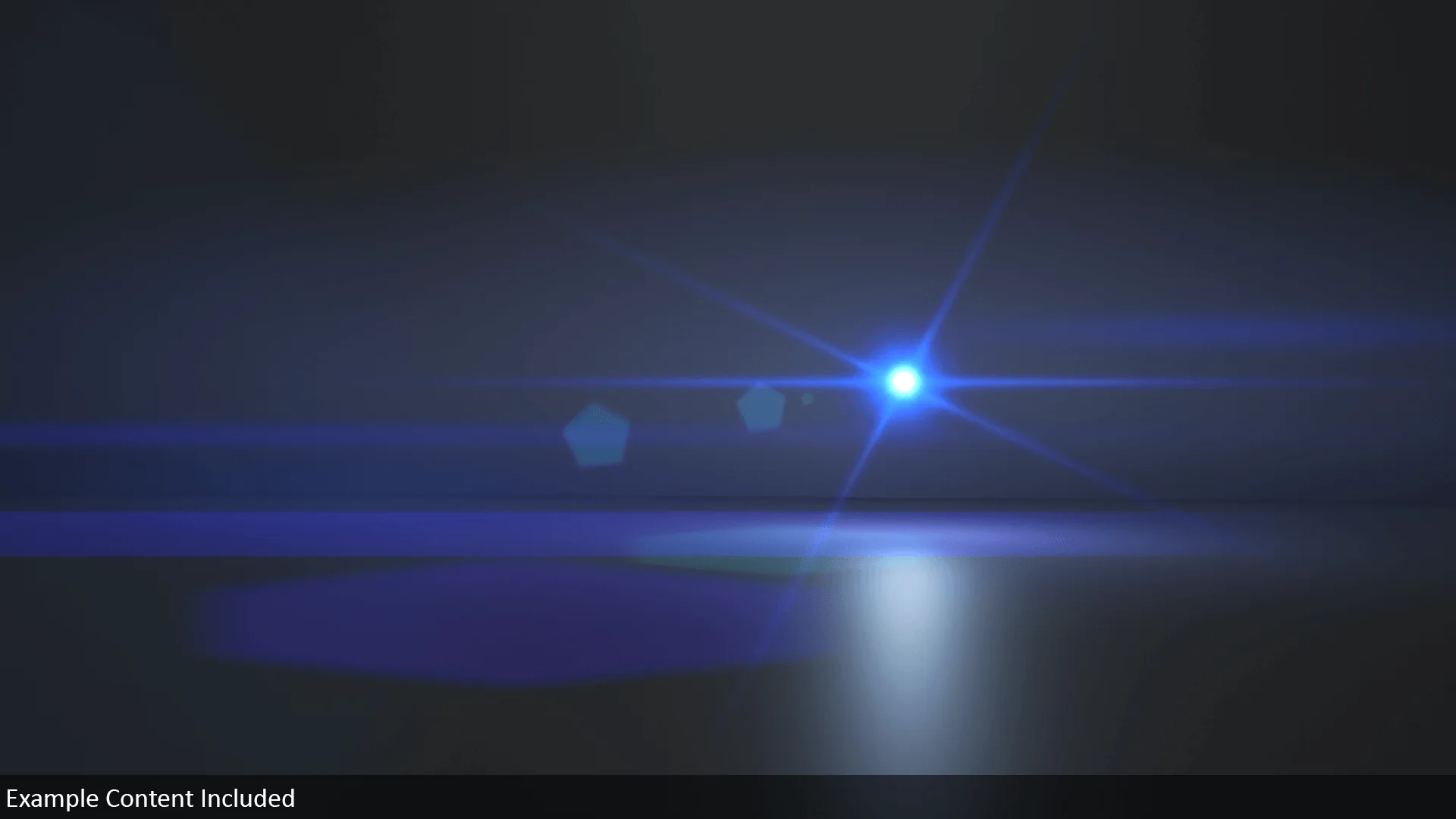
Lens flares are one of those camera details that either sell a shot or wreck it. A flare that sits in the wrong place, blooms too hard, or refuses to respond to the camera's movement reads as a decal pasted over the frame. The Custom Lens Flare Tool approaches the problem from the opposite direction: instead of accepting a fixed flare effect, it hands the construction of the flare itself to the artist, element by element.
The core of the pack is a single blueprint object. This lens flare actor creates and draws its own sprite flare elements, and it does so using screen space UMG widgets. That detail is the heart of the whole system. Because the flare is drawn in screen space through UMG, each sprite flare element can be treated as its own piece with its own customizable behavior and appearance, rather than as one indivisible effect. The package then offers a level of customization that allows for true artistic control over every single element in the flare.
That means a flare built with this actor is not one object but a composition. Streaks, orbs, ghosting shapes, and whatever else the artist assembles each exist as individual sprite flare elements, and each can behave and look differently from its neighbors. The tool is tagged for visual effect and camera work, with a realistic intent, which places it squarely in the territory of in-engine cinematography rather than abstract motion graphics.
Inside the Custom Lens Flare Tool package
The blueprint is the engine of the pack, but it does not arrive alone. Alongside it are 26 custom lens flare textures, giving the artist a starting library of flare imagery to draw from and combine. Four base materials provide the material foundations the flare elements are built on. Four premade complex example lens flares demonstrate what the system looks like when several elements are assembled into a finished, layered flare.
The blueprint object itself is fully commented with tooltips. For a system whose entire value proposition is per-element control, that documentation matters: the options are numerous by design, and the comments and tooltips are what make the blueprint approachable rather than opaque.
Beyond the assets, there is an extensive educational map. It covers each option in detail and provides examples for anyone who wants to learn more. This is not a throwaway demo scene; it is structured as a walkthrough of the tool's options, pairing explanation with working examples so that the behavior of a given setting can be seen rather than guessed at.
Where the 26 textures and 4 materials fit
The textures and materials are the raw visual vocabulary. The 26 custom lens flare textures supply the sprite imagery, and the four base materials give those sprites their material grounding. The four premade complex example lens flares then show the vocabulary in use, assembled into complete flares that combine multiple elements. An artist can start from a premade example and pull it apart, or begin from the base materials and textures and build a flare from nothing.
Composing a flare instead of accepting one
The practical difference between this approach and a one-piece flare effect shows up in how you tune a shot. Because each sprite flare element carries its own customizable behavior and appearance, adjustments stay local. Changing how one element behaves does not require rebuilding the whole flare, and an element that looks wrong in a particular camera move can be shaped on its own terms.
This is where the artistic control claim becomes concrete. A flare is rarely convincing because of a single shape; it is convincing because several elements relate to one another in a believable way — some prominent, some faint, each with its own presence. The Custom Lens Flare Tool is built to let an artist define exactly that relationship, element by element, with the screen space UMG widget layer handling the drawing.
The educational map supports this way of working directly. Since it covers each option in detail and backs those explanations with examples, it doubles as a reference while composing: when a particular behavior needs to change, the map is where the corresponding option is explained and demonstrated.
Fitting the tool into a camera-driven workflow
The realistic camera tag is a fair signal of where this belongs. Scenes that lean on a virtual camera — cinematic sequences, in-engine cutscenes, camera flythroughs, anything where the viewer is meant to feel a lens between them and the world — are the natural home for a flare system with this much per-element control. The flare actor draws its elements in screen space, so it lives in the same visual layer as the camera's view rather than in the physical scene.
Within a production, the pack supports two distinct entry points. An artist under time pressure can reach for one of the four premade complex example lens flares, using them as-is or as a structural starting point. An artist with a specific look in mind can work from the base materials and the 26 textures and assemble a flare whose every element is deliberately chosen. Both routes run through the same blueprint, and both are documented in the same educational map.
The fully commented blueprint with tooltips also matters for team workflows. When a flare setup has to be understood by someone other than the person who built it, comments and tooltips on the options are what keep the system legible. The educational map extends that legibility beyond the blueprint itself, giving a structured place to learn the tool's behavior before committing to a final look.
A short takeaway
Reach for the Custom Lens Flare Tool when a shot needs a flare that behaves like a designed element of the frame rather than a preset dropped on top of it. The combination of a commented blueprint, 26 custom textures, four base materials, four premade complex examples, and an educational map that explains each option gives an artist both the parts and the instruction to build flares deliberately — and to keep refining them element by element as the camera work demands.
 Gameplay Features
 Gameplay Features
 Gameplay Features