"ae2217ad8e73450c"{"id":"1003027","slug":"dance-mocap-collection","title":"Dance MoCap Collection","category":"Variety","engine":"4.22+,5.0+","assetVersion":"","engineVersion":"Engine Version: 4.22+,5.0+","tag":"Variety","accent":"blue","visual":"mech","summary":"Sixty FBX dance motion capture clips for a bipedal humanoid, updated to the UE5 Mannequin with proper looping, finger animation, and 60 FPS versions.","platform":"Unreal Engine","indexPolicy":"index","publishedAt":"2026-11-25T16:30:52.116Z","updatedAt":"2026-11-25T16:30:52.116Z","sourceNotes":[],"fileContents":[],"compatibility":["Unreal Engine","Engine Version: 4.22+,5.0+"],"featuredImage":{"alt":"Dance MoCap Collection","src":"/wp-content/uploads/published/2026/11/96e45fecbd51-390f1ebc-fe3b-45e7-bd40-065113f5bd75-dadbed233c.webp"},"hasDownloadLink":true,"downloads":0,"terms":[{"taxonomy":"category","slug":"variety-animations","name":"Variety"}],"galleryImages":[{"src":"/wp-content/uploads/published/2026/11/7215c84a596a-4db1474d-6531-43d8-873b-c615f022e1e0-5ef9ad0edd.webp","alt":"Dance MoCap Collection"},{"src":"/wp-content/uploads/published/2026/11/fb24356a8df1-fff826dd-a92a-404c-b98c-32041bf816a4-c28d2a9473.webp","alt":"Dance MoCap Collection"},{"src":"/wp-content/uploads/published/2026/11/f25402cb0b4d-449bb6ea-51d5-4ab6-bf54-dc4ddb4ce2d2-360adbf13d.webp","alt":"Dance MoCap Collection"},{"src":"/wp-content/uploads/published/2026/11/7d3aa58f0459-eece7c2a-f8b0-4b84-abcc-41698b2b1b8d-12c6188a96.webp","alt":"Dance MoCap Collection"},{"src":"/wp-content/uploads/published/2026/11/6cdfc72e7405-475e12ab-a1d9-4032-b48c-29968106c789-2bf1f3d13d.webp","alt":"Dance MoCap Collection"},{"src":"/wp-content/uploads/published/2026/11/0a3f694874dc-554fa3a3-e26a-45fb-8a87-87de8f3efb80-f6b564ec77.webp","alt":"Dance MoCap Collection"}],"accessPanel":{"kind":"resource","title":"Get this resource","safetyNote":"Resources are manually reviewed before listing to improve quality and reduce obvious risks.","fileName":"Content.7z","resourceType":"Resource archive","versions":[]},"contentHtml":"\u003cp\u003eA room where every character sways on the same beat is one of the quickest ways to make a scene read as unfinished. Party scenes, tavern floors, street celebrations and club interiors all depend on bodies moving with their own timing and their own weight. The Dance MoCap Collection exists to fill that gap: 60 motion-captured performances of a bipedal humanoid character working through a range of dance moves, delivered as FBX animation files.\u003c/p\u003e \u003cp\u003eThat number matters more than it first appears. Sixty separate clips means sixty separate performances, so a single shot can hold several characters without all of them cycling through the same motion. The collection is tagged Fun, Realistic, Animated, Character and Dance, and the realism tag is earned by the capture process itself — weight shifts, hip movement and the small off-balance moments that keyframed dance loops tend to smooth away are all present because a performer actually did them.\u003c/p\u003e \u003ch2\u003eWhere a Dance MoCap Library Earns Its Place\u003c/h2\u003e \u003cp\u003eDance animation is rarely the point of a scene. It is the texture underneath it. A character dancing in the background of a bar tells the player the space is inhabited; a group moving together at a festival tells them something is being celebrated. Neither moment usually justifies hand-animating a routine, and neither benefits from a single looping two-step repeated across a dozen bodies.\u003c/p\u003e \u003cp\u003eThe collection fits that middle ground. It gives a production enough distinct performances to spread across a crowd, and the range of dance moves means the same character can be swapped to a different clip between shots without the change reading as a reset. Because every clip is a complete dance move rather than a fragment, placing one is mostly a matter of choosing where it starts and how long it runs.\u003c/p\u003e \u003ch2\u003eSixty Clips, Already Cropped to Their Useful Range\u003c/h2\u003e \u003cp\u003eEvery animation in the set has been cropped to its optimal range. That is an editorial step done ahead of time: the lead-in before the movement begins and the trailing frames after it settles are trimmed off, leaving the portion that actually reads as dance. In a timeline, this removes the dead air that otherwise has to be cut by hand for each clip, and it makes blending between two performances far more predictable, since neither one starts with a second of a character standing still.\u003c/p\u003e \u003cp\u003eWhat arrives is a set of FBX files, one per dance, all authored for a bipedal humanoid. The package is made for Unreal Engine 4 and 5, and it has been updated to the UE5 Mannequin, so the animations line up with the current mannequin rather than an older skeleton. For teams already working inside Unreal, that update is the difference between importing and fixing, and between fixing and importing.\u003c/p\u003e \u003ch2\u003eLooping, Fingers, and the 60 FPS Dance MoCap Versions\u003c/h2\u003e \u003cp\u003eThree details in this set do most of the work in making the clips hold up under scrutiny.\u003c/p\u003e \u003cp\u003eProper looping comes first. A dance that ends on a frame that does not match its opening frame produces a visible hitch every time it cycles, and in a busy scene with several dancers that hitch repeats across the whole crowd at different moments. These clips loop cleanly, which means a single performance can carry a background character for as long as the shot requires without the seam becoming the thing the viewer notices.\u003c/p\u003e \u003cp\u003eFinger animation is the second. Hands are the first part of a dance animation to look wrong — they stiffen into a flat, unconsidered shape while the rest of the body moves convincingly. Finger motion is included here, so the hands participate in the movement instead of hanging off the end of the wrist.\u003c/p\u003e \u003cp\u003eThird, the collection ships 60 FPS versions alongside the standard animations. Where a shot needs to be slowed down, or where the project itself runs at a higher frame rate, the faster version keeps the motion smooth instead of stepping between sampled poses. Having both available means the same dance can serve a normal-speed crowd shot and a slower, more deliberate beat without hunting for a different clip.\u003c/p\u003e \u003ch2\u003eRetargeting: T-Poses, the UE5 Mannequin, and Engine Versions\u003c/h2\u003e \u003cp\u003eNot every project uses the mannequin, and the collection accounts for that. T-poses for retargeting purposes can be found in the provided source files — a reference pose that lets the animations be mapped onto a different humanoid rig, whether that rig is a custom hero character or a crowd variant built for performance. Retargeting is the standard route from a captured humanoid performance to a studio's own skeleton, and including the T-pose removes the step of tracking one down or building one to match.\u003c/p\u003e \u003cp\u003eCombined with the UE5 Mannequin update and support for both Unreal Engine 4 and 5, the set covers the common cases: drop the clips onto the mannequin and go, or retarget them onto a bespoke character when the scene calls for someone specific. Teams still on UE4 are not left out, and teams that have moved to UE5 get the version built against the current mannequin.\u003c/p\u003e \u003ch2\u003eMatching the Collection to the Scene in Front of You\u003c/h2\u003e \u003cp\u003eThe honest framing is that this is a crowd and ambience library with enough craft in it to survive close attention. A project that needs a single choreographed hero dance for a cutscene will still be blocking that performance itself — 60 clips of varied dance moves are not a routine. But a project that needs a bar to feel alive, a festival to feel crowded, or a handful of NPCs to stop looking like they are sharing one animation will find the set does most of that work out of the box.\u003c/p\u003e \u003cp\u003eThe strongest fit is a scene with several characters who need to move differently from one another: pick distinct clips per character, let the looping carry them through the length of the shot, and rely on the cropped ranges to keep transitions tight. Where a character is going to be seen at a distance, the standard versions are enough; where a dance is going to linger on screen or play back slowly, the 60 FPS versions are the ones to reach for. And if the cast is not built on the mannequin, start from the T-poses files and retarget before anything else.\u003c/p\u003e\n\n\u003ch2\u003eRelated Resources Worth Checking\u003c/h2\u003e\n\u003cul\u003e\n\u003cli\u003e\u003ca href=\"https://3dcghub.com/dance-party-mocap-pack/\" rel=\"noopener noreferrer\"\u003eDance Party - MoCap Pack\u003c/a\u003e\u003c/li\u003e\n\u003cli\u003e\u003ca href=\"https://3dcghub.com/arabian-fusion-mocap-dance-set/\" rel=\"noopener noreferrer\"\u003eArabian Fusion MoCap Dance Set\u003c/a\u003e\u003c/li\u003e\n\u003cli\u003e\u003ca href=\"https://3dcghub.com/party-dance-npc-animation-pack/\" rel=\"noopener noreferrer\"\u003eParty Dance NPC Animation Pack\u003c/a\u003e\u003c/li\u003e\n\u003cli\u003e\u003ca href=\"https://3dcghub.com/cooking-basics-mocap-animations/\" rel=\"noopener noreferrer\"\u003eCooking Basics Mocap Animations\u003c/a\u003e\u003c/li\u003e\n\u003cli\u003e\u003ca href=\"https://3dcghub.com/mocap-wizard-academy-animation-library/\" rel=\"noopener noreferrer\"\u003eMocap - Wizard Academy Animation Library\u003c/a\u003e\u003c/li\u003e\n\u003c/ul\u003e","contentTextLength":6252,"navigation":{"current":17,"total":4964,"previous":{"id":"1003028","slug":"dynamic-archer-set","title":"Dynamic Archer Set","category":"Combat","platform":"Unreal Engine","updatedAt":"2026-11-25T16:31:38.196Z"},"next":{"id":"1003026","slug":"custom-lens-flare-tool","title":"Custom Lens Flare Tool","category":"Gameplay Features","platform":"Unreal Engine","updatedAt":"2026-11-25T16:30:15.471Z"}},"relatedResources":[{"id":"1000811","slug":"dance-party-mocap-pack","title":"Dance Party - MoCap Pack","category":"Variety","engine":"4.27,5.0+","assetVersion":"","engineVersion":"Engine Version: 4.27,5.0+","tag":"Variety","accent":"blue","visual":"mech","summary":"18 motion-captured dance animations capturing everyday club and party behavior, from low-key conversation to high-energy freestyle, all looped at 120 BPM.","platform":"Unreal Engine","indexPolicy":"index","publishedAt":"2026-07-31T09:15:04.523Z","updatedAt":"2026-07-31T09:15:04.523Z","sourceNotes":[],"fileContents":[],"compatibility":["Unreal Engine","Engine Version: 4.27,5.0+"],"featuredImage":{"alt":"Dance Party - MoCap Pack","src":"/wp-content/uploads/published/2026/07/09a9b02e1a31-dc875a4f-0be4-4b36-88bb-b835aa3d0794-fc96afa831.webp"},"fileSizeBytes":36905176,"hasDownloadLink":true,"downloads":1},{"id":"6233","slug":"arabian-fusion-mocap-dance-set","title":"Arabian Fusion MoCap Dance Set","category":"Variety","engine":"4.26+,5.0+","assetVersion":"Engine version: 4.26+,5.0+","engineVersion":"4.24","tag":"Variety","accent":"blue","visual":"animation","summary":"Enhance your project with 12 high-quality Arabian fusion MoCap dance animations. Perfect for Unreal Engine characters, NPCs, and high-quality cinematic sequence","platform":"Unreal Engine","indexPolicy":"noindex","publishedAt":"2026-02-19T14:11:49.000Z","updatedAt":"2026-04-19T15:56:28.000Z","sourceNotes":[],"fileContents":[],"compatibility":["Unreal Engine","Engine version: 4.26+,5.0+"],"featuredImage":{"alt":"Arabian Fusion MoCap Dance Set","src":"https://3dcghub.com/wp-content/uploads/2026/02/7eae1490-6e74-412a-ba57-e26c7b594cc6.webp"},"fileSizeBytes":21456287,"hasDownloadLink":true,"downloads":0},{"id":"1000959","slug":"party-dance-npc-animation-pack","title":"Party Dance NPC Animation Pack","category":"Variety","engine":"5.0+","assetVersion":"","engineVersion":"Engine Version: 5.0+","tag":"Variety","accent":"blue","visual":"animation","summary":"28 mocap dance animations for NPCs, capturing body and fingers with optical mocap, retargeted for Unreal Engine 5 Manny. Built for party and concert scenes.","platform":"Unreal Engine","indexPolicy":"index","publishedAt":"2026-08-14T15:34:02.315Z","updatedAt":"2026-08-14T15:34:02.315Z","sourceNotes":[],"fileContents":[],"compatibility":["Unreal Engine","Engine Version: 5.0+"],"featuredImage":{"alt":"Party Dance NPC Animation Pack","src":"/wp-content/uploads/published/2026/08/061c43160ce2-92114015-e974-4ab8-ae32-da1ad7b90e19-7a87e478af.webp"},"fileSizeBytes":316678821,"hasDownloadLink":true,"downloads":1}]}[{"id":4225,"sourceId":4225,"taxonomyId":4225,"taxonomy":"category","slug":"asset-library","name":"Asset Library","parentId":null,"count":4817,"hasChildren":true,"href":"/","seoTitle":"Free Game Assets Library | 3DCGHUB","seoDescription":"Browse free Unreal Engine, Unity, Blender assets and game development tutorials on 3DCGHUB with previews, compatibility notes, and secure downloads.","sitemapEnabled":true,"children":[{"id":4227,"sourceId":4227,"taxonomyId":4227,"taxonomy":"category","slug":"blender-add-ons-plugins","name":"Blender Add-ons \u0026 Plugins","parentId":4225,"count":10,"hasChildren":false,"href":"/category/blender-add-ons-plugins/","seoTitle":"Free Blender Add-ons \u0026 Plugins | 3DCGHUB","seoDescription":"Browse free Blender Add-ons \u0026 Plugins tools for Blender on 3DCGHUB: curated downloads with preview images, compatibility notes and secure download access.","sitemapEnabled":true},{"id":514,"sourceId":514,"taxonomyId":514,"taxonomy":"category","slug":"unity-2","name":"Unity","parentId":4225,"count":453,"hasChildren":true,"href":"/category/unity-2/","seoTitle":"Free Unity Assets | 3DCGHUB","seoDescription":"Browse free Unity resources on 3DCGHUB: curated downloads with preview images, compatibility notes and secure download access.","sitemapEnabled":true,"children":[{"id":523,"sourceId":523,"taxonomyId":523,"taxonomy":"category","slug":"2d","name":"2D","parentId":514,"count":1,"hasChildren":true,"href":"/category/2d/","seoTitle":"Free Unity 2D | 3DCGHUB","seoDescription":"Browse free 2D assets for Unity on 3DCGHUB: curated downloads with preview images, compatibility notes and secure download access.","sitemapEnabled":true},{"id":515,"sourceId":515,"taxonomyId":515,"taxonomy":"category","slug":"3d-unity-2","name":"3D","parentId":514,"count":162,"hasChildren":true,"href":"/category/3d-unity-2/","seoTitle":"Free Unity 3D Assets | 3DCGHUB","seoDescription":"Browse free 3D assets for Unity on 3DCGHUB: curated downloads with preview images, compatibility notes and secure download access.","sitemapEnabled":true},{"id":565,"sourceId":565,"taxonomyId":565,"taxonomy":"category","slug":"add-ons","name":"Add-Ons","parentId":514,"count":2,"hasChildren":false,"href":"/category/add-ons/","seoTitle":"Free Unity Add-Ons | 3DCGHUB","seoDescription":"Browse free Add-Ons assets for Unity on 3DCGHUB: curated downloads with preview images, compatibility notes and secure download access.","sitemapEnabled":true},{"id":529,"sourceId":529,"taxonomyId":529,"taxonomy":"category","slug":"audio-unity-2","name":"Audio","parentId":514,"count":1,"hasChildren":true,"href":"/category/audio-unity-2/","seoTitle":"Free Unity Audio | 3DCGHUB","seoDescription":"Browse free Audio for Unity on 3DCGHUB: curated downloads with preview images, compatibility notes and secure download access.","sitemapEnabled":true},{"id":557,"sourceId":557,"taxonomyId":557,"taxonomy":"category","slug":"templates","name":"Templates","parentId":514,"count":36,"hasChildren":true,"href":"/category/templates/","seoTitle":"Free Unity Templates | 3DCGHUB","seoDescription":"Browse free Unity project templates on 3DCGHUB. Starter kits with previews, compatibility notes, and secure download access.","sitemapEnabled":true},{"id":533,"sourceId":533,"taxonomyId":533,"taxonomy":"category","slug":"tools-unity-2","name":"Tools","parentId":514,"count":0,"hasChildren":true,"href":"/category/tools-unity-2/","sitemapEnabled":true},{"id":554,"sourceId":554,"taxonomyId":554,"taxonomy":"category","slug":"vfx-unity-2","name":"VFX","parentId":514,"count":4,"hasChildren":true,"href":"/category/vfx-unity-2/","seoTitle":"Free Unity VFX | 3DCGHUB","seoDescription":"Browse free VFX for Unity on 3DCGHUB: curated downloads with preview images, compatibility notes and secure download access.","sitemapEnabled":true}]},{"id":511,"sourceId":511,"taxonomyId":511,"taxonomy":"category","slug":"unreal-engine-2","name":"Unreal Engine","parentId":4225,"count":4355,"hasChildren":true,"href":"/category/unreal-engine-2/","seoTitle":"Free Unreal Engine Assets | 3DCGHUB","seoDescription":"Browse free Unreal Engine resources on 3DCGHUB: curated downloads with preview images, compatibility notes and secure download access.","sitemapEnabled":true,"children":[{"id":54,"sourceId":54,"taxonomyId":54,"taxonomy":"category","slug":"3d","name":"3D","parentId":511,"count":2441,"hasChildren":true,"href":"/category/3d/","seoTitle":"Free Unreal Engine 3D | 3DCGHUB","seoDescription":"Browse free 3D assets for Unreal Engine on 3DCGHUB: curated downloads with preview images, compatibility notes and secure download access.","sitemapEnabled":true},{"id":441,"sourceId":441,"taxonomyId":441,"taxonomy":"category","slug":"animations","name":"Animations","parentId":511,"count":269,"hasChildren":true,"href":"/category/animations/","seoTitle":"Free Unreal Engine Animations | 3DCGHUB","seoDescription":"Browse free Animations for Unreal Engine on 3DCGHUB: curated downloads with preview images, compatibility notes and secure download access.","sitemapEnabled":true},{"id":446,"sourceId":446,"taxonomyId":446,"taxonomy":"category","slug":"audio","name":"Audio","parentId":511,"count":63,"hasChildren":true,"href":"/category/audio/","seoTitle":"Free Unreal Engine Audio Resources | 3DCGHUB","seoDescription":"Browse free Unreal Engine audio resources including sound effects, voices, dialogue, and ambient sounds. Curated free downloads on 3DCGHUB.","sitemapEnabled":true},{"id":466,"sourceId":466,"taxonomyId":466,"taxonomy":"category","slug":"game-systems","name":"Game Systems","parentId":511,"count":381,"hasChildren":true,"href":"/category/game-systems/","seoTitle":"Free Unreal Engine Game Systems | 3DCGHUB","seoDescription":"Browse free Game Systems tools for Unreal Engine on 3DCGHUB: curated downloads with preview images, compatibility notes and secure download access.","sitemapEnabled":true},{"id":478,"sourceId":478,"taxonomyId":478,"taxonomy":"category","slug":"game-templates","name":"Game Templates","parentId":511,"count":155,"hasChildren":true,"href":"/category/game-templates/","seoTitle":"Free Unreal Engine Game Templates | 3DCGHUB","seoDescription":"Browse free Game Templates for Unreal Engine on 3DCGHUB: curated downloads with preview images, compatibility notes and secure download access.","sitemapEnabled":true},{"id":432,"sourceId":432,"taxonomyId":432,"taxonomy":"category","slug":"hdri","name":"HDRI","parentId":511,"count":6,"hasChildren":true,"href":"/category/hdri/","seoTitle":"Free Unreal Engine HDRI | 3DCGHUB","seoDescription":"Browse free Unreal Engine HDRI skies and lighting maps on 3DCGHUB. Environment lighting with previews and secure downloads.","sitemapEnabled":true},{"id":228,"sourceId":228,"taxonomyId":228,"taxonomy":"category","slug":"material-and-textures","name":"Material \u0026 Textures","parentId":511,"count":172,"hasChildren":true,"href":"/category/material-and-textures/","seoTitle":"Free Unreal Engine Material \u0026 Textures | 3DCGHUB","seoDescription":"Browse free Material \u0026 Textures for Unreal Engine on 3DCGHUB: curated downloads with preview images, compatibility notes and secure download access.","sitemapEnabled":true},{"id":298,"sourceId":298,"taxonomyId":298,"taxonomy":"category","slug":"sprites-and-flipbooks","name":"Sprites \u0026 Flipbooks","parentId":511,"count":18,"hasChildren":true,"href":"/category/sprites-and-flipbooks/","seoTitle":"Free Unreal Engine Sprites \u0026 Flipbooks | 3DCGHUB","seoDescription":"Browse free Sprites \u0026 Flipbooks assets for Unreal Engine on 3DCGHUB: curated downloads with preview images, compatibility notes and secure download access.","sitemapEnabled":true},{"id":489,"sourceId":489,"taxonomyId":489,"taxonomy":"category","slug":"tools-and-plugins","name":"Tools \u0026 Plugins","parentId":511,"count":390,"hasChildren":true,"href":"/category/tools-and-plugins/","seoTitle":"Free Unreal Engine Tools \u0026 Plugins | 3DCGHUB","seoDescription":"Browse free Tools \u0026 Plugins for Unreal Engine on 3DCGHUB: curated downloads with preview images, compatibility notes and secure download access.","sitemapEnabled":true},{"id":459,"sourceId":459,"taxonomyId":459,"taxonomy":"category","slug":"ui","name":"UI","parentId":511,"count":47,"hasChildren":true,"href":"/category/ui/","seoTitle":"Free Unreal Engine UI | 3DCGHUB","seoDescription":"Browse free UI for Unreal Engine on 3DCGHUB: curated downloads with preview images, compatibility notes and secure download access.","sitemapEnabled":true},{"id":450,"sourceId":450,"taxonomyId":450,"taxonomy":"category","slug":"vfx","name":"VFX","parentId":511,"count":413,"hasChildren":true,"href":"/category/vfx/","seoTitle":"Free Unreal Engine VFX | 3DCGHUB","seoDescription":"Browse free VFX for Unreal Engine on 3DCGHUB: curated downloads with preview images, compatibility notes and secure download access.","sitemapEnabled":true}]}]},{"id":4222,"sourceId":4222,"taxonomyId":4222,"taxonomy":"category","slug":"tutorial-library","name":"Tutorial Library","parentId":null,"count":117,"hasChildren":false,"href":"/tutorials/","seoTitle":"Free Game Development Tutorial Library | 3DCGHUB","seoDescription":"Browse free game development tutorials for Unreal Engine, Unity, Blender, and more on 3DCGHUB with practical workflows and secure downloads.","sitemapEnabled":true}]
Resource screenshots
1 / 6
Asset drops
Daily Asset Drops
Follow 3DCGHUB on Telegram for daily Unreal, Unity & Blender drops and curated CC0 releases.
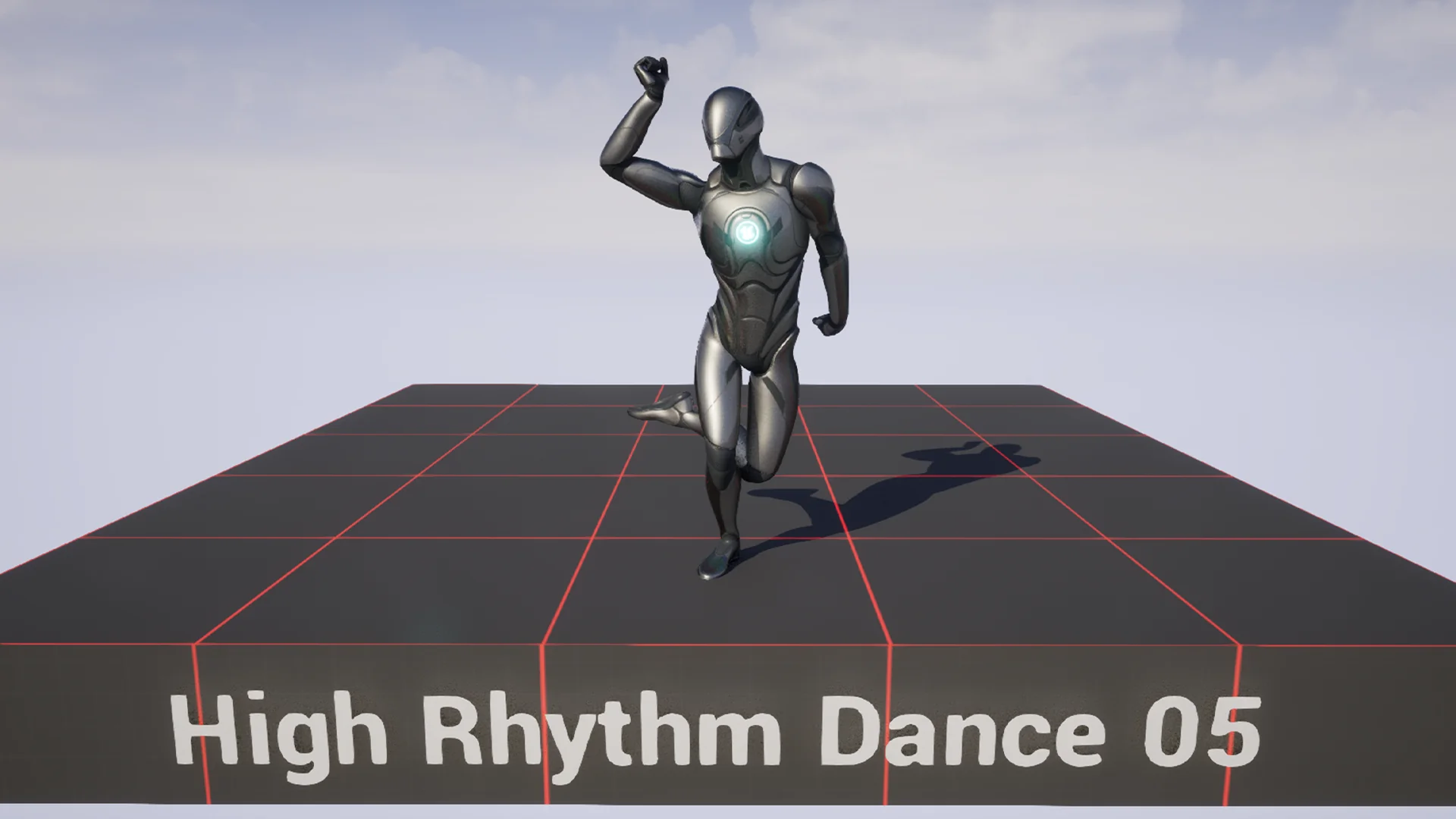
A room where every character sways on the same beat is one of the quickest ways to make a scene read as unfinished. Party scenes, tavern floors, street celebrations and club interiors all depend on bodies moving with their own timing and their own weight. The Dance MoCap Collection exists to fill that gap: 60 motion-captured performances of a bipedal humanoid character working through a range of dance moves, delivered as FBX animation files.
That number matters more than it first appears. Sixty separate clips means sixty separate performances, so a single shot can hold several characters without all of them cycling through the same motion. The collection is tagged Fun, Realistic, Animated, Character and Dance, and the realism tag is earned by the capture process itself — weight shifts, hip movement and the small off-balance moments that keyframed dance loops tend to smooth away are all present because a performer actually did them.
Where a Dance MoCap Library Earns Its Place
Dance animation is rarely the point of a scene. It is the texture underneath it. A character dancing in the background of a bar tells the player the space is inhabited; a group moving together at a festival tells them something is being celebrated. Neither moment usually justifies hand-animating a routine, and neither benefits from a single looping two-step repeated across a dozen bodies.
The collection fits that middle ground. It gives a production enough distinct performances to spread across a crowd, and the range of dance moves means the same character can be swapped to a different clip between shots without the change reading as a reset. Because every clip is a complete dance move rather than a fragment, placing one is mostly a matter of choosing where it starts and how long it runs.
Sixty Clips, Already Cropped to Their Useful Range
Every animation in the set has been cropped to its optimal range. That is an editorial step done ahead of time: the lead-in before the movement begins and the trailing frames after it settles are trimmed off, leaving the portion that actually reads as dance. In a timeline, this removes the dead air that otherwise has to be cut by hand for each clip, and it makes blending between two performances far more predictable, since neither one starts with a second of a character standing still.
What arrives is a set of FBX files, one per dance, all authored for a bipedal humanoid. The package is made for Unreal Engine 4 and 5, and it has been updated to the UE5 Mannequin, so the animations line up with the current mannequin rather than an older skeleton. For teams already working inside Unreal, that update is the difference between importing and fixing, and between fixing and importing.
Looping, Fingers, and the 60 FPS Dance MoCap Versions
Three details in this set do most of the work in making the clips hold up under scrutiny.
Proper looping comes first. A dance that ends on a frame that does not match its opening frame produces a visible hitch every time it cycles, and in a busy scene with several dancers that hitch repeats across the whole crowd at different moments. These clips loop cleanly, which means a single performance can carry a background character for as long as the shot requires without the seam becoming the thing the viewer notices.
Finger animation is the second. Hands are the first part of a dance animation to look wrong — they stiffen into a flat, unconsidered shape while the rest of the body moves convincingly. Finger motion is included here, so the hands participate in the movement instead of hanging off the end of the wrist.
Third, the collection ships 60 FPS versions alongside the standard animations. Where a shot needs to be slowed down, or where the project itself runs at a higher frame rate, the faster version keeps the motion smooth instead of stepping between sampled poses. Having both available means the same dance can serve a normal-speed crowd shot and a slower, more deliberate beat without hunting for a different clip.
Retargeting: T-Poses, the UE5 Mannequin, and Engine Versions
Not every project uses the mannequin, and the collection accounts for that. T-poses for retargeting purposes can be found in the provided source files — a reference pose that lets the animations be mapped onto a different humanoid rig, whether that rig is a custom hero character or a crowd variant built for performance. Retargeting is the standard route from a captured humanoid performance to a studio's own skeleton, and including the T-pose removes the step of tracking one down or building one to match.
Combined with the UE5 Mannequin update and support for both Unreal Engine 4 and 5, the set covers the common cases: drop the clips onto the mannequin and go, or retarget them onto a bespoke character when the scene calls for someone specific. Teams still on UE4 are not left out, and teams that have moved to UE5 get the version built against the current mannequin.
Matching the Collection to the Scene in Front of You
The honest framing is that this is a crowd and ambience library with enough craft in it to survive close attention. A project that needs a single choreographed hero dance for a cutscene will still be blocking that performance itself — 60 clips of varied dance moves are not a routine. But a project that needs a bar to feel alive, a festival to feel crowded, or a handful of NPCs to stop looking like they are sharing one animation will find the set does most of that work out of the box.
The strongest fit is a scene with several characters who need to move differently from one another: pick distinct clips per character, let the looping carry them through the length of the shot, and rely on the cropped ranges to keep transitions tight. Where a character is going to be seen at a distance, the standard versions are enough; where a dance is going to linger on screen or play back slowly, the 60 FPS versions are the ones to reach for. And if the cast is not built on the mannequin, start from the T-poses files and retarget before anything else.
 Variety
 Variety
 Variety