"8652e693bd7bbc55"{"id":"1002976","slug":"advanced-fishing-template","title":"Advanced Fishing Template","category":"Gameplay Features","engine":"4.24+,5.0+","assetVersion":"","engineVersion":"Engine Version: 4.24+,5.0+","tag":"Gameplay Features","accent":"blue","visual":"mech","summary":"Advanced Fishing Template is a full Blueprint-based Unreal Engine 4 fishing project with 8 fish meshes, cast and reel animations and a custom ocean shader.","platform":"Unreal Engine","indexPolicy":"index","publishedAt":"2026-11-25T09:03:40.419Z","updatedAt":"2026-11-25T09:03:40.419Z","sourceNotes":[],"fileContents":[],"compatibility":["Unreal Engine","Engine Version: 4.24+,5.0+"],"featuredImage":{"alt":"Advanced Fishing Template","src":"/wp-content/uploads/published/2026/11/8cd2308ef3b8-2f3a4250-e8e8-493d-b34c-b9a4cc1bf7d4-b6e7224169.webp"},"hasDownloadLink":true,"downloads":1,"terms":[{"taxonomy":"category","slug":"gameplay-features","name":"Gameplay Features"}],"galleryImages":[{"src":"/wp-content/uploads/published/2026/11/5227b622de5b-2f9dc32c-56a9-4a21-aabf-d3926f33c01d-5e069338c7.webp","alt":"Advanced Fishing Template"},{"src":"/wp-content/uploads/published/2026/11/88dc2d43e64e-eac078c2-0269-4ba5-b6d0-ab476838559c-f2a96729f6.webp","alt":"Advanced Fishing Template"},{"src":"/wp-content/uploads/published/2026/11/8c562c1ec5fd-5a93bf76-d269-4964-89a9-2b7f30ce8799-f64e5ad024.webp","alt":"Advanced Fishing Template"},{"src":"/wp-content/uploads/published/2026/11/a84746a0f42f-ac7869f1-2fbf-409e-b2c2-f809f2886f70-f98b51675a.webp","alt":"Advanced Fishing Template"},{"src":"/wp-content/uploads/published/2026/11/36b0e27418b5-38e7010d-2e73-47d9-91b3-e0486f3b26f4-c21ea9116f.webp","alt":"Advanced Fishing Template"},{"src":"/wp-content/uploads/published/2026/11/0defc8d90a6c-33fbca6b-1fcf-4b7b-ac5d-87f6d0bb1867-a50bcd1b57.webp","alt":"Advanced Fishing Template"},{"src":"/wp-content/uploads/published/2026/11/cf7421137cd5-35efabef-dfbf-46ab-bcba-4a6c69eaa122-11b7ad85db.webp","alt":"Advanced Fishing Template"}],"accessPanel":{"kind":"resource","title":"Get this resource","safetyNote":"Resources are manually reviewed before listing to improve quality and reduce obvious risks.","fileName":"Advanced Fishing Template.7z","resourceType":"Resource archive","versions":[]},"contentHtml":"\u003ch2\u003eScenes the Advanced Fishing Template Opens Up\u003c/h2\u003e\n\u003cp\u003eA riverbank at first light with the rod bent toward the water. A reef shelf where something large shifts between the coral. A boat drifting offshore while line plays out behind it. Those are the moments this project is set up to carry, and it carries them as a complete Unreal Engine 4 project rather than a scatter of props waiting to be scripted. The fishing itself is entirely Blueprinted, which means the scene dressing and the fishing behaviour live in the same place: you can build the environment you want, then bring the template's logic into it.\u003c/p\u003e\n\u003cp\u003eBecause the project arrives as a full scene rather than a kit of parts, it reads as a working fishing experience out of the box. There is water, there are fish, and there is a rod with a casting motion and a reel that winds both directions. An artist can open it, walk through the loop, and immediately see where their own environment would replace the placeholder one. A designer can look at the same loop and see which values are exposed for tuning. Both readings come from the same Blueprint graph, which is the practical advantage of the template being Blueprint-only: nothing in the fishing system is locked away in code that has to be rebuilt to be changed.\u003c/p\u003e \u003ch2\u003eOne Fishing Blueprint Class, Many Fish\u003c/h2\u003e\n\u003cp\u003eThe centre of the project is a fish Blueprint class built to be extended rather than edited in place. Eight skeletal meshes and eight ready-made child classes come with it, so there is a full roster to place in the water on day one. Adding more is a matter of deriving another child class from the parent and giving it its own settings — the template explicitly allows as many fish types as a project needs, which makes the eight included meshes a starting set rather than a fixed catalogue.\u003c/p\u003e\n\u003ch3\u003eWhat the detail panel exposes per fish\u003c/h3\u003e\n\u003cp\u003eEach fish carries its identifying data on the detail panel, and the fields are straightforward enough to edit without touching the graph. A fish has a name and a weight. It has a rarity value, which lets one catch sit apart from another in how uncommon it is. It has a mesh, so the visual can be swapped for anything that fits the skeleton. It has an image, which gives a fish a visual identity away from the water. It has a cost. Once those six values are set, the fish is defined: what it is called, how heavy it is, how rare it is, what it looks like in hand and in a picture, and what it is worth.\u003c/p\u003e\n\u003cp\u003eThat arrangement favours production work over one-off experimentation. A small lake and a deep-sea shelf can share the same parent class and still feel distinct, because rarity and weight do the differentiating rather than separate systems. If a project needs twenty fish, that is twenty child classes with twenty sets of values, all still behaving the way the parent class behaves. The mesh field matters here too: provided a mesh fits the fish skeleton arrangement the template works with, the visual identity can drift far from the eight supplied shapes.\u003c/p\u003e \u003ch2\u003eCasting and Reeling Without Rebuilding the Skeleton\u003c/h2\u003e\n\u003cp\u003eThe rod work is covered by three animations: casting, reeling up and reeling down. Casting sends the line out; the two reeling states handle winding in and paying out. Because the animations are scaled to the Epic skeleton, they are ready to use with a project's own characters rather than being bound to a bespoke rig. A first-person fisher, a third-person character, or a seated figure on a boat can all inherit the same motion set, which removes the retargeting step that usually sits between buying an animation and seeing it on your own character.\u003c/p\u003e\n\u003cp\u003eFor scene work this is the difference between a still and a moment. A cast is the pose a screenshot wants; the reeling states are what make a clip read as fishing rather than posing. Having both directions — up and down — also means the line can be worked back and forth, which is closer to how a real retrieve feels than a single loop.\u003c/p\u003e \u003ch2\u003eThe Ocean Shader and Ocean Blueprint Behind the Water\u003c/h2\u003e\n\u003cp\u003eWater in a fishing scene is not background, and the template treats it accordingly with two pieces: an ocean shader and an ocean Blueprint, both fully customizable. The shader handles the look of the surface; the Blueprint handles it as an object in the world. Splitting the two means a project can keep the ocean's behaviour and change its appearance, or keep the appearance and move the ocean into a different level entirely.\u003c/p\u003e\n\u003cp\u003eThis is the part that makes the template useful beyond fishing. A river bend, a harbour, a reef flat — all of them want a controllable body of water, and an ocean shader with a Blueprint attached is a far easier starting point than an empty plane. The same water can serve a fishing boat scene and a purely scenic one, with the fishing loop switched off and the ocean left in place.\u003c/p\u003e \u003ch2\u003eFrom River to Reef: the Range the Project Covers\u003c/h2\u003e\n\u003cp\u003eThe fishing vocabulary here stretches across several kinds of water and several kinds of gear. River and reef sit alongside open sea; the rod appears next to net and bait, and a boat gives the whole thing a mobile platform. The catch side reaches from shark down to the seafood end of the theme. Working in low-poly or aiming for something more realistic, the template's job stays the same: define fish, define water, define the rod motion, and let the Blueprint classes carry the variation.\u003c/p\u003e \u003ch2\u003eWhere It Fits in a Project\u003c/h2\u003e\n\u003cp\u003eReach for this when a fishing mechanic needs to exist and the environment is the part worth spending time on. The Blueprint parent-and-child structure means a team can populate a lake or a coastline quickly, then spend its effort on water look, terrain and character work. Projects that want a fishing loop as a side activity rather than the main system will find the six exposed fish fields and the three rod animations cover the essentials without demanding a custom framework. Projects building a fishing game outright get a full UE4 project to grow from, with the fish roster, the skeleton-compatible animations and the ocean already in place.\u003c/p\u003e\n\n\u003ch2\u003eRelated Resources Worth Checking\u003c/h2\u003e\n\u003cul\u003e\n\u003cli\u003e\u003ca href=\"https://3dcghub.com/wall-hiding-system/\" rel=\"noopener noreferrer\"\u003eWall Hiding System\u003c/a\u003e\u003c/li\u003e\n\u003cli\u003e\u003ca href=\"https://3dcghub.com/point-clouds-morphing-gpu-based-point-cloud-morphing-system/\" rel=\"noopener noreferrer\"\u003ePoint Clouds Morphing – GPU based point cloud morphing system\u003c/a\u003e\u003c/li\u003e\n\u003cli\u003e\u003ca href=\"https://3dcghub.com/portal-pack-teleport-blueprint-vfx/\" rel=\"noopener noreferrer\"\u003ePortal Pack / Teleport Blueprint / VFX\u003c/a\u003e\u003c/li\u003e\n\u003cli\u003e\u003ca href=\"https://3dcghub.com/modular-staircase-blueprint/\" rel=\"noopener noreferrer\"\u003eModular Staircase Blueprint\u003c/a\u003e\u003c/li\u003e\n\u003cli\u003e\u003ca href=\"https://3dcghub.com/path-tracer-toolkit/\" rel=\"noopener noreferrer\"\u003ePath Tracer Toolkit\u003c/a\u003e\u003c/li\u003e\n\u003c/ul\u003e","contentTextLength":6218,"navigation":{"current":15,"total":4911,"previous":{"id":"1002977","slug":"advanced-game-gui-with-multiplayer","title":"Advanced Game GUI with Multiplayer","category":"Gameplay Features","platform":"Unreal Engine","updatedAt":"2026-11-25T09:09:33.318Z"},"next":{"id":"1002975","slug":"advanced-enemy-sensor","title":"Advanced Enemy Sensor","category":"Weapons \u0026 Combat","platform":"Unreal Engine","updatedAt":"2026-11-25T09:00:19.497Z"}},"relatedResources":[{"id":"1002946","slug":"wall-hiding-system","title":"Wall Hiding System","category":"Gameplay Features","engine":"4.26+,5.0+","assetVersion":"","engineVersion":"Engine Version: 4.26+,5.0+","tag":"Gameplay Features","accent":"blue","visual":"mech","summary":"Examine how the Wall Hiding System uses material functions, Blueprint coordinates, and opacity masks to manage occlusion in top-down games.","platform":"Unreal Engine","indexPolicy":"index","publishedAt":"2026-11-21T23:35:05.525Z","updatedAt":"2026-11-21T23:35:05.525Z","sourceNotes":[],"fileContents":[],"compatibility":["Unreal Engine","Engine Version: 4.26+,5.0+"],"featuredImage":{"alt":"Wall Hiding System","src":"/wp-content/uploads/published/2026/11/e4b0eb55d3a7-1ddc06b6-a4b6-4733-ae7f-1c427c904a71-d76e809b03.webp"},"fileSizeBytes":43922213,"hasDownloadLink":true,"downloads":0},{"id":"1002827","slug":"point-clouds-morphing-gpu-based-point-cloud-morphing-system","title":"Point Clouds Morphing – GPU based point cloud morphing system","category":"Gameplay Features","engine":"4.15+,5.0+","assetVersion":"","engineVersion":"Engine Version: 4.15+,5.0+","tag":"Gameplay Features","accent":"blue","visual":"mech","summary":"Explore GPU-driven point cloud morphing in Unreal Engine. Bake static meshes directly to cloud textures with custom transitions and zero particle systems.","platform":"Unreal Engine","indexPolicy":"index","publishedAt":"2026-11-20T08:15:36.656Z","updatedAt":"2026-11-20T08:15:36.656Z","sourceNotes":[],"fileContents":[],"compatibility":["Unreal Engine","Engine Version: 4.15+,5.0+"],"featuredImage":{"alt":"Point Clouds Morphing – GPU based point cloud morphing system","src":"/wp-content/uploads/published/2026/11/b531e40b284d-044e96b4-9ff2-40fa-870a-13a39a1049da-3ab54fe8af.webp"},"fileSizeBytes":4037295,"hasDownloadLink":true,"downloads":0},{"id":"1002148","slug":"portal-pack-teleport-blueprint-vfx","title":"Portal Pack / Teleport Blueprint / VFX","category":"Gameplay Features","engine":"4.26+,5.0+","assetVersion":"","engineVersion":"Engine Version: 4.26+,5.0+","tag":"Gameplay Features","accent":"blue","visual":"mech","summary":"Explore the Portal Pack / Teleport Blueprint / VFX asset, featuring Niagara effects, interactive Blueprint teleportation, and Windows x64 demo testing.","platform":"Unreal Engine","indexPolicy":"index","publishedAt":"2026-10-29T09:52:41.232Z","updatedAt":"2026-10-29T09:52:41.232Z","sourceNotes":[],"fileContents":[],"compatibility":["Unreal Engine","Engine Version: 4.26+,5.0+"],"featuredImage":{"alt":"Portal Pack / Teleport Blueprint / VFX","src":"/wp-content/uploads/published/2026/10/3ed953fb85b7-bbc314a8-8cb1-4314-92d9-b415b7bafdd1-0597e5afee.webp"},"fileSizeBytes":437797178,"hasDownloadLink":true,"downloads":0}]}[{"id":4225,"sourceId":4225,"taxonomyId":4225,"taxonomy":"category","slug":"asset-library","name":"Asset Library","parentId":null,"count":4765,"hasChildren":true,"href":"/","seoTitle":"Free Game Assets Library | 3DCGHUB","seoDescription":"Browse free Unreal Engine, Unity, Blender assets and game development tutorials on 3DCGHUB with previews, compatibility notes, and secure downloads.","sitemapEnabled":true,"children":[{"id":4227,"sourceId":4227,"taxonomyId":4227,"taxonomy":"category","slug":"blender-add-ons-plugins","name":"Blender Add-ons \u0026 Plugins","parentId":4225,"count":10,"hasChildren":false,"href":"/category/blender-add-ons-plugins/","seoTitle":"Free Blender Add-ons \u0026 Plugins | 3DCGHUB","seoDescription":"Browse free Blender Add-ons \u0026 Plugins tools for Blender on 3DCGHUB: curated downloads with preview images, compatibility notes and secure download access.","sitemapEnabled":true},{"id":514,"sourceId":514,"taxonomyId":514,"taxonomy":"category","slug":"unity-2","name":"Unity","parentId":4225,"count":453,"hasChildren":true,"href":"/category/unity-2/","seoTitle":"Free Unity Assets | 3DCGHUB","seoDescription":"Browse free Unity resources on 3DCGHUB: curated downloads with preview images, compatibility notes and secure download access.","sitemapEnabled":true,"children":[{"id":523,"sourceId":523,"taxonomyId":523,"taxonomy":"category","slug":"2d","name":"2D","parentId":514,"count":1,"hasChildren":true,"href":"/category/2d/","seoTitle":"Free Unity 2D | 3DCGHUB","seoDescription":"Browse free 2D assets for Unity on 3DCGHUB: curated downloads with preview images, compatibility notes and secure download access.","sitemapEnabled":true},{"id":515,"sourceId":515,"taxonomyId":515,"taxonomy":"category","slug":"3d-unity-2","name":"3D","parentId":514,"count":162,"hasChildren":true,"href":"/category/3d-unity-2/","seoTitle":"Free Unity 3D Assets | 3DCGHUB","seoDescription":"Browse free 3D assets for Unity on 3DCGHUB: curated downloads with preview images, compatibility notes and secure download access.","sitemapEnabled":true},{"id":565,"sourceId":565,"taxonomyId":565,"taxonomy":"category","slug":"add-ons","name":"Add-Ons","parentId":514,"count":2,"hasChildren":false,"href":"/category/add-ons/","seoTitle":"Free Unity Add-Ons | 3DCGHUB","seoDescription":"Browse free Add-Ons assets for Unity on 3DCGHUB: curated downloads with preview images, compatibility notes and secure download access.","sitemapEnabled":true},{"id":529,"sourceId":529,"taxonomyId":529,"taxonomy":"category","slug":"audio-unity-2","name":"Audio","parentId":514,"count":1,"hasChildren":true,"href":"/category/audio-unity-2/","seoTitle":"Free Unity Audio | 3DCGHUB","seoDescription":"Browse free Audio for Unity on 3DCGHUB: curated downloads with preview images, compatibility notes and secure download access.","sitemapEnabled":true},{"id":557,"sourceId":557,"taxonomyId":557,"taxonomy":"category","slug":"templates","name":"Templates","parentId":514,"count":36,"hasChildren":true,"href":"/category/templates/","seoTitle":"Free Unity Templates | 3DCGHUB","seoDescription":"Browse free Unity project templates on 3DCGHUB. Starter kits with previews, compatibility notes, and secure download access.","sitemapEnabled":true},{"id":533,"sourceId":533,"taxonomyId":533,"taxonomy":"category","slug":"tools-unity-2","name":"Tools","parentId":514,"count":0,"hasChildren":true,"href":"/category/tools-unity-2/","sitemapEnabled":true},{"id":554,"sourceId":554,"taxonomyId":554,"taxonomy":"category","slug":"vfx-unity-2","name":"VFX","parentId":514,"count":4,"hasChildren":true,"href":"/category/vfx-unity-2/","seoTitle":"Free Unity VFX | 3DCGHUB","seoDescription":"Browse free VFX for Unity on 3DCGHUB: curated downloads with preview images, compatibility notes and secure download access.","sitemapEnabled":true}]},{"id":511,"sourceId":511,"taxonomyId":511,"taxonomy":"category","slug":"unreal-engine-2","name":"Unreal Engine","parentId":4225,"count":4303,"hasChildren":true,"href":"/category/unreal-engine-2/","seoTitle":"Free Unreal Engine Assets | 3DCGHUB","seoDescription":"Browse free Unreal Engine resources on 3DCGHUB: curated downloads with preview images, compatibility notes and secure download access.","sitemapEnabled":true,"children":[{"id":54,"sourceId":54,"taxonomyId":54,"taxonomy":"category","slug":"3d","name":"3D","parentId":511,"count":2434,"hasChildren":true,"href":"/category/3d/","seoTitle":"Free Unreal Engine 3D | 3DCGHUB","seoDescription":"Browse free 3D assets for Unreal Engine on 3DCGHUB: curated downloads with preview images, compatibility notes and secure download access.","sitemapEnabled":true},{"id":441,"sourceId":441,"taxonomyId":441,"taxonomy":"category","slug":"animations","name":"Animations","parentId":511,"count":245,"hasChildren":true,"href":"/category/animations/","seoTitle":"Free Unreal Engine Animations | 3DCGHUB","seoDescription":"Browse free Animations for Unreal Engine on 3DCGHUB: curated downloads with preview images, compatibility notes and secure download access.","sitemapEnabled":true},{"id":446,"sourceId":446,"taxonomyId":446,"taxonomy":"category","slug":"audio","name":"Audio","parentId":511,"count":63,"hasChildren":true,"href":"/category/audio/","seoTitle":"Free Unreal Engine Audio Resources | 3DCGHUB","seoDescription":"Browse free Unreal Engine audio resources including sound effects, voices, dialogue, and ambient sounds. Curated free downloads on 3DCGHUB.","sitemapEnabled":true},{"id":466,"sourceId":466,"taxonomyId":466,"taxonomy":"category","slug":"game-systems","name":"Game Systems","parentId":511,"count":366,"hasChildren":true,"href":"/category/game-systems/","seoTitle":"Free Unreal Engine Game Systems | 3DCGHUB","seoDescription":"Browse free Game Systems tools for Unreal Engine on 3DCGHUB: curated downloads with preview images, compatibility notes and secure download access.","sitemapEnabled":true},{"id":478,"sourceId":478,"taxonomyId":478,"taxonomy":"category","slug":"game-templates","name":"Game Templates","parentId":511,"count":151,"hasChildren":true,"href":"/category/game-templates/","seoTitle":"Free Unreal Engine Game Templates | 3DCGHUB","seoDescription":"Browse free Game Templates for Unreal Engine on 3DCGHUB: curated downloads with preview images, compatibility notes and secure download access.","sitemapEnabled":true},{"id":432,"sourceId":432,"taxonomyId":432,"taxonomy":"category","slug":"hdri","name":"HDRI","parentId":511,"count":6,"hasChildren":true,"href":"/category/hdri/","seoTitle":"Free Unreal Engine HDRI | 3DCGHUB","seoDescription":"Browse free Unreal Engine HDRI skies and lighting maps on 3DCGHUB. Environment lighting with previews and secure downloads.","sitemapEnabled":true},{"id":228,"sourceId":228,"taxonomyId":228,"taxonomy":"category","slug":"material-and-textures","name":"Material \u0026 Textures","parentId":511,"count":172,"hasChildren":true,"href":"/category/material-and-textures/","seoTitle":"Free Unreal Engine Material \u0026 Textures | 3DCGHUB","seoDescription":"Browse free Material \u0026 Textures for Unreal Engine on 3DCGHUB: curated downloads with preview images, compatibility notes and secure download access.","sitemapEnabled":true},{"id":298,"sourceId":298,"taxonomyId":298,"taxonomy":"category","slug":"sprites-and-flipbooks","name":"Sprites \u0026 Flipbooks","parentId":511,"count":18,"hasChildren":true,"href":"/category/sprites-and-flipbooks/","seoTitle":"Free Unreal Engine Sprites \u0026 Flipbooks | 3DCGHUB","seoDescription":"Browse free Sprites \u0026 Flipbooks assets for Unreal Engine on 3DCGHUB: curated downloads with preview images, compatibility notes and secure download access.","sitemapEnabled":true},{"id":489,"sourceId":489,"taxonomyId":489,"taxonomy":"category","slug":"tools-and-plugins","name":"Tools \u0026 Plugins","parentId":511,"count":390,"hasChildren":true,"href":"/category/tools-and-plugins/","seoTitle":"Free Unreal Engine Tools \u0026 Plugins | 3DCGHUB","seoDescription":"Browse free Tools \u0026 Plugins for Unreal Engine on 3DCGHUB: curated downloads with preview images, compatibility notes and secure download access.","sitemapEnabled":true},{"id":459,"sourceId":459,"taxonomyId":459,"taxonomy":"category","slug":"ui","name":"UI","parentId":511,"count":45,"hasChildren":true,"href":"/category/ui/","seoTitle":"Free Unreal Engine UI | 3DCGHUB","seoDescription":"Browse free UI for Unreal Engine on 3DCGHUB: curated downloads with preview images, compatibility notes and secure download access.","sitemapEnabled":true},{"id":450,"sourceId":450,"taxonomyId":450,"taxonomy":"category","slug":"vfx","name":"VFX","parentId":511,"count":413,"hasChildren":true,"href":"/category/vfx/","seoTitle":"Free Unreal Engine VFX | 3DCGHUB","seoDescription":"Browse free VFX for Unreal Engine on 3DCGHUB: curated downloads with preview images, compatibility notes and secure download access.","sitemapEnabled":true}]}]},{"id":4222,"sourceId":4222,"taxonomyId":4222,"taxonomy":"category","slug":"tutorial-library","name":"Tutorial Library","parentId":null,"count":117,"hasChildren":false,"href":"/tutorials/","seoTitle":"Free Game Development Tutorial Library | 3DCGHUB","seoDescription":"Browse free game development tutorials for Unreal Engine, Unity, Blender, and more on 3DCGHUB with practical workflows and secure downloads.","sitemapEnabled":true}]
Resource screenshots
1 / 7
Asset drops
Daily Asset Drops
Follow 3DCGHUB on Telegram for daily Unreal, Unity & Blender drops and curated CC0 releases.
Resources are manually reviewed before listing to improve quality and reduce obvious risks.
Reviewed archive
Gameplay Features
Advanced Fishing Template
Advanced Fishing Template is a full Blueprint-based Unreal Engine 4 fishing project with 8 fish meshes, cast and reel animations and a custom ocean shader.
A riverbank at first light with the rod bent toward the water. A reef shelf where something large shifts between the coral. A boat drifting offshore while line plays out behind it. Those are the moments this project is set up to carry, and it carries them as a complete Unreal Engine 4 project rather than a scatter of props waiting to be scripted. The fishing itself is entirely Blueprinted, which means the scene dressing and the fishing behaviour live in the same place: you can build the environment you want, then bring the template's logic into it.
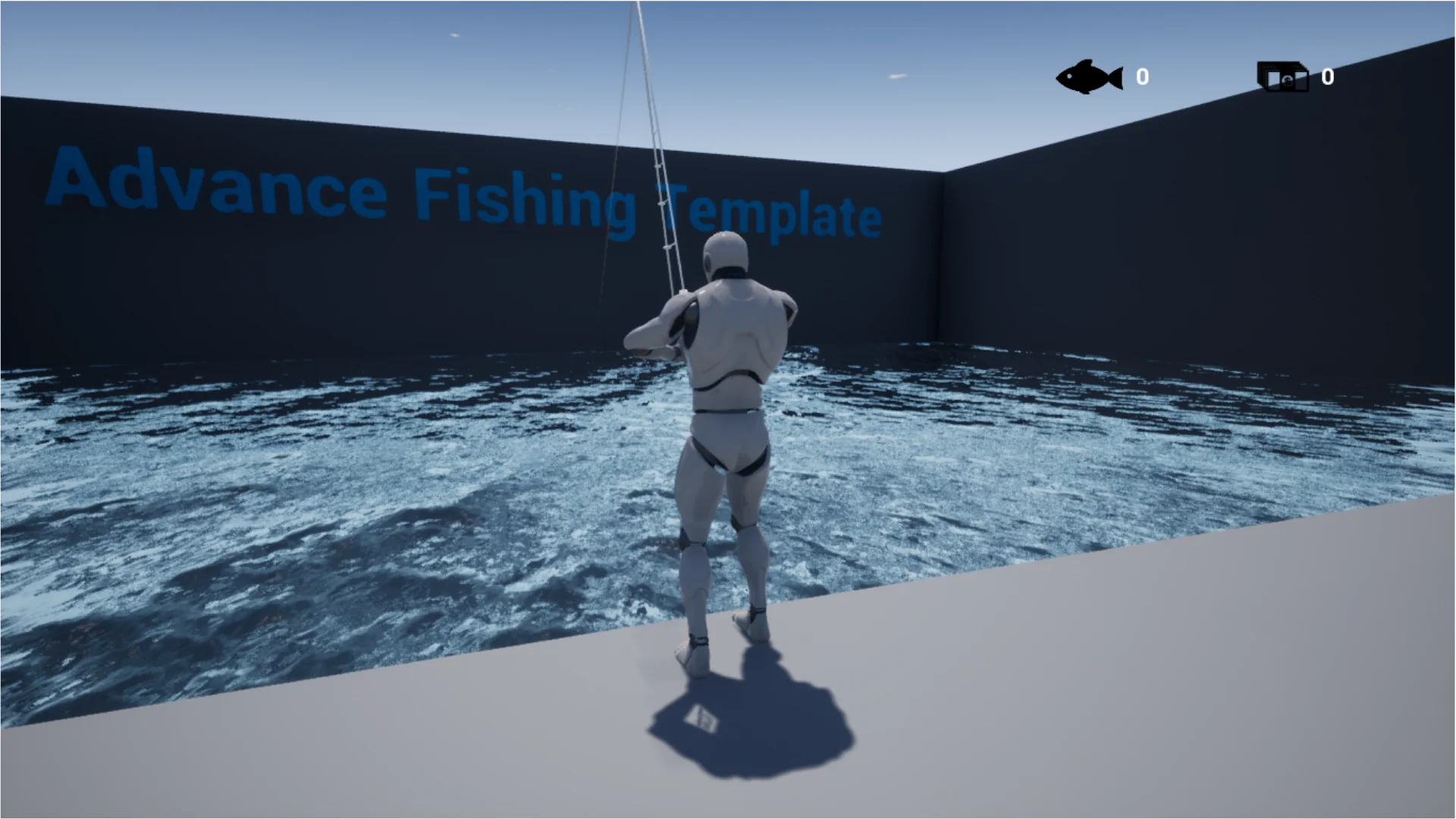
Because the project arrives as a full scene rather than a kit of parts, it reads as a working fishing experience out of the box. There is water, there are fish, and there is a rod with a casting motion and a reel that winds both directions. An artist can open it, walk through the loop, and immediately see where their own environment would replace the placeholder one. A designer can look at the same loop and see which values are exposed for tuning. Both readings come from the same Blueprint graph, which is the practical advantage of the template being Blueprint-only: nothing in the fishing system is locked away in code that has to be rebuilt to be changed.
One Fishing Blueprint Class, Many Fish
The centre of the project is a fish Blueprint class built to be extended rather than edited in place. Eight skeletal meshes and eight ready-made child classes come with it, so there is a full roster to place in the water on day one. Adding more is a matter of deriving another child class from the parent and giving it its own settings — the template explicitly allows as many fish types as a project needs, which makes the eight included meshes a starting set rather than a fixed catalogue.
What the detail panel exposes per fish
Each fish carries its identifying data on the detail panel, and the fields are straightforward enough to edit without touching the graph. A fish has a name and a weight. It has a rarity value, which lets one catch sit apart from another in how uncommon it is. It has a mesh, so the visual can be swapped for anything that fits the skeleton. It has an image, which gives a fish a visual identity away from the water. It has a cost. Once those six values are set, the fish is defined: what it is called, how heavy it is, how rare it is, what it looks like in hand and in a picture, and what it is worth.
That arrangement favours production work over one-off experimentation. A small lake and a deep-sea shelf can share the same parent class and still feel distinct, because rarity and weight do the differentiating rather than separate systems. If a project needs twenty fish, that is twenty child classes with twenty sets of values, all still behaving the way the parent class behaves. The mesh field matters here too: provided a mesh fits the fish skeleton arrangement the template works with, the visual identity can drift far from the eight supplied shapes.
Casting and Reeling Without Rebuilding the Skeleton
The rod work is covered by three animations: casting, reeling up and reeling down. Casting sends the line out; the two reeling states handle winding in and paying out. Because the animations are scaled to the Epic skeleton, they are ready to use with a project's own characters rather than being bound to a bespoke rig. A first-person fisher, a third-person character, or a seated figure on a boat can all inherit the same motion set, which removes the retargeting step that usually sits between buying an animation and seeing it on your own character.
For scene work this is the difference between a still and a moment. A cast is the pose a screenshot wants; the reeling states are what make a clip read as fishing rather than posing. Having both directions — up and down — also means the line can be worked back and forth, which is closer to how a real retrieve feels than a single loop.
The Ocean Shader and Ocean Blueprint Behind the Water
Water in a fishing scene is not background, and the template treats it accordingly with two pieces: an ocean shader and an ocean Blueprint, both fully customizable. The shader handles the look of the surface; the Blueprint handles it as an object in the world. Splitting the two means a project can keep the ocean's behaviour and change its appearance, or keep the appearance and move the ocean into a different level entirely.
This is the part that makes the template useful beyond fishing. A river bend, a harbour, a reef flat — all of them want a controllable body of water, and an ocean shader with a Blueprint attached is a far easier starting point than an empty plane. The same water can serve a fishing boat scene and a purely scenic one, with the fishing loop switched off and the ocean left in place.
From River to Reef: the Range the Project Covers
The fishing vocabulary here stretches across several kinds of water and several kinds of gear. River and reef sit alongside open sea; the rod appears next to net and bait, and a boat gives the whole thing a mobile platform. The catch side reaches from shark down to the seafood end of the theme. Working in low-poly or aiming for something more realistic, the template's job stays the same: define fish, define water, define the rod motion, and let the Blueprint classes carry the variation.
Where It Fits in a Project
Reach for this when a fishing mechanic needs to exist and the environment is the part worth spending time on. The Blueprint parent-and-child structure means a team can populate a lake or a coastline quickly, then spend its effort on water look, terrain and character work. Projects that want a fishing loop as a side activity rather than the main system will find the six exposed fish fields and the three rod animations cover the essentials without demanding a custom framework. Projects building a fishing game outright get a full UE4 project to grow from, with the fish roster, the skeleton-compatible animations and the ocean already in place.
 Gameplay Features
 Gameplay Features
 Gameplay Features