"8652e693bd7bbc55"{"id":"1002977","slug":"advanced-game-gui-with-multiplayer","title":"Advanced Game GUI with Multiplayer","category":"Gameplay Features","engine":"4.26+,5.0+","assetVersion":"","engineVersion":"Engine Version: 4.26+,5.0+","tag":"Gameplay Features","accent":"blue","visual":"mech","summary":"A multiplayer GUI package with lobby, session, pause, connection, and settings screens, plus Steam nickname handling, max FPS control, and a player points compo","platform":"Unreal Engine","indexPolicy":"index","publishedAt":"2026-11-25T09:09:33.318Z","updatedAt":"2026-11-25T09:09:33.318Z","sourceNotes":[],"fileContents":[],"compatibility":["Unreal Engine","Engine Version: 4.26+,5.0+"],"featuredImage":{"alt":"Advanced Game GUI with Multiplayer","src":"/wp-content/uploads/published/2026/11/d19856178101-5a9a0f49-ab06-4b0a-978e-32f892002dc8-61d338b33d.webp"},"hasDownloadLink":true,"downloads":0,"terms":[{"taxonomy":"category","slug":"gameplay-features","name":"Gameplay Features"}],"galleryImages":[{"src":"/wp-content/uploads/published/2026/11/a6cae4508dab-c3a776c0-cb2d-4ed8-b318-f781b5b1fb5f-54dbe104de.webp","alt":"Advanced Game GUI with Multiplayer"},{"src":"/wp-content/uploads/published/2026/11/c12f763d34d3-5906b499-d143-4e2b-bf29-f42819109beb-012d8d8f28.webp","alt":"Advanced Game GUI with Multiplayer"},{"src":"/wp-content/uploads/published/2026/11/12b7d104c6de-10a378b5-d7c2-407b-9fa2-51b7900c4942-5ff8bcbade.webp","alt":"Advanced Game GUI with Multiplayer"},{"src":"/wp-content/uploads/published/2026/11/227f165b63ef-bb59696f-d437-4595-a0c9-185472b34854-f16cea8b55.webp","alt":"Advanced Game GUI with Multiplayer"},{"src":"/wp-content/uploads/published/2026/11/d6834fe3e4e9-999ec915-70ec-4771-b230-afbd4cd20961-d7ca78c467.webp","alt":"Advanced Game GUI with Multiplayer"},{"src":"/wp-content/uploads/published/2026/11/dd2c54afe016-16524df1-3a58-457e-928d-71ce6bcd4408-121c478dd5.webp","alt":"Advanced Game GUI with Multiplayer"}],"accessPanel":{"kind":"resource","title":"Get this resource","safetyNote":"Resources are manually reviewed before listing to improve quality and reduce obvious risks.","fileName":"Advanced Game GUI with Multiplayer.7z","resourceType":"Resource archive","versions":[]},"contentHtml":"\u003ch2\u003eWhat the Advanced GUI Package Covers\u003c/h2\u003e\n\u003cp\u003eMultiplayer games tend to stall at the same point: the network code exists, but there is no clean way to move players from a connection screen into a lobby, start a session, pause, or change graphics settings. Advanced Game GUI with Multiplayer addresses that layer directly. It supplies a ready-to-use menu and interface set for games that need multiplayer and advanced game settings, rather than leaving every screen as a placeholder.\u003c/p\u003e\n\u003cp\u003eThe package's scope runs across connection, pause, lobby, session, settings, user, graphics, input, Steam, and Blueprint concerns. Those are the areas that usually become separate one-off screens in a project. Here they are grouped into a single GUI package that can sit in the menu flow. This gives less time spent wiring basic screens before a multiplayer build is playable.\u003c/p\u003e \u003ch2\u003eLobby, Session, and Connection Screens in the GUI\u003c/h2\u003e\n\u003cp\u003eA multiplayer flow is not one menu; it is a sequence. A player connects, joins or creates a session, waits in a lobby, and eventually reaches the game. The GUI covers those states as distinct interface pieces, with pause sitting outside the session flow so a player can stop without leaving the match.\u003c/p\u003e\n\u003cp\u003eHaving lobby, session, and connection screens in one package matters during production because these are the screens that get rebuilt most often. A lobby is the waiting step before the session starts; a connection screen is the join path; a pause menu interrupts play cleanly. The package treats them as part of the same interface layer, which keeps the menu structure coherent when the project moves from a test map to a real level.\u003c/p\u003e\n\u003cp\u003eThis is also where the “advanced” part of the name shows up. The menu is not limited to a single start button. It covers the screens around multiplayer setup and session management, so a build can expose those functions without a programmer building each panel from zero.\u003c/p\u003e \u003ch2\u003eSettings, Graphics, and Max FPS Controls\u003c/h2\u003e\n\u003cp\u003eThe settings side of the GUI includes graphics options and a max FPS control. The max FPS setting arrived in the 11 February 2019 update, which added the ability to set the frame-rate cap inside the settings interface. For a multiplayer project, that is a practical option to expose: players can choose a cap that suits their hardware, and the menu already has a place for it.\u003c/p\u003e\n\u003cp\u003eGraphics settings sit alongside the other user-facing options. The package's scope includes graphics and settings as menu categories, so the interface can present visual options in the same flow as connection and session controls. Input is part of that same interface layer, since menu navigation and gameplay input need to coexist without fighting each other.\u003c/p\u003e\n\u003cp\u003eThe settings screens are not a cosmetic extra. They are part of the high-level features the package is meant to provide: a build can expose a settings menu that covers graphics and frame rate instead of a bare options file or a developer-only console command.\u003c/p\u003e \u003ch2\u003eSteam Nickname and Player Points in the Multiplayer GUI\u003c/h2\u003e\n\u003cp\u003eSteam identity handling is built into the startup flow. The 18 February 2019 update made the subsystem nickname retrieve automatically at the start of the game, so a player using the Steam subsystem does not have to type a name into the interface before joining a session. That removes a manual step from the first screen and keeps the lobby display tied to the player's subsystem identity.\u003c/p\u003e\n\u003cp\u003eThe package includes a player points component, added in the 23 January 2019 update. The component is dedicated to player points and sits within the GUI package. That update also fixed bugs and removed casts from the setup. Cast removal is a Blueprint graph change: the interface logic no longer depends on those cast nodes, which removes those references from the package's own wiring.\u003c/p\u003e\n\u003cp\u003eThose updates are worth noting because they show where the package's maintenance has gone: identity retrieval, frame-rate control, graph cleanup, and a points component. They are small-sounding changes, but they touch the parts of a multiplayer menu that tend to break first when a project scales from a two-player test to a larger lobby.\u003c/p\u003e \u003ch2\u003eBlueprint and Input Wiring for the Advanced GUI\u003c/h2\u003e\n\u003cp\u003eThe interface is Blueprint-oriented, with input handling as part of its scope. The menu screens and their logic sit in Blueprint, and input is treated as part of the GUI rather than being hard-coded into each level. For a team already working in Blueprints, this keeps menu work in the same visual scripting environment as the rest of the game logic.\u003c/p\u003e\n\u003cp\u003eInput is the piece that often decides whether a menu feels finished. A pause screen has to take over input; a lobby has to accept navigation; a settings panel has to let a player change graphics or max FPS without leaking input back into gameplay. The package includes input in its interface scope, so those transitions are part of the same GUI structure instead of separate systems bolted on later.\u003c/p\u003e\n\u003cp\u003eThe Blueprint emphasis also affects how the package is extended. A project can open the provided graphs and menu screens, adjust the flow, and connect the GUI to its own session logic. The cast removal in the January update is a concrete change to the package's Blueprint setup, which is useful to know when the interface needs to be adapted rather than used as-is.\u003c/p\u003e \u003ch2\u003eWhere the Multiplayer GUI Fits in Production\u003c/h2\u003e\n\u003cp\u003eThe most direct fit is a multiplayer prototype or vertical slice that needs a working front end before the team can test session flow with real players. Instead of blocking playtests on menu construction, the GUI supplies the connection, lobby, session, pause, and settings screens as a starting layer. A small team can get players into a lobby, start a session, pause, and change graphics or max FPS while the rest of the game is still being built.\u003c/p\u003e\n\u003cp\u003eIt also fits projects that already have multiplayer logic but lack a coherent interface around it. The package's scope covers user, interface, menu, and advanced settings, so it can sit over an existing session system and provide the screens that expose it. The Steam nickname retrieval is especially relevant for builds that run through the Steam subsystem, because the player name is available at startup without an extra prompt.\u003c/p\u003e\n\u003cp\u003eThe player points component gives the GUI an additional hook for projects that track player points alongside the menu. It supplies a component for that data within the package, while the game rules stay outside the GUI's scope. That is the right level of scope for a GUI resource: it handles the interface and the adjacent plumbing without taking over the game's design.\u003c/p\u003e\n\u003cp\u003eBefore adopting it, check that the lobby, session, connection, and pause flow matches the states your game actually uses. The package covers those screens, but every multiplayer project names and orders its states differently. The practical value is in starting from a complete menu layer, then adapting the Blueprint graphs, input handling, and settings entries to the session structure already in place.\u003c/p\u003e\n\n\u003ch2\u003eExplore Similar Assets\u003c/h2\u003e\n\u003cul\u003e\n\u003cli\u003e\u003ca href=\"https://3dcghub.com/gui-with-multiplayer/\" rel=\"noopener noreferrer\"\u003eGUI with Multiplayer\u003c/a\u003e\u003c/li\u003e\n\u003cli\u003e\u003ca href=\"https://3dcghub.com/simple-screen-damage-indicator/\" rel=\"noopener noreferrer\"\u003eSimple Screen Damage Indicator\u003c/a\u003e\u003c/li\u003e\n\u003cli\u003e\u003ca href=\"https://3dcghub.com/advanced-framework-vr-mobile-desktop/\" rel=\"noopener noreferrer\"\u003eAdvanced Framework - VR, Mobile \u0026amp; Desktop\u003c/a\u003e\u003c/li\u003e\n\u003cli\u003e\u003ca href=\"https://3dcghub.com/experience-system/\" rel=\"noopener noreferrer\"\u003eExperience System\u003c/a\u003e\u003c/li\u003e\n\u003cli\u003e\u003ca href=\"https://3dcghub.com/super-powers/\" rel=\"noopener noreferrer\"\u003eSuper Powers\u003c/a\u003e\u003c/li\u003e\n\u003c/ul\u003e","contentTextLength":7141,"navigation":{"current":14,"total":4911,"previous":{"id":"1002978","slug":"advanced-menu-system","title":"Advanced Menu System","category":"Widgets \u0026 Controls","platform":"Unreal Engine","updatedAt":"2026-11-25T09:21:19.766Z"},"next":{"id":"1002976","slug":"advanced-fishing-template","title":"Advanced Fishing Template","category":"Gameplay Features","platform":"Unreal Engine","updatedAt":"2026-11-25T09:03:40.419Z"}},"relatedResources":[{"id":"1001686","slug":"gui-with-multiplayer","title":"GUI with Multiplayer","category":"Gameplay Features","engine":"5.0+","assetVersion":"","engineVersion":"Engine Version: 5.0+","tag":"Gameplay Features","accent":"blue","visual":"mech","summary":"Explore GUI with Multiplayer, a Blueprint menu, pause, and lobby interface designed without vehicle bloat and compatible with Complete RPG setups.","platform":"Unreal Engine","indexPolicy":"index","publishedAt":"2026-10-14T09:01:31.452Z","updatedAt":"2026-10-14T09:01:31.452Z","sourceNotes":[],"fileContents":[],"compatibility":["Unreal Engine","Engine Version: 5.0+"],"featuredImage":{"alt":"GUI with Multiplayer","src":"/wp-content/uploads/published/2026/10/adad783b7992-00a57126-ac3e-4e43-9e2f-f9b4e649e3b9-c27c2242f7.webp"},"fileSizeBytes":496784427,"hasDownloadLink":true,"downloads":0},{"id":"1000775","slug":"simple-screen-damage-indicator","title":"Simple Screen Damage Indicator","category":"Gameplay Features","engine":"5.4+","assetVersion":"","engineVersion":"Engine Version: 5.4+","tag":"Gameplay Features","accent":"blue","visual":"mech","summary":"A 100% Blueprint visual feedback system displaying a blood splatter overlay on hazard damage. Built for single-player prototyping with local multiplayer UI rend","platform":"Unreal Engine","indexPolicy":"index","publishedAt":"2026-07-28T18:07:04.744Z","updatedAt":"2026-07-28T18:07:04.744Z","sourceNotes":[],"fileContents":[],"compatibility":["Unreal Engine","Engine Version: 5.4+"],"featuredImage":{"alt":"Simple Screen Damage Indicator","src":"/wp-content/uploads/published/2026/07/5369eff53b58-641db878-ef1c-4892-ab16-112ae9023f3c-f070c8732a.webp"},"fileSizeBytes":287751606,"hasDownloadLink":true,"downloads":2},{"id":"28394","slug":"advanced-framework-vr-mobile-desktop","title":"Advanced Framework - VR, Mobile \u0026 Desktop","category":"Gameplay Features","engine":"5.0+","assetVersion":"Engine version: 5.0+","engineVersion":"","tag":"Gameplay Features","accent":"blue","visual":"luts","summary":"Advanced Framework is a production-ready foundation for VR, desktop, and mobile applications. It combines first-person control setups, interaction systems, multiplayer replication, navigation modes, and adaptable UI tools in one package.","platform":"Unreal Engine","indexPolicy":"index","publishedAt":"2026-05-12T09:33:53.000Z","updatedAt":"2026-05-12T09:33:54.000Z","sourceNotes":[],"fileContents":[],"compatibility":["Unreal Engine","Engine version: 5.0+"],"featuredImage":{"alt":"Advanced Framework - VR, Mobile \u0026 Desktop","src":"https://3dcghub.com/wp-content/uploads/2026/05/98ecd66b1773_1af6d69e-fbe1-435d-abdf-cc772ef3b31f.webp"},"fileSizeBytes":328010548,"hasDownloadLink":true,"downloads":3}]}[{"id":4225,"sourceId":4225,"taxonomyId":4225,"taxonomy":"category","slug":"asset-library","name":"Asset Library","parentId":null,"count":4765,"hasChildren":true,"href":"/","seoTitle":"Free Game Assets Library | 3DCGHUB","seoDescription":"Browse free Unreal Engine, Unity, Blender assets and game development tutorials on 3DCGHUB with previews, compatibility notes, and secure downloads.","sitemapEnabled":true,"children":[{"id":4227,"sourceId":4227,"taxonomyId":4227,"taxonomy":"category","slug":"blender-add-ons-plugins","name":"Blender Add-ons \u0026 Plugins","parentId":4225,"count":10,"hasChildren":false,"href":"/category/blender-add-ons-plugins/","seoTitle":"Free Blender Add-ons \u0026 Plugins | 3DCGHUB","seoDescription":"Browse free Blender Add-ons \u0026 Plugins tools for Blender on 3DCGHUB: curated downloads with preview images, compatibility notes and secure download access.","sitemapEnabled":true},{"id":514,"sourceId":514,"taxonomyId":514,"taxonomy":"category","slug":"unity-2","name":"Unity","parentId":4225,"count":453,"hasChildren":true,"href":"/category/unity-2/","seoTitle":"Free Unity Assets | 3DCGHUB","seoDescription":"Browse free Unity resources on 3DCGHUB: curated downloads with preview images, compatibility notes and secure download access.","sitemapEnabled":true,"children":[{"id":523,"sourceId":523,"taxonomyId":523,"taxonomy":"category","slug":"2d","name":"2D","parentId":514,"count":1,"hasChildren":true,"href":"/category/2d/","seoTitle":"Free Unity 2D | 3DCGHUB","seoDescription":"Browse free 2D assets for Unity on 3DCGHUB: curated downloads with preview images, compatibility notes and secure download access.","sitemapEnabled":true},{"id":515,"sourceId":515,"taxonomyId":515,"taxonomy":"category","slug":"3d-unity-2","name":"3D","parentId":514,"count":162,"hasChildren":true,"href":"/category/3d-unity-2/","seoTitle":"Free Unity 3D Assets | 3DCGHUB","seoDescription":"Browse free 3D assets for Unity on 3DCGHUB: curated downloads with preview images, compatibility notes and secure download access.","sitemapEnabled":true},{"id":565,"sourceId":565,"taxonomyId":565,"taxonomy":"category","slug":"add-ons","name":"Add-Ons","parentId":514,"count":2,"hasChildren":false,"href":"/category/add-ons/","seoTitle":"Free Unity Add-Ons | 3DCGHUB","seoDescription":"Browse free Add-Ons assets for Unity on 3DCGHUB: curated downloads with preview images, compatibility notes and secure download access.","sitemapEnabled":true},{"id":529,"sourceId":529,"taxonomyId":529,"taxonomy":"category","slug":"audio-unity-2","name":"Audio","parentId":514,"count":1,"hasChildren":true,"href":"/category/audio-unity-2/","seoTitle":"Free Unity Audio | 3DCGHUB","seoDescription":"Browse free Audio for Unity on 3DCGHUB: curated downloads with preview images, compatibility notes and secure download access.","sitemapEnabled":true},{"id":557,"sourceId":557,"taxonomyId":557,"taxonomy":"category","slug":"templates","name":"Templates","parentId":514,"count":36,"hasChildren":true,"href":"/category/templates/","seoTitle":"Free Unity Templates | 3DCGHUB","seoDescription":"Browse free Unity project templates on 3DCGHUB. Starter kits with previews, compatibility notes, and secure download access.","sitemapEnabled":true},{"id":533,"sourceId":533,"taxonomyId":533,"taxonomy":"category","slug":"tools-unity-2","name":"Tools","parentId":514,"count":0,"hasChildren":true,"href":"/category/tools-unity-2/","sitemapEnabled":true},{"id":554,"sourceId":554,"taxonomyId":554,"taxonomy":"category","slug":"vfx-unity-2","name":"VFX","parentId":514,"count":4,"hasChildren":true,"href":"/category/vfx-unity-2/","seoTitle":"Free Unity VFX | 3DCGHUB","seoDescription":"Browse free VFX for Unity on 3DCGHUB: curated downloads with preview images, compatibility notes and secure download access.","sitemapEnabled":true}]},{"id":511,"sourceId":511,"taxonomyId":511,"taxonomy":"category","slug":"unreal-engine-2","name":"Unreal Engine","parentId":4225,"count":4303,"hasChildren":true,"href":"/category/unreal-engine-2/","seoTitle":"Free Unreal Engine Assets | 3DCGHUB","seoDescription":"Browse free Unreal Engine resources on 3DCGHUB: curated downloads with preview images, compatibility notes and secure download access.","sitemapEnabled":true,"children":[{"id":54,"sourceId":54,"taxonomyId":54,"taxonomy":"category","slug":"3d","name":"3D","parentId":511,"count":2434,"hasChildren":true,"href":"/category/3d/","seoTitle":"Free Unreal Engine 3D | 3DCGHUB","seoDescription":"Browse free 3D assets for Unreal Engine on 3DCGHUB: curated downloads with preview images, compatibility notes and secure download access.","sitemapEnabled":true},{"id":441,"sourceId":441,"taxonomyId":441,"taxonomy":"category","slug":"animations","name":"Animations","parentId":511,"count":245,"hasChildren":true,"href":"/category/animations/","seoTitle":"Free Unreal Engine Animations | 3DCGHUB","seoDescription":"Browse free Animations for Unreal Engine on 3DCGHUB: curated downloads with preview images, compatibility notes and secure download access.","sitemapEnabled":true},{"id":446,"sourceId":446,"taxonomyId":446,"taxonomy":"category","slug":"audio","name":"Audio","parentId":511,"count":63,"hasChildren":true,"href":"/category/audio/","seoTitle":"Free Unreal Engine Audio Resources | 3DCGHUB","seoDescription":"Browse free Unreal Engine audio resources including sound effects, voices, dialogue, and ambient sounds. Curated free downloads on 3DCGHUB.","sitemapEnabled":true},{"id":466,"sourceId":466,"taxonomyId":466,"taxonomy":"category","slug":"game-systems","name":"Game Systems","parentId":511,"count":366,"hasChildren":true,"href":"/category/game-systems/","seoTitle":"Free Unreal Engine Game Systems | 3DCGHUB","seoDescription":"Browse free Game Systems tools for Unreal Engine on 3DCGHUB: curated downloads with preview images, compatibility notes and secure download access.","sitemapEnabled":true},{"id":478,"sourceId":478,"taxonomyId":478,"taxonomy":"category","slug":"game-templates","name":"Game Templates","parentId":511,"count":151,"hasChildren":true,"href":"/category/game-templates/","seoTitle":"Free Unreal Engine Game Templates | 3DCGHUB","seoDescription":"Browse free Game Templates for Unreal Engine on 3DCGHUB: curated downloads with preview images, compatibility notes and secure download access.","sitemapEnabled":true},{"id":432,"sourceId":432,"taxonomyId":432,"taxonomy":"category","slug":"hdri","name":"HDRI","parentId":511,"count":6,"hasChildren":true,"href":"/category/hdri/","seoTitle":"Free Unreal Engine HDRI | 3DCGHUB","seoDescription":"Browse free Unreal Engine HDRI skies and lighting maps on 3DCGHUB. Environment lighting with previews and secure downloads.","sitemapEnabled":true},{"id":228,"sourceId":228,"taxonomyId":228,"taxonomy":"category","slug":"material-and-textures","name":"Material \u0026 Textures","parentId":511,"count":172,"hasChildren":true,"href":"/category/material-and-textures/","seoTitle":"Free Unreal Engine Material \u0026 Textures | 3DCGHUB","seoDescription":"Browse free Material \u0026 Textures for Unreal Engine on 3DCGHUB: curated downloads with preview images, compatibility notes and secure download access.","sitemapEnabled":true},{"id":298,"sourceId":298,"taxonomyId":298,"taxonomy":"category","slug":"sprites-and-flipbooks","name":"Sprites \u0026 Flipbooks","parentId":511,"count":18,"hasChildren":true,"href":"/category/sprites-and-flipbooks/","seoTitle":"Free Unreal Engine Sprites \u0026 Flipbooks | 3DCGHUB","seoDescription":"Browse free Sprites \u0026 Flipbooks assets for Unreal Engine on 3DCGHUB: curated downloads with preview images, compatibility notes and secure download access.","sitemapEnabled":true},{"id":489,"sourceId":489,"taxonomyId":489,"taxonomy":"category","slug":"tools-and-plugins","name":"Tools \u0026 Plugins","parentId":511,"count":390,"hasChildren":true,"href":"/category/tools-and-plugins/","seoTitle":"Free Unreal Engine Tools \u0026 Plugins | 3DCGHUB","seoDescription":"Browse free Tools \u0026 Plugins for Unreal Engine on 3DCGHUB: curated downloads with preview images, compatibility notes and secure download access.","sitemapEnabled":true},{"id":459,"sourceId":459,"taxonomyId":459,"taxonomy":"category","slug":"ui","name":"UI","parentId":511,"count":45,"hasChildren":true,"href":"/category/ui/","seoTitle":"Free Unreal Engine UI | 3DCGHUB","seoDescription":"Browse free UI for Unreal Engine on 3DCGHUB: curated downloads with preview images, compatibility notes and secure download access.","sitemapEnabled":true},{"id":450,"sourceId":450,"taxonomyId":450,"taxonomy":"category","slug":"vfx","name":"VFX","parentId":511,"count":413,"hasChildren":true,"href":"/category/vfx/","seoTitle":"Free Unreal Engine VFX | 3DCGHUB","seoDescription":"Browse free VFX for Unreal Engine on 3DCGHUB: curated downloads with preview images, compatibility notes and secure download access.","sitemapEnabled":true}]}]},{"id":4222,"sourceId":4222,"taxonomyId":4222,"taxonomy":"category","slug":"tutorial-library","name":"Tutorial Library","parentId":null,"count":117,"hasChildren":false,"href":"/tutorials/","seoTitle":"Free Game Development Tutorial Library | 3DCGHUB","seoDescription":"Browse free game development tutorials for Unreal Engine, Unity, Blender, and more on 3DCGHUB with practical workflows and secure downloads.","sitemapEnabled":true}]
Resource screenshots
1 / 6
Asset drops
Daily Asset Drops
Follow 3DCGHUB on Telegram for daily Unreal, Unity & Blender drops and curated CC0 releases.
Resources are manually reviewed before listing to improve quality and reduce obvious risks.
Reviewed archive
Gameplay Features
Advanced Game GUI with Multiplayer
A multiplayer GUI package with lobby, session, pause, connection, and settings screens, plus Steam nickname handling, max FPS control, and a player points compo
Multiplayer games tend to stall at the same point: the network code exists, but there is no clean way to move players from a connection screen into a lobby, start a session, pause, or change graphics settings. Advanced Game GUI with Multiplayer addresses that layer directly. It supplies a ready-to-use menu and interface set for games that need multiplayer and advanced game settings, rather than leaving every screen as a placeholder.
The package's scope runs across connection, pause, lobby, session, settings, user, graphics, input, Steam, and Blueprint concerns. Those are the areas that usually become separate one-off screens in a project. Here they are grouped into a single GUI package that can sit in the menu flow. This gives less time spent wiring basic screens before a multiplayer build is playable.
Lobby, Session, and Connection Screens in the GUI
A multiplayer flow is not one menu; it is a sequence. A player connects, joins or creates a session, waits in a lobby, and eventually reaches the game. The GUI covers those states as distinct interface pieces, with pause sitting outside the session flow so a player can stop without leaving the match.
Having lobby, session, and connection screens in one package matters during production because these are the screens that get rebuilt most often. A lobby is the waiting step before the session starts; a connection screen is the join path; a pause menu interrupts play cleanly. The package treats them as part of the same interface layer, which keeps the menu structure coherent when the project moves from a test map to a real level.
This is also where the “advanced” part of the name shows up. The menu is not limited to a single start button. It covers the screens around multiplayer setup and session management, so a build can expose those functions without a programmer building each panel from zero.
Settings, Graphics, and Max FPS Controls
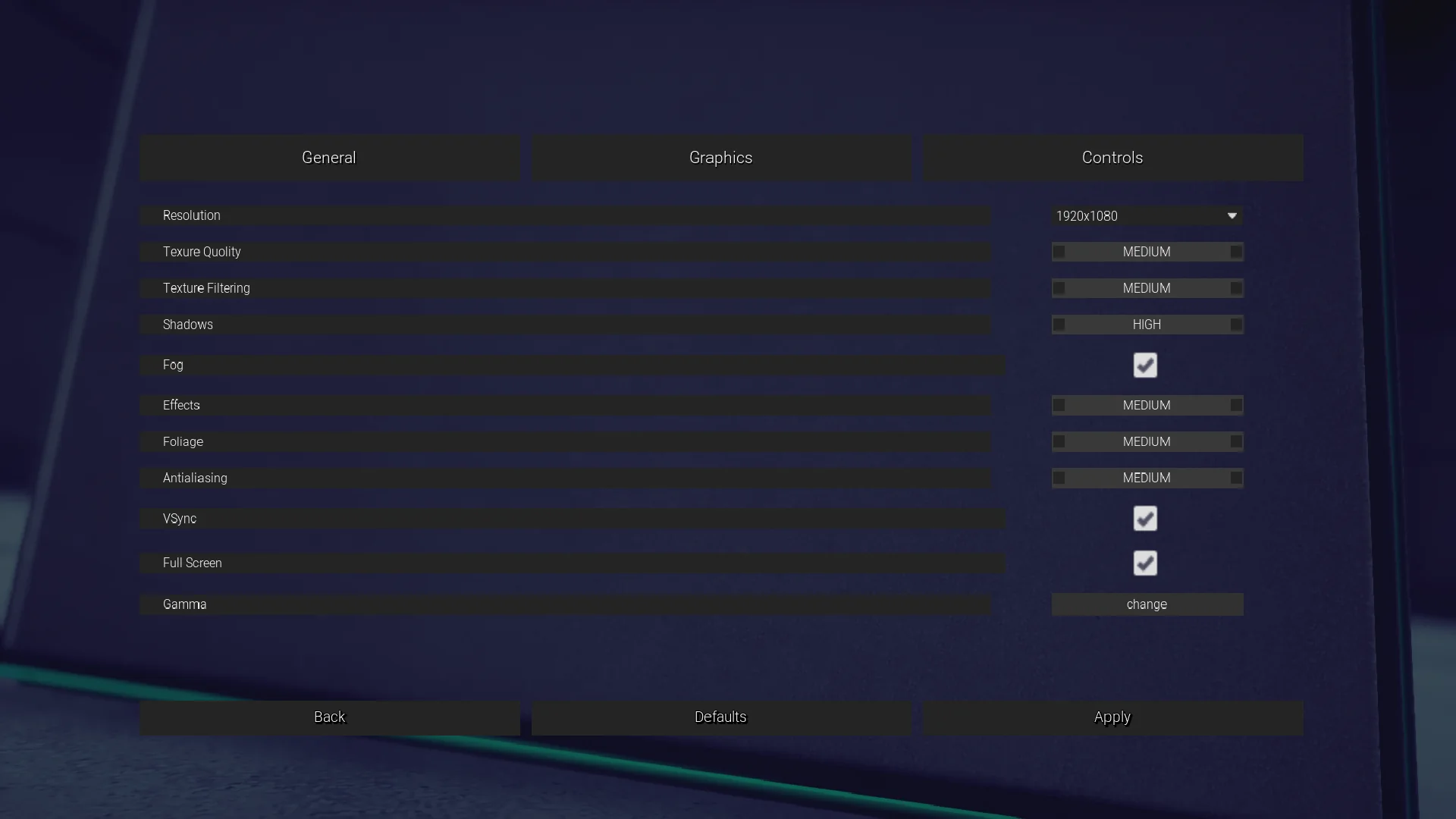
The settings side of the GUI includes graphics options and a max FPS control. The max FPS setting arrived in the 11 February 2019 update, which added the ability to set the frame-rate cap inside the settings interface. For a multiplayer project, that is a practical option to expose: players can choose a cap that suits their hardware, and the menu already has a place for it.
Graphics settings sit alongside the other user-facing options. The package's scope includes graphics and settings as menu categories, so the interface can present visual options in the same flow as connection and session controls. Input is part of that same interface layer, since menu navigation and gameplay input need to coexist without fighting each other.
The settings screens are not a cosmetic extra. They are part of the high-level features the package is meant to provide: a build can expose a settings menu that covers graphics and frame rate instead of a bare options file or a developer-only console command.
Steam Nickname and Player Points in the Multiplayer GUI
Steam identity handling is built into the startup flow. The 18 February 2019 update made the subsystem nickname retrieve automatically at the start of the game, so a player using the Steam subsystem does not have to type a name into the interface before joining a session. That removes a manual step from the first screen and keeps the lobby display tied to the player's subsystem identity.
The package includes a player points component, added in the 23 January 2019 update. The component is dedicated to player points and sits within the GUI package. That update also fixed bugs and removed casts from the setup. Cast removal is a Blueprint graph change: the interface logic no longer depends on those cast nodes, which removes those references from the package's own wiring.
Those updates are worth noting because they show where the package's maintenance has gone: identity retrieval, frame-rate control, graph cleanup, and a points component. They are small-sounding changes, but they touch the parts of a multiplayer menu that tend to break first when a project scales from a two-player test to a larger lobby.
Blueprint and Input Wiring for the Advanced GUI
The interface is Blueprint-oriented, with input handling as part of its scope. The menu screens and their logic sit in Blueprint, and input is treated as part of the GUI rather than being hard-coded into each level. For a team already working in Blueprints, this keeps menu work in the same visual scripting environment as the rest of the game logic.
Input is the piece that often decides whether a menu feels finished. A pause screen has to take over input; a lobby has to accept navigation; a settings panel has to let a player change graphics or max FPS without leaking input back into gameplay. The package includes input in its interface scope, so those transitions are part of the same GUI structure instead of separate systems bolted on later.
The Blueprint emphasis also affects how the package is extended. A project can open the provided graphs and menu screens, adjust the flow, and connect the GUI to its own session logic. The cast removal in the January update is a concrete change to the package's Blueprint setup, which is useful to know when the interface needs to be adapted rather than used as-is.
Where the Multiplayer GUI Fits in Production
The most direct fit is a multiplayer prototype or vertical slice that needs a working front end before the team can test session flow with real players. Instead of blocking playtests on menu construction, the GUI supplies the connection, lobby, session, pause, and settings screens as a starting layer. A small team can get players into a lobby, start a session, pause, and change graphics or max FPS while the rest of the game is still being built.
It also fits projects that already have multiplayer logic but lack a coherent interface around it. The package's scope covers user, interface, menu, and advanced settings, so it can sit over an existing session system and provide the screens that expose it. The Steam nickname retrieval is especially relevant for builds that run through the Steam subsystem, because the player name is available at startup without an extra prompt.
The player points component gives the GUI an additional hook for projects that track player points alongside the menu. It supplies a component for that data within the package, while the game rules stay outside the GUI's scope. That is the right level of scope for a GUI resource: it handles the interface and the adjacent plumbing without taking over the game's design.
Before adopting it, check that the lobby, session, connection, and pause flow matches the states your game actually uses. The package covers those screens, but every multiplayer project names and orders its states differently. The practical value is in starting from a complete menu layer, then adapting the Blueprint graphs, input handling, and settings entries to the session structure already in place.
 Gameplay Features
 Gameplay Features
 Gameplay Features