"8652e693bd7bbc55"{"id":"1002975","slug":"advanced-enemy-sensor","title":"Advanced Enemy Sensor","category":"Weapons \u0026 Combat","engine":"4.27,5.0+","assetVersion":"","engineVersion":"Engine Version: 4.27,5.0+","tag":"Weapons \u0026 Combat","accent":"blue","visual":"mech","summary":"Blueprint weapon script that detects subtle movement and heartbeats, with handheld sidearm and weapon-attachment builds for scope and optional laser mounting.","platform":"Unreal Engine","indexPolicy":"index","publishedAt":"2026-11-25T09:00:19.497Z","updatedAt":"2026-11-25T09:00:19.497Z","sourceNotes":[],"fileContents":[],"compatibility":["Unreal Engine","Engine Version: 4.27,5.0+"],"featuredImage":{"alt":"Advanced Enemy Sensor","src":"/wp-content/uploads/published/2026/11/86cd8a158755-7a5cc915-8e5a-4831-a0c3-23cc1668de84-29ad4c9baa.webp"},"hasDownloadLink":true,"downloads":0,"terms":[{"taxonomy":"category","slug":"weapons-and-combat","name":"Weapons \u0026 Combat"}],"galleryImages":[{"src":"/wp-content/uploads/published/2026/11/b9f2417a3827-e704f3e1-859e-4930-be36-334a5bff33c0-8a00986e63.webp","alt":"Advanced Enemy Sensor"},{"src":"/wp-content/uploads/published/2026/11/f108e4458653-be18ff81-3bfd-4876-8a36-35acbeb4cc85-2a6a08e0d4.webp","alt":"Advanced Enemy Sensor"},{"src":"/wp-content/uploads/published/2026/11/ce588a01ebc0-6db1a3a7-3f0b-4880-9c30-6eca1bd90242-547a0376cf.webp","alt":"Advanced Enemy Sensor"}],"accessPanel":{"kind":"resource","title":"Get this resource","safetyNote":"Resources are manually reviewed before listing to improve quality and reduce obvious risks.","fileName":"Advanced Enemy Sensor.7z","resourceType":"Resource archive","versions":[]},"contentHtml":"\u003ch2\u003eAdvanced Enemy Sensor Build Choices\u003c/h2\u003e\n\u003cp\u003eThe handheld build and the weapon attachment build do the same detection job but occupy different places in a loadout. The handheld version is designed to be used with a sidearm, so the sidearm remains the weapon the player carries while the sensor acts as a companion device. The attachment version moves the sensor onto the weapon itself and makes it the mounting point for a scope; a laser can be added as an optional extra. That split is the first decision to settle. A sidearm-led kit calls for the handheld form. A weapon setup that wants the sensor integrated into the sight line calls for the attachment form. The small size belongs to both. This is a helper, not a centerpiece, and it should occupy the visual space of an accessory while remaining legible enough that a player can tell what is in the loadout.\u003c/p\u003e \u003ch2\u003eHow the Sensor Reads Movement and a Beating Heart\u003c/h2\u003e\n\u003cp\u003eThe Advanced Enemy Sensor is not limited to large, obvious targets. It can spot subtle movement, and it can pick up the beating heart of prey. Those are two different tells. Movement detection covers small shifts that would be easy to dismiss at a glance. Heartbeat detection covers a target that may be still but is still alive and therefore still sending a signal. For encounter design, that changes how stealth can be staged. A character who holds position and tries not to move is not automatically outside the sensor's reach. A small gesture or a pulse gives the sensor something to find. The sensor suits moments where the player is trying to confirm a presence rather than simply watching a patrol. It also gives a designer a reason to build quiet, low-motion tension: the target may be hard to see, but the sensor has a second source of information beyond movement.\u003c/p\u003e \u003ch2\u003eMounting a Scope on the Attachment Build\u003c/h2\u003e\n\u003cp\u003eOn the weapon attachment version, the sensor is the part that carries the optic. The scope goes onto the sensor, and the laser is an optional addition. That order matters when assembling a weapon setup because the sensor sits between the weapon and the sight. That leaves a layered attachment stack: weapon, sensor, scope, and possibly laser. The scope choice is left open, so the sensor is not tied to one sight. A builder can choose the optic that fits the rest of the weapon. The optional laser keeps the setup flexible as well. A build can stay compact with just the sensor and a scope, or it can add the laser when the weapon's role calls for it. Keep the silhouette in mind during assembly. The sensor is small, but it becomes more visually prominent once a scope is mounted on top of it, and the laser adds another element to the same stack.\u003c/p\u003e \u003ch2\u003eBlueprint, Script, and the Realistic Weapon Tag\u003c/h2\u003e\n\u003cp\u003eThe asset is tagged Script, Blueprint, Realistic, and Weapon. Blueprint and Script point to game logic; the sensor is meant to function, not just sit in a scene as a prop. Realistic and Weapon set the tone. This is a weapon accessory intended to read as grounded equipment, and its detection role is part of that weapon context. For implementation, the important consequence is that the sensor belongs in the same discussion as loadout logic, weapon setup, and player-facing equipment. It is not a decorative model that needs a separate system invented around it. The Blueprint side is where the sensor's logic sits, while the visual side is the handheld or attachment form. Keeping those two concerns aligned is the main production task. If detection is tuned one way, the weapon presentation should support the same read: a small, serious piece of kit that gives the player information.\u003c/p\u003e \u003ch2\u003ePutting the Advanced Enemy Sensor into a Scene\u003c/h2\u003e\n\u003cp\u003eCreative use starts with the two forms. A handheld sensor paired with a sidearm supports a loadout where the player is already committed to a close weapon and wants an edge in finding prey. The attachment version supports a weapon-first build where the sensor and optic are part of the same aiming setup. The optional laser adds another layer for anyone designing a highly specific weapon silhouette. Beyond loadout choice, the detection profile is the creative lever. Subtle movement means small animation and small player motion can matter. A heartbeat means the sensor can be used in scenes where the target is trying to stay still. That combination is useful for horror, stealth, or hunting scenarios, but the asset does not need a genre label to work; it needs a scene where finding a quiet target is the point. The small size also makes it easy to treat as a secondary detail, which is often the right role for a helper device.\u003c/p\u003e \u003ch2\u003eProduction Notes for a Small Sensor\u003c/h2\u003e\n\u003cp\u003eProduction fit comes down to the two builds and the logic behind them. The handheld version is the simpler placement: a sidearm companion that stays visually separate from the main weapon. The attachment version asks for more assembly because the scope and optional laser sit on the sensor. Neither form is a large, scene-dominating asset; the sensor is small by design. That makes it a good fit for loadouts that need an information tool without turning the weapon into a bulky prop. The Blueprint and Script tags also mean the asset should be treated as part of the gameplay setup, not only the art pass. Check that the detection read and the weapon presentation agree, then choose the form that matches the loadout. The Advanced Enemy Sensor works best when it stays what it is: a compact helper that finds the subtle signs a player would otherwise miss.\u003c/p\u003e\n\n\u003ch2\u003eRelated Resources Worth Checking\u003c/h2\u003e\n\u003cul\u003e\n\u003cli\u003e\u003ca href=\"https://3dcghub.com/advanced-attachment-bundle/\" rel=\"noopener noreferrer\"\u003eAdvanced Attachment Bundle\u003c/a\u003e\u003c/li\u003e\n\u003cli\u003e\u003ca href=\"https://3dcghub.com/shooter-simplified-ai/\" rel=\"noopener noreferrer\"\u003eShooter Simplified AI\u003c/a\u003e\u003c/li\u003e\n\u003cli\u003e\u003ca href=\"https://3dcghub.com/tactical-grenades/\" rel=\"noopener noreferrer\"\u003eTactical Grenades\u003c/a\u003e\u003c/li\u003e\n\u003cli\u003e\u003ca href=\"https://3dcghub.com/rpg-7-grenade-launcher/\" rel=\"noopener noreferrer\"\u003eRPG-7 GRENADE LAUNCHER\u003c/a\u003e\u003c/li\u003e\n\u003cli\u003e\u003ca href=\"https://3dcghub.com/ai-turret-component/\" rel=\"noopener noreferrer\"\u003eAI Turret Component\u003c/a\u003e\u003c/li\u003e\n\u003c/ul\u003e","contentTextLength":5623,"navigation":{"current":16,"total":4911,"previous":{"id":"1002976","slug":"advanced-fishing-template","title":"Advanced Fishing Template","category":"Gameplay Features","platform":"Unreal Engine","updatedAt":"2026-11-25T09:03:40.419Z"},"next":{"id":"1002974","slug":"advance-male-customization","title":"Advance Male Customization","category":"Characters \u0026 Creatures","platform":"Unreal Engine","updatedAt":"2026-11-25T08:48:59.784Z"}},"relatedResources":[{"id":"1002288","slug":"advanced-attachment-bundle","title":"Advanced Attachment Bundle","category":"Weapons \u0026 Combat","engine":"4.24+,5.0+","assetVersion":"","engineVersion":"Engine Version: 4.24+,5.0+","tag":"Weapons \u0026 Combat","accent":"blue","visual":"mech","summary":"Advanced Attachment Bundle adds a Thermal Scope, Laser, and Enemy Sensor to realistic weapon projects; Script and Blueprint tags apply to the set.","platform":"Unreal Engine","indexPolicy":"index","publishedAt":"2026-11-04T05:18:09.932Z","updatedAt":"2026-11-04T05:18:09.932Z","sourceNotes":[],"fileContents":[],"compatibility":["Unreal Engine","Engine Version: 4.24+,5.0+"],"featuredImage":{"alt":"Advanced Attachment Bundle","src":"/wp-content/uploads/published/2026/11/5e30949b9335-79e53120-c335-4c52-8082-602c49da2a1b-674e543392.webp"},"fileSizeBytes":554834381,"hasDownloadLink":true,"downloads":0},{"id":"1002199","slug":"shooter-simplified-ai","title":"Shooter Simplified AI","category":"Weapons \u0026 Combat","engine":"5.3+","assetVersion":"","engineVersion":"Engine Version: 5.3+","tag":"Weapons \u0026 Combat","accent":"blue","visual":"mech","summary":"Shooter Simplified AI provides drag-and-drop Blueprint enemies, AI Perception for sight, hearing, and damage, and four modular behavior trees.","platform":"Unreal Engine","indexPolicy":"index","publishedAt":"2026-10-29T14:42:40.371Z","updatedAt":"2026-10-29T14:42:40.371Z","sourceNotes":[],"fileContents":[],"compatibility":["Unreal Engine","Engine Version: 5.3+"],"featuredImage":{"alt":"Shooter Simplified AI","src":"/wp-content/uploads/published/2026/10/8b3dba363e7e-457252f0-dc3c-425d-96fb-eda9700ce111-c775dcab1b.webp"},"fileSizeBytes":26944868,"hasDownloadLink":true,"downloads":0},{"id":"1001709","slug":"tactical-grenades","title":"Tactical Grenades","category":"Weapons \u0026 Combat","engine":"4.26+,5.0+","assetVersion":"","engineVersion":"Engine Version: 4.26+,5.0+","tag":"Weapons \u0026 Combat","accent":"blue","visual":"mech","summary":"AAA tactical grenades featuring 4K PBR textures, custom animations, visual effects, and audio for PC, console, and VR combat projects.","platform":"Unreal Engine","indexPolicy":"index","publishedAt":"2026-10-14T17:14:02.022Z","updatedAt":"2026-10-14T17:14:02.022Z","sourceNotes":[],"fileContents":[],"compatibility":["Unreal Engine","Engine Version: 4.26+,5.0+"],"featuredImage":{"alt":"Tactical Grenades","src":"/wp-content/uploads/published/2026/10/3b1d353a273c-01b18f81-7f25-4166-92a9-31ee2818a19d-3e669dc0f6.webp"},"fileSizeBytes":145344561,"hasDownloadLink":true,"downloads":5}]}[{"id":4225,"sourceId":4225,"taxonomyId":4225,"taxonomy":"category","slug":"asset-library","name":"Asset Library","parentId":null,"count":4765,"hasChildren":true,"href":"/","seoTitle":"Free Game Assets Library | 3DCGHUB","seoDescription":"Browse free Unreal Engine, Unity, Blender assets and game development tutorials on 3DCGHUB with previews, compatibility notes, and secure downloads.","sitemapEnabled":true,"children":[{"id":4227,"sourceId":4227,"taxonomyId":4227,"taxonomy":"category","slug":"blender-add-ons-plugins","name":"Blender Add-ons \u0026 Plugins","parentId":4225,"count":10,"hasChildren":false,"href":"/category/blender-add-ons-plugins/","seoTitle":"Free Blender Add-ons \u0026 Plugins | 3DCGHUB","seoDescription":"Browse free Blender Add-ons \u0026 Plugins tools for Blender on 3DCGHUB: curated downloads with preview images, compatibility notes and secure download access.","sitemapEnabled":true},{"id":514,"sourceId":514,"taxonomyId":514,"taxonomy":"category","slug":"unity-2","name":"Unity","parentId":4225,"count":453,"hasChildren":true,"href":"/category/unity-2/","seoTitle":"Free Unity Assets | 3DCGHUB","seoDescription":"Browse free Unity resources on 3DCGHUB: curated downloads with preview images, compatibility notes and secure download access.","sitemapEnabled":true,"children":[{"id":523,"sourceId":523,"taxonomyId":523,"taxonomy":"category","slug":"2d","name":"2D","parentId":514,"count":1,"hasChildren":true,"href":"/category/2d/","seoTitle":"Free Unity 2D | 3DCGHUB","seoDescription":"Browse free 2D assets for Unity on 3DCGHUB: curated downloads with preview images, compatibility notes and secure download access.","sitemapEnabled":true},{"id":515,"sourceId":515,"taxonomyId":515,"taxonomy":"category","slug":"3d-unity-2","name":"3D","parentId":514,"count":162,"hasChildren":true,"href":"/category/3d-unity-2/","seoTitle":"Free Unity 3D Assets | 3DCGHUB","seoDescription":"Browse free 3D assets for Unity on 3DCGHUB: curated downloads with preview images, compatibility notes and secure download access.","sitemapEnabled":true},{"id":565,"sourceId":565,"taxonomyId":565,"taxonomy":"category","slug":"add-ons","name":"Add-Ons","parentId":514,"count":2,"hasChildren":false,"href":"/category/add-ons/","seoTitle":"Free Unity Add-Ons | 3DCGHUB","seoDescription":"Browse free Add-Ons assets for Unity on 3DCGHUB: curated downloads with preview images, compatibility notes and secure download access.","sitemapEnabled":true},{"id":529,"sourceId":529,"taxonomyId":529,"taxonomy":"category","slug":"audio-unity-2","name":"Audio","parentId":514,"count":1,"hasChildren":true,"href":"/category/audio-unity-2/","seoTitle":"Free Unity Audio | 3DCGHUB","seoDescription":"Browse free Audio for Unity on 3DCGHUB: curated downloads with preview images, compatibility notes and secure download access.","sitemapEnabled":true},{"id":557,"sourceId":557,"taxonomyId":557,"taxonomy":"category","slug":"templates","name":"Templates","parentId":514,"count":36,"hasChildren":true,"href":"/category/templates/","seoTitle":"Free Unity Templates | 3DCGHUB","seoDescription":"Browse free Unity project templates on 3DCGHUB. Starter kits with previews, compatibility notes, and secure download access.","sitemapEnabled":true},{"id":533,"sourceId":533,"taxonomyId":533,"taxonomy":"category","slug":"tools-unity-2","name":"Tools","parentId":514,"count":0,"hasChildren":true,"href":"/category/tools-unity-2/","sitemapEnabled":true},{"id":554,"sourceId":554,"taxonomyId":554,"taxonomy":"category","slug":"vfx-unity-2","name":"VFX","parentId":514,"count":4,"hasChildren":true,"href":"/category/vfx-unity-2/","seoTitle":"Free Unity VFX | 3DCGHUB","seoDescription":"Browse free VFX for Unity on 3DCGHUB: curated downloads with preview images, compatibility notes and secure download access.","sitemapEnabled":true}]},{"id":511,"sourceId":511,"taxonomyId":511,"taxonomy":"category","slug":"unreal-engine-2","name":"Unreal Engine","parentId":4225,"count":4303,"hasChildren":true,"href":"/category/unreal-engine-2/","seoTitle":"Free Unreal Engine Assets | 3DCGHUB","seoDescription":"Browse free Unreal Engine resources on 3DCGHUB: curated downloads with preview images, compatibility notes and secure download access.","sitemapEnabled":true,"children":[{"id":54,"sourceId":54,"taxonomyId":54,"taxonomy":"category","slug":"3d","name":"3D","parentId":511,"count":2434,"hasChildren":true,"href":"/category/3d/","seoTitle":"Free Unreal Engine 3D | 3DCGHUB","seoDescription":"Browse free 3D assets for Unreal Engine on 3DCGHUB: curated downloads with preview images, compatibility notes and secure download access.","sitemapEnabled":true},{"id":441,"sourceId":441,"taxonomyId":441,"taxonomy":"category","slug":"animations","name":"Animations","parentId":511,"count":245,"hasChildren":true,"href":"/category/animations/","seoTitle":"Free Unreal Engine Animations | 3DCGHUB","seoDescription":"Browse free Animations for Unreal Engine on 3DCGHUB: curated downloads with preview images, compatibility notes and secure download access.","sitemapEnabled":true},{"id":446,"sourceId":446,"taxonomyId":446,"taxonomy":"category","slug":"audio","name":"Audio","parentId":511,"count":63,"hasChildren":true,"href":"/category/audio/","seoTitle":"Free Unreal Engine Audio Resources | 3DCGHUB","seoDescription":"Browse free Unreal Engine audio resources including sound effects, voices, dialogue, and ambient sounds. Curated free downloads on 3DCGHUB.","sitemapEnabled":true},{"id":466,"sourceId":466,"taxonomyId":466,"taxonomy":"category","slug":"game-systems","name":"Game Systems","parentId":511,"count":366,"hasChildren":true,"href":"/category/game-systems/","seoTitle":"Free Unreal Engine Game Systems | 3DCGHUB","seoDescription":"Browse free Game Systems tools for Unreal Engine on 3DCGHUB: curated downloads with preview images, compatibility notes and secure download access.","sitemapEnabled":true},{"id":478,"sourceId":478,"taxonomyId":478,"taxonomy":"category","slug":"game-templates","name":"Game Templates","parentId":511,"count":151,"hasChildren":true,"href":"/category/game-templates/","seoTitle":"Free Unreal Engine Game Templates | 3DCGHUB","seoDescription":"Browse free Game Templates for Unreal Engine on 3DCGHUB: curated downloads with preview images, compatibility notes and secure download access.","sitemapEnabled":true},{"id":432,"sourceId":432,"taxonomyId":432,"taxonomy":"category","slug":"hdri","name":"HDRI","parentId":511,"count":6,"hasChildren":true,"href":"/category/hdri/","seoTitle":"Free Unreal Engine HDRI | 3DCGHUB","seoDescription":"Browse free Unreal Engine HDRI skies and lighting maps on 3DCGHUB. Environment lighting with previews and secure downloads.","sitemapEnabled":true},{"id":228,"sourceId":228,"taxonomyId":228,"taxonomy":"category","slug":"material-and-textures","name":"Material \u0026 Textures","parentId":511,"count":172,"hasChildren":true,"href":"/category/material-and-textures/","seoTitle":"Free Unreal Engine Material \u0026 Textures | 3DCGHUB","seoDescription":"Browse free Material \u0026 Textures for Unreal Engine on 3DCGHUB: curated downloads with preview images, compatibility notes and secure download access.","sitemapEnabled":true},{"id":298,"sourceId":298,"taxonomyId":298,"taxonomy":"category","slug":"sprites-and-flipbooks","name":"Sprites \u0026 Flipbooks","parentId":511,"count":18,"hasChildren":true,"href":"/category/sprites-and-flipbooks/","seoTitle":"Free Unreal Engine Sprites \u0026 Flipbooks | 3DCGHUB","seoDescription":"Browse free Sprites \u0026 Flipbooks assets for Unreal Engine on 3DCGHUB: curated downloads with preview images, compatibility notes and secure download access.","sitemapEnabled":true},{"id":489,"sourceId":489,"taxonomyId":489,"taxonomy":"category","slug":"tools-and-plugins","name":"Tools \u0026 Plugins","parentId":511,"count":390,"hasChildren":true,"href":"/category/tools-and-plugins/","seoTitle":"Free Unreal Engine Tools \u0026 Plugins | 3DCGHUB","seoDescription":"Browse free Tools \u0026 Plugins for Unreal Engine on 3DCGHUB: curated downloads with preview images, compatibility notes and secure download access.","sitemapEnabled":true},{"id":459,"sourceId":459,"taxonomyId":459,"taxonomy":"category","slug":"ui","name":"UI","parentId":511,"count":45,"hasChildren":true,"href":"/category/ui/","seoTitle":"Free Unreal Engine UI | 3DCGHUB","seoDescription":"Browse free UI for Unreal Engine on 3DCGHUB: curated downloads with preview images, compatibility notes and secure download access.","sitemapEnabled":true},{"id":450,"sourceId":450,"taxonomyId":450,"taxonomy":"category","slug":"vfx","name":"VFX","parentId":511,"count":413,"hasChildren":true,"href":"/category/vfx/","seoTitle":"Free Unreal Engine VFX | 3DCGHUB","seoDescription":"Browse free VFX for Unreal Engine on 3DCGHUB: curated downloads with preview images, compatibility notes and secure download access.","sitemapEnabled":true}]}]},{"id":4222,"sourceId":4222,"taxonomyId":4222,"taxonomy":"category","slug":"tutorial-library","name":"Tutorial Library","parentId":null,"count":117,"hasChildren":false,"href":"/tutorials/","seoTitle":"Free Game Development Tutorial Library | 3DCGHUB","seoDescription":"Browse free game development tutorials for Unreal Engine, Unity, Blender, and more on 3DCGHUB with practical workflows and secure downloads.","sitemapEnabled":true}]
Resource screenshots
1 / 3
Asset drops
Daily Asset Drops
Follow 3DCGHUB on Telegram for daily Unreal, Unity & Blender drops and curated CC0 releases.
Resources are manually reviewed before listing to improve quality and reduce obvious risks.
Reviewed archive
Weapons & Combat
Advanced Enemy Sensor
Blueprint weapon script that detects subtle movement and heartbeats, with handheld sidearm and weapon-attachment builds for scope and optional laser mounting.
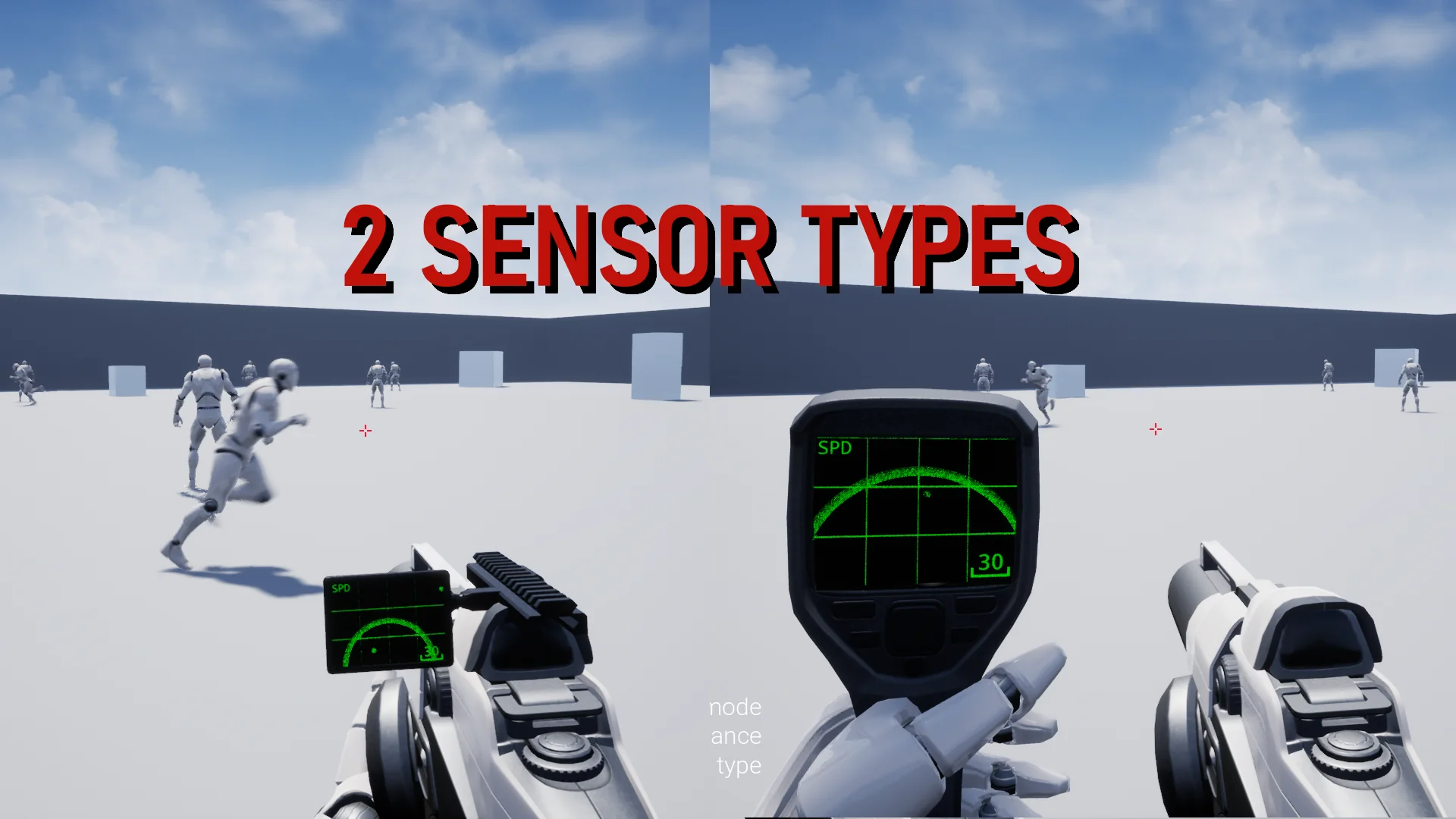
The handheld build and the weapon attachment build do the same detection job but occupy different places in a loadout. The handheld version is designed to be used with a sidearm, so the sidearm remains the weapon the player carries while the sensor acts as a companion device. The attachment version moves the sensor onto the weapon itself and makes it the mounting point for a scope; a laser can be added as an optional extra. That split is the first decision to settle. A sidearm-led kit calls for the handheld form. A weapon setup that wants the sensor integrated into the sight line calls for the attachment form. The small size belongs to both. This is a helper, not a centerpiece, and it should occupy the visual space of an accessory while remaining legible enough that a player can tell what is in the loadout.
How the Sensor Reads Movement and a Beating Heart
The Advanced Enemy Sensor is not limited to large, obvious targets. It can spot subtle movement, and it can pick up the beating heart of prey. Those are two different tells. Movement detection covers small shifts that would be easy to dismiss at a glance. Heartbeat detection covers a target that may be still but is still alive and therefore still sending a signal. For encounter design, that changes how stealth can be staged. A character who holds position and tries not to move is not automatically outside the sensor's reach. A small gesture or a pulse gives the sensor something to find. The sensor suits moments where the player is trying to confirm a presence rather than simply watching a patrol. It also gives a designer a reason to build quiet, low-motion tension: the target may be hard to see, but the sensor has a second source of information beyond movement.
Mounting a Scope on the Attachment Build
On the weapon attachment version, the sensor is the part that carries the optic. The scope goes onto the sensor, and the laser is an optional addition. That order matters when assembling a weapon setup because the sensor sits between the weapon and the sight. That leaves a layered attachment stack: weapon, sensor, scope, and possibly laser. The scope choice is left open, so the sensor is not tied to one sight. A builder can choose the optic that fits the rest of the weapon. The optional laser keeps the setup flexible as well. A build can stay compact with just the sensor and a scope, or it can add the laser when the weapon's role calls for it. Keep the silhouette in mind during assembly. The sensor is small, but it becomes more visually prominent once a scope is mounted on top of it, and the laser adds another element to the same stack.
Blueprint, Script, and the Realistic Weapon Tag
The asset is tagged Script, Blueprint, Realistic, and Weapon. Blueprint and Script point to game logic; the sensor is meant to function, not just sit in a scene as a prop. Realistic and Weapon set the tone. This is a weapon accessory intended to read as grounded equipment, and its detection role is part of that weapon context. For implementation, the important consequence is that the sensor belongs in the same discussion as loadout logic, weapon setup, and player-facing equipment. It is not a decorative model that needs a separate system invented around it. The Blueprint side is where the sensor's logic sits, while the visual side is the handheld or attachment form. Keeping those two concerns aligned is the main production task. If detection is tuned one way, the weapon presentation should support the same read: a small, serious piece of kit that gives the player information.
Putting the Advanced Enemy Sensor into a Scene
Creative use starts with the two forms. A handheld sensor paired with a sidearm supports a loadout where the player is already committed to a close weapon and wants an edge in finding prey. The attachment version supports a weapon-first build where the sensor and optic are part of the same aiming setup. The optional laser adds another layer for anyone designing a highly specific weapon silhouette. Beyond loadout choice, the detection profile is the creative lever. Subtle movement means small animation and small player motion can matter. A heartbeat means the sensor can be used in scenes where the target is trying to stay still. That combination is useful for horror, stealth, or hunting scenarios, but the asset does not need a genre label to work; it needs a scene where finding a quiet target is the point. The small size also makes it easy to treat as a secondary detail, which is often the right role for a helper device.
Production Notes for a Small Sensor
Production fit comes down to the two builds and the logic behind them. The handheld version is the simpler placement: a sidearm companion that stays visually separate from the main weapon. The attachment version asks for more assembly because the scope and optional laser sit on the sensor. Neither form is a large, scene-dominating asset; the sensor is small by design. That makes it a good fit for loadouts that need an information tool without turning the weapon into a bulky prop. The Blueprint and Script tags also mean the asset should be treated as part of the gameplay setup, not only the art pass. Check that the detection read and the weapon presentation agree, then choose the form that matches the loadout. The Advanced Enemy Sensor works best when it stays what it is: a compact helper that finds the subtle signs a player would otherwise miss.
 Weapons & Combat
 Weapons & Combat
 Weapons & Combat