"8652e693bd7bbc55"{"id":"1002979","slug":"advanced-multiplayer-chat-system-v2-0","title":"Advanced Multiplayer Chat System v2.0","category":"Network \u0026 Multiplayer","engine":"4.26+,5.0+","assetVersion":"Asset Version: 2.0","engineVersion":"Engine Version: 4.26+,5.0+","tag":"Network","accent":"blue","visual":"mech","summary":"A blueprint-only, replicated chat widget for dedicated-server multiplayer games, with 11 color-coded channels, dynamic tabs, per-tab settings, commands and a so","platform":"Unreal Engine","indexPolicy":"index","publishedAt":"2026-11-25T09:36:15.296Z","updatedAt":"2026-11-25T09:36:15.296Z","sourceNotes":[],"fileContents":[],"compatibility":["Unreal Engine","Asset Version: 2.0","Engine Version: 4.26+,5.0+"],"featuredImage":{"alt":"Advanced Multiplayer Chat System v2.0","src":"/wp-content/uploads/published/2026/11/5c6c298e4e92-69522a7f-8c3a-4456-bb22-86cd6ea91e86-8e2bb2375d.webp"},"hasDownloadLink":true,"downloads":0,"terms":[{"taxonomy":"category","slug":"network-and-multiplayer","name":"Network \u0026 Multiplayer"}],"galleryImages":[{"src":"/wp-content/uploads/published/2026/11/3279c07248ce-e9b7e6ca-9058-426a-bdad-180d7c759ae7-b7a365d46c.webp","alt":"Advanced Multiplayer Chat System v2.0"},{"src":"/wp-content/uploads/published/2026/11/7668d64055ef-11237768-9669-4f94-a722-5e12842a6e19-12e1d9e584.webp","alt":"Advanced Multiplayer Chat System v2.0"},{"src":"/wp-content/uploads/published/2026/11/a644d75d8bd9-ba8f191f-cb16-4e17-8a77-142dfacc0317-7dbaf76c91.webp","alt":"Advanced Multiplayer Chat System v2.0"},{"src":"/wp-content/uploads/published/2026/11/1535c971137f-026a0bf0-9b12-470a-8d9e-edfabaf20def-195f6cf463.webp","alt":"Advanced Multiplayer Chat System v2.0"}],"accessPanel":{"kind":"resource","title":"Get this resource","safetyNote":"Resources are manually reviewed before listing to improve quality and reduce obvious risks.","fileName":"Advanced Multiplayer Chat System v2.0.7z","resourceType":"Resource archive","versions":[]},"contentHtml":"\u003ch2\u003eWhere the Blueprint Work Starts\u003c/h2\u003e\n\u003cp\u003eEverything in Advanced Multiplayer Chat System v2.0 is assembled in Blueprints. No C++ knowledge is needed to bring the interface in, adjust how it behaves, or extend it, which keeps the entire chat feature inside the part of a project that designers and technical artists already work in. On a team where UI is built in the Blueprint graph, the chat window does not have to wait on an engineer to expose a native layer before layout and styling can begin.\u003c/p\u003e\n\u003cp\u003eThe network model is the first thing to settle. The system is fully functional in dedicated server multiplayer games and is explicitly not aimed at listen servers. Projects structured around a separate server process — the online and MMO-scale territory the tags point toward — are the ones it suits. A prototype that hosts and plays from the same session sits outside the supported case, so confirm the architecture before the widget goes in.\u003c/p\u003e\n\u003cp\u003eOnce that is decided, the rest of the work is configuration rather than code. Channels, tabs, per-tab settings, global settings and commands are all exposed for adjustment, which is what keeps a chat interface from becoming a fixed piece of furniture that every new game mode has to fight.\u003c/p\u003e \u003ch2\u003eChannel Structure and Color Coding\u003c/h2\u003e\n\u003cp\u003eConversation is divided into channels instead of poured into one undifferentiated stream. Each channel carries its own functionality and its own color, so messages are separated both by behavior and by how they read on screen when several lines are visible at once.\u003c/p\u003e\n\u003cp\u003eEleven channels are present in the current build, and that number is not locked. More can be added as a project needs another line of communication — a new team channel, a new system feed, a new grouping of players. The color assignment travels with the channel, so a reader scanning a busy chat log can tell at a glance which stream a message arrived on without reading the label every time.\u003c/p\u003e\n\u003cp\u003eFor an MMO or a large online session, this is the difference between a usable log and a wall of text. Players who care about one stream and ignore the rest can tune what they see through the tab system rather than asking for a global filter to be added later.\u003c/p\u003e \u003ch2\u003eTabs, Per-Tab Settings, and Global Chat Options\u003c/h2\u003e\n\u003cp\u003eTabs are dynamic. They can be added, removed and edited freely, so the layout of a player's chat window is not fixed at whatever the designer decided on day one. A player who wants a narrow window watching a single channel and a second window aggregating everything else can build that arrangement without touching a settings file.\u003c/p\u003e\n\u003cp\u003eThe detail that makes the tab system hold up is that settings are per tab. Every tab can be customized to player preference with its own separate configuration, and that configuration includes the ability to enable or disable specific channels for that particular tab. One tab can hide the noisier streams while another shows them in full; the choice is scoped to the tab rather than forced on the whole interface.\u003c/p\u003e\n\u003cp\u003eUnderneath sits a global settings layer with several global chat options that apply across the interface instead of to a single tab. The split is practical: global settings handle the things that should stay consistent everywhere, and per-tab settings handle what a player wants to vary. Keeping those two levels distinct is what stops a tab change from silently rewriting preferences the player set elsewhere.\u003c/p\u003e \u003ch2\u003eCommands and the Social Side of the Chat System\u003c/h2\u003e\n\u003cp\u003eCommands are handled through a system built to be easy to implement, and several commands already exist in the box. Adding a new one is a matter of extending that system rather than bolting a separate parser onto the chat window, which matters for teams that expect their chat to accumulate project-specific shortcuts over time.\u003c/p\u003e\n\u003cp\u003eGroup-related content is covered by a social system that spans a variety of channels and commands. In practice this is the layer that keeps chat tied to who a player is talking to and in what context, instead of treating every message as a broadcast into one pool. Combined with the channel color coding, it gives the interface a structure players can read quickly during play.\u003c/p\u003e\n\u003cp\u003eThe tags attached to the package — widget, interface, replicated, server, online, multiplayer, MMO — describe the same footprint: a user-facing chat widget meant to sit inside an online multiplayer build beyond one-player HUD.\u003c/p\u003e \u003ch2\u003eWhat Version 2.0 of the Chat System Changes\u003c/h2\u003e\n\u003cp\u003eThe 2.0 release is a substantial pass over the interface rather than a point fix. The headline changes:\u003c/p\u003e\n\u003cul\u003e\n\u003cli\u003eThe UI has been overhauled, so the visual layer is not the same one earlier adopters worked with.\u003c/li\u003e\n\u003cli\u003eBackground hiding has been improved, giving players a cleaner view when the chat is not the focus.\u003c/li\u003e\n\u003cli\u003ePreviously sent messages can be recalled with the Up and Down arrows, the same way players expect from messaging tools outside games.\u003c/li\u003e\n\u003cli\u003eMore feedback messages have been added, so the interface reports more of what it is doing.\u003c/li\u003e\n\u003cli\u003eBug fixes are included, along with further changes beyond those listed.\u003c/li\u003e\n\u003c/ul\u003e\n\u003cp\u003eThe arrow-key history is the one that changes daily behavior most. Retyping a message or a command because the input cleared is a small friction that compounds over a long session, and being able to walk back through what was already sent removes it. Additional features are covered in the documentation that ships with the system.\u003c/p\u003e \u003ch2\u003eMaintaining the Multiplayer Chat System Over Time\u003c/h2\u003e\n\u003cp\u003eThe parts worth documenting for whoever inherits the project are the extension points. Adding a channel means deciding its functionality and its color, then making it available to tabs. Adding a command means following the existing command pattern rather than inventing a parallel one. Reshaping the interface means working through the tab and global settings rather than editing each player's configuration by hand.\u003c/p\u003e\n\u003cp\u003eBecause everything is Blueprint, those changes stay reviewable by the people doing UI work, and the replicated behavior for dedicated servers does not have to be re-argued every time a channel or command is added. The practical takeaway is straightforward: settle the dedicated server architecture first, treat channels as the vocabulary of the chat, treat tabs as the player's view onto it, and extend commands through the system that is already there.\u003c/p\u003e\n\n\u003ch2\u003eContinue Browsing Similar Packs\u003c/h2\u003e\n\u003cul\u003e\n\u003cli\u003e\u003ca href=\"https://3dcghub.com/multiplayer-starter-pack/\" rel=\"noopener noreferrer\"\u003eMultiplayer Starter Pack\u003c/a\u003e\u003c/li\u003e\n\u003cli\u003e\u003ca href=\"https://3dcghub.com/multiplayer-blueprint-lobby-solution-template-by-kekdot/\" rel=\"noopener noreferrer\"\u003eMultiplayer Blueprint Lobby Solution - Template - By Kekdot\u003c/a\u003e\u003c/li\u003e\n\u003cli\u003e\u003ca href=\"https://3dcghub.com/cross-platform-voice-chat-pro/\" rel=\"noopener noreferrer\"\u003eCross-Platform Voice Chat Pro\u003c/a\u003e\u003c/li\u003e\n\u003cli\u003e\u003ca href=\"https://3dcghub.com/action-rpg-inventory-system/\" rel=\"noopener noreferrer\"\u003eAction RPG Inventory System\u003c/a\u003e\u003c/li\u003e\n\u003cli\u003e\u003ca href=\"https://3dcghub.com/simple-capture-the-flag/\" rel=\"noopener noreferrer\"\u003eSimple Capture The Flag\u003c/a\u003e\u003c/li\u003e\n\u003c/ul\u003e","contentTextLength":6458,"navigation":{"current":12,"total":4911,"previous":{"id":"1002980","slug":"advanced-shield-system","title":"Advanced Shield System","category":"Gameplay Features","platform":"Unreal Engine","updatedAt":"2026-11-25T09:36:49.054Z"},"next":{"id":"1002978","slug":"advanced-menu-system","title":"Advanced Menu System","category":"Widgets \u0026 Controls","platform":"Unreal Engine","updatedAt":"2026-11-25T09:21:19.766Z"}},"relatedResources":[{"id":"1002981","slug":"advanced-social-system","title":"Advanced Social System","category":"Network \u0026 Multiplayer","engine":"4.10+,5.0+","assetVersion":"","engineVersion":"Engine Version: 4.10+,5.0+","tag":"Network","accent":"blue","visual":"mech","summary":"A command-driven social layer for multiplayer and MMO projects: configurable chat channels, emotes with animations and sounds, parties, guilds and zone chat.","platform":"Unreal Engine","indexPolicy":"index","publishedAt":"2026-11-25T09:37:30.566Z","updatedAt":"2026-11-25T09:37:30.566Z","sourceNotes":[],"fileContents":[],"compatibility":["Unreal Engine","Engine Version: 4.10+,5.0+"],"featuredImage":{"alt":"Advanced Social System","src":"/wp-content/uploads/published/2026/11/92555ab367ff-42d4e6ed-3162-4b51-85b0-1ef8636782c5-e478be8928.webp"},"hasDownloadLink":true,"downloads":0},{"id":"1002330","slug":"multiplayer-starter-pack","title":"Multiplayer Starter Pack","category":"Network \u0026 Multiplayer","engine":"4.24+,5.0+","assetVersion":"","engineVersion":"Engine Version: 4.24+,5.0+","tag":"Network","accent":"blue","visual":"mech","summary":"Blueprint multiplayer template with host, join, and destroy sessions, chat, team selection, a pre-match timer, TPS locomotion, and health and ammo pickups.","platform":"Unreal Engine","indexPolicy":"index","publishedAt":"2026-11-06T06:35:10.726Z","updatedAt":"2026-11-06T06:35:10.726Z","sourceNotes":[],"fileContents":[],"compatibility":["Unreal Engine","Engine Version: 4.24+,5.0+"],"featuredImage":{"alt":"Multiplayer Starter Pack","src":"/wp-content/uploads/published/2026/11/3a54eaf386b8-506590ed-707a-4389-ad7a-99366257b1fa-78298e0e6c.webp"},"fileSizeBytes":65939969,"hasDownloadLink":true,"downloads":0},{"id":"1000657","slug":"multiplayer-blueprint-lobby-solution-template-by-kekdot","title":"Multiplayer Blueprint Lobby Solution - Template - By Kekdot","category":"Network \u0026 Multiplayer","engine":"5.3+","assetVersion":"","engineVersion":"Engine Version: 5.3+","tag":"Network","accent":"blue","visual":"luts","summary":"The MBLS template is a 100% Blueprint multiplayer lobby foundation for Unreal Engine, with server browser, chat, settings, character customization, and data-dri","platform":"Unreal Engine","indexPolicy":"index","publishedAt":"2026-07-21T20:17:43.082Z","updatedAt":"2026-07-21T20:17:43.082Z","sourceNotes":[],"fileContents":[],"compatibility":["Unreal Engine","Engine Version: 5.3+"],"featuredImage":{"alt":"Multiplayer Blueprint Lobby Solution - Template - By Kekdot","src":"/wp-content/uploads/published/2026/07/2aaa9d7b3fdd-d9a2d1e1-e1ad-4f4b-96a9-4c0245b7e2ed-5a79d3f3f4.webp"},"fileSizeBytes":3662109,"hasDownloadLink":true,"downloads":1}]}[{"id":4225,"sourceId":4225,"taxonomyId":4225,"taxonomy":"category","slug":"asset-library","name":"Asset Library","parentId":null,"count":4765,"hasChildren":true,"href":"/","seoTitle":"Free Game Assets Library | 3DCGHUB","seoDescription":"Browse free Unreal Engine, Unity, Blender assets and game development tutorials on 3DCGHUB with previews, compatibility notes, and secure downloads.","sitemapEnabled":true,"children":[{"id":4227,"sourceId":4227,"taxonomyId":4227,"taxonomy":"category","slug":"blender-add-ons-plugins","name":"Blender Add-ons \u0026 Plugins","parentId":4225,"count":10,"hasChildren":false,"href":"/category/blender-add-ons-plugins/","seoTitle":"Free Blender Add-ons \u0026 Plugins | 3DCGHUB","seoDescription":"Browse free Blender Add-ons \u0026 Plugins tools for Blender on 3DCGHUB: curated downloads with preview images, compatibility notes and secure download access.","sitemapEnabled":true},{"id":514,"sourceId":514,"taxonomyId":514,"taxonomy":"category","slug":"unity-2","name":"Unity","parentId":4225,"count":453,"hasChildren":true,"href":"/category/unity-2/","seoTitle":"Free Unity Assets | 3DCGHUB","seoDescription":"Browse free Unity resources on 3DCGHUB: curated downloads with preview images, compatibility notes and secure download access.","sitemapEnabled":true,"children":[{"id":523,"sourceId":523,"taxonomyId":523,"taxonomy":"category","slug":"2d","name":"2D","parentId":514,"count":1,"hasChildren":true,"href":"/category/2d/","seoTitle":"Free Unity 2D | 3DCGHUB","seoDescription":"Browse free 2D assets for Unity on 3DCGHUB: curated downloads with preview images, compatibility notes and secure download access.","sitemapEnabled":true},{"id":515,"sourceId":515,"taxonomyId":515,"taxonomy":"category","slug":"3d-unity-2","name":"3D","parentId":514,"count":162,"hasChildren":true,"href":"/category/3d-unity-2/","seoTitle":"Free Unity 3D Assets | 3DCGHUB","seoDescription":"Browse free 3D assets for Unity on 3DCGHUB: curated downloads with preview images, compatibility notes and secure download access.","sitemapEnabled":true},{"id":565,"sourceId":565,"taxonomyId":565,"taxonomy":"category","slug":"add-ons","name":"Add-Ons","parentId":514,"count":2,"hasChildren":false,"href":"/category/add-ons/","seoTitle":"Free Unity Add-Ons | 3DCGHUB","seoDescription":"Browse free Add-Ons assets for Unity on 3DCGHUB: curated downloads with preview images, compatibility notes and secure download access.","sitemapEnabled":true},{"id":529,"sourceId":529,"taxonomyId":529,"taxonomy":"category","slug":"audio-unity-2","name":"Audio","parentId":514,"count":1,"hasChildren":true,"href":"/category/audio-unity-2/","seoTitle":"Free Unity Audio | 3DCGHUB","seoDescription":"Browse free Audio for Unity on 3DCGHUB: curated downloads with preview images, compatibility notes and secure download access.","sitemapEnabled":true},{"id":557,"sourceId":557,"taxonomyId":557,"taxonomy":"category","slug":"templates","name":"Templates","parentId":514,"count":36,"hasChildren":true,"href":"/category/templates/","seoTitle":"Free Unity Templates | 3DCGHUB","seoDescription":"Browse free Unity project templates on 3DCGHUB. Starter kits with previews, compatibility notes, and secure download access.","sitemapEnabled":true},{"id":533,"sourceId":533,"taxonomyId":533,"taxonomy":"category","slug":"tools-unity-2","name":"Tools","parentId":514,"count":0,"hasChildren":true,"href":"/category/tools-unity-2/","sitemapEnabled":true},{"id":554,"sourceId":554,"taxonomyId":554,"taxonomy":"category","slug":"vfx-unity-2","name":"VFX","parentId":514,"count":4,"hasChildren":true,"href":"/category/vfx-unity-2/","seoTitle":"Free Unity VFX | 3DCGHUB","seoDescription":"Browse free VFX for Unity on 3DCGHUB: curated downloads with preview images, compatibility notes and secure download access.","sitemapEnabled":true}]},{"id":511,"sourceId":511,"taxonomyId":511,"taxonomy":"category","slug":"unreal-engine-2","name":"Unreal Engine","parentId":4225,"count":4303,"hasChildren":true,"href":"/category/unreal-engine-2/","seoTitle":"Free Unreal Engine Assets | 3DCGHUB","seoDescription":"Browse free Unreal Engine resources on 3DCGHUB: curated downloads with preview images, compatibility notes and secure download access.","sitemapEnabled":true,"children":[{"id":54,"sourceId":54,"taxonomyId":54,"taxonomy":"category","slug":"3d","name":"3D","parentId":511,"count":2434,"hasChildren":true,"href":"/category/3d/","seoTitle":"Free Unreal Engine 3D | 3DCGHUB","seoDescription":"Browse free 3D assets for Unreal Engine on 3DCGHUB: curated downloads with preview images, compatibility notes and secure download access.","sitemapEnabled":true},{"id":441,"sourceId":441,"taxonomyId":441,"taxonomy":"category","slug":"animations","name":"Animations","parentId":511,"count":245,"hasChildren":true,"href":"/category/animations/","seoTitle":"Free Unreal Engine Animations | 3DCGHUB","seoDescription":"Browse free Animations for Unreal Engine on 3DCGHUB: curated downloads with preview images, compatibility notes and secure download access.","sitemapEnabled":true},{"id":446,"sourceId":446,"taxonomyId":446,"taxonomy":"category","slug":"audio","name":"Audio","parentId":511,"count":63,"hasChildren":true,"href":"/category/audio/","seoTitle":"Free Unreal Engine Audio Resources | 3DCGHUB","seoDescription":"Browse free Unreal Engine audio resources including sound effects, voices, dialogue, and ambient sounds. Curated free downloads on 3DCGHUB.","sitemapEnabled":true},{"id":466,"sourceId":466,"taxonomyId":466,"taxonomy":"category","slug":"game-systems","name":"Game Systems","parentId":511,"count":366,"hasChildren":true,"href":"/category/game-systems/","seoTitle":"Free Unreal Engine Game Systems | 3DCGHUB","seoDescription":"Browse free Game Systems tools for Unreal Engine on 3DCGHUB: curated downloads with preview images, compatibility notes and secure download access.","sitemapEnabled":true},{"id":478,"sourceId":478,"taxonomyId":478,"taxonomy":"category","slug":"game-templates","name":"Game Templates","parentId":511,"count":151,"hasChildren":true,"href":"/category/game-templates/","seoTitle":"Free Unreal Engine Game Templates | 3DCGHUB","seoDescription":"Browse free Game Templates for Unreal Engine on 3DCGHUB: curated downloads with preview images, compatibility notes and secure download access.","sitemapEnabled":true},{"id":432,"sourceId":432,"taxonomyId":432,"taxonomy":"category","slug":"hdri","name":"HDRI","parentId":511,"count":6,"hasChildren":true,"href":"/category/hdri/","seoTitle":"Free Unreal Engine HDRI | 3DCGHUB","seoDescription":"Browse free Unreal Engine HDRI skies and lighting maps on 3DCGHUB. Environment lighting with previews and secure downloads.","sitemapEnabled":true},{"id":228,"sourceId":228,"taxonomyId":228,"taxonomy":"category","slug":"material-and-textures","name":"Material \u0026 Textures","parentId":511,"count":172,"hasChildren":true,"href":"/category/material-and-textures/","seoTitle":"Free Unreal Engine Material \u0026 Textures | 3DCGHUB","seoDescription":"Browse free Material \u0026 Textures for Unreal Engine on 3DCGHUB: curated downloads with preview images, compatibility notes and secure download access.","sitemapEnabled":true},{"id":298,"sourceId":298,"taxonomyId":298,"taxonomy":"category","slug":"sprites-and-flipbooks","name":"Sprites \u0026 Flipbooks","parentId":511,"count":18,"hasChildren":true,"href":"/category/sprites-and-flipbooks/","seoTitle":"Free Unreal Engine Sprites \u0026 Flipbooks | 3DCGHUB","seoDescription":"Browse free Sprites \u0026 Flipbooks assets for Unreal Engine on 3DCGHUB: curated downloads with preview images, compatibility notes and secure download access.","sitemapEnabled":true},{"id":489,"sourceId":489,"taxonomyId":489,"taxonomy":"category","slug":"tools-and-plugins","name":"Tools \u0026 Plugins","parentId":511,"count":390,"hasChildren":true,"href":"/category/tools-and-plugins/","seoTitle":"Free Unreal Engine Tools \u0026 Plugins | 3DCGHUB","seoDescription":"Browse free Tools \u0026 Plugins for Unreal Engine on 3DCGHUB: curated downloads with preview images, compatibility notes and secure download access.","sitemapEnabled":true},{"id":459,"sourceId":459,"taxonomyId":459,"taxonomy":"category","slug":"ui","name":"UI","parentId":511,"count":45,"hasChildren":true,"href":"/category/ui/","seoTitle":"Free Unreal Engine UI | 3DCGHUB","seoDescription":"Browse free UI for Unreal Engine on 3DCGHUB: curated downloads with preview images, compatibility notes and secure download access.","sitemapEnabled":true},{"id":450,"sourceId":450,"taxonomyId":450,"taxonomy":"category","slug":"vfx","name":"VFX","parentId":511,"count":413,"hasChildren":true,"href":"/category/vfx/","seoTitle":"Free Unreal Engine VFX | 3DCGHUB","seoDescription":"Browse free VFX for Unreal Engine on 3DCGHUB: curated downloads with preview images, compatibility notes and secure download access.","sitemapEnabled":true}]}]},{"id":4222,"sourceId":4222,"taxonomyId":4222,"taxonomy":"category","slug":"tutorial-library","name":"Tutorial Library","parentId":null,"count":117,"hasChildren":false,"href":"/tutorials/","seoTitle":"Free Game Development Tutorial Library | 3DCGHUB","seoDescription":"Browse free game development tutorials for Unreal Engine, Unity, Blender, and more on 3DCGHUB with practical workflows and secure downloads.","sitemapEnabled":true}]
Resource screenshots
1 / 4
Asset drops
Daily Asset Drops
Follow 3DCGHUB on Telegram for daily Unreal, Unity & Blender drops and curated CC0 releases.
Resources are manually reviewed before listing to improve quality and reduce obvious risks.
Reviewed archive
Network
Advanced Multiplayer Chat System v2.0
A blueprint-only, replicated chat widget for dedicated-server multiplayer games, with 11 color-coded channels, dynamic tabs, per-tab settings, commands and a so
Everything in Advanced Multiplayer Chat System v2.0 is assembled in Blueprints. No C++ knowledge is needed to bring the interface in, adjust how it behaves, or extend it, which keeps the entire chat feature inside the part of a project that designers and technical artists already work in. On a team where UI is built in the Blueprint graph, the chat window does not have to wait on an engineer to expose a native layer before layout and styling can begin.
The network model is the first thing to settle. The system is fully functional in dedicated server multiplayer games and is explicitly not aimed at listen servers. Projects structured around a separate server process — the online and MMO-scale territory the tags point toward — are the ones it suits. A prototype that hosts and plays from the same session sits outside the supported case, so confirm the architecture before the widget goes in.
Once that is decided, the rest of the work is configuration rather than code. Channels, tabs, per-tab settings, global settings and commands are all exposed for adjustment, which is what keeps a chat interface from becoming a fixed piece of furniture that every new game mode has to fight.
Channel Structure and Color Coding
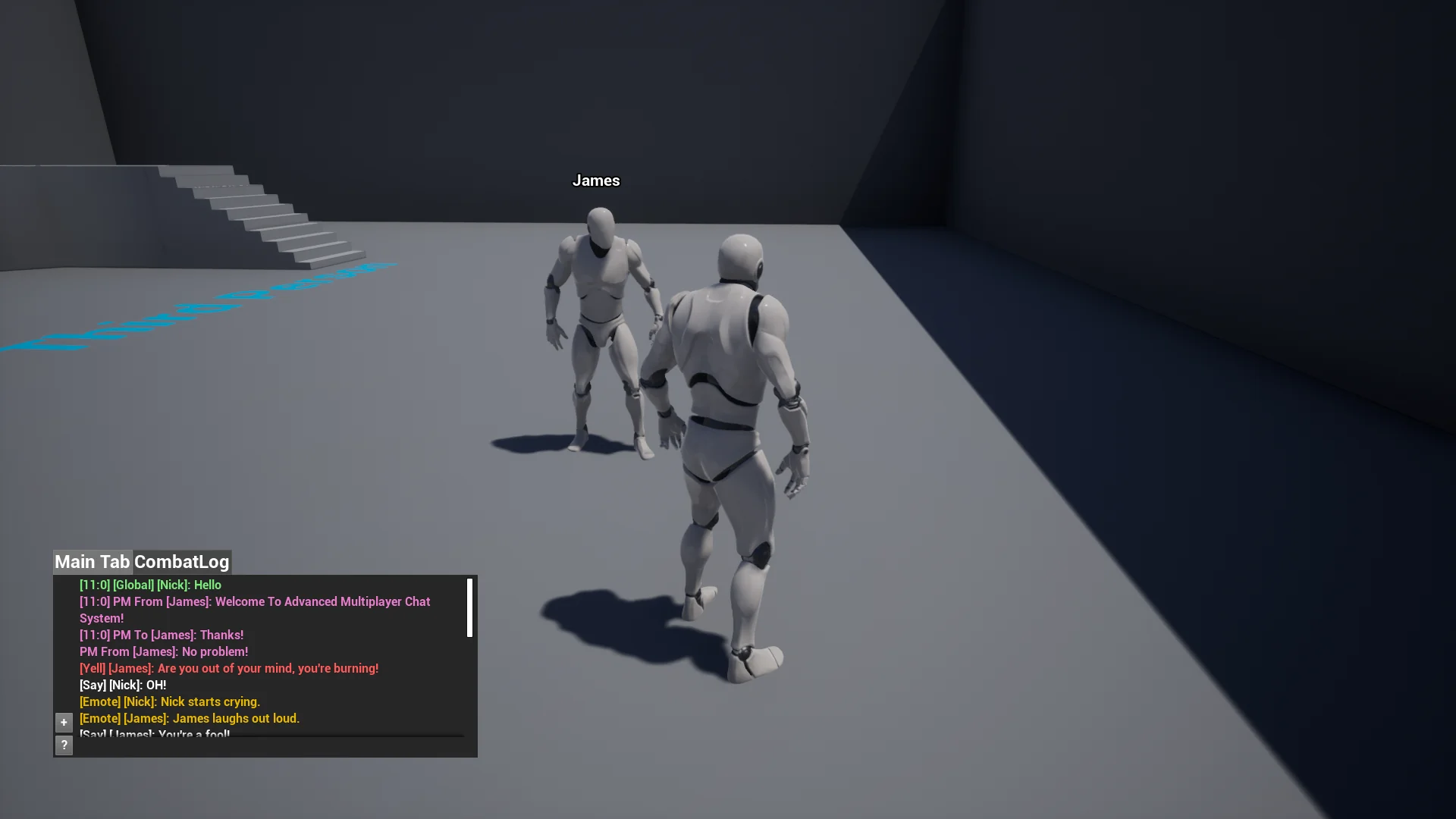
Conversation is divided into channels instead of poured into one undifferentiated stream. Each channel carries its own functionality and its own color, so messages are separated both by behavior and by how they read on screen when several lines are visible at once.
Eleven channels are present in the current build, and that number is not locked. More can be added as a project needs another line of communication — a new team channel, a new system feed, a new grouping of players. The color assignment travels with the channel, so a reader scanning a busy chat log can tell at a glance which stream a message arrived on without reading the label every time.
For an MMO or a large online session, this is the difference between a usable log and a wall of text. Players who care about one stream and ignore the rest can tune what they see through the tab system rather than asking for a global filter to be added later.
Tabs, Per-Tab Settings, and Global Chat Options
Tabs are dynamic. They can be added, removed and edited freely, so the layout of a player's chat window is not fixed at whatever the designer decided on day one. A player who wants a narrow window watching a single channel and a second window aggregating everything else can build that arrangement without touching a settings file.
The detail that makes the tab system hold up is that settings are per tab. Every tab can be customized to player preference with its own separate configuration, and that configuration includes the ability to enable or disable specific channels for that particular tab. One tab can hide the noisier streams while another shows them in full; the choice is scoped to the tab rather than forced on the whole interface.
Underneath sits a global settings layer with several global chat options that apply across the interface instead of to a single tab. The split is practical: global settings handle the things that should stay consistent everywhere, and per-tab settings handle what a player wants to vary. Keeping those two levels distinct is what stops a tab change from silently rewriting preferences the player set elsewhere.
Commands and the Social Side of the Chat System
Commands are handled through a system built to be easy to implement, and several commands already exist in the box. Adding a new one is a matter of extending that system rather than bolting a separate parser onto the chat window, which matters for teams that expect their chat to accumulate project-specific shortcuts over time.
Group-related content is covered by a social system that spans a variety of channels and commands. In practice this is the layer that keeps chat tied to who a player is talking to and in what context, instead of treating every message as a broadcast into one pool. Combined with the channel color coding, it gives the interface a structure players can read quickly during play.
The tags attached to the package — widget, interface, replicated, server, online, multiplayer, MMO — describe the same footprint: a user-facing chat widget meant to sit inside an online multiplayer build beyond one-player HUD.
What Version 2.0 of the Chat System Changes
The 2.0 release is a substantial pass over the interface rather than a point fix. The headline changes:
The UI has been overhauled, so the visual layer is not the same one earlier adopters worked with.
Background hiding has been improved, giving players a cleaner view when the chat is not the focus.
Previously sent messages can be recalled with the Up and Down arrows, the same way players expect from messaging tools outside games.
More feedback messages have been added, so the interface reports more of what it is doing.
Bug fixes are included, along with further changes beyond those listed.
The arrow-key history is the one that changes daily behavior most. Retyping a message or a command because the input cleared is a small friction that compounds over a long session, and being able to walk back through what was already sent removes it. Additional features are covered in the documentation that ships with the system.
Maintaining the Multiplayer Chat System Over Time
The parts worth documenting for whoever inherits the project are the extension points. Adding a channel means deciding its functionality and its color, then making it available to tabs. Adding a command means following the existing command pattern rather than inventing a parallel one. Reshaping the interface means working through the tab and global settings rather than editing each player's configuration by hand.
Because everything is Blueprint, those changes stay reviewable by the people doing UI work, and the replicated behavior for dedicated servers does not have to be re-argued every time a channel or command is added. The practical takeaway is straightforward: settle the dedicated server architecture first, treat channels as the vocabulary of the chat, treat tabs as the player's view onto it, and extend commands through the system that is already there.
 Network
 Network
 Network