"8652e693bd7bbc55"{"id":"1002972","slug":"action-rpg-inventory-system","title":"Action RPG Inventory System","category":"Network \u0026 Multiplayer","engine":"4.25+,5.0+","assetVersion":"","engineVersion":"Engine Version: 4.25+,5.0+","tag":"Network","accent":"blue","visual":"mech","summary":"A multiplayer inventory system with equip-able and usable items, replicated stats, configurable slots, loot and storage containers, and a drag-and-drop UI demo.","platform":"Unreal Engine","indexPolicy":"index","publishedAt":"2026-11-25T08:46:19.961Z","updatedAt":"2026-11-25T08:46:19.961Z","sourceNotes":[],"fileContents":[],"compatibility":["Unreal Engine","Engine Version: 4.25+,5.0+"],"featuredImage":{"alt":"Action RPG Inventory System","src":"/wp-content/uploads/published/2026/11/09f2123e194b-7a367a27-ea30-4e34-a602-2477f355d7bd-f4da46691b.webp"},"hasDownloadLink":true,"downloads":0,"terms":[{"taxonomy":"category","slug":"network-and-multiplayer","name":"Network \u0026 Multiplayer"}],"galleryImages":[{"src":"/wp-content/uploads/published/2026/11/2b79c0146992-63d5f532-1fe4-4d83-9fbe-aec7d1ef5a49-10247c527e.webp","alt":"Action RPG Inventory System"},{"src":"/wp-content/uploads/published/2026/11/b76e9beb6ccf-10c00211-59d0-4e11-8d92-e5ddebc24216-4953502070.webp","alt":"Action RPG Inventory System"},{"src":"/wp-content/uploads/published/2026/11/f05e6fad592a-a3962416-c6b1-4147-a269-49c8b53866b4-61ec5e02c6.webp","alt":"Action RPG Inventory System"},{"src":"/wp-content/uploads/published/2026/11/88e8d85c53fa-feb12f99-90a7-4efc-8195-f371a00397f8-d9d56eef00.webp","alt":"Action RPG Inventory System"},{"src":"/wp-content/uploads/published/2026/11/ac1d35153487-ac2e83f2-b2fb-479f-bac4-0b5c1944d84d-fcbfe2c5fb.webp","alt":"Action RPG Inventory System"}],"accessPanel":{"kind":"resource","title":"Get this resource","safetyNote":"Resources are manually reviewed before listing to improve quality and reduce obvious risks.","fileName":"Action RPG Inventory System.7z","resourceType":"Resource archive","versions":[]},"contentHtml":"\u003ch2\u003eThe Parts Bundled Into the Action RPG Inventory System\u003c/h2\u003e\n\u003cp\u003eThe package arrives as a set of separated, modular pieces rather than one monolithic script. At the centre is the inventory management logic itself, backed by replicated player stats and equipment, a configurable layer covering items, equipment and stats, and a pair of list examples — a master item list and a loot table list — that show how item data is meant to be laid out. Around that core sit sample blueprints for loot containers and storage containers, a group of example item types covering usable, equipment and consumable entries, and a technical demo presented as an MMO-styled scene with a drag-and-drop interface.\u003c/p\u003e\n\u003cp\u003eModularity is the point of that arrangement. A project that only needs equipment and stat handling can take that side without adopting the container samples at all; a project that wants a running start on its interface can lift the drag-and-drop example and leave the rest alone. The code is clean, efficient and easy to follow, which matters most when someone unfamiliar with the system has to trace a request from a UI click through to the server and back again.\u003c/p\u003e \u003ch3\u003eMaking New Items Without Touching the Core\u003c/h3\u003e\n\u003cp\u003eItem creation is configurable rather than hard-coded. Items, equipment and stats all expose configuration, so adding a new weapon, potion or piece of armour is a data exercise first and a code exercise only when the item needs behaviour the existing examples do not already demonstrate. The usable, equipment and consumable samples cover those three shapes, and the master item list example gives one place to see how entries sit alongside one another — useful when an inventory grows past a handful of starting objects and needs to stay readable.\u003c/p\u003e \u003ch2\u003eMove, Drop, Equip, Swap: The Actions the Inventory System Answers For\u003c/h2\u003e\n\u003cp\u003eThe verbs handled here are the everyday ones an inventory has to answer for: move, drop, use, equip, unequip, swap, stack and split. Each is a separate decision point when you extend the system, and each one has a visible consequence the player will notice immediately.\u003c/p\u003e\n\u003cp\u003eStacking and splitting deal with quantity — combining identical items into one entry and pulling part of that entry back out again. Swapping covers the exchange of contents between two positions, which is the mechanism behind reordering a bag or trading one equipped item for another. Equipping and unequipping move an item between the inventory and the equipment slots, and the equipment side is replicated, so what a player is wearing is shared state rather than something only their own client believes. Dropping pushes an item out of the inventory and into the world.\u003c/p\u003e\n\u003cp\u003eGetting those verbs right early saves a great deal of rework later. A UI built on top of a system that already understands swap and split does not need special-case handling for the fiddly cases; the interface simply reports what the player attempted.\u003c/p\u003e \u003ch2\u003eReplicated Stats and Equipment in Multiplayer\u003c/h2\u003e\n\u003cp\u003eMultiplayer is the default assumption rather than an addition bolted on at the end. Player stats and equipment are replicated, and the system takes a multiplayer-first approach in which network traffic is minimised when item information and requests pass between the server and clients. Single-player and multiplayer are both fully supported, so the same inventory behaves the same way whether or not a second player ever joins the session.\u003c/p\u003e\n\u003cp\u003eThat framing shapes how interactions are authored. An item pickup, an equip or a container interaction is treated as something that has to survive the round trip to the server, not as a local change that gets synchronised as an afterthought. For a project that begins as a solo experience and later grows a co-op mode or a shared world, this is a structural saving: the inventory does not have to be rebuilt when the second player arrives.\u003c/p\u003e \u003ch3\u003eSlots and Equipment Types You Define\u003c/h3\u003e\n\u003cp\u003ePlayer equipment types and slots are customisable, which is where the system bends toward a particular game. A conventional head, chest and legs layout and a more unusual set of equipment slots can both be served by the same underlying logic, because the slots themselves are configuration rather than a fixed assumption baked into the code. Stats are configurable on the same principle, so the numbers an item contributes are a matter of definition rather than of editing the systems that read them.\u003c/p\u003e \u003ch2\u003eThe Drag \u0026amp; Drop Demo and the MMO-Styled Showcase\u003c/h2\u003e\n\u003cp\u003eThe included technical demo is an MMO-styled example structured through a drag-and-drop interface. Its purpose is practical: it shows how quickly the inventory can be implemented and used in a project of your own, with the interface already wired to the underlying item actions so the connection between a drag gesture and a server-side request is visible rather than theoretical.\u003c/p\u003e\n\u003cp\u003eThat example is described as practical and easy to modify, which is the more useful claim for anyone adapting it. A demo that is easy to modify can be pulled apart — the layout changed, the panels resized, the styling replaced — without the inventory logic underneath coming loose. The system works regardless of game theme and UI design, so the MMO presentation is a demonstration of one arrangement rather than a requirement. A survival game, a looter or a turn-based project can present the same inventory very differently while using the same item handling.\u003c/p\u003e \u003ch2\u003eLoot Tables, Containers, and World Actors Feeding the Inventory\u003c/h2\u003e\n\u003cp\u003eInteraction is not confined to the player's own bag. The system allows easy interaction between the player's inventory and individual objects in the world, or actors that have an inventory of their own. That single idea covers a lot of ground: a chest, a corpse, a shop stock or a stash can all be treated as something the player's inventory talks to directly.\u003c/p\u003e\n\u003cp\u003eTwo container blueprints are included as samples — a loot container and a storage container — which together illustrate the two common shapes of that interaction. The loot container pairs naturally with the loot table list example, which shows how a set of possible drops is described; the storage container demonstrates the persistent side, where contents are held rather than generated. Between the master item list, the loot table list and the two container samples, most of the plumbing for a world that hands out and holds items is already sketched.\u003c/p\u003e \u003ch2\u003eWhy the Bonus Examples Are Not an RPG Starter Kit\u003c/h2\u003e\n\u003cp\u003eThe scope is inventory management, and the practical examples and items included are a bonus rather than the product itself. The usable, equipment and consumable item types, the container samples and the MMO-styled demo all exist to show how to use the system — they are demonstrations of the mechanism, not a game in a box.\u003c/p\u003e\n\u003cp\u003eReading them that way makes them more useful, not less. A creator approaching this as an inventory layer can take the item definitions, replace the placeholder items with their own, keep the drag-and-drop structure and discard anything that does not suit the project. Nothing about the sample content is load-bearing for the system's behaviour.\u003c/p\u003e \u003ch2\u003eWhat the Package Is Set Up to Handle\u003c/h2\u003e\n\u003cp\u003eThe system is set up to handle the unglamorous middle of an inventory: replicated stats and equipment, configurable slots and item types, the eight core item actions, containers in the world, and a UI example that can be modified rather than merely admired. It is easy to learn and expand upon, and the demo exists to prove that point quickly rather than to display a finished game. For projects that need a multiplayer-safe inventory foundation without adopting someone else's RPG design along with it, that is precisely the right shape.\u003c/p\u003e\n\n\u003ch2\u003eMore From The Same Workflow\u003c/h2\u003e\n\u003cul\u003e\n\u003cli\u003e\u003ca href=\"https://3dcghub.com/arc-inventory/\" rel=\"noopener noreferrer\"\u003eArc Inventory\u003c/a\u003e\u003c/li\u003e\n\u003cli\u003e\u003ca href=\"https://3dcghub.com/action-rpg-multiplayer-starter-template/\" rel=\"noopener noreferrer\"\u003eAction RPG Multiplayer Starter Template\u003c/a\u003e\u003c/li\u003e\n\u003cli\u003e\u003ca href=\"https://3dcghub.com/modern-rpg-bundle-v7-0-1/\" rel=\"noopener noreferrer\"\u003eModern RPG BUNDLE v7.0.1\u003c/a\u003e\u003c/li\u003e\n\u003cli\u003e\u003ca href=\"https://3dcghub.com/easy-topdown-template-v2-1-survival-action-shooter-top-down-rpg/\" rel=\"noopener noreferrer\"\u003eEasy TopDown Template V2.1 | Survival Action Shooter Top Down RPG\u003c/a\u003e\u003c/li\u003e\n\u003cli\u003e\u003ca href=\"https://3dcghub.com/acf-u-ascent-combat-framework-ultimate-v4-c-complete-action-rpg-creator/\" rel=\"noopener noreferrer\"\u003e(ACF U) Ascent Combat Framework Ultimate V4- C++ Complete Action RPG Creator\u003c/a\u003e\u003c/li\u003e\n\u003c/ul\u003e","contentTextLength":7889,"navigation":{"current":19,"total":4911,"previous":{"id":"1002973","slug":"active-ragdoll","title":"Active Ragdoll","category":"Animations","platform":"Unreal Engine","updatedAt":"2026-11-25T08:48:13.124Z"},"next":{"id":"1002971","slug":"abandoned-hatchback-car","title":"Abandoned Hatchback Car","category":"Cars \u0026 Trucks","platform":"Unreal Engine","updatedAt":"2026-11-25T08:45:38.112Z"}},"relatedResources":[{"id":"1002906","slug":"arc-inventory","title":"Arc Inventory","category":"Gameplay Features","engine":"4.27 - 5.1","assetVersion":"Asset Version: 1.4.0.157 - 2.0.2.271","engineVersion":"Engine Version: 4.27 - 5.1","tag":"Gameplay Features","accent":"blue","visual":"mech","summary":"A Gameplay Ability System inventory plugin for Unreal Engine, supporting multiplayer, ability-powered items, shooters, and RPG mechanics.","platform":"Unreal Engine","indexPolicy":"index","publishedAt":"2026-11-21T15:36:54.446Z","updatedAt":"2026-11-21T15:36:54.446Z","sourceNotes":[],"fileContents":[],"compatibility":["Unreal Engine","Asset Version: 1.4.0.157 - 2.0.2.271","Engine Version: 4.27 - 5.1"],"featuredImage":{"alt":"Arc Inventory","src":"/wp-content/uploads/published/2026/11/67074388befa-038469b4-87a1-4107-a50a-a0d2a2fa4793-7cbcbc413b.webp"},"fileSizeBytes":106049030,"hasDownloadLink":true,"downloads":0},{"id":"1002876","slug":"action-rpg-multiplayer-starter-template","title":"Action RPG Multiplayer Starter Template","category":"RPG","engine":"5.0+","assetVersion":"","engineVersion":"Engine Version: 5.0+","tag":"RPG","accent":"blue","visual":"mech","summary":"Explore the Action RPG Multiplayer Starter Template featuring jigsaw inventory, data-driven skills, AI encounters, quest authoring, and trading.","platform":"Unreal Engine","indexPolicy":"index","publishedAt":"2026-11-21T01:05:41.691Z","updatedAt":"2026-11-21T01:05:41.691Z","sourceNotes":[],"fileContents":[],"compatibility":["Unreal Engine","Engine Version: 5.0+"],"featuredImage":{"alt":"Action RPG Multiplayer Starter Template","src":"/wp-content/uploads/published/2026/11/1046e0a3eb0a-722ea6b8-641b-4312-80dd-80c2ac6a831d-a70db02ce7.webp"},"fileSizeBytes":335168011,"hasDownloadLink":true,"downloads":1},{"id":"1000249","slug":"modern-rpg-bundle-v7-0-1","title":"Modern RPG BUNDLE v7.0.1","category":"RPG","engine":"5.4+","assetVersion":"Asset Version: 6.1.1","engineVersion":"Engine Version: 5.4+","tag":"RPG","accent":"blue","visual":"mech","summary":"A comprehensive RPG framework featuring inventory systems, weapon modifications, complex vehicle mechanics, multiplayer menus, and MetaHuman compatibility.","platform":"Unreal Engine","indexPolicy":"index","publishedAt":"2026-06-30T20:57:03.116Z","updatedAt":"2026-06-30T20:57:03.116Z","sourceNotes":[],"fileContents":[],"compatibility":["Unreal Engine","Asset Version: 6.1.1","Engine Version: 5.4+"],"featuredImage":{"alt":"Modern RPG BUNDLE v7.0.1","src":"/wp-content/uploads/published/2026/06/8a8479d4c0b6-c35035a1-419b-41de-bdcb-0dbd98054c6d-1060ae143b.webp"},"fileSizeBytes":1630980938,"hasDownloadLink":true,"downloads":7}]}[{"id":4225,"sourceId":4225,"taxonomyId":4225,"taxonomy":"category","slug":"asset-library","name":"Asset Library","parentId":null,"count":4765,"hasChildren":true,"href":"/","seoTitle":"Free Game Assets Library | 3DCGHUB","seoDescription":"Browse free Unreal Engine, Unity, Blender assets and game development tutorials on 3DCGHUB with previews, compatibility notes, and secure downloads.","sitemapEnabled":true,"children":[{"id":4227,"sourceId":4227,"taxonomyId":4227,"taxonomy":"category","slug":"blender-add-ons-plugins","name":"Blender Add-ons \u0026 Plugins","parentId":4225,"count":10,"hasChildren":false,"href":"/category/blender-add-ons-plugins/","seoTitle":"Free Blender Add-ons \u0026 Plugins | 3DCGHUB","seoDescription":"Browse free Blender Add-ons \u0026 Plugins tools for Blender on 3DCGHUB: curated downloads with preview images, compatibility notes and secure download access.","sitemapEnabled":true},{"id":514,"sourceId":514,"taxonomyId":514,"taxonomy":"category","slug":"unity-2","name":"Unity","parentId":4225,"count":453,"hasChildren":true,"href":"/category/unity-2/","seoTitle":"Free Unity Assets | 3DCGHUB","seoDescription":"Browse free Unity resources on 3DCGHUB: curated downloads with preview images, compatibility notes and secure download access.","sitemapEnabled":true,"children":[{"id":523,"sourceId":523,"taxonomyId":523,"taxonomy":"category","slug":"2d","name":"2D","parentId":514,"count":1,"hasChildren":true,"href":"/category/2d/","seoTitle":"Free Unity 2D | 3DCGHUB","seoDescription":"Browse free 2D assets for Unity on 3DCGHUB: curated downloads with preview images, compatibility notes and secure download access.","sitemapEnabled":true},{"id":515,"sourceId":515,"taxonomyId":515,"taxonomy":"category","slug":"3d-unity-2","name":"3D","parentId":514,"count":162,"hasChildren":true,"href":"/category/3d-unity-2/","seoTitle":"Free Unity 3D Assets | 3DCGHUB","seoDescription":"Browse free 3D assets for Unity on 3DCGHUB: curated downloads with preview images, compatibility notes and secure download access.","sitemapEnabled":true},{"id":565,"sourceId":565,"taxonomyId":565,"taxonomy":"category","slug":"add-ons","name":"Add-Ons","parentId":514,"count":2,"hasChildren":false,"href":"/category/add-ons/","seoTitle":"Free Unity Add-Ons | 3DCGHUB","seoDescription":"Browse free Add-Ons assets for Unity on 3DCGHUB: curated downloads with preview images, compatibility notes and secure download access.","sitemapEnabled":true},{"id":529,"sourceId":529,"taxonomyId":529,"taxonomy":"category","slug":"audio-unity-2","name":"Audio","parentId":514,"count":1,"hasChildren":true,"href":"/category/audio-unity-2/","seoTitle":"Free Unity Audio | 3DCGHUB","seoDescription":"Browse free Audio for Unity on 3DCGHUB: curated downloads with preview images, compatibility notes and secure download access.","sitemapEnabled":true},{"id":557,"sourceId":557,"taxonomyId":557,"taxonomy":"category","slug":"templates","name":"Templates","parentId":514,"count":36,"hasChildren":true,"href":"/category/templates/","seoTitle":"Free Unity Templates | 3DCGHUB","seoDescription":"Browse free Unity project templates on 3DCGHUB. Starter kits with previews, compatibility notes, and secure download access.","sitemapEnabled":true},{"id":533,"sourceId":533,"taxonomyId":533,"taxonomy":"category","slug":"tools-unity-2","name":"Tools","parentId":514,"count":0,"hasChildren":true,"href":"/category/tools-unity-2/","sitemapEnabled":true},{"id":554,"sourceId":554,"taxonomyId":554,"taxonomy":"category","slug":"vfx-unity-2","name":"VFX","parentId":514,"count":4,"hasChildren":true,"href":"/category/vfx-unity-2/","seoTitle":"Free Unity VFX | 3DCGHUB","seoDescription":"Browse free VFX for Unity on 3DCGHUB: curated downloads with preview images, compatibility notes and secure download access.","sitemapEnabled":true}]},{"id":511,"sourceId":511,"taxonomyId":511,"taxonomy":"category","slug":"unreal-engine-2","name":"Unreal Engine","parentId":4225,"count":4303,"hasChildren":true,"href":"/category/unreal-engine-2/","seoTitle":"Free Unreal Engine Assets | 3DCGHUB","seoDescription":"Browse free Unreal Engine resources on 3DCGHUB: curated downloads with preview images, compatibility notes and secure download access.","sitemapEnabled":true,"children":[{"id":54,"sourceId":54,"taxonomyId":54,"taxonomy":"category","slug":"3d","name":"3D","parentId":511,"count":2434,"hasChildren":true,"href":"/category/3d/","seoTitle":"Free Unreal Engine 3D | 3DCGHUB","seoDescription":"Browse free 3D assets for Unreal Engine on 3DCGHUB: curated downloads with preview images, compatibility notes and secure download access.","sitemapEnabled":true},{"id":441,"sourceId":441,"taxonomyId":441,"taxonomy":"category","slug":"animations","name":"Animations","parentId":511,"count":245,"hasChildren":true,"href":"/category/animations/","seoTitle":"Free Unreal Engine Animations | 3DCGHUB","seoDescription":"Browse free Animations for Unreal Engine on 3DCGHUB: curated downloads with preview images, compatibility notes and secure download access.","sitemapEnabled":true},{"id":446,"sourceId":446,"taxonomyId":446,"taxonomy":"category","slug":"audio","name":"Audio","parentId":511,"count":63,"hasChildren":true,"href":"/category/audio/","seoTitle":"Free Unreal Engine Audio Resources | 3DCGHUB","seoDescription":"Browse free Unreal Engine audio resources including sound effects, voices, dialogue, and ambient sounds. Curated free downloads on 3DCGHUB.","sitemapEnabled":true},{"id":466,"sourceId":466,"taxonomyId":466,"taxonomy":"category","slug":"game-systems","name":"Game Systems","parentId":511,"count":366,"hasChildren":true,"href":"/category/game-systems/","seoTitle":"Free Unreal Engine Game Systems | 3DCGHUB","seoDescription":"Browse free Game Systems tools for Unreal Engine on 3DCGHUB: curated downloads with preview images, compatibility notes and secure download access.","sitemapEnabled":true},{"id":478,"sourceId":478,"taxonomyId":478,"taxonomy":"category","slug":"game-templates","name":"Game Templates","parentId":511,"count":151,"hasChildren":true,"href":"/category/game-templates/","seoTitle":"Free Unreal Engine Game Templates | 3DCGHUB","seoDescription":"Browse free Game Templates for Unreal Engine on 3DCGHUB: curated downloads with preview images, compatibility notes and secure download access.","sitemapEnabled":true},{"id":432,"sourceId":432,"taxonomyId":432,"taxonomy":"category","slug":"hdri","name":"HDRI","parentId":511,"count":6,"hasChildren":true,"href":"/category/hdri/","seoTitle":"Free Unreal Engine HDRI | 3DCGHUB","seoDescription":"Browse free Unreal Engine HDRI skies and lighting maps on 3DCGHUB. Environment lighting with previews and secure downloads.","sitemapEnabled":true},{"id":228,"sourceId":228,"taxonomyId":228,"taxonomy":"category","slug":"material-and-textures","name":"Material \u0026 Textures","parentId":511,"count":172,"hasChildren":true,"href":"/category/material-and-textures/","seoTitle":"Free Unreal Engine Material \u0026 Textures | 3DCGHUB","seoDescription":"Browse free Material \u0026 Textures for Unreal Engine on 3DCGHUB: curated downloads with preview images, compatibility notes and secure download access.","sitemapEnabled":true},{"id":298,"sourceId":298,"taxonomyId":298,"taxonomy":"category","slug":"sprites-and-flipbooks","name":"Sprites \u0026 Flipbooks","parentId":511,"count":18,"hasChildren":true,"href":"/category/sprites-and-flipbooks/","seoTitle":"Free Unreal Engine Sprites \u0026 Flipbooks | 3DCGHUB","seoDescription":"Browse free Sprites \u0026 Flipbooks assets for Unreal Engine on 3DCGHUB: curated downloads with preview images, compatibility notes and secure download access.","sitemapEnabled":true},{"id":489,"sourceId":489,"taxonomyId":489,"taxonomy":"category","slug":"tools-and-plugins","name":"Tools \u0026 Plugins","parentId":511,"count":390,"hasChildren":true,"href":"/category/tools-and-plugins/","seoTitle":"Free Unreal Engine Tools \u0026 Plugins | 3DCGHUB","seoDescription":"Browse free Tools \u0026 Plugins for Unreal Engine on 3DCGHUB: curated downloads with preview images, compatibility notes and secure download access.","sitemapEnabled":true},{"id":459,"sourceId":459,"taxonomyId":459,"taxonomy":"category","slug":"ui","name":"UI","parentId":511,"count":45,"hasChildren":true,"href":"/category/ui/","seoTitle":"Free Unreal Engine UI | 3DCGHUB","seoDescription":"Browse free UI for Unreal Engine on 3DCGHUB: curated downloads with preview images, compatibility notes and secure download access.","sitemapEnabled":true},{"id":450,"sourceId":450,"taxonomyId":450,"taxonomy":"category","slug":"vfx","name":"VFX","parentId":511,"count":413,"hasChildren":true,"href":"/category/vfx/","seoTitle":"Free Unreal Engine VFX | 3DCGHUB","seoDescription":"Browse free VFX for Unreal Engine on 3DCGHUB: curated downloads with preview images, compatibility notes and secure download access.","sitemapEnabled":true}]}]},{"id":4222,"sourceId":4222,"taxonomyId":4222,"taxonomy":"category","slug":"tutorial-library","name":"Tutorial Library","parentId":null,"count":117,"hasChildren":false,"href":"/tutorials/","seoTitle":"Free Game Development Tutorial Library | 3DCGHUB","seoDescription":"Browse free game development tutorials for Unreal Engine, Unity, Blender, and more on 3DCGHUB with practical workflows and secure downloads.","sitemapEnabled":true}]
Resource screenshots
1 / 5
Asset drops
Daily Asset Drops
Follow 3DCGHUB on Telegram for daily Unreal, Unity & Blender drops and curated CC0 releases.
Resources are manually reviewed before listing to improve quality and reduce obvious risks.
Reviewed archive
Network
Action RPG Inventory System
A multiplayer inventory system with equip-able and usable items, replicated stats, configurable slots, loot and storage containers, and a drag-and-drop UI demo.
The Parts Bundled Into the Action RPG Inventory System
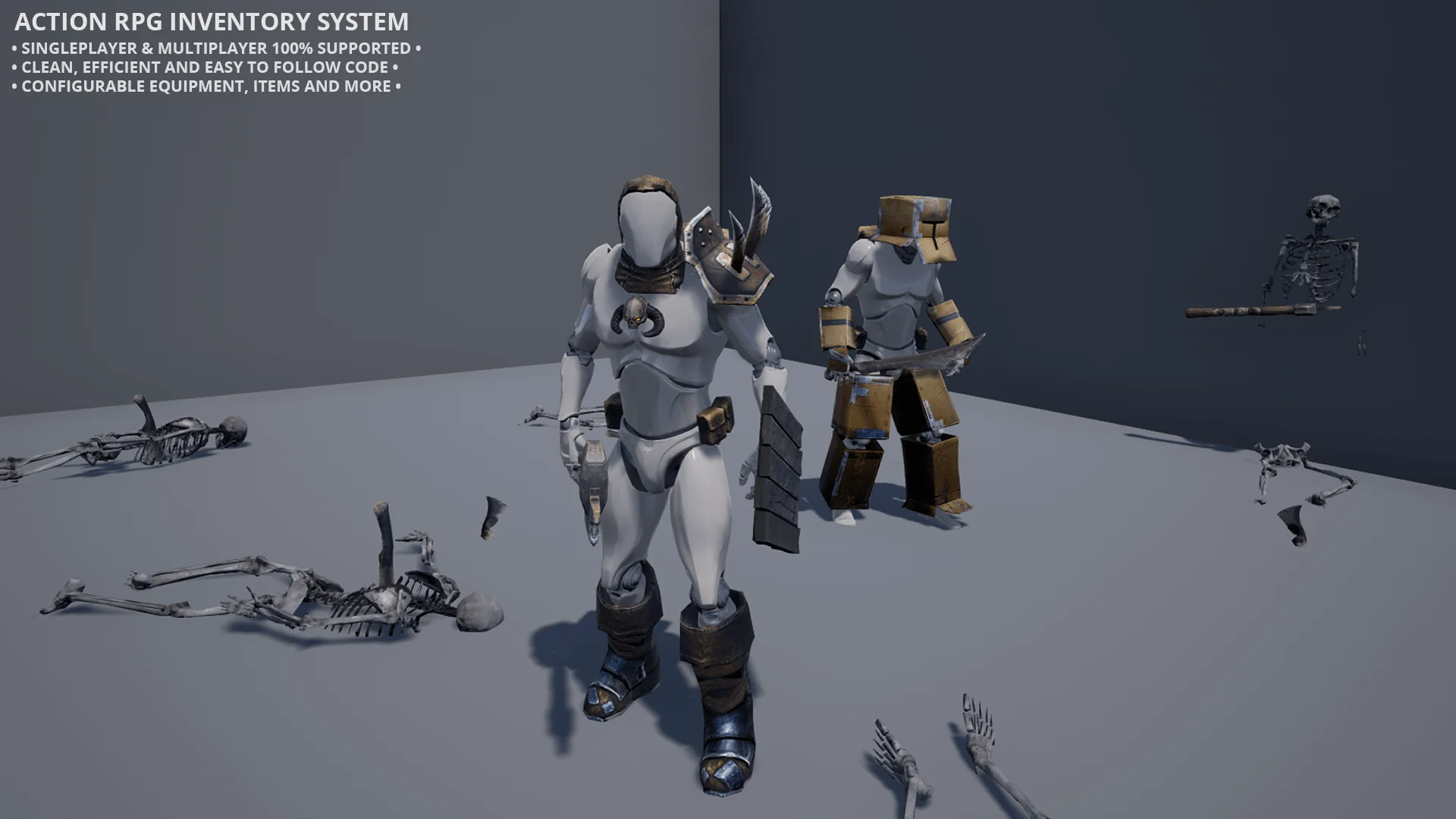
The package arrives as a set of separated, modular pieces rather than one monolithic script. At the centre is the inventory management logic itself, backed by replicated player stats and equipment, a configurable layer covering items, equipment and stats, and a pair of list examples — a master item list and a loot table list — that show how item data is meant to be laid out. Around that core sit sample blueprints for loot containers and storage containers, a group of example item types covering usable, equipment and consumable entries, and a technical demo presented as an MMO-styled scene with a drag-and-drop interface.
Modularity is the point of that arrangement. A project that only needs equipment and stat handling can take that side without adopting the container samples at all; a project that wants a running start on its interface can lift the drag-and-drop example and leave the rest alone. The code is clean, efficient and easy to follow, which matters most when someone unfamiliar with the system has to trace a request from a UI click through to the server and back again.
Making New Items Without Touching the Core
Item creation is configurable rather than hard-coded. Items, equipment and stats all expose configuration, so adding a new weapon, potion or piece of armour is a data exercise first and a code exercise only when the item needs behaviour the existing examples do not already demonstrate. The usable, equipment and consumable samples cover those three shapes, and the master item list example gives one place to see how entries sit alongside one another — useful when an inventory grows past a handful of starting objects and needs to stay readable.
Move, Drop, Equip, Swap: The Actions the Inventory System Answers For
The verbs handled here are the everyday ones an inventory has to answer for: move, drop, use, equip, unequip, swap, stack and split. Each is a separate decision point when you extend the system, and each one has a visible consequence the player will notice immediately.
Stacking and splitting deal with quantity — combining identical items into one entry and pulling part of that entry back out again. Swapping covers the exchange of contents between two positions, which is the mechanism behind reordering a bag or trading one equipped item for another. Equipping and unequipping move an item between the inventory and the equipment slots, and the equipment side is replicated, so what a player is wearing is shared state rather than something only their own client believes. Dropping pushes an item out of the inventory and into the world.
Getting those verbs right early saves a great deal of rework later. A UI built on top of a system that already understands swap and split does not need special-case handling for the fiddly cases; the interface simply reports what the player attempted.
Replicated Stats and Equipment in Multiplayer
Multiplayer is the default assumption rather than an addition bolted on at the end. Player stats and equipment are replicated, and the system takes a multiplayer-first approach in which network traffic is minimised when item information and requests pass between the server and clients. Single-player and multiplayer are both fully supported, so the same inventory behaves the same way whether or not a second player ever joins the session.
That framing shapes how interactions are authored. An item pickup, an equip or a container interaction is treated as something that has to survive the round trip to the server, not as a local change that gets synchronised as an afterthought. For a project that begins as a solo experience and later grows a co-op mode or a shared world, this is a structural saving: the inventory does not have to be rebuilt when the second player arrives.
Slots and Equipment Types You Define
Player equipment types and slots are customisable, which is where the system bends toward a particular game. A conventional head, chest and legs layout and a more unusual set of equipment slots can both be served by the same underlying logic, because the slots themselves are configuration rather than a fixed assumption baked into the code. Stats are configurable on the same principle, so the numbers an item contributes are a matter of definition rather than of editing the systems that read them.
The Drag & Drop Demo and the MMO-Styled Showcase
The included technical demo is an MMO-styled example structured through a drag-and-drop interface. Its purpose is practical: it shows how quickly the inventory can be implemented and used in a project of your own, with the interface already wired to the underlying item actions so the connection between a drag gesture and a server-side request is visible rather than theoretical.
That example is described as practical and easy to modify, which is the more useful claim for anyone adapting it. A demo that is easy to modify can be pulled apart — the layout changed, the panels resized, the styling replaced — without the inventory logic underneath coming loose. The system works regardless of game theme and UI design, so the MMO presentation is a demonstration of one arrangement rather than a requirement. A survival game, a looter or a turn-based project can present the same inventory very differently while using the same item handling.
Loot Tables, Containers, and World Actors Feeding the Inventory
Interaction is not confined to the player's own bag. The system allows easy interaction between the player's inventory and individual objects in the world, or actors that have an inventory of their own. That single idea covers a lot of ground: a chest, a corpse, a shop stock or a stash can all be treated as something the player's inventory talks to directly.
Two container blueprints are included as samples — a loot container and a storage container — which together illustrate the two common shapes of that interaction. The loot container pairs naturally with the loot table list example, which shows how a set of possible drops is described; the storage container demonstrates the persistent side, where contents are held rather than generated. Between the master item list, the loot table list and the two container samples, most of the plumbing for a world that hands out and holds items is already sketched.
Why the Bonus Examples Are Not an RPG Starter Kit
The scope is inventory management, and the practical examples and items included are a bonus rather than the product itself. The usable, equipment and consumable item types, the container samples and the MMO-styled demo all exist to show how to use the system — they are demonstrations of the mechanism, not a game in a box.
Reading them that way makes them more useful, not less. A creator approaching this as an inventory layer can take the item definitions, replace the placeholder items with their own, keep the drag-and-drop structure and discard anything that does not suit the project. Nothing about the sample content is load-bearing for the system's behaviour.
What the Package Is Set Up to Handle
The system is set up to handle the unglamorous middle of an inventory: replicated stats and equipment, configurable slots and item types, the eight core item actions, containers in the world, and a UI example that can be modified rather than merely admired. It is easy to learn and expand upon, and the demo exists to prove that point quickly rather than to display a finished game. For projects that need a multiplayer-safe inventory foundation without adopting someone else's RPG design along with it, that is precisely the right shape.
 Gameplay Features
 RPG
 RPG